2022 MAZDA MODEL MX-30 EV tires
[x] Cancel search: tiresPage 276 of 547

Lane-keep Assist System(LAS)
*
▼Lane-keep Assist System (LAS)
The LAS provides steering assistance to
help the driver stay within the vehicle
lane if the vehicle might be deviating.
The forward sensing camera (FSC)
detects the white lines (yellow lines) of
the vehicle lane in which the vehicle is
traveling and if the system determines
that the vehicle may deviate from its
lane, it operates the electric power
steering to assist the driver’s steering
operation. The system also alerts the
driver by displaying an alert on the
multi-information display and the
active driving display.
Use the system when you drive the
vehicle on roads with white (yellow)
lines such as expressways and
highways.
WARNING
Do not rely completely on the LAS
:
The LAS is not an automated driving
system. In addition, the system is not
designed to compensate for a
driver’s lack of caution, and
over-reliance on the system could
lead to an accident.
The functions of the LAS have
limitations. Always stay on course
using the steering wheel and drive
with care.
Do not use the LAS under the
following circumstances, otherwise it
may result in an accident.
The vehicle is driven on slippery
roads such as icy or snow-covered
roads, and unpaved roads.
Tires of a
different
speci fied size
are used, such as a temporary
spare tire.
The vehicle is being used to tow a
camper or boat trailer.
Tire chains are used.
The vehicle is driven on roads with
lane lines other than white (yellow)
lines, such as an expressway.
NOTE
The system may not operate normally
under the following conditions.
A condition under which the forward
sensing camera (FSC) cannot detect
a target object is met.
Refer to Forward Sensing Camera
(FSC) on page 4-71.
The visibility of white (yellow) lines is
poor (due to paint flaking or dirt, or
being hidden by vehicles ahead).
There are multiple white (yellow)
lines or they are interrupted.
A misleading line on the road is
picked up (such as temporary line for
construction, shadow, lingering
snow, or grooves filled with water).
The width of a lane is excessively
narrow.
The vehicle is shaken after hitting a
road bump.
The vehicle is driven on a section
with a closed lane or temporary lane
due to construction.
When Driving
i-ACTIVSENSE
*Some models.4-127
MX-30_8JD4-EA -21G_Edition2_new 2021-5-18 14:38:07
Page 279 of 547

sound and display indications alert the
driver of the danger.
WARNING
Do not rely completely on the Blind
Spot Assist function and always drive
carefully:
The Blind Spot Assist function has
limitations. Do not rely completely
on the system and always stay on
course using the steering wheel.
The Blind Spot Assist function is not
an autonomous driving system. In
addition, the system is not designed
to compensate for a driver’s lack of
caution, and over-reliance on the
system could lead to an accident.
The detection area of the camera
and sensors is limited. If the steering
wheel operation assist is operated
without detecting a two-wheeled
vehicle near the detecting vehicle, it
could result in an accident.
Do not use the system under the
following conditions. Otherwise, it
may result in an accident:
The vehicle is driven on slippery
roads such as icy roads,
snow-covered roads, and unpaved
roads.
Tires other than the speci fied size are
used, such as when tire chains or
temporary spare tires are used.
The vehicle is towing a camping
trailer or boat trailer.
The vehicle is driven on roads other
than expressways and highways.
The rear bumper around a rear side
radar sensor is deformed.
Operation conditions
The Blind Spot Assist function becomes
operational when all of the following
conditions are met.
The vehicle speed is about 64 km/h
(40 mph) or faster.
The vehicle is driven on a straight
road or gentle curve.
When Driving
i-ACTIVSENSE
4-130
MX -30_8JD4-EA -21G_Edition2_new 2021-5-18 14:38:07
Page 282 of 547

Multi-information display
Active driving display
▼Road Keep Assist
The Road Keep Assist
function assists
the driver in avoiding a departure from
the road while driving.
The Road Keep Assist function
recognizes the outside of the road
using the Forward Sensing Camera
(FSC). If your vehicle may be deviating
from the road, it provides steering
assistance to avoid departure from the
road.
When the steering wheel operation
assist operates, display indications
alert the driver of the possibility of a
road departure. Furthermore, if the
possibility of a road departure
increases, a warning sound and display
indications alert the driver of the
danger.
WARNING
Do not rely completely on the Road
Keep Assist function and always drive
carefully:
The Road Keep Assist function has
limitations. Do not rely completely
on the system and always stay on
course using the steering wheel.
The Road Keep Assist function is not
an autonomous driving system. In
addition, the system is not designed
to compensate for a driver’s lack of
caution, and over-reliance on the
system could lead to an accident.
Do not use the system under the
following conditions. Otherwise, it
may result in an accident:
The vehicle is driven on slippery
roads such as icy roads,
snow-covered roads, and unpaved
roads.
Tires other than the speci fied size are
used, such as when tire chains or
temporary spare tires are used.
The vehicle is towing a camping
trailer or boat trailer.
Operation conditions
The Road Keep Assist function
becomes operational when any of the
following conditions is met.
The vehicle speed is about 64 km/h
(40 mph) or faster.
The vehicle is driven on a straight
road or gentle curve.
The function recognizes the outside
of the road by detecting target
objects (such as gravel, grass, street
gutters, road curbs, guardrails, or
walls).
When Driving
i-ACTIVSENSE
4-133
MX -30_8JD4-EA -21G_Edition2_new 2021-5-18 14:38:07
Page 288 of 547

The vehicle is driven on rough
roads such as in areas where there
is grass and foliage or o ff-road.
Refer to Stopping the Smart Brake
Support (SBS) System Operation
on page 4-143.
Always use tires for all wheels that
are of the speci fied size, and the
same manufacture, brand, and tread
pattern. In addition, do not use tires
with signi ficantly di fferent wear
patterns on the same vehicle. If such
improper tires are used, the SBS may
not operate normally.
Rearward detection function
The rearward detection function is
designed to reduce damage in the
event of a collision with a target object
when reversing.
The rearward detection function
detects obstructions using the rear
ultrasonic sensors. In addition, if there
is the possibility of your vehicle
colliding with a target object at the rear
while you are driving in reverse, you
are notified of possible danger by a
warning sound and a warning
indication on the display.
Furthermore, if the possibility of a
collision increases, brake control is
performed to reduce damage in the
event of a collision.
WARNING
Always check the surrounding area
visually when reversing the vehicle:
The operation of the rearward
detection function has certain
limitations. Therefore, the function
might not operate or it might be
delayed even if there is a target object
at the rear of your vehicle. Always
make it your responsibility as a driver
to check the rear.
Operation conditions
The rearward detection function
operates when all of the following
conditions are met.
The EV system is operating.The SBS is on.The selector lever is in the R position.The vehicle speed is about 2 km/h
(2 mph) to 8 km/h (4 mph).
There is no problem with the DSC.The Electric Parking Brake (EPB) is
not operating.
NOTE
When any of the following
conditions is met, the rearward
detection function may not operate.
Directly after the EV system starts.The height of the obstruction is
low such as low walls or trucks
with low loading platforms.
The height of the obstruction is
high such as trucks with high
loading platforms.
The obstruction is not as large as a
vehicle or wall.
The obstruction is thin such as a
signpost.
The surface of the obstruction is
not pointed vertically relative to
your vehicle.
When Driving
i-ACTIVSENSE
4-139
MX -30_8JD4-EA -21G_Edition2_new 2021-5-18 14:38:07
Page 295 of 547

Consult an Authorized Mazda Dealer
for repair, painting , or replacement
of the front/rear camera, front
bumper, liftgate and door mirrors.
Heed the following cautions to
assure that the 360°View Monitor
operates normally.
Do not modify the vehicle
suspensions or lower/raise the
vehicle body, or both.
Always use tires of the
specified
type and size for the front and rear
wheels. Consult an Authorized
Mazda Dealer for tire replacement.
When the display is cold, images
may leave trails or the screen might
be darker than usual, making it
di fficult to check the vehicle
surroundings. Always confirm the
safety at the front and around the
vehicle visually when driving.
The method for parking/stopping
the vehicle using the 360°View
Monitor
differs depending on the
road circumstances/conditions and
the vehicle conditions. When and
how much you turn the steering
wheel will differ depending on the
situation, therefore always check the
vehicle surroundings directly with
your eyes while using the system.
Also, before using the system, always
make sure that the vehicle can be
parked/stopped in the parking/
stopping space.
NOTE
If there are water droplets, snow, or
mud on the camera lens, wipe it off
using a soft cloth. If the camera lens
is especially dirty, wash it o ff with
mild detergent.
If the camera lens is touched or there
is any dirt on it, it could a ffect the
screen image. Wipe the lens using a
soft cloth.
If the area where the camera is
installed, such as the front bumper,
liftgate or door mirrors, has been
damaged in a vehicle accident, the
camera (position, installation angle)
may have shifted. Always consult an
Authorized Mazda Dealer to have
the vehicle inspected.
If the camera is subjected to
excessive changes in temperature
such as by pouring hot water on the
camera during cold weather, the
360°View Monitor may not operate
normally.
If the vehicle is driven during cold
temperatures and the camera
temperature decreases, the top view
and the side view may become
u n c l ea r. H o we ve r, t h i s d o e s n o t
indicate a problem. If the vehicle is
stopped for a while and the camera
temperature increases, the top view
and the side view will return to the
normal condition.
If the lead-acid battery voltage is
low, the screen might be temporarily diffi cult to view, however, this does
not indicate a problem.
The 360°View Monitor has
limitations. Objects under the
bumper or near both ends of the
bumper cannot be displayed.
Obstructions above the upper image
range of the camera are not
displayed.
Under the following conditions, the
screen might be di fficult to view,
however this does not indicate a
problem.
The temperature near the lens is
high/low.
When Driving
i-ACTIVSENSE
4-146
MX -30_8JD4-EA -21G_Edition2_new 2021-5-18 14:38:07
Page 329 of 547
Tire Pressure MonitoringSystem (TPMS)
▼Tire Pressure Monitoring System
(TPMS)
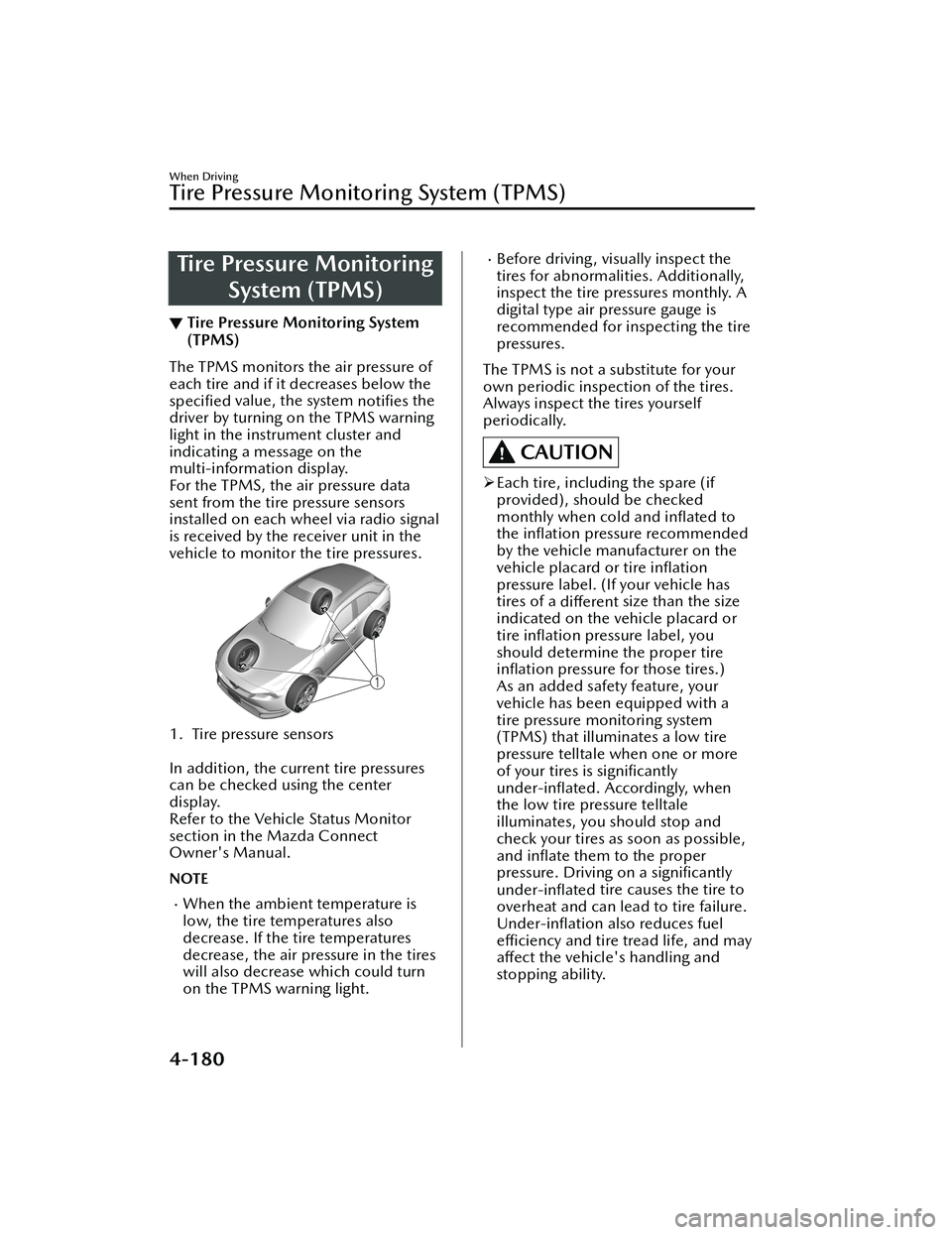
The TPMS monitors the air pressure of
each tire and if it decreases below the
speci
fied value, the system
notifies the
driver by turning on the TPMS warning
light in the instrument cluster and
indicating a message on the
multi-information display.
For the TPMS, the air pressure data
sent from the tire pressure sensors
installed on each wheel via radio signal
is received by the receiver unit in the
vehicle to monitor the tire pressures.
1. Tire pressure sensors
In addition, the current tire pressures
can be checked using the center
display.
Refer to the Vehicle Status Monitor
section in the Mazda Connect
Owner's Manual.
NOTE
When the ambient temperature is
low, the tire temperatures also
decrease. If the tire temperatures
decrease, the air pressure in the tires
will also decrease which could turn
on the TPMS warning light.
Before driving, visually inspect the
tires for abnormalities. Additionally,
inspect the tire pressures monthly. A
digital type air pressure gauge is
recommended for inspecting the tire
pressures.
The TPMS is not a substitute for your
own periodic inspection of the tires.
Always inspect the tires yourself
periodically.
CAUTION
Each tire, including the spare (if
provided), should be checked
monthly when cold and
inflated to
the in flation pressure recommended
by the vehicle manufacturer on the
vehicle placard or tire inflation
pressure label. (If your vehicle has
tires of a different size than the size
indicated on the vehicle placard or
tire in flation pressure label, you
should determine the proper tire in flation pressure for those tires.)
As an added safety feature, your
vehicle has been equipped with a
tire pressure monitoring system
(TPMS) that illuminates a low tire
pressure telltale when one or more
of your tires is significantly
under-in flated. Accordingly, when
the low tire pressure telltale
illuminates, you should stop and
check your tires as soon as possible,
and in flate them to the proper
pressure. Driving on a signi ficantly
under-in flated tire causes the tire to
overheat and can lead to tire failure.
Under-in flation also reduces fuel
e ffi ciency and tire tread life, and may
a ff ect the vehicle's handling and
stopping ability.
When Driving
Tire Pressure Monitoring System (TPMS)
4-180
MX -30_8JD4-EA -21G_Edition2_new 2021-5-18 14:38:07
Page 330 of 547

Please note that the TPMS is not a
substitute for proper tire
maintenance, and it is the driver's
responsibility to maintain correct tire
pressure, even if under-inflation has
not reached the level to trigger
illumination of the TPMS low tire
pressure telltale.
Your vehicle has also been equipped
with a TPMS malfunction indicator to
indicate when the system is not
operating properly.
The TPMS malfunction indicator is
combined with the low tire pressure
telltale. When the system detects a
malfunction, the telltale will flash for
approximately one minute and then
remain continuously illuminated.
This sequence will continue upon
subsequent vehicle start-ups as long
as the malfunction exists. When the
malfunction indicator is illuminated,
the system may not be able to detect
or signal low tire pressure as
intended. TPMS malfunctions may
occur for a variety of reasons,
including the installation of
replacement or alternate tires or
wheels on the vehicle that prevent
the TPMS from functioning properly.
Always check the TPMS malfunction
telltale after replacing one or more
tires or wheels on your vehicle to
ensure that the replacement or
alternate tires and wheels allow the
TPMS to continue to function
properly.
To avoid false readings, the system
samples for a little while before
indicating a problem. As a result it
will not instantaneously register a
rapid tire de flation or blow out.▼ If there is a problem with the Tire
Pressure Monitoring System
(TPMS)
If the TPMS warning light
flashes, there
may be a problem with the system.
Consult an Authorized Mazda Dealer
to have the system inspected.
Refer to Tire Pressure Monitoring
System (TPMS) Warning Indication/
Warning Light (Flashing) on page
7-27.
In the following cases, the system
cannot recognize the tire pressures
correctly and the TPMS warning light
may flash.
There is equipment or a device
nearby emitting radio signals the
same as a tire pressure sensor.
A metallic object such as a
non-genuine electronic device is
installed near the center of the
dashboard (obstructs the radio
signals from the tire pressure sensors
to the receiver).
A device such as one of the following
is used in the cabin.
Electronic devices such as a
computer.
Converter devices such as a
DC -AC converter.
There is a large accumulation of
snow or ice around the vehicle tires.
The battery in a tire pressure sensor
is dead.
A wheel not equipped with a tire
pressure sensor is used.
Tires employing steel in the sidewall
of the tire are installed.
Tire chains are used.
▼ When a tire pressure decreases
If the TPMS warning light turns on, a
tire pressure may be low. Inspect the
tire pressures and adjust them to the
correct in
flation pressure.
When Driving
Tire Pressure Monitoring System (TPMS)
4-181
MX -30_8JD4-EA -21G_Edition2_new 2021-5-18 14:38:07
Page 331 of 547
Refer to Tire Pressure Monitoring
System (TPMS) Warning Indication/
Warning Light (Turns on) on page
7-30.
▼Tires and Wheels
CAUTION
When inspecting/adjusting the tire
pressures, do not apply excessive force
to the air valve of the tire pressure
sensor. Otherwise, the tire pressure
sensor could be damaged.
When changing tires and wheels
When changing the tires or wheels
(such as installing winter tires), it will
be necessary to register the ID signal
code of the tire pressure sensor to the
TPMS.
Have an Authorized Mazda Dealer do
the registration or register the ID signal
codes of the tire pressure sensors using
the following procedure.
NOTE
The tire pressure sensors on each
wheel have a unique ID signal code.
For the TPMS to operate correctly, the
ID signal codes of the tire pressure
sensors need to be registered to the
system.
1. Wait more than 19 minutes after
changing a tire or wheel.
2. After more than 19 minutes have passed, drive the vehicle at a speed
of about 25 km/h (16 mph) or
faster for 3 minutes or longer. While
driving, the ID signal codes of the
tire pressure sensors are
automatically registered.
NOTE
If you drive the vehicle within 19
minutes of changing a tire or wheel,
the TPMS warning light will flash
because the ID signal codes for the tire
pressure sensors were not registered.
In this case, stop the vehicle and
register the ID signal codes of the tire
pressure sensors following the
procedure.
When replacing tires and wheels
CAUTION
When replacing the tires and wheels,
consult an Authorized Mazda Dealer
Otherwise, the tire pressure sensors
could be damaged when replacing
them.
Do not install non-genuine wheels. If
wheels other than genuine ones are
installed, it may not be possible to
install the tire pressure sensors.
When replacing a tire or wheel, always
install the tire pressure sensor. The
following combinations of tires,
wheels, or tires and wheels are
possible.
The tire pressure sensor from the old
wheel is removed and it is installed
to the new wheel.
Only a tire is replaced without
replacing the tire pressure sensor and
wheel.
A new tire pressure sensor is installed
to a new wheel.
NOTE
When installing a new tire pressure
sensor, the ID signal code for the tire
pressure sensor needs to be registered.
For details on purchasing a tire
pressure sensor and registering the ID
signal of the tire pressure sensor,
consult an Authorized Mazda Dealer.
When Driving
Tire Pressure Monitoring System (TPMS)
4-182
MX -30_8JD4-EA -21G_Edition2_new 2021-5-18 14:38:07