2022 MAZDA MODEL MX-30 EV brake
[x] Cancel search: brakePage 156 of 547
Spare keys or keys for other vehicles
equipped with an immobilizer
system touch or come near the key.
Devices for electronic purchases, or
security passage touch or come near
the key.
If the EV system cannot be started
because of a dead key battery, the EV
system can be started using the
following procedure:
1. Continue to depress the brake pedal firmly.
2. Make sure that the KEY indicator light in the instrument cluster and
power switch indicator light (green)
flashes.
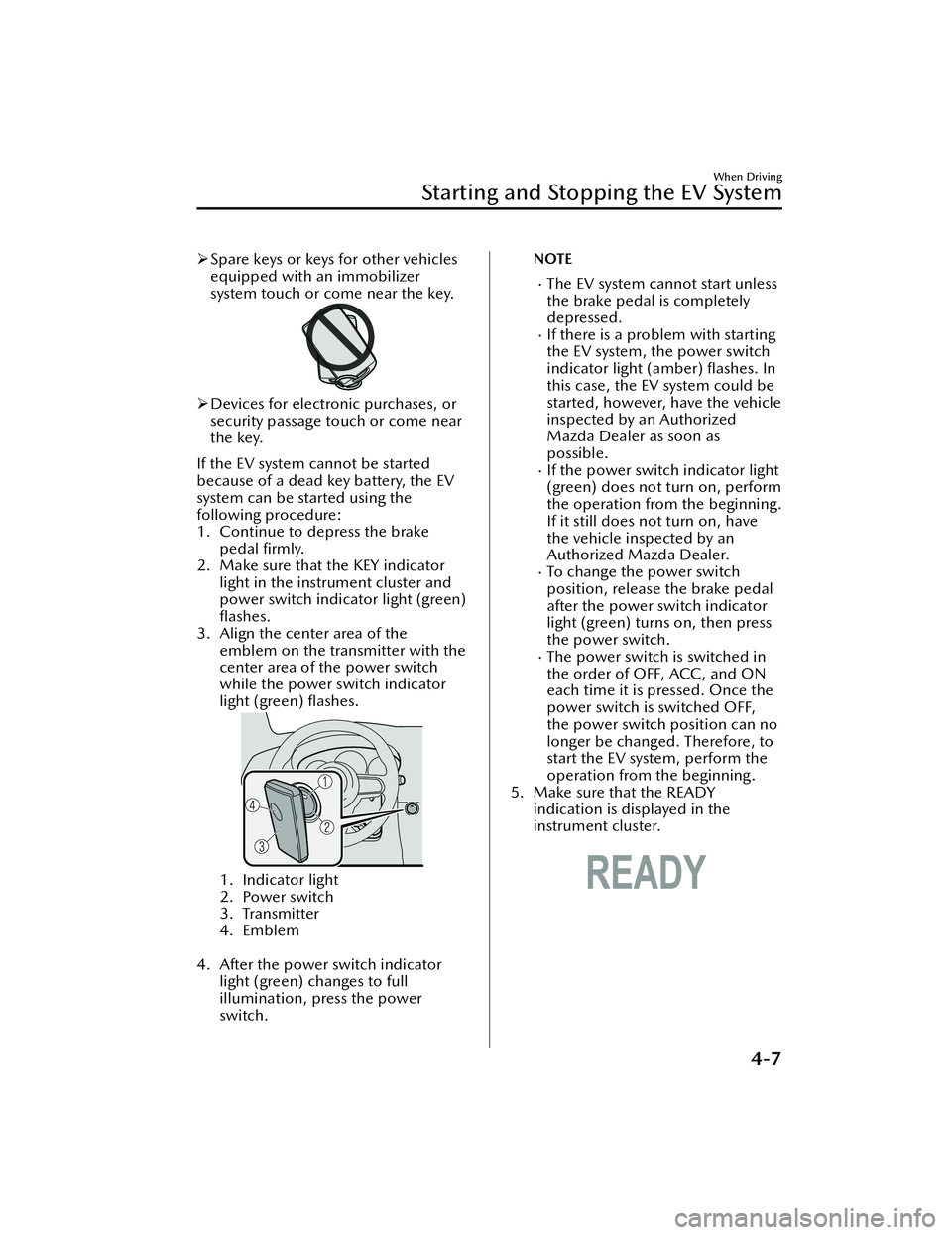
3. Align the center area of the emblem on the transmitter with the
center area of the power switch
while the power switch indicator
light (green) flashes.
1. Indicator light
2. Power switch
3. Transmitter
4. Emblem
4. After the power switch indicator light (green) changes to full
illumination, press the power
switch.
NOTE
The EV system cannot start unless
the brake pedal is completely
depressed.
If there is a problem with starting
the EV system, the power switch
indicator light (amber) flashes. In
this case, the EV system could be
started, however, have the vehicle
inspected by an Authorized
Mazda Dealer as soon as
possible.
If the power switch indicator light
(green) does not turn on, perform
the operation from the beginning.
If it still does not turn on, have
the vehicle inspected by an
Authorized Mazda Dealer.
To change the power switch
position, release the brake pedal
after the power switch indicator
light (green) turns on, then press
the power switch.
The power switch is switched in
the order of OFF, ACC, and ON
each time it is pressed. Once the
power switch is switched OFF,
the power switch position can no
longer be changed. Therefore, to
start the EV system, perform the
operation from the beginning.
5. Make sure that the READY indication is displayed in the
instrument cluster.
When Driving
Starting and Stopping the EV System
4-7
MX -30_8JD4-EA -21G_Edition2_new 2021-5-18 14:38:07
Page 157 of 547

Stopping the EV System
▼When Stopping the EV System
1. Shift the selector lever to the P
position.
2. Press the power switch. The READY
indication is not displayed in the
instrument cluster and the EV
system stops, and then the power
switch is switched OFF.
WARNING
Other than for an emergency
situation, do not attempt to stop the
EV system while driving the vehicle:
If the EV system is stopped while
driving the vehicle, loss of brake power
and power steering functions could
occur, making it di fficult to control the
vehicle which could result in an
accident.
CAUTION
Before leaving the vehicle, make sure
that the power switch is switched OFF
(READY indication is not displayed).
NOTE
Key battery
If the system detects that the key's
remaining battery power is low when
the power switch is switched from
ON to ACC or OFF, the KEY indicator
light (green) flashes in the instrument
cluster or the KEY warning indication
is displayed on the multi-information
display.
Refer to Starting the EV System When
the Key Battery is Dead on page 4-6.
Selector lever position
Because the AUTO P (parking lock)
function operates, the power
switch can be switched OFF even
with the selector lever in a position
other than P, however, for reasons
of safety, shift the selector lever to
the P position and then switch the
power switch OFF.
If you switch the power switch OFF
with the selector lever in a position
other than P, a warning sound and
a display indication notify you that
the selector lever position and the
shift position do not match.
Power switch position
If you leave or try to leave the vehicle
without switching the power switch
OFF, the KEY warning light (red) fl ashing , a display indication, and a
warning sound notify you that the
power switch is not switched OFF.
▼ Emergency EV System Stop
Pressing the power switch continuously
or pressing it quickly any number of
times even if the vehicle is not
stopped, will stop the EV system. The
power switch switches to ACC.
When Driving
Starting and Stopping the EV System
4-8
MX
-30_8JD4-EA -21G_Edition2_new 2021-5-18 14:38:07
Page 166 of 547

The average energy efficiency is also
indicated by a red arrow on the
instantaneous energy e fficiency gauge.
To reset the displayed average energy
e ffi ciency data, press the INFO switch
for 1.5 seconds or longer. After
resetting the data, - - - kWh/100 km
(- - - mile/kWh) is displayed before
the average energy e fficiency is
recalculated and displayed.
▼ Instantaneous Energy
Effi ciency
The instantaneous energy e fficiency
while driving the vehicle is calculated
from the electrical power consumption
and displayed.
NOTE
Indicates the 0 position when the
vehicle speed is about 5 km/h (3
mph) or slower.
The red arrow on the scale indicates
the average energy effi ciency.
▼ i-ACTIVSENSE Display*
Displays the system status.
Refer to Lane Departure Warning
System (LDWS) on page 4-86.
Refer to Blind Spot Monitoring
(BSM) on page 4-90.
Refer to Tra
ffic Sign Recognition
System (TSR) on page 4-95.
Refer to Distance & Speed Alert
(DSA) on page 4-99.
Refer to Driver Attention Alert (DAA)
on page 4-101.
Refer to Driver Monitoring (DM) on
page 4-103.
Refer to Front Cross Traffic Alert
(FCTA) on page 4-104.
Refer to Mazda Radar Cruise Control
with Stop & Go function (MRCC
with Stop & Go function) on page
4-112.
Refer to Tra ffic Jam Assist (TJA) on
page 4-119.
Refer to Lane-keep Assist System
(LAS) on page 4-128.
Refer to Emergency Lane Keeping
(ELK) on page 4-129.
Refer to Smart Brake Support (SBS)
on page 4-136.
Refer to Cruise Control on page
4-177.
When Driving
Instrument Cluster and Display
*Some models.4-17
MX -30_8JD4-EA -21G_Edition2_new 2021-5-18 14:38:07
Page 168 of 547

▼Warning Indication/Warning Lights
These lights turn on or
flash to notify the user of the system operation status or a
system malfunction.
Signal Warning Refer to
Brake System Warning Indication/Warning Light*17-21
ABS Warning Indication/Warning Light*1
Electronic
Brake Force
Distribution
System Warn- ing
7-22
ABS warning 7-26
Lead-acid Battery Charging System Warning Indication/Warning
Light*17-22
EV System Problem Warning Indication/Warning Light*17-22
High Voltage Battery Temperature Warning Indication 7-23
Remaining High Voltage Battery Power Warning Indication/Warning
Light*17-23
Charging System Warning Indication/Warning Light*17-24
Output Restriction Warning Indication/Warning Light*17-24
Power Steering Malfunction Indication/Indicator Light*17-25
Shift Control System Warning Indication/Warning light*17-25
Master Warning Indication7-26
Brake Control System Warning Indication/Warning Light*17-26
Brake Override Warning Indication7-26
When Driving
Instrument Cluster and Display
4-19
MX-30_8JD4-EA -21G_Edition2_new 2021-5-18 14:38:07
Page 171 of 547

SignalIndicator Refer to
Electric Parking Brake (EPB) Indication/Indicator Light*1*27-26
AUTOHOLD Active Indicator Light*14-59
*Mazda Radar Cruise Control with Stop & Go function (MRCC with
Stop & Go function) indicator Light 4-117
*Tra
ffic Jam Assist (TJA) Indicator Light 4-126
TCS/DSC Indication/Indicator Light*1
Tra c t i o n C o n -
trol System (TCS)4-64
Dynamic Sta- bility Control (DSC)4-66
Tu r n s o n 7-27
READY Indication 4-4
TCS OFF Indicator Light*14-64
(White)
i-ACTIVSENSE Status Symbol (Warning/Risk Avoidance Support Sys-
tem) 4-69
(Green)
(Amber)
i-ACTIVSENSE OFF Symbol (Warning/Risk Avoidance Support Sys-
tem)
4-69
(Green)
*High Beam Control System (HBC) Indicator Light
4-83
When Driving
Instrument Cluster and Display
4-22*Some models.
MX
-30_8JD4-EA -21G_Edition2_new 2021-5-18 14:38:07
Page 172 of 547

SignalIndicator Refer to
(White)
*Mazda Radar Cruise Control with Stop & Go function (MRCC with
Stop & Go function) Standby Indication 4-114
*Tra
ffic Jam Assist (TJA) Standby Indication 4-122
(Green)
*Mazda Radar Cruise Control with Stop & Go function (MRCC with
Stop & Go function) Set Indication 4-114
*Tra
ffic Jam Assist (TJA) Set Indication 4-122
*Smart Brake Support (SBS) OFF Indicator Light*14-143
*Emergency Lane Keeping (ELK) OFF Indicator Light*14-135
(White)
*Cruise Standby Indication 4-176
(Green)
*Cruise Set Indication4-176
*1 The light turns on when the power swit
ch is switched ON for an operation
check, and turns off a few seconds later or when the EV system is started. If the
light does not turn on or remains on, have the vehicle inspected by an
Authorized Mazda Dealer.
*2 The light turns on continuously when the parking brake is applied.
▼Wrench Indication/Indicator Light
The wrench indication/indicator light
is displayed/turns on under the
following conditions.
When the preset maintenance
period has arrived.
Refer to the Information section in
the Mazda Connect Owner's
Manual.
CAUTION
When the maintenance period
arrives, have your vehicle inspected
by an Authorized Mazda Dealer as
soon as possible. If maintenance is
neglected, a decrease in vehicle
performance may occur which
could cause damage. Have your
vehicle inspected before the
maintenance period arrives.
When Driving
Instrument Cluster and Display
*Some models.4-23
MX -30_8JD4-EA -21G_Edition2_new 2021-5-18 14:38:07
Page 174 of 547

Refer to Lane Departure Warning System (LDWS) on page 4-86.Blind Spot Monitoring (BSM) Operation Conditions and Warnings*
Refer to Blind Spot Monitoring (BSM) on page 4-87.Traffic Sign Recognition System (TSR) tra ffic signs and Warnings*
Refer to Tra ffic Sign Recognition System (TSR) on page 4-93.Front Cross
Traffic Alert (FCTA) Operation Conditions and Warning*
Refer to Front Cross Tra
ffic Alert (FCTA) on page 4-104.Mazda Radar Cruise Contro l with Stop & Go function (MRCC with Stop & Go
function) Operation Co nditions and Warnings*
Refer to Mazda Radar Cruise Control with Stop & Go function (MRCC with Stop
& Go function) on page 4-111.
Tra ffic Jam Assist (TJA) Operation Conditions and Warnings*
Refer to Tra
ffic Jam Assist (TJA) on page 4-118.Lane-keep Assist System (LAS) Warnings*
Refer to Lane-keep Assist System (LAS) on page 4-127.Emergency Lane Keeping (ELK) Warnings*
Refer to Emergency Lane Keeping (ELK) on page 4-129.Smart Brake Support (SBS) Operation Conditions and Warnings
Refer to Smart Brake Support (SBS) on page 4-136.
Cruise Control Operation Conditions
Refer to Cruise Control on page 4-176.
Navigation Guidance (vehicles with navigation system)Intersection Name (vehicles with navigation system)Street name (vehicles with navigation system)Lane Guidance (vehicles with navigation system)Speed limit indicator (vehicles with navigation system)Vehicle Speed
The active driving display settings can be changed or adjusted.
Refer to the Settings section in the Mazda Connect Owner's Manual.
NOTE
The desired driving position (display position, brightness level, display
information) can be called up after programming the position.
Refer to Driving Position Memory on page 2-10.
The street name may not be displayed depending on the market and region.
When Driving
Instrument Cluster and Display
*Some models.4-25
MX -30_8JD4-EA -21G_Edition2_new 2021-5-18 14:38:07
Page 175 of 547

Selector Lever PositionFunctions
▼Selector Lever Position Functions
1. Selector lever
2. Lock-release button
3. Shift indicator
P (Park)
Position when parking the vehicle and
when starting the EV system.
WARNING
Always set the selector lever to P
position and set the parking brake:
Only setting the selector lever to the P
position without using the parking
brake to hold the vehicle is dangerous.
If P fails to hold, the vehicle could
move and cause an accident.
NOTE
When the lead-acid battery is
depleted, the parking lock does not
operate even if the selector lever is
shifted to the P position.
R (Reverse)
Position for reversing the vehicle.
A beep is activated to notify the driver
that the shift position is in the R
position.
N (Neutral)
Position where power generated by the
motor is not transmitted to the EV
Tra n s a x l e .
WARNING
Do not shift into N when driving the
vehicle:
If the selector lever is shifted to the N
position while driving , deceleration
using the regenerative braking is not
possible which could result in an
accident.
NOTE
Apply the parking brake or depress the
brake pedal before moving the selector
lever from N position to prevent the
vehicle from moving unexpectedly.
D (Drive)
Position for normal driving.
Shift indicator
The shift position turns on.
NOTE
The shift indicator turns on at the same
position as the shift position indication
in the instrument cluster.
▼
Shift Position Indication
When Driving
Selector Lever Position Functions
4-26
MX
-30_8JD4-EA -21G_Edition2_new 2021-5-18 14:38:07