2022 MAZDA MODEL MX-30 EV ev system
[x] Cancel search: ev systemPage 198 of 547

If the indicator light flashes
rapidly in green, firmly press and
hold the Homelink button and
release it after two seconds have
passed. Repeat this process up to
three times to complete the
programming. The device
becomes operational and
programming is complete. If the
device does not operate, go to
the next step.
5. At the garage door opener receiver (motor-head unit) in the garage,
locate the “learn” or “smart” button.
This can usually be found where the
hanging antenna wire is attached to
the motor-head unit.
6. Firmly press and release the “learn” or “smart” button. (The name and
color of the button may vary by
manufacturer.)
NOTE
Complete the programming within
30 seconds.
7. Return to the vehicle and firmly press and hold the Homelink
button, and then release it after
two seconds have passed. Repeat
the “ press/hold/release” sequence
a second time, and, depending on
the brand of the garage door
opener (or other rolling code
equipped device), repeat this
sequence a third time to complete
the programming process.
Press the programmed HomeLink
button and make sure that the
HomeLink System operates.
8. If the status indicator arrows are flashing , refer to Garage Door
Two-Way Communication.
1. Indicator light
NOTE
To program the remaining two
HomeLink buttons, go back to Step 1
of Programming the HomeLink System
and repeat the procedure.
For questions or comments, please
contact HomeLink at
www.homelink.com or
www.youtube.com/
HomeLinkGentex , or the HomeLink
toll-free hotline at 1-800-355-3515
(for calls placed outside of the USA,
Canada, and Puerto Rico, international
rates will apply and may di ffer based
on landline or mobile phone).
▼ Gate operator/Canadian
Programming
Canadian radio-frequency laws require
transmitter signals to “time-out” (or
quit) after several seconds of
transmission
― which may not be long
enough for HomeLink to pick up the
signal during programming. Similar to
this Canadian law, some U.S. gate
operators are designed to “time-out”
in the same manner.
If you live in Canada or are having
di fficulties programming a gate
operator by using the programming
procedures (regardless of where you
live), replace Step 3 of Programming
When Driving
Switches and Controls
4-49
MX-30_8JD4-EA -21G_Edition2_new 2021-5-18 14:38:07
Page 199 of 547
the HomeLink System with the
following:
NOTE
If programming a garage door opener
or gate operator, it is advised to unplug
the device during the “cycling” process
to prevent possible overheating.
While the indicator light is flashing in
amber, press the button on the
hand-held transmitter for 2 seconds
and release it repeatedly until the
indicator light changes from amber to
green.
Go back to Step 4 of Programming the
HomeLink System to complete the
procedure.
▼ Operating the HomeLink System
Press the programmed HomeLink
button to operate a programmed
device.
▼Reprogramming the HomeLink
system
To program a device to HomeLink
using a HomeLink button previously
trained, follow these steps:
1. Press and hold the desired
HomeLink button. DO NOT release
the button.
2. After 20 seconds, the indicator light
flashes in amber. After the indicator
light flashes, release the HomeLink
button.
3. Go back to Step 2 of Programming the HomeLink System to complete
the procedure.
NOTE
If the programming has not been
completed, the system returns to the
previous programming.
▼Erasing Programmed HomeLink
Buttons
NOTE
All of the programmed HomeLink
buttons are reset. Individual buttons
cannot be reset, however, individual
buttons can be reprogrammed. For
individual button reprogramming,
refer to Reprogramming the
HomeLink System (page 4-50).
Verify that the programming has
been erased if you resell the vehicle.
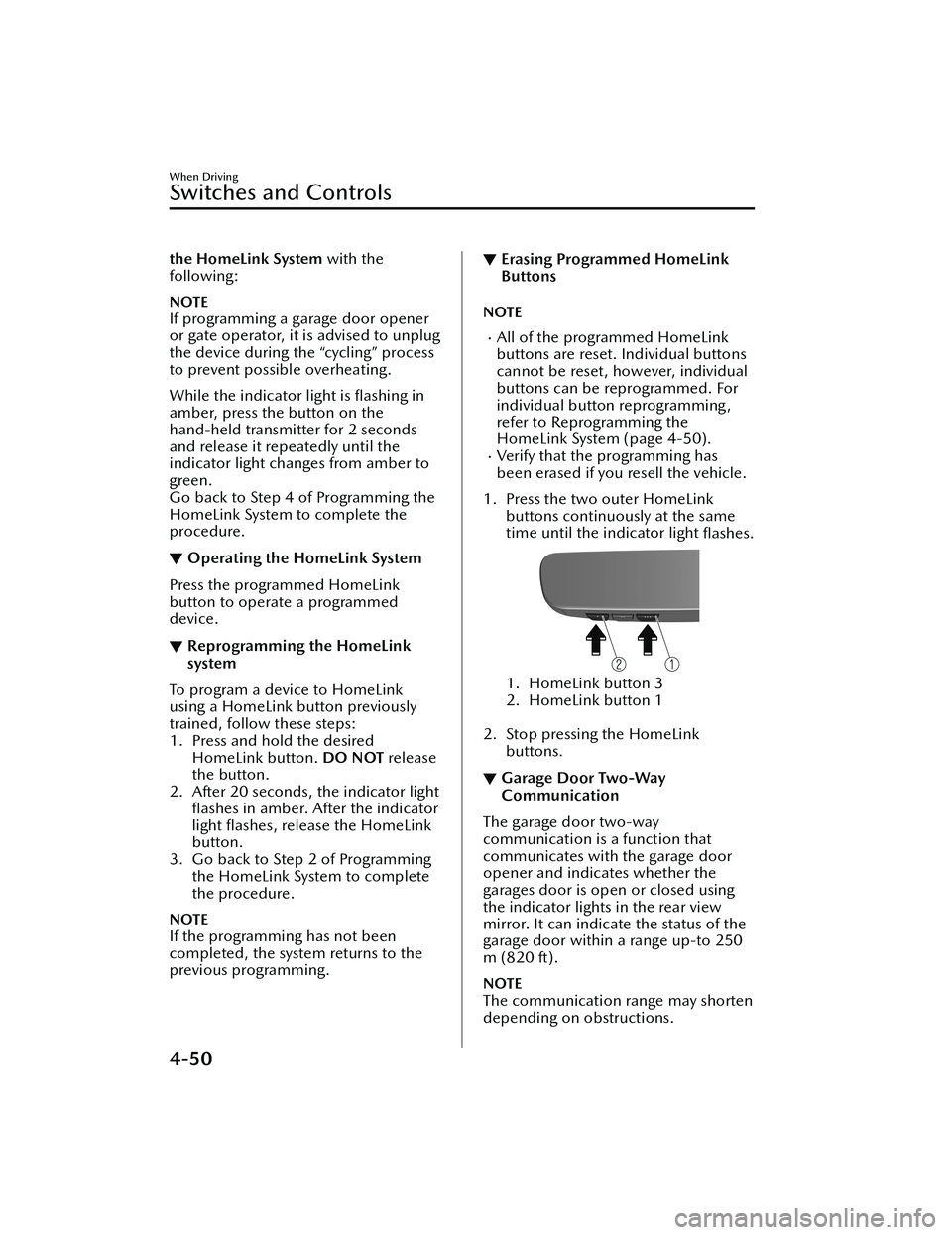
1. Press the two outer HomeLink buttons continuously at the same
time until the indicator light flashes.
1. HomeLink button 3
2. HomeLink button 1
2. Stop pressing the HomeLink buttons.
▼Garage Door Two-Way
Communication
The garage door two-way
communication is a function that
communicates with the garage door
opener and indicates whether the
garages door is open or closed using
the indicator lights in the rear view
mirror. It can indicate the status of the
garage door within a range up-to 250
m (820 ft).
NOTE
The communication range may shorten
depending on obstructions.
When Driving
Switches and Controls
4-50
MX
-30_8JD4-EA -21G_Edition2_new 2021-5-18 14:38:07
Page 201 of 547

Brake System
▼Foot Brake
This vehicle has power-assisted brakes
that adjust automatically through
normal use.
Should power-assist fail, you can stop
by applying greater force than normal
to the brake pedal. But the distance
required to stop will be greater than
usual.
WARNING
Do not coast with the EV system
stopped and stop the vehicle in a safe
place:
Coasting the vehicle with the EV
system stopped is dangerous. Braking
will require more
eff ort, and the
brake's power-assist could be
depleted if you pump the brake. This
will cause longer stopping distances or
even an accident.
Shift to a lower gear when going
down steep hills:
Driving with your foot continuously on
the brake pedal or steadily applying
the brakes for long distances is
dangerous. This causes overheated
brakes, resulting in longer stopping
distances or even total brake failure.
This could cause loss of vehicle control
and a serious accident. Avoid
continuous application of the brakes.
Dry off brakes that have become wet
by driving slowly, releasing the
accelerator pedal and lightly applying
the brakes several times until the
brake performance returns to normal:
Driving with wet brakes is dangerous.
Increased stopping distance or the
vehicle pulling to one side when
braking could result in a serious
accident. Light braking will indicate
whether the brakes have been
a ff ected.
CAUTION
Do not drive with your foot held on
the brake pedal. Doing so could
result in the following:
The brake parts will wear out more
quickly.
The brakes can overheat and
adversely
aff ect brake
performance.
Always depress the brake pedal with
the right foot. Applying the brakes
with the unaccustomed left foot
could slow your reaction time to an
emergency situation resulting in
insu fficient braking operation.
Wear shoes appropriate for driving in
order to avoid your shoe contacting
the brake pedal when depressing the
accelerator pedal.
▼ Electric Parking Brake (EPB)
The EPB system applies the parking
brake using an electric motor. The
system can operate automatically and
manually.
The EPB switch indicator light turns on
when applying the parking brake and it
When Driving
Brake
4-52
MX
-30_8JD4-EA -21G_Edition2_new 2021-5-18 14:38:07
Page 202 of 547

turns off when releasing the parking
brake.
1. Indicator light
WARNING
Do not drive the vehicle with the
parking brake applied:
If the vehicle is driven with the parking
brake applied, the brake parts may
generate heat and the brake system
may not operate, leading to an
accident.
Before driving the vehicle, release the
parking brake and make sure that the
EPB indicator light in the instrument
cluster turns o ff.
Apply the parking brake when leaving
the vehicle:
Not applying the parking brake when
parking the vehicle is dangerous as the
vehicle may move unexpectedly and
result in an accident. Before leaving the
vehicle, apply the parking brake and
make sure that the EPB indicator light
in the instrument cluster turns on.
NOTE
The parking brake cannot be applied
or released while the vehicle battery
is dead.
Refer to Jump-Starting on page
7-12.
When the power switch is switched
OFF while the charging system
warning light in the instrument
cluster turns on, the parking brake
cannot be applied. Before switching
the power switch OFF, apply the
parking brake manually.
The sound of the parking brake being
applied or released can be heard,
however, this does not indicate a
problem.
If the EPB is no t used for long
periods, an automatic inspection of
the system is performed while the
vehicle is parked. An operation
sound can be heard, however, this
does not indicate a problem.
When applying the parking brake
and switching the power switch OFF,
an operation sound can be heard,
however, this does not indicate a
problem.
The brake pedal may move while
applying or releasing the parking
brake, however, this does not
indicate a problem.
If there is a problem with the brake
system (foot brake) while driving the
vehicle, continually pulling up the
EPB switch will apply the brakes and
decelerate or stop the vehicle. The
parking brake on-reminder sound is
activated while the brake is applied.
In addition, when releasing the
switch, the brake is released and the
sound stops.
If the parking brake is applied with
the power switch switched OFF or in
ACC, the EPB indicator light in the
instrument cluster and the indicator
light in the EPB switch may flash for
15 seconds.
When Driving
Brake
4-53
MX -30_8JD4-EA -21G_Edition2_new 2021-5-18 14:38:07
Page 204 of 547

Releasing the parking brake
automatically
If the accelerator pedal is depressed
with the parking brake applied and all
of the following conditions met, the
parking brake is released automatically.
When the parking brake is released,
the EPB indicator light in the
instrument cluster and the EPB switch
indicator light turn off.
The power switch is switched ON
(EV system on).
The driver's door is closed.The driver's seat belt is fastened.The selector lever is in the D or R
position.
NOTE
If something such as the driver’s foot
contacts the accelerator pedal with the
power switch switched ON (EV system
on) and the parking brake applied, the
parking brake might be released
automatically. If you do not intend to
start driving the vehicle immediately,
shift the selector lever to the P or N
position.
Canceling the parking brake
automatic operation
The parking brake automatic operation
can be canceled by doing any of the
following after switching the power
switch from ON to OFF.
Auto operation cancel method 1
1. Switch the power switch ON.
2. Release the parking brake manually.
3. Turn
off the AUTOHOLD.
4. Press the EPB switch continuously for 2 seconds or longer (until a
sound is activated).
5. Release the EPB switch and switch the power switch OFF within 5
seconds after the sound was
activated.
After the auto operation is
canceled, a sound is activated one
time, and the EPB switch indicator
light switches from illumination to
flashing , and then turns o ff after 3
seconds.
Auto operation cancel method 2
1. Switch the power switch ON.
2. Release the parking brake manually.
3. Turn o ff the AUTOHOLD.
4. Switch the power switch OFF with the EPB switch pressed while the
brake pedal is not depressed.
When the auto operation is
canceled, a sound is activated one
time, and the EPB switch indicator
light goes from normal flashing to
faster flashing , and then turns o ff
after 3 seconds.
NOTE
When canceling the parking brake
auto operation and parking the
vehicle, shift the selector lever to the
P position and then use wheel
blocks.
The auto operation may not cancel if
the vehicle is parked on a steep
slope.
When the power switch is switched
ON, the parking brake auto operation
is restored.
▼ Warning Light
The warning light turns on when the
system has a malfunction.
Refer to Brake System Warning
Indication/Warning Light on page
7-21.
When Driving
Brake
4-55
MX
-30_8JD4-EA -21G_Edition2_new 2021-5-18 14:38:07
Page 205 of 547

▼Brake Pad Wear Indicator
When the disc brake pads become
worn, the built-in wear indicators
contact the disc plates. This causes a
screeching noise to warn that the pads
should be replaced.
When you hear this noise, consult an
Authorized Mazda Dealer as soon as
possible.
WARNING
Do not drive with worn disc pads:
Driving with worn disc pads is
dangerous. The brakes could fail and
cause a serious accident. As soon as
you hear a screeching noise consult an
Authorized Mazda Dealer.
NOTE
In high humidity weather conditions,
brake noises, such as brake squeak or
brake squeal can be heard. It does not
indicate a malfunction.
▼Brake Assist
During emergency braking situations
when it is necessary to depress the
brake pedal with greater force, the
brake assist system provides braking
assistance, thus
enhancing braking
performance.
When the brake pedal is depressed
hard or depressed more quickly, the
brakes apply more firmly.
NOTE
When the brake pedal is depressed
hard or depressed more quickly, the
pedal will feel softer but the brakes
will apply more firmly. This is a
normal eff ect of the brake assist
operation and does not indicate a
malfunction.
When the brake pedal is depressed
hard or depressed more quickly, a
motor/pump operation noise may
be heard. This is a normal e ffect of
the brake assist and does not
indicate a malfunction.
The brake assist equipment does not
supersede the functionality of the
vehicle's main braking system.
▼ Brake Override System
The brake override system applies the
brake
first for safety if the brake pedal
and accelerator pedal are depressed at
the same time.
NOTE
Operation of the brake override system
can be turned on or o ff.
Refer to the Settings section in the
Mazda Connect Owner's Manual.
When Driving
Brake
4-56
MX -30_8JD4-EA -21G_Edition2_new 2021-5-18 14:38:07
Page 206 of 547

AUTOHOLD
▼AUTOHOLD
The AUTOHOLD function automatically holds the vehicle stopped, even if you take
your foot
off the brake pedal. This function can be best used while stopped in
traffic
or at a traffic light. The brakes are released when you start driving the vehicle.
WARNING
Do not rely completely on the AUTOHOLD function:
The AUTOHOLD function is only designed to assist the brake operation while the
vehicle is stopped. Neglecting to operate the brakes and relying only on the
AUTOHOLD system is dangerous and could result in an unexpected accident if the
vehicle were to suddenly move. Operate the brakes appropriately in accordance
with the road and surrounding conditions.
Do not release your foot from the brake pedal while the vehicle is stopped on a
steep grade:
Because there is a possibility of the vehicl
e not being held in the stopped position by
the AUTOHOLD function, the vehicle may move unexpectedly and result in an
accident.
Do not use the AUTOHOLD function on slippery roads such as icy or
snow-covered roads, or unpaved roads:
Even if the vehicle is held in the stopped position by the AUTOHOLD function, the
vehicle may move unexpectedly and result in an accident. Operate the accelerator
pedal, brakes, or steering wheel appropriately as necessary.
Immediately depress the brake pedal in the following cases:
Because the AUTOHOLD function is canceled forcibly, the vehicle may move
unexpectedly and result in an accident.
“Depress Brake Pedal. Brake Hold Disabled” is displayed in the multi-information
display and the warning sound is activated at the same time.
Always apply the parking brake when parking the vehicle:
Not applying the parking brake when parking the vehicle is dangerous as the vehicle
may move unexpectedly and result in an accident. When parking the vehicle, shift
the selector lever to the P position and apply the parking brake.
When Driving
Brake
4-57
MX -30_8JD4-EA -21G_Edition2_new 2021-5-18 14:38:07
Page 208 of 547

The brake pedal response may change, sound may occur from the brakes, or the
brake pedal could vibrate from the operation of the AUTOHOLD function.
However, this does not indicate a malfunction.
▼To Turn On AUTOHOLD System
Press the AUTOHOLD switch and
when the AUTOHOLD standby
indicator light turns on, the
AUTOHOLD function turns on.
1. AUTOHOLD standby indicator light
NOTE
When all of the following conditions
are met, the AUTOHOLD standby
indicator light turns on when the
AUTOHOLD switch is pressed and the
AUTOHOLD function turns on.
The power switch is switched ON
(EV system on).
The driver's seat belt is fastened.The driver's door is closed.There is no problem with the
AUTOHOLD function.
To operate AUTOHOLD and hold the
brakes
1. Depress the brake pedal and bring the vehicle to a complete stop.
2. The AUTOHOLD active indicatorlight in the instrument cluster turns
on and the brakes are held.
3. The vehicle is held in its stoppedposition even with the brake pedal
released.
NOTE
When all of the following conditions
are met, the AUTOHOLD operates and
the brakes are held.
The power switch is switched ON
(EV system on).
The vehicle is stopped.The brake pedal is being depressed.The AUTOHOLD active indicator
light turns on.
The accelerator pedal is not
depressed.
The driver's seat belt is fastened.The driver's door is closed.There is no problem with the
AUTOHOLD function.
The parking brake is released.There is no problem with the Electric
Parking Brake (EPB) function.
The selector lever is in a position
other than R position or the vehicle
tilts forward with the selector lever in
the R position.
To release AUTOHOLD and start
driving the vehicle
If you try to resume driving the vehicle,
the brakes will be released
automatically and the AUTOHOLD
active indicator light turns o ff.
When Driving
Brake
4-59
MX -30_8JD4-EA -21G_Edition2_new 2021-5-18 14:38:07