2022 LINCOLN NAUTILUS mirror
[x] Cancel search: mirrorPage 285 of 586
CROSS TRAFFIC ALERT
LIMITATIONS
Cross traffic alert may not correctly operatewhen any of the following occur:
•Something is blocking the sensors.
•Adjacently parked vehicles or objects areobstructing the sensors.
•Vehicles approach at speeds less than4 mph (6 km/h) or greater than 37 mph(60 km/h).
•Your vehicle speed is greater than 7 mph(12 km/h).
•You reverse out of an angled parkingspace.
SWITCHING CROSS TRAFFIC
ALERT ON AND OFF
To switch cross traffic alert on or off use theinstrument cluster display:
1.Using the instrument cluster displaycontrols on the steering wheel, selectSETTINGS.
2.Select Driver assistance.
3.Switch Cross traffic alert on or off.
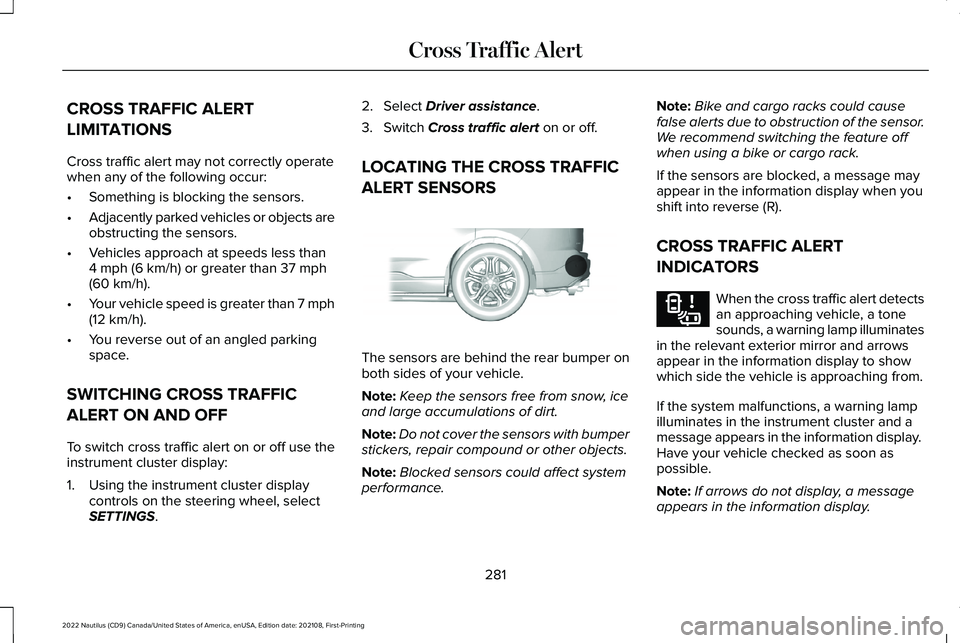
LOCATING THE CROSS TRAFFIC
ALERT SENSORS
The sensors are behind the rear bumper onboth sides of your vehicle.
Note:Keep the sensors free from snow, iceand large accumulations of dirt.
Note:Do not cover the sensors with bumperstickers, repair compound or other objects.
Note:Blocked sensors could affect systemperformance.
Note:Bike and cargo racks could causefalse alerts due to obstruction of the sensor.We recommend switching the feature offwhen using a bike or cargo rack.
If the sensors are blocked, a message mayappear in the information display when youshift into reverse (R).
CROSS TRAFFIC ALERT
INDICATORS
When the cross traffic alert detectsan approaching vehicle, a tonesounds, a warning lamp illuminatesin the relevant exterior mirror and arrowsappear in the information display to showwhich side the vehicle is approaching from.
If the system malfunctions, a warning lampilluminates in the instrument cluster and amessage appears in the information display. Have your vehicle checked as soon aspossible.
Note:If arrows do not display, a messageappears in the information display.
281
2022 Nautilus (CD9) Canada/United States of America, enUSA, Edition date: 202108, First-PrintingCross Traffic AlertE205199 E268294
Page 295 of 586

WHAT IS DRIVER ALERT
Driver alert alerts you if it determines thatyou are becoming drowsy or if your drivingdeteriorates.
HOW DOES DRIVER ALERT WORK
Driver Alert calculates your alertness levelbased on your driving behavior in relation tothe lane markings and other factors throughuse of the front camera sensor behind theinterior mirror.
DRIVER ALERT PRECAUTIONS
WARNING: You are responsible forcontrolling your vehicle at all times. Thesystem is designed to be an aid and doesnot relieve you of your responsibility todrive with due care and attention. Failureto follow this instruction could result in theloss of control of your vehicle, personalinjury or death.
WARNING: Take regular rest breaksif you feel tired. Do not wait for the systemto warn you.
WARNING: Certain driving styles mayresult in the system warning you even ifyou are not feeling tired.
WARNING: In cold and severeweather conditions the system may notfunction. Rain, snow and spray can all limitsensor performance.
WARNING: The system will notoperate if the sensor cannot track the roadlane markings.
WARNING: If damage occurs in theimmediate area surrounding the sensor,have your vehicle checked as soon aspossible.
WARNING: The system may notcorrectly operate if your vehicle is fittedwith a suspension kit not approved by us.
WARNING: The system may notoperate properly if the sensor is blocked.Keep the windshield free from obstruction.
Note:If something is blocking the cameraor damaged the windshield, Driver Alert maynot function.
291
2022 Nautilus (CD9) Canada/United States of America, enUSA, Edition date: 202108, First-PrintingDriver AlertE309385
Page 340 of 586

Protected ComponentsFuse RatingFuse or Relay Number
SYNC module.15 A15
Not used.–16
Headlamp control module.7.5 A17
Not used (spare).7.5 A18
Headlamp switch.5 A19Bluetooth low energy module.
Push button ignition switch.5 A20
Not used (spare).5 A21
Not used (spare).5 A22
Driver door window and mirror.30 A23Driver door module.Driver door lock indicator.Driver lock switch illumination.
Moonroof.30 A24
Amplifier.20 A25
Front passenger door window and mirror.30 A26Front passenger door module.Front passenger lock indicator.Front passenger switch illumination.
336
2022 Nautilus (CD9) Canada/United States of America, enUSA, Edition date: 202108, First-PrintingFuses
Page 341 of 586

Protected ComponentsFuse RatingFuse or Relay Number
Left-hand rear door module.30 A27
Right-hand rear door module.30 A28
Enhanced central gateway power - OBD connector.15 A29
Not used (spare).5 A30
Radio transceiver module.10 A31Multi-function display.Integrated control panel.
Radio.20 A32
Not used.–33
Run-start bus (fuse 17, 18, 21, 22, 35, 36, 37, circuit breaker 38).30 A34
Passenger airbag deactivation indicator.5 A35
Rear heated seat module.15 A36Suspension module.
Heated steering wheel.20 A37Auto-dimming interior mirror.Automatic high beam and lane departure mirror module.Parking assist control module.
Circuit breaker.30 A38
337
2022 Nautilus (CD9) Canada/United States of America, enUSA, Edition date: 202108, First-PrintingFuses
Page 456 of 586

HOW DO PERSONAL PROFILES
WORK
This feature allows you to create multiplepersonal profiles enabling users topersonalize vehicle’s settings such as seatsand mirrors, as well as non-positional settingslike radio, navigation, driver assist systemsettings. Positional settings are saved byholding a memory seat button.Non-positional settings are saved youchange a setting while a profile is active. Youcan create one profile for each presetmemory seat button along with a guestprofile.
Recalling and Changing a Profile
You can recall a profile using thetouchscreen or the preset button youselected when you created your profile. Youcan also link a remote control and a mobiledevice to your profile, which are used torecall it.
ENABLING OR DISABLING
PERSONAL PROFILES
When you switch on the Personal Profilesfeature:
•Unlocking a door with a remote controlor mobile device that is not linked to adriver profile does not change the activeprofile, but remains in the last knownprofile. It does not change the positionalsettings.
•Pressing a memory seat button that isnot linked to a driver profile or saved toa preset setting does not change theactive profile, but remains in the lastknown profile. It does not change thepositional settings.
•Pressing a memory seat button that isnot linked to a driver profile but is savedto a preset setting does not change theactive profile, but remains in the lastknown profile. It recalls the positionalsettings that you saved to that memoryseat button.
When you switch off a Personal Profilesfeature:
•Unlocking a door with a remote controlor mobile device does not recall anynon-positional settings but still recallspositional settings from the driver profilewhich the remote control or mobiledevice is linked to.
•Pressing a memory seat button that isnot linked to a driver profile or saved toa preset setting does not change thepositional or non-positional settings.
•Pressing a memory seat button that islinked to a driver profile or has saved toa preset setting recalls the positionalsettings that you saved to that memoryseat button.
CREATING A PERSONAL PROFILE
Use the touchscreen to create a personalprofile.
1.Switch the vehicle on and leave thevehicle in park (P).
2.Select the Personal Profiles button underSettings.
452
2022 Nautilus (CD9) Canada/United States of America, enUSA, Edition date: 202108, First-PrintingPersonal Profiles
Page 565 of 586

1
12V Battery Gauge.........................................141
3
360 Degree Camera...................................245360 Degree Camera Settings.........................247
360 Degree Camera Guide Lines............246360 Degree Camera Limitations..............246360 Degree Camera Precautions............245360 Degree Camera Settings...................247Switching the 360 Degree Camera On andOff......................................................................247Switching the 360 Degree CameraView..................................................................248
9
911 Assist...........................................................74
A
A/CSee: Climate Control..........................................156
About This Publication....................................17ABSSee: Brakes..........................................................220
Accessing Apps............................................449Accessing Navigation.................................454Accessing the Passive Key BackupPosition..........................................................194Accessories...................................................458Active Park Assist.........................................249Active Park Assist – Troubleshooting............251
Active Park Assist Precautions.................249Active Park Assist –Troubleshooting..........................................251Active Park Assist – Frequently AskedQuestions..........................................................251Active Park Assist – InformationMessages..........................................................251
Adaptive Cruise Control.............................256Adaptive Cruise Control –Troubleshooting.............................................266Lane Centering...................................................263
Adaptive Cruise Control AutomaticCancellation................................................260Adaptive Cruise Control Indicators.........263Adaptive Cruise Control Limitations........257Adaptive Cruise ControlPrecautions.................................................256Adaptive Cruise Control –Troubleshooting.........................................266Adaptive Cruise Control – InformationMessages.........................................................266
Adaptive Front Lighting...............................127How Does Adaptive Front LightingWork...................................................................127Switching Adaptive Front Lighting On andOff.......................................................................128
Adjusting the Exterior Mirrors....................135Adjusting the Headlamps..........................355Adjusting the Instrument Panel LightingBrightness....................................................130Adjusting the Map........................................454Changing the Format of the Map...................454Zooming the Map In and Out..........................454
Adjusting the Seatbelt Height.....................57Adjusting the Seatbelts DuringPregnancy......................................................56Adjusting the Sound Settings...................430Adjusting the Steering Wheel - VehiclesWith: Manual Adjustable SteeringColumn...........................................................114Adjusting the Steering Wheel - VehiclesWith: Power Adjustable SteeringColumn...........................................................114Adjusting the Volume..................................430Aid Mode.........................................................271How Does Aid Mode Work...............................271What Is Aid Mode................................................271
Airbag Precautions.........................................67
561
2022 Nautilus (CD9) Canada/United States of America, enUSA, Edition date: 202108, First-PrintingIndex
Page 566 of 586

Airbags..............................................................64Front Passenger Sensing System....................68
Air ConditioningSee: Climate Control..........................................156
Air Conditioning System Capacity andSpecification - 2.0L....................................416Air Conditioning System Capacity andSpecification - 2.7L.....................................418Air FilterSee: Changing the Engine Air Filter...............351
Alert and Aid Mode......................................272How Does Alert and Aid Mode Work............272What Is Alert and Aid Mode.............................272
Alert Mode.......................................................271How Does Alert Mode Work.............................271What Is Alert Mode..............................................271
All-Wheel Drive..............................................218All-Wheel Drive – Troubleshooting................219
All-Wheel Drive Limitations.........................218All-Wheel Drive Precautions.......................218All-Wheel Drive – Troubleshooting..........219All-Wheel Drive – InformationMessages..........................................................219
AM/FM Radio..................................................431AM/FM Radio Limitations...................................431Selecting a Radio Station.................................432
Ambient Lighting...........................................130Adjusting Ambient Lighting..............................130
Switching Ambient Lighting On and Off........130
Anti-Lock Braking System..........................220Anti-Lock Braking System Limitations..........220
Anti-Theft Alarm System..............................110How Does the Anti-Theft Alarm SystemWork....................................................................110What Are the Inclination Sensors.....................110What Are the Interior Sensors..........................110What Is the Anti-Theft Alarm System..............110What Is the Perimeter Alarm.............................110
Anti-Theft Alarm System Settings...............111Setting the Alarm Security Level.......................111Switching Ask on Exit On and Off.....................111What are the Alarm Security Levels.................111What Is Ask on Exit...............................................111
Appendices...................................................556Applying the Electric Parking Brake........223Applying the Electric Parking Brake in anEmergency..................................................223App Precautions...........................................449App Requirements.......................................449Apps.................................................................449Audio System................................................429AM/FM Radio........................................................431Digital Radio.........................................................432Satellite Radio......................................................434
Audio System Precautions.........................429
Auto-Dimming Exterior Mirror....................136What Is the Auto-Dimming ExteriorMirror..................................................................136
Auto-Dimming Interior Mirror.....................134Auto-Dimming Interior Mirror Limitations......134What Is the Auto-Dimming InteriorMirror..................................................................134
Auto Hold.......................................................228Auto Hold Indicators...................................229Autolamps.......................................................122Autolamp Settings...............................................122What Are Autolamps..........................................122
Autolock............................................................92Autolock Requirements.......................................92What Is Autolock...................................................92
Automatically Releasing the ElectricParking Brake.............................................224Automatic Crash Shutoff.............................319Automatic Crash Shutoff Precautions............319Re-Enabling Your Vehicle..................................319What Is Automatic Crash Shutoff....................319
Automatic Emergency Braking.................288Switching Automatic Emergency Braking Onand Off..............................................................288What Is Automatic Emergency Braking........288
Automatic Engine Stop................................193How Does Automatic Engine Stop Work......194Overriding Automatic Engine Stop.................194
562
2022 Nautilus (CD9) Canada/United States of America, enUSA, Edition date: 202108, First-PrintingIndex
Page 571 of 586

Electric Parking Brake –Troubleshooting.........................................224Electric Parking Brake – InformationMessages.........................................................225Electric Parking Brake – WarningLamps...............................................................224
Electric Power Steering..............................234Electric Power Steering Precautions.............234
Electromagnetic Compatibility.................556Emergency Call Limitations..........................75Emergency Call Requirements....................74Emergency Call System Data......................26Emergency Towing......................................322Emission Law.................................................554Enabling Apps on an AndroidDevice...........................................................449Enabling Apps on an iOS Device.............449Enabling or Disabling PersonalProfiles.........................................................452Enabling Remote Start.................................153End User License Agreement...................524Engine Block Heater....................................192Engine Block Heater Precautions...................192How Does the Engine Block HeaterWork...................................................................192Using the Engine Block Heater.......................193
Engine Coolant Temperature Gauge........141
Engine Oil Capacity and Specification -2.0L...............................................................408Engine Oil Capacity and Specification -2.7L.................................................................410Engine Oil.......................................................345Adding Engine Oil..............................................346Checking the Engine Oil Level.......................345Engine Oil Capacity and Specification..........347Engine Oil Dipstick Overview..........................345Resetting the Engine Oil ChangeReminder..........................................................346
Engine Oil Pressure Gauge.........................141Engine Specifications - 2.0L......................404Engine Specifications - 2.7L......................405Entering a Parallel Parking Space............249Entering a Perpendicular ParkingSpace...........................................................250Evasive Steering Assist..............................288Evasive Steering Assist Limitations...............288Switching Evasive Steering Assist On andOff......................................................................289What Is Evasive Steering Assist.....................288
Event Data........................................................24Exiting a Parking Space...............................251Extending the Remote Start Duration......154Exterior Bulbs................................................358Changing a Front Turn Signal LampBulb...................................................................360
Changing a License Plate Lamp Bulb............361Exterior Bulb Specification Chart...................358Removing a Headlamp Assembly..................360
Exterior Lamps...............................................123Exterior Lamp Audible Warning.......................124Exterior Lamp Indicators....................................124Switching the Daytime Running Lamps Onand Off...............................................................123Switching the Front Fog Lamps On andOff.......................................................................124Switching the Turn Signal Lamps On andOff.......................................................................123Switching Welcome Lighting On andOff.......................................................................124
Exterior Lighting Control..............................121Exterior Lighting.............................................121Adaptive Front Lighting.....................................127Autolamps.............................................................122Automatic High Beam Control.........................124Automatic High Beam Control –Troubleshooting..............................................127Exterior Lamps.....................................................123Headlamps.............................................................121Headlamps – Troubleshooting........................122
Exterior Mirrors..............................................135Auto-Dimming Exterior Mirror..........................136
567
2022 Nautilus (CD9) Canada/United States of America, enUSA, Edition date: 202108, First-PrintingIndex