Page 160 of 676
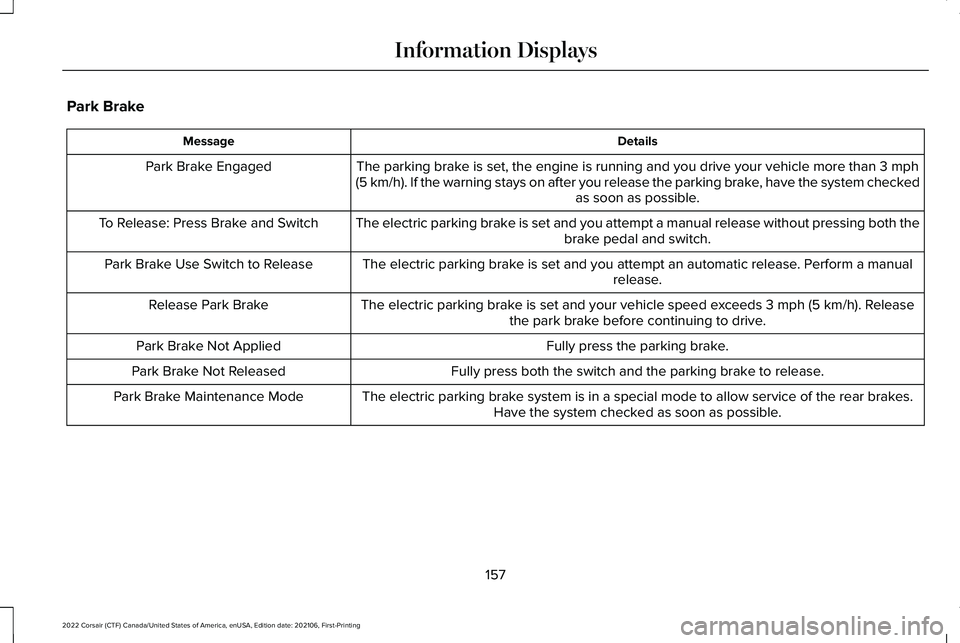
Park Brake
Details
Message
The parking brake is set, the engine is running and you drive your vehicle more than 3 mph
(5 km/h). If the warning stays on after you release the parking brake, have the system checked as soon as possible.
Park Brake Engaged
The electric parking brake is set and you attempt a manual release without pressing both thebrake pedal and switch.
To Release: Press Brake and Switch
The electric parking brake is set and you attempt an automatic release. Perform a manualrelease.
Park Brake Use Switch to Release
The electric parking brake is set and your vehicle speed exceeds
3 mph (5 km/h). Release
the park brake before continuing to drive.
Release Park Brake
Fully press the parking brake.
Park Brake Not Applied
Fully press both the switch and the parking brake to release.
Park Brake Not Released
The electric parking brake system is in a special mode to allow service of the rear brakes.Have the system checked as soon as possible.
Park Brake Maintenance Mode
157
2022 Corsair (CTF) Canada/United States of America, enUSA, Edition date: 202106, First-Printing Information Displays
Page 161 of 676

Details
Message
The electric park brake system detects a condition that requires service. Some functionalitymay still be available. Have the system checked as soon as possible.
Park Brake Limited Function Service Required
The electric parking brake system detects a condition that requires service. Have the systemchecked as soon as possible.
Park Brake Malfunction Service Now
Applying the park brake numerous times has overheated the system. Wait 2 minutes beforeattempting to apply again.
Park Brake System Overheated
Power Steering Details
Message
The power steering system detects a condition that requires service. Have the system checked as soon as possible.
Steering Fault Service Now
The power steering system is not working. Stop your vehicle in a safe place. Have the systemchecked as soon as possible.
Steering Loss Stop Safely
The power steering system detects a condition within the power steering \
system or passiveentry or passive start system that requires service. Have the system checked as soon as possible.
Steering Assist Fault Service Required
The steering lock system detects a condition that requires service. Have the system checkedas soon as possible.
Steering Lock Malfunction Service Now
158
2022 Corsair (CTF) Canada/United States of America, enUSA, Edition date: 202106, First-Printing Information Displays
Page 162 of 676

Pre-Collision Assist
Details
Message
Inclement weather conditions; ice, mud or water are blocking the sensor, causing poor radar
visibility. You can typically clean the sensor to resolve.
Pre-Collision Assist Not Available Sensor
Blocked
A fault with the system has occurred. Have the system checked as soon as possible.
Pre-Collision Assist Not Available
Remote Start Details
Message
Displays after a remote start to remind you to apply the brake and push the gear shift button to drive your vehicle.
To Drive: Press Brake and Gear Shift Button
Seats Details
Message
Move objects away from the seat. If the warning stays on or continues to\
come on, contactan authorized dealer as soon as possible.
Occupant Sensor BLOCKED Remove Objects
Near Passenger Seat
Displays as a reminder that memory seats are not available while driving\
.
Memory Recall Not Permitted While Driving
Displays to show you where you saved your memory setting.
Memory {0} Saved
159
2022 Corsair (CTF) Canada/United States of America, enUSA, Edition date: 202106, First-Printing Information Displays
Page 163 of 676
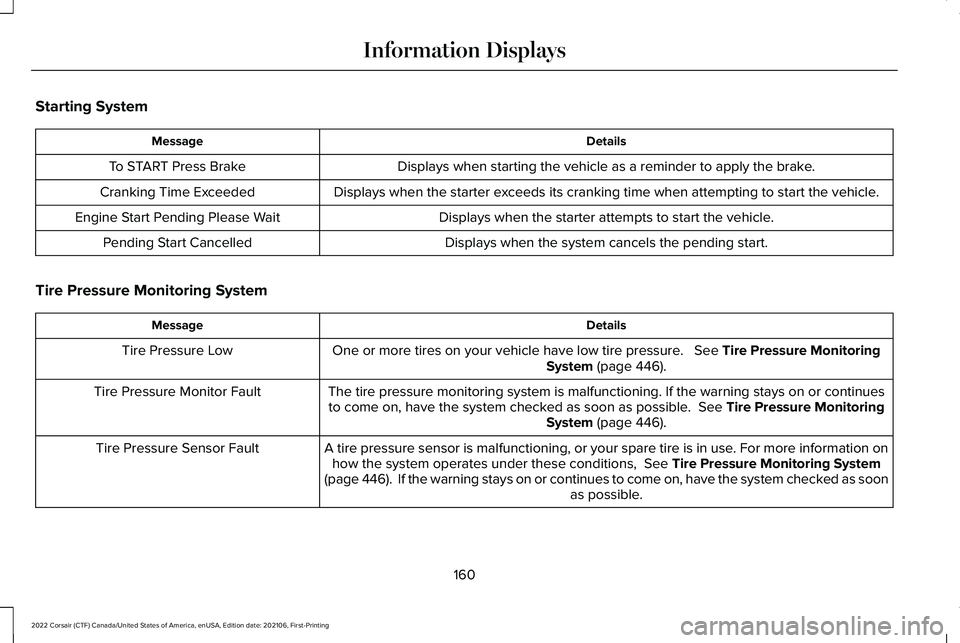
Starting System
Details
Message
Displays when starting the vehicle as a reminder to apply the brake.
To START Press Brake
Displays when the starter exceeds its cranking time when attempting to start the vehicle.
Cranking Time Exceeded
Displays when the starter attempts to start the vehicle.
Engine Start Pending Please Wait
Displays when the system cancels the pending start.
Pending Start Cancelled
Tire Pressure Monitoring System Details
Message
One or more tires on your vehicle have low tire pressure. See Tire Pressure Monitoring
System (page 446).
Tire Pressure Low
The tire pressure monitoring system is malfunctioning. If the warning st\
ays on or continuesto come on, have the system checked as soon as possible.
See Tire Pressure Monitoring
System (page 446).
Tire Pressure Monitor Fault
A tire pressure sensor is malfunctioning, or your spare tire is in use. For more information onhow the system operates under these conditions,
See Tire Pressure Monitoring System
(page 446). If the warning stays on or continues to come on, have the\
system checked as soon as possible.
Tire Pressure Sensor Fault
160
2022 Corsair (CTF) Canada/United States of America, enUSA, Edition date: 202106, First-Printing Information Displays
Page 164 of 676
.
Shift to Park
The transmission is too cold. Wait for it to warm up before you d")
Transmission
Details
Message
You switched the engine off and the gear selector is in any position othe\
r than park (P).
Shift to Park
The transmission is too cold. Wait for it to warm up before you drive.
Transmission Warming Up Please Wait
Displays when you need to press the brake pedal.
Press Brake Pedal
The transmission is overheating and needs to cool. Stop in a safe place as soon as possible.
Transmission Over Temperature Stop Safely
Have the system checked as soon as possible.
Transmission Service Required
The transmission is overheating and needs to cool. Stop in a safe place as soon as possible.
Transmission Too Hot Press Brake
The transmission has limited functionality. Have the system checked as soon as possible.
Transmission Limited Function See Manual
A reminder to shift into park. In addition, this message is typical afte\
r reconnecting or
recharging the battery until you switch the ignition to the on mode. See Changing the 12V
Battery (page 406).
Transmission Not in Park
Displays when there is a system fault and the park brake needs to be depressed beforeexiting the vehicle. Have the system checked as soon as possible.
SHIFT SYS FAULT Confirm Park Brake Apply
Before Exiting the Vehicle
Have the system checked as soon as possible.
SHIFT SYS FAULT Service Required
Displays when there is a system fault while the vehicle is shifting to p\
ark. Have the systemchecked as soon as possible.
SHIFT SYS FAULT Vehicle is Shifting to Park
Displays when there is a system fault while the vehicle is shifting to r\
everse. Have the systemchecked as soon as possible.
SHIFT SYS FAULT Reverse Unavailable
Service Required
161
2022 Corsair (CTF) Canada/United States of America, enUSA, Edition date: 202106, First-Printing Information Displays
Page 165 of 676

Details
Message
Have the system checked as soon as possible.
SHIFT SYS FAULT Drive Unavailable Select
S for Drive Service Required
Have the system checked as soon as possible.
SHIFT SYS FAULT Neutral Unavailable Service
Required
Have the system checked as soon as possible.
SHIFT SYS FAULT Sport Unavailable Service
Required
Displays when you select an invalid gear.
Invalid Gear Selection
Displays when you need to press the brake pedal to enable the transmission to shift from park.
Depress Brake to Shift from Park
HEAD UP DISPLAY (IF EQUIPPED)
The head up display (HUD) is a visual system
that shows information in your field of view
as you drive. The information comes from
various vehicle systems and includes vehicle
speed, speed limit, navigation, and advanced
driver assistance systems such as adaptive
cruise control and the lane keeping system.
This system projects the information off the
windshield, and focuses the image near the end of the hood approximately
7 ft (2 m) in
front of the driver. Viewing this information
does not require you to significantly move
your head, allowing you to keep your eyes
on the road while having quick and easy
access to information. Configuring The Head Up Display
You can control the system's options through
the information display by using the 4-way
toggle on the right-hand side of your steering
wheel.
See General Information (page 136).
You can adjust the display according to your
height to make viewing the content easier.
You can also adjust what content displays
and the brightness of the content. The
system's options appear in the instrument
cluster while the updates happen in the head
up display.
162
2022 Corsair (CTF) Canada/United States of America, enUSA, Edition date: 202106, First-Printing Information Displays
Page 166 of 676
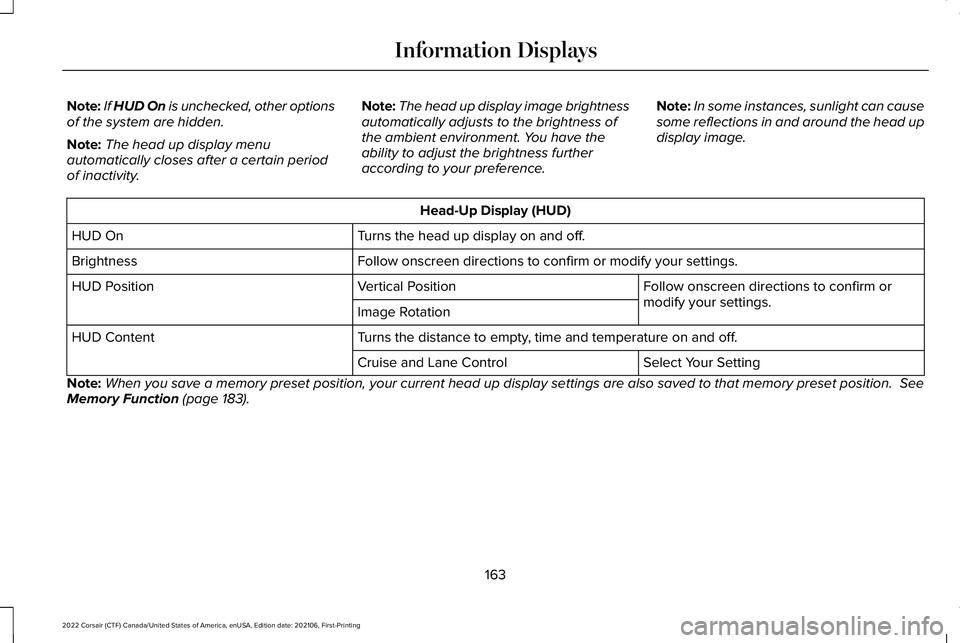
Note:
If HUD On is unchecked, other options
of the system are hidden.
Note: The head up display menu
automatically closes after a certain period
of inactivity. Note:
The head up display image brightness
automatically adjusts to the brightness of
the ambient environment. You have the
ability to adjust the brightness further
according to your preference. Note:
In some instances, sunlight can cause
some reflections in and around the head up
display image. Head-Up Display (HUD)
Turns the head up display on and off.
HUD On
Follow onscreen directions to confirm or modify your settings.
Brightness
Follow onscreen directions to confirm or
modify your settings.
Vertical Position
HUD Position
Image Rotation
Turns the distance to empty, time and temperature on and off.
HUD Content
Select Your Setting
Cruise and Lane Control
Note: When you save a memory preset position, your current head up display set\
tings are also saved to that memory preset position. See
Memory Function (page 183).
163
2022 Corsair (CTF) Canada/United States of America, enUSA, Edition date: 202106, First-Printing Information Displays
Page 167 of 676
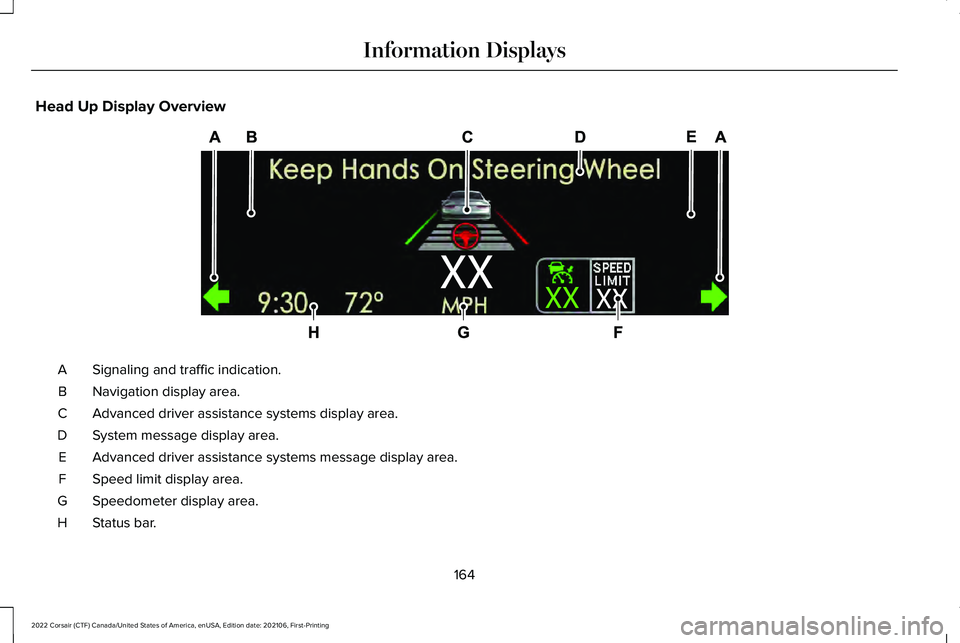
Head Up Display Overview
Signaling and traffic indication.
A
Navigation display area.
B
Advanced driver assistance systems display area.
C
System message display area.
D
Advanced driver assistance systems message display area.
E
Speed limit display area.
F
Speedometer display area.
G
Status bar.
H
164
2022 Corsair (CTF) Canada/United States of America, enUSA, Edition date: 202106, First-Printing Information DisplaysE307581