2022 KIA SPORTAGE check engine
[x] Cancel search: check enginePage 299 of 630
Driving your vehicle
14
5
Even if the smart key is in the vehi-
cle, if it is far away from you, the
engine may not start.
When the ENGINE START/STOP button is in the ACC position or
above, if any door is opened, the
system checks for the smart key. If
the smart key is not in the vehicle,
a message "key is not in the vehi-
cle" will appear on the LCD display.
And if all doors are closed, the
chime will sound for 5 seconds. The
indicator or warning will turn off
while the vehicle is moving. Always
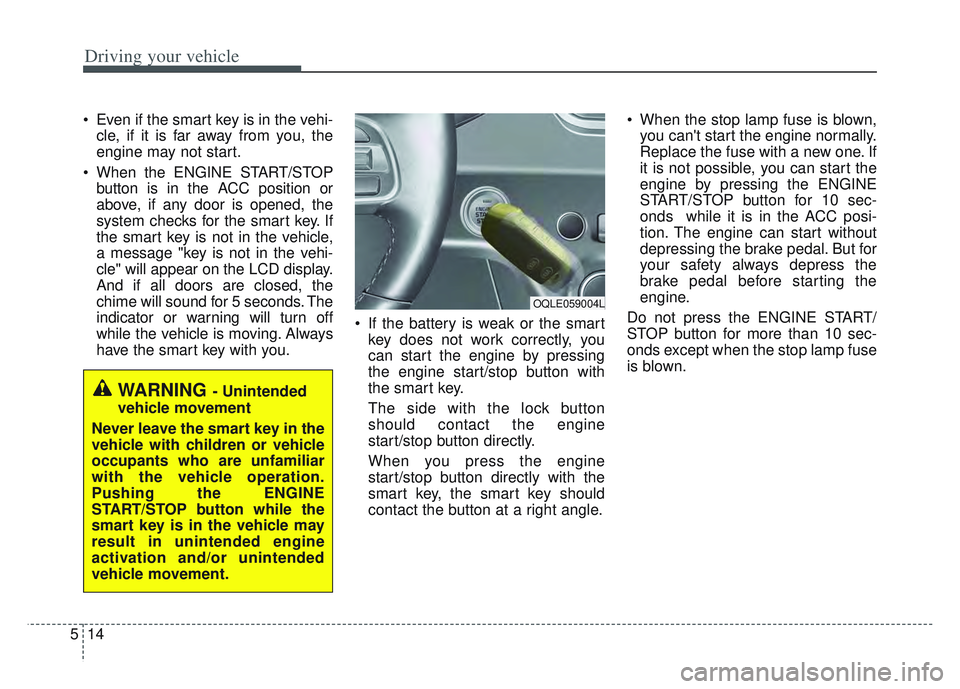
have the smart key with you. If the battery is weak or the smart
key does not work correctly, you
can start the engine by pressing
the engine start/stop button with
the smart key.
The side with the lock button
should contact the engine
start/stop button directly.
When you press the engine
start/stop button directly with the
smart key, the smart key should
contact the button at a right angle. When the stop lamp fuse is blown,
you can't start the engine normally.
Replace the fuse with a new one. If
it is not possible, you can start the
engine by pressing the ENGINE
START/STOP button for 10 sec-
onds while it is in the ACC posi-
tion. The engine can start without
depressing the brake pedal. But for
your safety always depress the
brake pedal before starting the
engine.
Do not press the ENGINE START/
STOP button for more than 10 sec-
onds except when the stop lamp fuse
is blown.
WARNING - Unintended
vehicle movement
Never leave the smart key in the
vehicle with children or vehicle
occupants who are unfamiliar
with the vehicle operation.
Pushing the ENGINE
START/STOP button while the
smart key is in the vehicle may
result in unintended engine
activation and/or unintended
vehicle movement.
OQLE059004L
Page 302 of 630
517
Driving your vehicle
N (Neutral)
The wheels and transmission are not
engaged. The vehicle will roll freely
even on the slightest incline unless
the parking brake or service brakes
are applied.- Parking in N (Neutral) gear
Follow below steps when parking
and you want the vehicle to move
when pushed.
1. After parking your vehicle,
depress the brake pedal and move
the shift lever to [P] with the igni-
tion button in [ON] or while the
engine is running.
2. If the parking brake is applied unlock the parking brake.
- For EPB (Electronic ParkingBrake) equipped vehicles, push
the brake pedal with the ignition
button in [ON] or while the engine
is running to disengage the park-
ing brake. If [AUTO HOLD] func-
tion is used while driving (If
[AUTO HOLD] indicator is on in
the cluster), press [AUTO HOLD]
switch and [AUTO HOLD] func-
tion should be turn off.
3. While pressing the brake pedal, turn the ignition button [OFF].
- For smart key equipped vehicles,the ignition switch can be moved
to [OFF] only when the shift lever
is in [P].CAUTION- Shifting
Always come to a complete stopbefore shifting into or out of R(Reverse); you may damage thetransmission if you shift into R(Reverse) while the vehicle is inmotion, except when “Rockingthe vehicle” explained in thischapter.
WARNING
ALWAYS check the surrounding
areas near your vehicle for peo-
ple, especially children, before
shifting a vehicle into D (Drive)
or R (Reverse).
Page 307 of 630
Driving your vehicle
22
5
Good driving practices
Never move the gear shift lever
from P (Park) to any other position
with the accelerator pedal
depressed.
Never move the gear shift lever into P (Park) when the vehicle is in
motion.
Slow down before shifting to a lower gear. Otherwise, the lower
gear may not be engaged.
Always use the parking brake. Do not depend on placing the trans-
mission in P (Park) to keep the
vehicle from moving.
Optimum vehicle performance and economy is obtained by smoothly
depressing and releasing the
accelerator pedal.
✽ ✽ NOTICE- Kickdown
Mechanism
Use the kickdown mechanism for
maximum acceleration. Depress the
accelerator pedal beyond the pres-
sure point. The automatic transmis-
sion will shift to a lower gear
depending on the engine speed.
Driving up a steep grade from astanding start
To drive up a steep grade from a
standing start, depress the brake
pedal, shift the shift lever to D
(Drive). Select the appropriate gear
depending on load weight and steep-
ness of the grade, and release the
parking brake. Depress the accelera-
tor gradually while releasing the
service brakes.
When accelerating from a stop on
a steep hill, the vehicle may have a
tendency to roll backwards.
Shifting the shift lever into 2
(Second Gear) will help prevent
the vehicle from rolling back-
wards.
WARNING
When driving uphill or downhill,
always shift to D (Drive) for driv-
ing forward or shift to R
(Reverse) for driving back-
wards, and check the gear posi-
tion indicated on the cluster
before driving.
Driving in the opposite direc-
tion of the selected gear can
lead to a dangerous situation by
shutting off the engine and
affecting the braking perform-
ance.
Page 308 of 630
523
Driving your vehicle
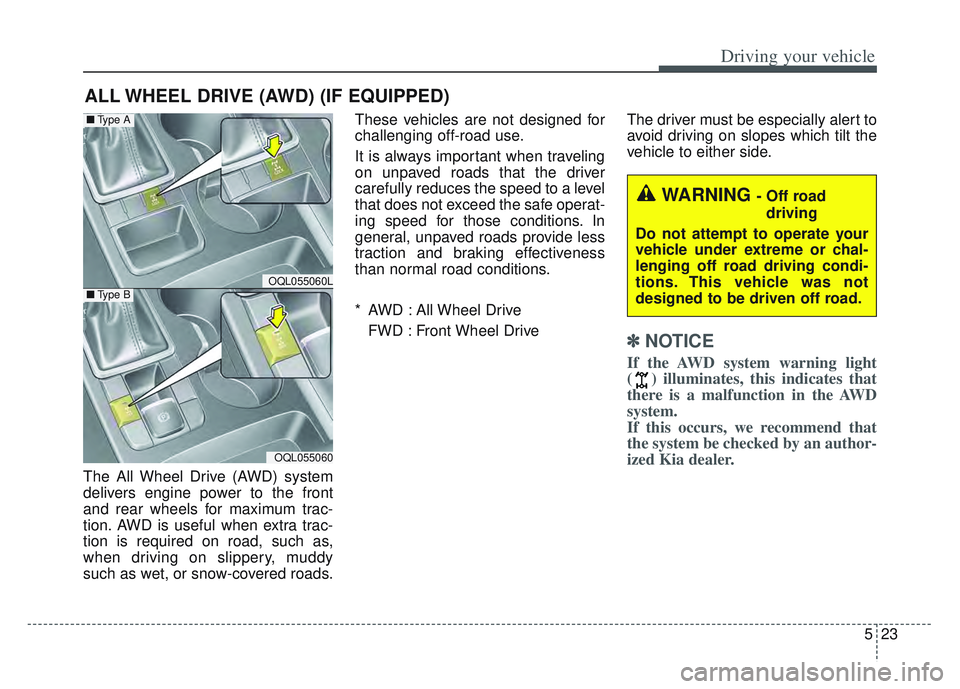
The All Wheel Drive (AWD) system
delivers engine power to the front
and rear wheels for maximum trac-
tion. AWD is useful when extra trac-
tion is required on road, such as,
when driving on slippery, muddy
such as wet, or snow-covered roads.These vehicles are not designed for
challenging off-road use.
It is always important when traveling
on unpaved roads that the driver
carefully reduces the speed to a level
that does not exceed the safe operat-
ing speed for those conditions. In
general, unpaved roads provide less
traction and braking effectiveness
than normal road conditions.
* AWD : All Wheel Drive
FWD : Front Wheel Drive The driver must be especially alert to
avoid driving on slopes which tilt the
vehicle to either side.
✽ ✽
NOTICE
If the AWD system warning light
( ) illuminates, this indicates that
there is a malfunction in the AWD
system.
If this occurs, we recommend that
the system be checked by an author-
ized Kia dealer.
ALL WHEEL DRIVE (AWD) (IF EQUIPPED)
WARNING - Off road
driving
Do not attempt to operate your
vehicle under extreme or chal-
lenging off road driving condi-
tions. This vehicle was not
designed to be driven off road.
OQL055060L
OQL055060
■ Type A
■Type B
Page 313 of 630
Driving your vehicle
28
5
If you need to drive in the water,
stop your vehicle, set your transfer
to the AWD LOCK mode and drive
at less than 5 mph (8 km/h).✽ ✽ NOTICE
• Do not drive in water if the level is
higher than the bottom of the vehi-
cle.
• Check your brake condition once you are out of mud or water. Press
the brake pedal several times as
you move slowly until you feel nor-
mal braking forces return.
• Shorten your scheduled mainte- nance interval if you drive in off-
road conditions such as sand, mud
or water (see “Maintenance under
severe usage conditions” in section
8). Always wash your vehicle thor-
oughly after off-road use, especially
cleaning the bottom of the vehicle.
• Since the driving torque is always applied to the 4 wheels the per-
formance of the AWD vehicle is
greatly affected by the condition of
the tires. Be sure to equip the vehi-
cle with four tires of the same size
and type.
• A full time all wheel drive vehicle cannot be towed by an ordinary
tow truck. Make sure that the
vehicle is placed on a flat bed
truck for moving.
WARNING - Driving
through water
Drive slowly. If you are driving
too fast in water, the water can
get into the engine compart-
ment and wet the ignition sys-
tem, causing your vehicle to
suddenly stop. If this happens
and your vehicle is in a tilted
position, your vehicle may roll
over.
WARNING - AWD driving
Avoid high cornering speed.
Do not make quick steering wheel movements, such as
sharp lane changes or fast,
sharp turns.
The risk of rollover is greatly increased if you lose control
of your vehicle at high speed.
Loss of control often occurs if two or more wheels drop off
the roadway and the driver
over-steers to re-enter the
roadway. In the event your
vehicle leaves the roadway, do
not steer sharply. Instead,
slow down before pulling
back into the travel lanes.
Page 315 of 630
Driving your vehicle
30
5
Full-time AWD vehicles must be
tested on a special four wheel
chassis dynamometer.
✽ ✽ NOTICE
Never engage the parking brake
while performing these tests.
A full-time AWD vehicle should not
be tested on a FWD roll tester. If a
FWD roll tester must be used, per-
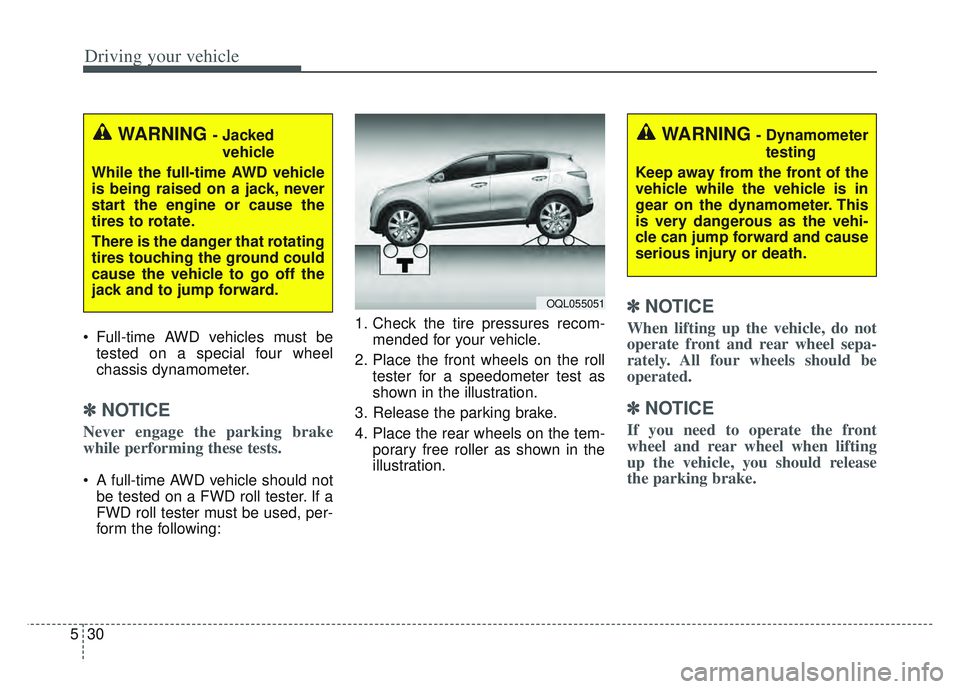
form the following: 1. Check the tire pressures recom-
mended for your vehicle.
2. Place the front wheels on the roll tester for a speedometer test as
shown in the illustration.
3. Release the parking brake.
4. Place the rear wheels on the tem- porary free roller as shown in the
illustration.
✽ ✽NOTICE
When lifting up the vehicle, do not
operate front and rear wheel sepa-
rately. All four wheels should be
operated.
✽ ✽NOTICE
If you need to operate the front
wheel and rear wheel when lifting
up the vehicle, you should release
the parking brake.
WARNING - Jacked
vehicle
While the full-time AWD vehicle
is being raised on a jack, never
start the engine or cause the
tires to rotate.
There is the danger that rotating
tires touching the ground could
cause the vehicle to go off the
jack and to jump forward.
OQL055051
WARNING- Dynamometer testing
Keep away from the front of the
vehicle while the vehicle is in
gear on the dynamometer. This
is very dangerous as the vehi-
cle can jump forward and cause
serious injury or death.
Page 319 of 630
Driving your vehicle
34
5
Check the brake warning light by
turning the ignition switch ON (do not
start the engine). This light will be
illuminated when the parking brake is
applied with the ignition switch in the
START or ON position.
Before driving, be sure the parking
brake is fully released and the brake
warning light is off.
If the brake warning light remains on
after the parking brake is released
while the engine is running, there
may be a malfunction in the brake
system. Contact an authorized Kia
dealer as soon as possible. If at all possible, cease driving the
vehicle immediately. If that is not pos-
sible, use extreme caution while
operating the vehicle and only con-
tinue to drive the vehicle until you
can reach a safe location or repair
shop.
Electronic Parking Brake
(EPB) (if equipped)
Applying the parking brake
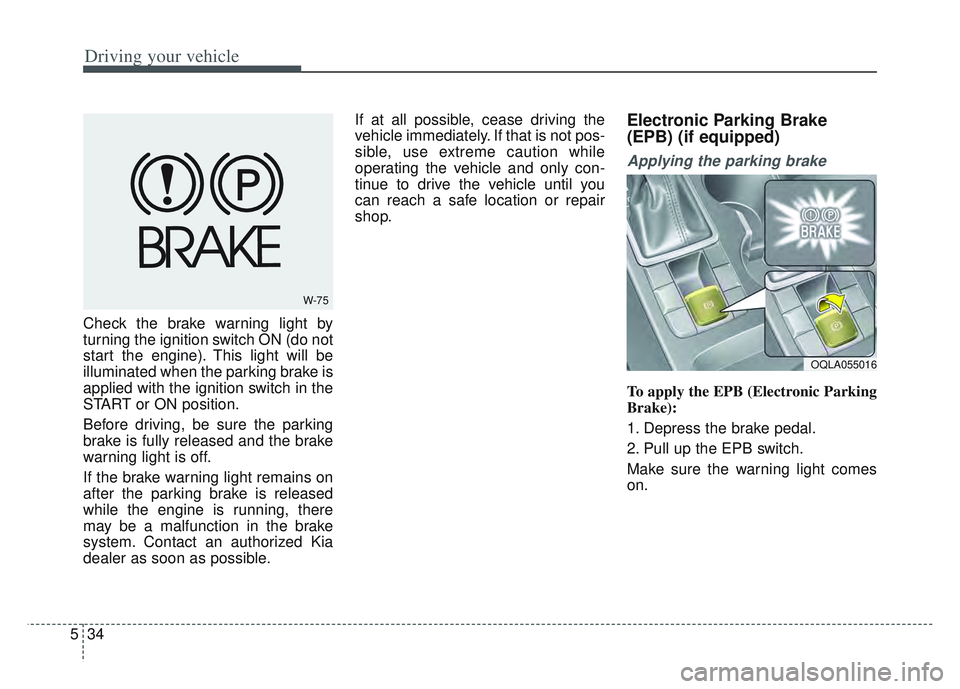
To apply the EPB (Electronic Parking
Brake):
1. Depress the brake pedal.
2. Pull up the EPB switch.
Make sure the warning light comes
on.
W-75
OQLA055016
Page 321 of 630
Driving your vehicle
36
5
To release EPB (Electronic Parking
Brake) automatically:
Shift lever in P (Park)
With the engine running depress
the brake pedal and shift out of P
(Park) to R (Reverse) or D (Drive).
Shift lever in N (Neutral) With the engine running depress
the brake pedal and shift out of N
(Neutral) to R (Reverse) or D
(Drive).
Automatic Transmission 1. Start the engine.
2. Fasten the driver's seat belt.
3. Close the driver's door, engine hood and tailgate.
4. Depress the accelerator pedal while the shift lever is in R (Rear),
D (Drive) or manual mode.
Make sure the brake warning light
goes off.✽ ✽ NOTICE
• For your safety, you can engage
the EPB even though the ignition
switch or engine stop/start button
is in the OFF position, but you
cannot release it.
• For your safety, depress the brake pedal and release the parking
brake manually with the EPB
switch when you drive downhill or
when backing up the vehicle.
Do not follow the above procedure
when driving on a flat level ground.
The vehicle may suddenly move for-
ward.
✽ ✽ NOTICE
If the parking brake warning light is
still on even though the EPB has
been released, have the system
checked by an authorized Kia dealer.
EPB (Electronic Parking Brake) may
be automatically applied when:
The EPB is overheated
Requested by other systems
✽ ✽NOTICE
For EPB (Electronic Parking Brake)
equipped vehicles with AUTO
HOLD function used while driving,
if the ignition button has been
turned OFF, the EPB will be
engaged automatically. Therefore,
the AUTO HOLD function should
be turned off before the ignition but-
ton is turned off.
CAUTION
Do not drive your vehicle with
the EPB applied. It may causeexcessive brake pad and brakerotor wear.