2022 KIA SPORTAGE check engine
[x] Cancel search: check enginePage 147 of 630
Features of your vehicle
58
4
Electronic power steering
(EPS)
The power steering uses a motor to
assist you in steering the vehicle. If
the engine is off or if the power steer-
ing system becomes inoperative, the
vehicle may still be steered, but it will
require increased steering effort.
Electronic power steering is con-
trolled by a power steering control
unit which senses the steering wheel
torque and vehicle speed to com-
mand the motor.
The steering becomes heavier as the
vehicle’s speed increases and
becomes lighter as the vehicle’s
speed decreases for optimum steer-
ing control.
Should you notice any change in the
effort required to steer during normal
vehicle operation, have the power
steering checked by an authorized
Kia dealer. If the Electronic Power Steering
System does not operate normally,
the warning light will illuminate on
the instrument cluster. The steering
wheel may require increased
steering effort. Take your vehicle to
an authorized Kia dealer and have
the vehicle checked as soon as
possible.
When you operate the steering wheel in low temperature, the steer-
ing effort may be high or abnormal
noise may occur. If temperature
rises, the noise will likely disappear.
This is a normal condition.
When the vehicle is stationary, and the steering wheel is turned all the
way to the left or right continuous-
ly, the steering wheel becomes
harder to turn. The power assist is
limited to protect the motor from
overheating.
As time passes, the steering wheel
will return to its normal condition.
✽ ✽ NOTICE
The following symptoms may occur
during normal vehicle operation:
• The EPS warning light does not
illuminate.
• The steering gets heavy immedi- ately after turning the ignition
switch on. This happens as the sys-
tem performs the EPS system
diagnostics. When the diagnostics
are completed, the steering wheel
will return to its normal condition.
• A click noise may be heard from the EPS relay after the ignition
switch is turned to the ON or
LOCK (OFF) position.
• A motor noise may be heard when the vehicle is at a stop or at a low
driving speed.
• If the Electronic Power Steering System does not operate normally,
the warning light will illuminate on
the instrument cluster. The steer-
ing wheel may become difficult to
control or operate abnormally.
Take your vehicle to an authorized
Kia dealer and have the vehicle
checked as soon as possible. (Continued)
STEERING WHEEL
Page 180 of 630
491
Features of your vehicle
Door
• Auto Lock :- Enable on Speed : All doors willbe automatically locked when the
vehicle speed exceeds 9.3 mph
(15 km/h).
- Enable on Shift (if equipped with Automatic transmission) : All
doors will be automatically locked
if the transmission shift lever is
shifted from the P (Park) position
to the R (Reverse), N (Neutral), or
D (Drive) position. (With the
Engine ON, it is activated.)
Auto Unlock : - Disable : The auto door unlockoperation will be canceled.
- Vehicle Off/On key out : All doors will be automatically unlocked
when the ignition key is removed
from the ignition switch or the
Engine Start/Stop button is set to
the OFF position. - On shift to P (if equipped with
Automatic transmission) : All
doors will be automatically
unlocked if the automatic trans-
mission shift lever is shifted to the
P (Park) position. (With the
Engine ON, it is activated.)
Two Press Unlock (if equipped) : - If this item is checked, the twopress unlock will be activated.
Press the door unlock button
once to unlock the driver's door,
and press the button once more
within 4 seconds to unlock the
rest of the doors.
Power Liftgate (if equipped) : - If this item is checked, the powerliftgate function will be activated.
❈ For more details, refer to “Power
Liftgate” in this chapter.
Smart Liftgate (if equipped) : - If this item is checked, the smartliftgate function will be activated.
❈ For more details, refer to “Smart
Liftgate” in this chapter. Lights
One Touch Turn Signal :
- Off: The one touch turn signalfunction will be deactivated.
- 3, 5, 7 Flashes : The lane change signals will blink 3, 5 or 7 times
when the turn signal lever is
moved slightly.
❈ For more details, refer to “Lighting”
in this chapter.
Headlight Delay : - If this item is checked, the headlamp delay function will be acti-
vated.
❈ For more details, refer to “Lighting”
in this chapter.
Page 187 of 630
Features of your vehicle
98
4
Press START button while turning
wheel (for smart key system)
This warning message illuminates if the steering wheel does not
unlock normally when the Engine
Start/Stop Button is pressed.
It means that you should press the Engine Start/Stop Button while
turning the steering wheel right
and left.
Steering wheel not locked
(for smart key system)
This warning message illuminates if the steering wheel does not lock
when the Engine Start/Stop Button
changes to the OFF position.
Check Steering Wheel Lock
System (for smart key system)
This warning message illuminates if the steering wheel does not lock
normally when the Engine
Start/Stop Button changes to the
OFF position.
Press brake pedal to start engine
(for smart key system and auto-
matic transmission)
This warning message illuminates if the Engine Start/Stop Button
changes to the ACC position twice
by pressing the button repeatedly
without depressing the brake pedal.
It means that you should depress the brake pedal to start the engine.
Key not detected
(for smart key system)
This warning message illuminates if the smart key is not detected
when you press the Engine
Start/Stop Button.
Remove key (for smart key sys-
tem)
This warning message illuminates if the smart key is remove the hold-
er.
Key not in vehicle
(for smart key system)
If the smart key is not in the vehicle and if any door is opened or closed
with the engine start/stop button in
ACC, ON, or START, the warning
illuminates on the LCD display.
Page 188 of 630
499
Features of your vehicle
Press start button again (for smart key system)
This warning message illuminates if you can not operate the Engine
Start/Stop Button when there is a
problem with the Engine Start/Stop
Button system.
It means that you could start the engine by pressing the Engine
Start/ Stop Button once more.
If the warning illuminates each time you press the Engine Start/Stop
Button, have the vehicle inspected
by a professional workshop. Kia
recommends to visit an authorized
Kia dealer/service partner.
Press start button with key
(for smart key system)
This warning message illuminates if you press the Engine Start/Stop
Button while the warning message
“Key not detected” is illuminating.
At this time, the immobilizer indica- tor light blinks.
Check BRAKE SWITCH fuse
(for smart key system and auto-matic transmission)
This warning message illuminates if the brake switch fuse is discon-
nected.
It means that you should replace the fuse with a new one. If that is
not possible, you can start the
engine by pressing the Engine
Start/Stop Button for 10 seconds in
the ACC position.
Shift to P or N to start engine
(for smart key system and auto-matic transmission)
This warning message illuminates if you try to start the engine with
the shift lever not in the P (Park) or
N (Neutral) position.
✽ ✽ NOTICE
You can start the engine with the
shift lever in the N (Neutral) position.
However, for your safety, we strongly
recommend that you start the engine
with the shift lever in the P (Park)
position.
Page 194 of 630
4105
Features of your vehicle
Parking Brake & BrakeFluid Warning Light
This warning light illuminates:
Once you set the ignition switch or Engine Start/Stop Button to the ON
position.
- It illuminates for approximately 3seconds
When the parking brake is applied, the warning light will remain on.
When the brake fluid level in the reservoir is low.
- If the warning light illuminateswith the parking brake released, it
indicates the brake fluid level in
reservoir is low. If the brake fluid level in the reservoir
is low:
1. Drive carefully to the nearest safe
location and stop your vehicle.
2. With the engine stopped, check the brake fluid level immediately and add
fluid as required (For more details,
refer to “Brake Fluid” in chapter 7).
Then check all brake components
for fluid leaks. If any leaks in the
brake system are still found, the
warning light remains on, or the
brakes do not operate properly, do
not drive the vehicle.
In this case, have your vehicle
towed to an authorized Kia dealer
and inspected. Dual-diagonal braking system
Your vehicle is equipped with dual-
diagonal braking systems. This
means you still have braking on two
wheels even if one of the dual sys-
tems should fail.
With only one of the dual systems
working, greater pedal pressure will
be required to stop the vehicle.
Also, the vehicle will require
increased stopping distance with
only a portion of the brake system
working.
If the brakes fail while you are driv-
ing, shift to a lower gear for addition-
al engine braking and stop the vehi-
cle as soon as it is safe to do so.
Driving the vehicle with a warning
light ON is dangerous. If the Parking
Brake & Brake Fluid Warning Light
illuminate with the parking brake
released, it indicates that the brake
fluid level is low.
In this case, have your vehicle inspect-
ed by an authorized Kia dealer.
Page 197 of 630
Features of your vehicle
108
4
Charging System
Warning Light
This warning light illuminates:
Once you set the ignition switch or Engine Start/Stop Button to the ON
position.
- It remains on until the engine isstarted.
When there is a malfunction with either the alternator or electrical
charging system.
If there is a malfunction with either
the alternator or electrical charging
system:
1. Drive carefully to the nearest safe location and stop your vehicle.
2. Turn the engine off and check the alternator drive belt for looseness
or breakage.
If the belt is adjusted properly,
there may be a problem in the
electrical charging system.
In this case, have your vehicle
inspected by an authorized Kia
dealer as soon as possible.
Engine Oil Pressure Warning Light
This warning light illuminates:
Once you set the ignition switch or Engine Start/Stop Button to the ON
position.
- It remains on until the engine isstarted.
When the engine oil pressure is low.
If the engine oil pressure is low:
1. Drive carefully to the nearest safe location and stop your vehicle.
2. Turn the engine off and check the engine oil level (For more details,
refer to “Engine Oil” in chapter 7).
If the level is low, add oil as
required.
If the warning light remains on
after adding oil or if oil is not avail-
able, have your vehicle inspected
by an authorized Kia dealer as
soon as possible.
CAUTION - Catalytic
Converter Damage
If the Malfunction Indicator Lamp (MIL) illuminates, poten-tial catalytic converter damageis possible which could result inloss of engine power.
In this case, have your vehicleinspected by an authorized Kiadealer as soon as possible.
CAUTION - Malfunction
Indicator Lamp (MIL)
Driving with the Malfunction Indicator Lamp (MIL) on maycause damage to the emissioncontrol systems which couldaffect drivability and/or fueleconomy.
Page 206 of 630

4117
Features of your vehicle
Rear View Monitor will activate with
the ignition switch or ENGINE
START/STOP button in the ON and
the shift lever in the R (Reverse) posi-
tion.
The rear view monitor may be turned
off by pressing the ON/OFF button
when the rear view monitor is activat-
ed.To turn the camera on again, press
the ON/OFF button again when the
ignition switch is on and the shift
lever is in R (Reverse). Also, the
camera will turn on automatically
whenever the ignition switch is
turned off and on again.
• This system is a supplementary
function only. It is the responsibility
of the driver to always check the
inside/outside rearview mirrors and
the area behind the vehicle before
and while backing up because
there is a dead zone that can't be
seen by the camera.
If the camera lens is covered with foreign material, the Rear View
Monitor may not operate normally.
Always keep the camera lens
clean.
However, do not use chemical sol-
vents such as strong detergents
containing high alkaline or volatile
organic solvents (gasoline, ace-
tone etc.). This may damage the
camera lens
❈If your vehicle is equipped with an
Infotainment System, rearview dis-
play will show through the
Infotainment System, monitor
while backing-up. Refer to a sepa-
rately supplied manual for detailed
information.
REAR VIEW MONITOR (RVM)
OQL048403L
OQL048404N
WARNING - Backing up &
using camera
Never rely solely on the rear view
camera when backing. You must
always use methods of viewing
the area behind you including
looking over both shoulders as
well as continuously checking all
three rear view mirrors. Due to
the difficulty of ensuring that the
area behind you remains clear,
always back slowly and stop
immediately if you even suspect .
This system is a supplemental
system that shows behind the
vehicle through the rearview dis-
play mirror while backing up. If
the vehicle is equipped with a
navigation system, then the sys-
tem will display on the screen.
Page 211 of 630
Features of your vehicle
122
4
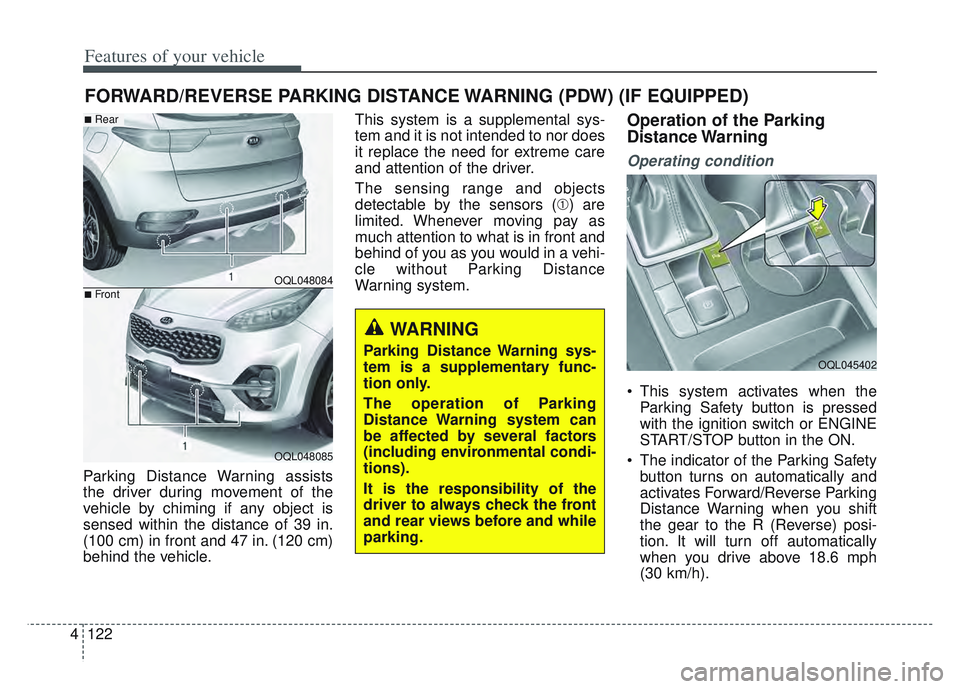
Parking Distance Warning assists
the driver during movement of the
vehicle by chiming if any object is
sensed within the distance of 39 in.
(100 cm) in front and 47 in. (120 cm)
behind the vehicle. This system is a supplemental sys-
tem and it is not intended to nor does
it replace the need for extreme care
and attention of the driver.
The sensing range and objects
detectable by the sensors (➀) are
limited. Whenever moving pay as
much attention to what is in front and
behind of you as you would in a vehi-
cle without Parking Distance
Warning system.
Operation of the Parking
Distance Warning
Operating condition
This system activates when the
Parking Safety button is pressed
with the ignition switch or ENGINE
START/STOP button in the ON.
The indicator of the Parking Safety button turns on automatically and
activates Forward/Reverse Parking
Distance Warning when you shift
the gear to the R (Reverse) posi-
tion. It will turn off automatically
when you drive above 18.6 mph
(30 km/h).
FORWARD/REVERSE PARKING DISTANCE WARNING (PDW) (IF EQUIPPED)
WARNING
Parking Distance Warning sys-
tem is a supplementary func-
tion only.
The operation of Parking
Distance Warning system can
be affected by several factors
(including environmental condi-
tions).
It is the responsibility of the
driver to always check the front
and rear views before and while
parking.
OQL048084
OQL048085
■Rear
■Front
OQL045402