Page 400 of 710
577
Driving your vehicle
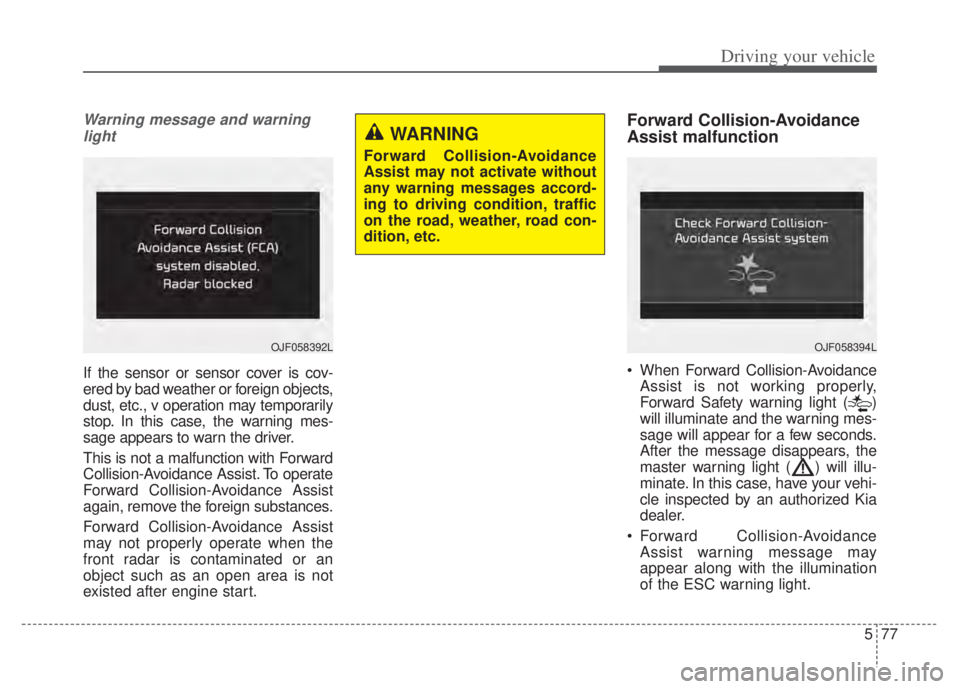
Warning message and warninglight
If the sensor or sensor cover is cov-
ered by bad weather or foreign objects,
dust, etc., v operation may temporarily
stop. In this case, the warning mes-
sage appears to warn the driver.
This is not a malfunction with Forward
Collision-Avoidance Assist. To operate
Forward Collision-Avoidance Assist
again, remove the foreign substances.
Forward Collision-Avoidance Assist
may not properly operate when the
front radar is contaminated or an
object such as an open area is not
existed after engine start.
Forward Collision-Avoidance
Assist malfunction
• When Forward Collision-Avoidance Assist is not working properly,
Forward Safety warning light ( )
will illuminate and the warning mes-
sage will appear for a few seconds.
After the message disappears, the
master warning light ( ) will illu-
minate. In this case, have your vehi-
cle inspected by an authorized Kia
dealer.
Forward Collision-Avoidance Assist warning message may
appear along with the illumination
of the ESC warning light.
WARNING
Forward Collision-Avoidance
Assist may not activate without
any warning messages accord-
ing to driving condition, traffic
on the road, weather, road con-
dition, etc.
OJF058394LOJF058392L
Page 410 of 710

587
Driving your vehicle
Lane Keeping Assist detects the lane
markers on the road with a front view
camera (1) at the front windshield,
and assists the driver’s steering to
help keep the vehicle in the lanes.
When the function detects the vehi-
cle straying from its lane, it warns the
driver with a visual and audible warn-
ing, while applying a slight counter-
steering torque, trying to prevent the
vehicle from moving out of its lane.
LANE KEEPING ASSIST (LKA) (IF EQUIPPED)
WARNING
Driver is responsible for beingaware of surroundings and
steering the vehicle safely.
Do not steer the steering wheel suddenly when the
steering wheel is being assist-
ed by the function.
Lane Keeping Assist helps prevent the driver from mov-
ing out of the lane uninten-
tionally by assisting the dri-
ver’s steering. If the driver
intentionally drives on one
side of the driving lane, a con-
tinuous steering force may
occur. However, the function
is just a convenience function
and the steering wheel is not
always controlled. While driv-
ing, the driver should pay
attention to the steering
wheel.
(Continued)
(Continued)
The operation of LaneKeeping Assist can be can-
celed or not work properly
depending on road condition
and surroundings. Always be
cautious when driving.
Do not disassemble the front view camera or attached any
type of coating or accessories
to it. If you disassemble the
front view camera, take your
vehicle to an authorized Kia
dealer to check if the function
needs a calibration.
When you replace the wind- shield glass, front view cam-
era or related parts of the
steering, take your vehicle to
an authorized Kia dealer to
check if the function needs a
calibration.
(Continued)
ODEP051029
Page 411 of 710

Driving your vehicle
88
5
Lane Keeping Assist operation
To activate/deactivate Lane Keeping
Assist :
With the ignition switch or ENGINE
START/STOP button in the ON posi-
tion, press the Lane Safety button
located on the instrument panel on
the lower left hand side of the driver.
The indicator ( ) in the cluster
display will initially illuminate white.
When the indicator(white) was acti-
vated in the previous ignition cycle,
the function turns on without any
control. If you press the Lane Safety
button again, the indicator on the
cluster display will go off.
(Continued)
The function detects lane
markers and controls the
steering wheel by a front view
camera, therefore, if the lane
markers are hard to detect,
the function may not work
properly. Always be cautious
when using the function.
When the lane markers are hard to detect, please refer to
“DRIVER’S ATTENTION”.
Do not remove or damage the related parts of the front view
camera function.
Do not place objects on the crash pad that reflect light
such as mirrors, white paper,
etc. it may cause malfunction
of Lane Keeping Assist if sun-
light is reflected.
You may not hear warning sound of Lane Keeping Assist
because of the excessive
audio sound.
(Continued)(Continued)
If other beeps such as theseat belt warning sound are in
operation and override Lane
Keeping Assist alarming func-
tion, Lane Keeping Assist
beeps may not occur.
At high vehicle speeds, the steering torque needed for
assistance may not be suffi-
cient to keep your vehicle
within the lane. If so, the vehi-
cle may move out of its lane.
Always obey the speed limit
when using Lane Keeping
Assist.
If you attach objects to the steering wheel, the function
may not assist steering.
If you attach objects to the steering wheel, hands off
alarm may not work properly.
ODEP051113N
Page 415 of 710

Driving your vehicle
92
5
✽ ✽
NOTICE
• Even though the steering is assist-
ed by the function, the driver may
control the steering.
• The steering wheel may feel heav- ier when the steering wheel is
assisted by the function than when
it is not. WARNING
The driver is responsible for
accurate steering.
Even though the steering is assisted by the function, the
driver may control the steer-
ing wheel.
Turn off the function and drive the vehicle in the below situa-
tions:
- In bad weather
- In bad road conditions
- When the steering wheelneeds to be controlled by the
driver frequently.
- When towing a vehicle or trailer.
The steering wheel may feel heavier when the steering
wheel is assisted by the func-
tion than when it is not.
WARNING
The hands-off warning mes-sage may be delayed accord-
ing to road conditions.
Therefore, always have your
hands on the steering wheel
while driving.
If you hold the steering wheel lightly, the function may dis-
play the hands off warning
because Lane Keeping Assist
may believe you are not grab-
bing the wheel.
Page 418 of 710

595
Driving your vehicle
(Continued)
• There is a boundary structure inthe roadway.
• The light of street, sun, or oncom- ing vehicle reflects from the water
on the road.
• When light shines brightly in the reverse direction you drive.
• Road surface is not even.
• The distance from the vehicle ahead is very short or the vehicle
ahead drives hiding the lane line.
• You drive on a steep grade or a sharp curve.
• The vehicle vibrates heavily.
• The temperature near inside mir- ror is very high due to direct sun
light and etc.
when front visibility is poor
• The lens or windshield is covered by strange materials.
• The sensor cannot detect the lane because of fog, heavy rain or snow.
• The windshield is fogged by humid air in the vehicle.
• Putting something on the crash pad and etc.
WARNING
Lane Keeping Assist is a func-
tion to help prevent the driver
from leaving the lane. However,
the driver should not solely rely
on the function and should
always drive safely and exercise
safe driving practices.
Page 420 of 710

597
Driving your vehicle
Blind-Spot Collision Warning
setting and activation
Blind-Spot Collision Warning set-ting
• The driver can activate the function by placing the ignition switch or
ENGINE START/STOP button to the
ON position and by selecting “User
Settings Driver Assistance
Blind-Spot Safety”
- Blind-Spot Collision Warning turns on and gets ready to be
activated when “Warning Only” is
selected. Then, if a vehicle
approaches the driver's blind spot
area a warning sounds.
- The function is deactivated and the indicator on the Blind-Spot
Safety button is extinguished
when 'Off' is selected. If you press Blind-Spot Safety but-
ton while “Warning Only” is select-
ed the indicator on the button extin-
guishes and the function deacti-
vates.
If you press Blind-Spot Safety but- ton while the function is cancelled
the indicator on the button illumi-
nates and the function activates. In
this case, the function returns to the
state before the vehicle turned off.
When the function is initially turned
on and when the motor is turned off
then on again while the function is
in activation, the warning light will
illuminate for 3 seconds on the out-
side rearview mirror. If the vehicle is turned off then on
again, the function maintains the
previous state.
ODEP051293N
Page 421 of 710

Driving your vehicle
98
5
Warning Timing
The driver can select the initial
warning activation time select “User
Settings Driver Assistance
Warning Timing”
The options for the initial Blind- Spot Collision Warning includes
the following: - Normal:
When this condition is selected,the initial Blind-Spot Collision
Warning is activated normally. If
this setting feels too sensitive
change the option to ‘Normal’.
The warning activation time may feel late if the side/rear vehicle
abruptly accelerates.
- Later: Select this warning activation
time when the traffic is light and
you are driving in a low speed.
✽ ✽ NOTICE
If you change the warning timing,
the warning time of other functions
may change. Always be aware
before changing the warning timing.
Operating conditions
The function enters the ready status,
when ‘Warning Only’ is selected and
the following conditions are satisfied:
(1) Blind-Spot Collision Warning will
activate when:
- The vehicle speed above approxi- mately 20 mph (30 km/h).
OYG059344L
Page 422 of 710

599
Driving your vehicle
Warning message and func-
tion control
Blind-Spot Collision Warning
First stage warning
If a vehicle is detected within the
boundary of the function, a warning
light will illuminate on the outside
rearview mirror and the head up dis-
play (if equipped).
Once the detected vehicle is no
longer within the blind spot area, the
warning will turn off according to the
driving conditions of the vehicle.
OJF055213
■First stage warning
(left)■First stage warning
(right)
ORJ058128ORJ058129
[A] : Warning sound
Second stage warning
A warning chime to warn the driver will activate when:
1. At the First stage warning (the warning light illuminate on the outside review mirror and the head up display (if equipped) AND
2. The turn signal is applied (same side as where the vehicle is being detected).
When this warning is activated, the warning light on the outside rearview mirror
and the head up display (if equipped) will also blink. And a warning chime will
sound.
If you turn off the turn signal indicator, the second stage warning will be deacti-
vated.
Once the detected vehicle is no longer within the blind spot area, the warn-
ing will turn off according to the driving conditions of the vehicle.
■Second stage warning (left)■Second stage warning (right)