2022 KIA NIRO PHEV warning light
[x] Cancel search: warning lightPage 379 of 710

Driving your vehicle
56
5
✽ ✽
NOTICE
If you change the warning timing,
the warning timing of other systems
may change. Always be aware of
warning timing before changing the
warning timing.
Prerequisite for activation
Forward Collision-Avoidance Assist
gets ready to be activated, when the
“Active Assist”, or “Warning Only”,
under the Forward Safety is selected
on the LCD display, and when the fol-
lowing prerequisites are satisfied.
- The ESC is activated.
- The driving speed is over 5 mph (8
km/h). (However, Forward Collision-
Avoidance Assist is activated within
certain driving speed.)
- The function detects a vehicle or a pedestrian in front, which may collide
with your vehicle. (Forward Collision-
Avoidance Assist may not be activat-
ed or may sound a warning alarm in
accordance with the driving situation
or vehicle condition.)
❈ Forward Collision-Avoidance
Assist may not operate properly
according to the frontal situation,
the direction and speed of pedes-
trian.WARNING
Completely stop the vehicle on
a safe location before operating
the switch on the steering
wheel to activate/deactivate
Forward Collision-Avoidance
Assist.
Forward Collision-Avoidance Assist automatically activates
upon placing the ignition switch
to the ON position. The driver
can deactivate Forward
Collision-Avoidance Assist by
canceling the function setting on
the LCD display or Infotainment
System screen.
Forward Collision-Avoidance Assist automatically deacti-
vates upon canceling the ESC.
When the ESC is canceled,
Forward Collision-Avoidance
Assist cannot be activated on
the LCD display or Infotainment
System screen.
Forward Collision-Avoidance
Assist warning light will illu-
minate, which is normal.
Page 380 of 710

557
Driving your vehicle
Forward Collision-Avoidance
Assist warning message and
function control
Forward Collision-Avoidance Assist
produces warning messages and
warning alarms in accordance with
the collision risk levels, such as
abrupt stopping of the vehicle in
front, insufficient braking distance,
pedestrian detection. Also, it controls
the brakes in accordance with the
collision risk levels.
The driver can select the initial warn-
ing activation time in the ‘Settings’ on
the LCD display or Infotainment
System screen. The options for the
initial Forward Collision Warning
include Normal or Late initial warning
time.
Collision Warning (1st warning)
The warning message appears onthe LCD display with the warning
alarms.
The Vehicle may slow down slightly - It will operate if the vehicle speedis greater than 5 mph (8 km/h)
and less than or equal to 40 mph
(60 km/h) on a forward vehicle.
(Depending on the condition of
the vehicle ahead and the envi-
ronment surrounding it, the possi-
ble maximum operating speed
may be reduced.) - For pedestrian, the vehicle speed
is greater than or equal to 5 mph
(8 km/h) and less than 40 mph (60
km/h). (Depending on the condi-
tion of pedestrian and the sur-
rounding environment the possi-
ble maximum operating speed
may be reduced.)
Forward Collision-Avoidance Assist controls the brakes within certain
limit to release shock from the colli-
sion.
- If you select “Warning Only”,Forward Collision-Avoidance
Assist activates and produces
only warning alarms in accor-
dance with the collision risk lev-
els. You should control the brake
directly because Forward
Collision-Avoidance Assist does
not control the brake.
OJF058389L
Page 383 of 710

Driving your vehicle
60
5
✽ ✽
NOTICE
• Be careful not to apply unneces-
sary force on the frontal sensor
area. When the sensor moves out
of the correct position due to
external force, Forward Collision-
Avoidance Assist may not normal-
ly operate even without the warn-
ing light or message. In this case,
have your vehicle inspected by an
authorized Kia dealer.
• Keep the sensor and sensor area clean.
• Be careful not to force to shock on sensor or area. If the sensor is out
of the position by the shock,
Forward Collision-Avoidance
Assist may not normally operate
even without the warning light ON
or message. In this case, have your
vehicle inspected by an authorized
Kia dealer.
• Do not tint the window or install stickers, accessories around the
inside mirror where the front view
camera is installed.
• Make sure the front view camera installation point does not get wet. (Continued)(Continued)
• Do not impact or arbitrarily
remove any front view camera
components.
• Do not place reflective objects(white paper or mirror etc.)
on the crash pad.
Forward Collision-Avoidance
Assist may activate unnecessarily
due to reflect of the sunlight.
• For more cautions for the camera sensor, refer to Lane Keeping
Assist (LKA) in this chapter.
Warning message and warning
light
If the front view camera is covered by
bad weather or foreign objects, dust,
etc., Forward Collision-Avoidance
Assist operation may stop temporari-
ly. If this occurs, a warning message
will appear on the LCD display.
Forward Collision-Avoidance Assist
will operate normally when debris is
removed.
OBDM058129N
Page 384 of 710

561
Driving your vehicle
Forward Collision-Avoidance
Assist malfunction
When Forward Collision-Avoidance Assist is not working
properly, Forward Collision-
Avoidance Assist warning light
( ) will illuminate and the warn-
ing message will appear for a few
seconds. After the message disap-
pears, the master warning light
( ) will illuminate. In this case,
have your vehicle inspected by an
authorized Kia dealer.
The Forward Collision-Avoidance Assist warning message may
appear along with the illumination
of the ESC warning light.
WARNING
Forward Collision-Avoidance
Assist may not activate without
any warning messages accord-
ing to driving condition, traffic
on the road, weather, road con-
dition, etc.
OJF058394L
WARNING
Forward Collision-AvoidanceAssist is only a supplemental
function for the driver’s con-
venience. The driver should
hold the responsibility to con-
trol the vehicle operation. Do
not solely depend on Forward
Collision-Avoidance Assist.
Rather, maintain a safe braking
distance, and, if necessary,
depress the brake pedal to
lower the driving speed.
In certain instances and under certain driving conditions,
Forward Collision-Avoidance
Assist may activate uninten-
tionally. This initial warning
message appears on the LCD
display with a warning chime.
Also, in certain instances the
front radar sensor or front view
camera recognition function
may not detect the vehicle or
pedestrian ahead. Forward
Collision-Avoidance Assist may
not activate and the warning
message will not be displayed.
(Continued)
Page 391 of 710

Driving your vehicle
68
5
Detecting pedestrian
The sensor may be limited when:
The pedestrian is not fully detected
by the front view camera recogni-
tion function, for example, if the
pedestrian is leaning over or is not
fully walking upright.
The pedestrian is moving very quickly or appears abruptly in the
front view camera detection area.
The pedestrian is wearing clothing that easily blends into the back-
ground, making it difficult to be
detected by the front view camera
recognition function.
The outside lighting is too bright (e.g. when driving in bright sunlight
or in sun glare) or too dark (e.g.
when driving on a dark rural road
at night).
It is difficult to detect and distin- guish the pedestrian from other
objects in the surroundings, for
example, when there is a group of
pedestrian, or a large crowd. There is an item similar to a per-
son's body structure.
The pedestrian is small.
The pedestrian has impaired mobility.
In case of front view camera sen- sor recognition is in a marginal
state.
When the pedestrian suddenly interrupts in front of the vehicle.
When there is any other electro- magnetic interference.
When the construction area, rail or other metal object is near the
pedestrian.
In case of a large number of pedestrian are gathered.
When it is difficult to distinguish between surroundings and pedes-
trian.
When it is at night or in dark sur- roundings.WARNING
Do not use Forward Collision-Avoidance Assist when tow-
ing a vehicle. Application of
Forward Collision-Avoidance
Assist while towing may
adversely affect the safety of
your vehicle or the towing
vehicle.
Use extreme caution when the vehicle in front of you has
cargo that extends rearward
from the cab, or when the
vehicle in front of you has
higher ground clearance.
Forward Collision-Avoidance Assist is designed to detect
and monitor the vehicle ahead
in the roadway through front
view camera recognition. It is
not designed to detect bicy-
cles, motorcycles, or smaller
wheeled objects such as lug-
gage bags, shopping carts, or
strollers.
(Continued)
Page 394 of 710
571
Driving your vehicle
The warning light illumi-
nates on the LCD display,
when you cancel Forward
Collision-Avoidance
Assist. The driver can monitor the
Forward Collision-Avoidance Assist
ON/OFF status on the LCD display.
Also, the warning light illuminates
when the ESC (Electronic Stability
Control) is turned off. When the
warning light remains ON with
Forward Collision-Avoidance Assist
activated, have your vehicle inspect-
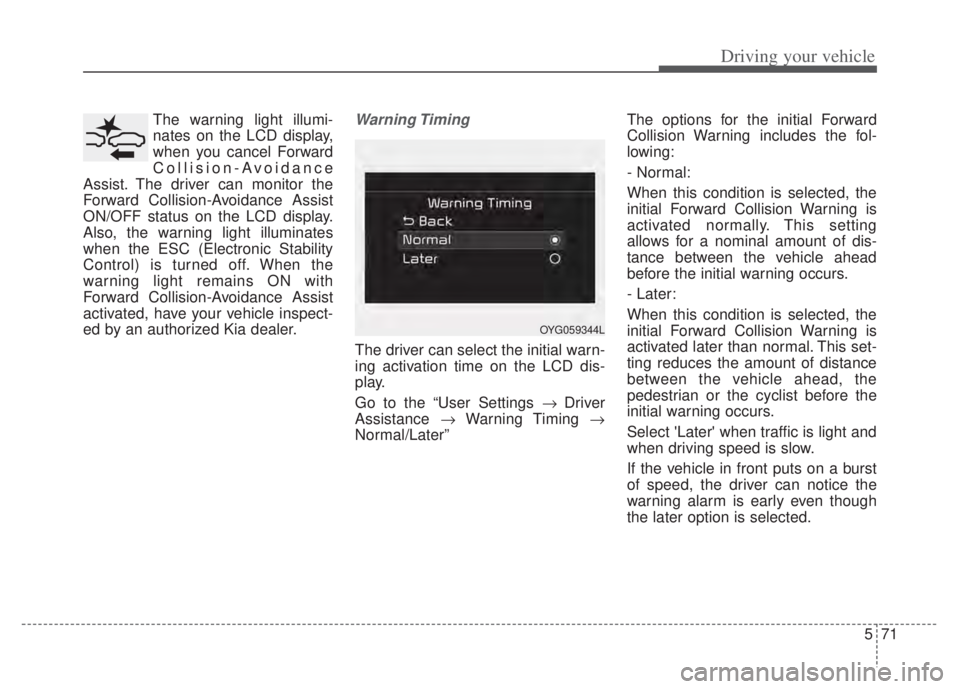
ed by an authorized Kia dealer.Warning Timing
The driver can select the initial warn-
ing activation time on the LCD dis-
play.
Go to the “User Settings Driver
Assistance Warning Timing
Normal/Later” The options for the initial Forward
Collision Warning includes the fol-
lowing:
- Normal:
When this condition is selected, the
initial Forward Collision Warning is
activated normally. This setting
allows for a nominal amount of dis-
tance between the vehicle ahead
before the initial warning occurs.
- Later:
When this condition is selected, the
initial Forward Collision Warning is
activated later than normal. This set-
ting reduces the amount of distance
between the vehicle ahead, the
pedestrian or the cyclist before the
initial warning occurs.
Select 'Later' when traffic is light and
when driving speed is slow.
If the vehicle in front puts on a burst
of speed, the driver can notice the
warning alarm is early even though
the later option is selected.
OYG059344L
Page 396 of 710

573
Driving your vehicle
Forward Collision-Avoidance
Assist warning message and
function control
Forward Collision-Avoidance Assist
produces warning messages and
warning alarms in accordance with
the collision risk levels of followings
like vehicle’s sudden braking in front
or lack of vehicle distance or collision
to pedestrian or cyclist. Also, it con-
trols the brakes in accordance with
the collision risk levels.The driver can select the initial warn-
ing activation time in the User set-
tings in the LCD display. The
options for the initial Forward
Collision Warning include Normal or
Late initial warning time.
Collision Warning (1st warning)
The warning message appears on the LCD display with the warning
alarms.
The Vehicle may slow down slightly - It will operate if the vehicle speedis greater than 5 mph (8 km/h)
and less than or equal to 110
mph (180 km/h) on a forward
vehicle. (Depending on the condi-
tion of the vehicle ahead and the
environment surrounding it, the
possible maximum operating
speed may be reduced.)
WARNING
Completely stop the vehicle in a safe location before operat-
ing the switch on the steering
wheel to activate/deactivate
Forward Collision-Avoidance
Assist.
Forward Collision-Avoidance Assist automatically activates
upon placing the ignition
switch to the ON position. The
driver can deactivate Forward
Collision-Avoidance Assist by
canceling the function setting
on the LCD display or
Infotainment System screen.
Forward Collision-Avoidance Assist automatically deacti-
vates upon canceling the ESC.
When the ESC is canceled,
Forward Collision-Avoidance
Assist cannot be activated on
the LCD display or Infotainment
System screen.
Forward Collision-Avoidance
Assist warning light will illu-
minate, which is normal.
OJF058389L
Page 399 of 710

Driving your vehicle
76
5
In bad weather conditions such as
heavy rain, heavy snow, and fog, or
when sensor is covered by foreign
material, dust, etc., the sensors will
be degraded and the function will be
temporarily disabled.
Always keep the sensor clean.✽ ✽
NOTICE
• Do not install any accessories,
such as license plate molding or
sticker, on the sensor area. Nor
arbitrarily replace the bumper.
Those may adversely affect the
sensing performance.
• Always keep the sensor/bumper area clean.
• Use only soft cloths to wash the vehicle. Also, do not spray highly-
pressurized water on the sensor
installed on the bumper.
• Be careful not to apply unneces- sary force on the frontal sensor
area. When the sensor moves out
of the correct position due to
external force, the function may
not normally operate even without
the warning light or message. In
this case, have your vehicle
inspected by an authorized Kia
dealer.
• Use only the genuine Kia sensor cover. Do not arbitrarily apply
paint on the sensor cover. (Continued)(Continued)
• Do not tint the window or install
stickers, accessories around the
inside mirror where the camera is
installed.
• Make sure the front view camera installation point does not get wet.
• Do not impact or arbitrarily remove any front radar compo-
nents.
• Do not place reflective objects(white paper or mirror etc.)
on the crash pad.
The function may activate unnec-
essarily due to reflect of the sun-
light.
• Excessive audio volume may dis- turb the sound of the function
warning alarm.
• For more cautions for the front view camera sensor, refer to the
“Lane Keeping Assist (LKA)” in
this chapter.