2022 KIA NIRO HYBRID EV cruise control
[x] Cancel search: cruise controlPage 454 of 684
5127
Driving your vehicle
Navigation-based Smart
Cruise Control operation
Operating conditions
Navigation-based Smart Cruise
Control is ready to operate if all of
the following conditions are satisfied:
Smart Cruise Control is operating
Driving on main roads of highways
(or motorways)
✽ ✽
NOTICE
For more details on how to operate
Smart Cruise Control, refer to
“Smart Cruise Control (SCC)” in
this chapter.
Display and control
When Navigation-based Smart
Cruise Control operates, it will be
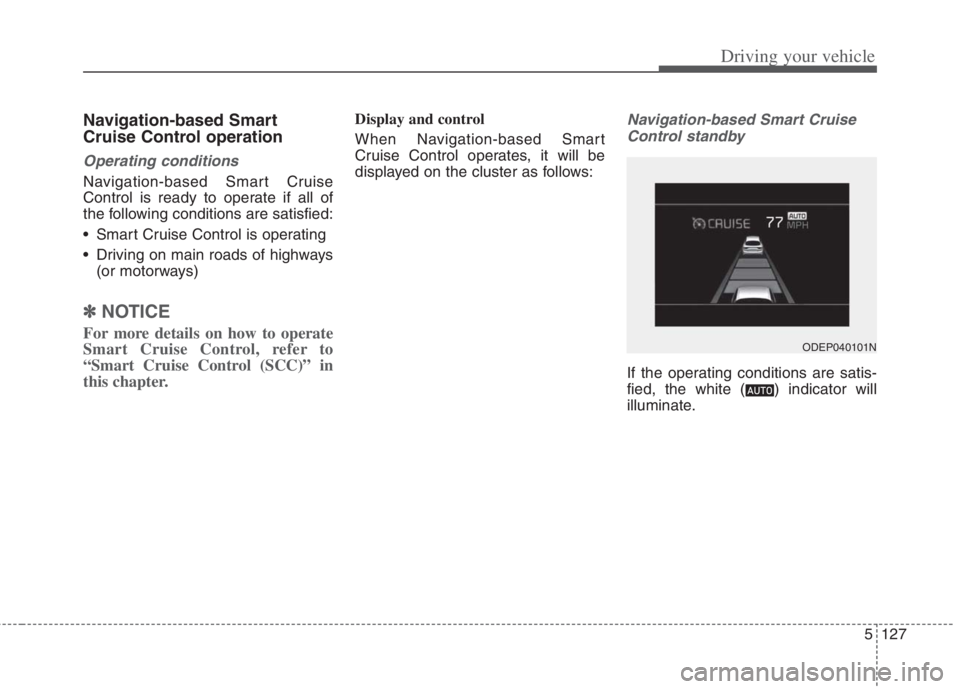
displayed on the cluster as follows:Navigation-based Smart Cruise
Control standby
If the operating conditions are satis-
fied, the white ( ) indicator will
illuminate.
ODEP040101N
Page 455 of 684
Driving your vehicle
128 5
Navigation-based Smart Cruise
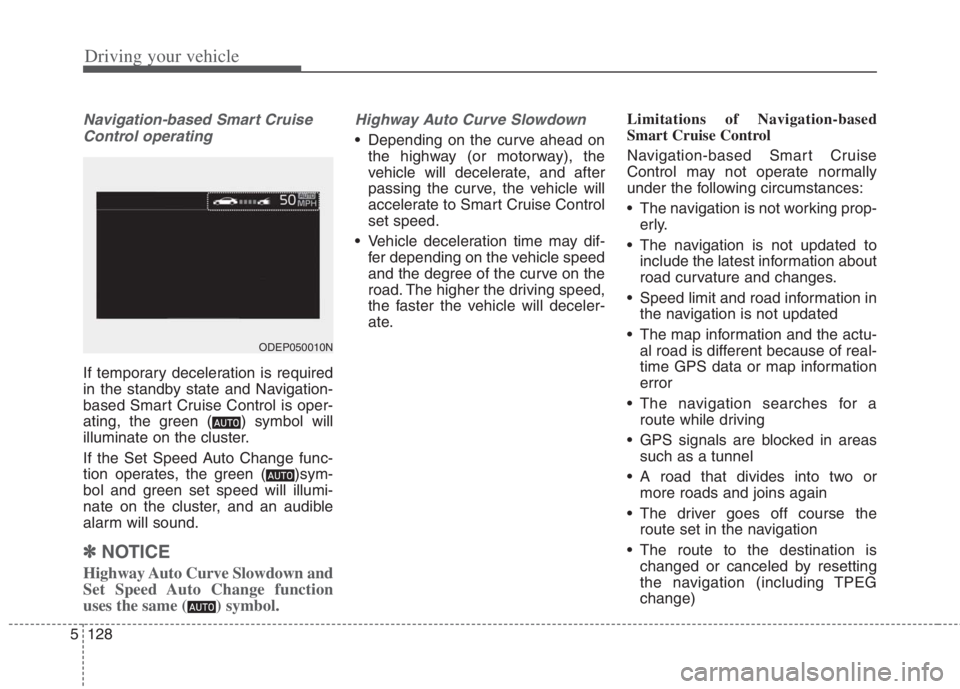
Control operating
If temporary deceleration is required
in the standby state and Navigation-
based Smart Cruise Control is oper-
ating, the green ( ) symbol will
illuminate on the cluster.
If the Set Speed Auto Change func-
tion operates, the green ( )sym-
bol and green set speed will illumi-
nate on the cluster, and an audible
alarm will sound.
✽ ✽
NOTICE
Highway Auto Curve Slowdown and
Set Speed Auto Change function
uses the same ( ) symbol.
Highway Auto Curve Slowdown
Depending on the curve ahead on
the highway (or motorway), the
vehicle will decelerate, and after
passing the curve, the vehicle will
accelerate to Smart Cruise Control
set speed.
Vehicle deceleration time may dif-
fer depending on the vehicle speed
and the degree of the curve on the
road. The higher the driving speed,
the faster the vehicle will deceler-
ate.Limitations of Navigation-based
Smart Cruise Control
Navigation-based Smart Cruise
Control may not operate normally
under the following circumstances:
The navigation is not working prop-
erly.
The navigation is not updated to
include the latest information about
road curvature and changes.
Speed limit and road information in
the navigation is not updated
The map information and the actu-
al road is different because of real-
time GPS data or map information
error
The navigation searches for a
route while driving
GPS signals are blocked in areas
such as a tunnel
A road that divides into two or
more roads and joins again
The driver goes off course the
route set in the navigation
The route to the destination is
changed or canceled by resetting
the navigation (including TPEG
change)
ODEP050010N
Page 457 of 684
Driving your vehicle
130 5
(Continued)
The navigation's speed limit
information may differ from
the actual speed limit informa-
tion on the road. It is the dri-
ver's responsibility to check
the speed limit on the actual
driving road or lane.
Highway Auto Curve
Slowdown will automatically
cancel when you leave the
main road of the highway.
Always pay attention to road
and driving conditions while
driving.
Navigation-based Smart Cruise
Control may not operate due to
the existence of leading vehi-
cles and the driving conditions
of the vehicle. Always pay
attention to road and driving
conditions while driving.
When you are towing a trailer
or another vehicle, we recom-
mend that Navigation-based
Smart Cruise Control is turned
off due to safety reasons.
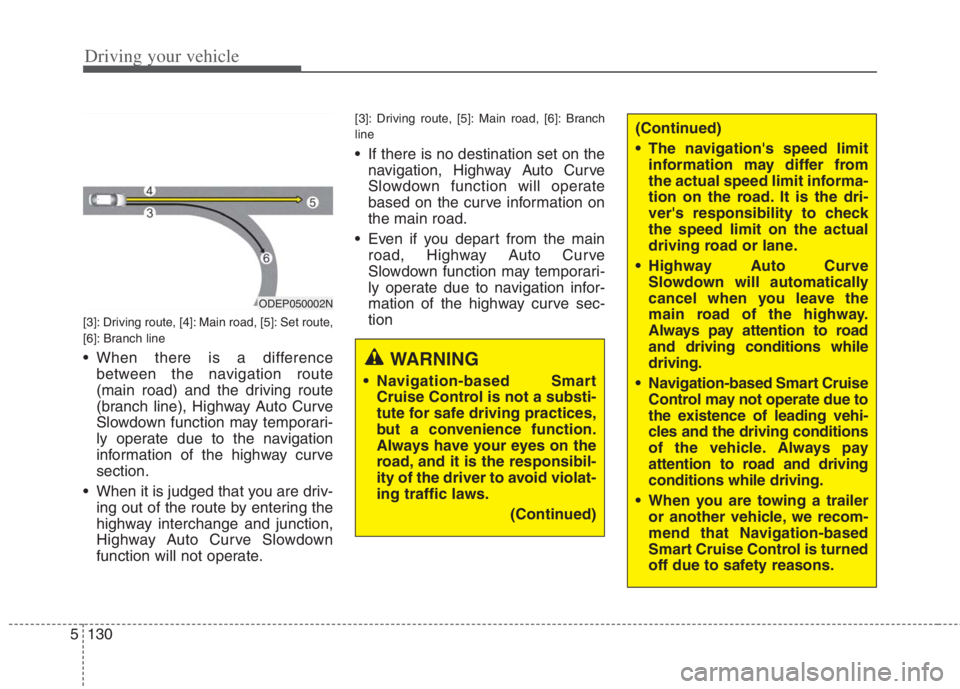
[3]: Driving route, [4]: Main road, [5]: Set route,
[6]: Branch line
When there is a difference
between the navigation route
(main road) and the driving route
(branch line), Highway Auto Curve
Slowdown function may temporari-
ly operate due to the navigation
information of the highway curve
section.
When it is judged that you are driv-
ing out of the route by entering the
highway interchange and junction,
Highway Auto Curve Slowdown
function will not operate.
[3]: Driving route, [5]: Main road, [6]: Branch
line
If there is no destination set on the
navigation, Highway Auto Curve
Slowdown function will operate
based on the curve information on
the main road.
Even if you depart from the main
road, Highway Auto Curve
Slowdown function may temporari-
ly operate due to navigation infor-
mation of the highway curve sec-
tion
ODEP050002N
WARNING
Navigation-based Smart
Cruise Control is not a substi-
tute for safe driving practices,
but a convenience function.
Always have your eyes on the
road, and it is the responsibil-
ity of the driver to avoid violat-
ing traffic laws.
(Continued)
Page 458 of 684
5131
Driving your vehicle
After you pass through a tollgateon a highway, Navigation-based
Smart Cruise Control operates
based on the first lane. If you enter
one of the other lanes, the function
might not properly decelerate.
The vehicle will accelerate if the driver depresses the accelerate
pedal while Navigation-based
Smart Cruise Control is operating,
and function will not decelerate the
vehicle. If not depressing the accel-
erator pedal sufficiently, the vehicle
speed may decrease.
If the driver accelerates and releases the accelerator pedal
while the Navigation-based Smart
Cruise Control is operating, the
vehicle may not decelerate suffi-
ciently or may rapidly decelerate to
a safe speed.
If the curve is too large or too small, Navigation-based Smart
Cruise Control may not operate.✽ ✽ NOTICE
• When the function is activated, the
vehicle decelerates automatically
before reaching the curved road
according to its curvature, and the
driving speed returns to the speed
set by Smart Cruise Control after
passing the curved section.
• The speed information on the clus- ter and navigation may differ
• The time gap could occur between the navigation's guidance and
when Navigation-based Smart
Cruise Control operation starts
and ends.
• Even if you are driving at a speed lower than Smart Cruise Control
set speed, acceleration may be lim-
ited by the speeding cameras and
curve sections ahead.
• If Navigation-based Smart Cruise Control is operating while leaving
the main road to enter an inter-
change, junction, rest area, etc.,
the function may operate for a cer-
tain period of time. (Continued)(Continued)
• Deceleration by Navigation-based
Smart Cruise Control may not be
sufficient due to road conditions
such as uneven road surfaces, nar-
row lanes, etc.
This device complies with
Industry Canada licence-exempt
RSS standard(s)
Operation is subject to the following
conditions:
1. This device may not cause inter-
ference, and
2. This device must accept any inter- ference, including interference that
may cause
3. Changes or modifications not expressly approved by the party
responsible for compliance could
void the user's authority to operate
the device.
Page 459 of 684
Driving your vehicle
132 5
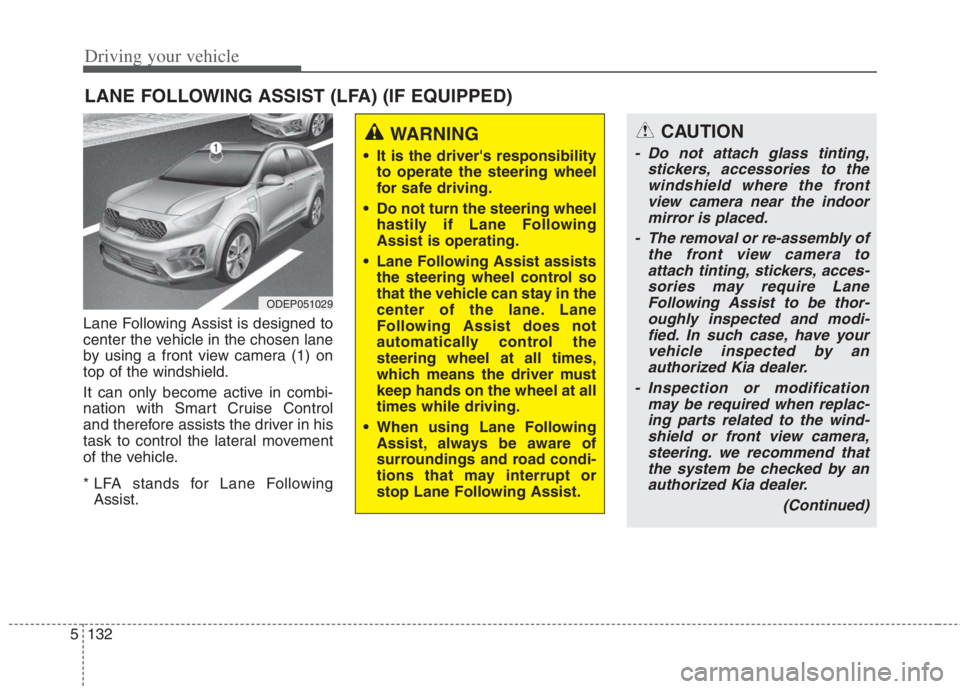
Lane Following Assist is designed to
center the vehicle in the chosen lane
by using a front view camera (1) on
top of the windshield.
It can only become active in combi-
nation with Smart Cruise Control
and therefore assists the driver in his
task to control the lateral movement
of the vehicle.
* LFA stands for Lane Following
Assist.
LANE FOLLOWING ASSIST (LFA) (IF EQUIPPED)
ODEP051029
WARNING
It is the driver's responsibility
to operate the steering wheel
for safe driving.
Do not turn the steering wheel
hastily if Lane Following
Assist is operating.
Lane Following Assist assists
the steering wheel control so
that the vehicle can stay in the
center of the lane. Lane
Following Assist does not
automatically control the
steering wheel at all times,
which means the driver must
keep hands on the wheel at all
times while driving.
When using Lane Following
Assist, always be aware of
surroundings and road condi-
tions that may interrupt or
stop Lane Following Assist.
CAUTION
- Do not attach glass tinting,
stickers, accessories to the
windshield where the front
view camera near the indoor
mirror is placed.
- The removal or re-assembly of
the front view camera to
attach tinting, stickers, acces-
sories may require Lane
Following Assist to be thor-
oughly inspected and modi-
fied. In such case, have your
vehicle inspected by an
authorized Kia dealer.
- Inspection or modification
may be required when replac-
ing parts related to the wind-
shield or front view camera,
steering. we recommend that
the system be checked by an
authorized Kia dealer.
(Continued)
Page 460 of 684
5133
Driving your vehicle
Lane Following Assist opera-
tion
To use Lane Following Assist two
steps are necessary:
(1) Lane Following Assist has to be
enabled, and
(2) Smart Cruise Control has to be
activated
Select or release the setting from
“User setting Driver Assistance
Driving Assist Lane Following
Assist”. Select Lane Following
Assist in the user setting of the
instrument panel.
Press the Lane Driving Assist but-
ton ( ) located on the steering
wheel to turn on Lane Following
Assist.
(Continued)
- Depending on your surround-
ings and road conditions,
Lane Following Assist could
fail to recognize the lane and
stop working. In turn, extra
caution is required while driv-
ing with Lane Following
Assist on.
- Be sure to check the non-
operating conditions and cau-
tions for the driver before
using Lane Following Assist.
- Do not place reflective materi-
als such as white paper or
mirror on the crash pad.
Sunlight reflections can cause
a malfunction in Lane
Following Assist.
- Too big sound from the sound
function can interrupt the
alarming sound from Lane
Following Assist.
(Continued)(Continued)
- Keeping your hands off the
wheel while driving will trigger
the hands-off warning and
deactivate the steering-assist
function. Put your hands back
on the wheel, then the steer-
ing-assist system will be re-
activated.
- When driving at a high speed,
the steering assist force can
become weak and the vehicle
can drive out of its lane. Extra
caution is required, and com-
ply with the speed limit.
- Attaching an object to the
steering wheel could deter
steering assistance.
- Attaching an object to the
steering wheel could deter the
hands-off alarming system.
Page 676 of 684
I3
Index
Vehicle Stability Management (VSM) . . . . . . . . . . . 5-51
Warning messages . . . . . . . . . . . . . . . . . . . . . . . . . . 5-43
Bulb wattage . . . . . . . . . . . . . . . . . . . . . . . . . . . . . . . . . . 8-3
Checking fluid levels . . . . . . . . . . . . . . . . . . . . . . . . . . 7-18
Child Restraint System (CRS) . . . . . . . . . . . . . . . . . . . 3-35
Children always in the rear . . . . . . . . . . . . . . . . . . . 3-35
Installing a Child Restraint System (CRS) . . . . . . . 3-39
Selecting a Child Restraint System (CRS) . . . . . . . 3-36
Climate control air filter . . . . . . . . . . . . . . . . . . . . . . . . 7-35
Filter inspection . . . . . . . . . . . . . . . . . . . . . . . . . . . . 7-35
Coolant . . . . . . . . . . . . . . . . . . . . . . . . . . . . . . . . . . . . . 7-22
Changing the coolant . . . . . . . . . . . . . . . . . . . . . . . . 7-26
Checking the coolant level . . . . . . . . . . . . . . . . . . . . 7-22
Engine coolant . . . . . . . . . . . . . . . . . . . . . . . . . . . . . 7-23
Inverter coolant . . . . . . . . . . . . . . . . . . . . . . . . . . . . 7-23
Recommended coolant . . . . . . . . . . . . . . . . . . . . . . . 7-24
Cruise Control (CC) . . . . . . . . . . . . . . . . . . . . . . . . . . . 5-98
Driving Assist button . . . . . . . . . . . . . . . . . . . . . . . . 5-99
To cancel Cruise Control, do one of the following 5-101
To decrease Cruise Control set speed . . . . . . . . . . 5-100
To increase Cruise Control set speed . . . . . . . . . . . 5-100
To resume cruising speed at more than approximately
30 km/h (20 mph). . . . . . . . . . . . . . . . . . . . . . . . . 5-102
To set Cruise Control speed . . . . . . . . . . . . . . . . . . . 5-99
To temporarily accelerate with Cruise Control on. . 5-101To turn Cruise Control off, do one of the following . 5-102
Declaration of Conformity . . . . . . . . . . . . . . . . . . . . . 5-148
IC . . . . . . . . . . . . . . . . . . . . . . . . . . . . . . . . . . . . . . 4-189
The radio frequency components (Front Radar)
complies . . . . . . . . . . . . . . . . . . . . . . . . . . . . . . . . 5-148
The radio frequency components (Rear Corner Radar)
complies . . . . . . . . . . . . . . . . . . . . . . . . . . . . . . . . 5-153
Defroster . . . . . . . . . . . . . . . . . . . . . . . . . . . . . . . . . . . 4-147
Rear window defroster . . . . . . . . . . . . . . . . . . . . . . 4-147
Dimensions . . . . . . . . . . . . . . . . . . . . . . . . . . . . . . . . . . . 8-2
Door locks . . . . . . . . . . . . . . . . . . . . . . . . . . . . . . . . . . 4-22
Child-protector rear door lock . . . . . . . . . . . . . . . . . 4-26
Operating door locks from inside the vehicle . . . . . 4-23
Operating door locks from outside the vehicle . . . . 4-22
Rear Occupant Alert (ROA) system. . . . . . . . . . . . . 4-26
Driver Attention Warning (DAW). . . . . . . . . . . . . . . . . 5-91
Basic function. . . . . . . . . . . . . . . . . . . . . . . . . . . . . . 5-91
Leading Vehicle Departure Alert . . . . . . . . . . . . . . . 5-96
Leading Vehicle Departure Alert function . . . . . . . 5-91
Dual Clutch Transmission (DCT). . . . . . . . . . . . . . . . . 5-16
Dual clutch transmission operation . . . . . . . . . . . . . 5-16
Good driving practices . . . . . . . . . . . . . . . . . . . . . . . 5-26
C
D
Page 681 of 684
Index
8I
Maintenance services . . . . . . . . . . . . . . . . . . . . . . . . . . . 7-5
Owner maintenance precautions . . . . . . . . . . . . . . . . 7-6
Owner’s responsibility . . . . . . . . . . . . . . . . . . . . . . . . 7-5
Mirrors . . . . . . . . . . . . . . . . . . . . . . . . . . . . . . . . . . . . . 4-53
Inside rearview mirror . . . . . . . . . . . . . . . . . . . . . . . 4-53
Outside rearview mirror . . . . . . . . . . . . . . . . . . . . . . 4-64
Navigation-based Smart Cruise Control (NSCC). . . . 5-125
Highway Auto Curve Slowdown . . . . . . . . . . . . . . 5-126
Navigation-based Smart Cruise Control operation 5-127
Navigation-based Smart Cruise Control settings . . 5-126
Owner maintenance . . . . . . . . . . . . . . . . . . . . . . . . . . . . 7-7
Owner maintenance schedule . . . . . . . . . . . . . . . . . . 7-7
Parking brake . . . . . . . . . . . . . . . . . . . . . . . . . . . . . . . . 7-32
Checking the parking brake . . . . . . . . . . . . . . . . . . . 7-32Rear Cross-Traffic Collision Warning (RCCW). . . . . 5-139
Rear Cross-Traffic Collision Warning setting and
activation . . . . . . . . . . . . . . . . . . . . . . . . . . . . . . . 5-139
Warning message and function control . . . . . . . . . 5-141
Rear View Monitor (RVM) . . . . . . . . . . . . . . . . . . . . . 4-122
Recommended lubricants and capacities . . . . . . . . . . . . 8-8
Recommended SAE viscosity number. . . . . . . . . . . . 8-9
Regenerative braking system . . . . . . . . . . . . . . . . . . . . 5-28
Regenerative Braking (Paddle Shifter) . . . . . . . . . . 5-28
Reporting Safety Defects . . . . . . . . . . . . . . . . . . . . . . . 8-13
Reverse Parking Distance Warning (PDW) . . . . . . . . 4-123
Reverse Parking Distance Warning not operation . 4-124
Reverse Parking Distance Warning operation . . . . 4-123
Reverse Parking Distance Warning precautions . . 4-125
Self-diagnosis . . . . . . . . . . . . . . . . . . . . . . . . . . . . . 4-125
Road warning . . . . . . . . . . . . . . . . . . . . . . . . . . . . . . . . . 6-2
Hazard warning flasher . . . . . . . . . . . . . . . . . . . . . . . 6-2
Scheduled maintenance service . . . . . . . . . . . . . . . . . . . 7-9
Seat . . . . . . . . . . . . . . . . . . . . . . . . . . . . . . . . . . . . . . . . . 3-4
Driver position memory system (for power seat) . . 3-10
Front seat adjustment - manual . . . . . . . . . . . . . . . . . 3-7
Front seat adjustment - power (for driver’s seat) . . . . 3-8
Headrest (for front seat) . . . . . . . . . . . . . . . . . . . . . . 3-12
N
O
S
RM
P