Page 205 of 380
7-23
Community
POI name
Police Stations
Post Offices
Libraries
Schools
Fire Departments
Convention Centers
Churches
Synagogues
City Halls
Civic Centers
Court Houses
Government Offices
Waste & Sanitary
Utilities
Business FacilitiesKia
Services
POI name
Hospitals
Medical Services
Physicians
Tax Services
Attorneys
Funeral Homes
Hair & Beauty
Cleaning & Laundry
Social Services
Communication
Dentists
Photography
Tailors & Alterations
Movers
Nursing Homes
Optical
Personal Services
Repair Services
Veterinary Hospitals
Shipping Centers
A
Available POI names may change when
the system is updated.
Page 206 of 380

7-24
Available voice commands (Type2)
You can view the voice commands that can be recognized by the system.
A
Depending on vehicle model or specifications, the screen layout and available commands
may differ. Check the screen type for your vehicle model and view the appropriate
instructions.
Call commands
Command Function
Call You can make a call to one of your mobile phone's contacts. Say
a contact's name to begin a call.
Call The system dials the phone number of that contact. If the
contact has multiple phone numbers, select a phone number.
Call on Mobile The system dials the phone number saved as "Mobile" for that
contact.
Call at Work The system dials the phone number saved as "Work" for that
contact.
Call at Home The system dials the phone number saved as "Home" for that
contact.
Call on Other The system dials a phone number saved as other than "Mobile",
"Work", or "Home" for that contact.
Dial Number You can make a call. Say a phone number to begin a call.
Dial You can make a call immediately to that phone number.
Send Message You can send a text message to one of your mobile phone's
contacts. Say a contact's name and then enter the message
content by following the guidance.
This command is available only if Kia Connect is activated.
Send Message to
You can send a text message to that specific contact. Enter the
message content by following the guidance.
This command is available only if Kia Connect is activated.
Send Message to
You can send a text message to that contact more directly.
This command is available only if Kia Connect is activated.
Change Bluetooth
Device You can search for and connect another Bluetooth device.
A
To use call commands, your mobile phone must be connected to the system via Bluetooth
and your contacts must be downloaded.
> See "Connecting a Bluetooth device."
A
Some functions may not be available, depending on the connected mobile p\
hone.
Page 208 of 380

7-26
A
When you use a command starting with "Find," the system searches for locations within
the state or province where your vehicle is currently located. To search for locations in
another state or province, say the state or province name first and then say the location
you want.
A
Some commands, such as "Cancel Route" or "Show Route," are available only when a
destination is set.
Radio commands
Command Function
FM <87.5 to 107.9> Turn on the FM radio with that frequency.
AM <530 to 1710> Turn on the AM radio with that frequency.
SiriusXM <0 to 999> Turn on the SiriusXM radio with that channel number.
Tune to SiriusXM
<0 to 999> Tune on the SiriusXM radio with that channel number.
Tune to
Turn on the SiriusXM radio with that channel name.
A
Some commands are recognizable in English only.
A
Some commands may not be supported, depending on the vehicle model and f\
unctions.
Vehicle control commands (if equipped)
Command Function
Climate On/Off Turn on or off the climate control.
Air Conditioner
On/Off Can turn on or off the air conditioner.
Heat On/Off Can turn on or off the heater.
Fan High/Low Used to set the fan level.
Set Fan to windshield/
Face/Feet Used to set the air direction.
Warmer/Cooler Set the climate control temperature.
Open/Close all windows Open or close all windows.
Open/Close the
windows Open or close the driver-side window.
Open/Close the
passenger's window Open or close the passenger-side window.
Page 209 of 380

7-27
CommandFunction
Open/Close the rear
windows Open or close all rear-seat windows.
Open/Close the sunroof Open or close the sunroof.
Open/Close the
trunk (liftgate) Open or close the trunk (liftgate).
Turn On/Off the heated
steering wheel Turn on or off the steering wheel heater.
Turn On/Off all seat
warmers Turn on or off the heaters for all seats.
Turn On/Off seat
warmer Turn on or off the driver's seat heater.
Seat warmer
level 1 to 3 Set the driver's seat heater level in the range of 1 to 3.
Turn On/Off the
passenger seat warmer Turn on or off the passenger seat heater.
Passenger's Seat
Warmer Level 1 to 3 Set the passenger seat heater level in the range of 1 to 3.
Turn On/Off the rear
seat warmer Turn on or off the rear-seat heaters.
Turn On/Off all air
ventilation seats Turn on or off the ventilation for all seats.
Turn On/Off air
ventilation seats Turn on or off the driver's seat ventilation.
Air ventilation seat level
1 to 3 Set the driver's seat ventilation level in the range of 1 to 3.
Turn On/Off the
passenger air ventilation
seats Turn on or off the passenger seat ventilation.
Passenger's Air
Ventilation Seat Level
1 to 3 Set the passenger seat ventilation level in the rage of 1 to 3.
Turn On/Off the rear air
ventilation seat Turn on or off the rear-seat ventilation.
Page 216 of 380
7-34
POI name
Rest AreasComplete Rest Area
Parking and Rest Room Only
Parking Only
Motorway Service Area
Scenic Overlook
City Centers
Campgrounds
Ferry Terminals
Bus Stations
Local Transit
Railway Station
Commuter Rail Station
Shopping
POI name
Department Stores Canadian Tire
Dollar General
Dollar Tree
Family Dollar
JCPenney
Kmart
Kohl's
Nordstrom
Sears
Sears Hometown Store
Target
T.J. Maxx
Walmart
Big Lots
Macy's
Marshalls
Ross Dress For Less
POI name
Convenience Stores7-Eleven
ampm
BP
Circle K
Fleetfuels
GetGo
Kangaroo Express
Murphy Express
Murphy USA
Petro Stopping Centers
QuikTrip
Rutter's
TravelCenters of America
Wawa
Cumberland Farms
Hess Express
Mac's
Mini Mart
Quick Stop
Valero Corner Store
Shopping Centers
Grocery Stores Giant Eagle
Giant Food Stores
IGA
Ingles Markets
Food Lion
Kmart
Kroger
Martin's Food Markets
Meijer
Publix
Sav-Mor Foods
Page 217 of 380
7-35
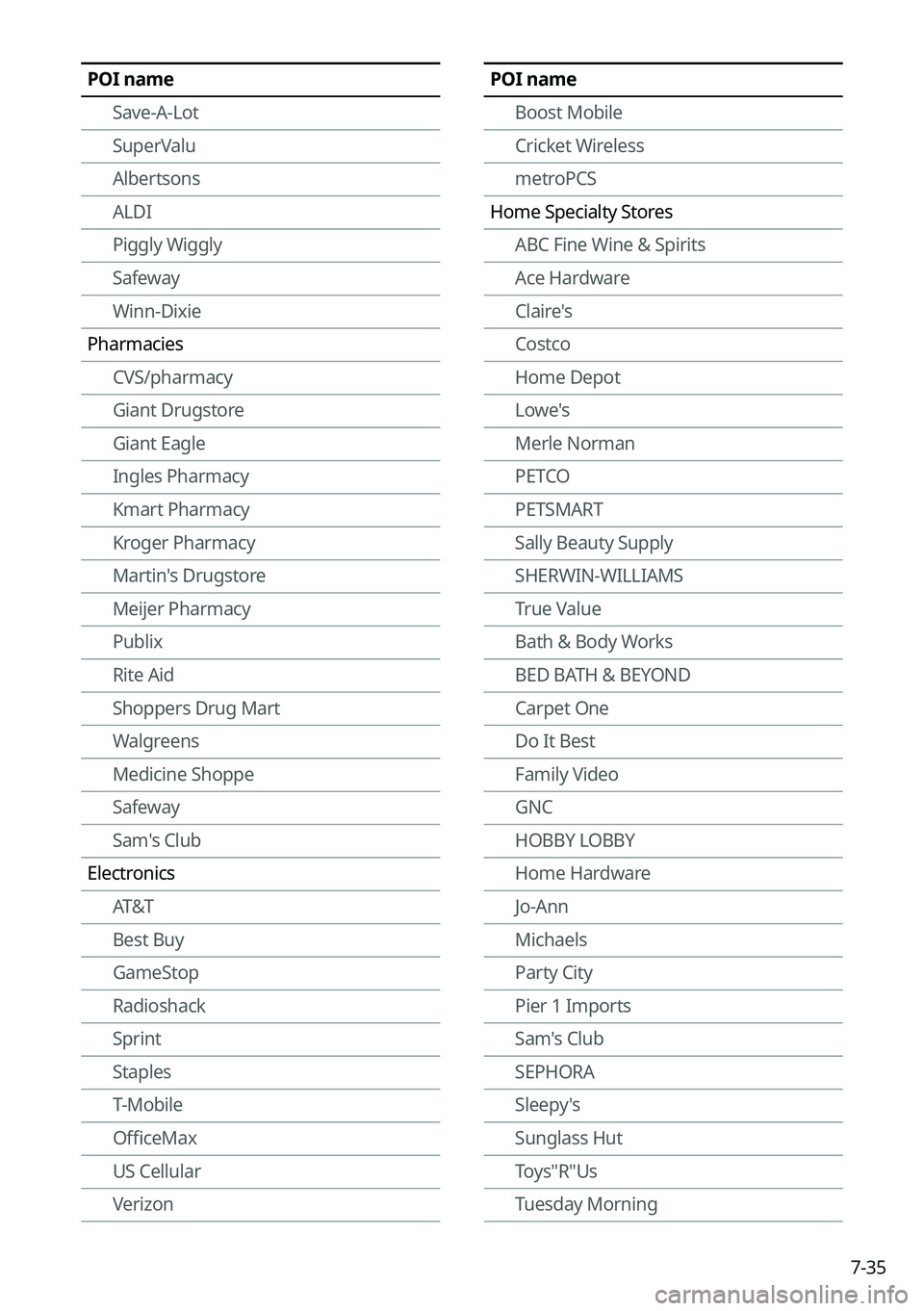
POI nameSave-A-Lot
SuperValu
Albertsons
ALDI
Piggly Wiggly
Safeway
Winn-Dixie
Pharmacies CVS/pharmacy
Giant Drugstore
Giant Eagle
Ingles Pharmacy
Kmart Pharmacy
Kroger Pharmacy
Martin's Drugstore
Meijer Pharmacy
Publix
Rite Aid
Shoppers Drug Mart
Walgreens
Medicine Shoppe
Safeway
Sam's Club
Electronics AT&T
Best Buy
GameStop
Radioshack
Sprint
Staples
T-Mobile
OfficeMax
US Cellular
VerizonPOI name
Boost Mobile
Cricket Wireless
metroPCS
Home Specialty Stores ABC Fine Wine & Spirits
Ace Hardware
Claire's
Costco
Home Depot
Lowe's
Merle Norman
PETCO
PETSMART
Sally Beauty Supply
SHERWIN-WILLIAMS
True Value
Bath & Body Works
BED BATH & BEYOND
Carpet One
Do It Best
Family Video
GNC
HOBBY LOBBY
Home Hardware
Jo-Ann
Michaels
Party City
Pier 1 Imports
Sam's Club
SEPHORA
Sleepy's
Sunglass Hut
Toys"R"Us
Tuesday Morning
Page 220 of 380
7-38
Community
POI name
Police Stations
Post Offices
Libraries
Schools
Fire Departments
Convention Centers
Churches
Synagogues
City Halls
Civic Centers
Court Houses
Government Offices
Waste & Sanitary
Utilities
Business FacilitiesKia
Services
POI name
Hospitals
Medical Services
Physicians
Tax Services
Attorneys
Funeral Homes
Hair & Beauty
Cleaning & Laundry
Social Services
Communication
Dentists
Photography
Tailors & Alterations
Movers
Nursing Homes
Optical
Personal Services
Repair Services
Veterinary Hospitals
Shipping Centers
A
Available POI names may change when
the system is updated.
Page 221 of 380
7-39
Using the Siri Eyes Free
When you connect an Apple device that is compatible with Siri to your system via Bluetooth,
you can use the Siri Eyes Free. This allows you to perform the functions on your system and
Apple device with voice commands so that you can devote your attention to driving.
First, make sure that your Apple device supports Siri and that you have activated Siri.
1 Connect your Apple device to your system via Bluetooth.
2 On the steering wheel, press and hold the Voice Recognition button.
3 On the Siri screen, press Speak.
4 Say a command.
A
You can perform the functions related to Bluetooth calls on the system and other
functions on your Apple device.
A
Press the Voice Recognition button to restart Siri.
5 To end Siri, press and hold the Voice Recognition button on the steering
wheel.
A
Apple devices may have different functions enabled and may vary in the way how they
respond to Siri commands, depending on the device type and iOS version.