2022 HYUNDAI TUCSON API
[x] Cancel search: APIPage 340 of 638
06
6-55
OLMB053017
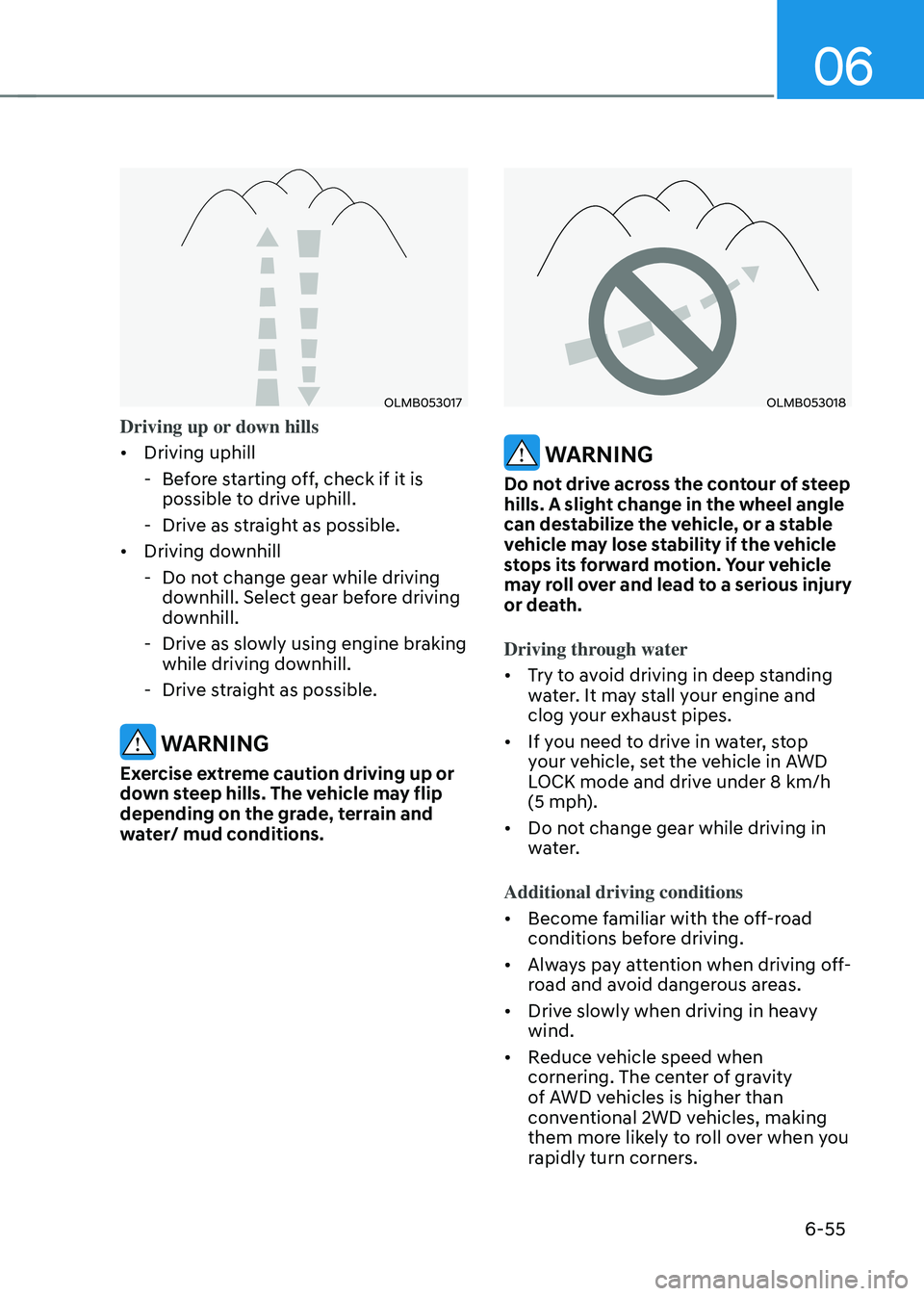
Driving up or down hills
• Driving uphill
-Before starting off, check if it is
possible to drive uphill.
-Drive as straight as possible.
• Driving downhill
-Do not change gear while driving
downhill. Select gear before driving
downhill.
-Drive as slowly using engine braking
while driving downhill.
-Drive straight as possible.
WARNING
Exercise extreme caution driving up or
down steep hills. The vehicle may flip
depending on the grade, terrain and
water/ mud conditions.
OLMB053018
WARNING
Do not drive across the contour of steep
hills. A slight change in the wheel angle
can destabilize the vehicle, or a stable
vehicle may lose stability if the vehicle
stops its forward motion. Your vehicle
may roll over and lead to a serious injury
or death.
Driving through water
• Try to avoid driving in deep standing
water. It may stall your engine and
clog your exhaust pipes.
• If you need to drive in water, stop
your vehicle, set the vehicle in AWD
LOCK mode and drive under 8 km/h
(5 mph).
• Do not change gear while driving in
water.
Additional driving conditions
• Become familiar with the off-road
conditions before driving.
• Always pay attention when driving off-
road and avoid dangerous areas.
• Drive slowly when driving in heavy
wind.
• Reduce vehicle speed when
cornering. The center of gravity
of AWD vehicles is higher than
conventional 2WD vehicles, making
them more likely to roll over when you
rapidly turn corners.
Page 346 of 638
06
6-61
WINTER DRIVING
The severe weather conditions of winter
quickly wear out tires and cause other
problems. To minimize winter driving
problems, you should take the following
suggestions:
Snow or icy conditions
You need to keep sufficient distance
between your vehicle and the vehicle in
front of you.
Apply the brakes gently. Speeding, rapid
acceleration, sudden brake applications,
and sharp turns are potentially
very hazardous practices. During
deceleration, use engine braking to the
fullest extent. Sudden brake applications
on snowy or icy roads may cause the
vehicle to skid.
To drive your vehicle in deep snow, it
may be necessary to use snow tires or to
install tire chains on your tires.
Always carry emergency equipment.
Some of the items you may want to carry
include tire chains, tow straps or chains,
a flashlight, emergency flares, sand, a
shovel, jumper cables, a window scraper,
gloves, ground cloth, coveralls, a blanket,
etc.
Snow tires
WARNING
Snow tires should be equivalent in size
and type to the vehicle’s standard tires.
Otherwise, the safety and handling of
your vehicle may be adversely affected.
We recommend that you use snow tires
when road temperature is below 45°F
(7°C). Refer to the below chart, and
mount the recommended snow tire for
your vehicle.
If you mount snow tires on your vehicle,
make sure to use the same Inflation
pressure as the original tires. Mount
snow tires on all four wheels to balance
your vehicle’s handling in all weather
conditions. The traction provided by
snow tires on dry roads may not be as
high as your vehicle’s original equipment
tires. Check with the tire dealer for
maximum speed recommendations.
Page 375 of 638
Driver assistance system
7-12
This may result in unnecessary
warning or braking assist, or no
warning or braking assist when
necessary.
Also, vehicle speed may rapidly
decrease when a vehicle, pedestrian
or cyclist ahead is suddenly
detected.
Always have your eyes on the road
while driving uphill or downhill and
if necessary, steer the vehicle and
depress the brake pedal to reduce
your driving speed in order to
maintain a safe distance.•
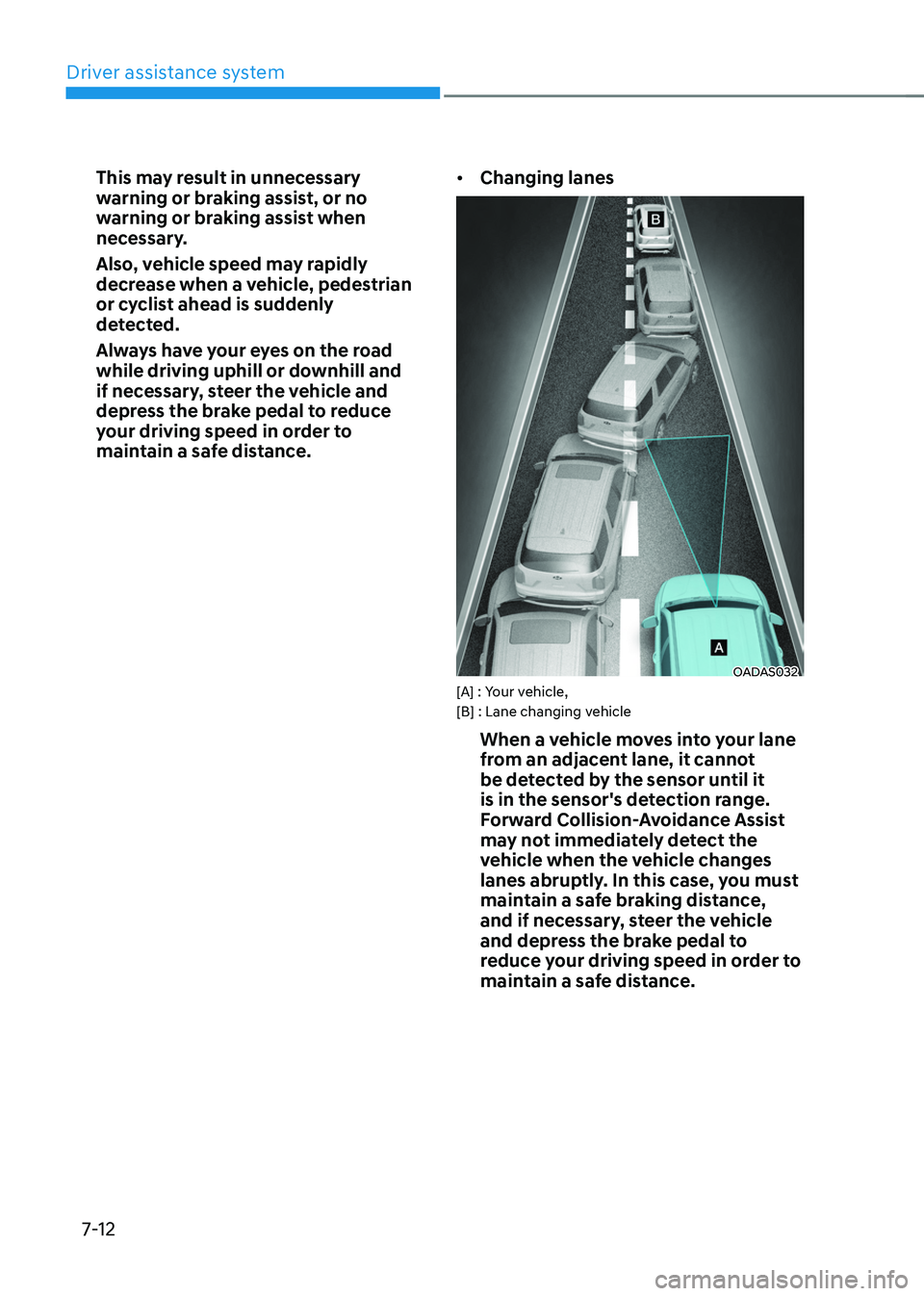
Changing lanes
OADAS032[A] : Your vehicle,
[B] : Lane changing vehicle
When a vehicle moves into your lane
from an adjacent lane, it cannot
be detected by the sensor until it
is in the sensor's detection range.
Forward Collision-Avoidance Assist
may not immediately detect the
vehicle when the vehicle changes
lanes abruptly. In this case, you must
maintain a safe braking distance,
and if necessary, steer the vehicle
and depress the brake pedal to
reduce your driving speed in order to
maintain a safe distance.
Page 391 of 638

Driver assistance system
7-28
• Driving on a slope
OADAS012
OADAS010OADAS011
Forward Collision-Avoidance Assist
may not detect other vehicles,
pedestrians or cyclists in front of
you while driving uphill or downhill
adversely affecting the performance
of the sensors.
This may result in unnecessary
warning or braking assist, or no
warning or braking assist when
necessary.
Also, vehicle speed may rapidly
decrease when a vehicle, pedestrian
or cyclist ahead is suddenly
detected.
Always have your eyes on the road
while driving uphill or downhill and
if necessary, steer your vehicle and
depress the brake pedal to reduce
your driving speed in order to
maintain a safe distance. •
Changing lanes
OADAS030[A] : Your vehicle,
[B] : Lane changing vehicle
When a vehicle moves into your lane
from an adjacent lane, it cannot
be detected by the sensor until it
is in the sensor's detection range.
Forward Collision-Avoidance Assist
may not immediately detect the
vehicle when the vehicle changes
lanes abruptly. In this case, you must
maintain a safe braking distance,
and if necessary, steer your vehicle
and depress the brake pedal to
reduce your driving speed in order to
maintain a safe distance.
Page 453 of 638
Driver assistance system
7-90
• The vehicle in front is bent out of
shape
•
The front vehicle’s speed is fast or slow
• With a vehicle in front, your vehicle
changes lane at low speed
• The vehicle in front is covered with
snow
• Unstable driving
• You are on a roundabout and the
vehicle in front is not detected
• You are continuously driving in a circle
• Driving in a parking lot
• Driving through a construction area,
unpaved road, partial paved road,
uneven road, speed bumps, etc.
• Driving on an incline road, curved
road, etc.
• Driving through a roadside with trees
or streetlights
• The adverse road conditions cause
excessive vehicle vibrations while
driving
• Your vehicle height is low or high
due to heavy loads, abnormal tire
pressure, etc.
• Driving through a narrow road where
trees or grass are overgrown
• There is interference by
electromagnetic waves, such as
driving in an area with strong radio
waves or electrical noise •
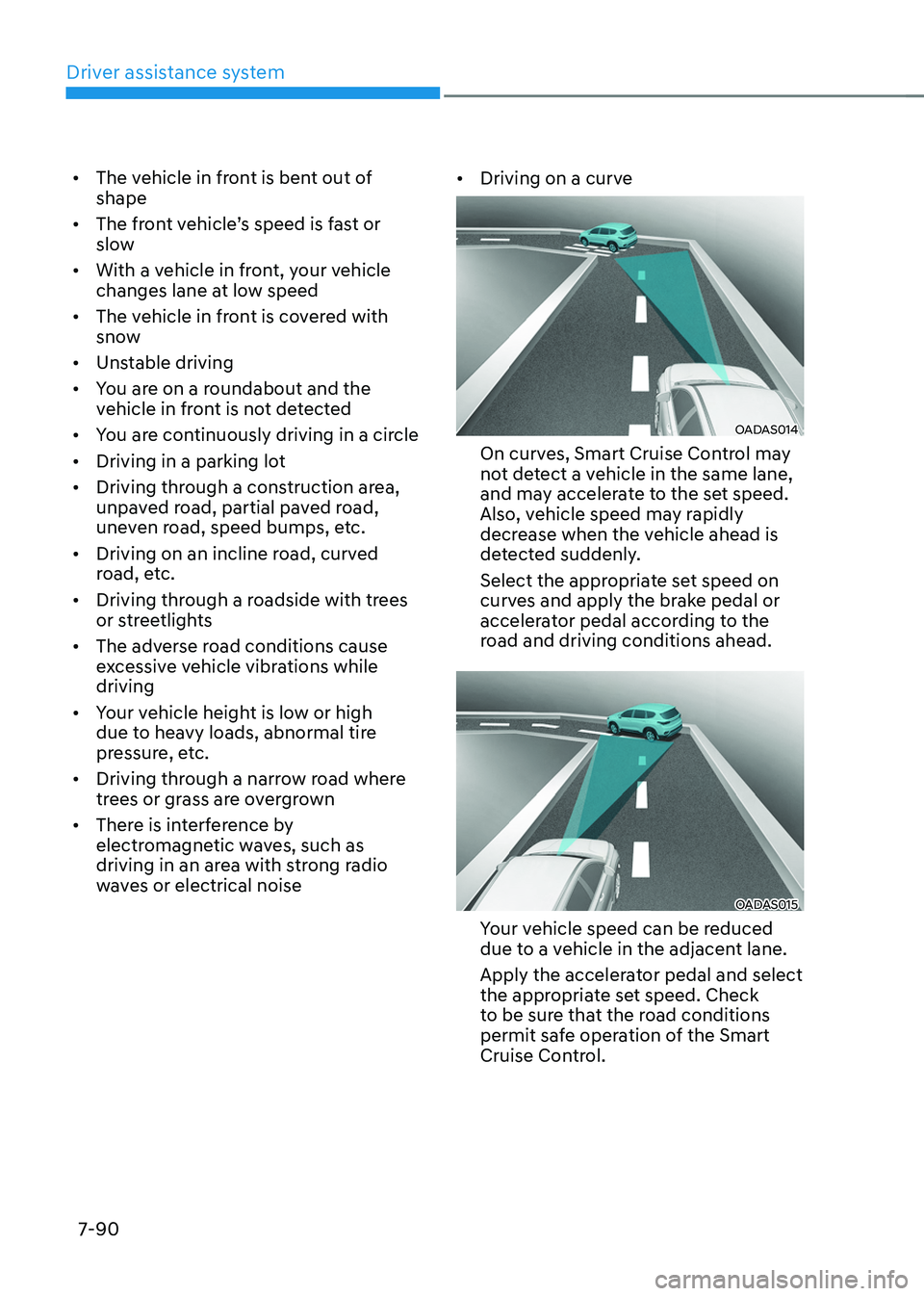
Driving on a curve
OADAS014
On curves, Smart Cruise Control may
not detect a vehicle in the same lane,
and may accelerate to the set speed.
Also, vehicle speed may rapidly
decrease when the vehicle ahead is
detected suddenly.
Select the appropriate set speed on
curves and apply the brake pedal or
accelerator pedal according to the
road and driving conditions ahead.
OADAS015
Your vehicle speed can be reduced
due to a vehicle in the adjacent lane.
Apply the accelerator pedal and select
the appropriate set speed. Check
to be sure that the road conditions
permit safe operation of the Smart
Cruise Control.
Page 454 of 638
07
7-91
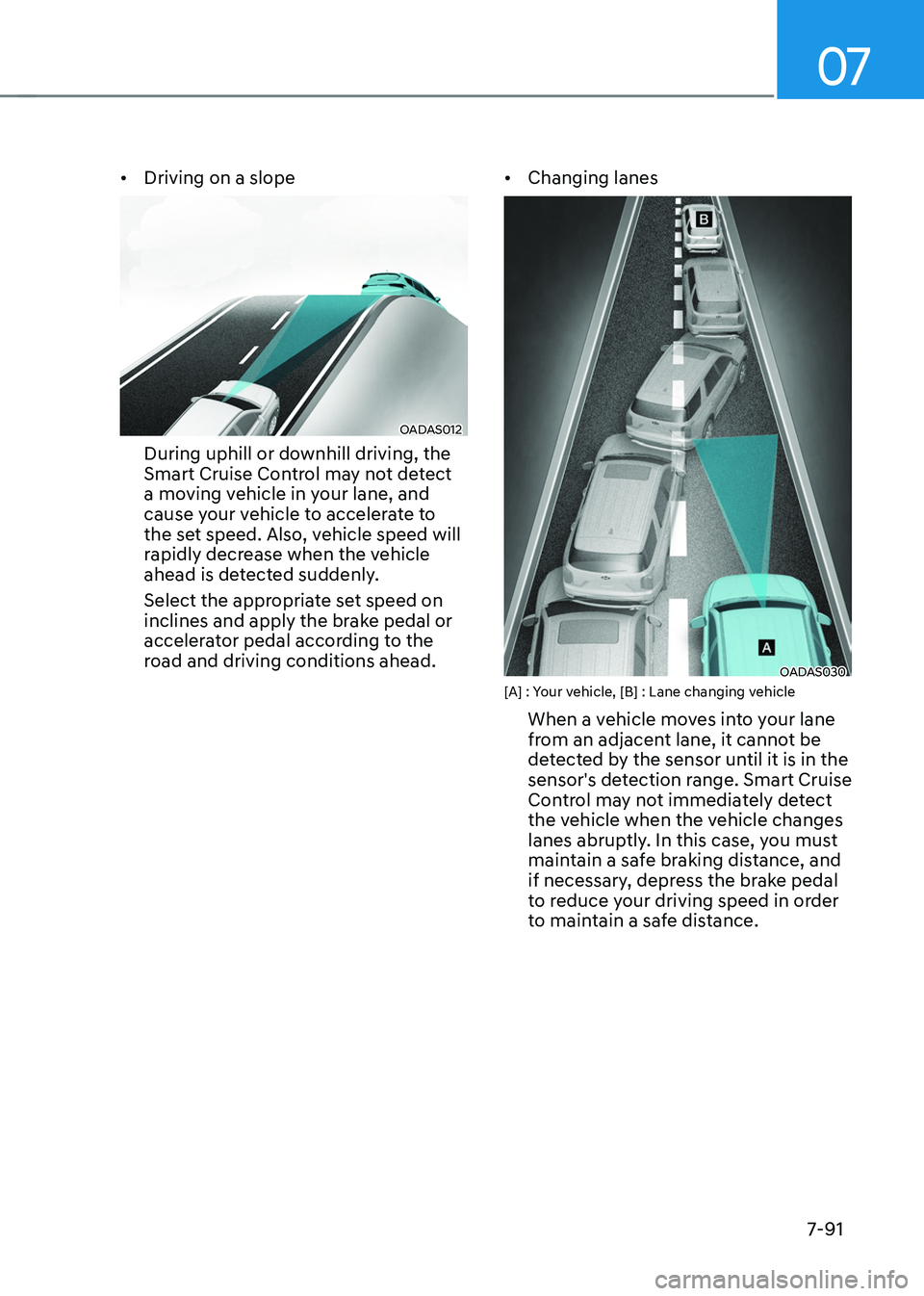
• Driving on a slope
OADAS012
During uphill or downhill driving, the
Smart Cruise Control may not detect
a moving vehicle in your lane, and
cause your vehicle to accelerate to
the set speed. Also, vehicle speed will
rapidly decrease when the vehicle
ahead is detected suddenly.
Select the appropriate set speed on
inclines and apply the brake pedal or
accelerator pedal according to the
road and driving conditions ahead. •
Changing lanes
OADAS030 [A] : Your vehicle, [B] : Lane changing vehicle
When a vehicle moves into your lane
from an adjacent lane, it cannot be
detected by the sensor until it is in the
sensor's detection range. Smart Cruise
Control may not immediately detect
the vehicle when the vehicle changes
lanes abruptly. In this case, you must
maintain a safe braking distance, and
if necessary, depress the brake pedal
to reduce your driving speed in order
to maintain a safe distance.
Page 461 of 638
![HYUNDAI TUCSON 2022 Owners Manual Driver assistance system
7-98
OJX1070280L[1] : Set route, [2] : Branch line, [3] : Driving route,
[4] : Main road, [5] : Curved road section
• When there is a difference between
the navigation set](/manual-img/35/41173/w960_41173-460.png "HYUNDAI TUCSON 2022 Owners Manual Driver assistance system
7-98
OJX1070280L[1] : Set route, [2] : Branch line, [3] : Driving route,
[4] : Main road, [5] : Curved road section
• When there is a difference between
the navigation set")
Driver assistance system
7-98
OJX1070280L[1] : Set route, [2] : Branch line, [3] : Driving route,
[4] : Main road, [5] : Curved road section
• When there is a difference between
the navigation set route (branch line)
and the driving route (main road),
Highway Curve Zone Auto Slowdown
function may not operate until the
driving route is recognized as the
main road.
• When the vehicle's driving route
is recognized as the main road by
maintaining the main road instead
of the navigation set route, Highway
Curve Zone Auto Slowdown function
will operate. Depending on the
distance to the curve and the current
vehicle speed, vehicle deceleration
may not be sufficient or may
decelerate rapidly.
OJX1070281L[1] : Set route, [2] : Branch line, [3] : Driving route,
[4] : Main road, [5] : Curved road section
• When there is a difference between
the navigation route (main road)
and the driving route (branch line),
Highway Curve Zone Auto Slowdown
function will operate based on the
curve information on the main road.
• When it is judged that you are driving
out of the route by entering the
highway interchange or junction,
Highway Curve Zone Auto Slowdown
function will not operate.
Page 463 of 638
Driver assistance system
7-100
• After you pass through a tollgate on a
highway (or motorway), Navigation-
based Smart Cruise Control will
operate based on the first lane. If
you enter one of the other lanes,
Navigation-based Smart Cruise
Control may not operate properly.
• The vehicle will accelerate if the
driver depresses the accelerator
pedal while Navigation-based Smart
Cruise Control is operating, and
the function will not decelerate the
vehicle. However, if the accelerator
pedal is depressed insufficiently, the
vehicle may decelerate.
• If the driver accelerates and
releases the accelerator pedal while
Navigation-based Smart Cruise
Control is operating, the vehicle may
not decelerate sufficiently or may
rapidly decelerate to a safe speed.
• If the curve is too large or too small,
Navigation-based Smart Cruise
Control may not operate.
Information
• The time gap could occur between
the navigation’s guidance and when
Navigation-based Smart Cruise Control
operation starts and ends.
• The speed information on the cluster
and navigation may differ.
• Even if you are driving at a speed lower
than Smart Cruise Control set speed,
acceleration may be limited by the
curve sections ahead.
• If Navigation-based Smart Cruise
Control is operating while leaving the
main road to enter an interchange,
junction, rest area, etc., the function
may operate for a certain period of
time.
• Deceleration by Navigation-based
Smart Cruise Control may feel it is not
sufficient due to road conditions such
as uneven road surfaces, narrow lanes,
etc.
Information
This device complies with Part 15 of the
FCC rules.
Operation is subject to the following three
conditions:
1. This device may not cause harmful
interference, and
2. This device must accept any
interference received, including
interference that may cause undesired
operation.
3. Changes or modifications not expressly
approved by the party responsible
for compliance could void the user's
authority to operate the device.
Information
Radio frequency radiation exposure
information:
This equipment complies with FCC
radiation exposure limits set forth for an
uncontrolled environment.
This equipment should be installed and
operated with minimum distance of 8 in.
(20 cm) between the radiator (antenna)
and your body.
This transmitter must not be co-located or
operating in conjunction with any other
antenna or transmitter.