2022 HYUNDAI TUCSON car play
[x] Cancel search: car playPage 53 of 638

Seats & Safety System
3-22
Rear Occupant Alert (ROA) (if
equipped)
Rear Occupant Alert is provided to
prevent a driver from leaving a vehicle
with a rear passenger left in the vehicle.
System setting
To use Rear Occupant Alert, it must be
enabled from the Settings menu in the
infotainment system screen. Select:
-Setup → Vehicle Settings → Convenience → Rear Occupant Alert
For detailed information, scan the QR
code in the separately supplied simple
manual.
System operation
• First alert
When you turn off the engine and
open the driver’s door after opening
and closing the rear door or liftgate,
the ‘Check rear seats’ warning
message appears on the cluster.
• Second alert
After the first alert, the second alert
operates when any movement is
detected in the vehicle after the
driver’s door is closed and all the
doors are locked. The horn will sound
for approximately 25 seconds. If
the system continues to detect a
movement, the alert operates up to 8
times.
Unlock the doors with the smart key
to stop the alert.
• The system detects movement in the
vehicle for 8 hours after the door is
locked.
• The second alert is activated only after
the prior activation of the first alert.
System precautions
• Make sure that all the windows are
closed. If the window is open, the
alert may operate by the sensor
detecting an unintended movement
(e.g. wind or bugs).
• „„Cluster„„Steering wheel
OTM048165LOCN7050079
If you do not want to use Rear
Occupant Alert, press the OK button
on the steering wheel when the first
alert is displayed on the cluster. Doing
so will deactivate the second alert one
time.
• An alert can occur if there is an impact
on the roof.
• If boxes or objects are stacked in the
vehicle, the system may not detect
the boxes or objects. Or, the alert may
operate if the boxes or objects fall off.
• The sensor may not operate normally
if the sensor is blocked with foreign
substances.
• The alert may operate if movement
in the driver or passenger seat is
detected.
• The alert may operate with the doors
locked due to car wash or surrounding
vibration or noise.
• If the vehicle is started remotely (if
equipped with Remote Start), inside
movement detection will stop.
• When the scheduled ventilation
function is in operation, inside
movement detection will stop.
Page 90 of 638

03
3-59
OHI038158
• NEVER lean on the door or center console or sit on
one side of the front passenger seat.
OJX1039069
• Do not sit on the passenger seat wearing heavily
padded clothes such as ski wear and hip protector.
OJX1039070
• Do not use car seat accessories such as thick blankets
and cushions which cover up the car seat surface.
OJX1039071
• Do not place electronic devices such as laptops, DVD
player, or conductive materials such as water bottles
on the passenger seat.
• Do not use electronic devices such as laptops and
satellite radios which use inverter chargers.
OJX1039072
• If large quantity of liquid has been spilled on the
passenger seat, the air bag warning light may
illuminate or malfunction.
Therefore, make sure the seat has been completely
dried before driving the vehicle.
• Do not place sharp objects on the front passenger seat. These may damage the
occupant detection system, if they puncture the seat cushion.
• Do not place any items under the front passenger seat.
• When changing or replacing the seat or seat cover, use original items only.
The OCS has been developed based on using original HYUNDAI car seats only.
Altering or changing the authentic parts may result in system malfunction and
increase risk of injury when in collision. Any of the above could interfere with the
proper operation of the OCS sensor thereby increasing the risk of an injury in an
accident.
Page 152 of 638
Convenient features
5-8
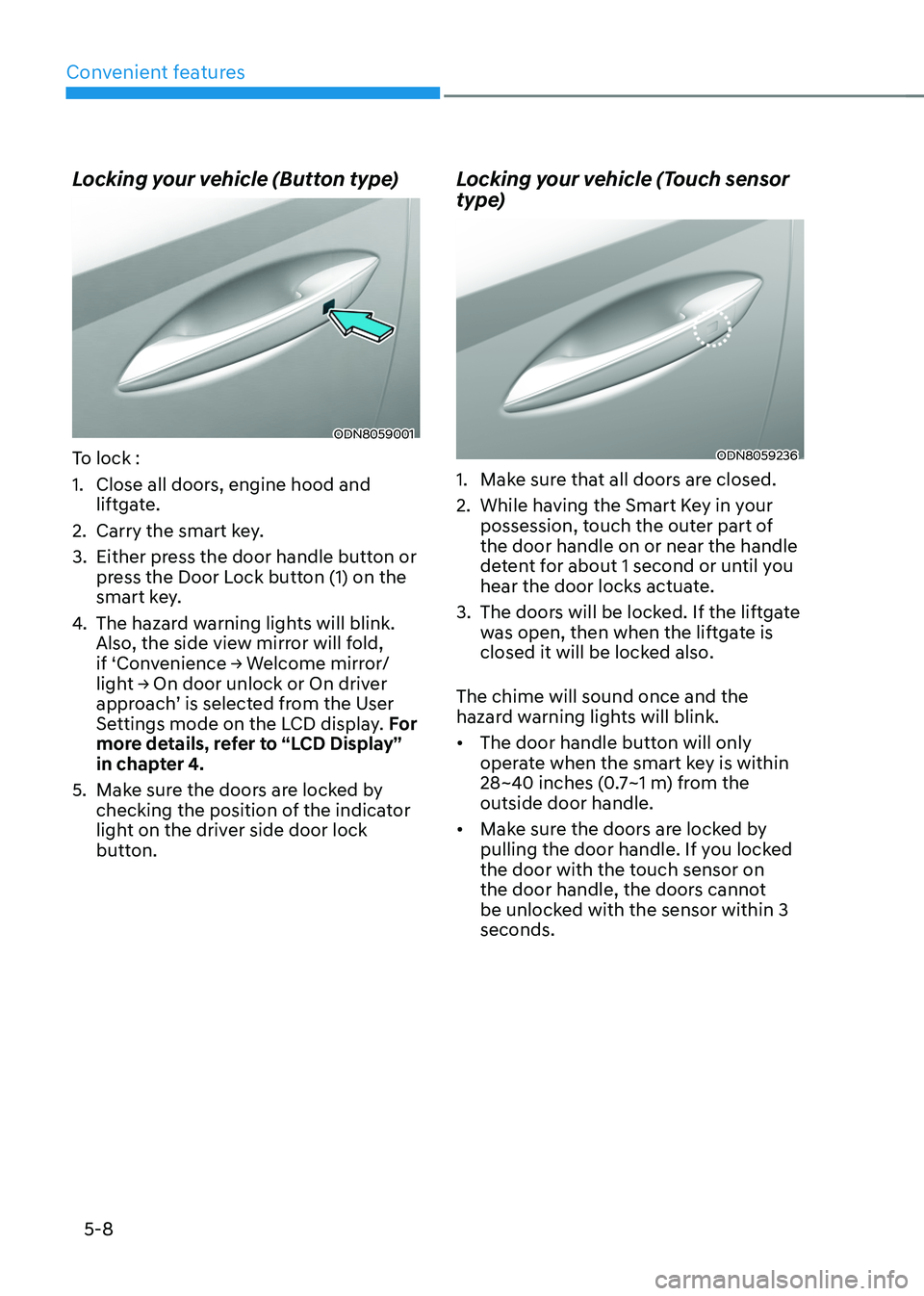
Locking your vehicle (Button type)
ODN8059001
To lock :
1. Close all doors, engine hood and
liftgate.
2. Carry the smart key.
3. Either press the door handle button or
press the Door Lock button (1) on the
smart key.
4. The hazard warning lights will blink.
Also, the side view mirror will fold,
if ‘Convenience → Welcome mirror/light → On door unlock or On driver approach’ is selected from the User
Settings mode on the LCD display. For
more details, refer to “LCD Display”
in chapter 4.
5. Make sure the doors are locked by
checking the position of the indicator
light on the driver side door lock
button.
Locking your vehicle (Touch sensor
type)
ODN8059236
1. Make sure that all doors are closed.
2. While having the Smart Key in your
possession, touch the outer part of
the door handle on or near the handle
detent for about 1 second or until you
hear the door locks actuate.
3. The doors will be locked. If the liftgate
was open, then when the liftgate is
closed it will be locked also.
The chime will sound once and the
hazard warning lights will blink.
• The door handle button will only
operate when the smart key is within
28~40 inches (0.7~1 m) from the
outside door handle.
• Make sure the doors are locked by
pulling the door handle. If you locked
the door with the touch sensor on
the door handle, the doors cannot
be unlocked with the sensor within 3
seconds.
Page 159 of 638
05
5-15
Hyundai Digital Key
(if equipped)
Digital Key Application
To use Hyundai Digital Key mobile app,
you should install the Hyundai Digital
Key application on your Android phone.
Search ‘Hyundai digital key’ in the
Google Play Store and download the app.
Please refer to the detailed manual of the
digital key app. The option can be found
under the following app menu:
Menu → Application Info → Tutorial
Please review the contents of the manual
before using the app.
ÃThis service is only available for
Android smartphones. Please confirm
supported/compatible devices on our
website.
WARNING
Delete Digital Key Settings When
Purchasing a Used Vehicle
If any of the digital key (smartphone key
or card key) is already registered when
you press ON button after unlocking
the doors, the message ‘Digital key(s)
active’ appears on the instrument
cluster once. If you sell your vehicle
or purchase a used Hyundai vehicle
equipped with the Digital Key feature,
you should confirm the message and
delete the registered smartphone key
and card key. For more information,
please contact the Hyundai Customer
Care Center. If the card key does not
work properly, please delete the card
key and register the smartphone key
and re-register the card key.
For vehicle maintenance
If you need to have your Digital Key
System repaired or replaced please
ensure your Smartphone Key is still
active. You may have to pair your phone
again.
In the case, re-initialize your Digital Keys
using the Hyundai Digital Key mobile app.
Digital key (smartphone) NFC
function
You can use the smartphone Digital Key
feature once Near Field Communication
(NFC) setting has been enabled on your
phone.
To enable NFC, go to Settings on your
smart phone.
In addition, your smart phone screen
should be unlocked when using the
Digital Key feature.
ÃTo enable the user settings for NFC on
your smart phone, go to the Settings
app on your phone. For further
assistance, refer to your smart phone
manual.
Page 168 of 638
Convenient features
5-24
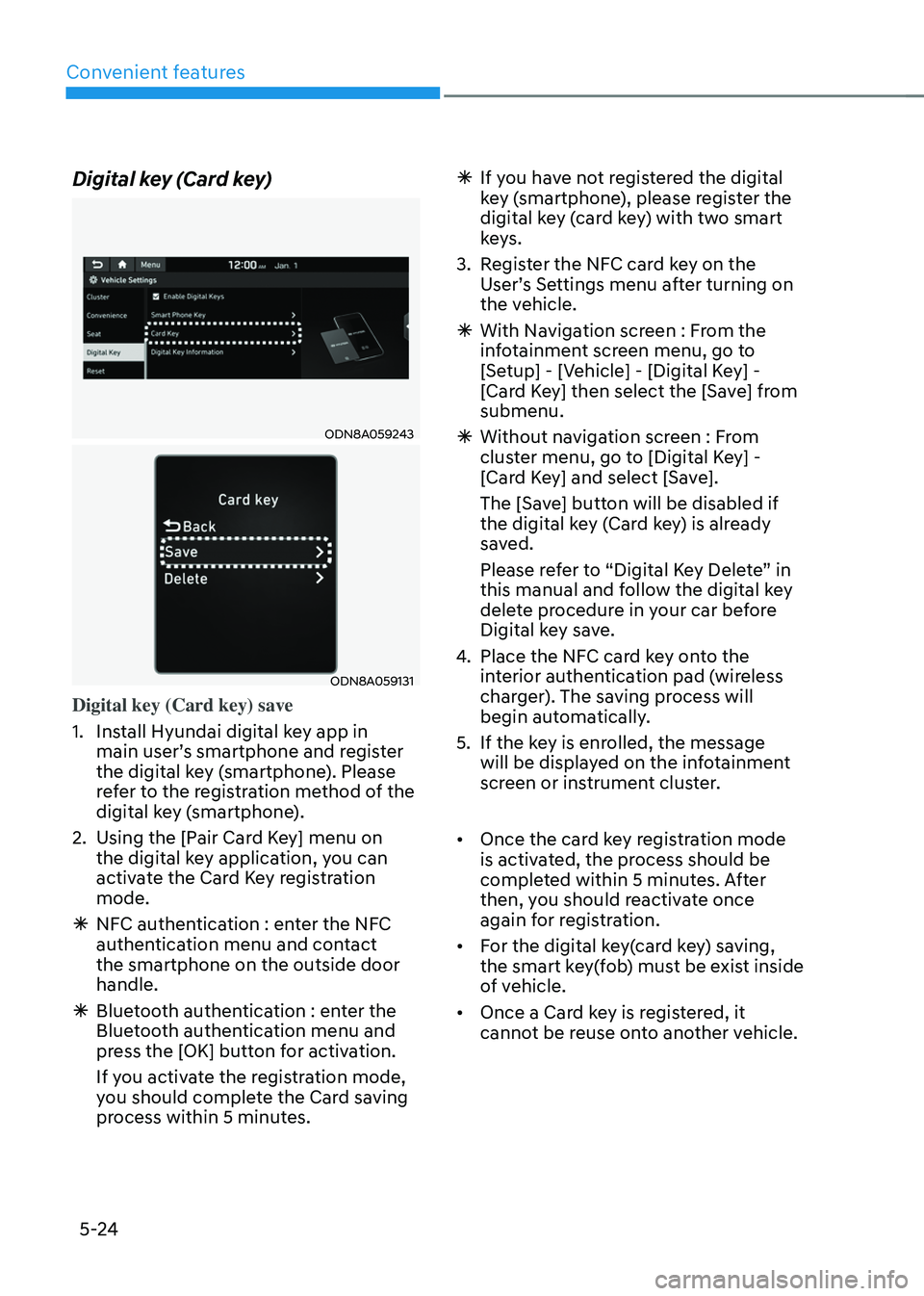
Digital key (Card key)
ODN8A059243
ODN8A059131
Digital key (Card key) save
1. Install Hyundai digital key app in
main user’s smartphone and register
the digital key (smartphone). Please
refer to the registration method of the
digital key (smartphone).
2. Using the [Pair Card Key] menu on
the digital key application, you can
activate the Card Key registration
mode.
ÃNFC authentication : enter the NFC
authentication menu and contact
the smartphone on the outside door
handle.
ÃBluetooth authentication : enter the
Bluetooth authentication menu and
press the [OK] button for activation.
If you activate the registration mode,
you should complete the Card saving
process within 5 minutes.
ÃIf yo u have not registered the digital
key (smartphone), please register the
digital key (card key) with two smart
keys.
3. Register the NFC card key on the
User’s Settings menu after turning on
the vehicle.
à With Navigation screen : From the
infotainment screen menu, go to
[Setup] - [Vehicle] - [Digital Key] -
[Card Key] then select the [Save] from
submenu.
ÃWithout navigation screen : From
cluster menu, go to [Digital Key] -
[Card Key] and select [Save].
The [Save] button will be disabled if
the digital key (Card key) is already
saved.
Please refer to “Digital Key Delete” in
this manual and follow the digital key
delete procedure in your car before
Digital key save.
4. Place the NFC card key onto the
interior authentication pad (wireless
charger). The saving process will
begin automatically.
5. If the key is enrolled, the message
will be displayed on the infotainment
screen or instrument cluster.
• Once the card key registration mode
is activated, the process should be
completed within 5 minutes. After
then, you should reactivate once
again for registration.
• For the digital key(card key) saving,
the smart key(fob) must be exist inside
of vehicle.
• Once a Card key is registered, it
cannot be reuse onto another vehicle.
Page 169 of 638
05
5-25
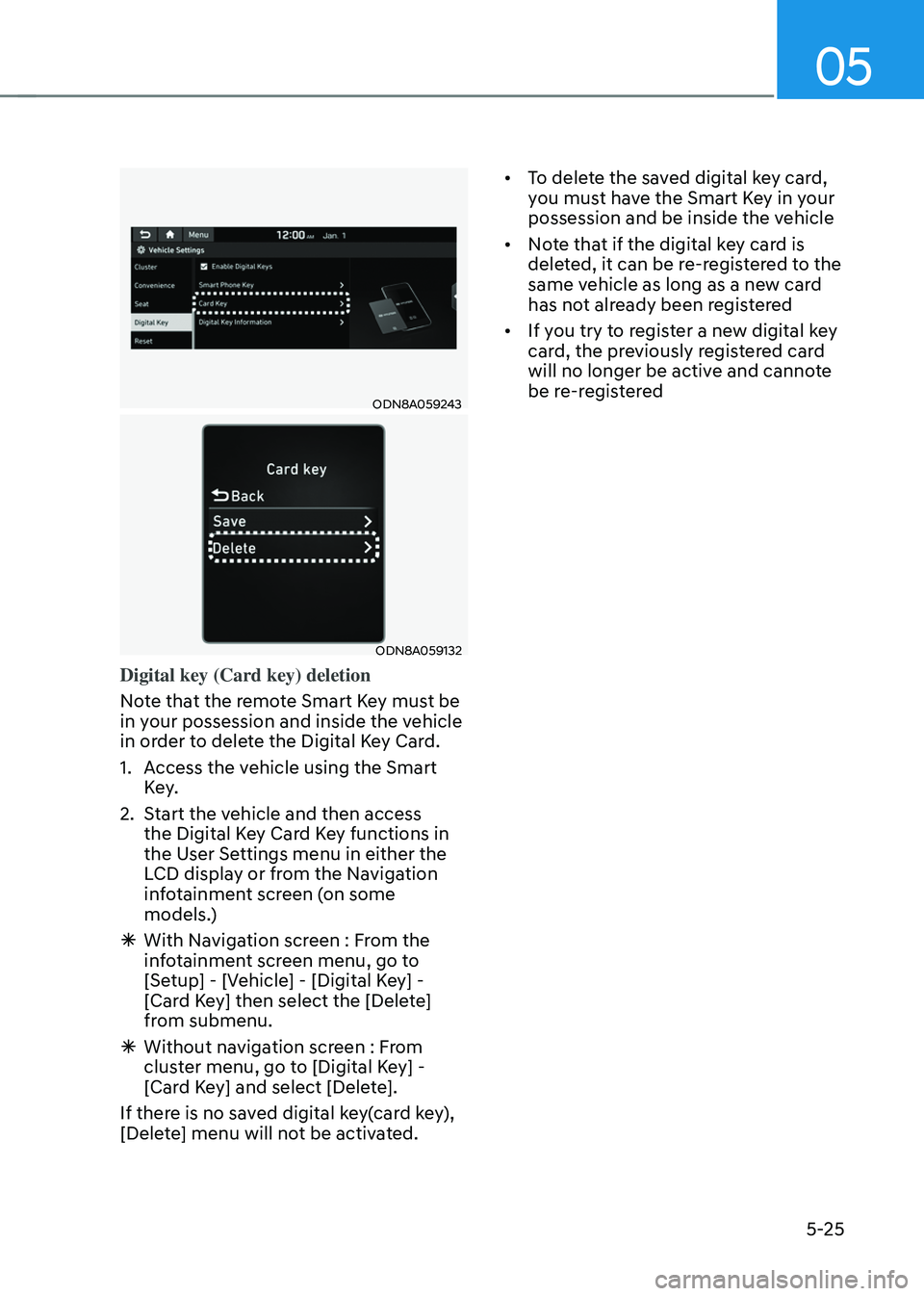
ODN8A059243
ODN8A059132
Digital key (Card key) deletion
Note that the remote Smart Key must be
in your possession and inside the vehicle
in order to delete the Digital Key Card.
1. Access the vehicle using the Smart
Key.
2. Start the vehicle and then access
the Digital Key Card Key functions in
the User Settings menu in either the
LCD display or from the Navigation
infotainment screen (on some
models.)
ÃWith Navigation screen : From the
infotainment screen menu, go to
[Setup] - [Vehicle] - [Digital Key] -
[Card Key] then select the [Delete]
from submenu.
ÃWithout navigation screen : From
cluster menu, go to [Digital Key] -
[Card Key] and select [Delete].
If there is no saved digital key(card key),
[Delete] menu will not be activated. •
To delete the saved digital key card,
you must have the Smart Key in your
possession and be inside the vehicle
• Note that if the digital key card is
deleted, it can be re-registered to the
same vehicle as long as a new card
has not already been registered
• If you try to register a new digital key
card, the previously registered card
will no longer be active and cannote
be re-registered
Page 174 of 638
Convenient features
5-30
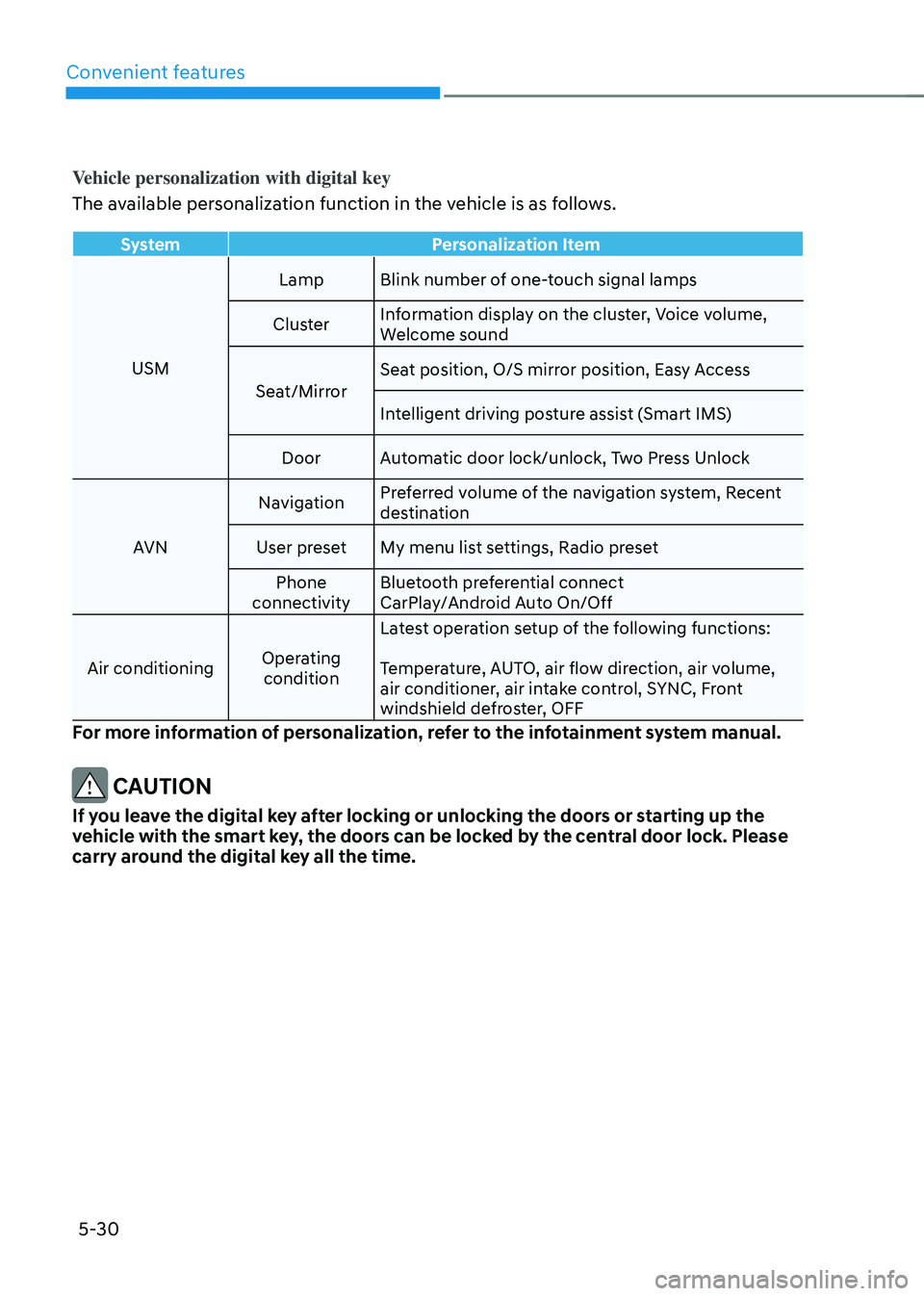
Vehicle personalization with digital key
The available personalization function in the vehicle is as follows.
SystemPersonalization Item
USM Lamp
Blink number of one-touch signal lamps
Cluster Information display on the cluster, Voice volume,
Welcome sound
Seat/Mirror Seat position, O/S mirror position, Easy Access
Intelligent driving posture assist (Smart IMS)
Door Automatic door lock/unlock, Two Press Unlock
AVN Navigation
Preferred volume of the navigation system, Recent
destination
User preset My menu list settings, Radio preset
Phone
connectivity Bluetooth preferential connect
CarPlay/Android Auto On/Off
Air conditioning Operating
condition Latest operation setup of the following functions:
Temperature, AUTO, air flow direction, air volume,
air conditioner, air intake control, SYNC, Front
windshield defroster, OFF
For more information of personalization, refer to the infotainment system manual.
CAUTION
If you leave the digital key after locking or unlocking the doors or starting up the
vehicle with the smart key, the doors can be locked by the central door lock. Please
carry around the digital key all the time.
Page 211 of 638
05
5-67
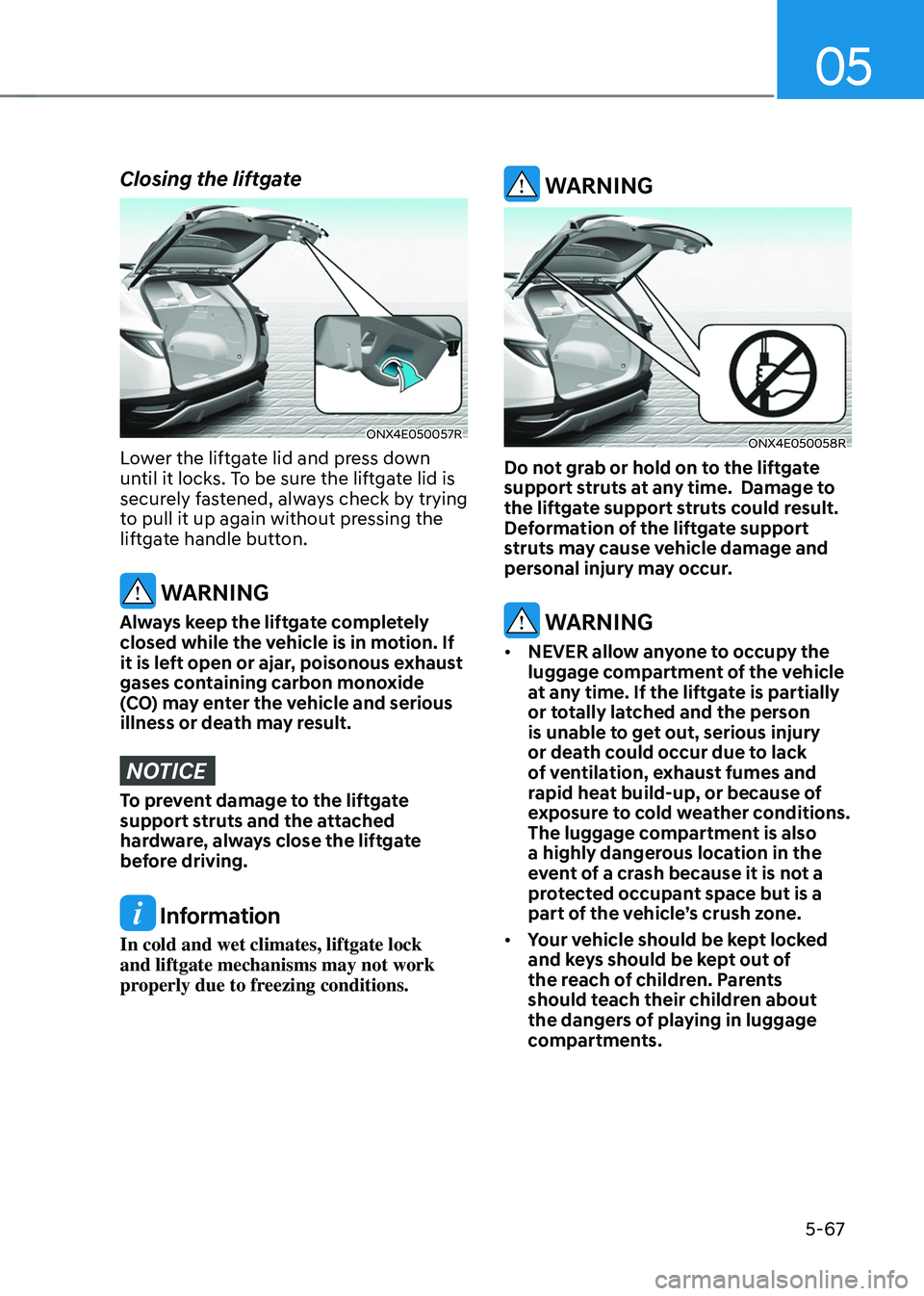
Closing the liftgate
ONX4E050057R
Lower the liftgate lid and press down
until it locks. To be sure the liftgate lid is
securely fastened, always check by trying
to pull it up again without pressing the
liftgate handle button.
WARNING
Always keep the liftgate completely
closed while the vehicle is in motion. If
it is left open or ajar, poisonous exhaust
gases containing carbon monoxide
(CO) may enter the vehicle and serious
illness or death may result.
NOTICE
To prevent damage to the liftgate
support struts and the attached
hardware, always close the liftgate
before driving.
Information
In cold and wet climates, liftgate lock
and liftgate mechanisms may not work
properly due to freezing conditions.
WARNING
ONX4E050058R
Do not grab or hold on to the liftgate
support struts at any time. Damage to
the liftgate support struts could result.
Deformation of the liftgate support
struts may cause vehicle damage and
personal injury may occur.
WARNING
• NEVER allow anyone to occupy the
luggage compartment of the vehicle
at any time. If the liftgate is partially
or totally latched and the person
is unable to get out, serious injury
or death could occur due to lack
of ventilation, exhaust fumes and
rapid heat build-up, or because of
exposure to cold weather conditions.
The luggage compartment is also
a highly dangerous location in the
event of a crash because it is not a
protected occupant space but is a
part of the vehicle’s crush zone.
• Your vehicle should be kept locked
and keys should be kept out of
the reach of children. Parents
should teach their children about
the dangers of playing in luggage
compartments.