2022 HYUNDAI SONATA HYBRID phone
[x] Cancel search: phonePage 268 of 527
Convenient Features
5-120
Sunvisor
OTM048089
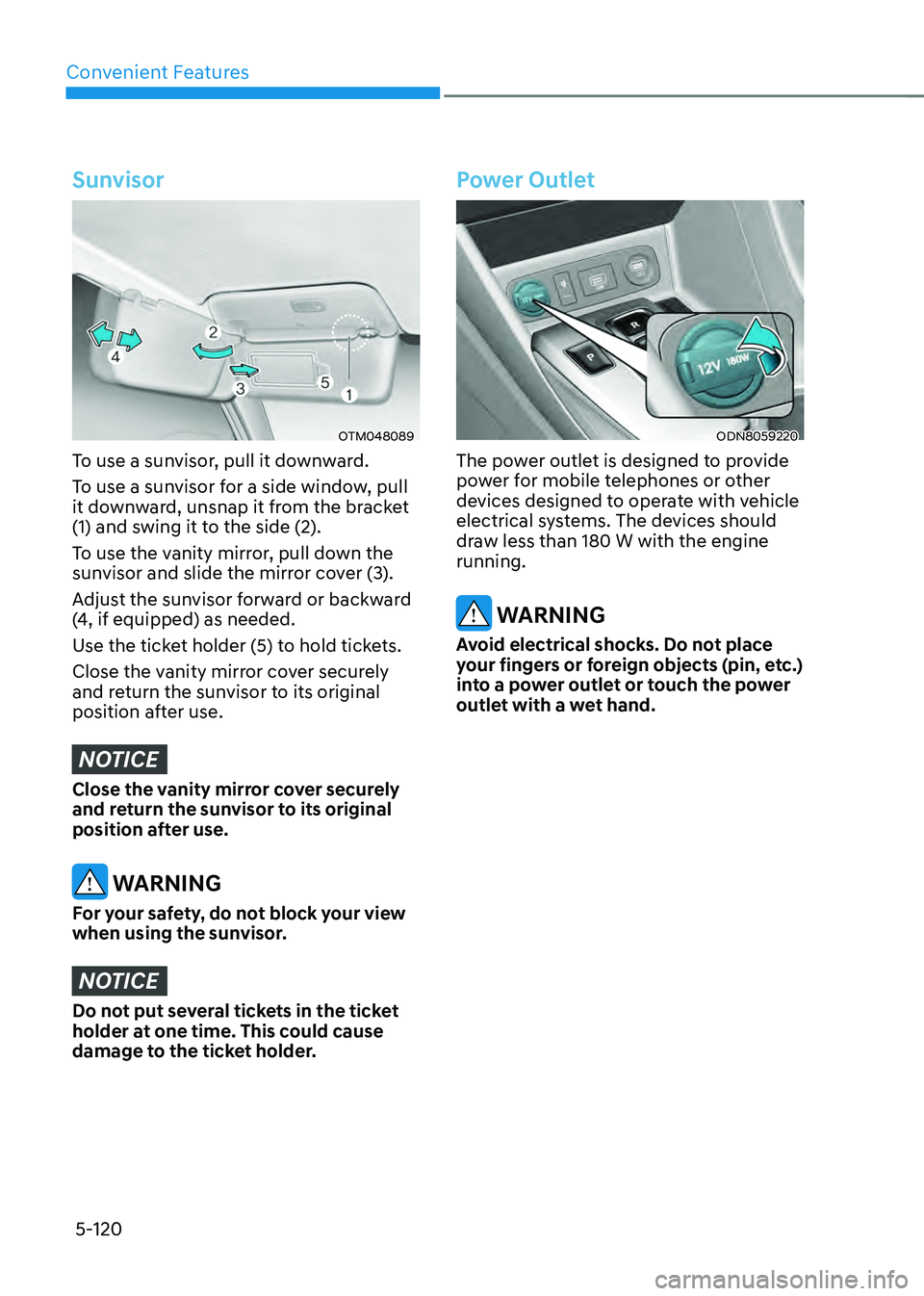
To use a sunvisor, pull it downward.
To use a sunvisor for a side window, pull
it downward, unsnap it from the bracket
(1) and swing it to the side (2).
To use the vanity mirror, pull down the
sunvisor and slide the mirror cover (3).
Adjust the sunvisor forward or backward
(4, if equipped) as needed.
Use the ticket holder (5) to hold tickets.
Close the vanity mirror cover securely
and return the sunvisor to its original
position after use.
NOTICE
Close the vanity mirror cover securely
and return the sunvisor to its original
position after use.
WARNING
For your safety, do not block your view
when using the sunvisor.
NOTICE
Do not put several tickets in the ticket
holder at one time. This could cause
damage to the ticket holder.
Power Outlet
ODN8059220
The power outlet is designed to provide
power for mobile telephones or other
devices designed to operate with vehicle
electrical systems. The devices should
draw less than 180 W with the engine
running.
WARNING
Avoid electrical shocks. Do not place
your fingers or foreign objects (pin, etc.)
into a power outlet or touch the power
outlet with a wet hand.
Page 269 of 527
05
5-121
NOTICE
To prevent damage to the Power
Outlets:
• Use the power outlet only when the
engine is running and remove the
accessory plug after use. Using the
accessory plug for prolonged periods
of time with the engine off could
cause the battery to discharge.
• Only use 12V electric accessories
which are less than 180 W in electric
capacity.
• Adjust the air-conditioner or heater
to the lowest operating level when
using the power outlet.
• Close the cover when not in use.
• Some electronic devices can
cause electronic interference
when plugged into a vehicle’s
power outlet. These devices may
cause excessive audio static and
malfunctions in other electronic
systems or devices used in your
vehicle.
• Push the plug in as far as it will go. If
good contact is not made, the plug
may overheat and the fuse may open.
• Plug in battery equipped electrical/
electronic devices with reverse
current protection. The current
from the battery may flow into the
vehicle’s electrical/electronic system
and cause system malfunction.
USB Charger (if equipped)
„„Front
ODN8059222
„„Rear
ODN8059296L
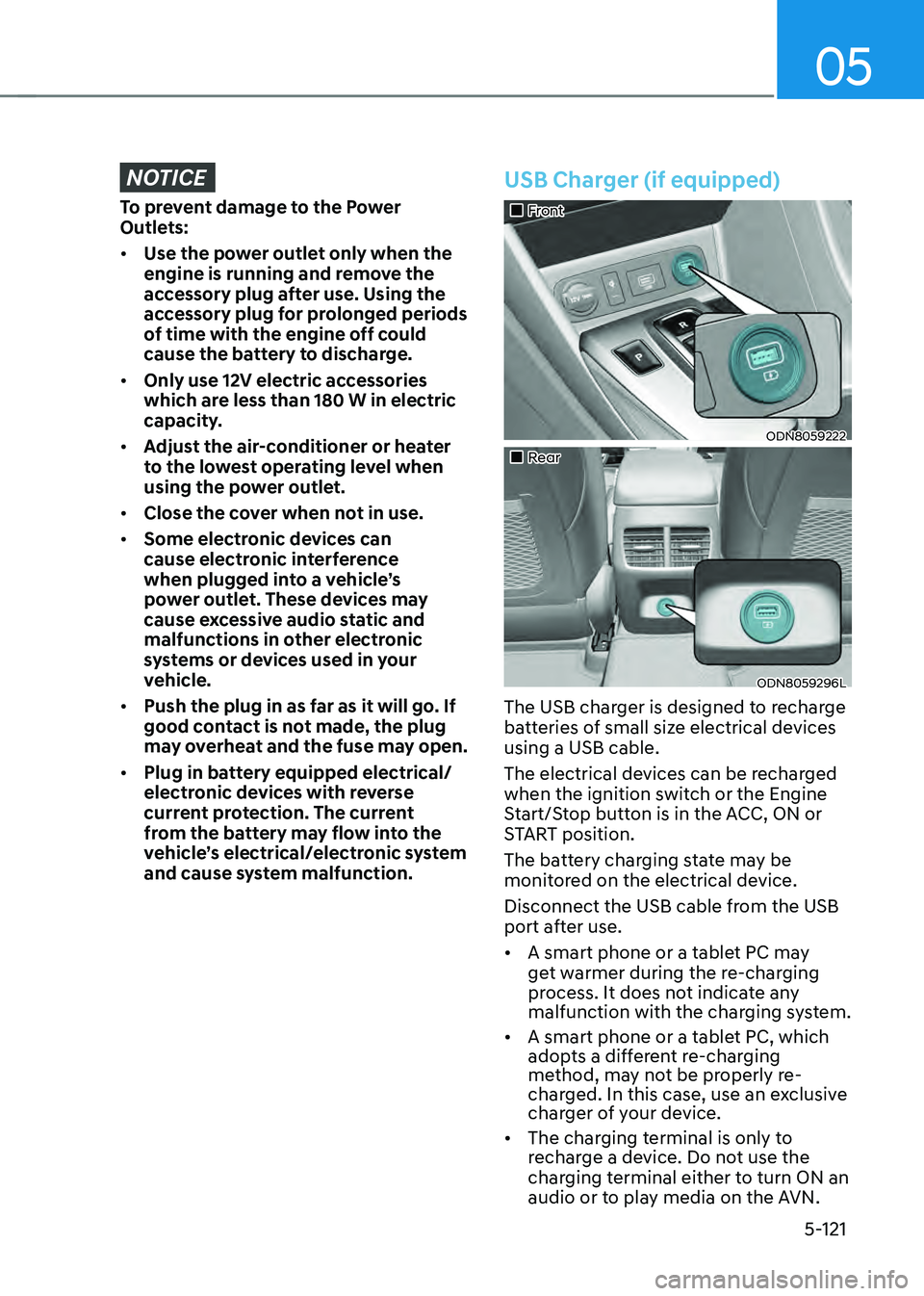
The USB charger is designed to recharge
batteries of small size electrical devices
using a USB cable.
The electrical devices can be recharged
when the ignition switch or the Engine
Start/Stop button is in the ACC, ON or
START position.
The battery charging state may be
monitored on the electrical device.
Disconnect the USB cable from the USB
port after use.
• A smart phone or a tablet PC may
get warmer during the re-charging
process. It does not indicate any
malfunction with the charging system.
• A smart phone or a tablet PC, which
adopts a different re-charging
method, may not be properly re-
charged. In this case, use an exclusive
charger of your device.
• The charging terminal is only to
recharge a device. Do not use the
charging terminal either to turn ON an
audio or to play media on the AVN.
Page 270 of 527
![HYUNDAI SONATA HYBRID 2022 Owners Manual Convenient Features
5-122
Wireless Cellular Phone
Charging System (if equipped)
ODN8059223
[A]: Indicator light, [B]: Charging pad
On certain models, the vehicle comes
equipped with a wireless cellu](/manual-img/35/56188/w960_56188-269.png "HYUNDAI SONATA HYBRID 2022 Owners Manual Convenient Features
5-122
Wireless Cellular Phone
Charging System (if equipped)
ODN8059223
[A]: Indicator light, [B]: Charging pad
On certain models, the vehicle comes
equipped with a wireless cellu")
Convenient Features
5-122
Wireless Cellular Phone
Charging System (if equipped)
ODN8059223
[A]: Indicator light, [B]: Charging pad
On certain models, the vehicle comes
equipped with a wireless cellular phone
charger.
The system is available when all doors
are closed, and when the ignition switch
is ON.
To charge a cellular phone
The wireless cellular phone charging
system charges only the Qi-enabled
cellular phones. Read the label on the
cellular phone accessory cover or visit
your cellular phone manufacturer’s
website to check whether your cellular
phone supports the Qi technology.
The wireless charging process starts
when you put a Qi-enabled cellular
phone on the wireless charging unit.
1. Remove other items, including the
smart key, from the wireless charging
unit. If not, the wireless charging
process may be interrupted. Place the
cellular phone on the center of the
charging pad (
).
2. The indicator light is orange when
the cellular phone is charging. The
indicator light turns green when
phone charging is complete.
3. You can turn ON or OFF the wireless
charging function in the user settings
mode on the instrument cluster. For
further information, refer to the “LCD
Display Modes” in this chapter.
If your cellular phone is not charging:
- Slightly change the position of the
cellular phone on the charging pad.
-Make sure the indicator light is
orange.
The indicator light will blink orange for 10
seconds if there is a malfunction in the
wireless charging system.
In this case, temporarily stop the
charging process, and re-attempt to
charge your cellular phone again.
The system warns you with a message
on the LCD display if the cellular phone
is still on the wireless charging unit after
the engine is turned OFF and the front
door is opened.
Information
For some manufacturers’ cellular phones,
the system may not warn you even though
the cellular phone is left on the wireless
charging unit. This is due to the particular
characteristic of the cellular phone and
not a malfunction of the wireless charging.
Page 271 of 527
05
5-123
NOTICE
• The wireless cellular phone charging
system may not support certain
cellular phones, which are not verified
for the Qi specification (
).
• When placing your cellular phone on
the charging mat, position the phone
in the middle of the mat for optimal
charging performance. If your cellular
phone is off to the side, the charging
rate may be less and in some cases
the cellular phone may experience
higher heat conduction.
• In some cases, the wireless charging
may stop temporarily when the
Remote Key or Smart Key is used,
either when starting the vehicle or
locking/unlocking the doors, etc.
• When charging certain cellular
phones, the charging indicator may
not change to green when the cellular
phone is fully charged.
• The wireless charging process may
temporarily stop, when temperature
abnormally increases inside the
wireless cellular phone charging
system. Stop the charging cellular
phone and wait until temperature falls
to a certain level.
• The wireless charging process may
temporarily stop when there is any
metallic item, such as a coin, between
the wireless cellular phone charging
system and the cellular phone.
• When charging some cellular phones
with a self-protection feature, the
wireless charging speed may decrease
and the wireless charging may stop.
• If the cellular phone has a thick cover,
the wireless charging may not be
possible. •
If the cellular phone is not completely
contacting the charging pad, wireless
charging may not operate properly.
• Some magnetic items like credit
cards, phone cards or rail tickets may
be damaged if left with the cellular
phone during the charging process.
• When any cellular phone without
a wireless charging function or a
metallic object is placed on the
charging pad, a small noise may
sound. This small sound is due to the
vehicle discerning compatibility of the
object placed on the charging pad.
It does not affect your vehicle or the
cellular phone in any way.
Information
If the ignition switch is in the OFF
position, the charging also stops.
Information
This device complies with part 15 of the
FCC Rules.
Operation is subject to the following two
conditions:
1. This device may not cause harmful
interference, and
2. This device must accept any
interference received, including
interference that may cause undesired
operation.
Page 276 of 527
Convenient Features
5-128
Bluetooth® Wireless Technology
Hands-Free
ODN8059230
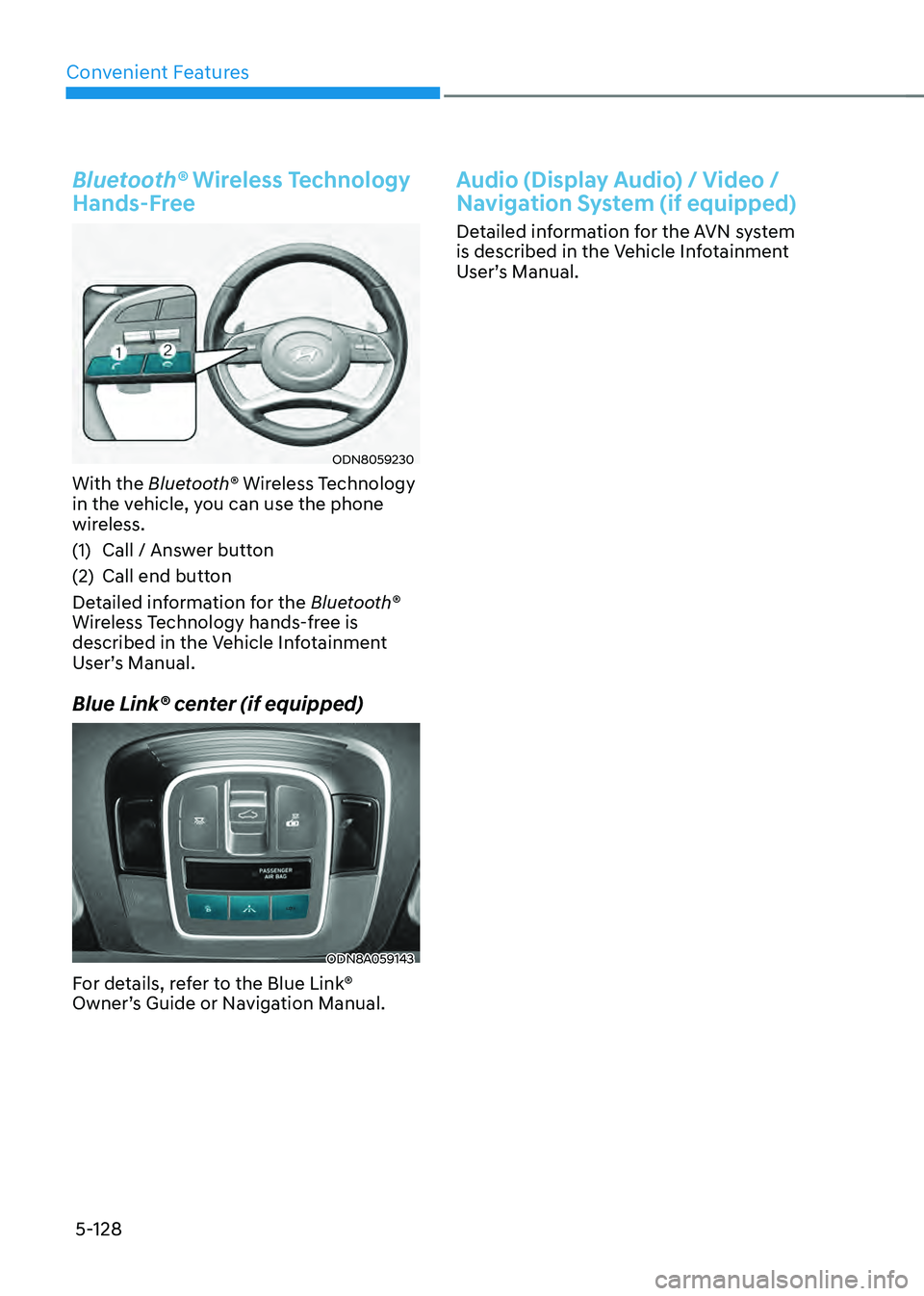
With the Bluetooth® Wireless Technology
in the vehicle, you can use the phone
wireless.
(1) Call / Answer button
(2) Call end button
Detailed information for the Bluetooth®
Wireless Technology hands-free is
described in the Vehicle Infotainment
User’s Manual.
Blue Link® center (if equipped)
ODN8A059143
For details, refer to the Blue Link®
Owner’s Guide or Navigation Manual.
Audio (Display Audio) / Video /
Navigation System (if equipped)
Detailed information for the AVN system
is described in the Vehicle Infotainment
User’s Manual.
Page 516 of 527

Index
I-8
G
Gauges and meters
........................................................................\
........................4-3
Glove box
........................................................................\
.................................5-118
Guide to Hyundai genuine parts
........................................................................\
...1-3
H
Hazard warning flasher
........................................................................\
.................7-2
Hazardous driving conditions
........................................................................\
...6-132
Head restraints
........................................................................\
............................3-11
Front seat head restraints
........................................................................\
........3-12
Rear seat restraints
........................................................................\
.................3-14
Headlamp delay function
........................................................................\
............5-77
Headlamp leveling device ........................................................................\
............ 5-78
Headlamp position
........................................................................\
......................5-72
Head-up display (HUD)
........................................................................\
..............5-70
Heated steering wheel
........................................................................\
.................5-40
HEV (Hybrid Electric Vehicle) system
................................................................1-12
High Beam Assist (HBA)
........................................................................\
............5-74
High beam operation ........................................................................\
.................... 5-73
Highway driving
........................................................................\
........................6-134
Highway Driving Assist (HDA)
........................................................................\
6-114
Hill-start assist control (HAC)
........................................................................\
.....6-32
HomeLink® system
........................................................................\
.....................5-43
Hood
........................................................................\
............................................5-62
Horn
........................................................................\
.............................................5-41
How to use this manual
........................................................................\
.................1-4
Hybrid battery SOC (State of Charge) gauge
......................................................1-15
Hybrid system gauge
........................................................................\
...................1-15
Power gauge
........................................................................\
............................1-15
Hyundai digital key ........................................................................\
...................... 5-12
Digital key application
........................................................................\
...........5-12
Digital key (smartphone) NFC function
........................................................5-13
Digital key (smartphone) ........................................................................\
......... 5-13
Digital key (card key) ........................................................................\
.............. 5-21
Page 518 of 527
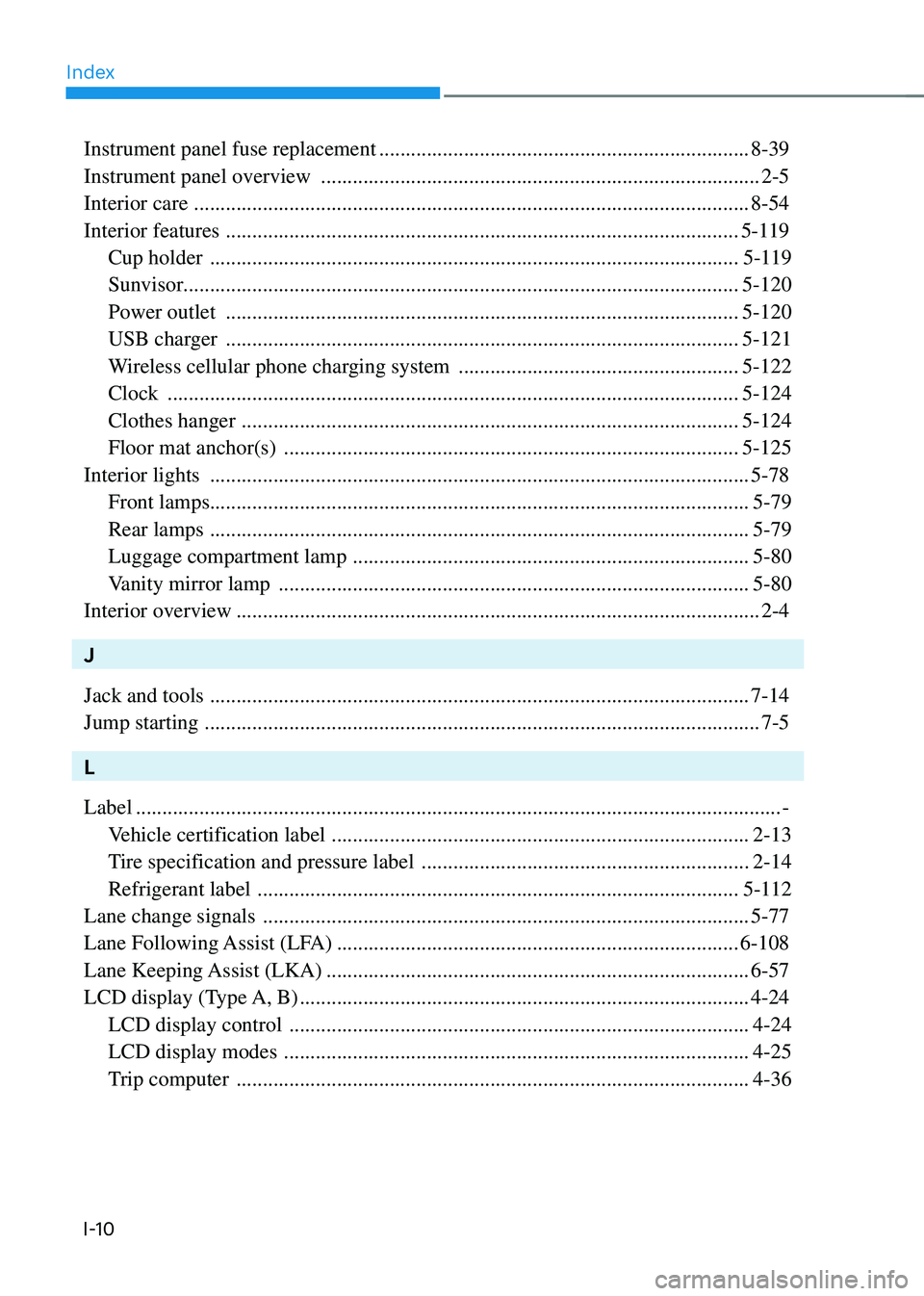
Index
I-10
Instrument panel fuse replacement ......................................................................8-39
Instrument panel overview
........................................................................\
...........2-5
Interior care
........................................................................\
.................................8-54
Interior features
........................................................................\
.........................5-119
Cup holder
........................................................................\
............................5-119
Sunvisor ........................................................................\
................................. 5-120
Power outlet
........................................................................\
.........................5-120
USB charger
........................................................................\
.........................5-121
Wireless cellular phone charging system
.....................................................5-122
Clock
........................................................................\
....................................5-124
Clothes hanger
........................................................................\
......................5-124
Floor mat anchor(s)
........................................................................\
..............5-125
Interior lights
........................................................................\
..............................5-78
Front lamps ........................................................................\
.............................. 5-79
Rear lamps
........................................................................\
..............................5-79
Luggage compartment lamp
........................................................................\
...5-80
Vanity mirror lamp
........................................................................\
.................5-80
Interior overview
........................................................................\
...........................2-4
J
Jack and tools
........................................................................\
..............................7-14
Jump starting
........................................................................\
.................................7-5
L
Label
........................................................................\
..................................................-
Vehicle certification label
........................................................................\
.......2-13
Tire specification and pressure label
..............................................................2-14
Refrigerant label
........................................................................\
...................5-112
Lane change signals
........................................................................\
....................5-77
Lane Following Assist (LFA)
........................................................................\
....6-108
Lane Keeping Assist (LKA)
........................................................................\
........6-57
LCD display (Type A, B)
........................................................................\
.............4-24
LCD display control
........................................................................\
...............4-24
LCD display modes
........................................................................\
................4-25
Trip computer
........................................................................\
.........................4-36
Page 527 of 527

I
I-19
Light ON indicator light ........................................................................\
.........4-18
Forward Collision-Avoidance Assist warning light
.......................................4-18
Lane Keeping Assist indicator light
...............................................................4-18
Regenerative brake warning light
..........................................................1-16, 4-11
Service warning light
........................................................................\
.....1-16, 4-14
Exhaust system (GPF) warning light
..............................................................4-14
Ready indicator
........................................................................\
..............1-16, 4-17
EV mode indicator
........................................................................\
.........1-16, 4-17
Washer fluid
........................................................................\
................................8-21
Welcome system
........................................................................\
.........................5-81
Welcome light
........................................................................\
........................5-81
Interior lamp
........................................................................\
...........................5-81
Wheel alignment and tire balance ........................................................................\
8-28
Wheel replacement
........................................................................\
......................8-28
Windows
........................................................................\
......................................5-51
Power windows
........................................................................\
......................5-52
Auto up/down window
........................................................................\
...........5-52
Automatic reverse
........................................................................\
..................5-53
Power window lock switch
........................................................................\
....5-54
Windshield defrosting and defogging
...............................................................5-113
Windshield washers
........................................................................\
....................5-83
Windshield wipers
........................................................................\
......................5-82
Winter driving
........................................................................\
...........................6-135
Snow tires
........................................................................\
.............................6-135
Tire chains
........................................................................\
............................6-136
Winter Precautions
........................................................................\
....................6-137
Wiper blades replacement
........................................................................\
...........8-24
Wipers and washers
........................................................................\
....................5-82
Windshield wipers
........................................................................\
..................5-82
Windshield washers
........................................................................\
................5-83
Wireless cellular phone charging system
..........................................................5-122