2022 HYUNDAI SONATA HYBRID phone
[x] Cancel search: phonePage 172 of 527
Convenient Features
5-24
Start-up with Card key
After placing your registered card key
onto the interior authentication pad
(wireless charger), step on the brake and
press the Engine Start/Stop button.
WARNING
• If you do not place the digital key
(card key) onto the center of the
interior authentication pad (wireless
charger) exactly, the card key may
not be recognized. If the engine is
not turned on, adjust and place the
key again.
• If you overlap and use the key
with NFC-enabled cards such as
transportation card or credit card,
the card key may not be recognized.
• If the digital key (card key) does not
work, please detach the key around
4 inches (0.1 m) from the handle
authentication pad and retry to
contact.
• The card key may be damaged due to
impact. It would not work properly if
the key is damaged. You should buy a
new card and register again.
For more information, refer to the
Engine Start/Stop button in chapter 6.
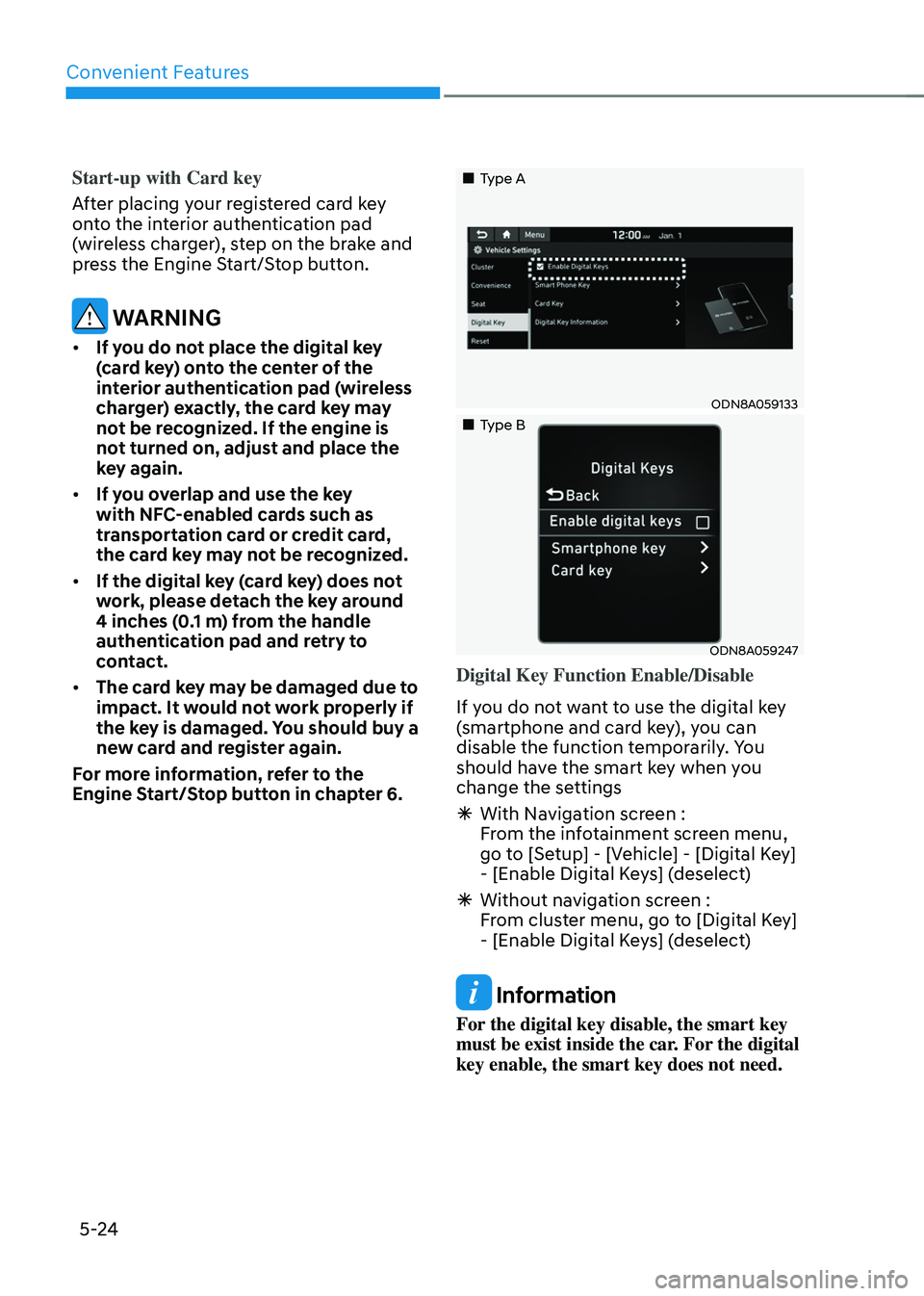
„„Type A
ODN8A059133
„„Type B
ODN8A059247
Digital Key Function Enable/Disable
If you do not want to use the digital key
(smartphone and card key), you can
disable the function temporarily. You
should have the smart key when you
change the settings
à With Navigation screen :
From the infotainment screen menu,
go to [Setup] - [Vehicle] - [Digital Key]
- [Enable Digital Keys] (deselect)
ÃWithout navigation screen :
From cluster menu, go to [Digital Key]
- [Enable Digital Keys] (deselect)
Information
For the digital key disable, the smart key
must be exist inside the car. For the digital
key enable, the smart key does not need.
Page 173 of 527

05
5-25
CAUTION
If you uncheck Enable digital keys, it is
impossible to lock or unlock the doors
or start up the vehicle with digital keys
such as smartphone and card key. If
you check Enable digital keys again, the
registered digital keys(smartphone and
card key) are available. Even though
you stop the digital key function, the
registered keys (smartphone and card
key) are not deleted.
Personalized profile and vehicle
settings
Connect the registered digital key with
personalized profile. Then in case you
lock or unlock the door with the digital
key NFC function or unlock the door
remotely by digital key application
Bluetooth connection, the vehicle
will play the personalized user profile
settings. Profile connection and
personalization are available for Driver 1
and Driver 2.Profile link/unlinked
Profile link
1. Select Setup → User Profile → Profile Settings → Link Digital Key (Smartphone) on the infotainment
system menu.
2. Unlock and place your smartphone on
the wireless charger according to a
message and it automatically starts to
interwork.
3. It begins the profile link with a
message.
4. If you select Link, the registered
phone number’s digital key and the
user’s profile are linked.
5. The interconnection process is
completed with a message.
Profile unlink
1. Select Digital Key information on
infotainment Vehicle Settings menu. It
is possible to unlink only if the profile
is interconnected.
2. Profile unlink is completed with a
message.
Information
If you connect both Driver 1 and Driver 2
with a single smartphone, the smartphone
digital key always works as Driver 1.
If you unlink the Driver 1, personalization
function will operate as Driver 2.
Page 174 of 527
Convenient Features
5-26
PRECAUTION for vehicle profile link and
unlink
When you link or unlink the profile of
digital key, you should be careful of the
following.
• Profile link is possible to use with the
digital key. (Infotainment Vehicle
Settings Mode → Digital Key → Enable Digital Keys)
• Profile link information remains even
when you set the digital key function
disable.
• Only the smart phone with digital key
app enables you to link your profile.
(Impossible to link with NFC card)
• Profile link works only when the
smart phone and the digital key are
registered to the vehicle. The smart
phone with another vehicle’s digital
key cannot link profile.
• If you remove the smart phone
from the wireless charger before
completing the profile link, it does not
work.
• To unlink the profile, the smart phone
does not need to be on the wireless
charger.
• Vehicle personalization operation
The personalization function linked with
digital key works as following conditions:
•
Contact the driver’s door handle with
the profile linked smart phone to lock
or unlock the doors (Personalization
does not operate when locking or
unlocking the front passenger door.)
• Remote door unlock with the profile
linked smartphone digital key app.
The profile linked with digital key can be
changed manually in the infotainment
system setup screen.
Precaution for digital key profile link and
unlink
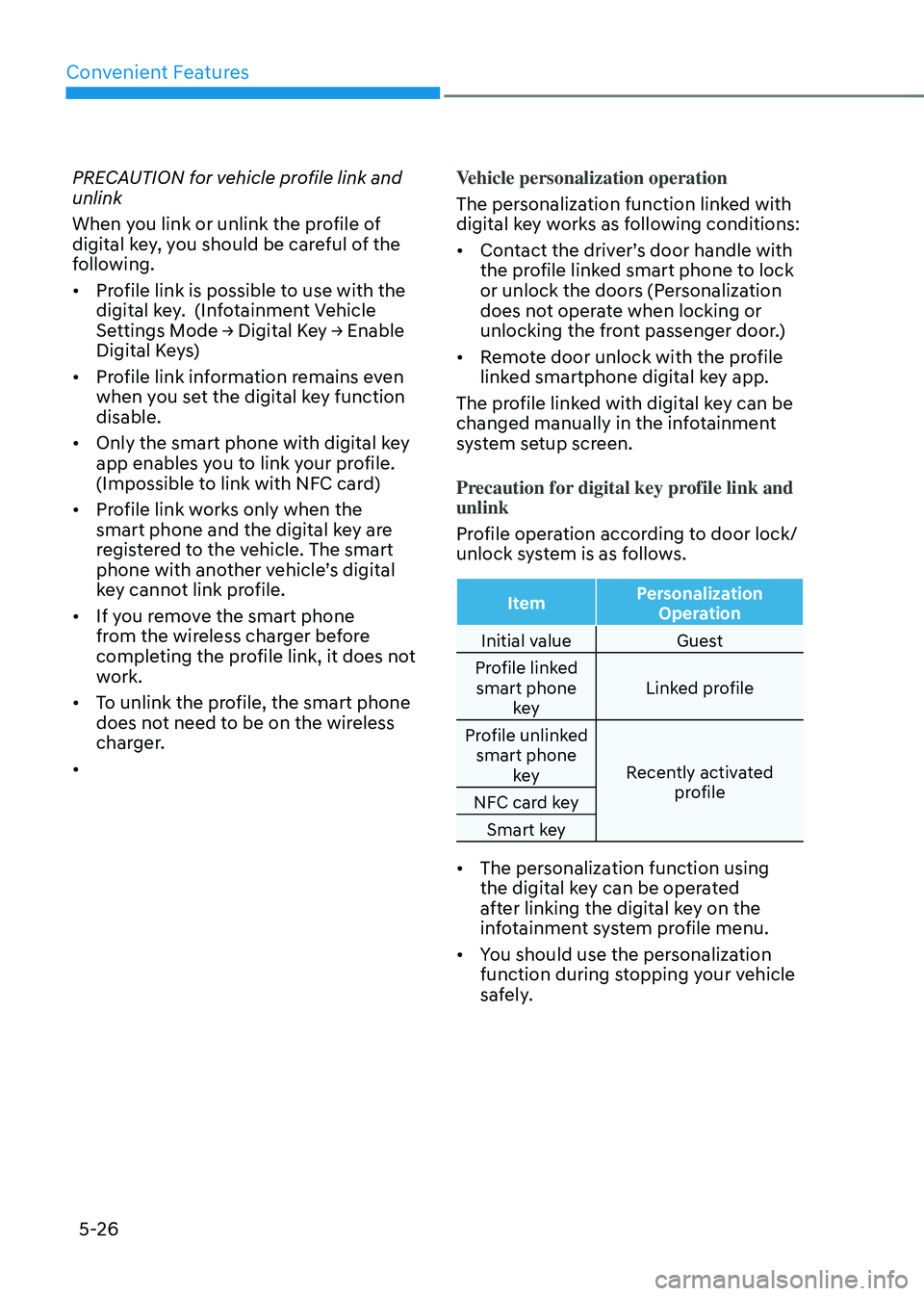
Profile operation according to door lock/
unlock system is as follows.
Item Personalization
Operation
Initial value Guest
Profile linked smart phone key Linked profile
Profile unlinked smart phone key Recently activated
profile
NFC card key
Smart key
• The personalization function using
the digital key can be operated
after linking the digital key on the
infotainment system profile menu.
• You should use the personalization
function during stopping your vehicle
safely.
Page 175 of 527

05
5-27
Vehicle personalization with digital key
The available personalization function in the vehicle is as follows.
SystemPersonalization Item
USM HUD
Position adjustment of image, Information display
selection, Size and color of speedometer
Lamp Blink number of one-touch signal lamps
Cluster Information display on the cluster, Voice volume,
Welcome sound
Seat/Mirror Seat position, O/S mirror position, Easy Access
Intelligent driving posture assist (Smart IMS)
Door Automatic door lock/unlock, Two Press Unlock
AVN Navigation
Preferred volume of the navigation system, Recent
destination
User preset My menu list settings, Radio preset
Phone
connectivity Bluetooth preferential connect
CarPlay/Android Auto/MirrorLink On/Off
Air conditioning Operating
condition Latest operation setup of the following functions:
Temperature, AUTO, air flow direction, air volume,
air conditioner, air intake control, SYNC, Front
windshield defroster, OFF
For more information of personalization, refer to the infotainment system manual.
CAUTION
If you leave the digital key after locking or unlocking the doors or starting up the
vehicle with the smart key, the doors can be locked by the central door lock. Please
carry around the digital key all the time.
Page 215 of 527
05
5-67
Information
• If you press the door unlock button
(2), the Smart Trunk with Auto
Open function will be deactivated
temporarily. But, if you do not open
any door for 30 seconds, the Smart
Trunk with Auto Open function will be
activated again.
• If you press the trunk open button
(3) for more than 1 second, the trunk
opens.
• If you press the door lock button (1) or
trunk open button (3) when the Smart
Trunk with Auto Open in the Detect
and Alert stage, the Smart Trunk
with Auto Open function will not be
deactivated.
• In case you have deactivated the Smart
Trunk with Auto Open function by
pressing the smart key button and
opened a door, the Smart Trunk with
Auto Open function can be activated
again by closing and locking all doors.
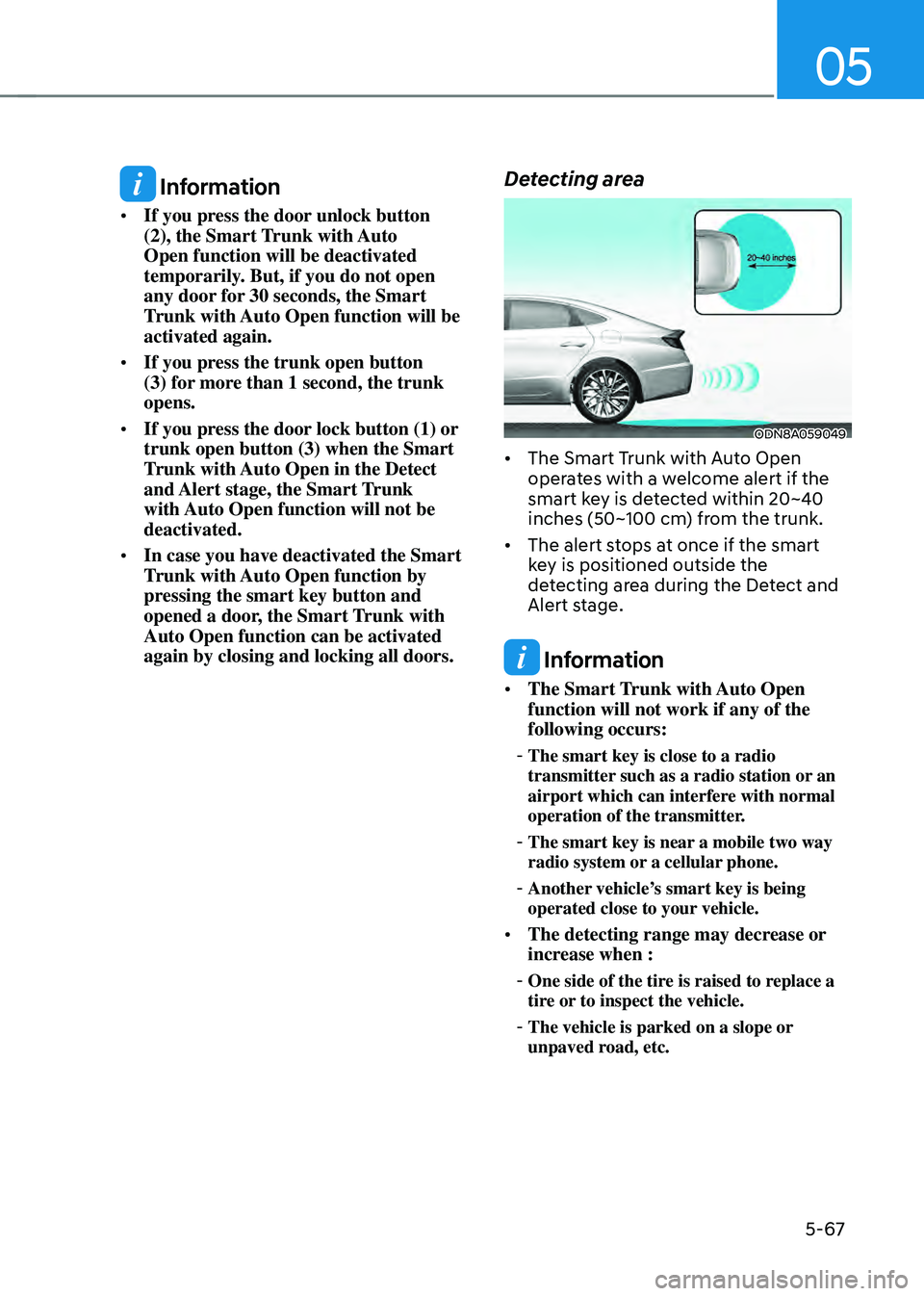
Detecting area
ODN8A059049
• The Smart Trunk with Auto Open
operates with a welcome alert if the
smart key is detected within 20~40
inches (50~100 cm) from the trunk.
• The alert stops at once if the smart
key is positioned outside the
detecting area during the Detect and
Alert stage.
Information
• The Smart Trunk with Auto Open
function will not work if any of the
following occurs:
-The smart key is close to a radio
transmitter such as a radio station or an
airport which can interfere with normal
operation of the transmitter.
-The smart key is near a mobile two way
radio system or a cellular phone.
-Another vehicle’s smart key is being
operated close to your vehicle.
• The detecting range may decrease or
increase when :
-One side of the tire is raised to replace a
tire or to inspect the vehicle.
-The vehicle is parked on a slope or
unpaved road, etc.
Page 216 of 527
Convenient Features
5-68
Fuel Filler Door
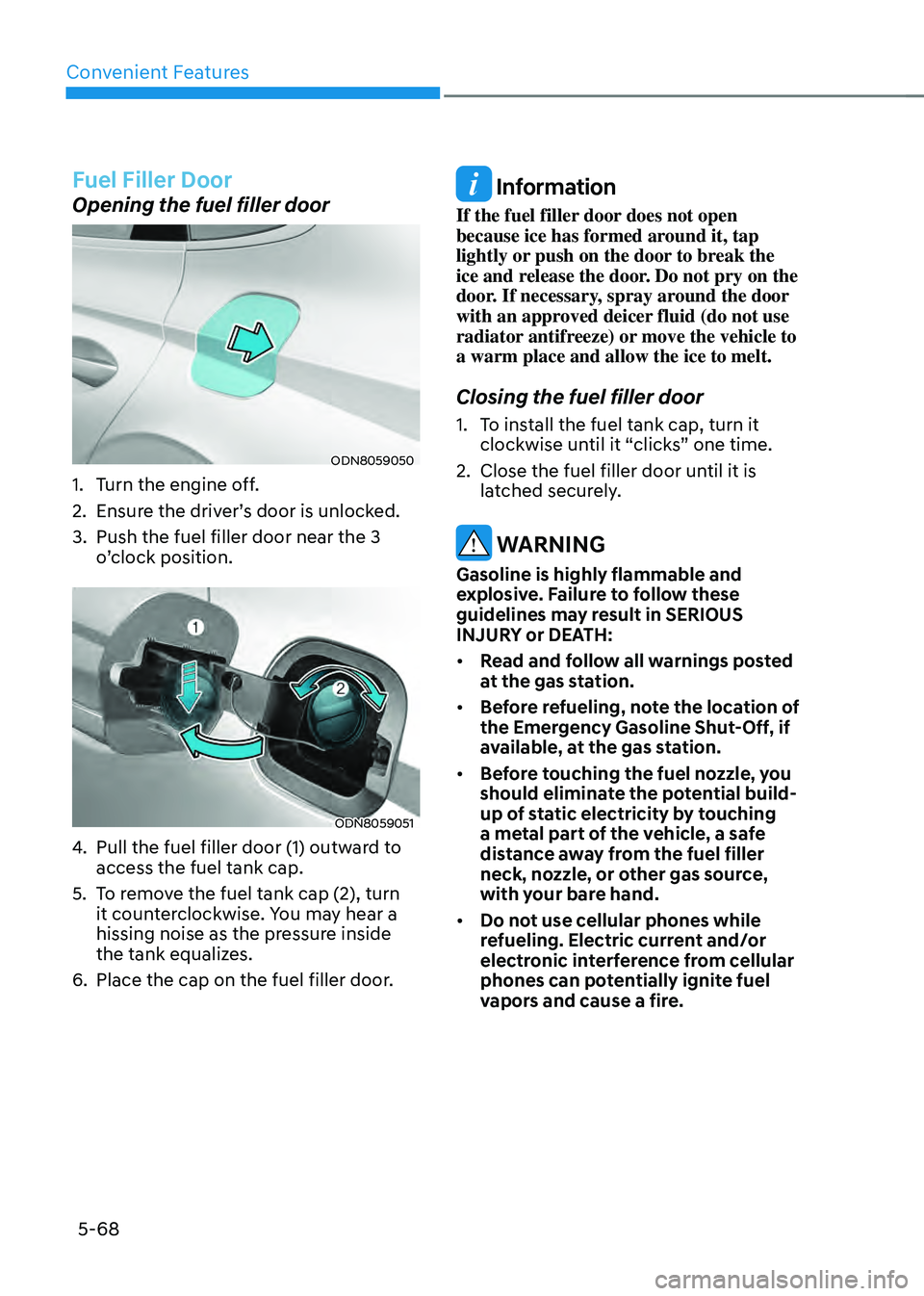
Opening the fuel filler door
ODN8059050
1. Turn the engine off.
2. Ensure the driver’s door is unlocked.
3. Push the fuel filler door near the 3
o’clock position.
ODN8059051
4. Pull the fuel filler door (1) outward to
access the fuel tank cap.
5. To remove the fuel tank cap (2), turn
it counterclockwise. You may hear a
hissing noise as the pressure inside
the tank equalizes.
6. Place the cap on the fuel filler door.
Information
If the fuel filler door does not open
because ice has formed around it, tap
lightly or push on the door to break the
ice and release the door. Do not pry on the
door. If necessary, spray around the door
with an approved deicer fluid (do not use
radiator antifreeze) or move the vehicle to
a warm place and allow the ice to melt.
Closing the fuel filler door
1. To install the fuel tank cap, turn it
clockwise until it “clicks” one time.
2. Close the fuel filler door until it is
latched securely.
WARNING
Gasoline is highly flammable and
explosive. Failure to follow these
guidelines may result in SERIOUS
INJURY or DEATH:
• Read and follow all warnings posted
at the gas station.
• Before refueling, note the location of
the Emergency Gasoline Shut-Off, if
available, at the gas station.
• Before touching the fuel nozzle, you
should eliminate the potential build-
up of static electricity by touching
a metal part of the vehicle, a safe
distance away from the fuel filler
neck, nozzle, or other gas source,
with your bare hand.
• Do not use cellular phones while
refueling. Electric current and/or
electronic interference from cellular
phones can potentially ignite fuel
vapors and cause a fire.
Page 237 of 527
05
5-89
To Turn off Reverse Parking
Distance Warning System
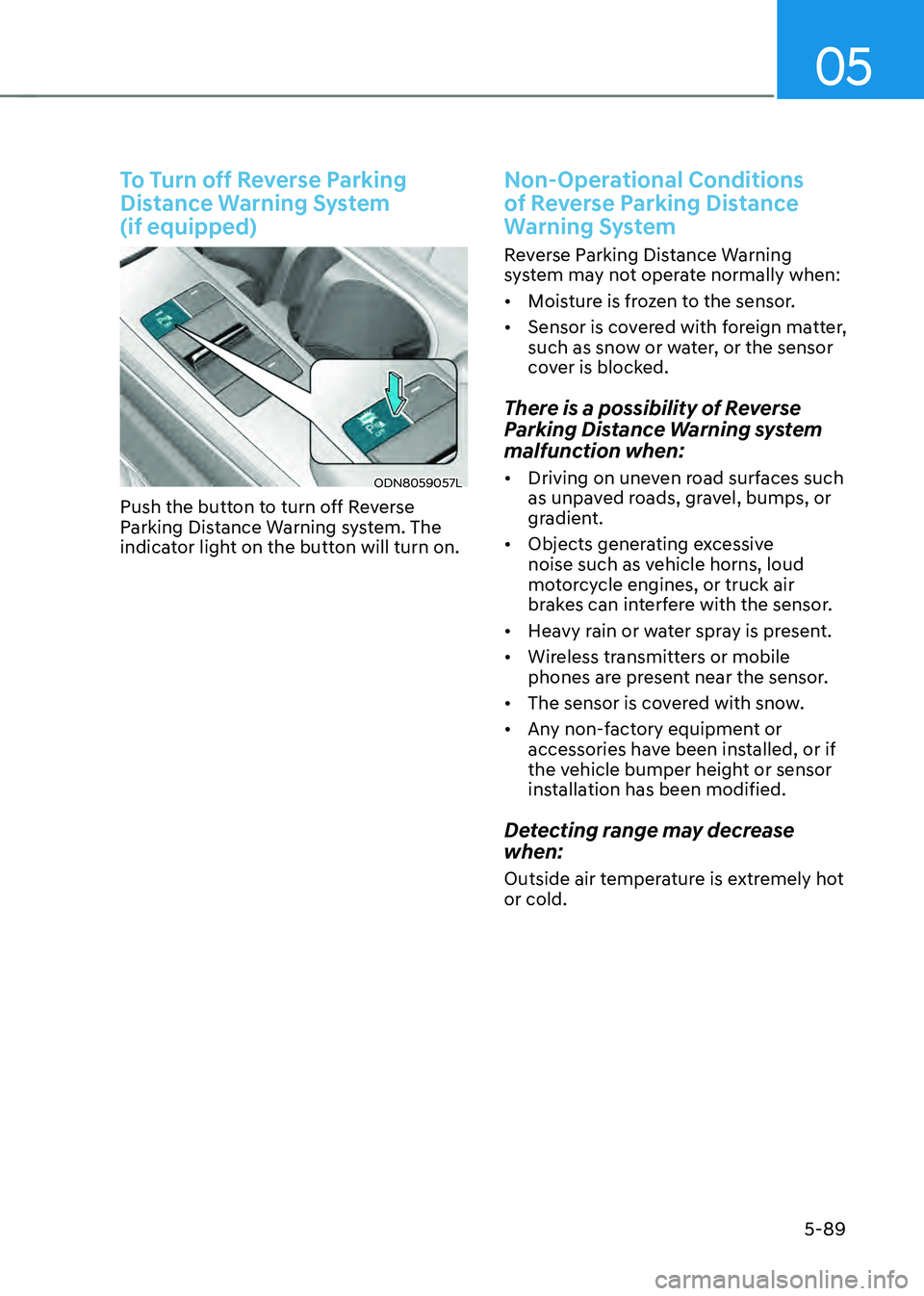
(if equipped)
ODN8059057L
Push the button to turn off Reverse
Parking Distance Warning system. The
indicator light on the button will turn on.
Non-Operational Conditions
of Reverse Parking Distance
Warning System
Reverse Parking Distance Warning
system may not operate normally when:
• Moisture is frozen to the sensor.
• Sensor is covered with foreign matter,
such as snow or water, or the sensor
cover is blocked.
There is a possibility of Reverse
Parking Distance Warning system
malfunction when:
• Driving on uneven road surfaces such
as unpaved roads, gravel, bumps, or
gradient.
• Objects generating excessive
noise such as vehicle horns, loud
motorcycle engines, or truck air
brakes can interfere with the sensor.
• Heavy rain or water spray is present.
• Wireless transmitters or mobile
phones are present near the sensor.
• The sensor is covered with snow.
• Any non-factory equipment or
accessories have been installed, or if
the vehicle bumper height or sensor
installation has been modified.
Detecting range may decrease
when:
Outside air temperature is extremely hot
or cold.
Page 242 of 527
Convenient Features
5-94
Non-Operational Conditions
of Forward/Reverse Parking
Distance Warning System
Forward/Reverse Parking Distance
Warning system may not operate
normally when:
• Moisture is frozen to the sensor.
• Sensor is covered with foreign matter,
such as snow or water, or the sensor
cover is blocked.
There is a possibility of Forward/
Reverse Parking Distance Warning
system malfunction when:
• Driving on uneven road surfaces such
as unpaved roads, gravel, bumps, or
gradient.
• Objects generating excessive
noise such as vehicle horns, loud
motorcycle engines, or truck air
brakes can interfere with the sensor.
• Heavy rain or water spray is present.
• Wireless transmitters or mobile
phones are present near the sensor.
• The sensor is covered with snow.
• Any non-factory equipment or
accessories have been installed, or if
the vehicle bumper height or sensor
installation has been modified.
Detecting range may decrease
when:
Outside air temperature is extremely hot
or cold.
The following objects may not be
recognized by the sensor:
• Sharp or slim objects such as ropes,
chains or small poles.
• Objects, which tend to absorb sensor
frequency such as clothes, spongy
material or snow.
• Undetectable objects smaller than 40
in (100 cm) and narrower than 6 in (14
cm) in diameter.
WARNING
Your new vehicle warranty does not
cover any accidents or damage to the
vehicle or injuries to its occupants
related to Forward/Reverse Parking
Distance Warning system. Always drive
safely and cautiously.
Forward/Reverse Parking
Distance Warning System
Precautions
• Forward/Reverse Parking Distance
Warning system may not sound
consistently depending on the speed
and shapes of the objects detected.
• Forward/Reverse Parking Distance
Warning system may malfunction if
the vehicle bumper height or sensor
installation has been modified or
damaged. Any non-factory installed
equipment or accessories may also
interfere with the sensor performance.
• The sensor may not recognize objects
less than 12 in (30 cm) from the
sensor, or it may sense an incorrect
distance. Use caution.
• When the sensor is frozen or stained
with snow, dirt, or water, the sensor
may be inoperative until the stains are
removed using a soft cloth.
• Do not push, scratch or strike the
sensor. Sensor damage could occur.
• Do not spray the sensors or its
surrounding area directly with a high
pressure washer. Shock applied from
high pressure water may cause the
device to not operate normally.