2022 HYUNDAI SANTA CRUZ trailer
[x] Cancel search: trailerPage 406 of 598
Driver Assistance System
7-54
Safe Exit Warning Malfunction
and Limitations
Safe Exit Warning malfunction
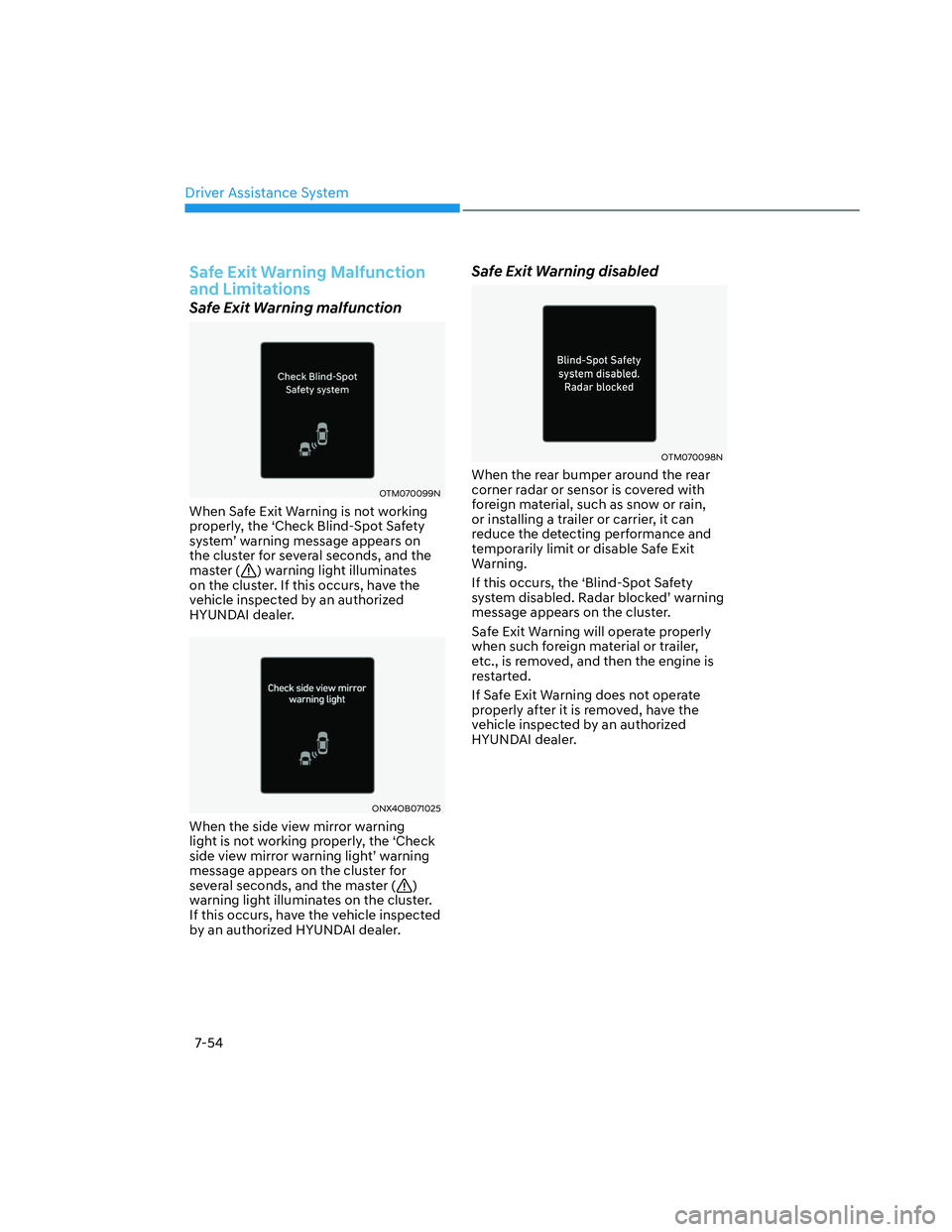
OTM070099N OTM070099N
When Safe Exit Warning is not working
properly, the ‘Check Blind-Spot Safety
system’ warning message appears on
the cluster for several seconds, and the
master (
) warning light illuminates
on the cluster. If this occurs, have the
vehicle inspected by an authorized
HYUNDAI dealer.
ONX4OB071025ONX4OB071025
When the side view mirror warning
light is not working properly, the ‘Check
side view mirror warning light’ warning
message appears on the cluster for
several seconds, and the master (
)
warning light illuminates on the cluster.
If this occurs, have the vehicle inspected
by an authorized HYUNDAI dealer.
Safe Exit Warning disabled
OTM070098NOTM070098N
When the rear bumper around the rear
corner radar or sensor is covered with
foreign material, such as snow or rain,
or installing a trailer or carrier, it can
reduce the detecting performance and
temporarily limit or disable Safe Exit
Warning.
If this occurs, the ‘Blind-Spot Safety
system disabled. Radar blocked’ warning
message appears on the cluster.
Safe Exit Warning will operate properly
when such foreign material or trailer,
etc., is removed, and then the engine is
restarted.
If Safe Exit Warning does not operate
properly after it is removed, have the
vehicle inspected by an authorized
HYUNDAI dealer.
Page 407 of 598
07
7-55
WARNING
• Even though the warning message
does not appear on the cluster,
Safe Exit Warning may not properly
operate.
• Safe Exit Warning may not properly
operate in an area (for example,
open terrain) where any objects are
not detected right after the engine
is turned on, or when the detecting
sensor is blocked with foreign
material right after the engine is
turned on.
CAUTION
Turn off Safe Exit Warning to install
or remove a trailer, carrier, or another
attachment. Turn on Safe Exit Warning
when finished.
Limitations of Safe Exit Warning
Safe Exit Warning may not operate
properly, or it may operate unexpectedly
under the following circumstances:
• Getting out of the vehicle where trees
or grass are overgrown
• Getting out of the vehicle where the
road is wet
• The approaching vehicle is very fast or
very slow
Information
For more details on the limitations of the
rear corner radar, refer to “Blind-Spot
Collision-Avoidance Assist (BCA)” section
in this chapter.
WARNING
• Safe Exit Warning may not operate
properly if interfered by strong
electromagnetic waves.
• Safe Exit Warning may not operate
for 3 seconds after the vehicle is
started, or rear corner radars are
initialized.
Page 427 of 598
07
7-75
Turning off Cruise Control
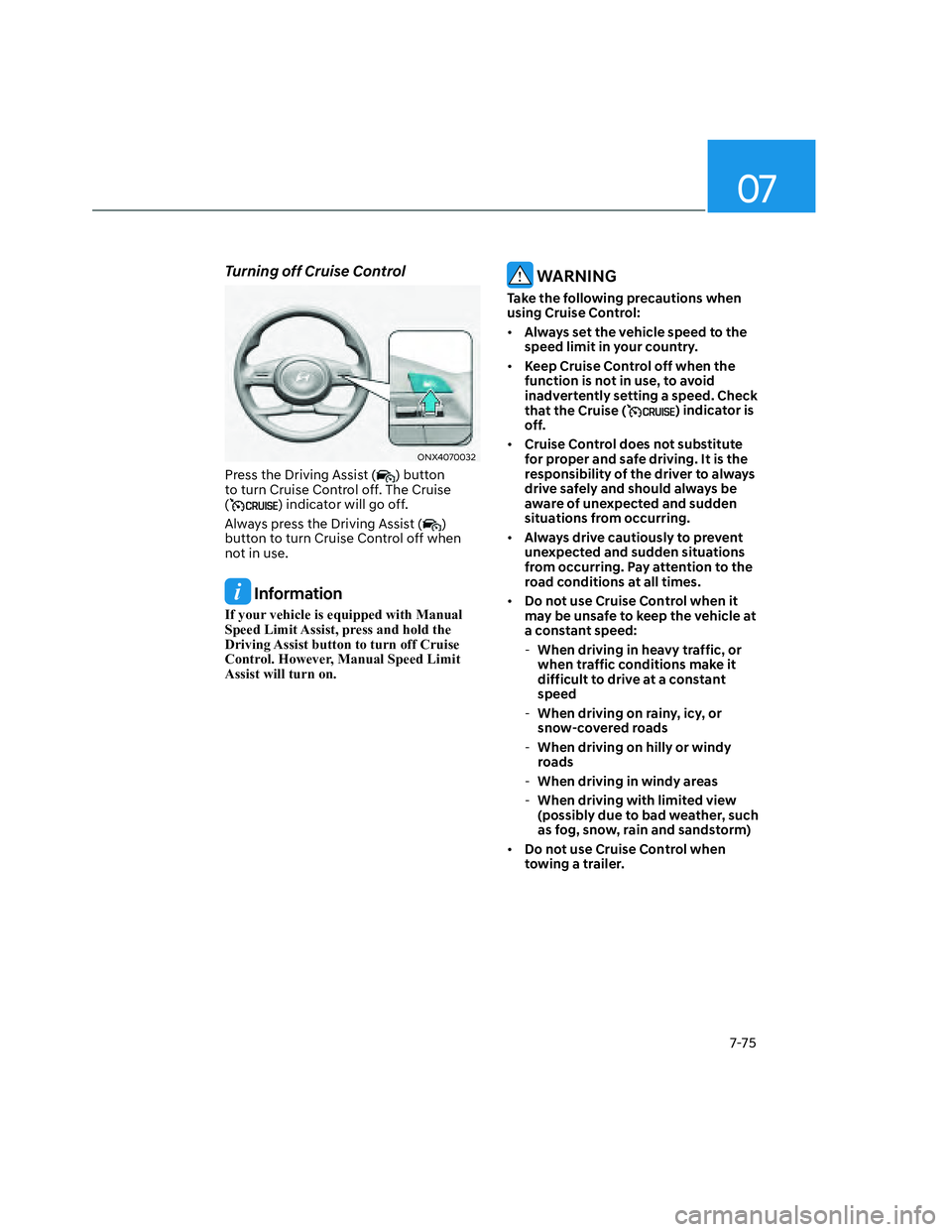
ONX4070032ONX4070032
Press the Driving Assist () button
to turn Cruise Control off. The Cruise
(
) indicator will go off.
Always press the Driving Assist (
)
button to turn Cruise Control off when
not in use.
Information
If your vehicle is equipped with Manual
Speed Limit Assist, press and hold the
Driving Assist button to turn off Cruise
Control. However, Manual Speed Limit
Assist will turn on.
WARNING
Take the following precautions when
using Cruise Control:
• Always set the vehicle speed to the
speed limit in your country.
• Keep Cruise Control off when the
function is not in use, to avoid
inadvertently setting a speed. Check
that the Cruise (
) indicator is
off.
• Cruise Control does not substitute
for proper and safe driving. It is the
responsibility of the driver to always
drive safely and should always be
aware of unexpected and sudden
situations from occurring.
• Always drive cautiously to prevent
unexpected and sudden situations
from occurring. Pay attention to the
road conditions at all times.
• Do not use Cruise Control when it
may be unsafe to keep the vehicle at
a constant speed:
-When driving in heavy traffic, or
when traffic conditions make it
difficult to drive at a constant
speed
-When driving on rainy, icy, or
snow-covered roads
-When driving on hilly or windy
roads
-When driving in windy areas
-When driving with limited view
(possibly due to bad weather, such
as fog, snow, rain and sandstorm)
• Do not use Cruise Control when
towing a trailer.
Page 438 of 598
Driver Assistance System
7-86
WARNING
Take the following precautions when
using Smart Cruise Control:
• Smart Cruise Control does not
substitute for proper and safe
driving. It is the responsibility of the
driver to always check the speed and
distance to the vehicle ahead.
• Smart Cruise Control may not
recognize unexpected and sudden
situations or complex driving
situations, so always pay attention to
driving conditions and control your
vehicle speed.
• Keep Smart Cruise Control off when
the function is not in use to avoid
inadvertently setting a speed.
• Do not open the door or leave the
vehicle when Smart Cruise Control
is operating, even if the vehicle is
stopped.
• Always be aware of the selected
speed and vehicle distance.
• Keep a safe distance according to
road conditions and vehicle speed.
If the vehicle distance is too close
during high-speed driving, a serious
collision may result.
• When maintaining distance with
the vehicle ahead, if the front
vehicle disappears, Smart Cruise
Control may suddenly accelerate to
the set speed. Always be aware of
unexpected and sudden situations
from occurring.
• Vehicle speed may decrease on an
upward slope and increase on a
downward slope.
• Always be aware of situations such
as when a vehicle cuts in suddenly.
• When you are towing a trailer or
another vehicle, we recommend that
Smart Cruise Control is turned off
due to safety reasons.
• Turn off Smart Cruise Control when
your vehicle is being towed.• Smart Cruise Control may not
operate properly if interfered by
strong electromagnetic waves.
• Smart Cruise Control may not
detect an obstacle in front and lead
to a collision. Always look ahead
cautiously to prevent unexpected
and sudden situations from
occurring.
• Vehicles moving in front of you with
a frequent lane change may cause
a delay in Smart Cruise Control
reaction or may cause Smart Cruise
Control to react to a vehicle actually
in an adjacent lane. Always drive
cautiously to prevent unexpected
and sudden situations from
occurring.
• Always be aware of the surroundings
and drive safely, even though a
warning message does not appear or
an audible warning does not sound.
• If any other system’s warning
message is displayed or warning
sound is generated, Smart Cruise
Control warning message may not
be displayed and warning sound may
not be generated.
• You may not hear the warning sound
of Forward Collision-Avoidance
Assist if the surrounding is noisy.
• The vehicle manufacturer is not
responsible for any traffic violation
or accidents caused by the driver.
• Always set the vehicle speed under
the speed limit in your country.
Information
• Smart Cruise Control may not operate
for 15 seconds after the vehicle is
started or the front view camera or
front radar is initialized.
• You may hear a sound when the brake
is controlled by Smart Cruise Control.
Page 443 of 598
07
7-91
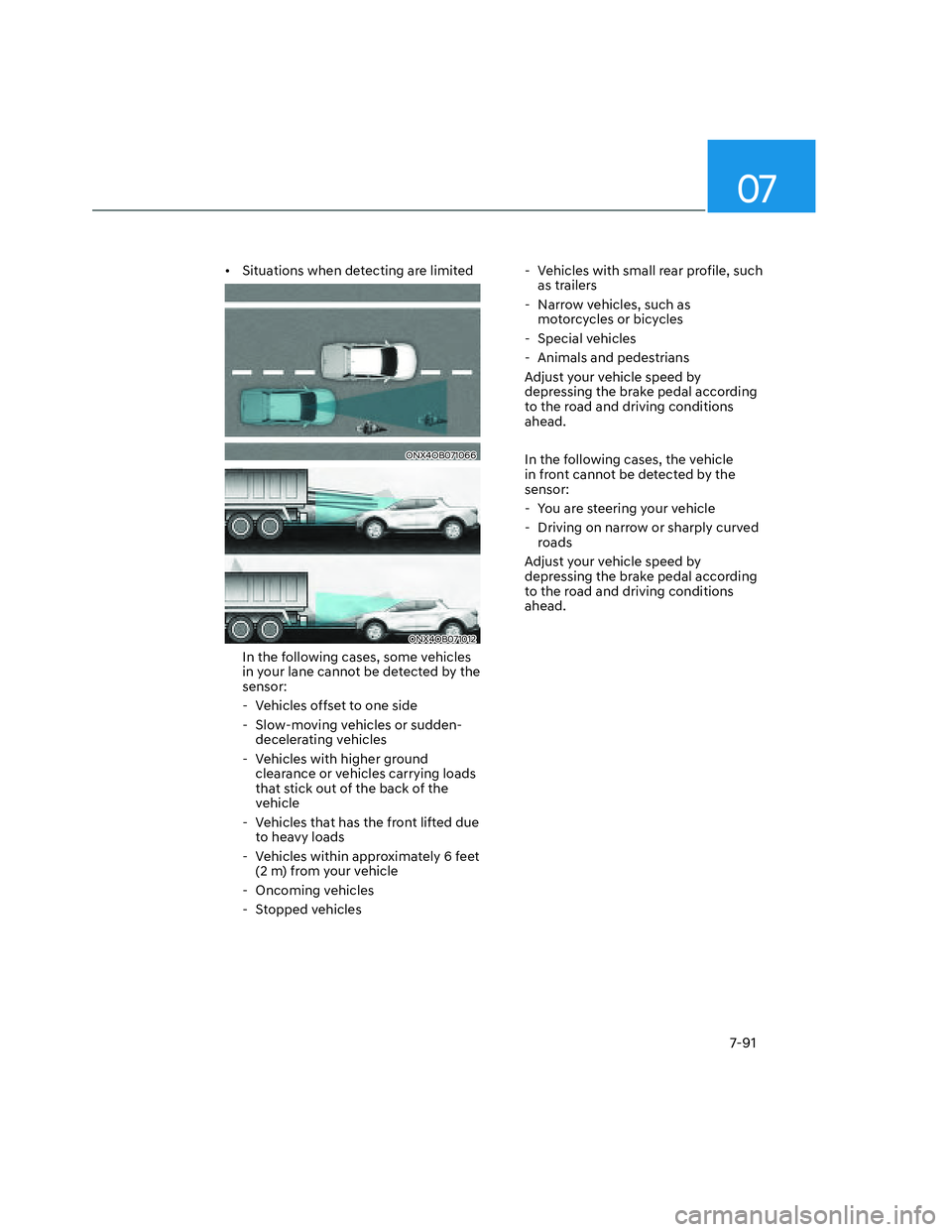
• Situations when detecting are limited
ONX4OB071066ONX4OB071066
ONX4OB071012ONX4OB071012
In the following cases, some vehicles
in your lane cannot be detected by the
sensor:
- Vehicles offset to one side
- Slow-moving vehicles or sudden-
decelerating vehicles
- Vehicles with higher ground
clearance or vehicles carrying loads
that stick out of the back of the
vehicle
- Vehicles that has the front lifted due
to heavy loads
- Vehicles within approximately 6 feet
(2 m) from your vehicle
- Oncoming vehicles
- Stopped vehicles - Vehicles with small rear profile, such
as trailers
- Narrow vehicles, such as
motorcycles or bicycles
- Special vehicles
- Animals and pedestrians
Adjust your vehicle speed by
depressing the brake pedal according
to the road and driving conditions
ahead.
In the following cases, the vehicle
in front cannot be detected by the
sensor:
- You are steering your vehicle
- Driving on narrow or sharply curved
roads
Adjust your vehicle speed by
depressing the brake pedal according
to the road and driving conditions
ahead.
Page 450 of 598
![HYUNDAI SANTA CRUZ 2022 Owners Manual Driver Assistance System
7-98
ONX4OB071072ONX4OB071072[1] : Driving route, [2] : Branch line,
[3] : Curved road section, [4] : Main road
• If there is no destination set on the
navigation, Highwa](/manual-img/35/41171/w960_41171-449.png "HYUNDAI SANTA CRUZ 2022 Owners Manual Driver Assistance System
7-98
ONX4OB071072ONX4OB071072[1] : Driving route, [2] : Branch line,
[3] : Curved road section, [4] : Main road
• If there is no destination set on the
navigation, Highwa")
Driver Assistance System
7-98
ONX4OB071072ONX4OB071072[1] : Driving route, [2] : Branch line,
[3] : Curved road section, [4] : Main road
• If there is no destination set on the
navigation, Highway Auto Curve
Slowdown function will operate based
on the curve information on the main
road.
• Even if you depart from the main
road, Highway Auto Curve Slowdown
function may temporarily operate
due to navigation information of the
highway curve section.
WARNING
• Navigation-based Smart Cruise
Control is not a substitute for safe
driving practices, but a convenience
function. Always have your eyes on
the road, and it is the responsibility
of the driver to avoid violating traffic
laws.
• The navigation’s speed limit
information may differ from the
actual speed limit information on the
road. It is the driver's responsibility
to check the speed limit on the
actual driving road or lane.
• Navigation-based Smart Cruise
Control will automatically be
cancelled when you leave the
highway main road. Always pay
attention to road and driving
conditions while driving.
• Navigation-based Smart Cruise
Control may not operate due to the
existence of leading vehicles and
the driving conditions of the vehicle.
Always pay attention to road and
driving conditions while driving.
• When you are towing a trailer or
another vehicle, we recommend
that Navigation-based Smart Cruise
Control is turned off due to safety
reasons.
Page 461 of 598
07
7-109
WARNING
• The driver is responsible for
controlling the vehicle for safe
driving.
• Always have your hands on the
steering wheel while driving.
• Highway Driving Assist is a
supplemental function that assists
the driver in driving the vehicle
and is not a complete autonomous
driving system. Always check road
conditions, and if necessary, take
appropriate actions to drive safely.
• Always have your eyes on the road,
and it is the responsibility of the
driver to avoid violating traffic laws.
The vehicle manufacturer is not
responsible for any traffic violation
or accidents caused by the driver.
• Highway Driving Assist may not
be able to recognize all traffic
situations. Highway Driving Assist
may not detect possible collisions
due to limitations of the function.
Always be aware of the limitations
of the function. Obstacles such as
vehicles, motorcycles, bicycles,
pedestrians, or unspecified objects
or structures such as guardrails,
tollgate, etc., that may collide with
the vehicle may not be detected.
• Highway Driving Assist will turn off
automatically under the following
situations:
-Driving on roads that Highway
Driving Assist does not operate,
such as a rest area, intersection,
junction, etc.
-The navigation does not operate
properly such as when the
navigation is being updated or
restarted • Highway Driving Assist may
inadvertently operate or turn off
depending on road conditions
(navigation information) and
surroundings.
• Lane Following Assist function may
be temporarily disabled when the
front view camera cannot detect
lanes properly or the hands-off
warning is on.
• You may not hear the warning sound
of Highway Driving Assist if the
surrounding is noisy.
• If the vehicle is driven at high speed
above a certain speed at a curve,
your vehicle may drive to one side or
may depart from the driving lane.
• When you are towing a trailer or
another vehicle, we recommend that
Highway Driving Assist is turned off
due to safety reasons.
• The hands–off warning message
may appear early or late depending
on how the steering wheel is held or
road conditions. Always have your
hands on the steering wheel while
driving.
• For your safety, please read the
owner's manual before using the
Highway Driving Assist.
• Highway Driving Assist will not
operate when the engine is started,
or when the detecting sensors or
navigation is being initialized.
Page 478 of 598
Driver Assistance System
7-126
Rear Cross-Traffic Collision-
Avoidance Assist Malfunction
and Limitations
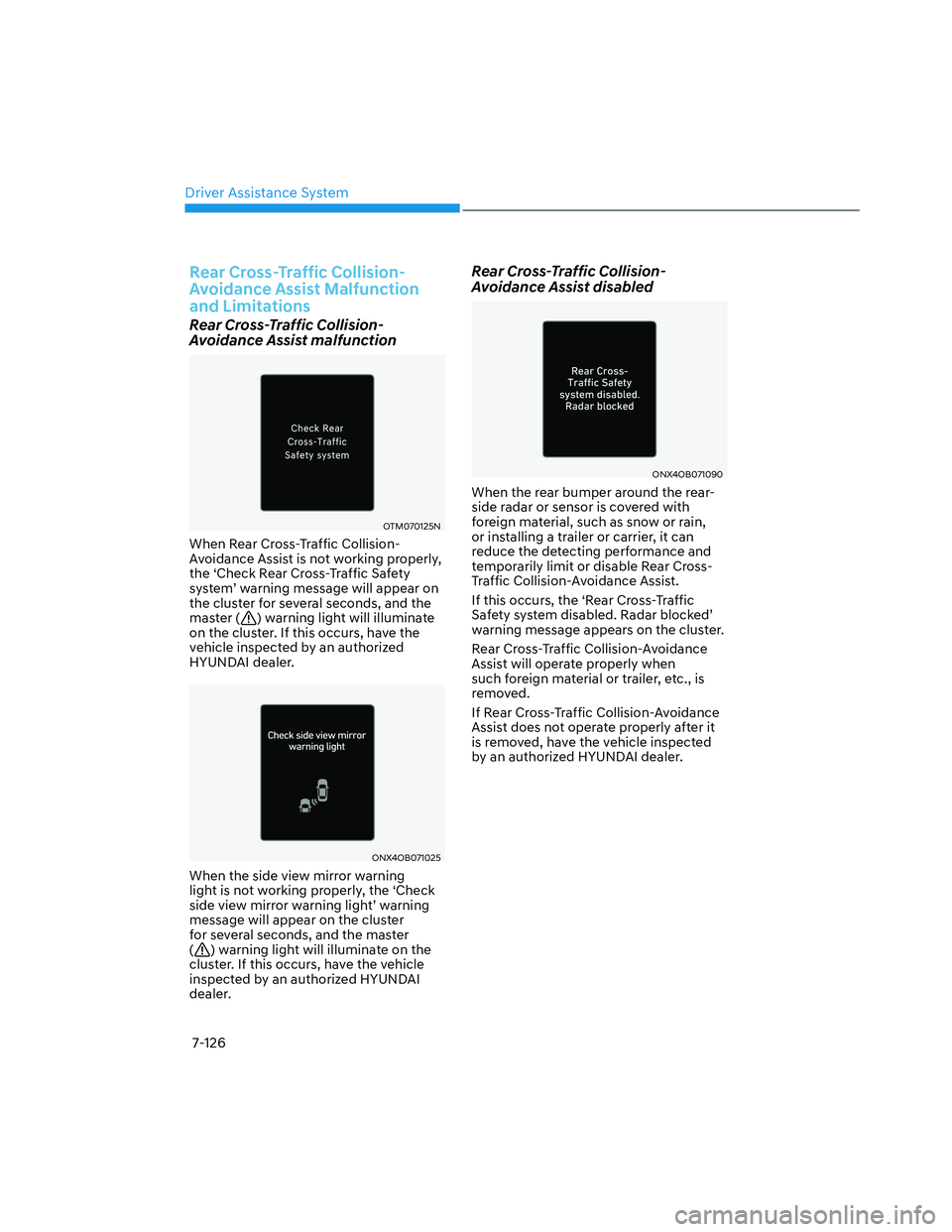
Rear Cross-Traffic Collision-
Avoidance Assist malfunction
OTM070125NOTM070125N
When Rear Cross-Traffic Collision-
Avoidance Assist is not working properly,
the ‘Check Rear Cross-Traffic Safety
system’ warning message will appear on
the cluster for several seconds, and the
master (
) warning light will illuminate
on the cluster. If this occurs, have the
vehicle inspected by an authorized
HYUNDAI dealer.
ONX4OB071025ONX4OB071025
When the side view mirror warning
light is not working properly, the ‘Check
side view mirror warning light’ warning
message will appear on the cluster
for several seconds, and the master
(
) warning light will illuminate on the
cluster. If this occurs, have the vehicle
inspected by an authorized HYUNDAI
dealer.
Rear Cross-Traffic Collision-
Avoidance Assist disabled
ONX4OB071090ONX4OB071090
When the rear bumper around the rear-
side radar or sensor is covered with
foreign material, such as snow or rain,
or installing a trailer or carrier, it can
reduce the detecting performance and
temporarily limit or disable Rear Cross-
Traffic Collision-Avoidance Assist.
If this occurs, the ‘Rear Cross-Traffic
Safety system disabled. Radar blocked’
warning message appears on the cluster.
Rear Cross-Traffic Collision-Avoidance
Assist will operate properly when
such foreign material or trailer, etc., is
removed.
If Rear Cross-Traffic Collision-Avoidance
Assist does not operate properly after it
is removed, have the vehicle inspected
by an authorized HYUNDAI dealer.