2022 HYUNDAI KONA change time
[x] Cancel search: change timePage 415 of 579
07
7-83
Information
Depending on the curve ahead on the
highway, the vehicle will decelerate,
and after passing the curve, the
vehicle will accelerate to Smart Cruise
Control set speed.
Vehicle deceleration time may differ
depending on the vehicle speed
and the degree of the curve on the
road. The higher the driving speed,
deceleration will start faster.
Highway Set Speed Auto Change
function will operate when Smart
Cruise Control set speed and the
highway speed limit is matched.
While Highway Set Speed Auto
Change function is operating, when
the highway speed limit changes,
Smart Cruise Control set speed
automatically changes to the changed
speed limit.
If Smart Cruise Control set speed is
adjusted different from the speed
limit, Highway Set Speed Auto Change
function will be in the standby state.
If Highway Set Speed Auto Change
function has changed to the standby
state by driving on a road other than
the highway main road, Highway Set
Speed Auto Change function will
operate again when you drive on the
main road again without setting the
set speed.
If Highway Set Speed Auto Change
function has changed to the standby
state by depressing the brake pedal
or pressing the switch on the
steering wheel, press the switch
to restart the function.
Highway Set Speed Auto Change
function does not operate on highway
interchanges or junctions.
Information
Page 416 of 579

Driver assistance system
7-84
Limitations of Navigation-based
Smart Cruise Control
Navigation-based Smart Cruise Control
may not operate normally under the
following circumstances:
The navigation is not working properly
Map information is not transmitted
due to infotainment system's
abnormal operation
Speed limit and road information in
the navigation is not updated
The map information and the actual
road is different because of real-time
GPS data or map information error
The navigation searches for a route
while driving
GPS signals are blocked in areas such
as a tunnel
The navigation is updated while
driving
A road that divides into two or more
roads and joins again
The driver goes off course the route
set in the navigation
The route to the destination is
changed or canceled by resetting the
navigation
The vehicle enters a service station or
rest area
Android Auto or Car Play is operating
The navigation cannot detect the
current vehicle position (ex: elevated
roads including overpass adjacent to
general roads or nearby roads exist in
a parallel way)
The navigation is being updated while
driving
The navigation is being restarted while
driving
The speed limit of some sections
changes according to the road
situations
Driving on a road under construction
Driving on a road that is controlled
There is bad weather, such as heavy
rain, heavy snow, etc.
Driving on a road that is sharply
curved
Page 428 of 579
Driver assistance system
7-96
Highway Driving Assist standby
When Smart Cruise Control is
temporarily canceled while Highway
Driving Assist is operating, Highway
Driving Assist will be in the standby state.
At this time, Lane Following Assist will
operate normally.
Highway Driving Assist
malfunction and limitation
Highway Driving Assist malfunction
OTM070120N
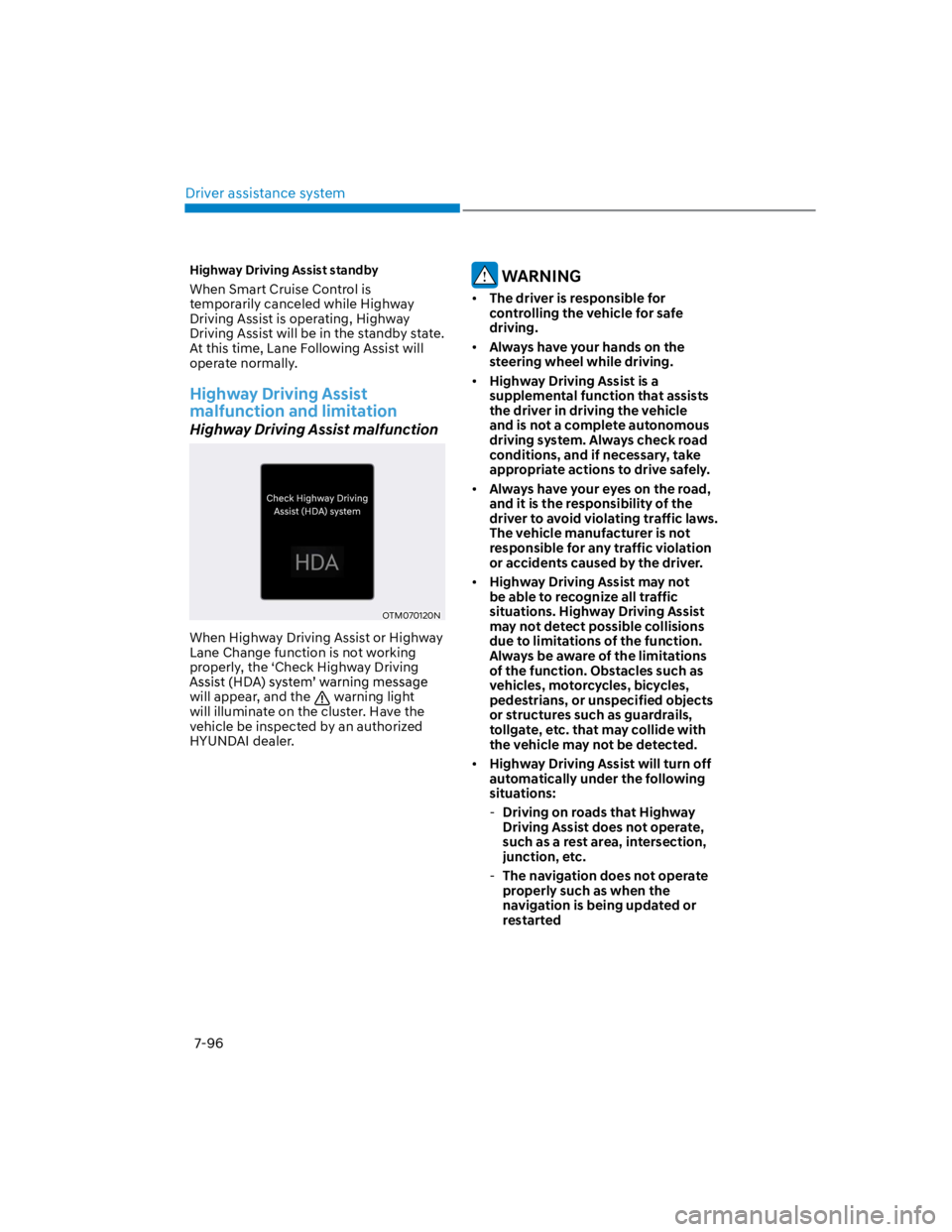
When Highway Driving Assist or Highway
Lane Change function is not working
properly, the ‘Check Highway Driving
will appear, and the warning light
will illuminate on the cluster. Have the
vehicle be inspected by an authorized
HYUNDAI dealer.
WARNING
The driver is responsible for
controlling the vehicle for safe
driving.
Always have your hands on the
steering wheel while driving.
Highway Driving Assist is a
supplemental function that assists
the driver in driving the vehicle
and is not a complete autonomous
driving system. Always check road
conditions, and if necessary, take
appropriate actions to drive safely.
Always have your eyes on the road,
and it is the responsibility of the
driver to avoid violating traffic laws.
The vehicle manufacturer is not
responsible for any traffic violation
or accidents caused by the driver.
Highway Driving Assist may not
be able to recognize all traffic
situations. Highway Driving Assist
may not detect possible collisions
due to limitations of the function.
Always be aware of the limitations
of the function. Obstacles such as
vehicles, motorcycles, bicycles,
pedestrians, or unspecified objects
or structures such as guardrails,
tollgate, etc. that may collide with
the vehicle may not be detected.
Highway Driving Assist will turn off
automatically under the following
situations:
-Driving on roads that Highway
Driving Assist does not operate,
such as a rest area, intersection,
junction, etc.
-The navigation does not operate
properly such as when the
navigation is being updated or
restarted
Page 429 of 579

07
7-97
Highway Driving Assist may
inadvertently operate or turn off
depending on road conditions
(navigation information) and
surroundings.
Lane Following Assist function may
be temporarily disabled when the
front view camera cannot detect
lanes properly or the hands-off
warning is on.
You may not hear the warning sound
of Highway Driving Assist if the
surrounding is noisy.
If the vehicle is driven at high speed
above a certain speed at a curve,
your vehicle may drive to one side or
may depart from the driving lane.
When you are towing a trailer or
another vehicle, we recommend that
Highway Driving Assist is turned off
due to safety reasons.
The hands–off warning message
may appear early or late depending
on how the steering wheel is held or
road conditions. Always have your
hands on the steering wheel while
driving.
For your safety, please read the
owner's manual before using the
Highway Driving Assist.
Highway Driving Assist will not
operate when the engine is started,
or when the detecting sensors or
navigation is being initialized.
Limitations of Highway Driving
Assist
Highway Driving Assist may not operate
normally, or may not operate under the
following circumstances:
The map information and the
actual road is different because the
navigation is not updated
The map information and the actual
road is different because of real-time
GPS data or map information error
The infotainment system is overloaded
by simultaneously performing
functions such as route search, video
playback, voice recognition, etc.
GPS signals are blocked in areas such
as a tunnel
The driver goes off course or the
route to the destination is changed or
canceled by resetting the navigation
The vehicle enters a service station or
rest area
Android Auto or Car Play is operating
The navigation cannot detect the
current vehicle position (ex: elevated
roads including overpass adjacent to
general roads or nearby roads exist in
a parallel way)
Information
Page 435 of 579
07
7-103
Rear Cross-Traffic Safety system
settings
Setting features
OTM070194N
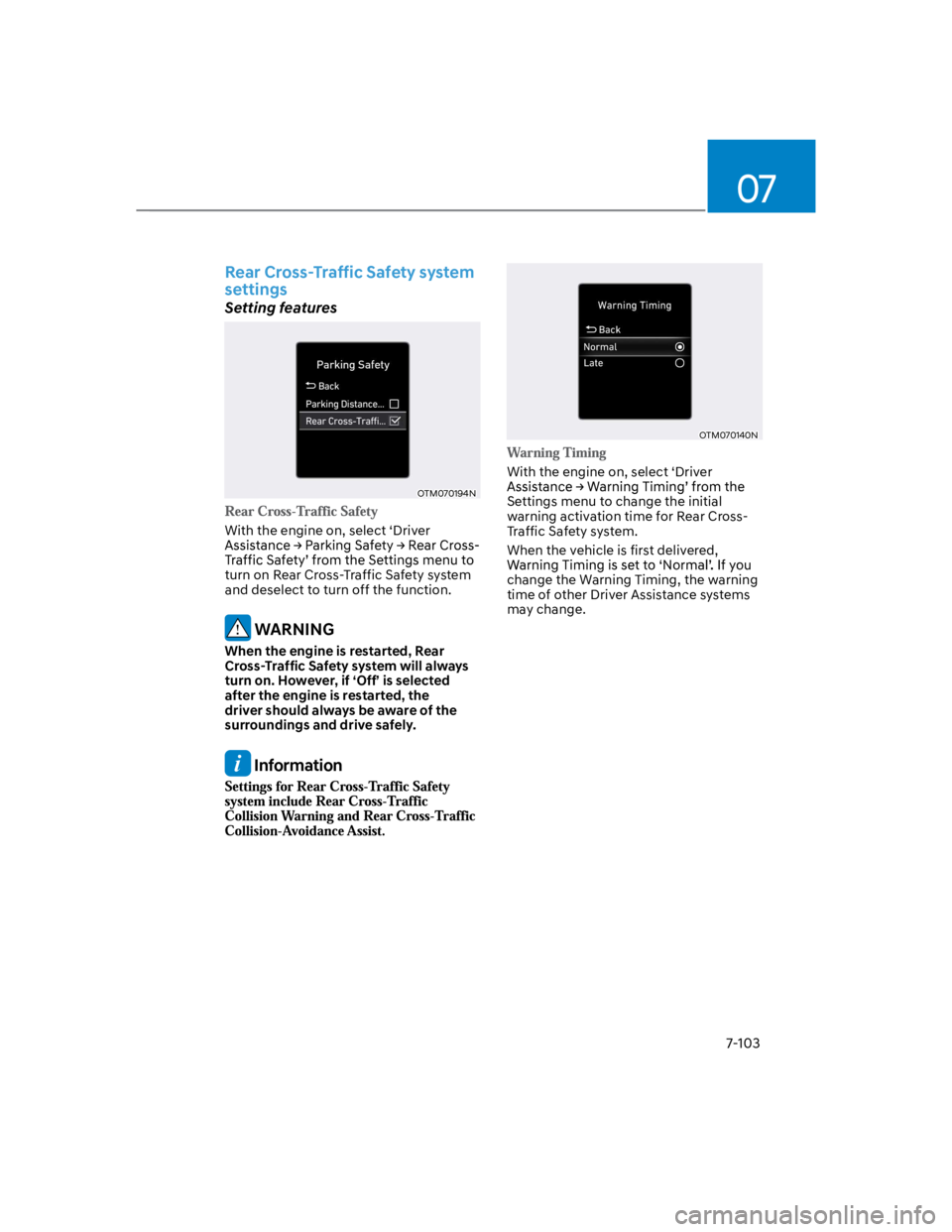
With the engine on, select ‘Driver
turn on Rear Cross-Traffic Safety system
and deselect to turn off the function.
WARNING
When the engine is restarted, Rear
Cross-Traffic Safety system will always
turn on. However, if ‘Off’ is selected
after the engine is restarted, the
driver should always be aware of the
surroundings and drive safely.
Information
OTM070140N
With the engine on, select ‘Driver
Settings menu to change the initial
warning activation time for Rear Cross-
Traffic Safety system.
When the vehicle is first delivered,
change the Warning Timing, the warning
time of other Driver Assistance systems
may change.
Page 436 of 579
Driver assistance system
7-104
OOS070110N
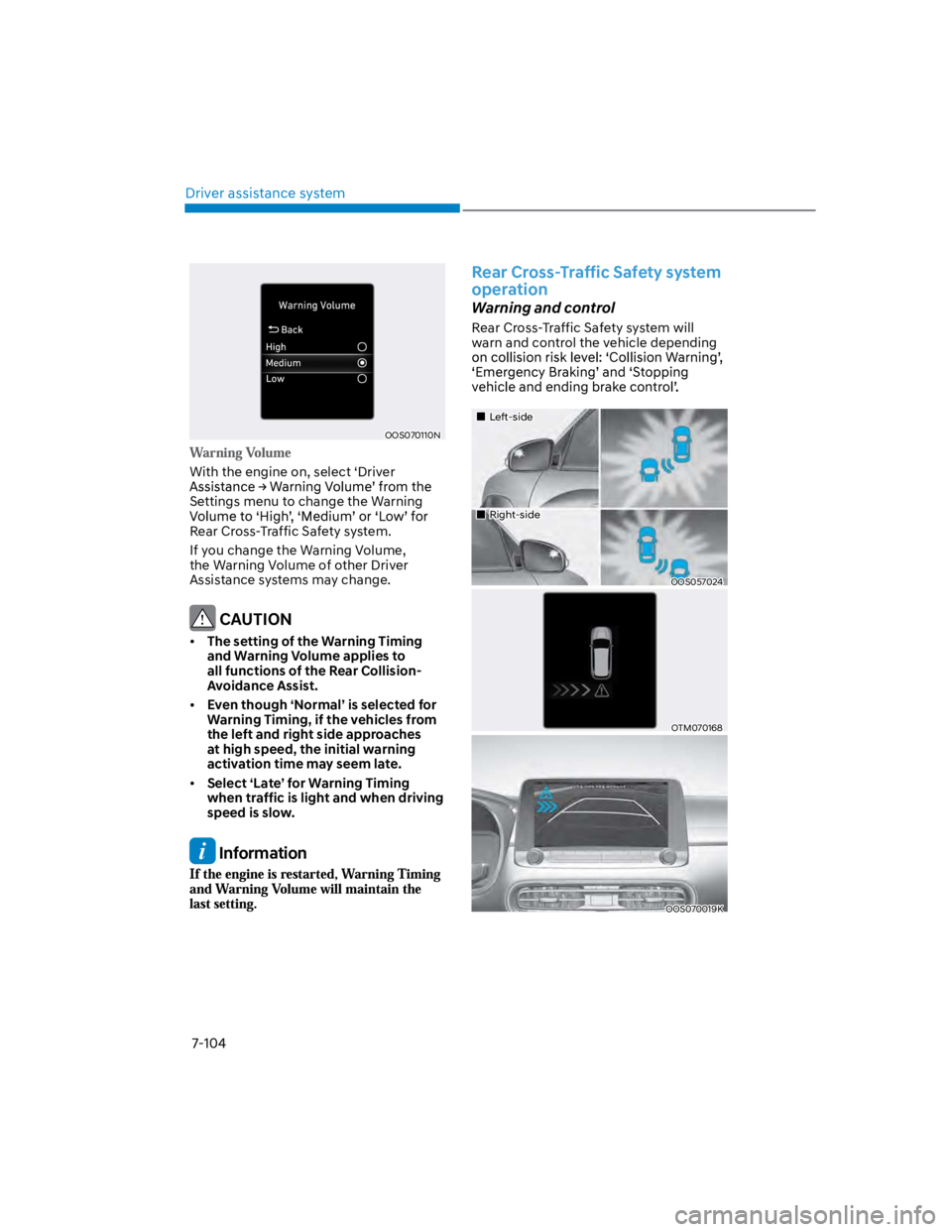
With the engine on, select ‘Driver
Settings menu to change the Warning
Rear Cross-Traffic Safety system.
If you change the Warning Volume,
the Warning Volume of other Driver
Assistance systems may change.
CAUTION
The setting of the Warning Timing
and Warning Volume applies to
all functions of the Rear Collision-
Avoidance Assist.
Even though ‘Normal’ is selected for
Warning Timing, if the vehicles from
the left and right side approaches
at high speed, the initial warning
activation time may seem late.
Select ‘Late’ for Warning Timing
when traffic is light and when driving
speed is slow.
Information
Rear Cross-Traffic Safety system
operation
Warning and control
Rear Cross-Traffic Safety system will
warn and control the vehicle depending
Left-side
Right-side
OOS057024
OTM070168
OOS070019K
Page 495 of 579
09
9-9
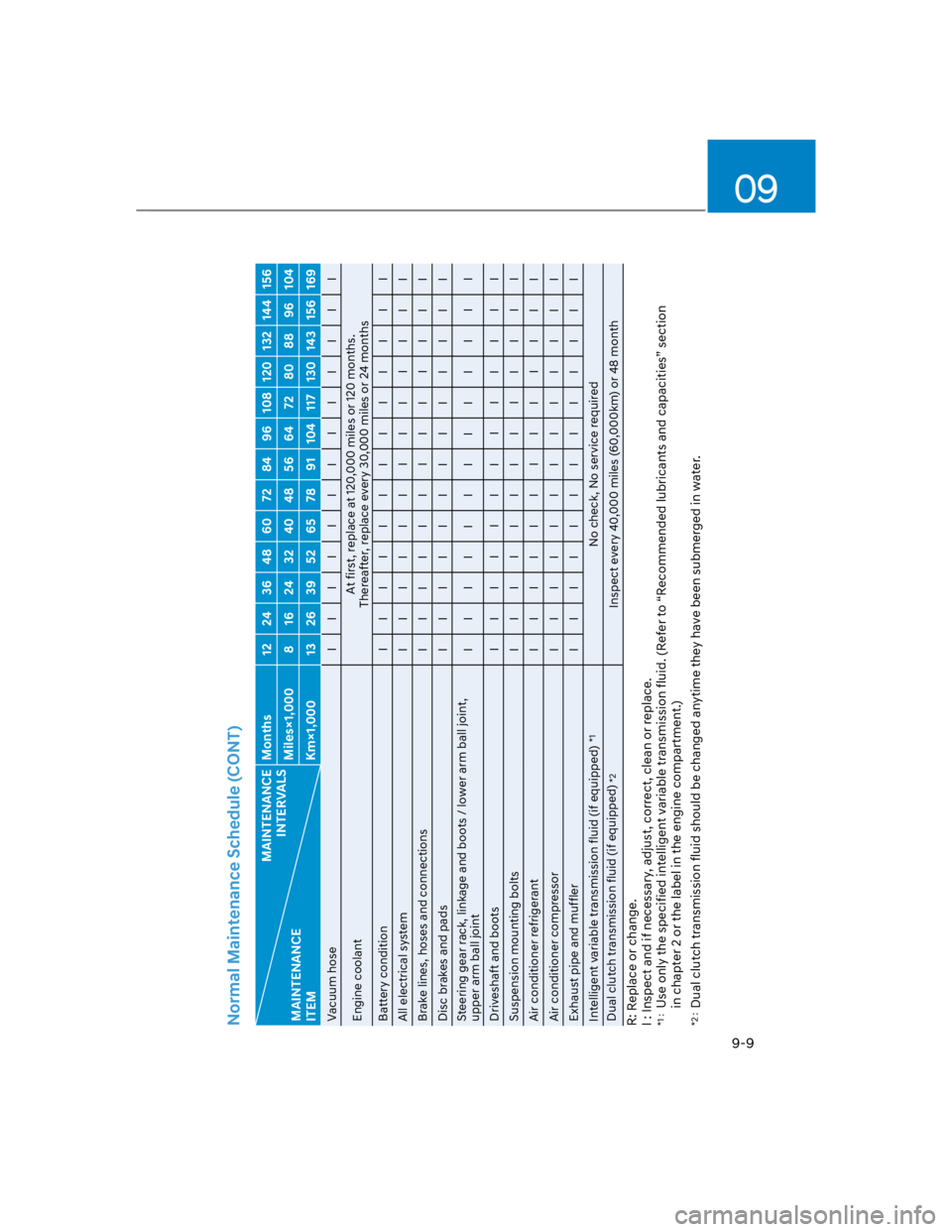
Normal Maintenance Schedule (CONT)
MAINTENANCE
INTERVALS
MAINTENANCE
ITEM
Months 12 24 36 48 60 72 84 96 108 120 132 144 156
Miles×1,000 8 16 24 32 40 48 56 64 72 80 88 96 104
Km×1,000 13 26 39 52 65 78 91 104 117 130 143 156 169
Vacuum hose I I I I I I I I I I I I I
Engine coolant
At first, replace at 120,000 miles or 120 months.
Thereafter, replace every 30,000 miles or 24 months
Battery condition I I I I I I I I I I I I I
All electrical system I I I I I I I I I I I I I
Brake lines, hoses and connections I I I I I I I I I I I I I
Disc brakes and pads I I I I I I I I I I I I I
Steering gear rack, linkage and boots / lower arm ball joint,
upper arm ball joint
I I I I I I I I I I I I I
Driveshaft and boots I I I I I I I I I I I I I
Suspension mounting bolts I I I I I I I I I I I I I
Air conditioner refrigerant I I I I I I I I I I I I I
Air conditioner compressor I I I I I I I I I I I I I
Exhaust pipe and muffler I I I I I I I I I I I I I
Intelligent variable transmission fluid (if equipped)
*1
No check, No service required
Dual clutch transmission fluid (if equipped)
*2
Inspect every 40,000 miles (60,000km) or 48 month
R: Replace or change.
I : Inspect and if necessary, adjust, correct, clean or replace.
*1 :
Use only the specified intelligent variable transmission fluid. (Refer to “Recommended lubricants and capacities” section
in chapter 2 or the label in the engine compartment.)
*2 :
Dual clutch transmission fluid should be changed anytime they have been submerged in water.
Page 496 of 579
Maintenance
9-10
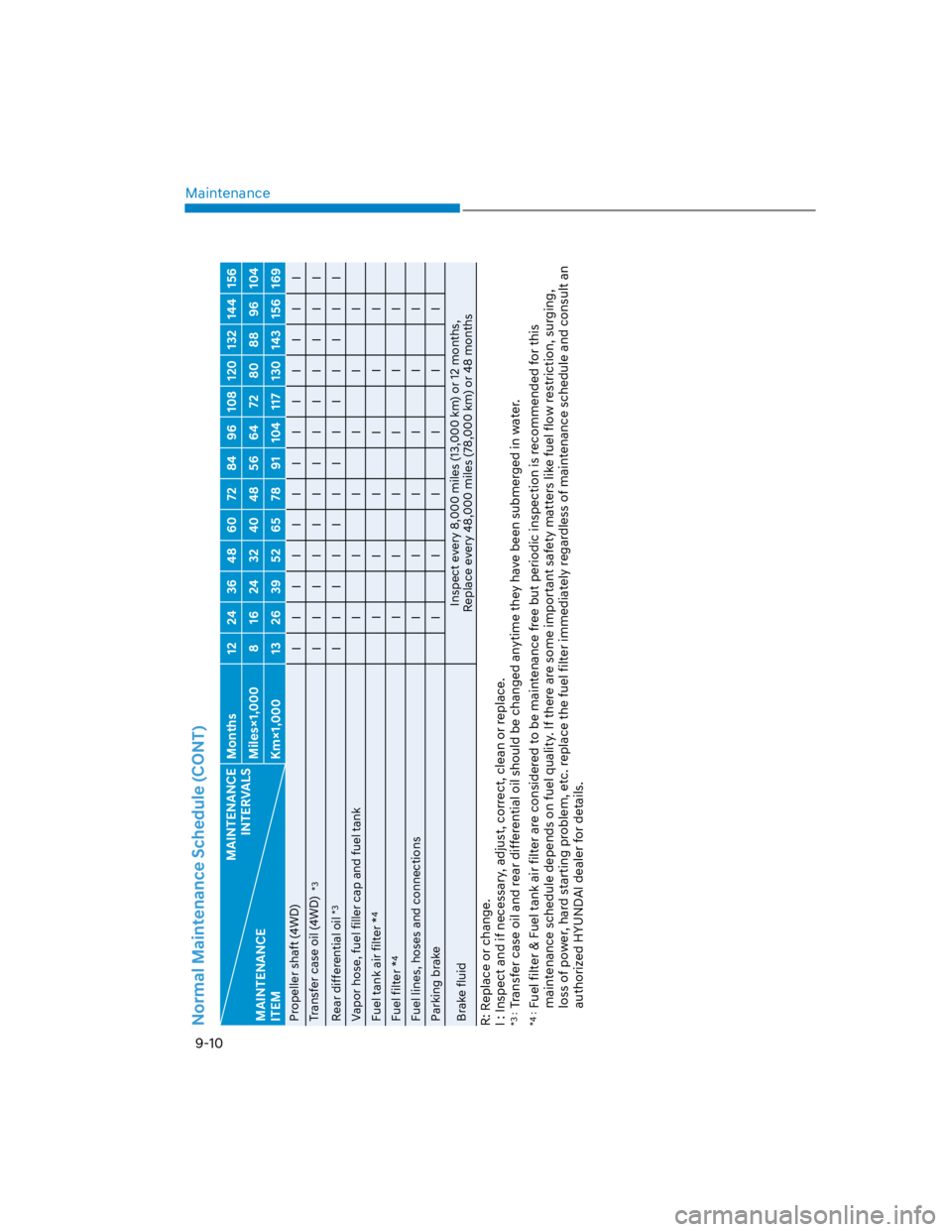
Normal Maintenance Schedule (CONT)
MAINTENANCE
INTERVALS
MAINTENANCE
ITEM
Months 12 24 36 48 60 72 84 96 108 120 132 144 156
Miles×1,000 8 16 24 32 40 48 56 64 72 80 88 96 104
Km×1,000 13 26 39 52 65 78 91 104 117 130 143 156 169
Propeller shaft (4WD)
I I I I I I I I I I I I I
Transfer case oil (4WD)
*3
I I I I I I I I I I I I I
Rear differential oil
*3
I I I I I I I I I I I I I
Vapor hose, fuel filler cap and fuel tank I I I I I I
Fuel tank air filter *
4
I I I I I I
Fuel filter *
4
I I I I I I
Fuel lines, hoses and connections I I I I I I
Parking brake I I I I I I
Brake fluid
Inspect every 8,000 miles (13,000 km) or 12 months,
Replace every 48,000 miles (78,000 km) or 48 months
R: Replace or change.
I : Inspect and if necessary, adjust, correct, clean or replace.
*3 :
Transfer case oil and rear differential oil should be changed anytime they have been submerged in water.
*4 :
Fuel filter & Fuel tank air filter are considered to be maintenance free but periodic inspection is recommended for this
maintenance schedule depends on fuel quality. If there are some important safety matters like fuel flow restriction, surging,
loss of power, hard starting problem, etc. replace the fuel filter immediately regardless of maintenance schedule and consult an
authorized HYUNDAI dealer for details.