2022 HYUNDAI KONA warning lights
[x] Cancel search: warning lightsPage 205 of 579
05
5-71
Interior lights
WARNING
Do not use the interior lights when
driving in the dark. The interior lights
may obscure your view and cause an
accident.
NOTICE
Do not use the interior lights for
extended periods when the vehicle is
turned off or the battery will discharge.
Interior lamp AUTO cut
The interior lamps will automatically go
off approximately 20 minutes after the
vehicle is turned off and the doors are
closed. If a door is opened, the lamp
will go off 40 minutes after the vehicle
is turned off. If the doors are locked by
the smart key and the vehicle enters the
armed stage of the theft alarm system,
the lamps will go off five seconds later.
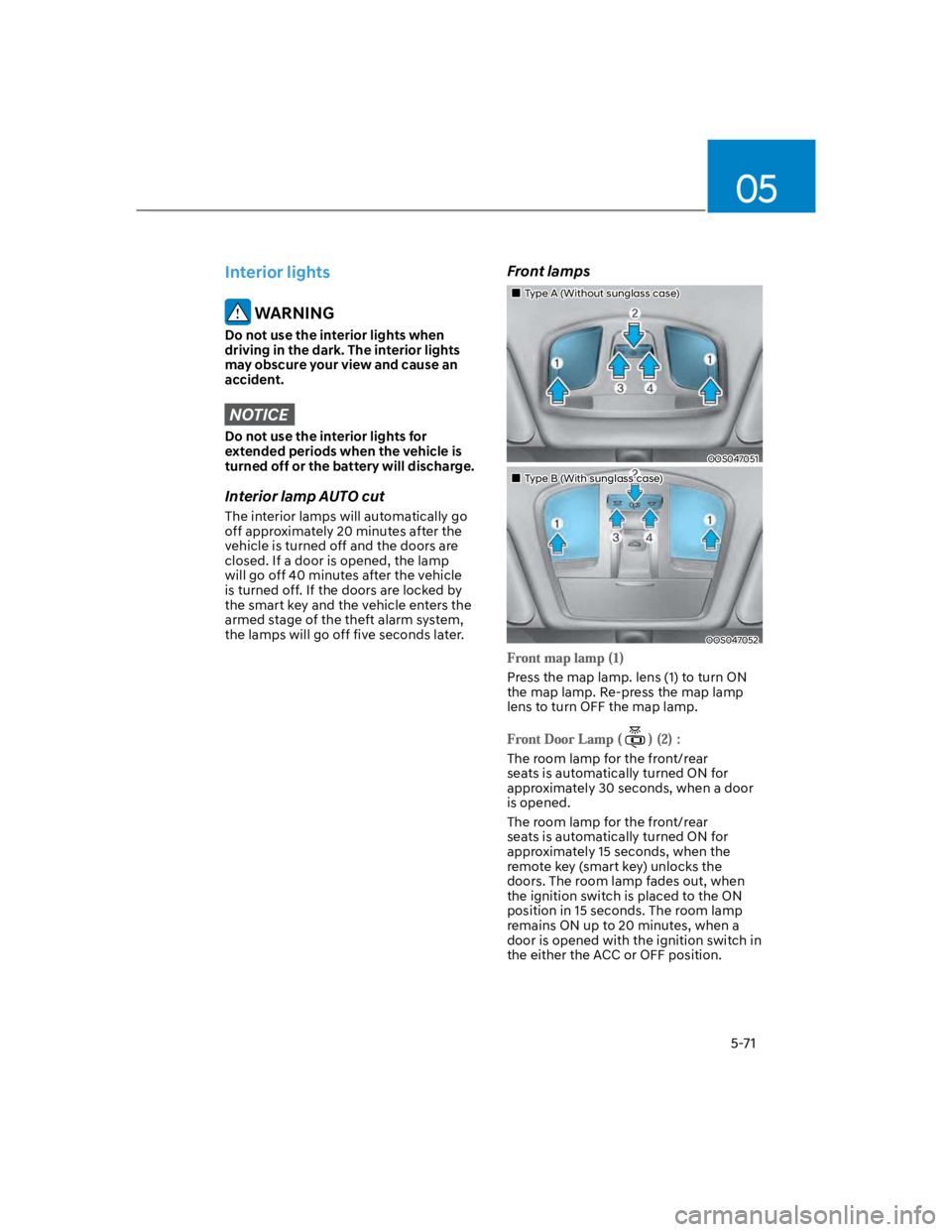
Front lamps
Type A (Without sunglass case)
OOS047051
Type B (With sunglass case)
OOS047052
Press the map lamp. lens (1) to turn ON
the map lamp. Re-press the map lamp
lens to turn OFF the map lamp.
The room lamp for the front/rear
seats is automatically turned ON for
approximately 30 seconds, when a door
is opened.
The room lamp for the front/rear
seats is automatically turned ON for
approximately 15 seconds, when the
remote key (smart key) unlocks the
doors. The room lamp fades out, when
the ignition switch is placed to the ON
position in 15 seconds. The room lamp
remains ON up to 20 minutes, when a
door is opened with the ignition switch in
the either the ACC or OFF position.
Page 209 of 579
05
5-75
Operating condition
1. Place the lamp switch in the AUTO
position.
2. Turn on the high beam by pushing the
lever away from you.
3. High Beam Assist () indicator will
illuminate.
4. High Beam Assist will turn on when
vehicle speed is above 25mph (40
km/h).
1) If the lamp switch is pushed away
when High Beam Assist is operating,
High Beam Assist will turn off
and the high beam will be on
continuously.
2) If the lamp switch is pulled towards
you when the high beam is off, the
high beam will turn on without High
Beam Assist canceled. When you let
go of the lamp switch, the lever will
move to the middle and the high
beam will turn off.
3) If the lamp switch is pulled towards
you when the high beam is on by
High Beam Assist, the low beam
will be on and High Beam Assist will
turn off.
4) If the lamp switch is placed to the
headlamp position, High Beam
Assist will turn off and the low
beam will be on continuously.
When High Beam Assist is operating,
high beam switches to low beam if
any of the following conditions occur:
- When the headlamp of an
oncoming vehicle is detected.
- When the tail lamp of a vehicle in
front is detected.
- When the headlamp or tail lamp of a
motorcycle or a bicycle is detected.
- When the surrounding ambient light
is bright enough that high beams
are not required.
- When streetlights or other lights are
detected.
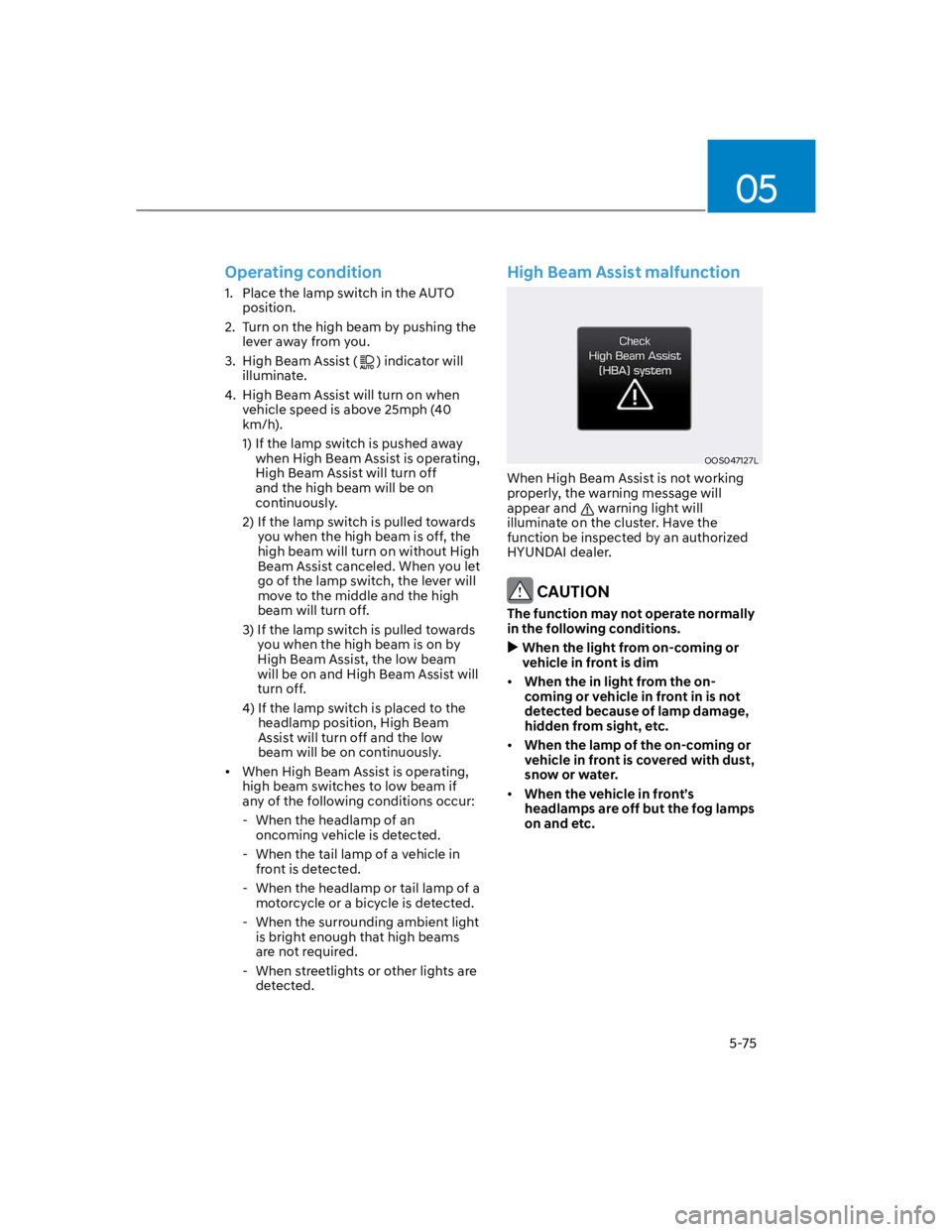
High Beam Assist malfunction
OOS047127L
When High Beam Assist is not working
properly, the warning message will
appear and warning light will
illuminate on the cluster. Have the
function be inspected by an authorized
HYUNDAI dealer.
CAUTION
The function may not operate normally
in the following conditions.
When the light from on-coming or
vehicle in front is dim
When the in light from the on-
coming or vehicle in front in is not
detected because of lamp damage,
hidden from sight, etc.
When the lamp of the on-coming or
vehicle in front is covered with dust,
snow or water.
When the vehicle in front’s
headlamps are off but the fog lamps
on and etc.
Page 261 of 579
Driving your vehicle
6-4
Before entering the vehicle
Be sure all windows, outside mirror(s),
and outside lights are clean and
unobstructed.
Remove frost, snow, or ice.
Visually check the tires for uneven
wear and damage.
Check under the vehicle for any sign
of leaks.
Be sure there are no obstacles behind
you if you intend to back up.
Before starting
Make sure the hood, the liftgate, and
the doors are securely closed and
locked.
Adjust the position of the seat and
steering wheel.
Adjust the inside and side view
mirrors.
Verify all the lights work.
Fasten your seat belt. Check that all
passengers have fastened their seat
belts.
Check the gauges and indicators
in the instrument panel and the
messages on the instrument display
when the ignition switch is in the ON
position.
Check that any items you are carrying
are stored properly or fastened down
securely.
WARNING
To reduce the risk of SERIOUS INJURY or
DEATH, take the following precautions:
ALWAYS wear your seat belt. All
passengers must be properly belted
whenever the vehicle is moving.
For more information, refer to “Seat
Belts” section in chapter 3.
Always drive defensively. Assume
other drivers or pedestrians may be
careless and make mistakes.
Stay focused on the task of driving.
Driver distraction can cause
accidents.
Leave plenty of space between you
and the vehicle in front of you.
WARNING
NEVER drink or take drugs and drive.
Drinking or taking drugs and driving
is dangerous and may result in an
accident and SERIOUS INJURY or
DEATH.
Drunk driving is the number one
contributor to the highway death
toll each year. Even a small amount
of alcohol will affect your reflexes,
perceptions and judgment. Just
one drink can reduce your ability to
respond to changing conditions and
emergencies and your reaction time
gets worse with each additional drink.
Driving while under the influence
of drugs is as dangerous or more
dangerous than driving under the
influence of alcohol.
You are much more likely to have a
serious accident if you drink or take
drugs and drive. If you are drinking or
taking drugs, don’t drive. Do not ride
with a driver who has been drinking
or taking drugs. Choose a designated
driver or call a taxi.
BEFORE DRIVING
Page 263 of 579
Driving your vehicle
6-6
Key ignition switch positions
Switch
PositionAction Notes
LOCK
To turn the ignition switch to the LOCK
position, push the key in at the ACC
position and turn the key towards the
LOCK position.
The ignition key can be removed in
the LOCK position.
ACC
Some electrical accessories are
usable. The steering wheel unlocks.
If difficulty is experienced turning the
ignition switch to the ACC position,
turn the key while turning the steering
wheel right and left to release.
ON
This is the normal key position when
the engine has started. All features
and accessories are usable.
The warning lights can be checked
when you turn the ignition switch
from ACC to ON.
Do not leave the ignition switch in the
ON position when the engine is not
running to prevent the battery from
discharging.
START
To start the engine, turn the ignition
switch to the START position. The
switch returns to the ON position
when you let go of the key.
The engine will crank until you release
the key.
Page 266 of 579
06
6-9
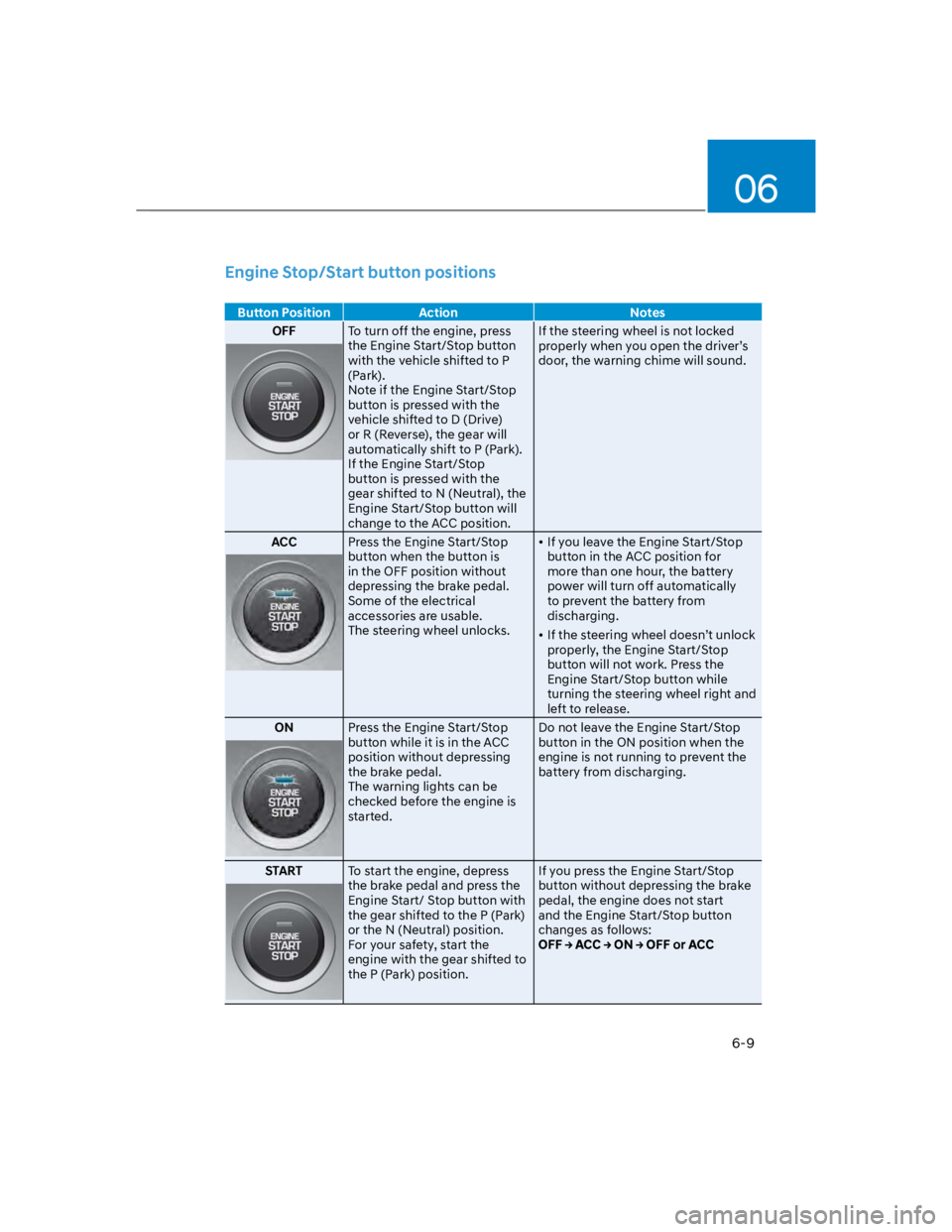
Engine Stop/Start button positions
Button Position Action Notes
OFFTo turn off the engine, press
the Engine Start/Stop button
with the vehicle shifted to P
(Park).
Note if the Engine Start/Stop
button is pressed with the
vehicle shifted to D (Drive)
or R (Reverse), the gear will
automatically shift to P (Park).
If the Engine Start/Stop
button is pressed with the
gear shifted to N (Neutral), the
Engine Start/Stop button will
change to the ACC position.
If the steering wheel is not locked
properly when you open the driver’s
door, the warning chime will sound.
ACCPress the Engine Start/Stop
button when the button is
in the OFF position without
depressing the brake pedal.
Some of the electrical
accessories are usable.
The steering wheel unlocks.
If you leave the Engine Start/Stop
button in the ACC position for
more than one hour, the battery
power will turn off automatically
to prevent the battery from
discharging.
If the steering wheel doesn’t unlock
properly, the Engine Start/Stop
button will not work. Press the
Engine Start/Stop button while
turning the steering wheel right and
left to release.
ONPress the Engine Start/Stop
button while it is in the ACC
position without depressing
the brake pedal.
The warning lights can be
checked before the engine is
started.
Do not leave the Engine Start/Stop
button in the ON position when the
engine is not running to prevent the
battery from discharging.
STARTTo start the engine, depress
the brake pedal and press the
Engine Start/ Stop button with
the gear shifted to the P (Park)
or the N (Neutral) position.
For your safety, start the
engine with the gear shifted to
the P (Park) position.
If you press the Engine Start/Stop
button without depressing the brake
pedal, the engine does not start
and the Engine Start/Stop button
changes as follows:
Page 269 of 579

Driving your vehicle
6-12
Remote start (if equipped)
You can start the vehicle using the
Remote Start button of the smart key.
To start the vehicle remotely:
1. Press the door lock button within 10 m
(32 feet) from the vehicle.
2. Press the remote start () button for
over 2 seconds within 4 seconds after
locking the doors. The hazard warning
lights will blink.
3. To turn off the remote start function,
press the remote start () button
once.
The remote start () button may not
operate if the smart key is not within
10 m (32 feet).
The vehicle will not remotely start if
the engine hood or liftgate is opened.
The vehicle must be in P (Park) for the
remote start function to start.
The engine turns off if you get in the
vehicle without a registered smart key.
The engine turns off if you do not get
in the vehicle within 10 minutes after
remotely starting the vehicle.
Do not idle the engine for a long
period.
Page 295 of 579
Driving your vehicle
6-38
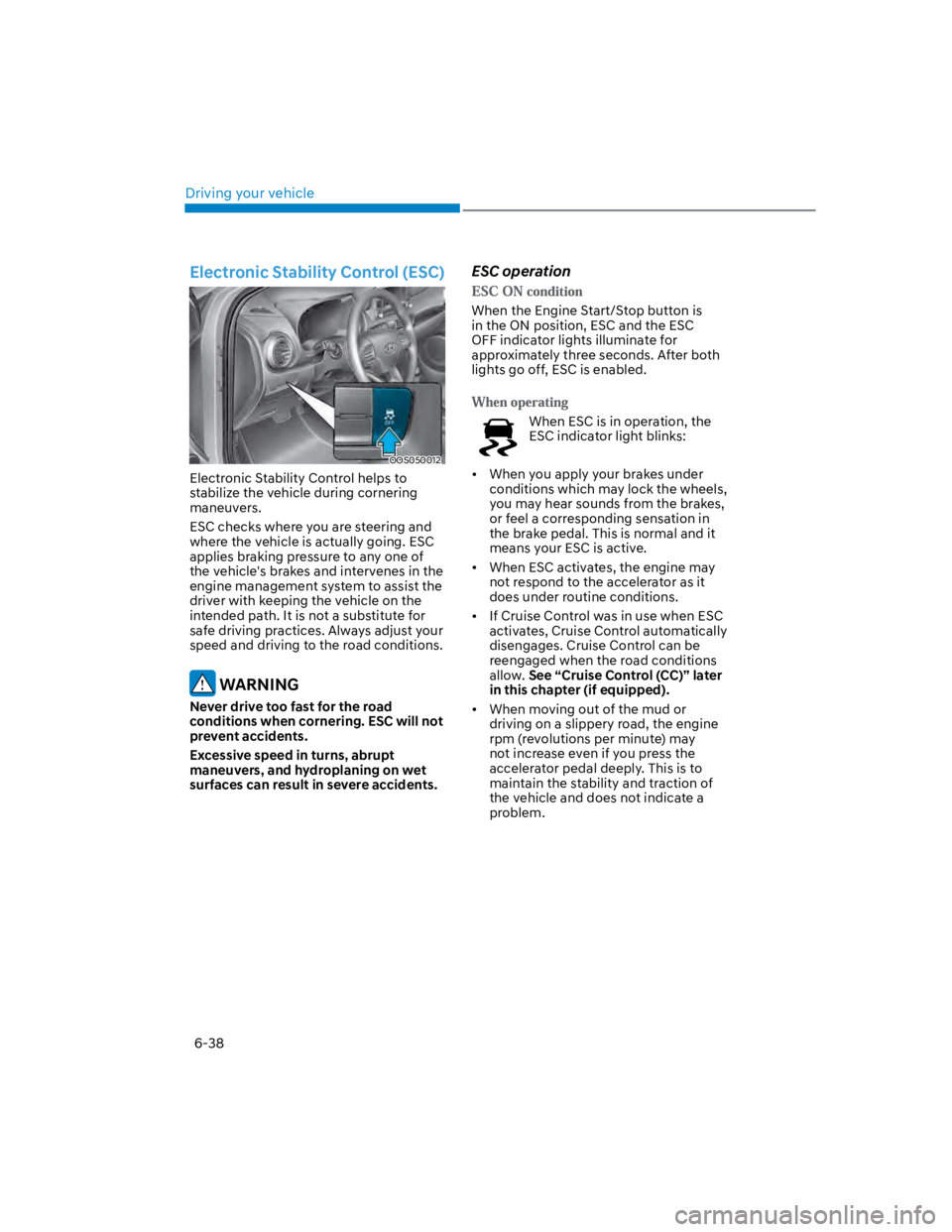
Electronic Stability Control (ESC)
OOS050012
Electronic Stability Control helps to
stabilize the vehicle during cornering
maneuvers.
ESC checks where you are steering and
where the vehicle is actually going. ESC
applies braking pressure to any one of
the vehicle's brakes and intervenes in the
engine management system to assist the
driver with keeping the vehicle on the
intended path. It is not a substitute for
safe driving practices. Always adjust your
speed and driving to the road conditions.
WARNING
Never drive too fast for the road
conditions when cornering. ESC will not
prevent accidents.
Excessive speed in turns, abrupt
maneuvers, and hydroplaning on wet
surfaces can result in severe accidents.
ESC operation
When the Engine Start/Stop button is
in the ON position, ESC and the ESC
OFF indicator lights illuminate for
approximately three seconds. After both
lights go off, ESC is enabled.
When ESC is in operation, the
ESC indicator light blinks:
When you apply your brakes under
conditions which may lock the wheels,
you may hear sounds from the brakes,
or feel a corresponding sensation in
the brake pedal. This is normal and it
means your ESC is active.
When ESC activates, the engine may
not respond to the accelerator as it
does under routine conditions.
If Cruise Control was in use when ESC
activates, Cruise Control automatically
disengages. Cruise Control can be
reengaged when the road conditions
allow. See “Cruise Control (CC)” later
in this chapter (if equipped).
When moving out of the mud or
driving on a slippery road, the engine
rpm (revolutions per minute) may
not increase even if you press the
accelerator pedal deeply. This is to
maintain the stability and traction of
the vehicle and does not indicate a
problem.
Page 297 of 579
Driving your vehicle
6-40
NOTICE
Driving with wheels and tires with
different sizes may cause the ESC
system to malfunction. Before replacing
tires, make sure all four tires and wheels
are the same size. Never drive the
vehicle with different sized wheels and
tires installed.
ESC OFF usage
The ESC OFF mode should only be used
briefly to help free the vehicle if stuck in
snow or mud, by temporarily stopping
operation of ESC, to maintain wheel
torque.
To turn ESC off while driving, press the
ESC OFF button while driving on a flat
road surface.
NOTICE
To prevent damage to the transmission:
Do not allow wheel(s) of one axle to
spin excessively while the ESC, ABS,
and Parking Brake warning lights
are displayed. The repairs would not
be covered by the vehicle warranty.
Reduce engine power and do not
spin the wheel(s) excessively while
these lights are displayed.
When operating the vehicle
on a dynamometer, make sure
ESC is turned off (ESC OFF light
illuminated).
Information
Vehicle Stability Management
(VSM)
Vehicle Stability Management is a
function of the Electronic Stability
Control (ESC) system. It helps the vehicle
stay stable when accelerating or braking
suddenly on wet, slippery and rough
roads where traction over the four tires
can suddenly become uneven.
WARNING
Take the following precautions when
using Vehicle Stability Management:
ALWAYS check the speed and the
distance to the vehicle ahead. VSM
is not a substitute for safe driving
practices.
Never drive too fast for the road
conditions. VSM will not prevent
accidents. Excessive speed in bad
weather, on slippery and uneven
roads can result in severe accidents.
VSM operation
When you apply your brakes under
conditions which may activate ESC, you
may hear sounds from the brakes, or feel
a corresponding sensation in the brake
pedal. This is normal and it means your
VSM is active.
Information