2022 HYUNDAI KONA sensor
[x] Cancel search: sensorPage 169 of 579

05
5-35
This system helps to protect your vehicle
and valuables. The horn will sound and
the hazard warning lights will blink
continuously if any of the following
occur:
- A door is opened without using the
smart key.
- The liftgate is opened without using
the smart key.
- The engine hood is opened.
The alarm continues for 30 seconds, then
the system resets. To turn off the alarm,
unlock the doors with the smart key.
The Theft Alarm System automatically
sets 30 seconds after you lock the
doors and the liftgate. For the system to
activate, you must lock the doors and
the liftgate from outside the vehicle with
the smart key or by touching the touch
sensor on the outside of the door handle
with the smart key in your possession.
The hazard warning lights will blink and
the chime will sound once to indicate the
system is armed.
Once the security system is set, opening
any door, the liftgate, or the hood
without using the smart key will cause
the alarm to activate.
The Theft Alarm System will not set if the
hood, the liftgate, or any door is not fully
closed. If the system will not set, check
the hood, the liftgate, or the doors are
fully closed.
Do not attempt to alter this system or
add other devices to it.
Information
Page 175 of 579
05
5-41
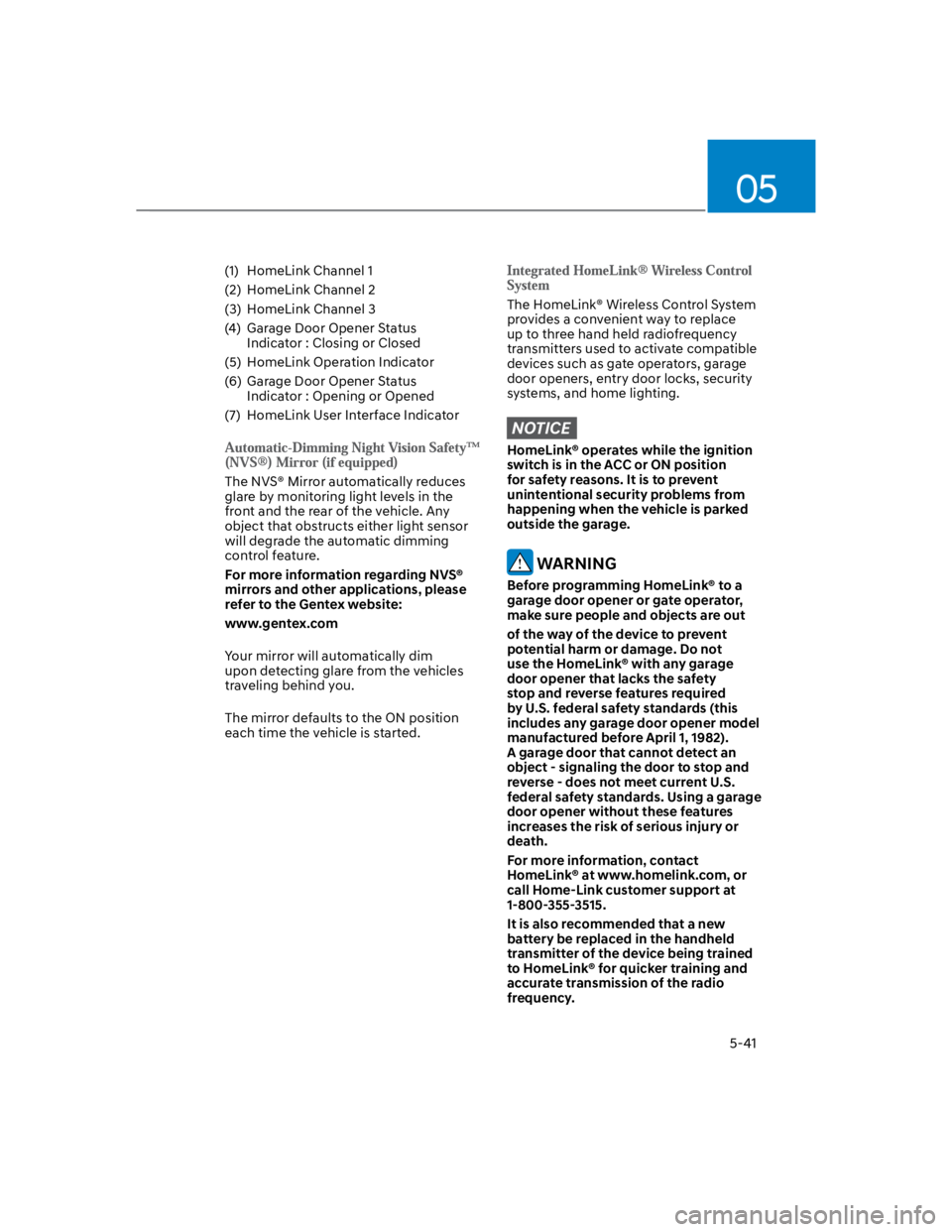
(1) HomeLink Channel 1
(2) HomeLink Channel 2
(3) HomeLink Channel 3
(4) Garage Door Opener Status
Indicator : Closing or Closed
(5) HomeLink Operation Indicator
(6) Garage Door Opener Status
Indicator : Opening or Opened
(7) HomeLink User Interface Indicator
The NVS® Mirror automatically reduces
glare by monitoring light levels in the
front and the rear of the vehicle. Any
object that obstructs either light sensor
will degrade the automatic dimming
control feature.
For more information regarding NVS®
mirrors and other applications, please
refer to the Gentex website:
www.gentex.com
Your mirror will automatically dim
upon detecting glare from the vehicles
traveling behind you.
The mirror defaults to the ON position
each time the vehicle is started.
The HomeLink® Wireless Control System
provides a convenient way to replace
up to three hand held radiofrequency
transmitters used to activate compatible
devices such as gate operators, garage
door openers, entry door locks, security
systems, and home lighting.
NOTICE
HomeLink® operates while the ignition
switch is in the ACC or ON position
for safety reasons. It is to prevent
unintentional security problems from
happening when the vehicle is parked
outside the garage.
WARNING
Before programming HomeLink® to a
garage door opener or gate operator,
make sure people and objects are out
of the way of the device to prevent
potential harm or damage. Do not
use the HomeLink® with any garage
door opener that lacks the safety
stop and reverse features required
by U.S. federal safety standards (this
includes any garage door opener model
manufactured before April 1, 1982).
A garage door that cannot detect an
object - signaling the door to stop and
reverse - does not meet current U.S.
federal safety standards. Using a garage
door opener without these features
increases the risk of serious injury or
death.
For more information, contact
HomeLink® at www.homelink.com, or
call Home-Link customer support at
1-800-355-3515.
It is also recommended that a new
battery be replaced in the handheld
transmitter of the device being trained
to HomeLink® for quicker training and
accurate transmission of the radio
frequency.
Page 201 of 579
05
5-67
Exterior lights
Lighting control
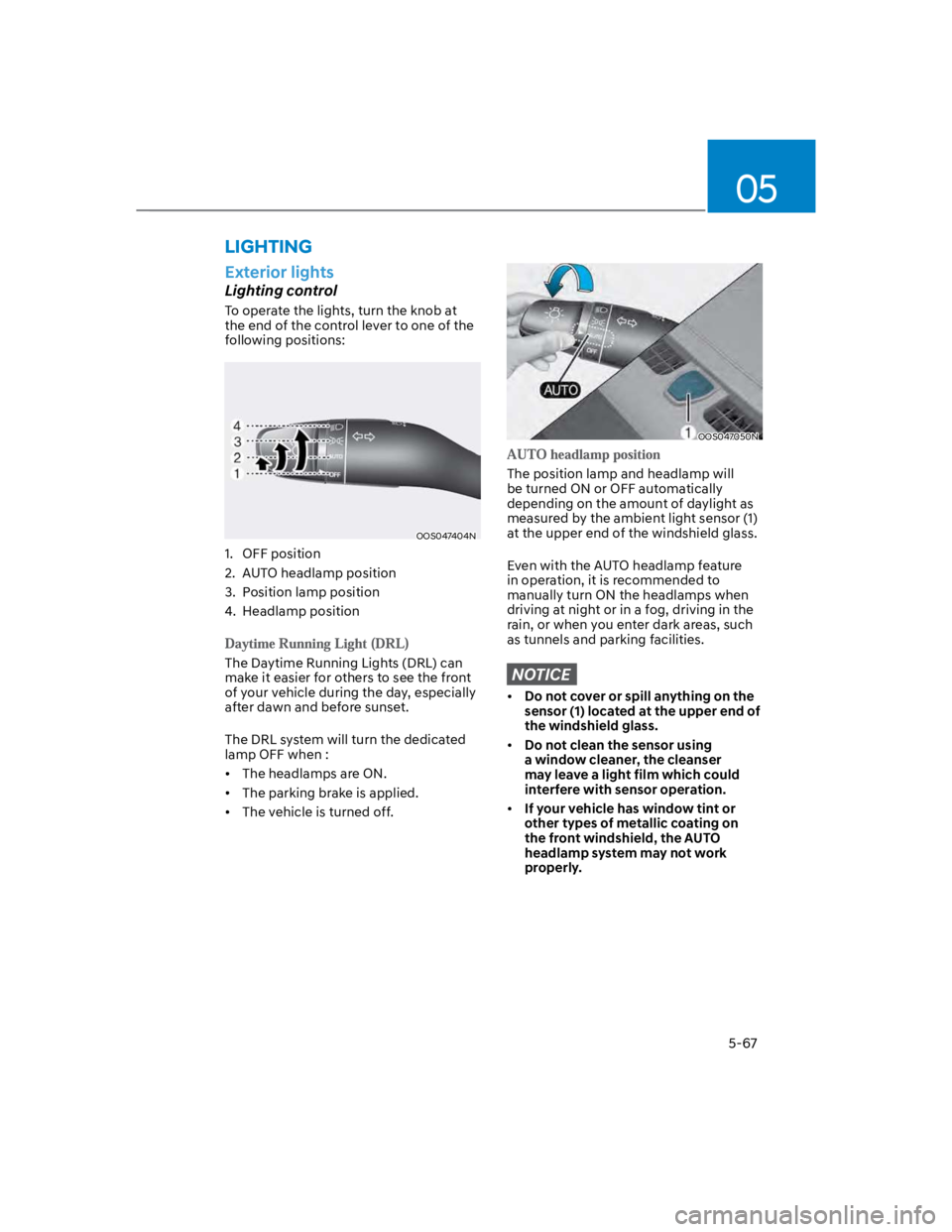
To operate the lights, turn the knob at
the end of the control lever to one of the
following positions:
OOS047404N
1. OFF position
2. AUTO headlamp position
3. Position lamp position
4. Headlamp position
The Daytime Running Lights (DRL) can
make it easier for others to see the front
of your vehicle during the day, especially
after dawn and before sunset.
The DRL system will turn the dedicated
lamp OFF when :
The headlamps are ON.
The parking brake is applied.
The vehicle is turned off.
OOS047050N
The position lamp and headlamp will
be turned ON or OFF automatically
depending on the amount of daylight as
measured by the ambient light sensor (1)
at the upper end of the windshield glass.
Even with the AUTO headlamp feature
in operation, it is recommended to
manually turn ON the headlamps when
driving at night or in a fog, driving in the
rain, or when you enter dark areas, such
as tunnels and parking facilities.
NOTICE
Do not cover or spill anything on the
sensor (1) located at the upper end of
the windshield glass.
Do not clean the sensor using
a window cleaner, the cleanser
may leave a light film which could
interfere with sensor operation.
If your vehicle has window tint or
other types of metallic coating on
the front windshield, the AUTO
headlamp system may not work
properly.
LIGHTING
Page 208 of 579
Convenient features
5-74
OOS047409N
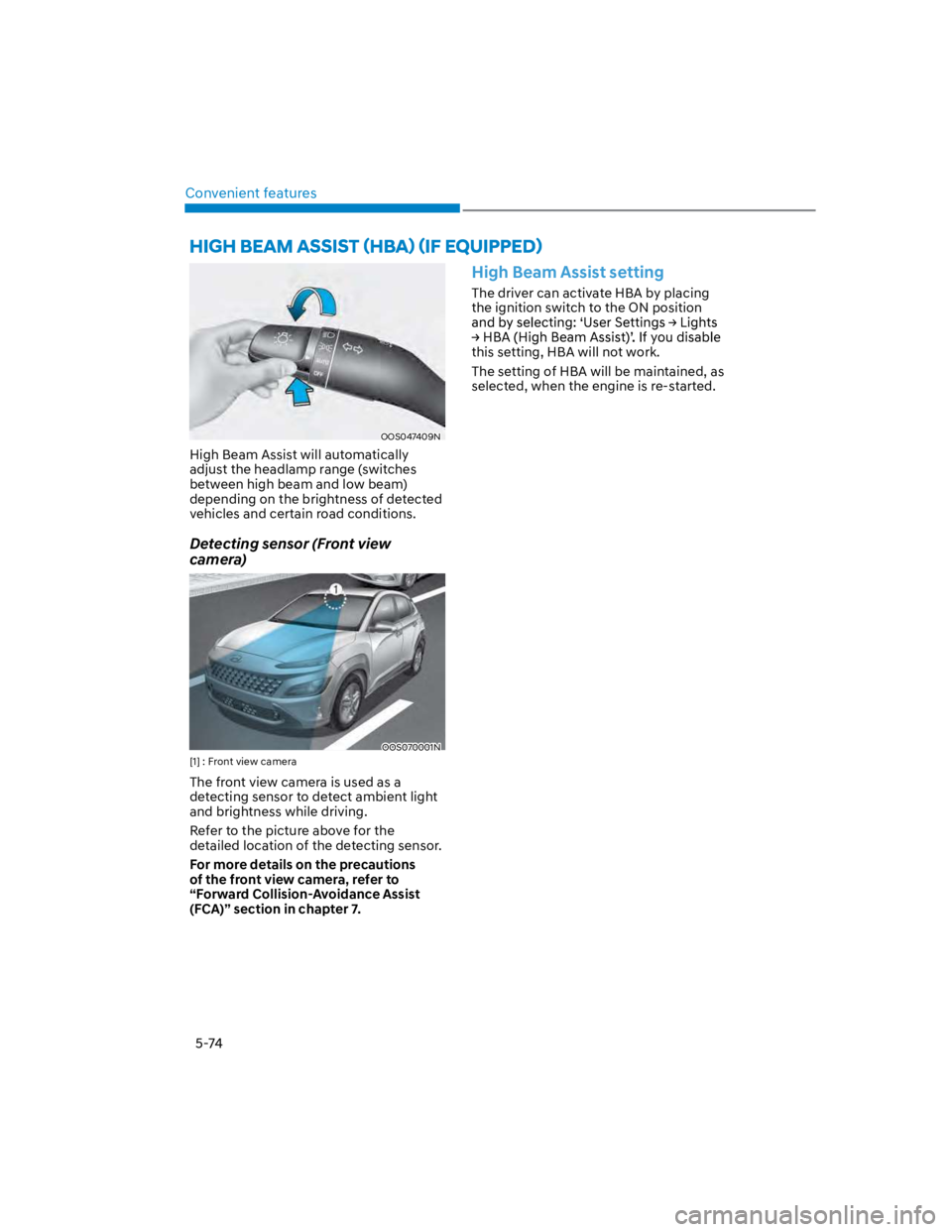
High Beam Assist will automatically
adjust the headlamp range (switches
between high beam and low beam)
depending on the brightness of detected
vehicles and certain road conditions.
Detecting sensor (Front view
camera)
OOS070001N
[1] : Front view camera
The front view camera is used as a
detecting sensor to detect ambient light
and brightness while driving.
Refer to the picture above for the
detailed location of the detecting sensor.
For more details on the precautions
of the front view camera, refer to
“Forward Collision-Avoidance Assist
(FCA)” section in chapter 7.
High Beam Assist setting
The driver can activate HBA by placing
the ignition switch to the ON position
this setting, HBA will not work.
The setting of HBA will be maintained, as
selected, when the engine is re-started.
Page 211 of 579
05
5-77
Front windshield wiper/washer
OTLE045161
Rear windshield wiper/washer
OTLE045508
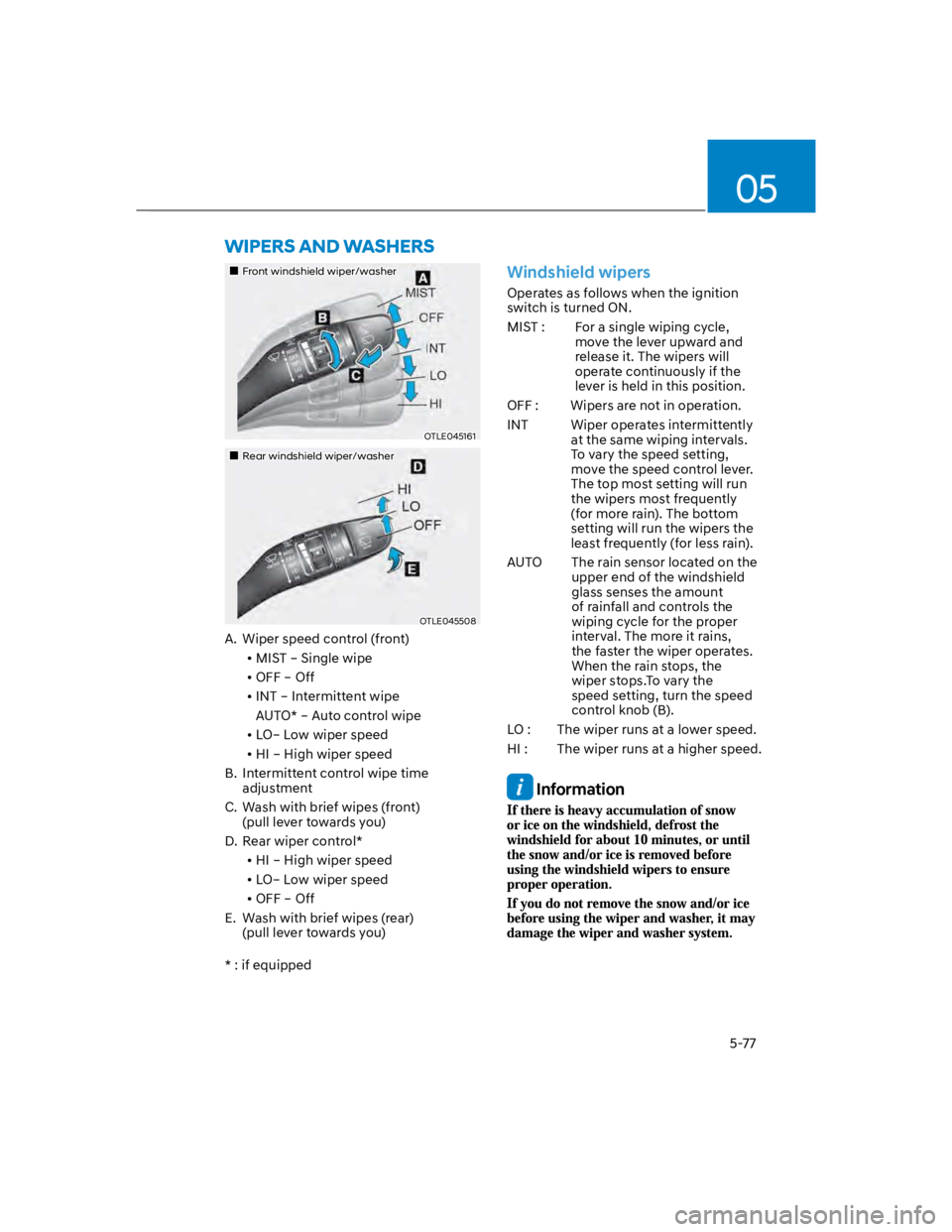
A. Wiper speed control (front)
MIST – Single wipe
OFF – Off
INT – Intermittent wipe
AUTO* – Auto control wipe
LO– Low wiper speed
HI – High wiper speed
B. Intermittent control wipe time
adjustment
C. Wash with brief wipes (front)
(pull lever towards you)
D. Rear wiper control*
HI – High wiper speed
LO– Low wiper speed
OFF – Off
E. Wash with brief wipes (rear)
(pull lever towards you)
* : if equipped
Windshield wipers
Operates as follows when the ignition
switch is turned ON.
MIST : For a single wiping cycle,
move the lever upward and
release it. The wipers will
operate continuously if the
lever is held in this position.
OFF : Wipers are not in operation.
INT Wiper operates intermittently
at the same wiping intervals.
To vary the speed setting,
move the speed control lever.
The top most setting will run
the wipers most frequently
(for more rain). The bottom
setting will run the wipers the
least frequently (for less rain).
AUTO The rain sensor located on the
upper end of the windshield
glass senses the amount
of rainfall and controls the
wiping cycle for the proper
interval. The more it rains,
the faster the wiper operates.
When the rain stops, the
wiper stops.To vary the
speed setting, turn the speed
control knob (B).
LO : The wiper runs at a lower speed.
HI : The wiper runs at a higher speed.
Information
Page 212 of 579
Convenient features
5-78
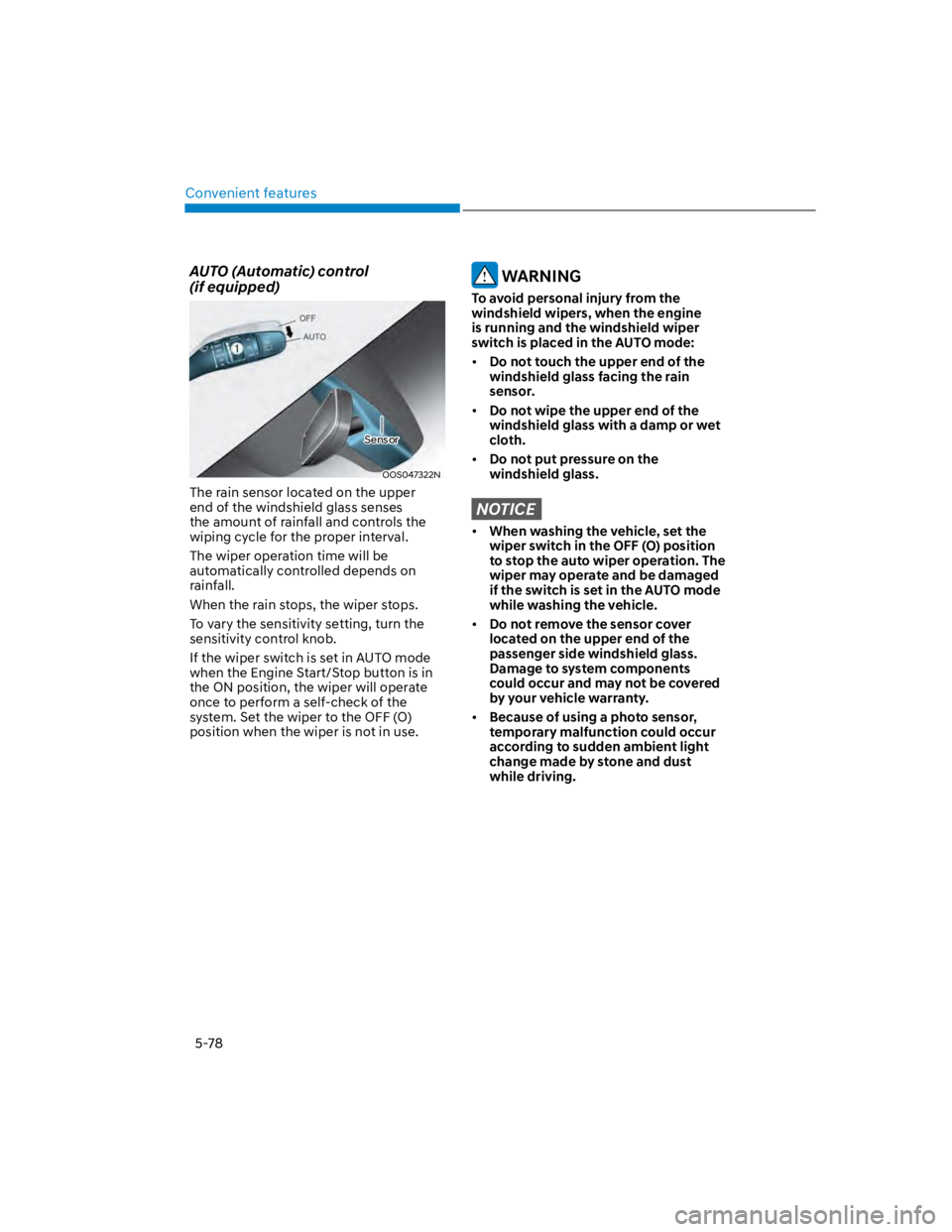
AUTO (Automatic) control
(if equipped)
OOS047322N
The rain sensor located on the upper
end of the windshield glass senses
the amount of rainfall and controls the
wiping cycle for the proper interval.
The wiper operation time will be
automatically controlled depends on
rainfall.
When the rain stops, the wiper stops.
To vary the sensitivity setting, turn the
sensitivity control knob.
If the wiper switch is set in AUTO mode
when the Engine Start/Stop button is in
the ON position, the wiper will operate
once to perform a self-check of the
system. Set the wiper to the OFF (O)
position when the wiper is not in use.
WARNING
To avoid personal injury from the
windshield wipers, when the engine
is running and the windshield wiper
switch is placed in the AUTO mode:
Do not touch the upper end of the
windshield glass facing the rain
sensor.
Do not wipe the upper end of the
windshield glass with a damp or wet
cloth.
Do not put pressure on the
windshield glass.
NOTICE
When washing the vehicle, set the
wiper switch in the OFF (O) position
to stop the auto wiper operation. The
wiper may operate and be damaged
if the switch is set in the AUTO mode
while washing the vehicle.
Do not remove the sensor cover
located on the upper end of the
passenger side windshield glass.
Damage to system components
could occur and may not be covered
by your vehicle warranty.
Because of using a photo sensor,
temporary malfunction could occur
according to sudden ambient light
change made by stone and dust
while driving.
Sensor
Page 235 of 579
05
5-101
When the Auto Defogging
System operates, the
indicator will illuminate.
If a high amount of humidity is detected
in the vehicle, the Auto Defogging
System will be enabled. The following
steps will be performed automatically:
Step 1) The air intake control will change
to Fresh mode.
Step 2) The A/C button will turn ON.
Step 3) The mode will be changed to
defrost to direct airflow to the
windshield.
Step 4) The fan speed will be set to MAX.
If the air conditioning is off or
recirculated air position is manually
selected while Auto Defogging System is
ON, the Auto Defogging System Indicator
will blink 3 times to signal that the
manual operation has been canceled.
Press the front windshield defroster
button for 3 seconds when the ignition
switch is in the ON position. When the
Auto Defogging System is canceled, the
ADS OFF symbol will blink 3 times and
ADS OFF will be displayed on the climate
control information screen.
When the Auto Defogging System is
reset, the ADS OFF symbol will blink 6
times without a signal.
Information
NOTICE
Do not remove the sensor cover located
on the upper end of the windshield
glass.
Damage to system parts could occur
and may not be covered by your vehicle
warranty.
Page 259 of 579

6
Idle Stop and Go (ISG) system ....................................................................... 6-54
Activating the ISG ...................................................................................................... 6-54
Deactivating the ISG ................................................................................................. 6-54
Condition of ISG system operation .......................................................................... 6-56
ISG Indication ............................................................................................................. 6-57
ISG malfunction ......................................................................................................... 6-58
The battery sensor deactivation ............................................................................... 6-59
Drive mode integrated control system ..........................................................6-60
Special driving conditions .............................................................................. 6-63
Hazardous driving conditions .................................................................................. 6-63
Rocking the vehicle ................................................................................................... 6-63
Smooth cornering ..................................................................................................... 6-64
Driving at night .......................................................................................................... 6-64
Driving in the rain ...................................................................................................... 6-64
Driving in flooded areas ............................................................................................ 6-65
Highway driving ........................................................................................................ 6-65
Reducing the risk of a rollover .................................................................................. 6-65
Winter driving ..................................................................................................6-66
Snow or icy conditions .............................................................................................. 6-66
Winter precautions .................................................................................................... 6-68
Vehicle load limit............................................................................................. 6-70
The Loading Information Label ..................................................................................6-71
Trailer Towing .................................................................................................. 6-75