2022 HYUNDAI KONA Brake
[x] Cancel search: BrakePage 152 of 579

Convenient features
5-18
You can manage multiple digital keys
from the Digital key app. From the list of
digital keys you own, select the vehicle
you want to make your priority vehicle.
For more information, please refer to
the ‘Tutorial’ on your Digital key app.
OOS050002K
[1] : Door handle authentication pad
You should contact your smartphone’s
NFC antenna(backside of phone) to door
handle authentication pad (1) marked
position near by the lock button) of
driver’s (or front passenger’s) outside
door for 2 seconds to lock or unlock the
doors. If the Two Press Unlock feature
is applied (press twice for unlocking),
driver’s seat door will be unlocked by
contacting the digital key (smartphone
key). In this state, if you contact one
more time within 4 seconds, all the doors
unlock. Please make sure the doors are
locked. If you do not open any of the
doors after unlocking, it automatically
re-lock after 30 seconds.
Note that you cannot lock your vehicle
when you contact NFC antenna in the
smartphone to the door handle pad if
any of the following occurs:
The Proximity / Smart Key is in the
vehicle.
The Engine Start/Stop button is in
ACC or ON position.
Any of the doors, hood and trunk is
opened.
If the smartphone digital key does not
work, please remove the smartphone
more than 4 inches (0.1 m) from the door
handle authentication pad and try it
again.
After unlock the door or start up the
vehicle with digital key, even though
the driver tries to lock the doors by the
central door lock switch, the door lock
will be once locked and immediately
released at the moment of door closed.
1. After placing your registered
smartphone onto the interior
authentication pad (wireless charger),
step on the brake and press the
Engine Start/Stop button.
2. After start-up, the digital key data
will be automatically updated. It
takes 5 to 20 seconds, after that,
the smartphone can be go into the
wireless charging mode automatically.
Once the engine started, you can
remove the smartphone from the pad.
Page 160 of 579
Convenient features
5-26
After placing your registered card key
onto the interior authentication pad
(wireless charger), step on the brake and
press the Engine Start/Stop button.
WARNING
If you do not place the digital key
(card key) onto the center of the
interior authentication pad (wireless
charger) exactly, the card key may
not be recognized. If the engine is
not turned on, adjust and place the
key again.
If you overlap and use the key
with NFC-enabled cards such as
transportation card or credit card,
the card key may not be recognized.
If the digital key (card key) does not
work, please detach the key around
4 inches (0.1 m) from the handle
authentication pad and retry to
contact.
The card key may be damaged due to
impact. It would not work properly if
the key is damaged. You should buy a
new card and register again.
For more information, refer to the
Engine Start/Stop button in chapter 6.
If you do not want to use the digital key
(smartphone and card key), you can
disable the function temporarily. You
should have the smart key when you
change the settings
With Navigation screen :
From the infotainment screen menu,
go to [Setup] - [Vehicle] - [Digital Key]
- [Enable Digital Keys] (deselect)
Without navigation screen :
From cluster menu, go to [Digital Key]
- [Enable Digital Keys] (deselect)
Information
CAUTION
If you uncheck Enable digital keys, it is
impossible to lock or unlock the doors
or start up the vehicle with digital keys
such as smartphone and card key. If
you check Enable digital keys again, the
registered digital keys(smartphone and
card key) are available. Even though
you stop the digital key function, the
registered keys (smartphone and card
key) are not deleted.
Page 166 of 579
Convenient features
5-32
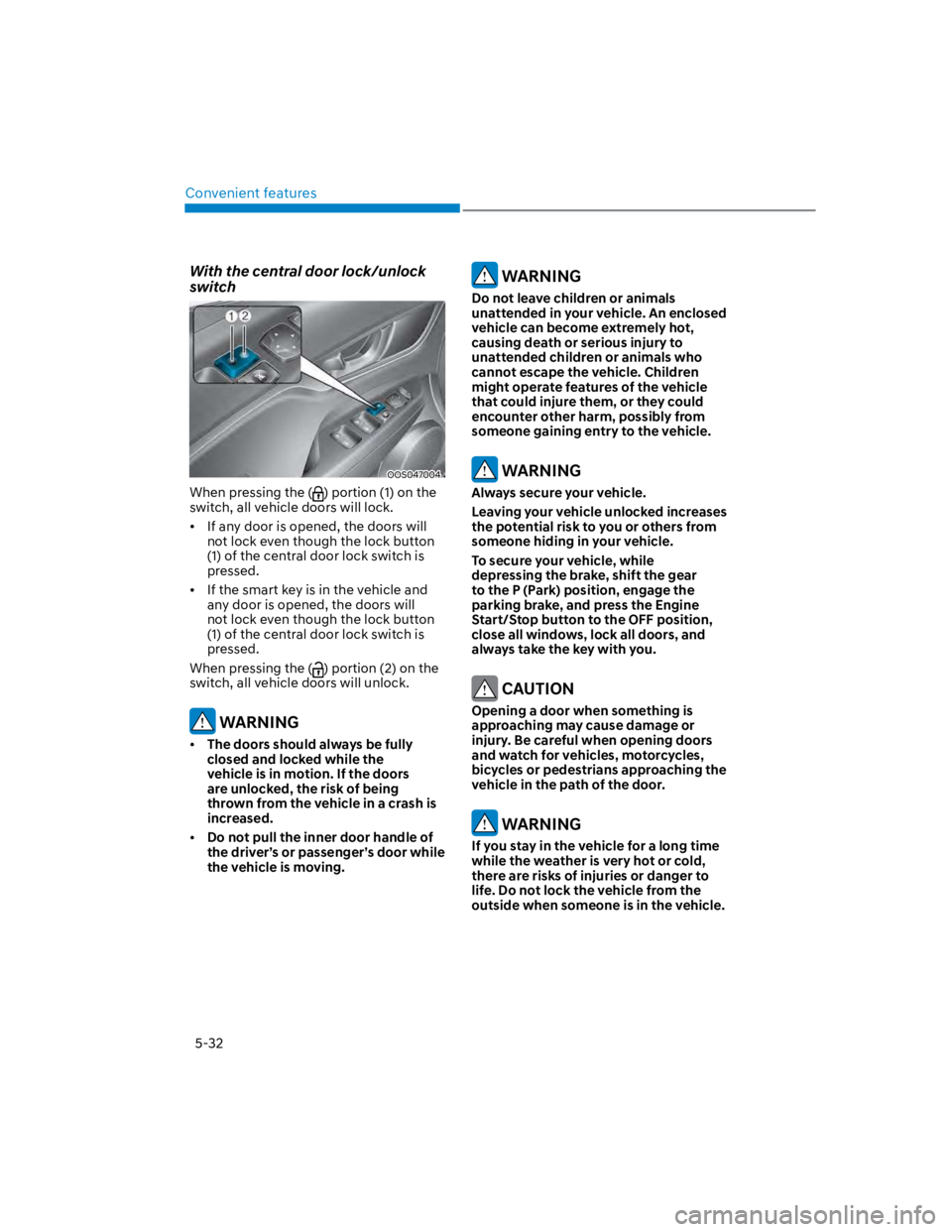
With the central door lock/unlock
switch
OOS047004
When pressing the () portion (1) on the
switch, all vehicle doors will lock.
If any door is opened, the doors will
not lock even though the lock button
(1) of the central door lock switch is
pressed.
If the smart key is in the vehicle and
any door is opened, the doors will
not lock even though the lock button
(1) of the central door lock switch is
pressed.
When pressing the () portion (2) on the
switch, all vehicle doors will unlock.
WARNING
The doors should always be fully
closed and locked while the
vehicle is in motion. If the doors
are unlocked, the risk of being
thrown from the vehicle in a crash is
increased.
Do not pull the inner door handle of
the driver’s or passenger’s door while
the vehicle is moving.
WARNING
Do not leave children or animals
unattended in your vehicle. An enclosed
vehicle can become extremely hot,
causing death or serious injury to
unattended children or animals who
cannot escape the vehicle. Children
might operate features of the vehicle
that could injure them, or they could
encounter other harm, possibly from
someone gaining entry to the vehicle.
WARNING
Always secure your vehicle.
Leaving your vehicle unlocked increases
the potential risk to you or others from
someone hiding in your vehicle.
To secure your vehicle, while
depressing the brake, shift the gear
to the P (Park) position, engage the
parking brake, and press the Engine
Start/Stop button to the OFF position,
close all windows, lock all doors, and
always take the key with you.
CAUTION
Opening a door when something is
approaching may cause damage or
injury. Be careful when opening doors
and watch for vehicles, motorcycles,
bicycles or pedestrians approaching the
vehicle in the path of the door.
WARNING
If you stay in the vehicle for a long time
while the weather is very hot or cold,
there are risks of injuries or danger to
life. Do not lock the vehicle from the
outside when someone is in the vehicle.
Page 195 of 579
05
5-61
Hood
Opening the hood
OOS040024
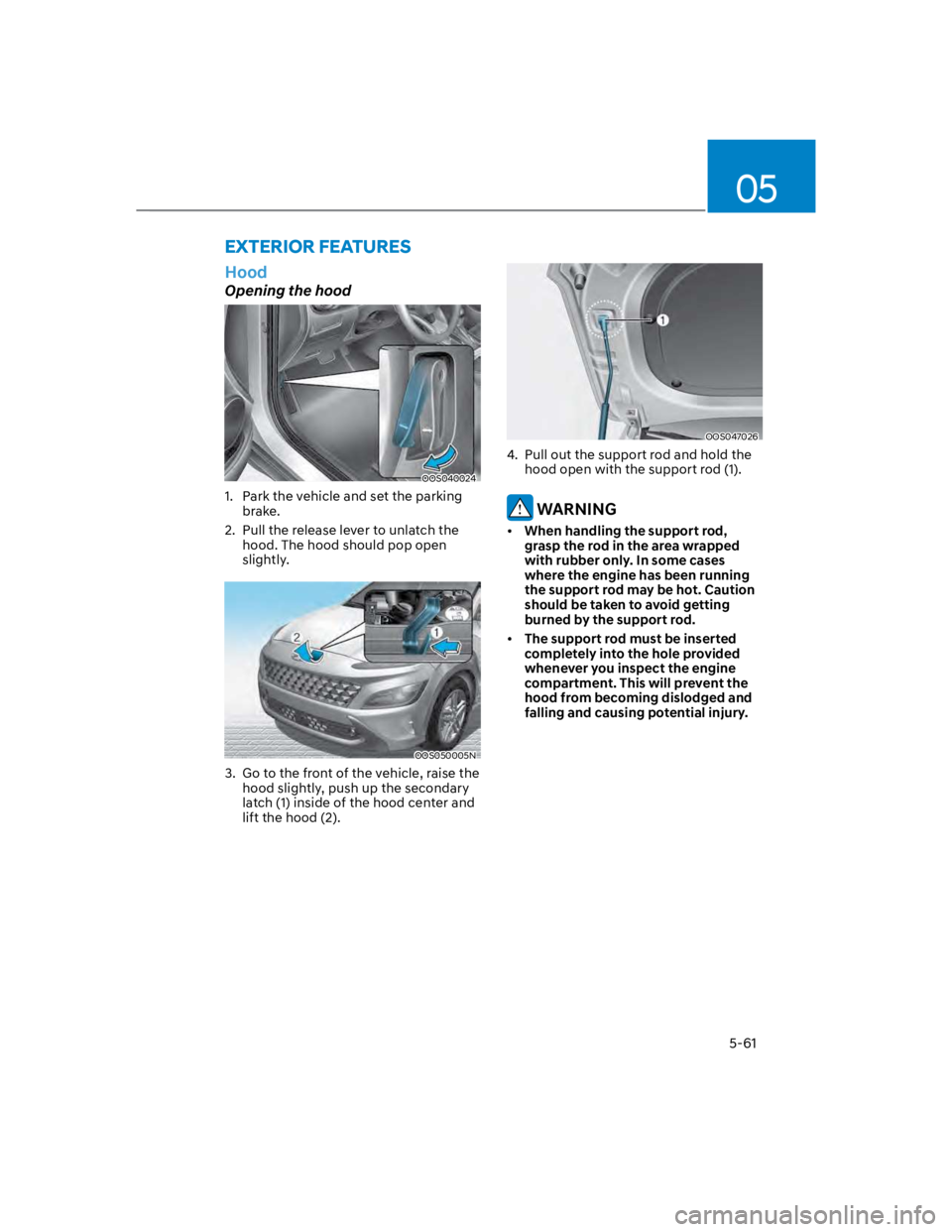
1. Park the vehicle and set the parking
brake.
2. Pull the release lever to unlatch the
hood. The hood should pop open
slightly.
OOS050005N
3. Go to the front of the vehicle, raise the
hood slightly, push up the secondary
latch (1) inside of the hood center and
lift the hood (2).
OOS047026
4. Pull out the support rod and hold the
hood open with the support rod (1).
WARNING
When handling the support rod,
grasp the rod in the area wrapped
with rubber only. In some cases
where the engine has been running
the support rod may be hot. Caution
should be taken to avoid getting
burned by the support rod.
The support rod must be inserted
completely into the hole provided
whenever you inspect the engine
compartment. This will prevent the
hood from becoming dislodged and
falling and causing potential injury.
EXTERIOR FEATURES
Page 196 of 579
Convenient features
5-62
Closing the hood
1. Before closing the hood, check in and
around the engine compartment to
ensure the following:
- Any tools or other loose objects
are removed from the engine room
area or hood opening area
- All glove, rags, or other
combustible material is removed
from the engine compartment
- All filler caps are tightly and
correctly installed
2. Lower the hood halfway (lifted
approximately 12 in. (30 cm) from the
closed position) and push down to
securely lock in place. Then double
check to be sure the hood is secure.
If the hood can be raised slightly, it is
not securely locked. Open it again and
close it with more force.
WARNING
Before closing the hood, ensure
all obstructions are removed from
around the hood opening.
Always double check to be sure that
the hood is firmly latched before
driving away. Check there is no
hood open warning light or message
displayed on the instrument cluster.
Driving with the hood opened may
cause a total loss of visibility, which
might result in an accident.
Do not move the vehicle with the
hood in the raised position, as vision
is obstructed, which might result in
an accident, and the hood could fall
or be damaged.
Liftgate
Opening the liftgate
OOS050006K
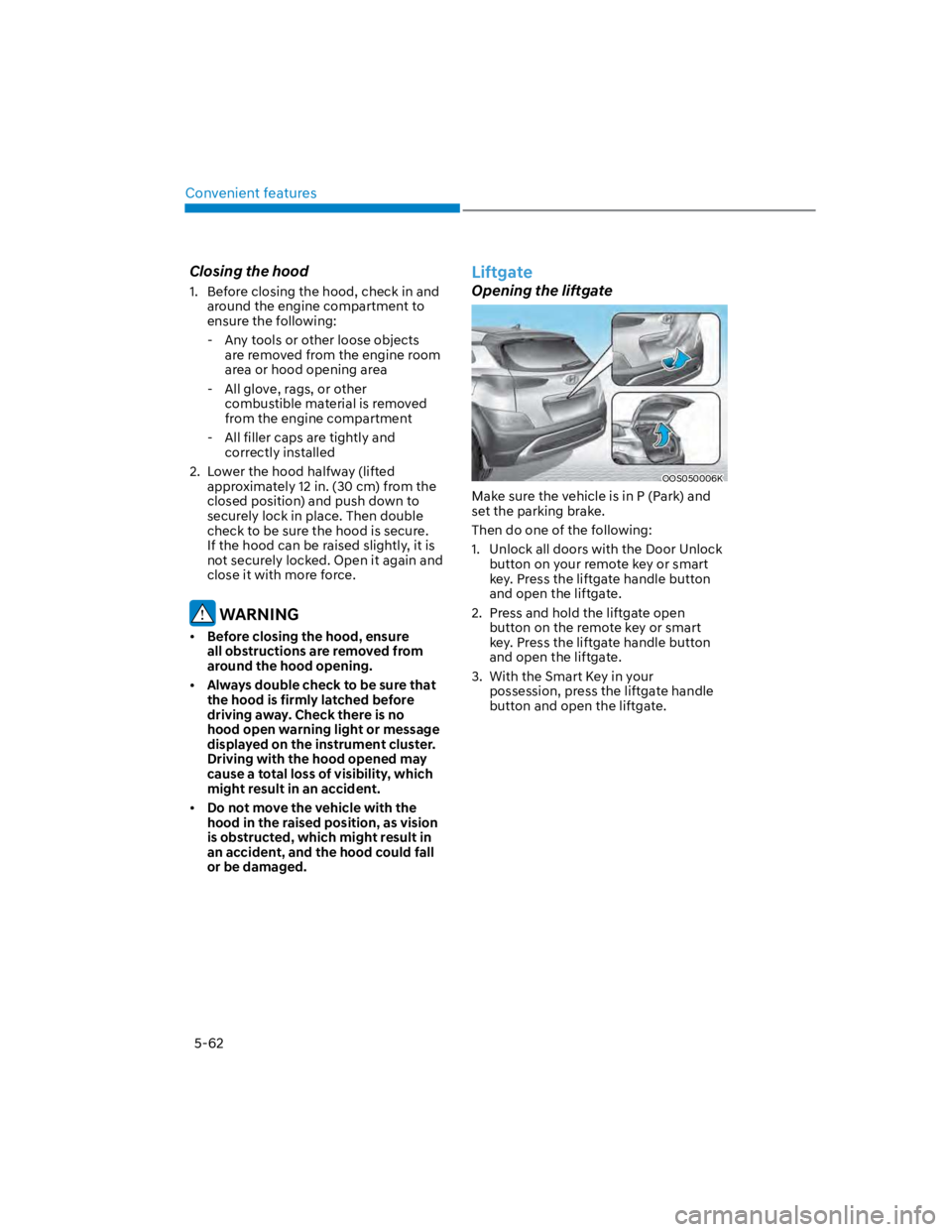
Make sure the vehicle is in P (Park) and
set the parking brake.
Then do one of the following:
1. Unlock all doors with the Door Unlock
button on your remote key or smart
key. Press the liftgate handle button
and open the liftgate.
2. Press and hold the liftgate open
button on the remote key or smart
key. Press the liftgate handle button
and open the liftgate.
3. With the Smart Key in your
possession, press the liftgate handle
button and open the liftgate.
Page 199 of 579

05
5-65
Information
Closing the fuel filler door
1. To install the fuel tank cap, turn it
clockwise until it “clicks” one time.
2. Close the fuel filler door until it is
latched securely.
WARNING
Gasoline is highly flammable and
explosive. Failure to follow these
guidelines may result in SERIOUS
INJURY or DEATH:
Read and follow all warnings posted
at the gas station.
Before refueling, note the location
of the Emergency Fuel Shut-Off, if
available, at the gas station.
Before touching the fuel nozzle, you
should eliminate the potential build-
up of static electricity by touching
a metal part of the vehicle, a safe
distance away from the fuel filler
neck, nozzle, or other gas source,
with your bare hand.
Do not use cellular phones while
refueling. Electric current and/or
electronic interference from cellular
phones can potentially ignite fuel
vapors and cause a fire.
Do not get back into a vehicle
once you have begun refueling.
You can generate a buildup of
static electricity by touching,
rubbing or sliding against any item
or fabric capable of producing
static electricity. Static electricity
discharge can ignite fuel vapors
causing a fire. If you must re-enter
the vehicle, you should once again
eliminate potentially dangerous
static electricity discharge by
touching a metal part of the vehicle,
away from the fuel filler neck, nozzle
or other fuel source, with your bare
hand.
When using an approved portable
fuel container, be sure to place the
container on the ground prior to
refueling. Static electricity discharge
from the container can ignite fuel
vapors causing a fire.
Once refueling has begun, contact
between your bare hand and the
vehicle should be maintained until
the filling is complete.
Use only approved portable plastic
fuel containers designed to carry and
store fuel.
When refueling, always shift the
gear to the P (Park) position, set
the parking brake, and press the
Engine Start/Stop button to the
OFF position. Sparks produced by
electrical components related to the
engine can ignite fuel vapors causing
a fire.
Do not use matches or a lighter and
do not smoke or leave a lit cigarette
in your vehicle while at a gas station,
especially during refueling.
Page 201 of 579
05
5-67
Exterior lights
Lighting control
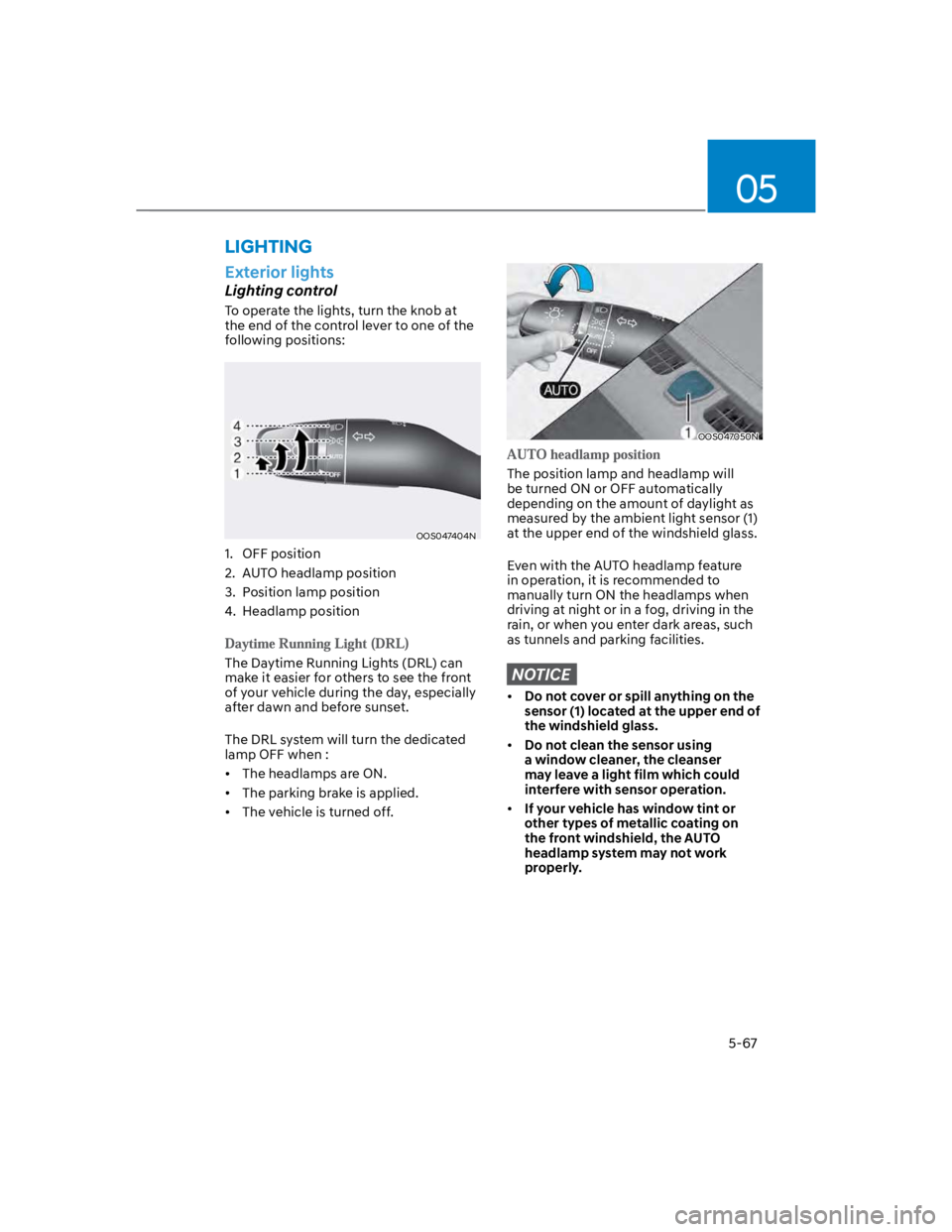
To operate the lights, turn the knob at
the end of the control lever to one of the
following positions:
OOS047404N
1. OFF position
2. AUTO headlamp position
3. Position lamp position
4. Headlamp position
The Daytime Running Lights (DRL) can
make it easier for others to see the front
of your vehicle during the day, especially
after dawn and before sunset.
The DRL system will turn the dedicated
lamp OFF when :
The headlamps are ON.
The parking brake is applied.
The vehicle is turned off.
OOS047050N
The position lamp and headlamp will
be turned ON or OFF automatically
depending on the amount of daylight as
measured by the ambient light sensor (1)
at the upper end of the windshield glass.
Even with the AUTO headlamp feature
in operation, it is recommended to
manually turn ON the headlamps when
driving at night or in a fog, driving in the
rain, or when you enter dark areas, such
as tunnels and parking facilities.
NOTICE
Do not cover or spill anything on the
sensor (1) located at the upper end of
the windshield glass.
Do not clean the sensor using
a window cleaner, the cleanser
may leave a light film which could
interfere with sensor operation.
If your vehicle has window tint or
other types of metallic coating on
the front windshield, the AUTO
headlamp system may not work
properly.
LIGHTING
Page 258 of 579
6
Before driving .................................................................................................... 6-4
Before entering the vehicle ........................................................................................ 6-4
Before starting ............................................................................................................. 6-4
Ignition switch ................................................................................................... 6-5
Key ignition switch .......................................................................................................6-5
Key ignition switch positions ...................................................................................... 6-6
Starting the engine ....................................................................................................... 6-7
Engine Start/Stop button ................................................................................. 6-8
Engine Stop/Start button positions ........................................................................... 6-9
Starting the engine ..................................................................................................... 6-10
Turning off the engine ................................................................................................. 6-11
Remote start ............................................................................................................... 6-12
Intelligent variable transmission ..................................................................... 6-13
Intelligent variable transmission operation .............................................................. 6-13
Parking ........................................................................................................................ 6-16
Good driving practices ................................................................................................6-17
Dual clutch transmission .................................................................................6-18
Dual clutch transmission operation .......................................................................... 6-18
Parking ........................................................................................................................6-24
Good driving practices .............................................................................................. 6-25
Braking system ................................................................................................ 6-26
Power-assist brakes ...................................................................................................6-26
Disc brakes wear indicator ........................................................................................6-26
Parking Brake .............................................................................................................. 6-27
Electronic Parking Brake (EPB) .................................................................................6-28
Auto Hold ....................................................................................................................6-33
Anti-lock Brake System (ABS) ................................................................................... 6-36
Electronic Stability Control (ESC) ............................................................................ 6-38
Vehicle Stability Management (VSM) ..................................................................... 6-40
Hill-Start Assist Control (HAC) .................................................................................. 6-41
Downhill Brake Control (DBC) ................................................................................. 6-42
Good braking practices ............................................................................................. 6-45
Four wheel drive (4WD) ..................................................................................6-46
Four Wheel Drive (4WD) operation ...........................................................................6-47
Emergency precautions ............................................................................................. 6-51
Reducing the risk of a rollover ...................................................................................6-52
6. Driving your vehicle