Page 160 of 579
Convenient features
5-26
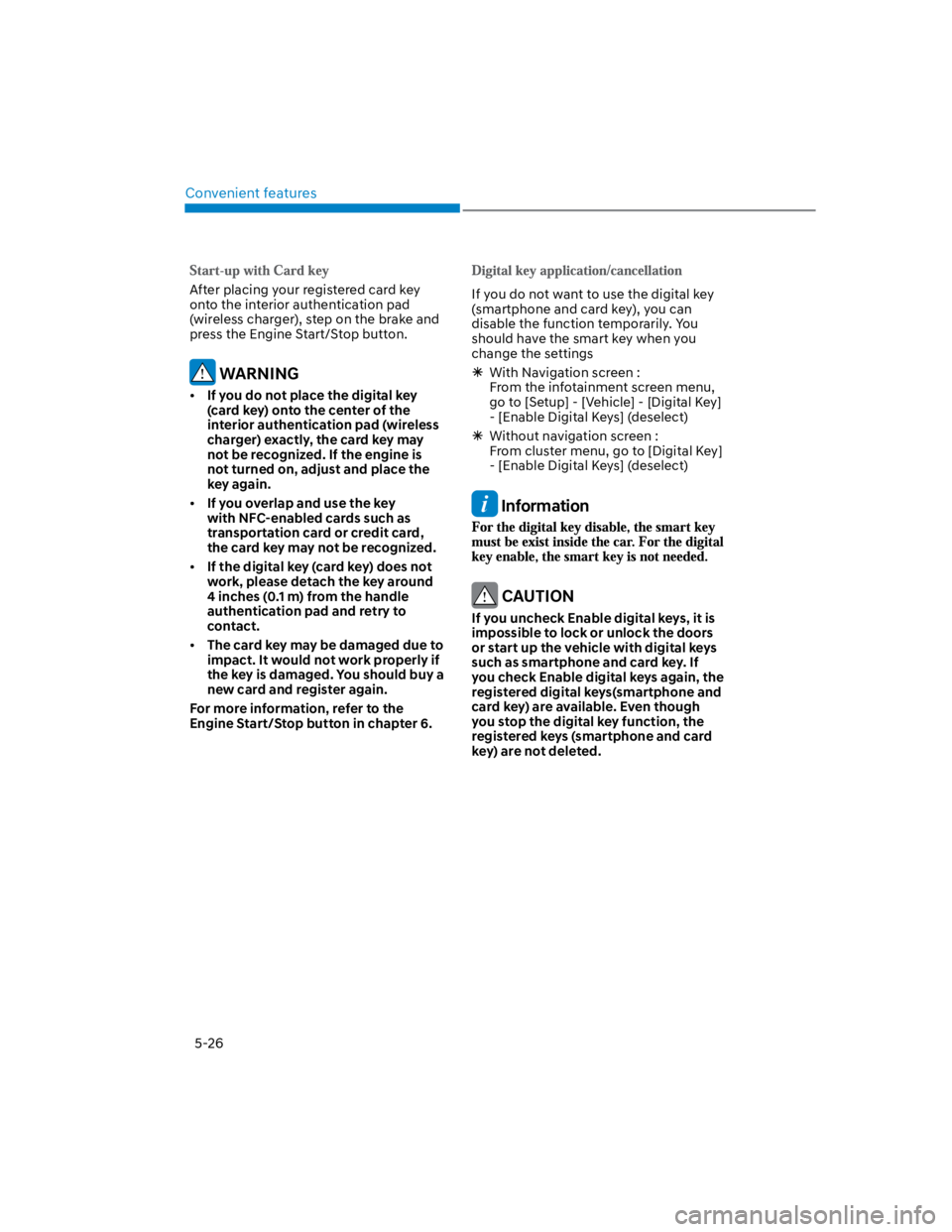
After placing your registered card key
onto the interior authentication pad
(wireless charger), step on the brake and
press the Engine Start/Stop button.
WARNING
If you do not place the digital key
(card key) onto the center of the
interior authentication pad (wireless
charger) exactly, the card key may
not be recognized. If the engine is
not turned on, adjust and place the
key again.
If you overlap and use the key
with NFC-enabled cards such as
transportation card or credit card,
the card key may not be recognized.
If the digital key (card key) does not
work, please detach the key around
4 inches (0.1 m) from the handle
authentication pad and retry to
contact.
The card key may be damaged due to
impact. It would not work properly if
the key is damaged. You should buy a
new card and register again.
For more information, refer to the
Engine Start/Stop button in chapter 6.
If you do not want to use the digital key
(smartphone and card key), you can
disable the function temporarily. You
should have the smart key when you
change the settings
With Navigation screen :
From the infotainment screen menu,
go to [Setup] - [Vehicle] - [Digital Key]
- [Enable Digital Keys] (deselect)
Without navigation screen :
From cluster menu, go to [Digital Key]
- [Enable Digital Keys] (deselect)
Information
CAUTION
If you uncheck Enable digital keys, it is
impossible to lock or unlock the doors
or start up the vehicle with digital keys
such as smartphone and card key. If
you check Enable digital keys again, the
registered digital keys(smartphone and
card key) are available. Even though
you stop the digital key function, the
registered keys (smartphone and card
key) are not deleted.
Page 163 of 579
05
5-29
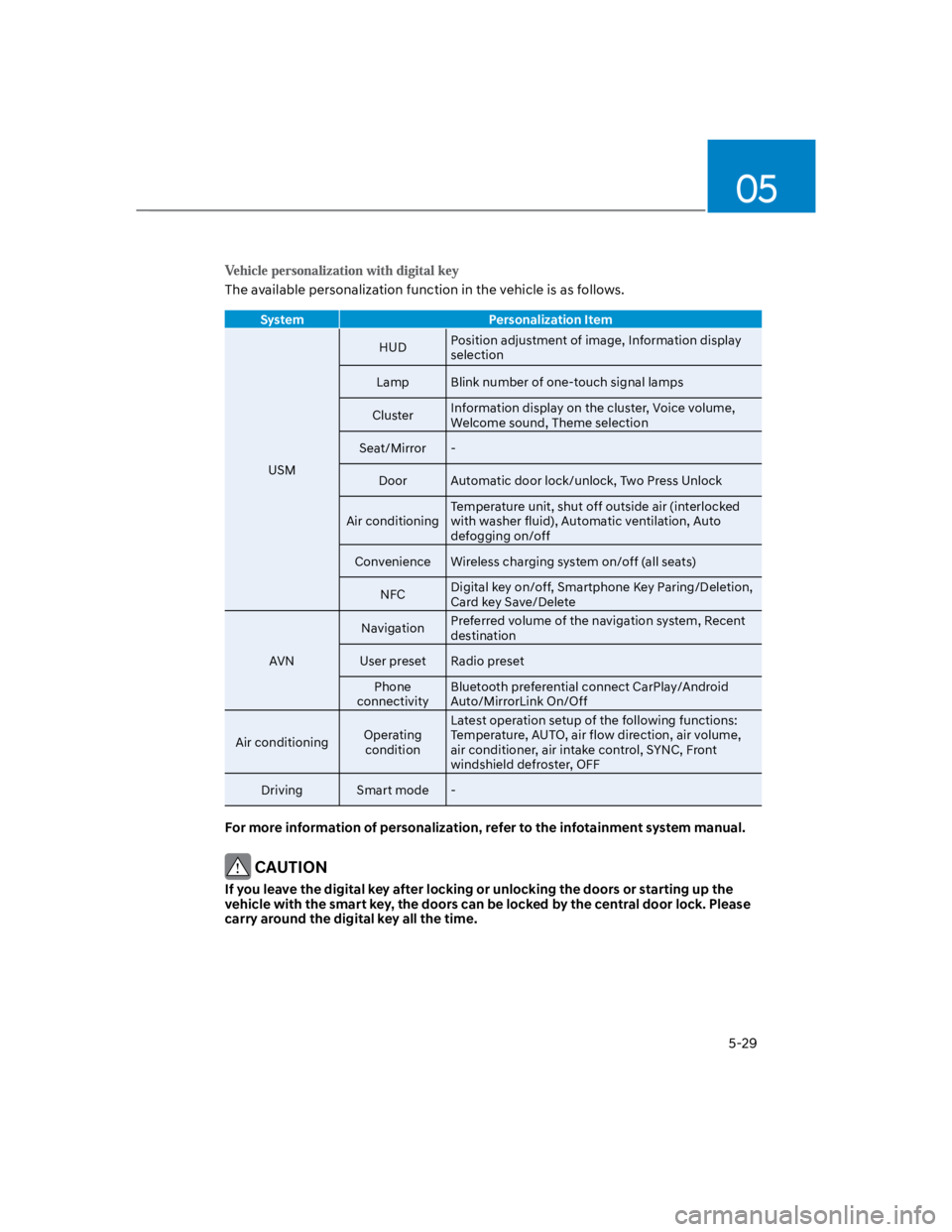
The available personalization function in the vehicle is as follows.
System Personalization Item
USM
HUDPosition adjustment of image, Information display
selection
Lamp Blink number of one-touch signal lamps
ClusterInformation display on the cluster, Voice volume,
Welcome sound, Theme selection
Seat/Mirror -
Door Automatic door lock/unlock, Two Press Unlock
Air conditioning
Temperature unit, shut off outside air (interlocked
with washer fluid), Automatic ventilation, Auto
defogging on/off
Convenience Wireless charging system on/off (all seats)
NFCDigital key on/off, Smartphone Key Paring/Deletion,
Card key Save/Delete
AVN
NavigationPreferred volume of the navigation system, Recent
destination
User preset Radio preset
Phone
connectivity
Bluetooth preferential connect CarPlay/Android
Auto/MirrorLink On/Off
Air conditioningOperating
condition
Latest operation setup of the following functions:
Temperature, AUTO, air flow direction, air volume,
air conditioner, air intake control, SYNC, Front
windshield defroster, OFF
Driving Smart mode -
For more information of personalization, refer to the infotainment system manual.
CAUTION
If you leave the digital key after locking or unlocking the doors or starting up the
vehicle with the smart key, the doors can be locked by the central door lock. Please
carry around the digital key all the time.
Page 168 of 579
Convenient features
5-34
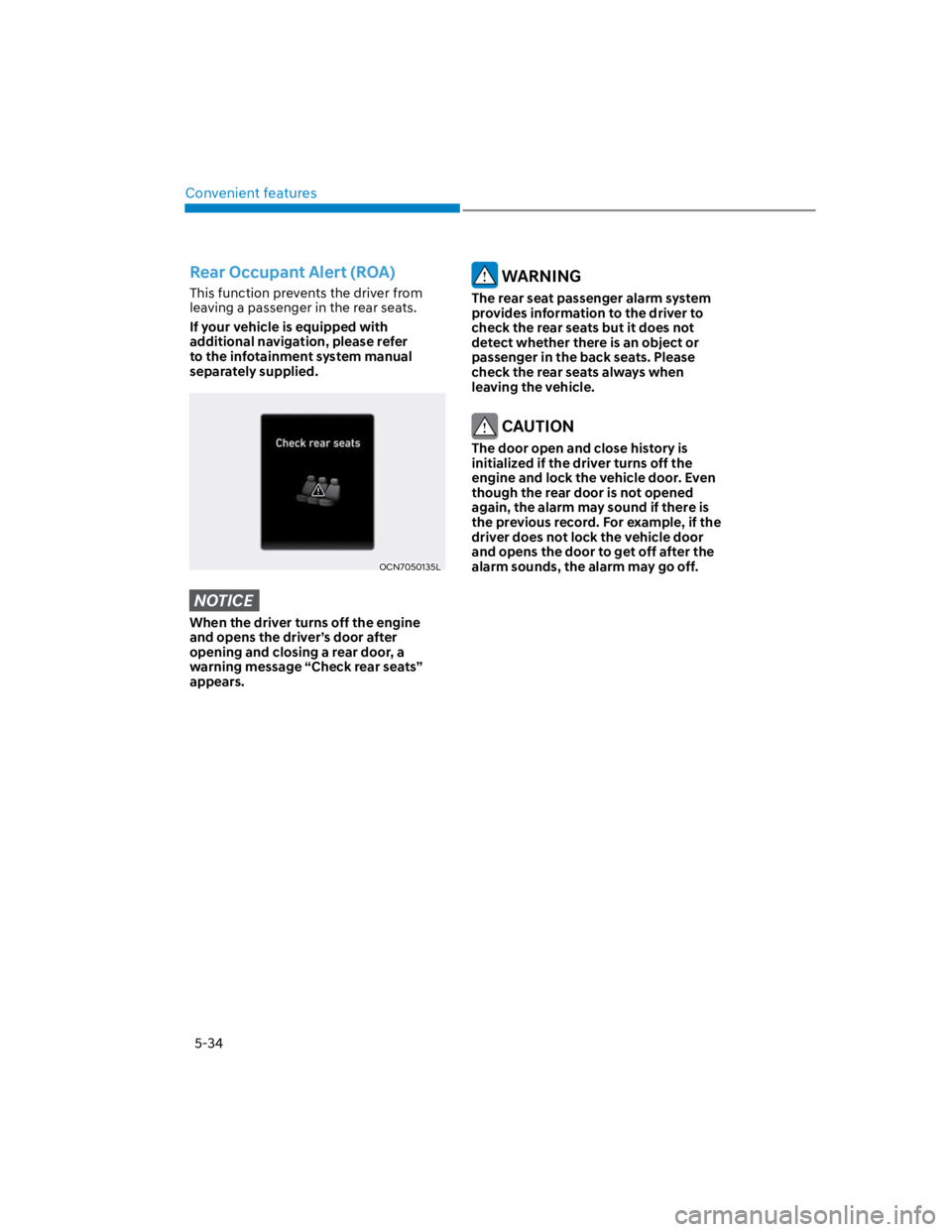
Rear Occupant Alert (ROA)
This function prevents the driver from
leaving a passenger in the rear seats.
If your vehicle is equipped with
additional navigation, please refer
to the infotainment system manual
separately supplied.
OCN7050135L
NOTICE
When the driver turns off the engine
and opens the driver’s door after
opening and closing a rear door, a
warning message “Check rear seats”
appears.
WARNING
The rear seat passenger alarm system
provides information to the driver to
check the rear seats but it does not
detect whether there is an object or
passenger in the back seats. Please
check the rear seats always when
leaving the vehicle.
CAUTION
The door open and close history is
initialized if the driver turns off the
engine and lock the vehicle door. Even
though the rear door is not opened
again, the alarm may sound if there is
the previous record. For example, if the
driver does not lock the vehicle door
and opens the door to get off after the
alarm sounds, the alarm may go off.
Page 174 of 579
Convenient features
5-40
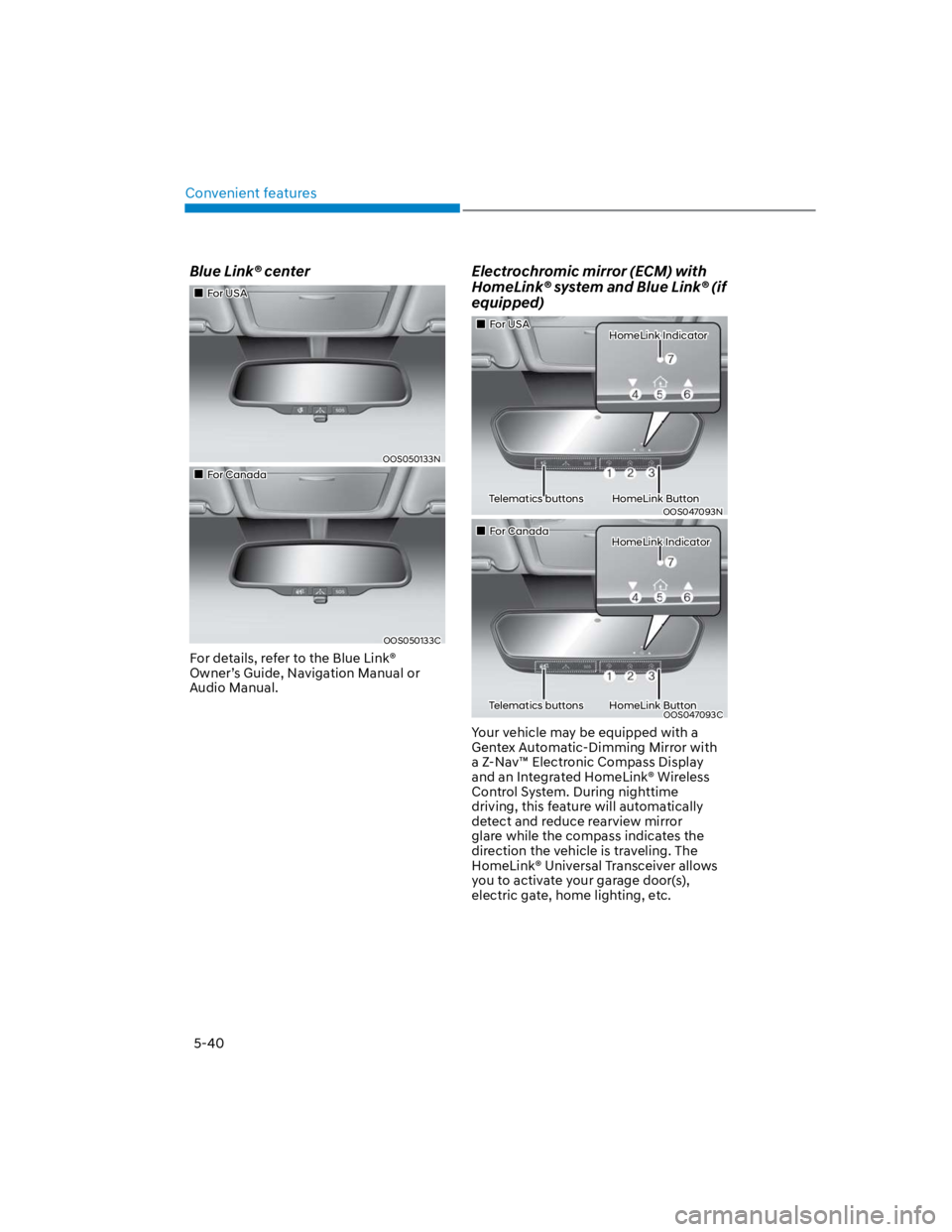
Blue Link® center
For USA
OOS050133N
For Canada
OOS050133C
For details, refer to the Blue Link®
Owner’s Guide, Navigation Manual or
Audio Manual.
Electrochromic mirror (ECM) with
HomeLink® system and Blue Link® (if
equipped)
For USA HomeLink Indicator
Telematics buttons HomeLink Button
OOS047093N
For Canada HomeLink Indicator
Telematics buttons HomeLink ButtonOOS047093C
Your vehicle may be equipped with a
Gentex Automatic-Dimming Mirror with
a Z-Nav™ Electronic Compass Display
and an Integrated HomeLink® Wireless
Control System. During nighttime
driving, this feature will automatically
detect and reduce rearview mirror
glare while the compass indicates the
direction the vehicle is traveling. The
HomeLink® Universal Transceiver allows
you to activate your garage door(s),
electric gate, home lighting, etc.
Page 246 of 579
Convenient features
5-112
Clock
WARNING
Do not attempt to adjust the clock
while driving. Doing so may result in
distracted driving which may lead to
an accident involving personal injury or
death.
Vehicles with Audio system
Select the [SETUP/CLOCK] button on the
Set time: Set the time displayed on
the audio screen.
Time format: Choose between 12-hour
and 24-hour time formats.
Vehicles with Navigation system
Select the Settings menu on the
GPS time: Displays time according to
the received GNSS time.
24-hour: Switches to 12 hour or 24
hour.
For more details, please refer to the
separate manual that was supplied with
your vehicle.
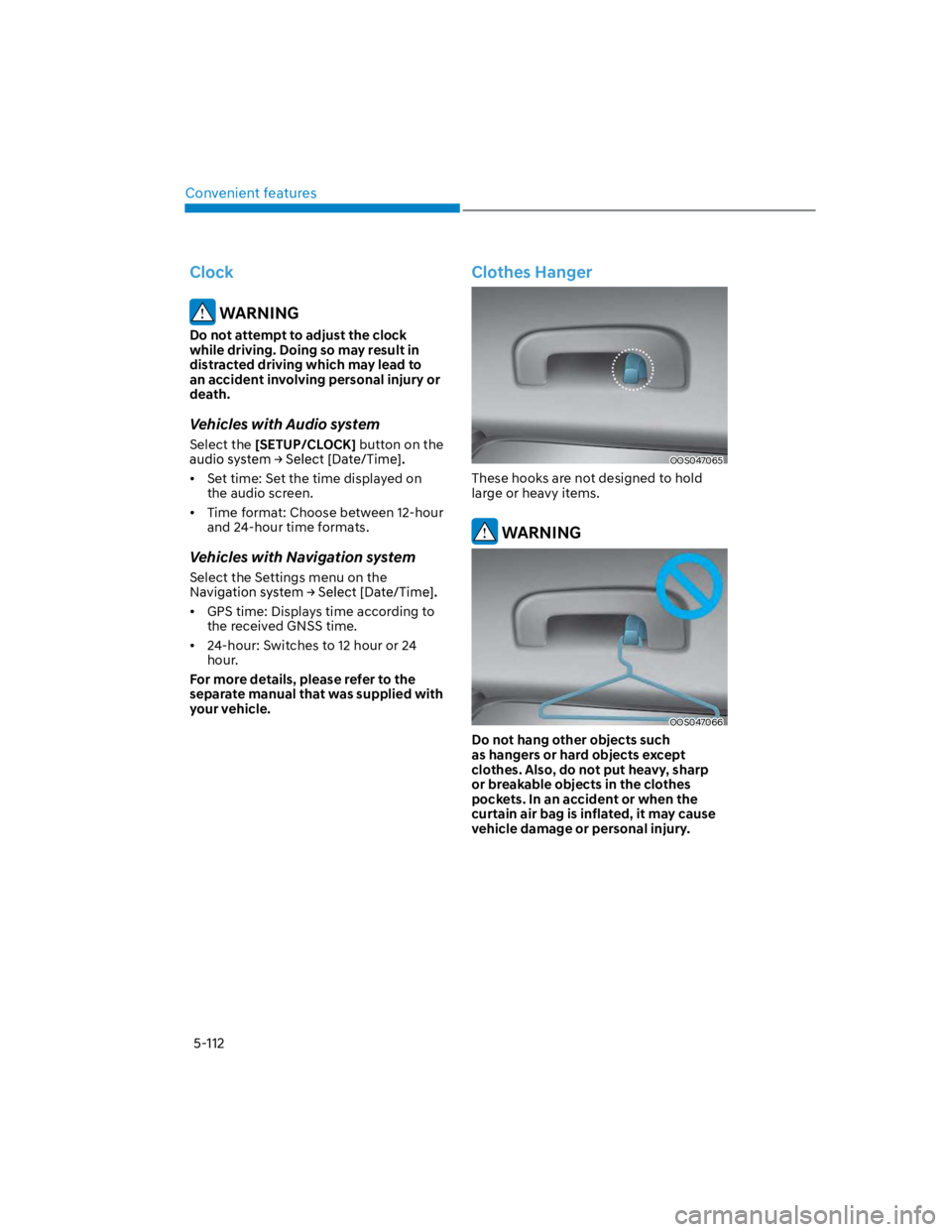
Clothes Hanger
OOS047065
These hooks are not designed to hold
large or heavy items.
WARNING
OOS047066
Do not hang other objects such
as hangers or hard objects except
clothes. Also, do not put heavy, sharp
or breakable objects in the clothes
pockets. In an accident or when the
curtain air bag is inflated, it may cause
vehicle damage or personal injury.
Page 252 of 579
Convenient features
5-118
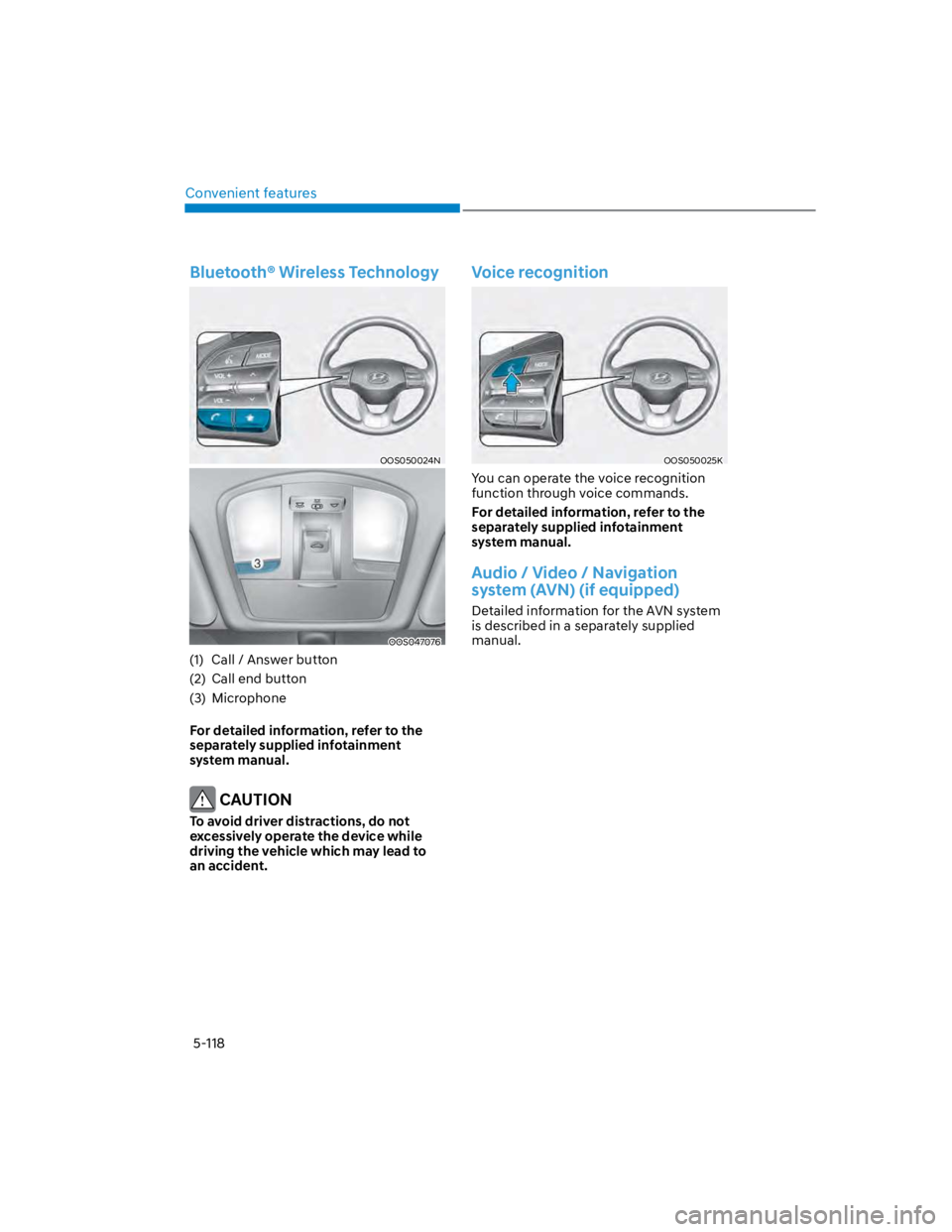
Bluetooth® Wireless Technology
OOS050024N
OOS047076
(1) Call / Answer button
(2) Call end button
(3) Microphone
For detailed information, refer to the
separately supplied infotainment
system manual.
CAUTION
To avoid driver distractions, do not
excessively operate the device while
driving the vehicle which may lead to
an accident.
Voice recognition
OOS050025K
You can operate the voice recognition
function through voice commands.
For detailed information, refer to the
separately supplied infotainment
system manual.
Audio / Video / Navigation
system (AVN) (if equipped)
Detailed information for the AVN system
is described in a separately supplied
manual.
Page 316 of 579
06
6-59
The battery sensor deactivation
OOS090040E
[A] : Battery sensor
The battery sensor is deactivated, when
the battery is disconnected from the
negative pole for maintenance purpose.
In this case, the ISG system is limitedly
operated due to the battery sensor
deactivation. Thus, the driver needs
to take the following procedures to
reactivate the battery sensor after
disconnecting the battery.
Prerequisites to reactivate the
battery sensor
Keep the engine in the OFF status for 4
hours, and attempt to restart the engine
3 to 4 times for the battery-sensor
reactivation.
Pay extreme caution not to connect any
accessories (i.e. navigation and black
box) to the vehicle with the engine in the
OFF status. If not, the battery sensor may
not be reactivated.
Information
-
-
-
NOTICE
Use only the genuine HYUNDAI ISG
battery for replacement. If not, the ISG
system may not normally operate.
Page 333 of 579
7
Driving Safety
Forward Collision–Avoidance Assist (FCA) (Front view camera only) ................... 7-2
Forward Collision–Avoidance Assist (FCA) (Sensor fusion) .................................. 7-14
Lane Keeping Assist (LKA) ...................................................................................... 7-29
Blind-Spot Collision-Avoidance Assist (BCA) ........................................................ 7-35
Safe Exit Warning (SEW) ..........................................................................................7-49
Driver Attention Warning (DAW) ............................................................................ 7-54
Driving Convenience
Cruise Control (CC) .................................................................................................7-60
Smart Cruise Control (SCC) ....................................................................................7-64
Navigation-Based Smart Cruise Control (NSCC) ...................................................7-81
Lane Following Assist (LFA) ....................................................................................7-88
Highway Driving Assist (HDA) ................................................................................. 7-92
Parking Safety
Rear View Monitor (RVM) .......................................................................................7-99
Rear Cross-Traffic Collision-Avoidance Assist (RCCA) ........................................7-102
Reverse Parking Distance Warning (PDW) .............................................................7-113
Declaration of conformity ............................................................................. 7-116
7. Driver assistance system
![HYUNDAI KONA 2022 Owners Manual 06
6-59
The battery sensor deactivation
OOS090040E
[A] : Battery sensor
The battery sensor is deactivated, when
the battery is disconnected from the
negative pole for maintenance purpose.
In this c](/manual-img/35/41169/w960_41169-315.png "HYUNDAI KONA 2022 Owners Manual 06
6-59
The battery sensor deactivation
OOS090040E
[A] : Battery sensor
The battery sensor is deactivated, when
the battery is disconnected from the
negative pole for maintenance purpose.
In this c")