2022 HYUNDAI IONIQ ELECTRIC towing
[x] Cancel search: towingPage 72 of 546
H63
If you cannot put out the fire
immediately, the high voltage
battery may explode. Evacuate
to a safe place and do not let
other people approach the site.
Contact the fire department and notify them of an electric vehi-
cle fire.
If the vehicle is flooded with
water, immediately turn OFF
the vehicle and evacuate to a
safe place. Contact fire
department or an authorized
HYUNDAI dealer.
WARNING
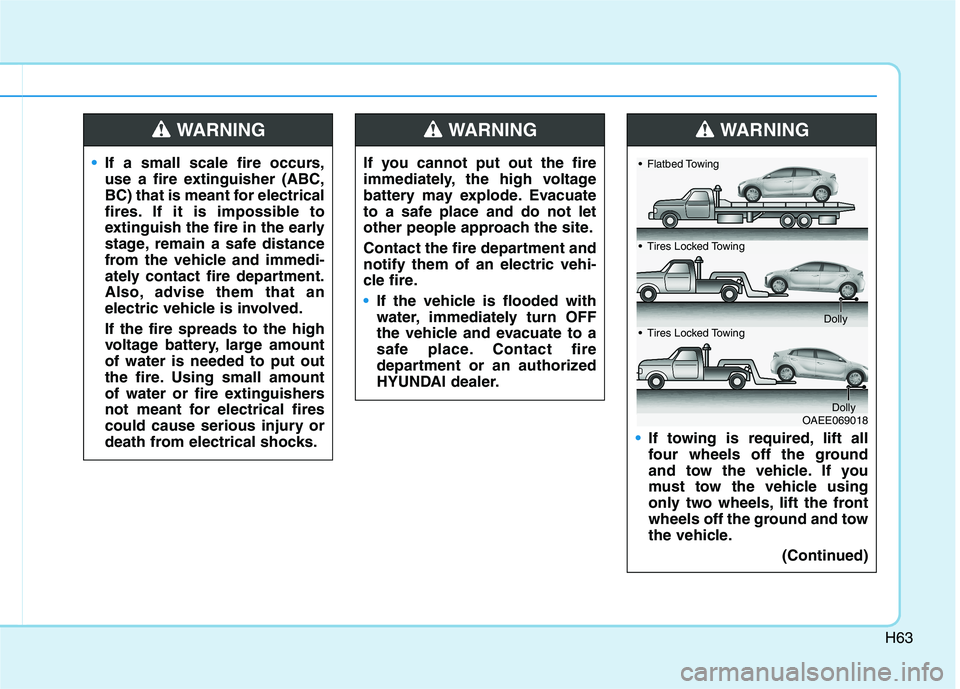
If towing is required, lift all
four wheels off the ground
and tow the vehicle. If you
must tow the vehicle using
only two wheels, lift the front
wheels off the ground and tow
the vehicle.(Continued)
WARNING
OAEE069018
Flatbed Towing
Tires Locked Towing
Dolly
Tires Locked Towing
Dolly
If a small scale fire occurs,
use a fire extinguisher (ABC,
BC) that is meant for electrical
fires. If it is impossible to
extinguish the fire in the early
stage, remain a safe distance
from the vehicle and immedi-
ately contact fire department.
Also, advise them that an
electric vehicle is involved. If the fire spreads to the high
voltage battery, large amountof water is needed to put out
the fire. Using small amount
of water or fire extinguishers
not meant for electrical fires
could cause serious injury or
death from electrical shocks.
WARNING
Page 73 of 546
H64
Other Precautions for Electric
Vehicle
When you paint or apply heat treat-ment to the vehicle as a result of
an accident, the performance of
the high voltage battery can bereduced. If heat treatment is required, contact
an authorized HYUNDAI dealer.
When you clean the motor com- partment, do not use high pressure
water to wash. This may cause an
electric shock due to a discharge in
high voltage electricity, or damage
the vehicle's electric system.
Do not use, remodel, or install non- genuine parts. This may damage
the electric power system.
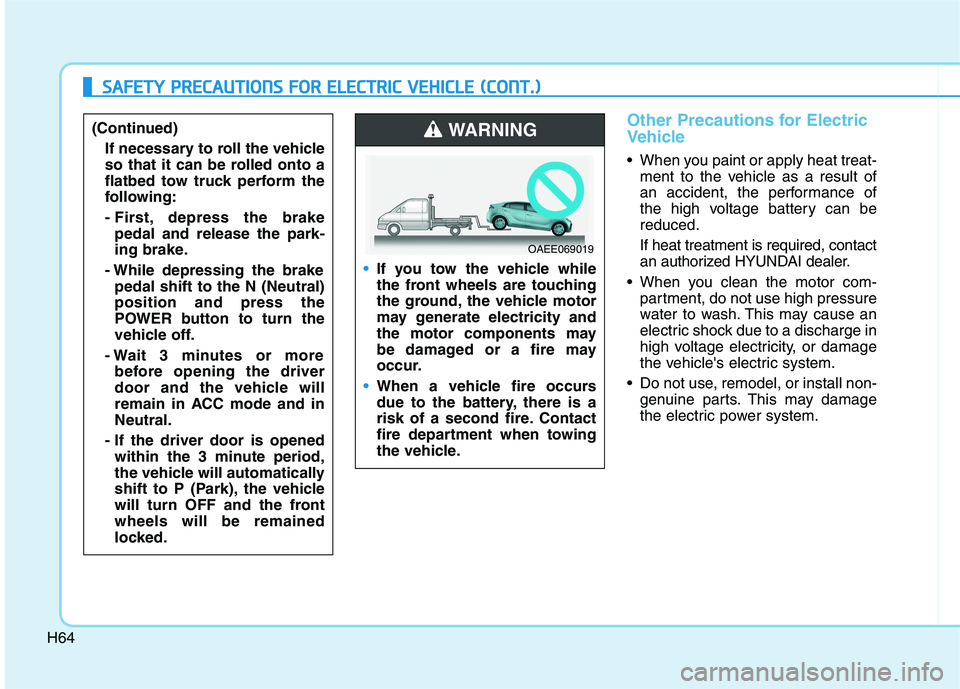
If you tow the vehicle while
the front wheels are touching
the ground, the vehicle motor
may generate electricity and
the motor components may
be damaged or a fire may
occur.
When a vehicle fire occurs
due to the battery, there is a
risk of a second fire. Contact
fire department when towing
the vehicle.
WARNING
OAEE069019
SSAA FFEE TT YY PP RR EECCAA UU TTIIOO NNSS FF OO RR EE LLEE CCTT RR IICC VV EEHH IICC LLEE (( CC OO NNTT..))
(Continued)
If necessary to roll the vehicle
so that it can be rolled onto a
flatbed tow truck perform the
following:
- First, depress the brakepedal and release the park-
ing brake.
- While depressing the brake pedal shift to the N (Neutral)position and press the
POWER button to turn the
vehicle off.
- Wait 3 minutes or more before opening the driver
door and the vehicle will
remain in ACC mode and inNeutral.
- If the driver door is opened within the 3 minute period,
the vehicle will automatically
shift to P (Park), the vehicle
will turn OFF and the frontwheels will be remained
locked.
Page 292 of 546
5
Blind-spot Collision Warning (BCW) ................5-70System description .........................................................5-70
System setting and operation ......................................5-71
Warning message and system control.......................5-73
Declaration of conformity ............................................5-81
Driver Attention Warning (DAW) ......................5-83 System setting and operation ......................................5-83
Resetting the system ....................................................5-86
System standby ...............................................................5-86
System malfunction ........................................................5-86
Leading Vehicle Departure Alert ................................5-89
Smart Cruise Control with Stop and Go
(SCC with S&G).....................................................5-91 To adjust the sensitivity of Smart Cruise Control ..5-93
To convert to Cruise Control mode ............................5-94
Smart Cruise Control speed ..........................................5-94
Smart Cruise Control Vehicle-to-Vehicle
Distance .............................................................................5-99 Sensor to detect distance to the vehicle ahead ...5-102
Limitations of the system ...........................................5-104
Lane Following Assist (LFA) ...........................5-110 LFA operation ................................................................5-112
Warning message ..........................................................5-113
Limitations of the system ...........................................5-115 Highway Driving Assist (HDA) system ...........5-117
System Setting and Operation...................................5-117
Warning Message .........................................................5-120
Rear Cross-Traffic Collision
Warning (RCCW) ................................................5-124 System description .......................................................5-124
System setting and operation....................................5-124
Warning message and system control ....................5-126
Detecting Sensor...........................................................5-128
Special driving conditions .................................5-135 Hazardous Driving Conditions....................................5-135
Rocking the Vehicle ......................................................5-135
Smooth Cornering .........................................................5-136
Driving at Night .............................................................5-136
Driving in the Rain ........................................................5-136
Driving in Flooded Areas.............................................5-137
Highway Driving ............................................................5-137
Winter driving .....................................................5-138 Snow or Icy Conditions................................................5-138
Winter Precautions .......................................................5-138
Vehicle load limit ................................................5-140 Tire Loading Information Label .................................5-141
Trailer Towing .....................................................5-145
Page 356 of 546
5-66
Driving your vehicle
Information
Even though the steering is assisted by the system, the driver can still
steer to control the steering wheel.
The steering wheel may feel heavier or lighter when the steering wheel is
assisted by the system than when it
is not.
Warning light and message
Check Lane Keeping Assist (LKA)
system
If there is a problem with the system
a message will appear for a few sec-
onds. If the problem continues LKA
system failure indicator will illumi-
nate.
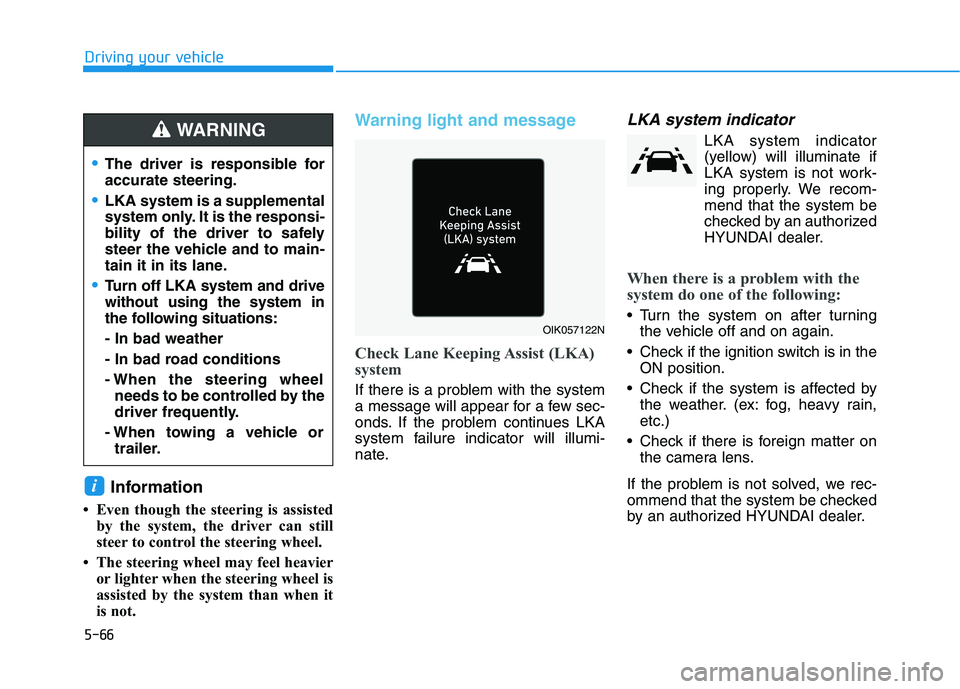
LKA system indicator
LKA system indicator(yellow) will illuminate if
LKA system is not work-
ing properly. We recom-
mend that the system be
checked by an authorized
HYUNDAI dealer.
When there is a problem with the
system do one of the following:
Turn the system on after turning the vehicle off and on again.
Check if the ignition switch is in the ON position.
Check if the system is affected by the weather. (ex: fog, heavy rain, etc.)
Check if there is foreign matter on the camera lens.
If the problem is not solved, we rec-
ommend that the system be checked
by an authorized HYUNDAI dealer.
i
OIK057122N
The driver is responsible for accurate steering.
LKA system is a supplemental
system only. It is the responsi-
bility of the driver to safely
steer the vehicle and to main-
tain it in its lane.
Turn off LKA system and drive without using the system in
the following situations: - In bad weather
- In bad road conditions
- When the steering wheel needs to be controlled by the
driver frequently.
- When towing a vehicle or trailer.
WARNING
Page 398 of 546
5-108
Driving your vehicle
Smart Cruise Control system may
not operate temporarily due to:
Electrical interference
Modifying the suspension
Differences of tire abrasion ortire pressure
Installing different type of tires
NOTICE(Continued)
Smart Cruise Control system
may not recognize complex
driving situations so always
pay attention to driving condi-
tions and control your vehiclespeed.
Turn off the Smart Cruise
Control system when the
vehicle is being towed.
Do not activate Smart Cruise
Control when towing a trailer
or vehicle.
Safety of the vehicle may be deteriorated when braking
control is applied in the tow-ing condition.
(Continued)
Smart Cruise Control system
cannot recognize a stopped
vehicle, pedestrians or an
oncoming vehicle. Always
look ahead cautiously to pre-
vent unexpected and sudden
situations from occurring.
Vehicles moving in front of
you with a frequent lane
change may cause a delay in
the system's reaction or maycause the system to react to a
vehicle actually in an adjacent
lane. Always drive cautiously
to prevent unexpected and
sudden situations from occur-ring.
Always be aware of the select-
ed speed and vehicle to vehi-
cle distance. The driver
should not solely rely on the
system but always pay atten-tion to driving conditions and
control your vehicle speed.
(Continued)
Page 413 of 546
5-123
Driving your vehicle
5
Information
For information's on vehicle to vehi- cle distance control and the front
radar, refer to "Smart Cruise
Control (SCC)" in this chapter.
For information's on steering con- trol and distance control and the
front camera, refer to "Lane
Following Assist (LFA)" in this
chapter.
Information
This device complies with Industry
Canada RSS-210 standard.
Operation is subject to the following
three conditions:
1. This device may not cause harmful interference, and
2. This device must accept any inter- ference received, including interfer-
ence that may cause undesired
operation.
3. Changes or modifications not expressly approved by the party
responsible for compliance could
void the user's authority to operate
the device. Information
Radio frequency radiation exposure
information:
This equipment complies with RSS
radiation exposure limits set forth for
an uncontrolled environment.
This equipment should be installed
and operated with minimum distance
of 20 cm (8 in.) between the radiator
(antenna) and your body.
This transmitter must not be co-locat-
ed or operating in conjunction with
any other antenna or transmitter.i
i
i(Continued)
The speed limit of selected
highway section is changed
due to road conditions.
Android Auto or Car Play is operating.
The navigation cannot detect
the current vehicle position
(ex: elevated roads including
overpass adjacent to general
roads or nearby roads exist in
a parallel way).
The navigation is being updat- ed while driving.
The navigation is being reset while driving.
The road is slippery due to
bad weather such as rain or
snow.
another vehicle, you should
release Highway Driving
Assist system. Operating thebrake system or steering sys-
tem while towing may
adversely affect the safety.
Page 426 of 546
5-136
Driving your vehicle
Information
The ESC system (if equipped) must be
turned OFF before rocking the vehi-
cle.
If you are still stuck after rocking
the vehicle a few times, have the
vehicle pulled out by a tow vehicle
to avoid vehicle overheating, pos-
sible damage to the reduction
gear and tire damage. See
"Towing" in chapter 6.Smooth Cornering
Avoid braking or gear changing in
corners, especially when roads are
wet. Ideally, corners should always
be taken under gentle acceleration.
Driving at Night
Night driving presents more hazards
than driving in the daylight. Here are
some important tips to remember:
Slow down and keep more dis- tance between you and other vehi-
cles, as it may be more difficult tosee at night, especially in areas
where there may not be any street
lights.
Adjust your mirrors to reduce the glare from other driver's head-
lamps.
Keep your headlamps clean and properly aimed. Dirty or improperly
aimed headlamps will make it
much more difficult to see at night.
Avoid staring directly at the head- lamps of oncoming vehicles. You
could be temporarily blinded, and it
will take several seconds for your
eyes to readjust to the darkness.
Driving in the Rain
Rain and wet roads can make driving
dangerous. Here are a few things to
consider when driving in the rain or
on slick pavement:
Slow down and allow extra follow-ing distance. A heavy rainfall
makes it harder to see and increas-es the distance needed to stop
your vehicle.
Turn OFF your Cruise Control. (if equipped)
Replace your windshield wiper blades when they show signs ofstreaking or missing areas on thewindshield.
Be sure your tires have enough tread. If your tires do not have
enough tread, making a quick stop
on wet pavement can cause a skid
and possibly lead to an accident.
See "Tire Tread" in chapter 7 .
Turn on your headlamps to make it easier for others to see you.
Driving too fast through large pud- dles can affect your brakes. If you
must go through puddles, try to
drive through them slowly.
NOTICE
i
Page 431 of 546
5-141
Driving your vehicle
5
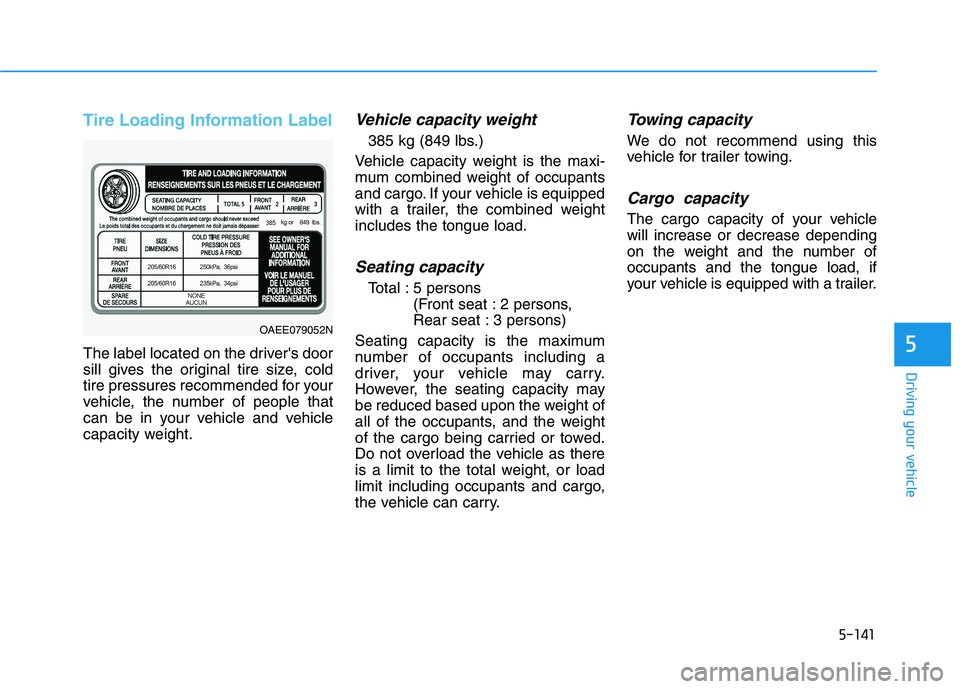
Tire Loading Information Label
The label located on the driver's door
sill gives the original tire size, cold
tire pressures recommended for your
vehicle, the number of people that
can be in your vehicle and vehicle
capacity weight.
Vehicle capacity weight
385 kg (849 lbs.)
Vehicle capacity weight is the maxi-
mum combined weight of occupants
and cargo. If your vehicle is equipped
with a trailer, the combined weightincludes the tongue load.
Seating capacity
Total : 5 persons (Front seat : 2 persons,
Rear seat : 3 persons)
Seating capacity is the maximum
number of occupants including a
driver, your vehicle may carry.
However, the seating capacity may
be reduced based upon the weight of
all of the occupants, and the weight
of the cargo being carried or towed.
Do not overload the vehicle as there
is a limit to the total weight, or load
limit including occupants and cargo,
the vehicle can carry.
Towing capacity
We do not recommend using this
vehicle for trailer towing.
Cargo capacity
The cargo capacity of your vehiclewill increase or decrease depending
on the weight and the number ofoccupants and the tongue load, if
your vehicle is equipped with a trailer.
OAEE079052N