2022 HYUNDAI ELANTRA HYBRID audio
[x] Cancel search: audioPage 14 of 529
01
1-11
When the hybrid system is turned ON,
the gasoline engine may run or may not.
In this situation, you may feel a vibration.
This does not indicate a malfunction. When the “
” indicator illuminates, the
hybrid system is ready to begin driving.
Even if the engine is off, you can operate
the vehicle as long as the “
” indicator
is illuminated.
NOTICE
The hybrid system contains many
electronic components. High voltage
components, such as cables and other
parts, may emit electromagnetic waves.
Even when the electromagnetic cover
blocks electromagnetic emissions,
electromagnetic waves may have an
effect on electronic devices. When your
vehicle is not used for a long period of
time, the hybrid system will discharge.
You need to drive the vehicle several
times a month. We recommend driving
at least for 1 hour or 16 km. When the
hybrid battery is discharged, or when it
is impossible to jump start the vehicle,
we recommend that you contact your
authorized HYUNDAI dealer.
WARNING
• When you start the hybrid system
with the shift button in P (Parking), the “
” indicator illuminates on
the instrument cluster. The driver
can drive the vehicle, even when the
gasoline engine is off.
• When you leave the vehicle, you
should turn OFF the hybrid system
or locate the shift button in P (Park).
When you depress the accelerator
pedal by mistake, or when the shift
button is not in P (Park), the vehicle
will abruptly move, possibly resulting
in serious injury or death. Virtual Engine Sound System (VESS)
The Virtual Engine Sound System
generates engine sound for pedestrians
to hear vehicle sound because there is
limited sound while motor power is used. •
If the gear shifts from P (Parking) after
start-up, the VESS sound is output.
• When the gear is shifted to R
(Reverse), an additional warning
sound will be heard.
What does regenerative braking do?
It uses an electric motor when
decelerating and when braking. It
transforms kinetic energy to electrical
energy in order to charge the high
voltage battery.
Battery • The vehicle is composed of a high
voltage battery that drives the motor
and air conditioner, and an integrated
12V lithium ion polymer battery with
the HEV battery that drives the lamps,
wipers, and audio system.
• The integrated 12V battery is
automatically charged when the
vehicle is in the ready (
) mode.
Page 150 of 529
5
Storage Compartment ................................................................................. 5-86
Center Console Storage ......................................................................................... 5-86
Glove Box ................................................................................................................ 5-86
Cup Holder .............................................................................................................. 5-87
Interior Features ........................................................................................... 5-87
Sunvisor .................................................................................................................. 5-88
Power Outlet ........................................................................................................... 5-88
USB Charger ........................................................................................................... 5-89
Wireless Cellular Phone Charging System ...........................................................5-90
Clock ....................................................................................................................... 5-92
Clothes Hanger ....................................................................................................... 5-92
Infotainment System ................................................................................... 5-93
USB Port .................................................................................................................. 5-93
Antenna ................................................................................................................... 5-93
Steering wheel Audio Control ............................................................................... 5-94
Infotainment System .............................................................................................. 5-95
Voice Recognition .......................................................................................................... 5-95
Bluetooth® Wireless Technology Hands-Free ......................................................5-95
How Vehicle Radio Works ...................................................................................... 5-96
5. Convenient Features
Page 236 of 529
05
5-89
CAUTION
To prevent damage to the Power
Outlets: • Use the power outlet only when the
engine is running and remove the
accessory plug after use. Using the
accessory plug for prolonged periods
of time with the engine off could
cause the battery to discharge.
• Only use 12V electric accessories
which are less than 15A in electric
capacity.
• Adjust the air-conditioner or heater
to the lowest operating level when
using the power outlet.
• Close the cover when not in use.
• Some electronic devices can
cause electronic interference
when plugged into a vehicle’s
power outlet. These devices may
cause excessive audio static and
malfunctions in other electronic
systems or devices used in your
vehicle.
• Push the plug in as far as it will go. If
good contact is not made, the plug
may overheat and the fuse may open.
• Plug in battery equipped electrical/
electronic devices with reverse
current protection. The current
from the battery may flow into the
vehicle’s electrical/electronic system
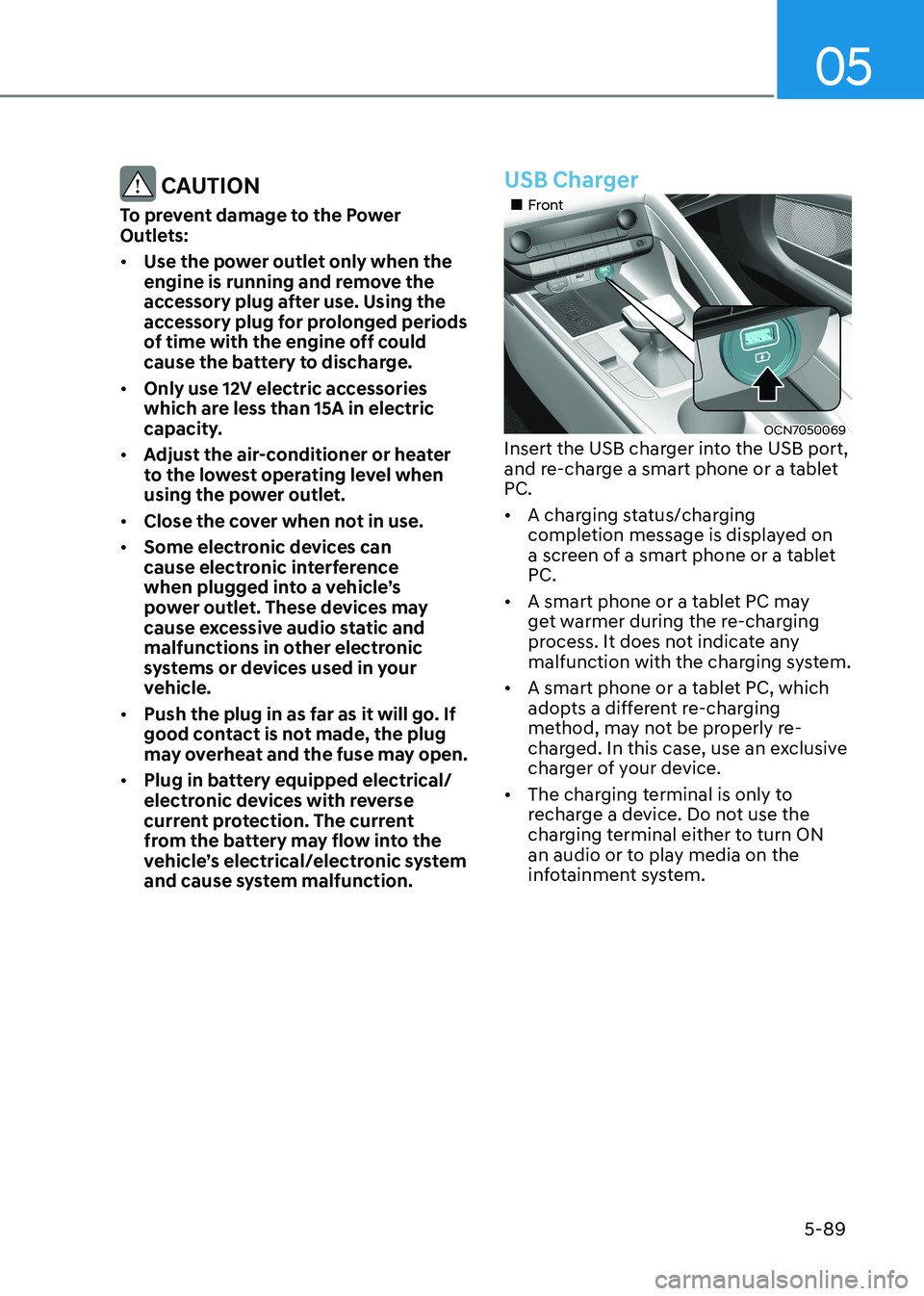
and cause system malfunction.USB Charger
„„Front
OCN7050069
Insert the USB charger into the USB port,
and re-charge a smart phone or a tablet
PC. • A charging status/charging
completion message is displayed on
a screen of a smart phone or a tablet
PC.
• A smart phone or a tablet PC may
get warmer during the re-charging
process. It does not indicate any
malfunction with the charging system.
• A smart phone or a tablet PC, which
adopts a different re-charging
method, may not be properly re-
charged. In this case, use an exclusive
charger of your device.
• The charging terminal is only to
recharge a device. Do not use the
charging terminal either to turn ON
an audio or to play media on the
infotainment system.
Page 240 of 529
05
5-93
infOtainment SyStem
NOTICE
• If you install an aftermarket HID
head lamp, your vehicle’s audio and
electronic devices may not function
properly.
• Prevent chemicals such as perfume,
cosmetic oil, sunscreen, hand
cleaner, and air freshener from
contacting the interior parts
because they may cause damage or
discoloration.
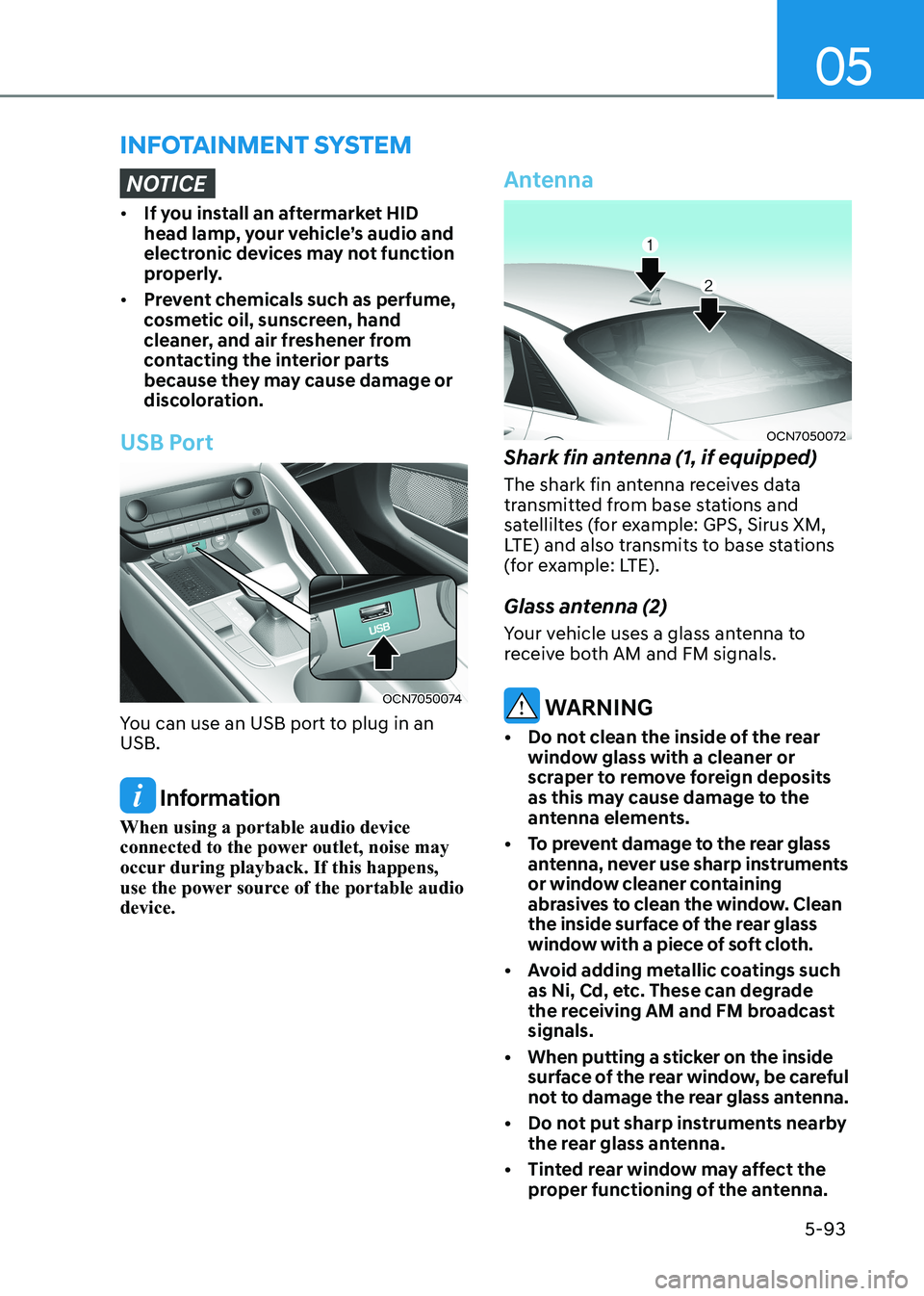
USB Port
OCN7050074
You can use an USB port to plug in an USB.
Information
When using a portable audio device
connected to the power outlet, noise may
occur during playback. If this happens,
use the power source of the portable audio device.
Antenna
OCN7050072
Shark fin antenna (1, if equipped)
The shark fin antenna receives data
transmitted from base stations and
satelliltes (for example: GPS, Sirus XM,
LTE) and also transmits to base stations
(for example: LTE).
Glass antenna (2)
Your vehicle uses a glass antenna to
receive both AM and FM signals.
WARNING
• Do not clean the inside of the rear window glass with a cleaner or
scraper to remove foreign deposits
as this may cause damage to the
antenna elements.
• To prevent damage to the rear glass antenna, never use sharp instruments
or window cleaner containing
abrasives to clean the window. Clean
the inside surface of the rear glass
window with a piece of soft cloth.
• Avoid adding metallic coatings such as Ni, Cd, etc. These can degrade
the receiving AM and FM broadcast signals.
• When putting a sticker on the inside surface of the rear window, be careful
not to damage the rear glass antenna.
• Do not put sharp instruments nearby the rear glass antenna.
• Tinted rear window may affect the proper functioning of the antenna.
Page 241 of 529
Convenient Features
5-94
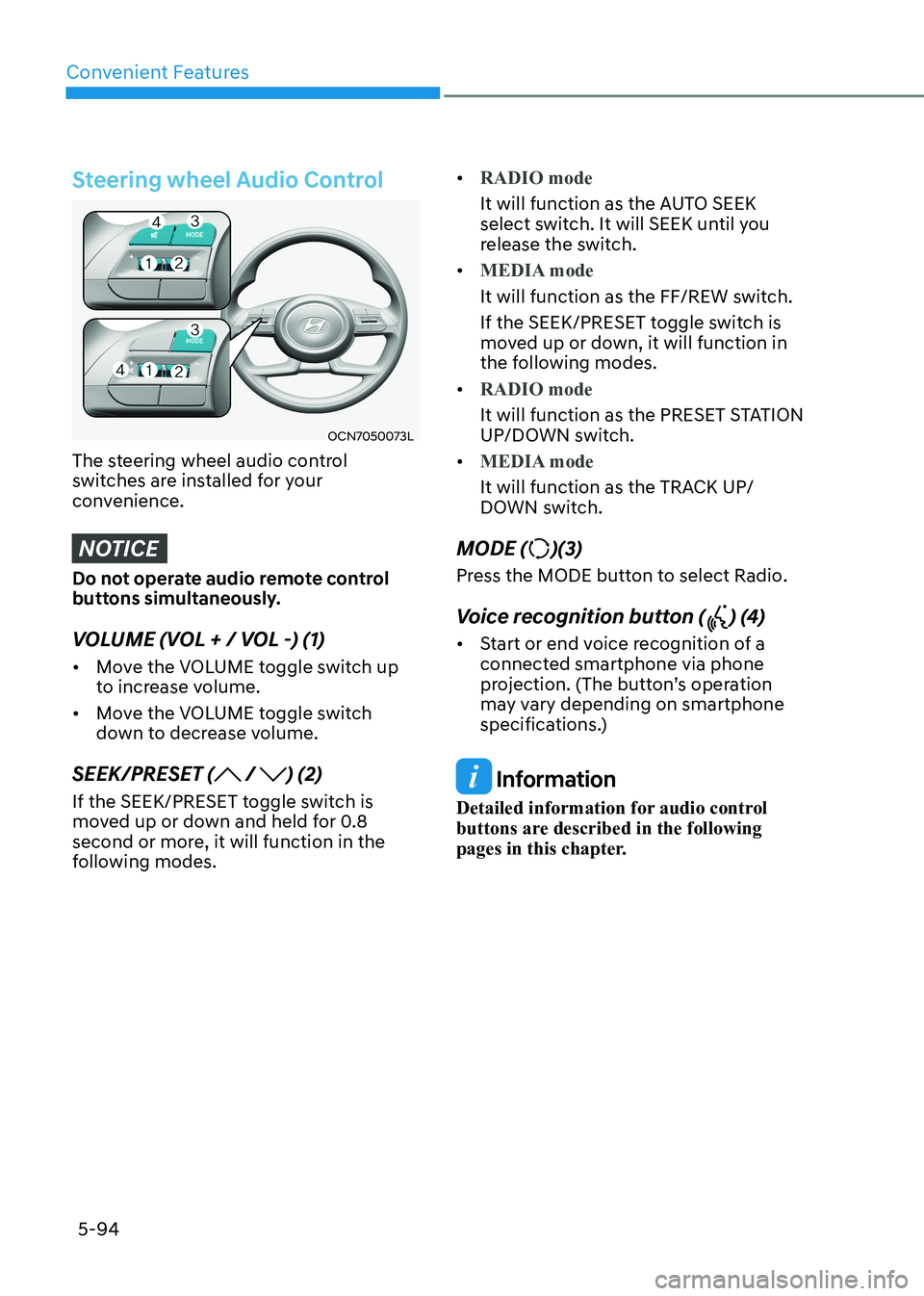
Steering wheel Audio Control
OCN7050073L
The steering wheel audio control
switches are installed for your
convenience.
NOTICE
Do not operate audio remote control
buttons simultaneously.
VOLUME (VOL + / VOL -) (1) • Move the VOLUME toggle switch up
to increase volume.
• Move the VOLUME toggle switch
down to decrease volume.
SEEK/PRESET (
/ ) (2)
If the SEEK/PRESET toggle switch is
moved up or down and held for 0.8
second or more, it will function in the
following modes. •
RADIO mode
It will function as the AUTO SEEK
select switch. It will SEEK until you
release the switch.
•
MEDIA mode
It will function as the FF/REW switch.
If the SEEK/PRESET toggle switch is
moved up or down, it will function in
the following modes.
•
RADIO mode
It will function as the PRESET STATION
UP/DOWN switch.
•
MEDIA mode
It will function as the TRACK UP/
DOWN switch.
MODE (
)(3)
Press the MODE button to select Radio.
Voice recognition button (
) (4)
• Start or end voice recognition of a
connected smartphone via phone
projection. (The button’s operation
may vary depending on smartphone
specifications.)
Information
Detailed information for audio control
buttons are described in the following
pages in this chapter.
Page 242 of 529
05
5-95
Infotainment System (if equipped)
If your vehicle is equipped with
additional navigation, please refer to the
infotainment system manual separately supplied.
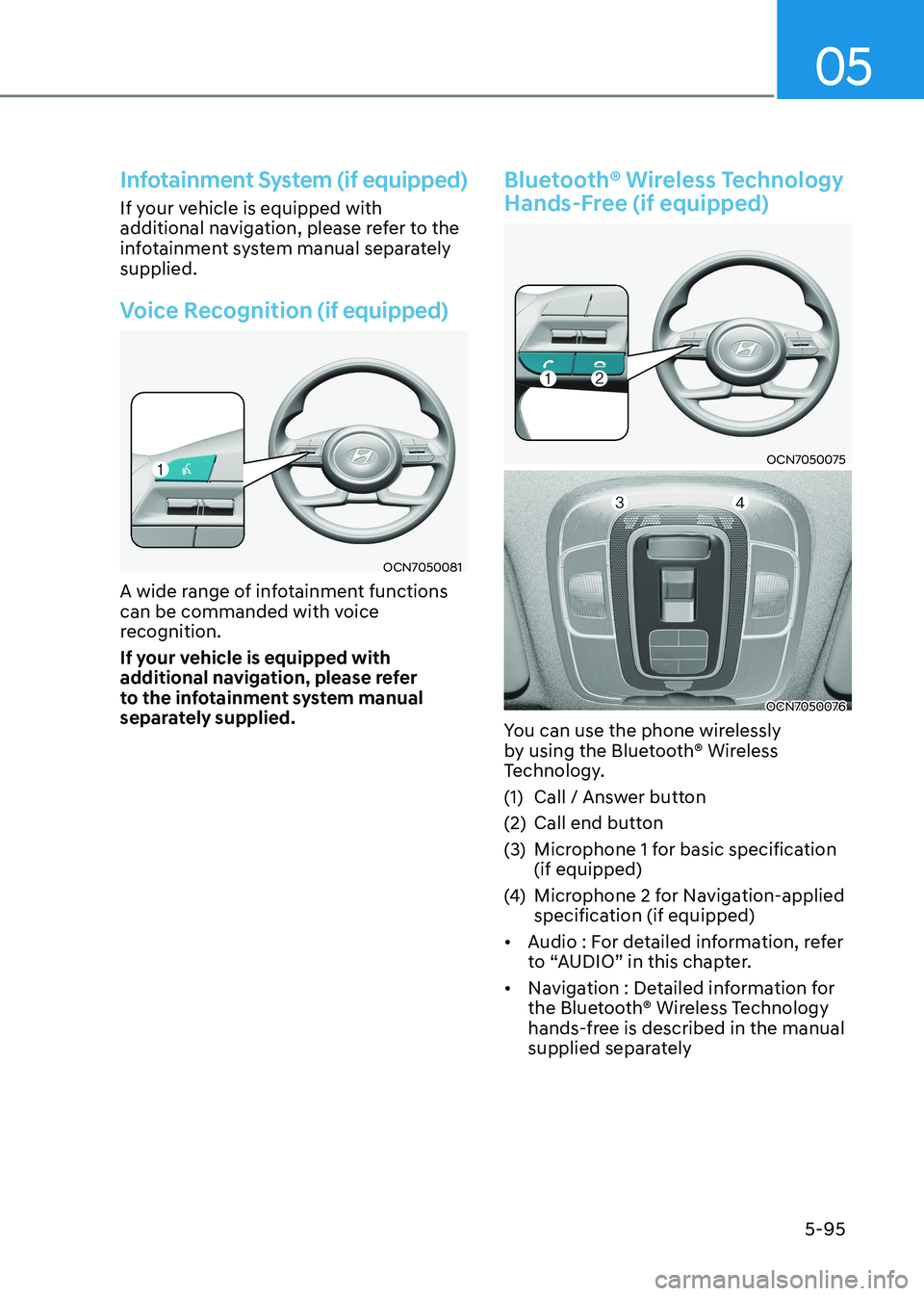
Voice Recognition (if equipped)
OCN7050081
A wide range of infotainment functions
can be commanded with voice
recognition.
If your vehicle is equipped with
additional navigation, please refer
to the infotainment system manual
separately supplied.
Bluetooth® Wireless Technology
Hands-Free (if equipped)
OCN7050075
OCN7050076
You can use the phone wirelessly
by using the Bluetooth® Wireless
Technology.
(1) Call / Answer button
(2) Call end button
(3) Microphone 1 for basic specification (if equipped)
(4) Microphone 2 for Navigation-applied
specification (if equipped)
• Audio : For detailed information, refer
to “AUDIO” in this chapter.
• Navigation : Detailed information for
the Bluetooth® Wireless Technology
hands-free is described in the manual
supplied separately
Page 243 of 529
Convenient Features
5-96
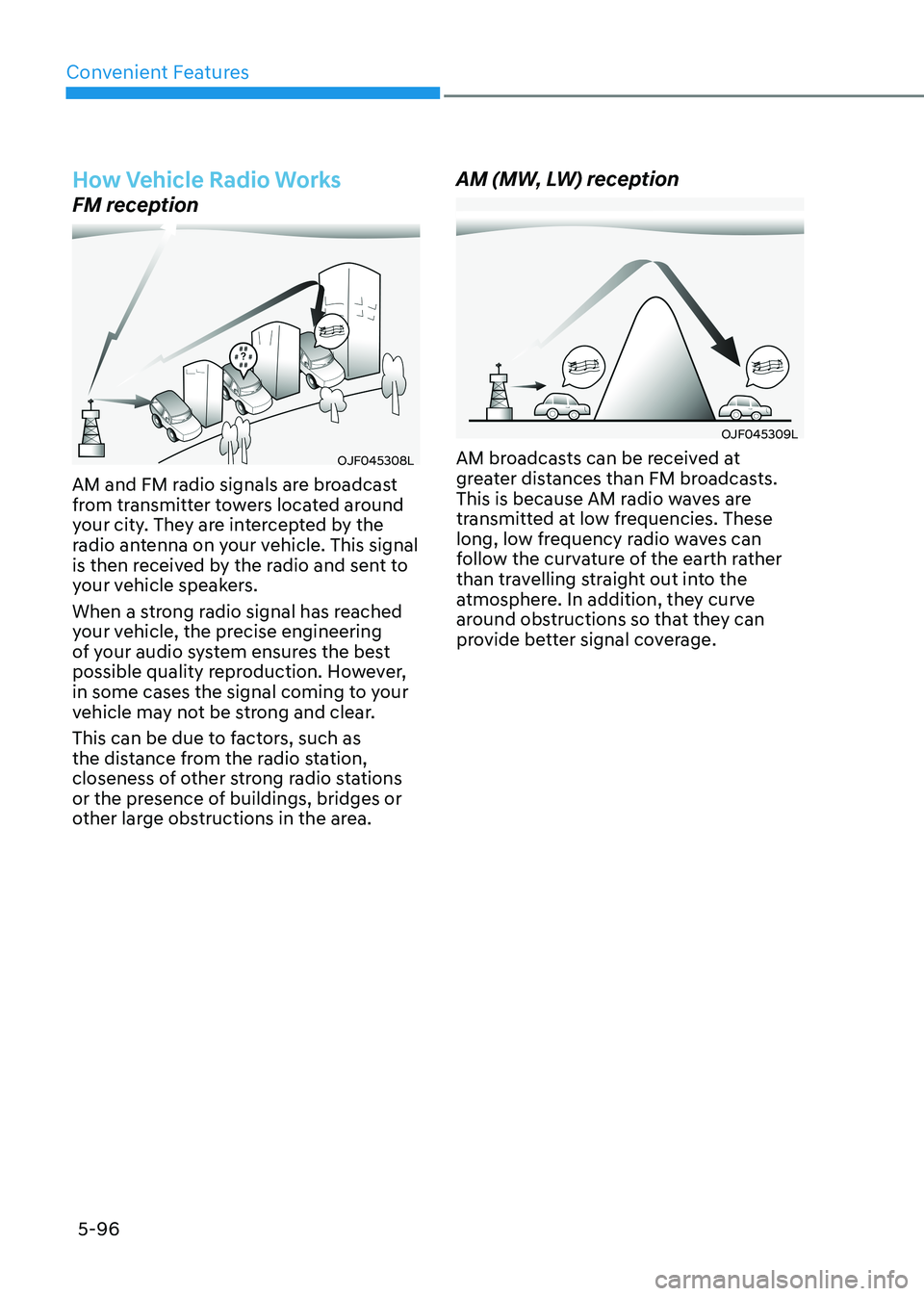
How Vehicle Radio Works
FM reception
OJF045308L
AM and FM radio signals are broadcast
from transmitter towers located around
your city. They are intercepted by the
radio antenna on your vehicle. This signal
is then received by the radio and sent to
your vehicle speakers.
When a strong radio signal has reached
your vehicle, the precise engineering
of your audio system ensures the best
possible quality reproduction. However,
in some cases the signal coming to your
vehicle may not be strong and clear.
This can be due to factors, such as
the distance from the radio station,
closeness of other strong radio stations
or the presence of buildings, bridges or
other large obstructions in the area. AM (MW, LW) reception
OJF045309L
AM broadcasts can be received at
greater distances than FM broadcasts.
This is because AM radio waves are
transmitted at low frequencies. These
long, low frequency radio waves can
follow the curvature of the earth rather
than travelling straight out into the
atmosphere. In addition, they curve
around obstructions so that they can
provide better signal coverage.
Page 245 of 529
Convenient Features
5-98
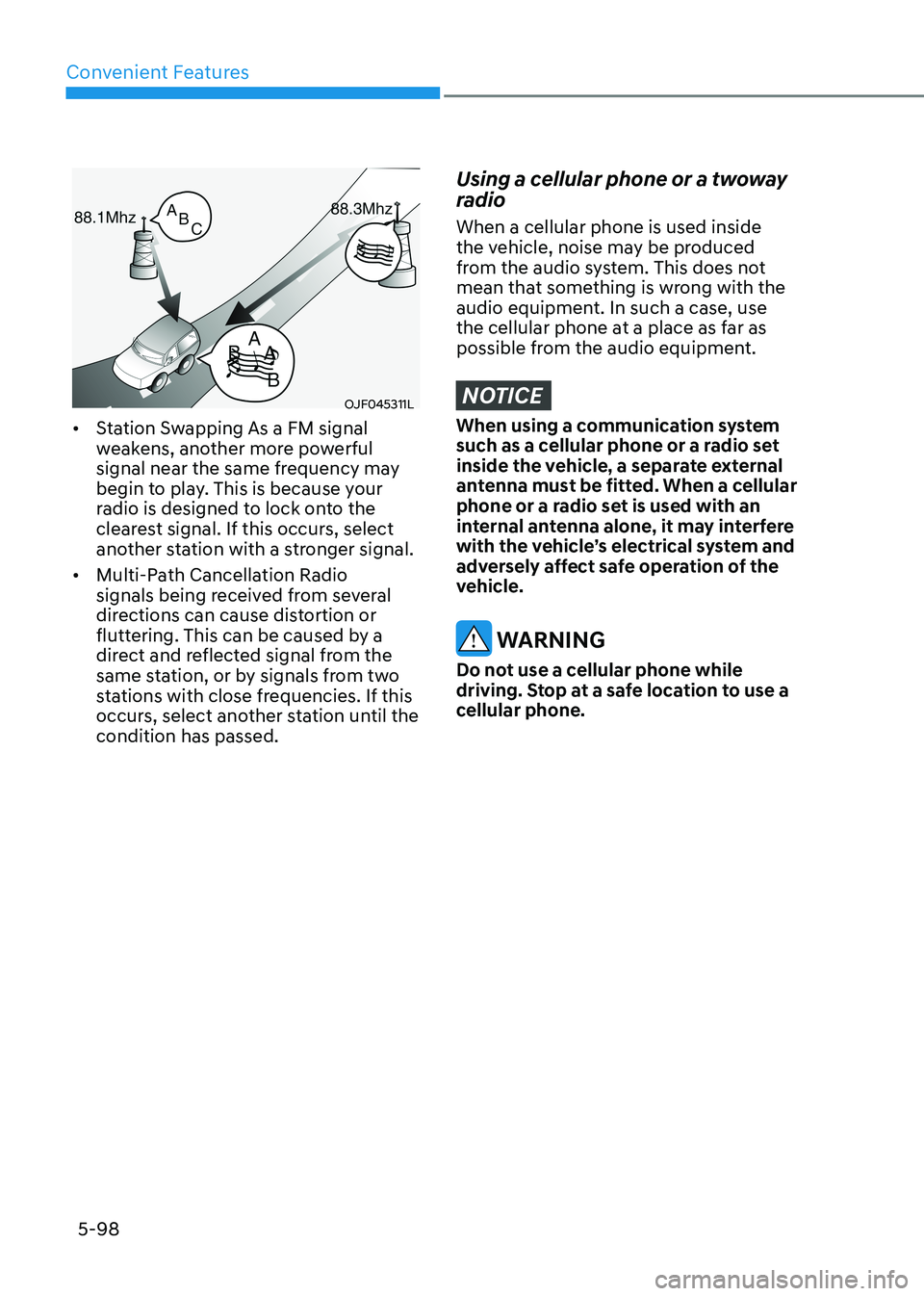
OJF045311L
• Station Swapping As a FM signal
weakens, another more powerful
signal near the same frequency may
begin to play. This is because your
radio is designed to lock onto the
clearest signal. If this occurs, select
another station with a stronger signal.
• Multi-Path Cancellation Radio
signals being received from several
directions can cause distortion or
fluttering. This can be caused by a
direct and reflected signal from the
same station, or by signals from two
stations with close frequencies. If this
occurs, select another station until the condition has passed.
Using a cellular phone or a twoway
radio When a cellular phone is used inside
the vehicle, noise may be produced
from the audio system. This does not
mean that something is wrong with the
audio equipment. In such a case, use
the cellular phone at a place as far as
possible from the audio equipment.
NOTICE
When using a communication system
such as a cellular phone or a radio set
inside the vehicle, a separate external
antenna must be fitted. When a cellular
phone or a radio set is used with an
internal antenna alone, it may interfere
with the vehicle’s electrical system and
adversely affect safe operation of the
vehicle.
WARNING
Do not use a cellular phone while
driving. Stop at a safe location to use a
cellular phone.