Page 276 of 737
uuAudio System Basic Operation uAudio/Information Screen
274
Features
■To move icons on the home screen
You can change location on the home screen. 1.Select and hold an icon.
u The screen switches to the customization
screen.
2. Drag and drop the icon to where you want
it to be.
3. Select Done.
u The screen will return to the home
screen.1To move icons on the home screen
Select Tips to show tips. To hide them, select it again.
Select and hold.
Drag and drop.
22 PILOT-31TG76600.book 274 ページ 2021年6月11日 金曜日 午後4時40分
Page 277 of 737
Continued275
uuAudio System Basic Operation uAudio/Information Screen
Features
■To remove icons on the home screen
You can delete the icons on the home screen. 1.Select and hold an icon.
u The screen switches to the customization
screen.
2. Drag and drop the icon you want to remove
to the Hide icon.
u The icon is removed from the home
screen.
3. Select Done.
u The screen will return to the home
screen.1To remove icons on the home screen
Apps will not be deleted by deleting the icon on the
home screen.
Select Tips to show tips. To hide them, select it again.
Select and hold.
Drag and drop to
Hide icon.
22 PILOT-31TG76600.book 275 ページ 2021年6月11日 金曜日 午後4時40分
Page 278 of 737
uuAudio System Basic Operation uAudio/Information Screen
276
Features
■To create shortcuts for apps displayed on the home screen
Three shortcut icons for accessing apps displayed on the home screen are displayed
in the upper left area of the screen. You can replace any of these shortcut icons with
an icon of your preference. 1.From the home screen, select and hold the
icon that you want to store in the upper left
of the screen.
u The screen will switch to the
customization screen.
2. Drag the icon over to the upper left of the
screen and drop it over the icon that you
want to replace.
u The new icon will appear in place of the
old icon.
3. Select Done.
u The screen will return to the home
screen.1To create shortcuts for apps displayed on the home screen
Select Tips to show tips. To hide them, select it again.
Select and hold.
Drag and
drop to preset
icon.Preset
Icons
22 PILOT-31TG76600.book 276 ページ 2021年6月11日 金曜日 午後4時40分
Page 279 of 737
277
uuAudio System Basic Operation uAudio/Information Screen
Continued
Features
1. Select the system status icon.
u The status area appears.
2. Select an item to see the details.
3. Select or the system status icon to close
the area.
■Status Area
System
Status Icon
Status Area
22 PILOT-31TG76600.book 277 ページ 2021年6月11日 金曜日 午後4時40分
Page 280 of 737
uuAudio System Basic Operation uAudio/Information Screen
278
Features
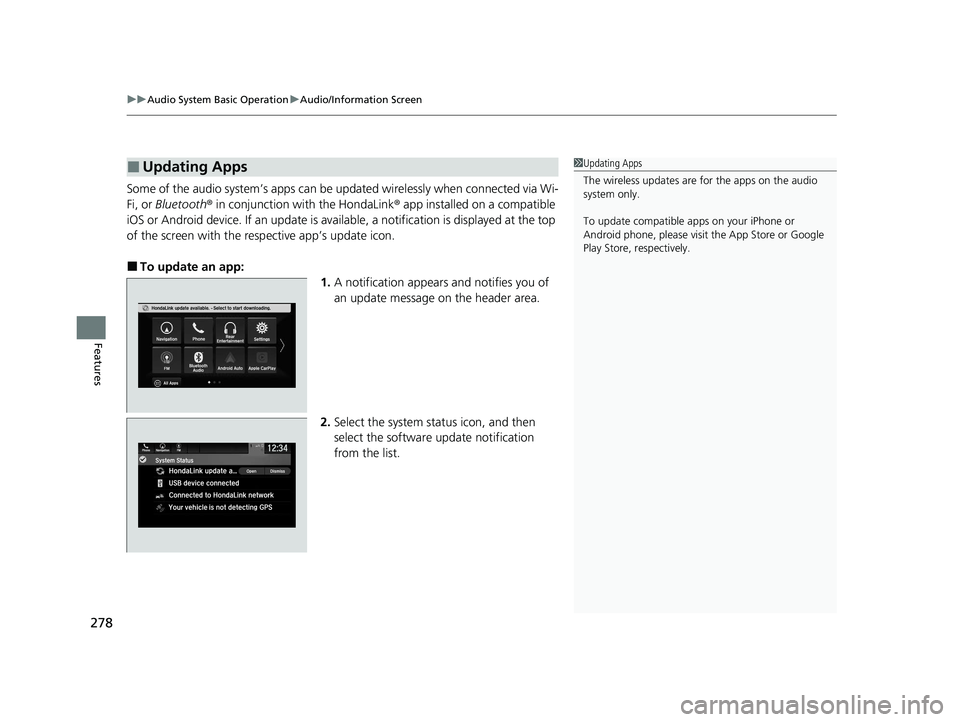
Some of the audio system’s apps can be updated wirelessly when connected via Wi-
Fi, or Bluetooth ® in conjunction with the HondaLink ® app installed on a compatible
iOS or Android device. If an update is available, a notification is displayed at the top
of the screen with the resp ective app’s update icon.
■To update an app:
1.A notification appears and notifies you of
an update message on the header area.
2. Select the system stat us icon, and then
select the software update notification
from the list.
■Updating Apps1 Updating Apps
The wireless updates are for the apps on the audio
system only.
To update compatible a pps on your iPhone or
Android phone, please visit the App Store or Google
Play Store, respectively.
22 PILOT-31TG76600.book 278 ページ 2021年6月11日 金曜日 午後4時40分
Page 281 of 737
279
uuAudio System Basic Operation uAudio/Information Screen
Features
3. Select Download .
4. Select OK.
u A notification appears on the screen if
the update is su ccessful. Select OK.
u Restart the engine for the update to be
applied.
22 PILOT-31TG76600.book 279 ページ 2021年6月11日 金曜日 午後4時40分
Page 282 of 737
280
uuAudio System Basic Operation uSystem Updates
Features
System Updates
The audio system’s firmware can be updated with a Wi-Fi connection or with a USB
device.
■Wireless connecti on mode setup
1.Select .
2. Select System Updates .
3. Select Settings .
4. Select Connection Setup .
5. Select Change Mode .
6. Select Network, then Save.
u The display returns to the network list.
7. Select an access point from the network list,
then Connect .
u If the audio system requires a password,
enter a password.
■How to Update Wirelessly
1Wireless connection mode setup
If your vehicle has a telema tics control unit (TCU), you
do not need the wireless connection mode setup.
22 PILOT-31TG76600.book 280 ページ 2021年6月11日 金曜日 午後4時40分
Page 283 of 737
281
uuAudio System Basic Operation uSystem Updates
Continued
Features
■How to update
When the audio system update is available, the notification is shown on the audio/
information screen. Use the following procedure to update the system.
1.Select .
2. Select System Updates .
3. Select via Wireless .
4. Select Download Now .
u A notification appears on the screen.
Notification
22 PILOT-31TG76600.book 281 ページ 2021年6月11日 金曜日 午後4時40分