Page 485 of 609

484
uuMulti-View Rear Camera uAbout Your Multi-View Rear Camera
Driving
You can view three different camera mo des on the audio/information screen.
Touch the appropriate icon to switch the mode. : Wide view mode
: Normal view mode
: Top down view mode
• If you were last using Wide view mode or Normal view mode, the same view
mode will be activated the next time you put the transmission into
(R.
• If you were using Top down view mode before turning off the power system, the
next time you set the power mode to ON and put the transmission into
(R, the
view mode you were using just before using Top down view mode (Wide view
mode or Normal view mode) will be activated.
• If you were using Top down view mode and 10 seconds elapsed after you took
the transmission out of
(R, the view mode you were using just before selecting
Top down view mode (Wide view mode or Normal view mode) will be activated
the next time you put the transmission into
(R.
22 INSIGHT HMIN-31TXM6300.book 484 ページ 2021年2月24日 水曜日 午後3時45分
Page 493 of 609

492
uuBefore Performing Maintenance uParts and Fluids Used in Maintenance Service
Maintenance
• The vehicle must be in a stationary condition.
u Make sure your vehicle is parked on leve l ground, the parking brake is set, and
the power system is turned off.
• Be aware that hot parts can burn you.
u Make sure to let the power system incl uding the engine and exhaust system
cool thoroughly before touching vehicle parts.
• Be aware that moving parts can injure you.
u Do not activate the power system unle ss instructed, and keep your hands and
limbs away from moving parts. When the power mode is on, the engine can
automatically start, or the radiator fan may start operating without the engine
running.
• Do not touch the high -voltage battery and wiring (orange).
Parts and Fluids Used in Maintenance Service
The use of Honda genuine parts and fluids is recommended when maintaining and
servicing your vehicle. Honda genuine parts are manufactured according to the
same high quality standards used in Honda vehicles.
■Vehicle Safety
22 INSIGHT HMIN-31TXM6300.book 492 ページ 2021年2月24日 水曜日 午後3時45分
Page 517 of 609
516
Maintenance
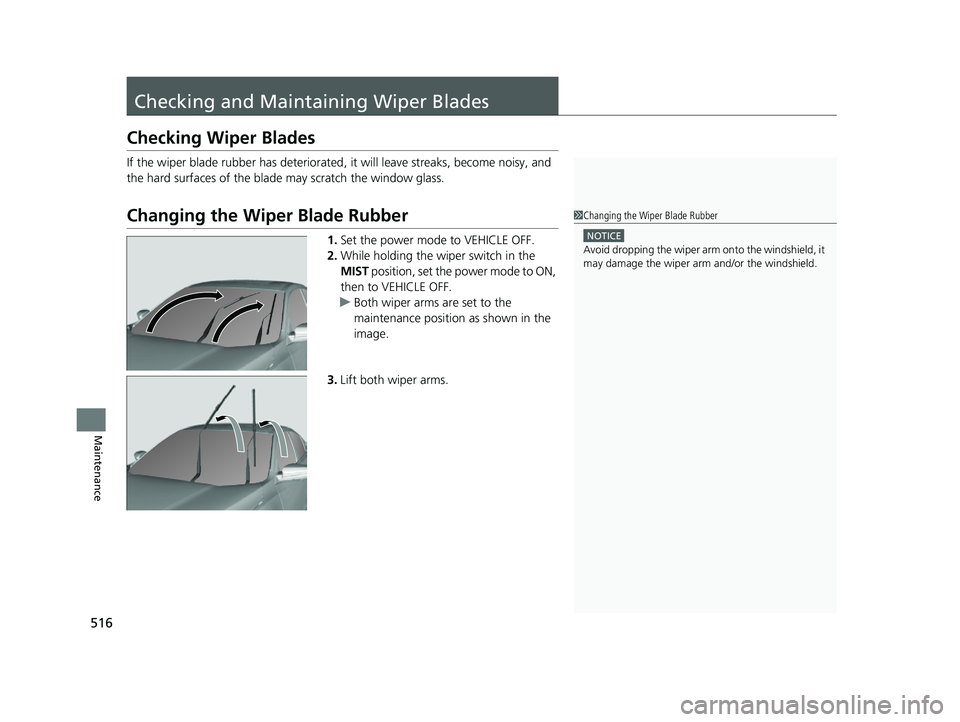
Checking and Maintaining Wiper Blades
Checking Wiper Blades
If the wiper blade rubber has deteriorated , it will leave streaks, become noisy, and
the hard surfaces of the blade may scratch the window glass.
Changing the Wiper Blade Rubber
1. Set the power mode to VEHICLE OFF.
2. While holding the wiper switch in the
MIST position, set the power mode to ON,
then to VEHICLE OFF.
u Both wiper arms are set to the
maintenance position as shown in the
image.
3. Lift both wiper arms.
1Changing the Wiper Blade Rubber
NOTICE
Avoid dropping the wiper arm onto the windshield, it
may damage the wiper arm and/or the windshield.
22 INSIGHT HMIN-31TXM6300.book 516 ページ 2021年2月24日 水曜日 午後3時45分
Page 520 of 609

519
Maintenance
Checking and Maintaining Tires
Checking Tires
To safely operate your vehicle, your tires must be of the proper type and size, in
good condition with adequate tread, and properly inflated.
■Inflation guidelines
Properly inflated tires provid e the best combination of hand ling, tread life, and comfort.
Refer to the driver’s doorjamb label or spec ifications page for the specified pressure.
Underinflated tires wear unev enly, adversely affect handling and fuel economy, and
are more likely to fail from overheating.
Overinflated tires make your vehicle ride ha rshly, are more prone to road hazards,
and wear unevenly.
Every day before you drive, look at each of the tires. If one looks lower than the
others, check the pressure with a tire gauge.
At least once a month or before long trips, use a gauge to measure the pressure in all
tires, including the spare
*. Even tires in good condition can lose 1–2 psi (10–20 kPa,
0.1–0.2 kgf/cm2) per month.
■Inspection guidelines
Every time you check inflation, also examine the tires and valve stems.
Look for:
• Bumps or bulges on the side or in the tr ead. Replace the tire if you find any cuts,
splits, or cracks in the side of the tire . Replace it if you see fabric or cord.
• Remove any foreign objects and inspect for air leaks.
• Uneven tread wear. Have a deal er check the wheel alignment.
• Excessive tread wear.
2 Wear Indicators P. 524
•Cracks or other damage around valve stem.
1Checking Tires
Measure the air pressure when tires are cold. This
means the vehicle has been parked for at least three
hours, or driven less than 1 mile (1.6 km). If
necessary, add or releas e air until the specified
pressure is reached.
If checked when hot, tire pressure can be as much as
4–6 psi (30–40 kPa, 0.3–0.4 kgf/cm
2) higher than if
checked when cold.
Whenever tire pressure is adjusted, you must
calibrate the TPMS. 2 TPMS Calibration P. 406
Have a dealer check the tires if you feel a consistent
vibration while driving. Ne w tires and any that have
been removed and reinst alled should be properly
balanced.
Check the spare tire pressu re once a month or before
long trips.
3WARNING
Using tires that are excessively worn or
improperly inflated can cause a crash in
which you can be seriously hurt or killed.
Follow all instruction s in this owner’s
manual regarding tire inflation and
maintenance.
Models with optional spare tire
* Not available on all models
22 INSIGHT HMIN-31TXM6300.book 519 ページ 2021年2月24日 水曜日 午後3時45分
Page 525 of 609

524
uuChecking and Maintaining Tires uWear Indicators
Maintenance
Wear Indicators
The groove where the wear indicator is
located is about 1/16 inch (about 1.6 mm)
shallower than elsewher e on the tire. If the
tread has worn so that the indicator is
exposed, replace the tire. Worn out tires
have poor traction on wet roads.
Tire Service Life
The life of your tires is dependent on many factors, including driving habits, road
conditions, vehicle loading, inflation pre ssure, maintenance history, speed, and
environmental conditions (even when the tires are not in use).
In addition to regular in spections and inflation pres sure maintenance, it is
recommended that you have annual inspecti ons performed once the tires reach five
years old. All tires, including the spare
*, should be removed from service after 10
years from the date of manufacture, regard less of their condition or state of wear.
Example of a Wear
Indicator mark
* Not available on all models
22 INSIGHT HMIN-31TXM6300.book 524 ページ 2021年2月24日 水曜日 午後3時45分
Page 563 of 609
562
uuPower System Won’t Start uIf the Keyless Remote Battery is Weak
Handling the Unexpected
If the Keyless Remote Battery is Weak
If the beeper sounds, the To Start, Hold Remote Near Start Button message
appears on the driver info rmation interface, and the POWER button flashes, the
READY indicator does not come on. Turn on the power system as follows:
1.Touch the center of the POWER button
with the H logo on the keyle ss remote while
the POWER button is flashing. The buttons
on the keyless remote should be facing you.
u The POWER button flashes for about 30
seconds.
2. Depress the brake pedal and press the
POWER button within 10 seconds after the
beeper sounds and the POWER button
changes from flashing to on.
u The READY indicator comes on.
u If you don’t depress the pedal, the mode
will change to ACCESSORY.
22 INSIGHT HMIN-31TXM6300.book 562 ページ 2021年2月24日 水曜日 午後3時45分
Page 564 of 609

563
uuPower System Won’t StartuEmergency Power System Off
Handling the Unexpected
Emergency Power System Off
The POWER button may be used to turn the power system off due to an emergency
situation even while driving. If you must tu rn the power system off, do either of the
following operations:
• Press and hold the POWER button about for two seconds.
• Firmly press the POWER button three times.
The steering wheel will not lock. However, because turning off the power system
disables the power assist the power syst em provides to the steering and braking
systems, it will require significantly more physical effort and time to steer and slow
the vehicle. Use both feet on the brake pe dal to slow down the vehicle and stop
immediately in a safe place.
The transmission automa tically changes to
(P after the vehicle comes to a complete
stop. Then, the power mode changes to VEHICLE OFF.
1 Emergency Power System Off
Do not press the POWER button while driving unless
it is absolutely necessary for the power system to be
turned off.
If you press the POWER button while driving, the
beeper sounds.
22 INSIGHT HMIN-31TXM6300.book 563 ページ 2021年2月24日 水曜日 午後3時45分
Page 590 of 609

589
uuSpecifications u
Information
■
Brake Fluid
■ Transmissi on Fluid
SpecifiedHonda Heavy Duty Brake Fluid DOT 3
SpecifiedHonda ATF DW-1
Capacity Change 2.3 US qt (2.2 L)
■ Engine Oil
■ Engine Coolant
■ Inverter Coolant
Recommended·Honda Genuine Motor Oil 0W-20
·API Premium-grade 0W-20 detergent oil
Capacity Change 3.3 US qt (3.1 L)
Change
including
filter
3.5 US qt (3.3 L)
SpecifiedHonda Long Life Antifreeze/Coolant Type 2
Ratio 50/50 with distilled water
Capacity1.22 US gal (4.61 L)
(change including the remaining
0.14 US gal (0.52 L) in the reserve tank)
SpecifiedHonda Long Life Antifreeze/Coolant Type 2
■ Tire
*1: Models with 16 inch wheel
*2: Models with 17 inch wheel
*3: Vehicles with optional spare tire
Regular
Size215/55R16 93V*1
215/50R17 91H*2
Pressure
psi (kPa [kgf/cm2])
Front35 (240 [2.4])
Rear33 (230 [2.3])*1
32 (220 [2.2])*2
Compact
Spare*3
Size T125/80D16 97M
Pressure
psi (kPa [kgf/cm
2]) 60 (420 [4.2])
Wheel SizeRegular16 x 7J*1
17 x 7J*2
Compact Spare*316 x 4T
22 INSIGHT HMIN-31TXM6300.book 589 ページ 2021年2月24日 水曜日 午後3時45分