Page 363 of 641
361
uuCustomized Features u
Continued
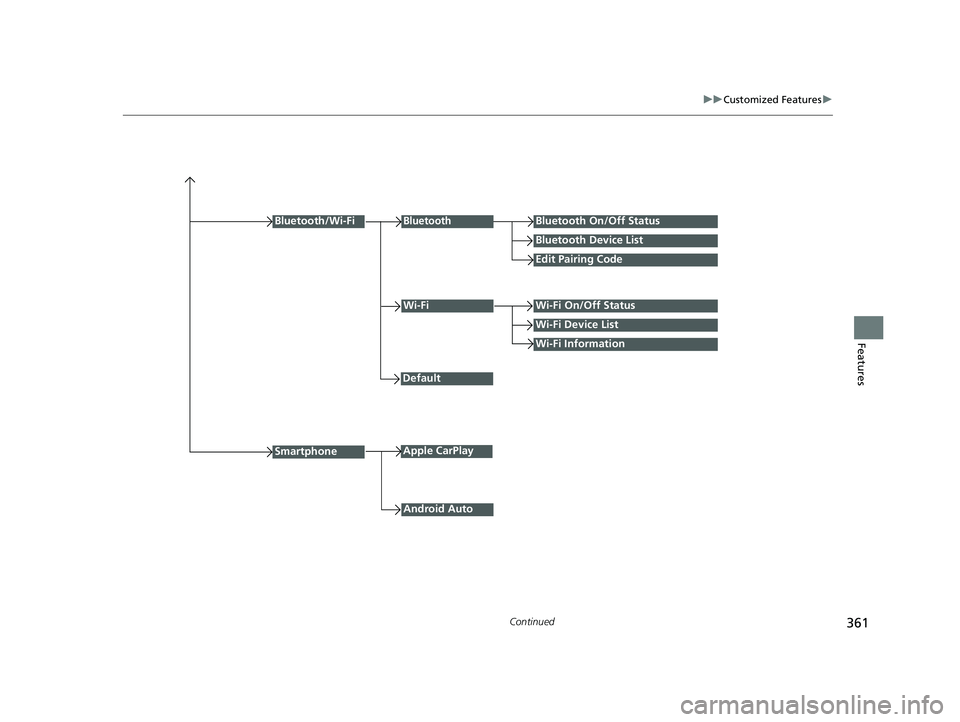
FeaturesWi-Fi Information
Wi-FiWi-Fi On/Off Status
Wi-Fi Device List
Default
Bluetooth/Wi-Fi
Android Auto
BluetoothBluetooth On/Off Status
Bluetooth Device List
Edit Pairing Code
SmartphoneApple CarPlay
22 HR-V HDMC-31T7A6600.book 361 ページ 2021年4月12日 月曜日 午前10時50分
Page 366 of 641
364
uuCustomized Features u
Features
*1:Default Setting
Setup
GroupCustomizable FeaturesDescriptionSelectable Settings
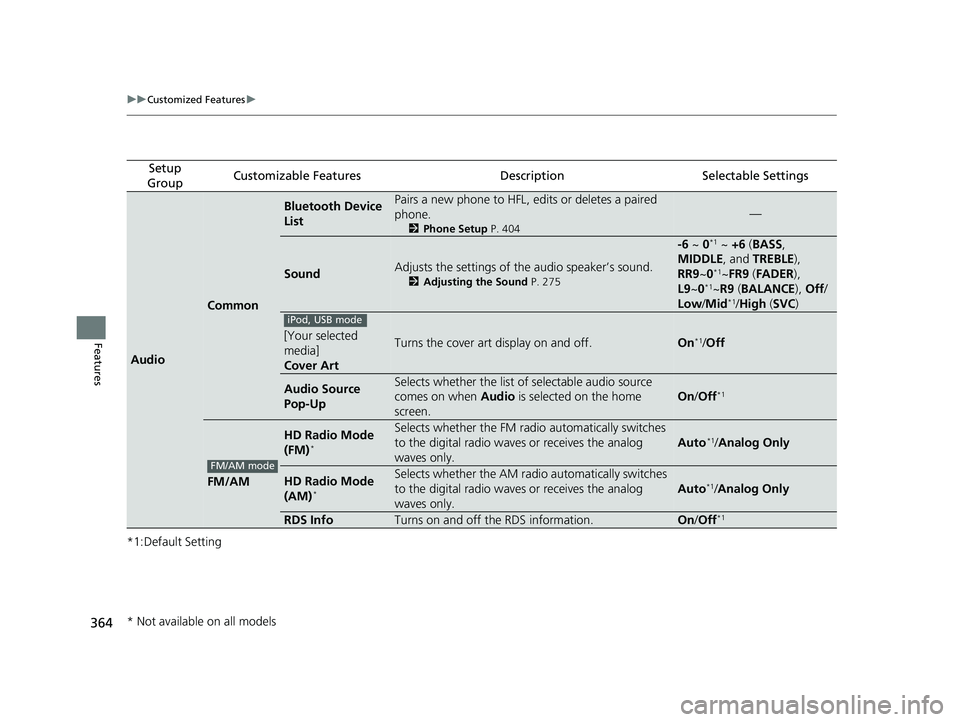
Audio
Common
Bluetooth Device
ListPairs a new phone to HFL, edits or deletes a paired
phone.
2 Phone Setup P. 404
—
SoundAdjusts the settings of the audio speaker’s sound.
2Adjusting the Sound P. 275
-6 ~ 0*1 ~ +6 (BASS ,
MIDDLE , and TREBLE ),
RR9 ~0
*1~FR9 (FADER ),
L9 ~0*1~R9 (BALANCE ), Off /
Low/ Mid*1/High (SVC )
[Your selected
media]
Cover ArtTurns the cover art display on and off.On*1/Off
Audio Source
Pop-UpSelects whether the list of selectable audio source
comes on when Audio is selected on the home
screen.
On /Off*1
FM/AM
HD Radio Mode
(FM)*
Selects whether the FM radio automatically switches
to the digital radio waves or receives the analog
waves only.
Auto*1/ Analog Only
HD Radio Mode
(AM)*
Selects whether the AM radio automatically switches
to the digital radio waves or receives the analog
waves only.
Auto*1/ Analog Only
RDS InfoTurns on and off the RDS information.On /Off*1
iPod, USB mode
FM/AM mode
* Not available on all models
22 HR-V HDMC-31T7A6600.book 364 ページ 2021年4月12日 月曜日 午前10時50分
Page 367 of 641
365
uuCustomized Features u
Continued
Features
*1:Default Setting
Setup
GroupCustomizable FeaturesDescriptionSelectable Settings
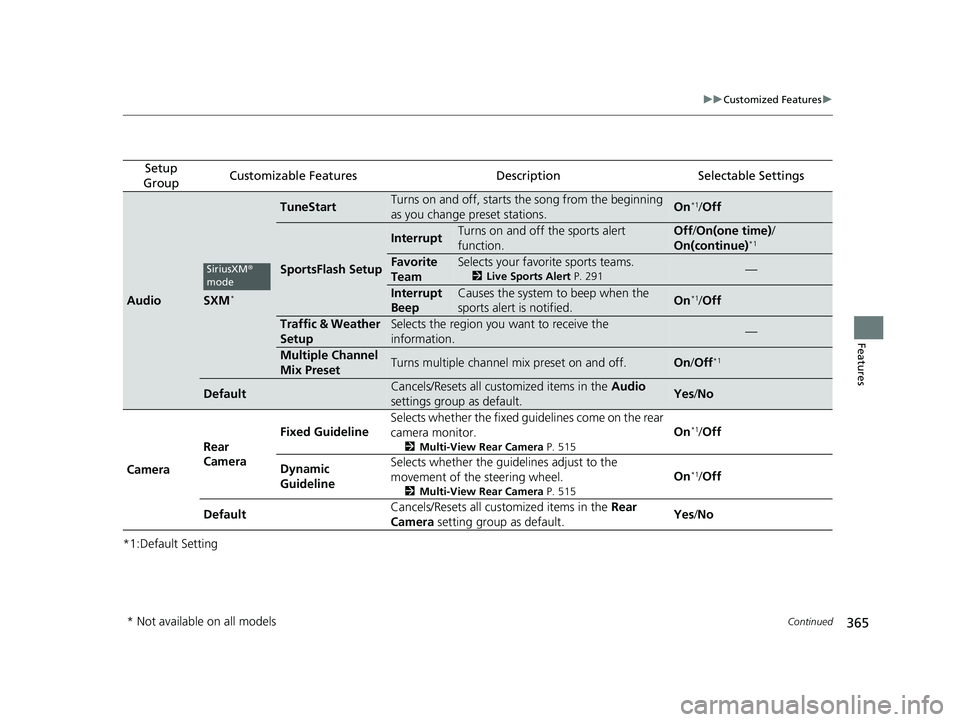
AudioSXM*
TuneStartTurns on and off, starts the song from the beginning
as you change preset stations.On*1/ Off
SportsFlash Setup
InterruptTurns on and off the sports alert
function.Off /On(one time) /
On(continue)*1
Favorite
TeamSelects your favorite sports teams.
2 Live Sports Alert P. 291—
Interrupt
BeepCauses the system to beep when the
sports alert is notified.On*1/ Off
Traffic & Weather
SetupSelects the region you want to receive the
information.—
Multiple Channel
Mix PresetTurns multiple channel mix preset on and off.On /Off*1
DefaultCancels/Resets all customized items in the Audio
settings group as default.Yes /No
Camera Rear
Camera Fixed Guideline
Selects whether the fixed guidelines come on the rear
camera monitor.
2
Multi-View Rear Camera P. 515
On*1/Off
Dynamic
Guideline Selects whether the guid
elines adjust to the
movement of the steering wheel.
2 Multi-View Rear Camera P. 515
On*1/Off
Default Cancels/Resets all customized items in the
Rear
Camera setting group as default. Yes
/No
SiriusXM ®
mode
* Not available on all models
22 HR-V HDMC-31T7A6600.book 365 ページ 2021年4月12日 月曜日 午前10時50分
Page 368 of 641
366
uuCustomized Features u
Features
*1:Default Setting
Setup
GroupCustomizable FeaturesDescriptionSelectable Settings
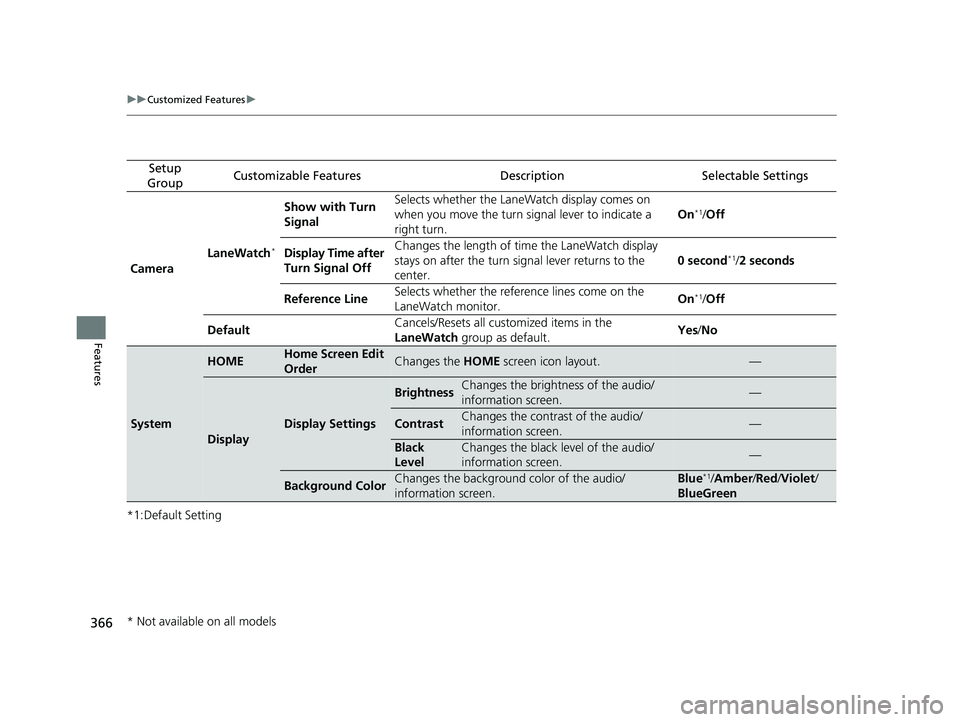
Camera LaneWatch
*
Show with Turn
Signal Selects whether the LaneWatch display comes on
when you move the turn signal lever to indicate a
right turn.
On*1/
Off
Display Time after
Turn Signal Off Changes the length of ti
me the LaneWatch display
stays on after the turn signal lever returns to the
center. 0 second
*1/
2 seconds
Reference Line Selects whether the reference lines come on the
LaneWatch monitor. On
*1/
Off
Default Cancels/Resets all customized items in the
LaneWatch
group as default. Yes
/No
System
HOMEHome Screen Edit
OrderChanges the HOME screen icon layout.—
Display
Display Settings
BrightnessChanges the brightness of the audio/
information screen.—
ContrastChanges the contrast of the audio/
information screen.—
Black
LevelChanges the black level of the audio/
information screen.—
Background ColorChanges the background color of the audio/
information screen.Blue*1/Amber /Red /Violet /
BlueGreen
* Not available on all models
22 HR-V HDMC-31T7A6600.book 366 ページ 2021年4月12日 月曜日 午前10時50分
Page 370 of 641
368
uuCustomized Features u
Features
*1:Default Setting
*2:Models with the keyless access system have an ENGINE START/STOP button instead of an ignition switch.
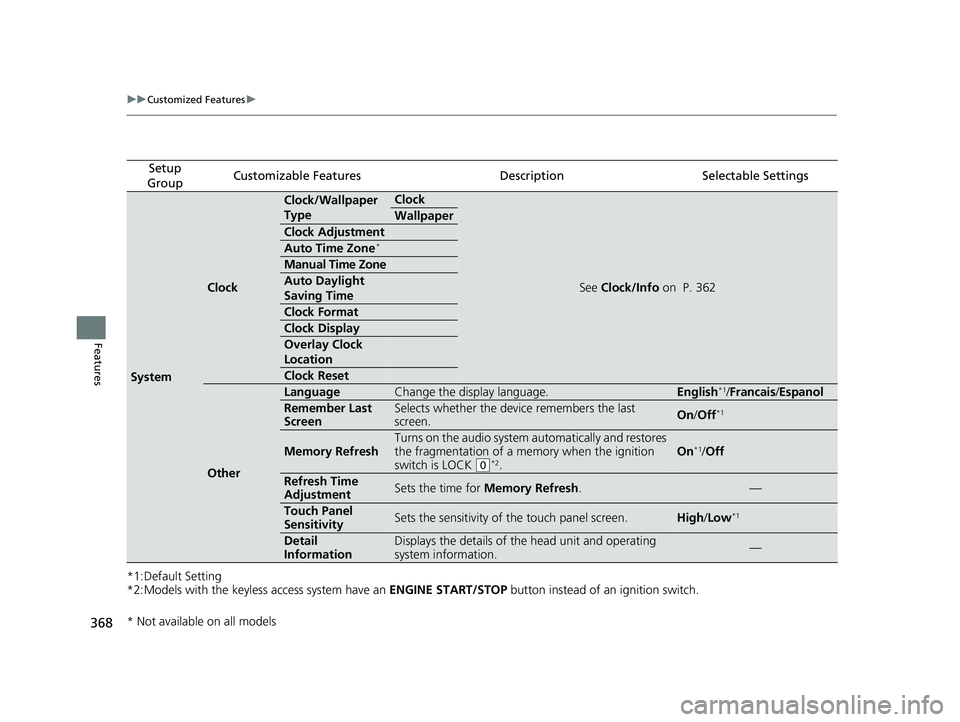
Setup
GroupCustomizable FeaturesDescriptionSelectable Settings
System
Clock
Clock/Wallpaper
TypeClock
See Clock/Info on P. 362
Wallpaper
Clock Adjustment
Auto Time Zone*
Manual Time Zone
Auto Daylight
Saving Time
Clock Format
Clock Display
Overlay Clock
Location
Clock Reset
Other
LanguageChange the display language.English*1/Francais /Espanol
Remember Last
ScreenSelects whether the device remembers the last
screen.On /Off*1
Memory Refresh
Turns on the audio system automatically and restores
the fragmentation of a memory when the ignition
switch is LOCK
(0*2.
On*1/ Off
Refresh Time
AdjustmentSets the time for Memory Refresh .—
Touch Panel
SensitivitySets the sensitivity of the touch panel screen.High/Low*1
Detail
InformationDisplays the details of th e head unit and operating
system information.—
* Not available on all models
22 HR-V HDMC-31T7A6600.book 368 ページ 2021年4月12日 月曜日 午前10時50分
Page 371 of 641
369
uuCustomized Features u
Features
*1:Default Setting
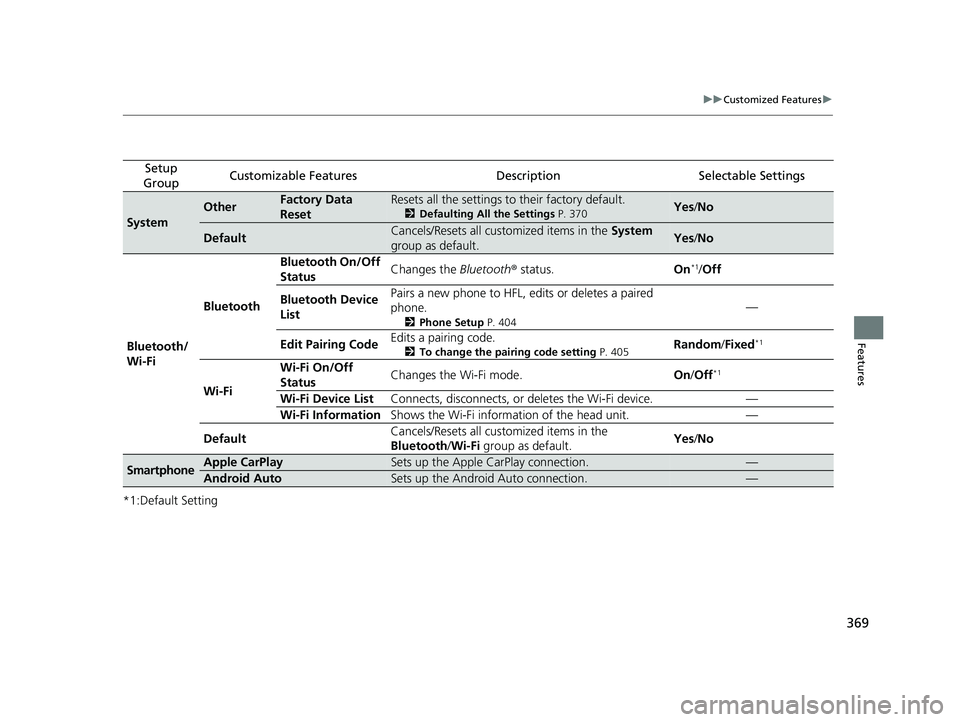
Setup
GroupCustomizable FeaturesDescriptionSelectable Settings
System
OtherFactory Data
ResetResets all the settings to their factory default.
2 Defaulting All the Settings P. 370Yes/No
DefaultCancels/Resets all customized items in the System
group as default.Yes /No
Bluetooth/
Wi-Fi Bluetooth
Bluetooth On/Off
Status
Changes the
Bluetooth® status. On
*1/Off
Bluetooth Device
List Pairs a new phone to HFL, edits or deletes a paired
phone.
2
Phone Setup P. 404
—
Edit Pairing Code Edits a pairing code.
2
To change the pairing code setting P. 405Random/Fixed*1
Wi-Fi Wi-Fi On/Off
Status
Changes the Wi-Fi mode.
On/Off
*1
Wi-Fi Device List Connects, disconnects, or deletes the Wi-Fi device. —
Wi-Fi Information Shows the Wi-Fi information of the head unit. —
Default Cancels/Resets all customized items in the
Bluetooth
/Wi-Fi group as default. Yes
/No
SmartphoneApple CarPlaySets up the Apple CarPlay connection.—
Android AutoSets up the Android Auto connection.—
22 HR-V HDMC-31T7A6600.book 369 ページ 2021年4月12日 月曜日 午前10時50分
Page 373 of 641
371
Features
HomeLink® Universal Transceiver*
The HomeLink ® Universal Transceiver can be programmed to operate up to three
remote controlled devices around your home, such as garage doors, lighting, or
home security systems.
Refer to the safety information that came wi th your garage door opener to test that
the safety features are functioning prope rly. If you do not have the safety
information, contact the manufacturer.
Before programming HomeLink, make sure that people and objects are out of the
way of the garage or gate to prevent potential injury or damage.
When programming a garage door opener, park just outside the garage door’s
path.
■Important Safety Precautions
1 HomeLink ® Universal Transceiver*
Before programming HomeLi nk to operate a garage
door opener, confirm that the opener has an external
entrapment protection system , such as an “electronic
eye,” or other safety and re verse stop features. If it
does not, HomeLink may not be able to operate it.
NOTE:
Some LED lightbulbs instal led in the garage door
opener can interfere with th e training and consistent
operation of your HomeLink device. Please consider
use of Low RF interference bulbs in your garage door
opener.
* Not available on all models
22 HR-V HDMC-31T7A6600.book 371 ページ 2021年4月12日 月曜日 午前10時50分
Page 377 of 641

375
uuBluetooth ® HandsFreeLink ®u Using HFL
Features
The audio/information screen notifies you
when there is an incoming call.
Certain manual functions are disabled or inoperable while the vehicle is in motion.
You cannot select a grayed-out option until the vehicle is stopped.
Only previously stored speed dial entrie s can be called using voice commands while
the vehicle is in motion.
2 Speed Dial P. 387
■HFL Status Display1Bluetooth ® HandsFreeLink ®
Bluetooth ® Wireless Technology
The Bluetooth ® word mark and logos are registered
trademarks owned by Blue tooth SIG, Inc., and any
use of such marks by Honda Motor Co., Ltd., is under
license. Other trademarks and trade names are those
of their respective owners.
HFL Limitations
An incoming call on HFL will interrupt the audio
system when it is playing. It will resume when the call
is ended.
HFL Mode
Battery Level Status
Signal Strength
Bluetooth Indicator
Appears when your
phone is connected
to HFL.
Roam Status
Call Name
■Limitations for Manual Operation
1HFL Status Display
The information that appears on the audio/
information screen vari es between phone models.
You can change the system language to English,
French, or Spanish. 2 Customized Features P. 349
22 HR-V HDMC-31T7A6600.book 375 ページ 2021年4月12日 月曜日 午前10時50分