2022 HONDA HRV information
[x] Cancel search: informationPage 348 of 641
346
uuGeneral Information on the Audio System uHonda App License Agreement
Features
I. Availability/Interruption. The SOFTWARE and certain SERVICES are made availa ble through your VEHICLE’s compatible multimedia
system when the VEHICLE is turned on. Certai n SERVICES may be available only through your compatible mobile device when it is w ithin
the operating range of the VEHICLE and a wireless carrier. The availability of the SOFTWARE and SERVICES may be subject to tran smission
limitation or interruption, including but not limited to technica l obsolesce or sunsetting of the hardware, software or firmware, inside of
or external to the Vehicle, required for data transmission or receipt. HONDA does not guarantee that the SOFTWARE, SERVICES, or any
portion thereof will be av ailable at all times or in all areas. You acknowle dge and agree that HONDA is not responsible for per formance
degradation, interruption or delays. You acknowledge that HONDA shall not be liable to you if the SOFTWARE or SERVICES in a given
location are not available. If the SOFTWARE or SERVICES are not available within your intended location, you agree that your so le remedy
shall be to cease using the SOFTWARE and SERVICES.
J. PRODUCT SUPPORT: Product support for the SOFTWARE is provided by HONDA. For product support, please refer to HONDA
instructions provided in the DOCUMENTATION. Should you have any que stions concerning this AGREEMENT, or if you desire to contact
HONDA for any other reason, please refer to the HONDA contact information provided in the DOCUMENTATION.
K. Termination and Transfer.
1. Termination. This AGREEMENT is effective until terminated by you or US. WE may term inate this AGREEMENT for any or no reason,
and with or without notice to you. Your rights under this AGRE EMENT will terminate automatically without notice from US if you fail to
comply with any term of this AGREEMENT. Upon termination of this AGREEMENT, you sh all cease all use of the SOFTWARE and SERVICE S.
2. Transfer: You may permanently transfer your rights under this AGREEMENT only as part of a sale or transfer of the VEHICLE, provided
you retain no copies, you transfer all of the SOFTWARE and HO NDA SERVICES (including all component parts, the media and printed
materials, and any upgrades), and the recipi ent agrees to the terms of this AGREEMENT. You agree to notify HONDA upon the sale or
transfer of the VEHICLE. To contact HONDA, please refer to the HONDA contact information provided in the DOCUMENTATION.
22 HR-V HDMC-31T7A6600.book 346 ページ 2021年4月12日 月曜日 午前10時50分
Page 349 of 641
347
uuGeneral Information on the Audio System uHonda App License Agreement
Continued
Features
L. Changes to the SOFT WARE or SERVICES. WE may change, modify, or update the SOFTWARE or SERVICES from time to time. Unless
explicitly stated otherwise, any new featur es or services that augment or enhance the SOFTWARE or SERVICES in the future shall
respectively be considered part of the SOFTWARE or SERVICES and s ubject to this AGREEMENT. WE reserve the right at any time and from
time to time to interrupt, res trict, modify, suspend, discontinue, temporarily or permanently, the SOFTWARE or SERVICES (or any portion
thereof), with or without notice to you, and you agree that HONDA shall not be li able to you or to any third party for any modification,
suspension or discontinuance of the SOFTWARE or SERVICES.
M. ARBITRATION:
PLEASE READ THIS ARBITRATION PROVISION CAREFULLY TO UNDER STAND YOUR RIGHTS. YOU AGREE THAT ANY CLAIM THAT YOU
MAY HAVE IN THE FUTURE MUST BE RESOLVED THROUGH BIND ING ARBITRATION. YOU WAIVE THE RIGHT TO HAVE YOUR DISPUTE
HEARD IN COURT AND WAIVE THE RIGHT TO BRING CLASS CL AIMS. YOU UNDERSTAND THAT DISCOVERY AND APPEAL RIGHTS ARE
MORE LIMITED IN ARBITRATION.
Arbitration is a method of resolving a claim, dispute or contro versy without filing a lawsuit. By agreeing to arbitrate, the right to go to
court is waived and instead clai ms, disputes or controversies are submitted to binding arbitration. This provision sets forth t he terms and
conditions of our agreement. YOU and HONDA agree and acknowle dge that this Agreement affects interstate commerce and the
Federal Arbitration Act (“FAA”) applies. By using the Software, Vehicle, or Services, YO U elect to have disputes resolved by arbitration.
YOU, HONDA or any involved third party may pursue a Claim. “Claim” means any dispute between YOU, HONDA, or any involved third
party relating to your use of the Software , the Vehicle, or the Services, this Agreement, or our relationship, including any
representations, omissions or warranties. “Claim” does not include personal injury or wrongful death claims. YOU or HONDA may s eek
remedies in small claims court or provisional judicial remedies without arbitrating. In addition, notwithstanding anything here in to the
contrary, YOU or HONDA may seek equitable re lief in a court of competent jurisdiction.
YOU or HONDA may select arbitration with American Arbitration Asso ciation, JAMS or National Arbitration and Mediation. Contact
these sponsors for their rules. The hearing will be in the federal district where YOU reside. If agreed, it may be by telephone or written
submissions. Filing and arbitrator fees to be paid per the sponsor rules. You may contact the sponsor for a fee waiver. If no fee waivers,
HONDA will pay filing and arbitrator fees up to $5,000, unless law requires more. Each party is responsible for other fees. Arbitrator
may award costs or fees to pr evailing party, if permitted by law. HONDA will not seek fees, unless the claims are frivolous.
22 HR-V HDMC-31T7A6600.book 347 ページ 2021年4月12日 月曜日 午前10時50分
Page 350 of 641
348
uuGeneral Information on the Audio System uHonda App License Agreement
Features
N. Miscellaneous: You may not assign this AGREEMENT without HONDA’s pr ior written consent. This AGREEMENT and any additional
HONDA TERMS and PROVIDER TERMS represents the entire agreement between you and US. HONDA may amend the terms of this
AGREEMENT by providing you with notices of such updated terms. If you do not consent to be bound by the updated terms, your sole
remedy will be to cease using the SOFTWARE and SERVICES. If any part of this AGREEMENT is found invalid, void, or unenforceable, the
balance of the AGREEMENT will remain valid and enforceable according to its terms. To the fullest extent permitted by law, and except as
explicitly provided otherwise, this AGREEMEN T and any disputes arising out of or relating to it will be governed by the laws of the State of
California, except that California laws co ncerning choice of law or conflicts shall not apply if they would cause the substanti ve law of
another jurisdiction to apply. Notwithstand ing the foregoing, Section M shall be governed by the Federal Arbitration Act and the laws of
the State of California, as applicable, as set forth therein. The failure to enforce any term of this AGREEMENT on one occasion shall not
prevent enforcement on any other occasion or the enforcement of any other term. Headings and captions shall not be considered included
for purposes of interpretation or applicat ion hereof, but are for convenience only.
Arbitrator shall be an attorney or current
or retired judge familiar with automotive or consumer software. The arbitrator shall follow
substantive law, statute of limitations and decide all issues relating to the interpretation, construction, enforceability and applicability of
this provision. The arbitrator may order relie f permitted by law. This provision is governed and enforceable by the FAA. An awa rd shall
include a written opinion and be final, subject to appeal by the FAA.
This provision survives termination of this Agreement or relationship, bankruptcy, assi gnment or transfer. If part of this provision is
unenforceable, the remainder remains in effe ct. If unenforceability allows arbitration as a class action, then this provision is entirely
unenforceable. YOU may opt out wi thin 30 days of your initial use of the Software by sending a signed, written notice to HONDA at
Honda Financial Services, P.O. Box 165007, Irving, TX 75016. HO NDA reserves the right to make changes to this provision after
providing written notice and an opportunity to opt out.
22 HR-V HDMC-31T7A6600.book 348 ページ 2021年4月12日 月曜日 午前10時50分
Page 351 of 641

349Continued
Features
Customized Features
Use the audio/information screen to customize certain features.
■How to customize
While the vehicle is at a complete st op with the ignition switch in ON
(w, press the
MENU/CLOCK button, then select Settings. To customize the phone settings,
press the button, then select Phone Setup.
1Customized Features
When you customize settings:
•Make sure that the vehicle is at a complete stop.
•Shift to (P.
Models with color audio system
1 How to customize
These indications are used to show how to operate
the selector knob.
Rotate to select.
Press to enter.
To customize other features, select Settings, rotate
, then press .
2 List of customizable options P. 353
Audio/Information Screen
MENU/CLOCK Button
Selector Knob
(Phone) Button
22 HR-V HDMC-31T7A6600.book 349 ページ 2021年4月12日 月曜日 午前10時50分
Page 355 of 641

353
uuCustomized Features u
Continued
Features
■List of customizable options
*1:Default Setting
Setup
GroupCustomizable FeaturesDescriptionSelectable Settings
Adjust ClockAdjusts the clock.
2 Clock P. 138—
Settings Bluetooth
Add New Device Pairs a new phone to HFL, edits and deletes a
paired phone, and creat
e a code for a paired
phone.
2 Phone Setup P. 380
—
Connect an Audio
Device Connects, disconnects or pairs a
Bluetooth®
Audio device to HFL. —
Display
Adjustment Brightness
Changes the brightness of the audio/
information screen.
—
Contrast Changes the contrast of the audio/
information screen. —
Black Level Changes the black level of the audio/
information screen. —
Rear
Camera Camera Guideline Selects whether the guidelines come on the
audio/information screen.
On
*1/
Off
22 HR-V HDMC-31T7A6600.book 353 ページ 2021年4月12日 月曜日 午前10時50分
Page 356 of 641
354
uuCustomized Features u
Features
*1:Default Setting
Setup
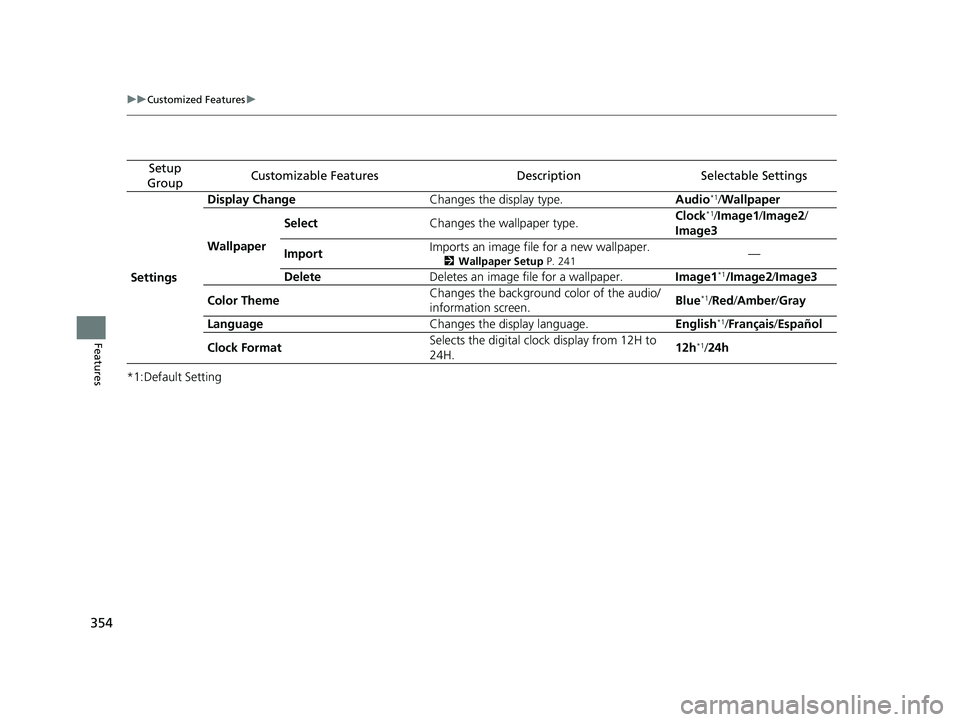
GroupCustomizable FeaturesDescriptionSelectable Settings
Settings Display Change
Changes the display type. Audio
*1/Wallpaper
Wallpaper Select
Changes the wallpaper type. Clock*1/
Image1/ Image2/
Image3
Import Imports an image file for a new wallpaper.
2
Wallpaper Setup P. 241—
Delete Deletes an image file for a wallpaper. Image1
*1/Image2/Image3
Color Theme Changes the background color of the audio/
information screen.
Blue
*1/
Red/ Amber /Gray
Language Changes the display language. English
*1/Français /Español
Clock Format Selects the digital clock display from 12H to
24H. 12h
*1/
24h
22 HR-V HDMC-31T7A6600.book 354 ページ 2021年4月12日 月曜日 午前10時50分
Page 358 of 641

356
Features
Customized Features
Use the audio/information screen to customize certain features.
■How to customize
With the ignition switch in ON
(w*1, select Settings , then select a setting item.
*1 : Models with the keyless access system have an ENGINE START/STOP button instead of an ignition
switch.
1 Customized Features
When you customize settings:
•Make sure that the vehicle is at a complete stop.
•Shift to (P.
To customize other features, select Settings.
2 List of customizable options P. 362
Models with display audio system
Audio/Information Screen
22 HR-V HDMC-31T7A6600.book 356 ページ 2021年4月12日 月曜日 午前10時50分
Page 362 of 641

360
uuCustomized Features u
Features
Auto Daylight Saving Time
Auto Time Zone*
ClockClock/Wallpaper Type
Clock Adjustment
Manual Time Zone
Clock Format
System
Default
OtherLanguage
Remember Last Screen
Memory Refresh
Clock Display
Clock Reset
Overlay Clock Location
Detail Information
Touch Panel Sensitivity
Refresh Time Adjustment
Clock
Wallpaper
Factory Data Reset
* Not available on all models
22 HR-V HDMC-31T7A6600.book 360 ページ 2021年4月12日 月曜日 午前10時50分