2022 HONDA CRV change wheel
[x] Cancel search: change wheelPage 477 of 692

475
uuWhen Driving uPrecautions While Driving
Driving
Precautions While Driving
Utility vehicles have a significantly higher rollover rate than other types of vehicles.
To prevent rollovers or loss of control:
• Take corners at slower speeds than yo u would with a passenger vehicle.
• Avoid sharp turns and abrupt maneuvers whenever possible.
• Do not modify your vehicle in any way th at you would raise the center of gravity.
• Do not carry heavy cargo on roof.
• Roof load capacity is 165 lbs (75 kg), ava ilable roof racks/carriers may have lower
capacities. Please check accessory' s information (Honda accessory).
Avoid driving in deep water and on flooded roads. This can damage the engine or
driveline, or cause electrical component failure.
If there is a strong impact with something under the vehicle, stop in a safe location.
Check the underside of the vehicle for damage or any fluid leaks.
■Driving Guidelines for Your Utility Vehicle
■In Rain
■Other Precautions
1 Precautions While Driving
NOTICE
Do not change the shift position while pressing the
accelerator pedal. You could damage the
transmission.
NOTICE
If you repeatedly turn the steering wheel at an
extremely low speed, or hold the steering wheel in
the full left or right position for a while, the electric
power steering (EPS) system heats up. The system
goes into a protective mode, and limits its
performance. The steering wheel becomes harder
and harder to operate. Once the system cools down,
the EPS system is restored.
Repeated operation under these conditions can
eventually damage the system.
22 CR-V HEV ELP-31TPG6200.book 475 ページ 2021年6月30日 水曜日 午前11時6分
Page 486 of 692
484
uuWhen Driving uDeceleration Paddle Selector
Driving
Deceleration Paddle Selector
When you release the accelerator pedal, yo u can control the rate of deceleration
without removing your hands from the steering wheel. Using the deceleration
paddle selector situated on the steering wheel, you can sequentially shift through
four stages of deceleration.
When descending a hill, you can use the deceleration paddle selector to help
maintain the rate of deceleration, thereb y allowing you to keep a safe distance
between your vehicle and the vehicle ahead.
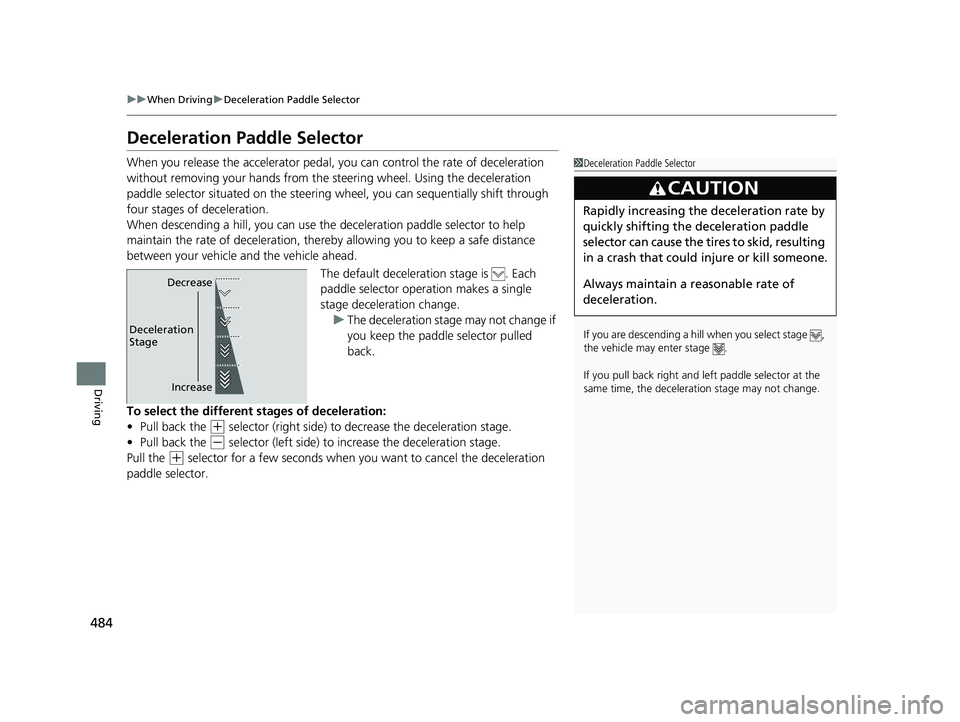
The default deceleration stage is . Each
paddle selector operation makes a single
stage deceleration change. u The deceleration stage may not change if
you keep the paddle selector pulled
back.
To select the different stages of deceleration:
• Pull back the
(+ selector (right side) to decrease the deceleration stage.
• Pull back the
(- selector (left side) to increase the deceleration stage.
Pull the
(+ selector for a few seconds when you want to cancel the deceleration
paddle selector.
1 Deceleration Paddle Selector
If you are descending a hill when you select stage ,
the vehicle may enter stage .
If you pull back right and le ft paddle selector at the
same time, the decelerati on stage may not change.
3CAUTION
Rapidly increasing the deceleration rate by
quickly shifting the deceleration paddle
selector can cause the tires to skid, resulting
in a crash that could injure or kill someone.
Always maintain a reasonable rate of
deceleration.
Increase
Deceleration
Stage Decrease
22 CR-V HEV ELP-31TPG6200.book 484 ページ 2021年6月30日 水曜日 午前11時6分
Page 495 of 692
493
uuWhen Driving uTire Pressure Monitoring System (TPMS)
Continued
Driving
Tire Pressure Monitoring System (TPMS)
Instead of directly measuring the pressure in each tire, the TPMS on this vehicle
monitors and compares the rolling radius and rotational characteristics of each
wheel and tire while you are driving to determine if one or more tires are
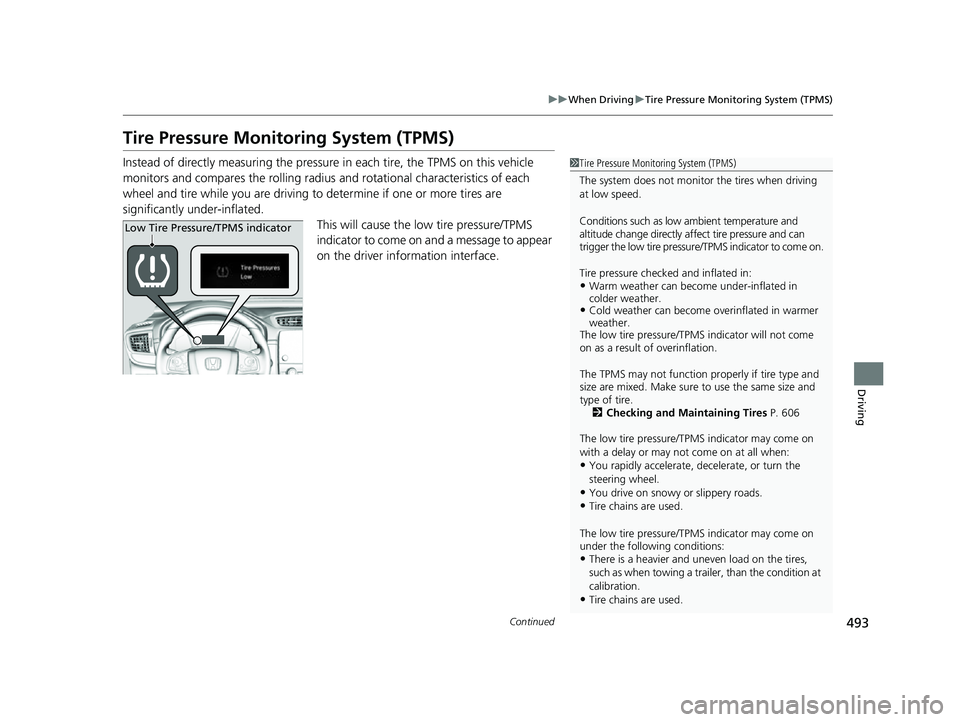
significantly under-inflated. This will cause the low tire pressure/TPMS
indicator to come on and a message to appear
on the driver information interface.1 Tire Pressure Monitoring System (TPMS)
The system does not monitor the tires when driving
at low speed.
Conditions such as low ambient temperature and
altitude change directly a ffect tire pressure and can
trigger the low tire pressure/TPMS indicator to come on.
Tire pressure checked and inflated in:
•Warm weather can beco me under-inflated in
colder weather.
•Cold weather can become overinflated in warmer
weather.
The low tire pressure/TPMS indicator will not come
on as a result of overinflation.
The TPMS may not function pr operly if tire type and
size are mixed. Make sure to use the same size and
type of tire. 2 Checking and Maintaining Tires P. 606
The low tire pressure/TPMS indicator may come on
with a delay or may not come on at all when:
•You rapidly accelerate, decelerate, or turn the
steering wheel.
•You drive on snowy or slippery roads.•Tire chains are used.
The low tire pressure/TPMS indicator may come on
under the following conditions:
•There is a heavier and une ven load on the tires,
such as when towing a trailer, than the condition at
calibration.
•Tire chains are used.
Low Tire Pressure/TPMS indicator
22 CR-V HEV ELP-31TPG6200.book 493 ページ 2021年6月30日 水曜日 午前11時6分
Page 536 of 692

534
uuHonda Sensing ®u Lane Keeping Assist System (LKAS)
Driving
Lane Keeping Assist System (LKAS)
Provides steering input to help keep the vehicle in the middle of a detected lane and
provides tactile and visual alerts if the ve hicle is detected drifting out of its lane.1Lane Keeping Assist System (LKAS)
Important Safety Reminders
The LKAS is for your convenience only. It is not an
autonomous driving system and always requires
driver attention and control. The system does not
work if you take your hands off the steering wheel or
fail to steer the vehicle.
The LKAS is convenient when it is used on freeways.
Do not place objects on the instrument panel.
Objects may reflect on th e front windshield and
prevent correct detectio n of the traffic lanes.
The LKAS only alerts you when lane drift is detected
without a turn signal in use. The LKAS may not detect
all lane markings or lane departures; accuracy will
vary based on weather, speed, and lane marker
condition. It is always your responsibility to safely
operate the vehicle an d avoid collisions.
The LKAS may not work properly or may work
improperly under the certain conditions: 2 LKAS Conditions and Limitations P. 540
You can read about handling information for the
camera equipped with this system. 2 Front Sensor Camera P. 548
■Tactile and visual alerts
Rapid vibrations on the steering wheel and a warning display alert you that the
vehicle is drifting out of a detected lane.
When you operate the turn signals to chan ge lanes, the system is suspended, and
resumes after the signals are off.
If you make a lane change without operat ing the turn signals, the LKAS alerts
activate, and torque is applied to the steering.
■Front sensor camera
Monitors the lane
lines The system applies torque to the
steering to keep the vehicle
between the left and right lane
lines. The applied torque becomes
stronger as the vehicle gets closer to
either of the lane lines.
■Steering input assist
22 CR-V HEV ELP-31TPG6200.book 534 ページ 2021年6月30日 水曜日 午前11時6分
Page 544 of 692
542
uuHonda Sensing ®u Lane Keeping Assist System (LKAS)
Driving
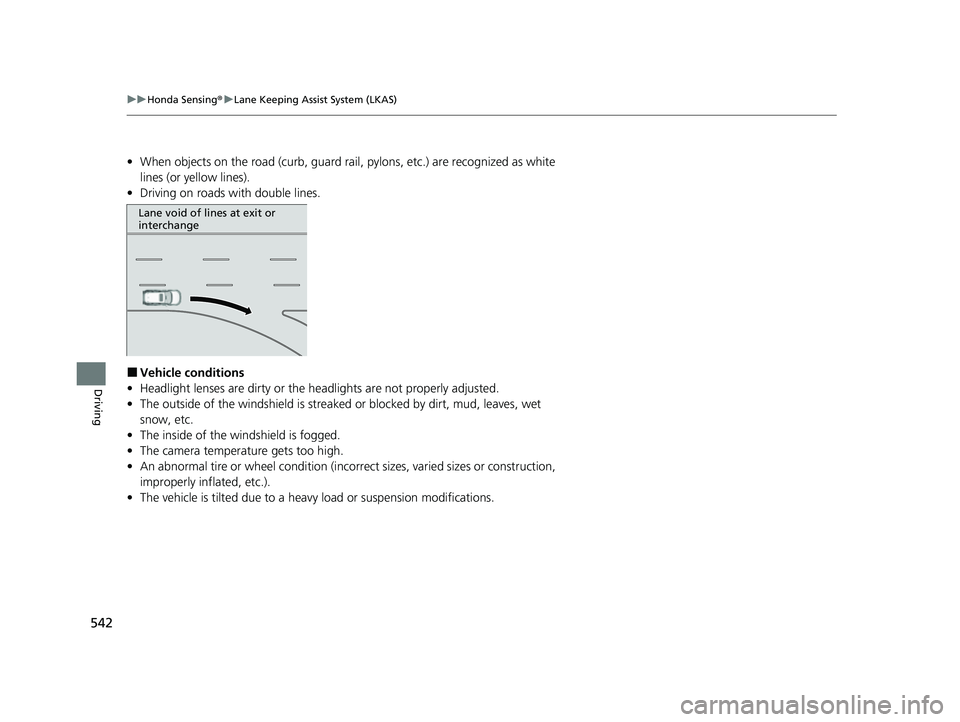
• When objects on the road (curb, guard rail, pylons, etc.) are recognized as white
lines (or yellow lines).
• Driving on roads with double lines.
■Vehicle conditions
• Headlight lenses are dirty or the headlights are not properly adjusted.
• The outside of the windshield is streake d or blocked by dirt, mud, leaves, wet
snow, etc.
• The inside of the windshield is fogged.
• The camera temperature gets too high.
• An abnormal tire or wheel condition (incorre ct sizes, varied sizes or construction,
improperly inflated, etc.).
• The vehicle is tilted due to a heav y load or suspension modifications.
Lane void of lines at exit or
interchange
22 CR-V HEV ELP-31TPG6200.book 542 ページ 2021年6月30日 水曜日 午前11時6分
Page 572 of 692

570
Driving
Multi-View Rear Camera
About Your Multi-View Rear Camera
The audio/information screen can display your vehicle’s rear view.
The display automatically changes to a rear view when the transmission is put into
(R.
■Multi-View Rear Camera Display Area
1About Your Multi-View Rear Camera
The rear camera view is restricted. You cannot see
the corner ends of the bumper or what is underneath
the bumper. Its unique le ns also makes objects
appear closer or farther than they actually are.
Visually confirm that it is safe to drive before backing
up. Certain conditions (such as weather, lighting, and
high temperatures) may also restrict the rear view. Do
not rely on the rearview display which does not give
you all information about conditions at the back of
your vehicle.
If the camera lens is cove red with dirt or moisture,
use a soft, moist cloth to keep the lens clean and free
of debris.
You can change the Fixed Guideline and Dynamic
Guideline settings. 2 Customized Features P. 369
Fixed Guideline
On: Guidelines appear when you put the
transmission into
( R.
Off: Guidelines do not appear.
Dynamic Guideline
On: Guidelines move accordi ng to the steering wheel
direction.
Off: Guidelines do not move.
Models with Display Audio
Guidelines Bumper Wide View Mode
Normal View Mode
Top Down View Mode
Approx.
39
inches
(1 m
)
Approx.
20 inches
(50 cm)
Tailgate
Open
Range
Camera
22 CR-V HEV ELP-31TPG6200.book 570 ページ 2021年6月30日 水曜日 午前11時6分
Page 648 of 692

646
uuPower System Won’t Start uEmergency Power System Off
Handling the Unexpected
Emergency Power System Off
The POWER button may be used to turn the pow er system off due to an emergency
situation even while driving. If you must turn the power system off, do either of the
following operations:
• Press and hold the POWER button for about two seconds.
• Firmly press the POWER button three times.
The steering wheel will not lock. However, because turning off the power system
disables the power assist the power syst em provides to the steering and braking
systems, it will require significantly more physical effort and time to steer and slow
the vehicle. Use both feet on the brake pe dal to slow down the vehicle and stop
immediately in a safe place.
The transmission automa tically changes to
(P after the vehicle comes to a complete
stop. Then, the power mode changes to VEHICLE OFF.
1 Emergency Power System Off
Do not press the POWER button while driving unless
it is absolutely necessary for the power system to be
turned off.
If you press the POWER button while driving, the
beeper sounds.
22 CR-V HEV ELP-31TPG6200.book 646 ページ 2021年6月30日 水曜日 午前11時6分
Page 671 of 692
669
uuSpecifications u
Information
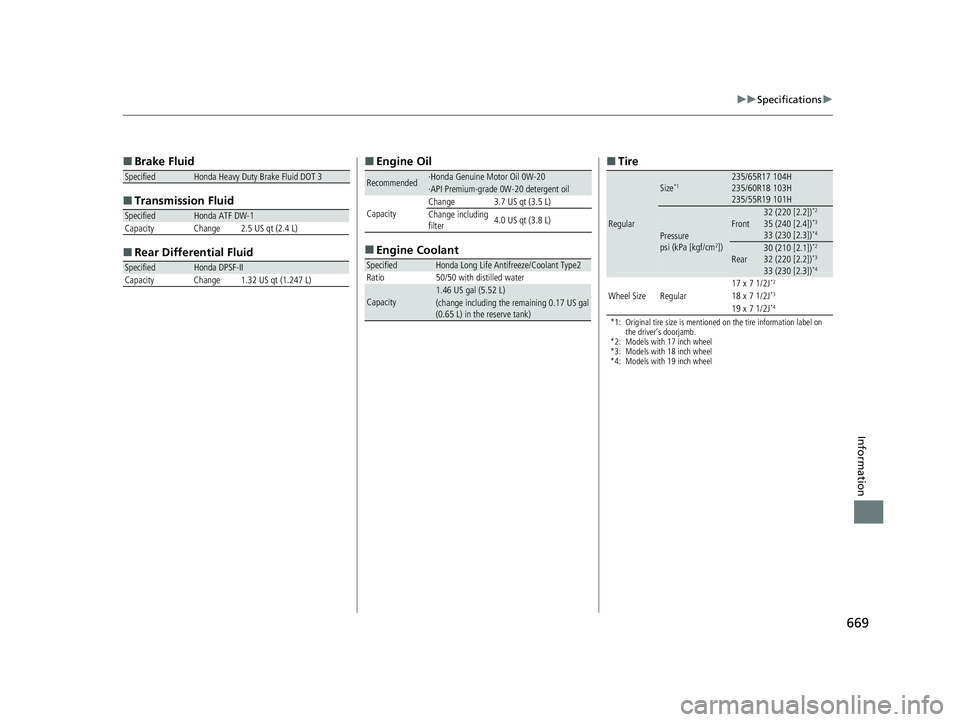
■
Brake Fluid
■ Transmissi on Fluid
■ Rear Differential Fluid
SpecifiedHonda Heavy Duty Brake Fluid DOT 3
SpecifiedHonda ATF DW-1
Capacity Change 2.5 US qt (2.4 L)
SpecifiedHonda DPSF-II
Capacity Change 1.32 US qt (1.247 L)
■ Engine Oil
■ Engine Coolant
Recommended·Honda Genuine Motor Oil 0W-20·API Premium-grade 0W-20 detergent oil
CapacityChange3.7 US qt (3.5 L)
Change including
filter 4.0 US qt (3.8 L)
SpecifiedHonda Long Life Antifreeze/Coolant Type2
Ratio 50/50 with distilled water
Capacity1.46 US gal (5.52 L)(change including the remaining 0.17 US gal
(0.65 L) in the reserve tank)
■ Tire
*1: Original tire size is mentioned on the tire information label on
the driver’s doorjamb.
*2: Models with 17 inch wheel
*3: Models with 18 inch wheel
*4: Models with 19 inch wheel
Regular
Size*1235/65R17 104H
235/60R18 103H
235/55R19 101H
Pressure
psi (kPa [kgf/cm2])
Front32 (220 [2.2])*2
35 (240 [2.4])*3
33 (230 [2.3])*4
Rear30 (210 [2.1])*2
32 (220 [2.2])*3
33 (230 [2.3])*4
Wheel SizeRegular17 x 7 1/2J*2
18 x 7 1/2J*3
19 x 7 1/2J*4
22 CR-V HEV ELP-31TPG6200.book 669 ページ 2021年6月30日 水曜日 午前11時6分