Page 7 of 692
Contents
Child Safety P. 72Exhaust Gas Hazard P. 86Safety Labels P. 87
Tailgate P. 167 Security System P. 178 Windows P. 181
Operating the Switches Around the Steering Wheel P. 186 Mirrors P. 206
Climate Control System P. 235
Audio Error Messages P. 340 General Information on the Audio System P. 345
Bluetooth ® HandsFreeLink ® P. 398, 422 Compass* P. 456
Off-Highway Driving Guidelines P. 467 When Driving P. 469 Honda Sensing ® P. 503 Braking P. 551
Refueling P. 572 Fuel Economy and CO
2 Emissions P. 575
Maintenance Under the Hood P. 586 Replacing Light Bulbs P. 598
Checking and Maintaining Tires P. 606 12-volt Battery P. 615 Remote Transmitter Care P. 617
Cleaning P. 619 Accessories and Modifications P. 624
Handling of the Jack P. 643 Power System Won’t Start P. 644 If the 12-Volt Battery Is Dead P. 647
Fuses P. 659 Emergency Towing P. 663
Refueling P. 665
Devices that Emit Radio Waves P. 671 Reporting Safety Defects P. 672
Authorized Manuals P. 678 Customer Service Information P. 679
Quick Reference GuideP. 6
Safe DrivingP. 41
Instrument PanelP. 89
ControlsP. 149
FeaturesP. 243
DrivingP. 459
MaintenanceP. 577
Handling the UnexpectedP. 627
InformationP. 667
IndexP. 681
22 CR-V HEV ELP-31TPG6200.book 5 ページ 2021年6月30日 水曜日 午前11時6分
Page 31 of 692
29
Quick Reference Guide
● / Button
● (Display/Information) Button:
Press to change contents. 2 Driver Information Interface
(P128)
Radio: Press to change the preset station.
Press and hold to select the next or
previous strong station.
USB device: Press to skip to the beginning of
the next song or return to the
beginning of the current song.
Press and hold to change a folder.
Pandora ®:
Press to skip to the next track.
Press and hold to select the next or
previous station.
22 CR-V HEV ELP-31TPG6200.book 29 ページ 2021年6月30日 水曜日 午前11時6分
Page 32 of 692
30
Quick Reference Guide
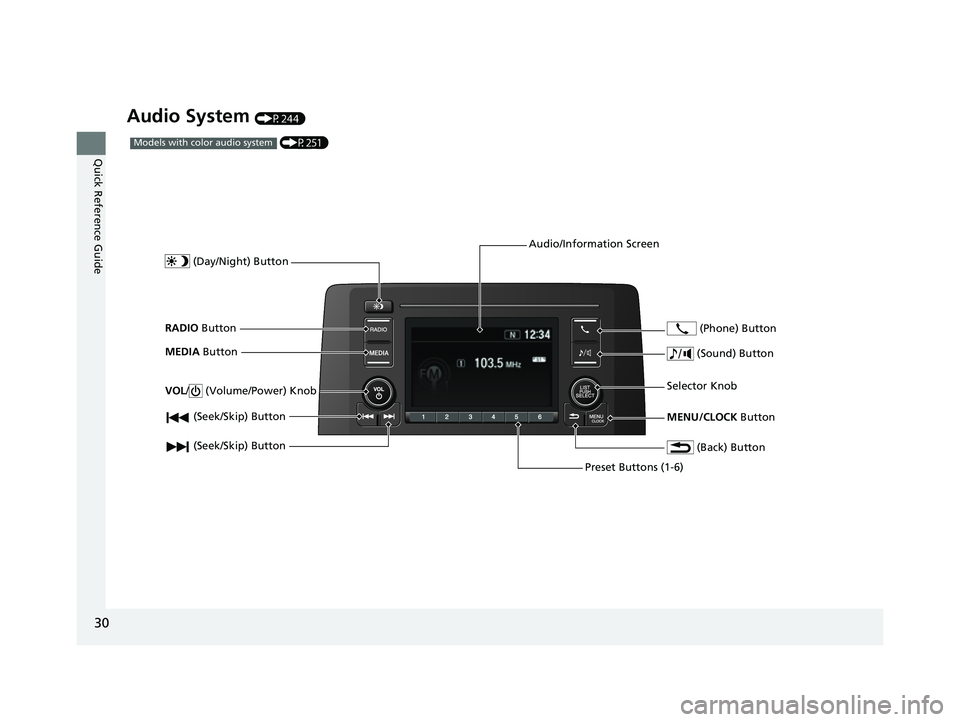
Audio System (P244)
(P251)Models with color audio system
(Seek/Skip) Button
RADIO Button
(Day/Night) Button
MEDIA Button
Preset Buttons (1-6)
(Seek/Skip) Button
VOL
/ (Volume/Power) Knob
Audio/Information Screen
(Back) Button
(Sound) Button
MENU/CLOCK Button
Selector Knob (Phone) Button
22 CR-V HEV ELP-31TPG6200.book 30 ページ 2021年6月30日 水曜日 午前11時6分
Page 156 of 692
154
uuLocking and Unlocking the Doors uLow Keyless Remote Signal Strength
Controls
Low Keyless Remote Signal Strength
The vehicle transmits radio waves to lo cate the keyless remote when locking/
unlocking the doors, opening the tailgate, or to activate the power system.
In the following cases, locking/unlocking the doors, opening the tailgate, or
activating the power system may be inhibited or operation may be unstable:
• Strong radio waves are being tra nsmitted by nearby equipment.
• You are carrying the keyless remote together with telecommunications
equipment, laptop computers, ce ll phones, or wireless devices.
• A metallic object is touching or covering the keyless remote.1Low Keyless Remote Signal Strength
Communication between the keyless remote and the
vehicle consumes the ke yless remote’s battery.
Battery life is about two years, but this varies
depending on re gularity of use.
The battery is consumed whenever the keyless
remote is receivi ng strong radio wave s. Avoid placing
it near electrical appliances such as televisions and
personal computers.
22 CR-V HEV ELP-31TPG6200.book 154 ページ 2021年6月30日 水曜日 午前11時6分
Page 180 of 692
178
Controls
Security System
Immobilizer System
This system prevents a key that has not been pre-registered from starting the power
system.
Pay attention to the follo wing when pressing the POWER button:
• Do not allow objects that emit strong radio waves near the POWER button.
• Make sure the key is not covered by or touching a metal object.
• Do not bring a key from another vehi cle’s immobilizer system near the POWER
button.
• Do not put the key near magnetic items. El ectronic device, such as televisions and
audio systems emit strong magnetic fields. Note that even a key chain can
become magnetic.
Security System Alarm*
The security system alarm activates when the tailgate, hood or doors are forcibly
opened. The alarm does not activate if the tailgate or doors are opened with the key,
remote transmitter or keyless access system.
However, the alarm activates if a door is opened with the key and then the hood is
opened before the power mode is set to ON.
■When the security sy stem alarm activates
The horn sounds intermittently, and some exterior lights flash.
1 Immobilizer System
NOTICE
Leaving the key in the vehicl e can result in theft or
accidental movement of the vehicle.
Always take the key with you whenever you leave the
vehicle unattendedM
Do not alter the system or add other devices to itM
Doing so may damage the system and make your
vehicle inoperableM
1 Security System Alarm*
The security system alarm continues for a maximum
of two minutes until the security system alarm
deactivates.
* Not available on all models
22 CR-V HEV ELP-31TPG6200.book 178 ページ 2021年6月30日 水曜日 午前11時6分
Page 234 of 692
uuInterior Convenience Items uOther Interior Convenience Items
232
Controls
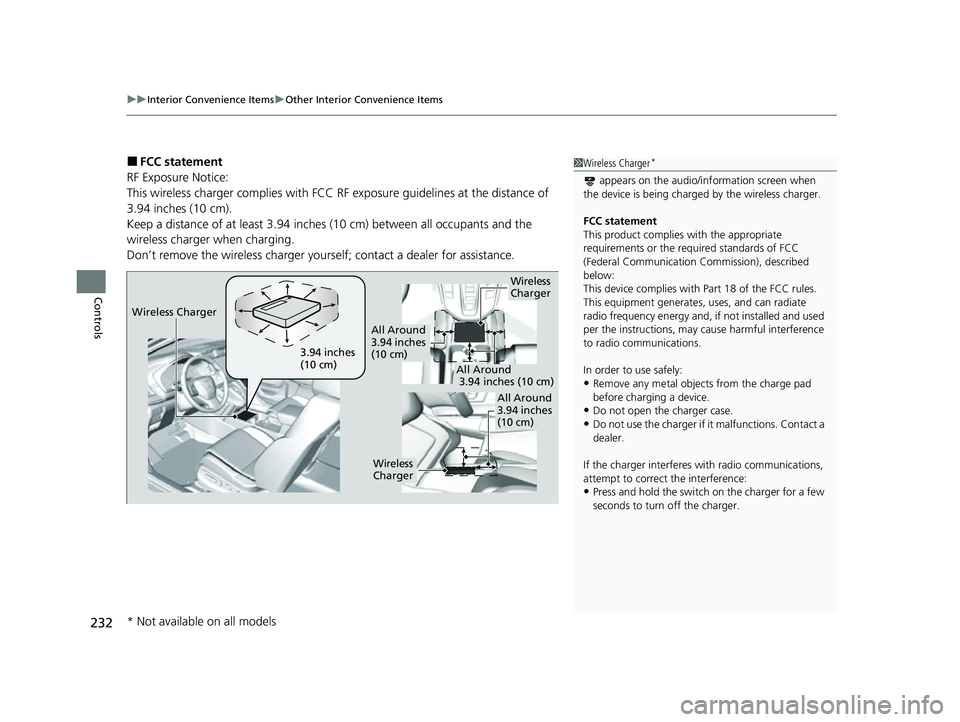
■FCC statement
RF Exposure Notice:
This wireless charger complies with FCC RF exposure guidelines at the distance of
3.94 inches (10 cm).
Keep a distance of at least 3.94 inches (10 cm) between all occupants and the
wireless charger when charging.
Don’t remove the wireless charger yourse lf; contact a dealer for assistance.1Wireless Charger*
appears on the audio/information screen when
the device is being charge d by the wireless charger.
FCC statement
This product complies with the appropriate
requirements or the requ ired standards of FCC
(Federal Communication Commission), described
below:
This device complies with Part 18 of the FCC rules.
This equipment generates, uses, and can radiate
radio frequency energy and, if not installed and used
per the instructions, may cause harmful interference
to radio communications.
In order to use safely:
•Remove any metal objects from the charge pad
before charging a device.
•Do not open the charger case.
•Do not use the charger if it malfunctions. Contact a
dealer.
If the charger interferes with radio communications,
attempt to correct the interference:
•Press and hold the switch on the charger for a few
seconds to turn off the charger.
Wireless
Charger
3.94 inches
(10 cm)
All Around
3.94 inches
(10 cm)
All Around
3.94 inches (10 cm)
All Around
3.94 inches
(10 cm)
Wireless
Charger
Wireless Charger
* Not available on all models
22 CR-V HEV ELP-31TPG6200.book 232 ページ 2021年6月30日 水曜日 午前11時6分
Page 245 of 692

243
Features
This chapter describes how to operate technology features.
Audio SystemAbout Your Audio System ................ 244
USB Port(s) ....................................... 245
Audio System Theft Protection ......... 247
Audio Remote Controls .................... 248
Audio System Basic Operation Audio/Information Screen ................ 252
Adjusting the Sound ........................ 256
Display Setup ................................... 257
Playing AM/FM Radio ....................... 258
Playing an iPod ................................ 260
Playing Pandora ®.............................. 263
Playing a USB Flash Drive ................. 265
Models with color audio system
Playing Bluetooth ® Audio................. 268
Siri ® Eyes Free .................................. 271
Audio System Basic Operation Audio/Information Screen ................ 273
Adjusting the Sound ........................ 294
Display Setup ................................... 295
Voice Control Operation .................. 297
Playing AM/FM Radio ....................... 301
Playing SiriusXM ® Radio ................... 305
Playing an iPod ................................ 312
Song By Voice
TM (SBV) ...................... 315
Playing Pandora ®............................. 319
Playing a USB Flash Drive ................. 321
Models with Display Audio
Playing Bluetooth ® Audio ................ 324
HondaLink ®..................................... 326
Wi-Fi Connection ............................. 331
Siri ® Eyes Free .................................. 332
Apple CarPlay
TM............................... 333
Android AutoTM............................... 336
Audio Error Messages ...................... 340
General Information on the Audio System ............................................. 345
Customized Features ................ 362, 369
HomeLink ® Universal Transceiver
*.. 395
Bluetooth® HandsFreeLink® ..... 398, 422
Compass
*.......................................... 456
* Not available on all models
22 CR-V HEV ELP-31TPG6200.book 243 ページ 2021年6月30日 水曜日 午前11時6分
Page 246 of 692
244
Features
Audio System
About Your Audio System
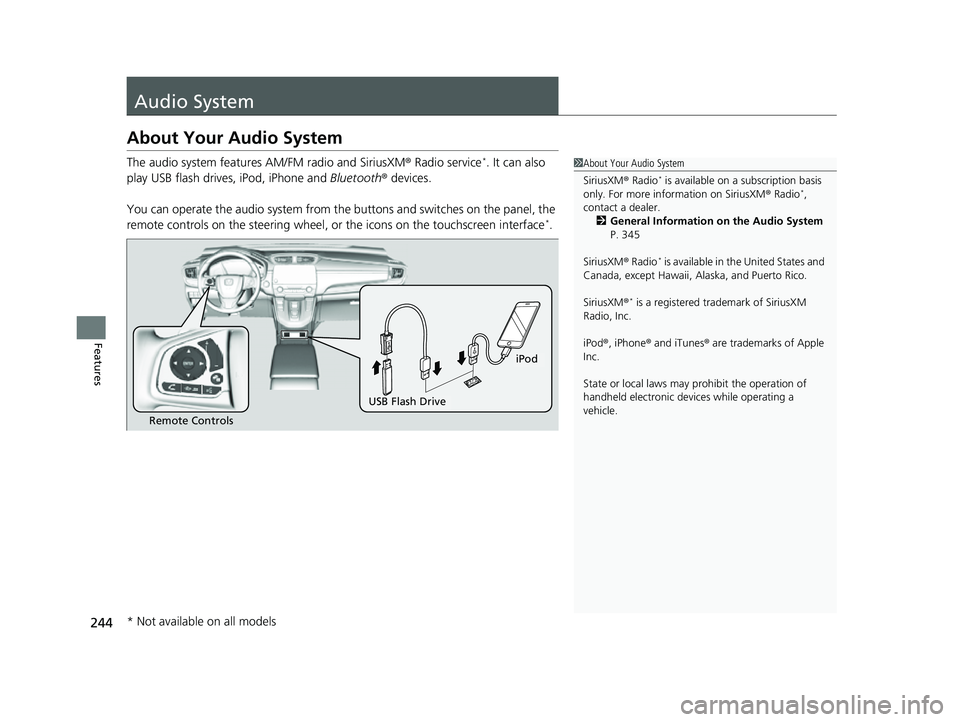
The audio system features AM/FM radio and SiriusXM® Radio service*. It can also
play USB flash drives, iPod, iPhone and Bluetooth® devices.
You can operate the audio system from the buttons and switches on the panel, the
remote controls on the steering wheel, or the icons on the touchscreen interface
*.
1 About Your Audio System
SiriusXM ® Radio
* is available on a subscription basis
only. For more information on SiriusXM ® Radio*,
contact a dealer. 2 General Information on the Audio System
P. 345
SiriusXM ® Radio
* is available in the United States and
Canada, except Ha waii, Alaska, and Puerto Rico.
SiriusXM ®
* is a registered tra demark of SiriusXM
Radio, Inc.
iPod ®, iPhone ® and iTunes ® are trademarks of Apple
Inc.
State or local laws may pr ohibit the operation of
handheld electronic devices while operating a
vehicle.
Remote Controls
iPod
USB Flash Drive
* Not available on all models
22 CR-V HEV ELP-31TPG6200.book 244 ページ 2021年6月30日 水曜日 午前11時6分