Page 30 of 692

28
Quick Reference Guide
Features (P243)
Audio Remote Controls
(P248)
●(+ / ( - Bar
Press to adjust the volume up/down.
● / Button
Press or to cycle through the audio
mode as follows:
FM1/FM2/AM/USB or iPod/Pandora ®/
Bluetooth ®Audio
FM/AM/SiriusXM® /USB/iPod/
Bluetooth ®Audio/Pandora® /Apps/
Audio Apps
ENTER Button
/ / / Button34
(+ / (- Bar
Button
3434
.PEFMT�XJUI�DPMPS�BVEJP�TZTUFN
.PEFMT�XJUI�%JTQMBZ�"VEJP
●ENTER Button
•When listening to a USB flash drive
aPress ENTER to display the folder list.
bPress or to select a folder.
cPress ENTER to display a list of tracks in
that folder.
dPress or to select a track, then
press ENTER .
•When listening to an iPod
aPress ENTER to display the iPod music
list.
bPress or to select a category.
cPress ENTER to display a list of items in
the category.
dPress or to select an item, then
press ENTER .
uPress ENTER and press or
repeatedly until a desired item you
want to listen is displayed.
Models with Display Audio
34
34
34
34
34
• When listening to Pandora®
aPress ENTER to display the station list.
bPress or to select an item, then
press ENTER .
•When listening to Bluetooth®Audio
aPress ENTER to display the track list.
bPress or to select a track, then
press ENTER .
34
34
22 CR-V HEV ELP-31TPG6200.book 28 ページ 2021年6月30日 水曜日 午前11時6分
Page 32 of 692
30
Quick Reference Guide
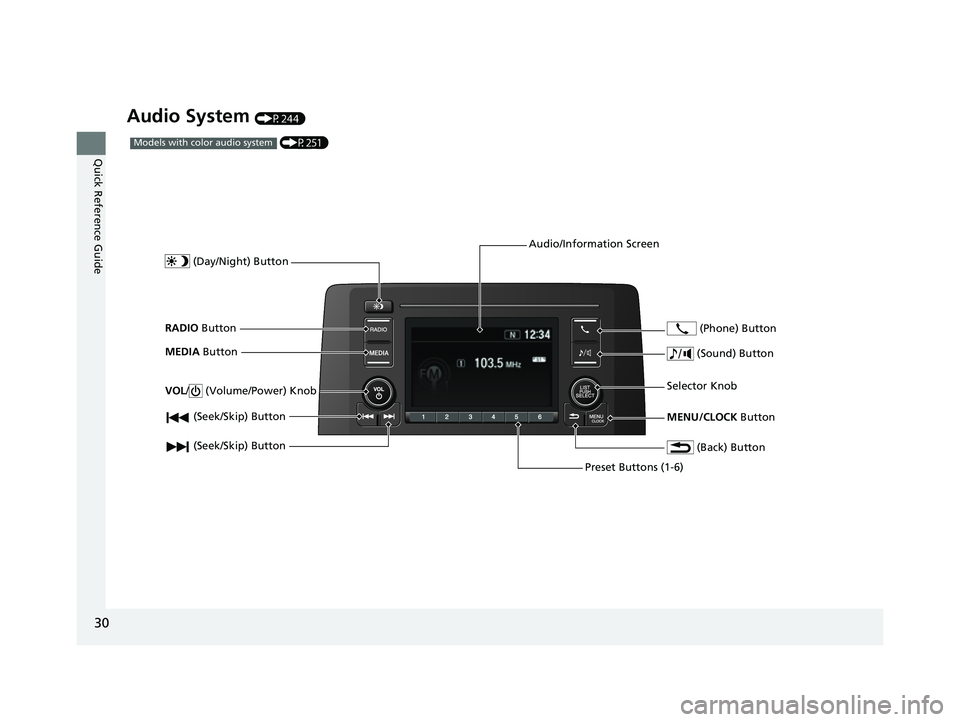
Audio System (P244)
(P251)Models with color audio system
(Seek/Skip) Button
RADIO Button
(Day/Night) Button
MEDIA Button
Preset Buttons (1-6)
(Seek/Skip) Button
VOL
/ (Volume/Power) Knob
Audio/Information Screen
(Back) Button
(Sound) Button
MENU/CLOCK Button
Selector Knob (Phone) Button
22 CR-V HEV ELP-31TPG6200.book 30 ページ 2021年6月30日 水曜日 午前11時6分
Page 33 of 692
31
Quick Reference Guide
(P272)
For navigation system operation () See the Navigation System Manual
Models with Display Audio
(Audio) Icon
(Back) Icon
Audio/Information Screen (Instrument Panel) Icon (Day/Night) Icon
*
VOL/ AUDIO (Volume/
Power Audio) Knob
(Home) Icon
(Map) Icon*
(Phone) Icon
Compass Icon*
* Not available on all models
22 CR-V HEV ELP-31TPG6200.book 31 ページ 2021年6月30日 水曜日 午前11時6分
Page 143 of 692
141
uuGauges and Driver Information Interface uDriver Information Interface
Continued
Instrument Panel
■Customization flow
Press the button.
ENTER
TPMS Calibration
Vehicle Settings
Lane Keeping Assist Suspend Beep
Forward Collision Warning Distance
Road Departure Mitigation Setting
Driver Attention Monitor
Driver Assist System SetupENTER
ACC Forward Vehicle Detect Beep
“Trip B” Reset Timing
Language Selection
“Trip A” Reset Timing
Adjust Alarm Volume
Speed/Distance Units
Reverse Alert Tone
Meter SetupENTER
Adjust Outside Temp. Display
3
4
3
4
3
4
3
4
3
4
3
4
ENTER
Fuel Efficiency Backlight
22 CR-V HEV ELP-31TPG6200.book 141 ページ 2021年6月30日 水曜日 午前11時6分
Page 146 of 692

144
uuGauges and Driver Information Interface uDriver Information Interface
Instrument Panel
*1:Default SettingSetup Group Customizable Features
Description Selectable Settings
Meter Setup
Language SelectionChanges the displayed language.English*1/Français /Español
Adjust Outside Temp.
DisplayAdjusts the temperature reading by a few
degrees.-5°F ~ ±0°F*1 ~ +5°F
“Trip A” Reset TimingChanges the setting of how to reset trip meter
A, average fuel economy A, average speed A,
and elapsed time A.When Fully Refueled /IGN OFF /
Manually Reset*1
“Trip B” Reset Timing
Changes the setting of how to reset trip meter
B, average fuel economy B, average speed B,
and elapsed time B.When Fully Refueled /IGN OFF /
Manually Reset*1
Adjust Alarm VolumeChanges the alarm volume, such as buzzers,
warnings, turn signal sound, and so on.High /Mid*1/Low
Reverse Alert ToneCauses the beeper to sound once when the
shift position is changed to
(R.ON*1/OFF
Fuel Efficien cy BacklightTurns the ambient meter feature on and off.ON*1/OFF
Speed/Distance UnitsSelects the trip computer units.km/h∙km /mph∙miles*1
22 CR-V HEV ELP-31TPG6200.book 144 ページ 2021年6月30日 水曜日 午前11時6分
Page 251 of 692
249
uuAudio System uAudio Remote Controls
Continued
Features
• When listening to an iPod
1. From the audio screen in the dr iver information interface, press ENTER to display
the iPod music list.
2. Press or to select a category.
3. Press ENTER to display a list of items in the category.
4. Press or to select an item, then press ENTER.
u Press ENTER and press or repeatedly until the desired mode you want
to listen to is displayed.
• When listening to Pandora ®
1. From the audio screen in the dr iver information interface, press ENTER to display
the station list.
2. Press or to select an item, then press ENTER.
• When listening to Bluetooth ®Audio
1. From the audio screen in the dr iver information interface, press ENTER to display
the track list.
2. Press or to select a track, then press ENTER.
(+ (- (Volume) Bar
Press
(+: To increase the volume.
Press
(-: To decrease the volume.
34
34
34
34
34
22 CR-V HEV ELP-31TPG6200.book 249 ページ 2021年6月30日 水曜日 午前11時6分
Page 258 of 692
256
uuAudio System Basic Operation uAdjusting the Sound
Features
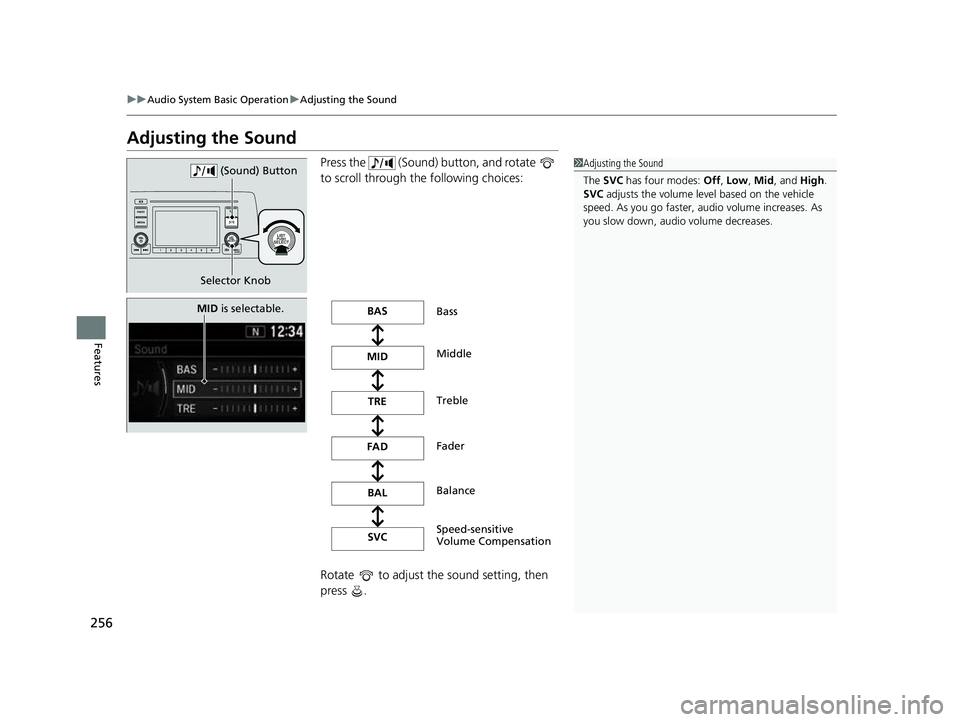
Adjusting the Sound
Press the (Sound) button, and rotate
to scroll through th e following choices:
Rotate to adjust the sound setting, then
press .1 Adjusting the Sound
The SVC has four modes: Off, Low , Mid , and High.
SVC adjusts the volume level based on the vehicle
speed. As you go faster, audio volume increases. As
you slow down, audi o volume decreases.
Selector Knob (Sound) Button
MID
is selectable.BAS
MID
FAD
BAL
SVC Bass
Middle
Fader
Balance
Speed-sensitive
V
ol
u
me Compensation
TRE
Treble
22 CR-V HEV ELP-31TPG6200.book 256 ページ 2021年6月30日 水曜日 午前11時6分
Page 260 of 692
258
uuAudio System Basic Operation uPlaying AM/FM Radio
Features
Playing AM/FM Radio
RADIO Button
Press to select a band.
(Back) Button
Press to go back to the
previous display or cancel a
setting.
/ (Seek/Skip) Buttons
Press or to search up and down
the selected band for a station with a strong
signal.
VOL/ (Volume/Power) Knob
Press to turn the audio system
on and off.
Turn to adjust the volume.
Preset Buttons (1-6)
To store a station:
1. Tune to the selected station.
2. Pick a preset button and hold it until you hear a beep.
To listen to a stored station, select a band, then press the preset button. Selector Knob
Turn to tune the radio
frequency.
Press, and then turn to select an
item. After that, press again to
make your selection.
MENU/CLOCK Button
Press to display the menu
items.
Audio/Information Screen
22 CR-V HEV ELP-31TPG6200.book 258 ページ 2021年6月30日 水曜日 午前11時6分