Page 262 of 692
260
uuAudio System Basic Operation uPlaying an iPod
Features
Playing an iPod
Using your USB connector, connect the iPod to the USB port, then select the USB
mode.
2 USB Port(s) P. 245
USB Indicator
Appears when an iPod is connected.
MEDIA Button
Press to select iPod
(if connected).
(Back) Button
Press to go back to the
previous display or cancel a
setting.
/ (Seek/Skip) Buttons
Press or to change songs.
Press and hold to move rapidly within a song.
VOL/ (Volume/Power) Knob
Press to turn the audio system
on and off.
Turn to adjust the volume.Selector Knob
Turn to change songs.
Press, and then turn to select
an item. After that, press
again to make your selection.
MENU/CLOCK Button
Press to display the menu
items.
Audio/Information Screen
Albu m Ar
t
Pla
y Mode Buttons
Press to select a play mode.
Play Button
Press to resume a
song. Pause Button
Press to pause a
song.
22 CR-V HEV ELP-31TPG6200.book 260 ページ 2021年6月30日 水曜日 午前11時6分
Page 265 of 692

263
uuAudio System Basic Operation uPlaying Pandora ®
Continued
Features
Playing Pandora ®
Your audio system allows you to listen to music from the Pandora ® app on a
compatible smartphone.
This function is available when the phone is paired and connected to the vehicle’s
Bluetooth ® HandsFreeLink ® (HFL) system, or with an iPhone, you can connect using
your USB cable to the USB port.
2 Phone Setup P. 404
2 USB Port(s) P. 245
1Playing Pandora ®
Pandora ®, the Pandora logo, and the Pandora trade
dress are trademarks or registered trademarks of
Pandora Media, Inc., used with permission. Pandora
is only available in certai n countries. Visit the Pandora
website for more information.
To find out if your phone is compatible with this
feature, visit automobiles.honda.com/handsfreelink/ ,
or call 1-888-528-7876.
To use this service in your vehicle, the Pandora ® app
must first be installed on your phone. Visit
www.pandora.com . for more information.
Pandora ® is free, personalized radio that plays music
and comedy you’ll love. Just start with the name of
one of your favorite arti sts, tracks, comedians or
composers and Pandora ® will create a custom station
that plays similar tracks. Pandora ® also features
hundreds of genre stations ranging from Dubstep to
Smooth Jazz to Power Workout.
If you cannot operate Pandora ® through the audio
system, it may be streaming through Bluetooth®
Audio. Make sure Pandora ® mode on your audio
system is selected.
Audio/Information Screen Selector Knob
Turn to change a
station.
Press, and then turn to
select an item. After
that, press again to
make your selection.
VOL/ (Volume/Power)
Kn
ob
Pres
s to turn the audio
system on and off.
Turn to adjust the
volume.
(Back) Button
Press to go back to the previous
display or cancel a setting.
MEDIA Button
Press to select Pandora ®.
Play/Pause Button
Select to resume or play a track.
(Skip) Button
Press to skip a track.
Like/Dislike Buttons
Select to evaluate a track.
MENU/CLOCK Button
Press to display the menu
items.
Bookmark Button
Select to set a track as a bookmark.
22 CR-V HEV ELP-31TPG6200.book 263 ページ 2021年6月30日 水曜日 午前11時6分
Page 267 of 692

265
uuAudio System Basic Operation uPlaying a USB Flash Drive
Continued
Features
Playing a USB Flash Drive
Your audio system reads and plays sound files on a USB flash drive in either MP3,
WMA, AAC*1 or WAV format.
Connect your USB flash drive to the USB port, then press the MEDIA button.
2USB Port(s) P. 245
*1:Only AAC format files recorded with iTunes are playable on this unit.
USB Indicator
Appears when a USB flash drive is connected.
MEDIA Button
Press to select USB flash drive
(if connected).
(Back) Button
Press to go back to the previous display.
/ (Seek/Skip) Buttons
Press or to change files.
Press and hold to move rapidly within a file.
VOL/ (Volume/Power) Knob
Press to turn the audio system
on and off.
Turn to adjust the volume.Selector Knob
Turn to change files.
Press, and then turn to select
an item. After that, press again
to make your selection.
MENU/CLOCK Button
Press to display the menu
items.
Audio/Information Screen
Play Mode Buttons (1-6)
Press to s
elect a play mode.
Cover Art
22 CR-V HEV ELP-31TPG6200.book 265 ページ 2021年6月30日 水曜日 午前11時6分
Page 270 of 692
268
uuAudio System Basic Operation uPlaying Bluetooth ® Audio
Features
Playing Bluetooth ® Audio
Your audio system allows you to listen to music from your Bluetooth-compatible
phone.
This function is available when the phone is paired and connected to the vehicle’s
Bluetooth ® HandsFreeLink ® (HFL) system.
2 Phone Setup P. 404
1Playing Bluetooth ® Audio
Not all Bluetooth -enabled phones with streaming
audio capabilities are compatible with the system.
For a list of compatible phones, visit
automobiles.honda.com /handsfreelink/,
or call 1-888-528-7876.
In some states, it may be il legal to perform some data
device functions while driving.
Only one phone can be used with HFL at a time.
When there are more than two paired phones in the
vehicle, the system automatically connects to the
prioritized phone. You can a ssign priority to a phone
in the Priority Device Setup .
2 Customized Features P. 362
If more than one phone is paired to the HFL system,
there will be a delay before the system begins to play.
In some cases, the name of the artist, album, or track
may not appear correctly.
Some functions may not be available on some
devices.
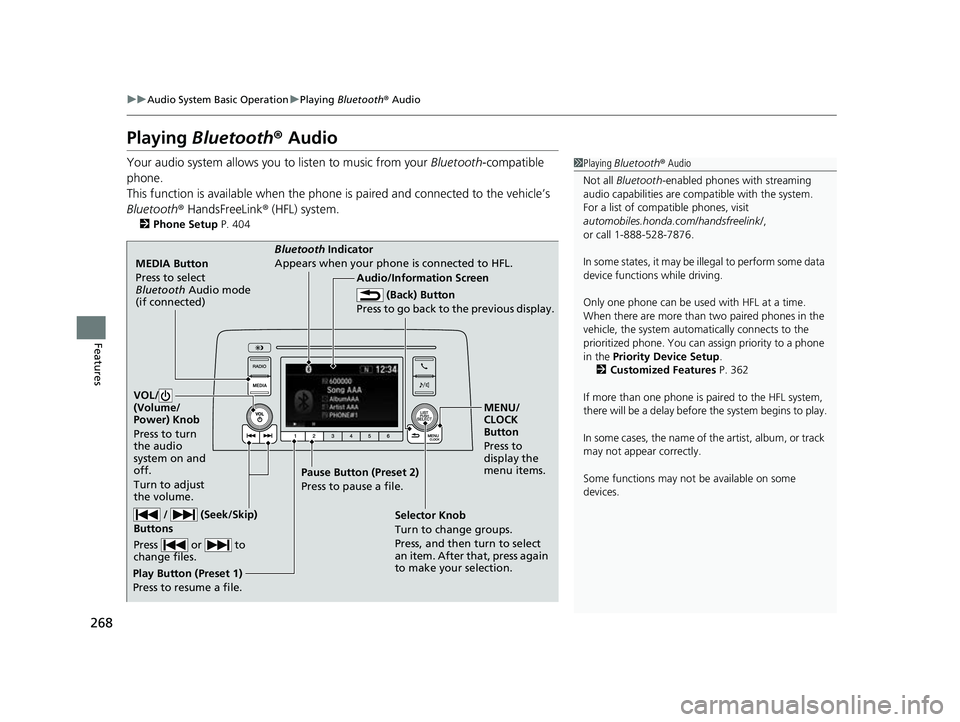
MEDIA Button
Press to select
Bluetooth Audio mode
(if connected)
VOL/
(Volume/
Power) Knob
Press to turn
the audio
system on and
off.
Turn to adjust
the volume.
MENU/
CLOCK
Button
Press to
display the
menu items.
Audio/Information Screen
Bluetooth Ind
icator
Appe ars
when your phone is connected to HFL.
/ (Seek/Skip)
Buttons
Press or to
change files.
Play Button (Preset 1)
Press to resume a file. Pause Button (Preset 2)
Press to pause a file.
Selector Knob
Turn to change groups.
Press, and then turn to select
an item. After that, press again
to make your selection.
(Back) Button
Press to go back to the previous display.
22 CR-V HEV ELP-31TPG6200.book 268 ページ 2021年6月30日 水曜日 午前11時6分
Page 296 of 692
294
uuAudio System Basic Operation uAdjusting the Sound
Features
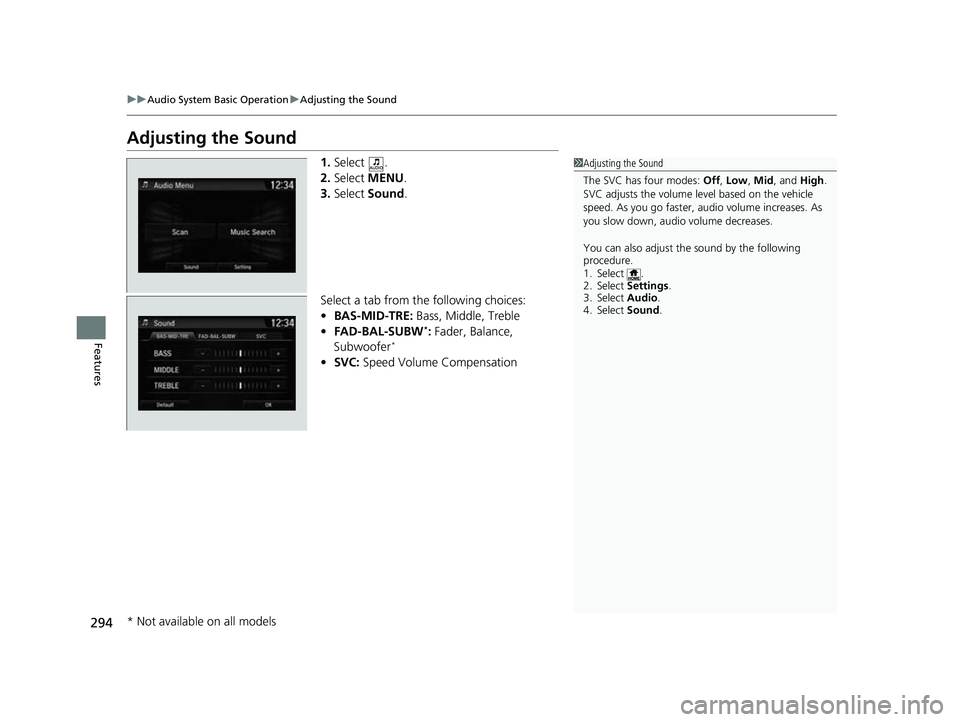
Adjusting the Sound
1. Select .
2. Select MENU .
3. Select Sound.
Select a tab from the following choices:
• BAS-MID-TRE: Bass, Middle, Treble
• FAD-BAL-SUBW
*: Fader, Balance,
Subwoofer*
• SVC: Speed Volume Compensation
1Adjusting the Sound
The SVC has four modes: Off, Low , Mid, and High.
SVC adjusts the volume level based on the vehicle
speed. As you go faster, audio volume increases. As
you slow down, audi o volume decreases.
You can also adjust the sound by the following
procedure.
1. Select .
2. Select Settings .
3. Select Audio.
4. Select Sound .
* Not available on all models
22 CR-V HEV ELP-31TPG6200.book 294 ページ 2021年6月30日 水曜日 午前11時6分
Page 303 of 692
301
uuAudio System Basic Operation uPlaying AM/FM Radio
Continued
Features
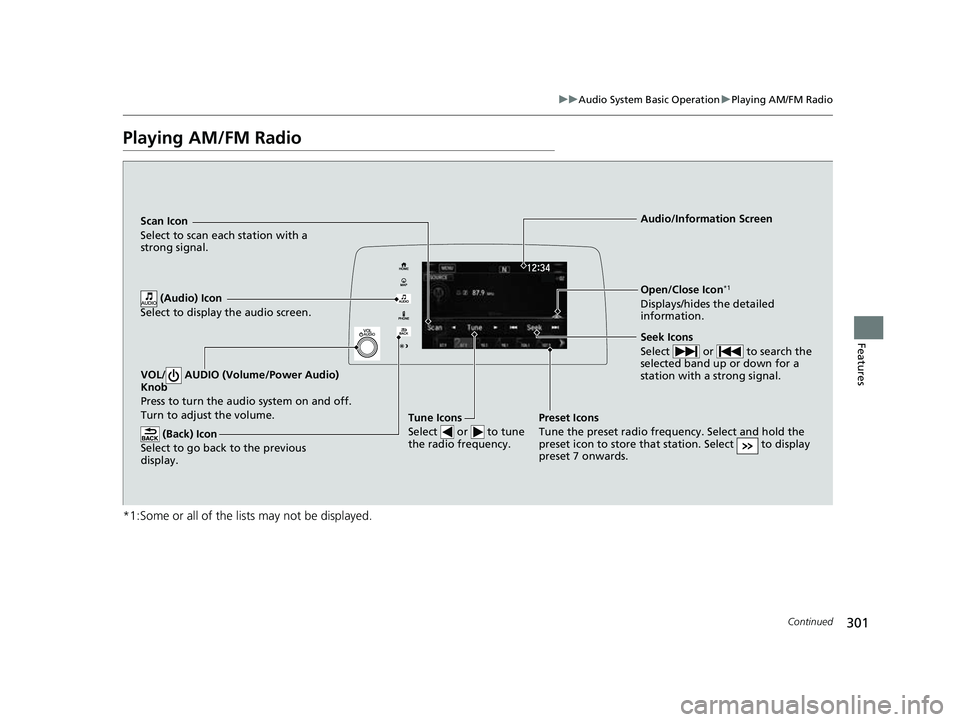
Playing AM/FM Radio
*1:Some or all of the lists may not be displayed.
VOL/ AUDIO (Volume/Power Audio)
Knob
Press to turn the a udio system on and off.
Turn to adjust the volume.
(Back) Icon
Select to go back to the previous
display.
Seek Icons
Select or to search the
selected band up or down for a
station with a strong signal.
Open/Close Icon*1
Displays/hides the detailed
information.
(Audio) Icon
Select to display the audio screen.
Tune Icons
Select or to tune
the radio frequency.
Audio/Information Screen
Scan Icon
Select
to scan each station with a
strong signal.
Preset Icons
Tune the preset radio frequency. Select and hold the
preset icon to store that station. Select to display
preset 7 onwards.
22 CR-V HEV ELP-31TPG6200.book 301 ページ 2021年6月30日 水曜日 午前11時6分
Page 307 of 692

305
uuAudio System Basic Operation uPlaying SiriusXM ® Radio
Continued
Features
Playing SiriusXM® Radio
*1:Some or all of the lists may not be displayed.
VOL/ AUDIO (Volume/Power Audio) Knob
Press to turn the audio system on and off.
Turn to adjust the volume.
(Back) Icon
Select to go back to the previous display.
Channel Icons
Select or to the previous
or next channel.
Select and hold to rapidly skip 10
channels at a time.
Open/Close Icon*1
Displays/hides the detailed
information.
(Audio) Icon
Select to display the audio screen.
Category Icons
Select or to display and select a
SiriusXM ® Radio category.
Audio/Information Screen
Scan Icon
Select to scan eac
h channel.
Preset Icons
Tune the preset radio station. Select
and hold the preset icon to store that
station. Select to display preset 7
onwards.
Skip Icons
Select or to change
section in the channel. Select and
hold to move rapidly within the
section.
Station Art
22 CR-V HEV ELP-31TPG6200.book 305 ページ 2021年6月30日 水曜日 午前11時6分
Page 314 of 692
312
uuAudio System Basic Operation uPlaying an iPod
Features
Playing an iPod
Connect the iPod using your USB connector to the USB port, then select the iPod
mode.
2 USB Port(s) P. 245
*1:Some or all of the lists may not be displayed.
VOL/ AUDIO (Volume/Power Audio) Knob
Press to turn the audio system on and off.
Turn to adjust the volume.
(Back) Icon
Select to go back to the previous
display.
Song Icons
Select or to change songs.
Select and hold to move rapidly
within a song.
Open/Close Icon*1
Displays/hides the detailed
information.
(Audio) Icon
Select to display the audio screen.
Cover Art Audio/Information Screen
Play/Pause Icon
22 CR-V HEV ELP-31TPG6200.book 312 ページ 2021年6月30日 水曜日 午前11時6分