2022 HONDA CRV change wheel
[x] Cancel search: change wheelPage 200 of 692
198
uuOperating the Switches Around the Steering Wheel uWipers and Washers
Controls
Wipers and Washers
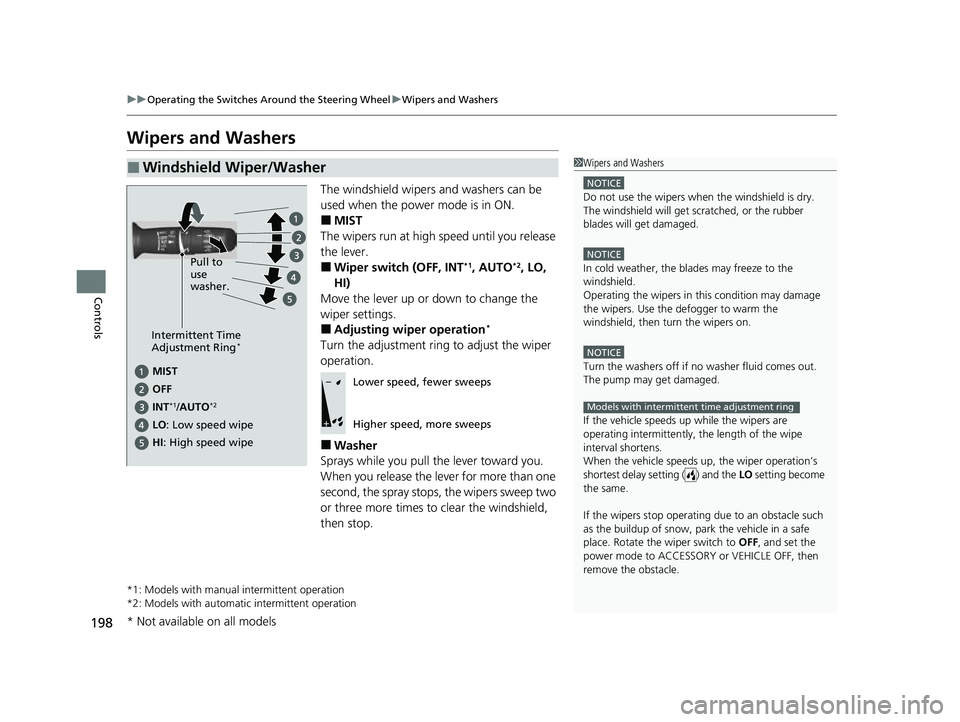
The windshield wipers and washers can be
used when the power mode is in ON.
■MIST
The wipers run at high speed until you release
the lever.
■Wiper switch (OFF, INT*1, AUTO*2, LO,
HI)
Move the lever up or down to change the
wiper settings.
■Adjusting wiper operation*
Turn the adjustment ring to adjust the wiper
operation.
■Washer
Sprays while you pull the lever toward you.
When you release the lever for more than one
second, the spray stops, the wipers sweep two
or three more times to clear the windshield,
then stop.
*1: Models with manual intermittent operation
*2: Models with automati c intermittent operation
■Windshield Wiper/Washer1Wipers and Washers
NOTICE
Do not use the wipers when the windshield is dry.
The windshield will get sc ratched, or the rubber
blades will get damaged.
NOTICE
In cold weather, the blades may freeze to the
windshield.
Operating the wipers in th is condition may damage
the wipers. Use the defogger to warm the
windshield, then turn the wipers on.
NOTICE
Turn the washers off if no washer fluid comes out.
The pump may get damaged.
If the vehicle speeds up while the wipers are
operating intermittently, the length of the wipe
interval shortens.
When the vehicle speeds up, the wiper operation’s
shortest delay setting ( ) and the LO setting become
the same.
If the wipers st op operating due to an obstacle such
as the buildup of snow, park the vehicle in a safe
place. Rotate the wiper switch to OFF, and set the
power mode to ACCESSORY or VEHICLE OFF, then
remove the obstacle.
Models with intermittent time adjustment ring
Intermittent Time
Adjustment Ring*
MIST
INT
*1/AUTO*2
OFF
LO : Low speed wipe Pull to
use
washer.
HI: High speed wipe
Lower speed, fewer sweeps
Higher speed, more sweeps
* Not available on all models
22 CR-V HEV ELP-31TPG6200.book 198 ページ 2021年6月30日 水曜日 午前11時6分
Page 202 of 692
200
uuOperating the Switches Around the Steering Wheel uWipers and Washers
Controls
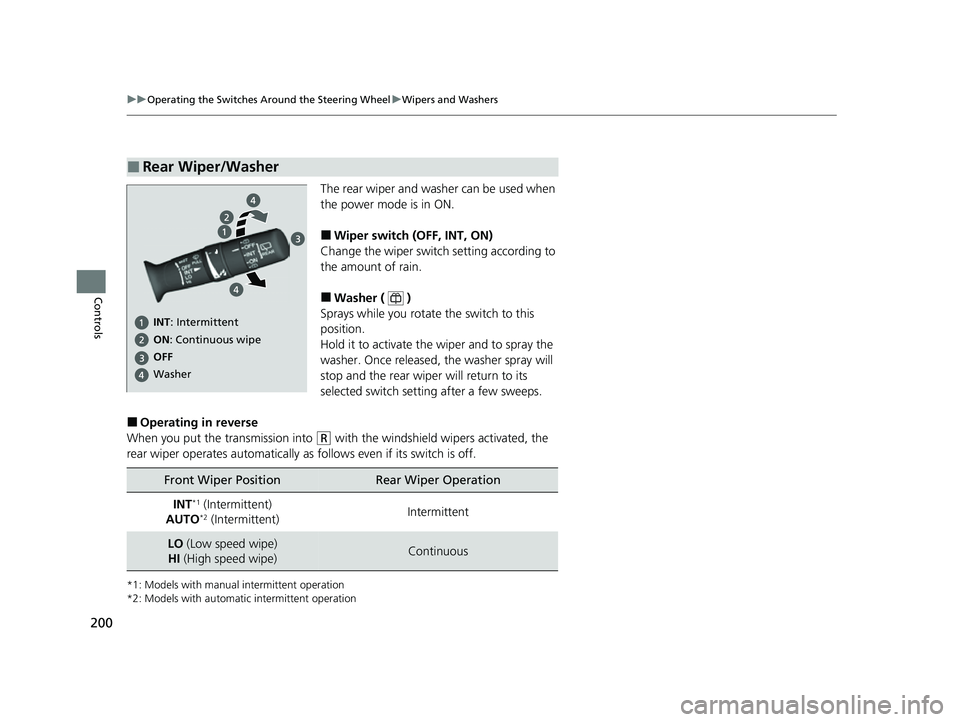
The rear wiper and washer can be used when
the power mode is in ON.
■Wiper switch (OFF, INT, ON)
Change the wiper switch setting according to
the amount of rain.
■Washer ( )
Sprays while you rotate the switch to this
position.
Hold it to activate the wiper and to spray the
washer. Once released, the washer spray will
stop and the rear wiper will return to its
selected switch setting after a few sweeps.
■Operating in reverse
When you put the transmission into
(R with the windshield wipers activated, the
rear wiper operates automatically as follows even if its switch is off.
*1: Models with manual intermittent operation
*2: Models with automati c intermittent operation
■Rear Wiper/Washer
INT: Intermittent
OFF ON : Continuous wipe
Washer
Front Wiper PositionRear Wiper Operation
INT*1 (Intermittent)
AUTO*2 (Intermittent)Intermittent
LO (Low speed wipe)
HI (High speed wipe)Continuous
22 CR-V HEV ELP-31TPG6200.book 200 ページ 2021年6月30日 水曜日 午前11時6分
Page 253 of 692

251
Features
Audio System Basic Operation
To use the audio system, the power mode must be in ACCESSORY or ON.Use the selector knob or MENU/CLOCK
button to access some audio functions.
Press to switch between the normal and
extended display fo r some functions.
Selector knob: Rotate left or right to scroll
through the available choices. Press to set
your selection.
MENU/CLOCK button: Press to select any
mode.
The available modes include wallpaper,
display, clock, language setup, and play
modes. Play mode choices include scan,
random, repeat, and so on.
(Back) button: Press to go back to the previous display.
(Sound) button: Press to select the sound setting mode.
(Day/Night) button: Press to change the audio/information screen
brightness.
Press the button, then adjust the brightness using . u Each time you press the button, the mode switches between the daytime
mode, nighttime mode and off mode.
Models with color audio system1 Audio System Basic Operation
These indications are used to show how to operate
the selector knob.
Rotate to select.
Press to enter.
Menu Items 2 Adjust Clock P. 150
2 Wallpaper Setup P. 254
2 Display Setup P. 257
2 Customized Features P. 362
Press the buttons on the steering wheel to change
any audio setting. 2 Audio Remote Controls P. 248
(Back)
Button
Selector Knob MENU/
CLOCK
Button
(Day/Night) Button
(Sound) Button
Menu
Display
22 CR-V HEV ELP-31TPG6200.book 251 ページ 2021年6月30日 水曜日 午前11時6分
Page 261 of 692

259
uuAudio System Basic Operation uPlaying AM/FM Radio
Features
Provides text data information related to your selected RDS capable FM station.
■To find an RDS station from Station List
1. Press while listening to an FM station.
2. Rotate to select the station, then press .
■Update List
Updates your available st ation list at any time.
1. Press while listening to an FM station.
2. Rotate to select Update List, then press .
■Radio text
Displays the radio text information of the selected RDS station.
1. Press the MENU/CLOCK button.
2. Rotate to select Settings, then press .
3. Rotate to select RDS Settings, then press .
4. Rotate to select Radio Text, then press .
■Scan
Samples each of the strongest stations on the selected band for 10 seconds.
1. Press the MENU/CLOCK button.
2. Rotate to select Scan, then press .
To turn off scan, press .
■Radio Data System (RDS)1 Playing AM/FM Radio
The ST indicator appears on the display indicating
stereo FM broadcasts.
Stereo reproduction in AM is not available.
You can store 6 AM stations and 12 FM stations into
the preset memory. FM1 and FM2 let you store 6
stations each.
Switching the Audio Mode
Press the audio source selecting buttons on the
steering wheel. 2 Audio Remote Controls P. 248
1Radio Data System (RDS)
When you select an RDS-capable FM station, the RDS
automatically turns on, and the frequency display
changes to the station name. However, when the
signals of that station become weak, the display
changes from the statio n name to the frequency.
22 CR-V HEV ELP-31TPG6200.book 259 ページ 2021年6月30日 水曜日 午前11時6分
Page 273 of 692

271
uuAudio System Basic Operation uSiri ® Eyes Free
Features
Siri® Eyes Free
You can talk to Siri using the (Talk) button on the steering wheel when your
iPhone is paired to the Bluetooth® HandsFreeLink ® (HFL) system.
2Phone Setup P. 404
■Using Siri® Eyes Free
1Siri ® Eyes Free
Siri is a trademark of Apple Inc.
Check Apple Inc. website for features available for
Siri.
We recommend against using Siri other than in Siri ®
Eyes Free while operating a vehicle.
1 Using Siri ® Eyes Free
Some commands work only on specific phone
features or apps.
This audio system cannot operate the audio functions
by using Siri ® Eyes Free.
(Talk) Button
Press and hold until the display changes as shown.
(Hang-up/back) Button
Press to deactivate Siri ® Eyes Free.
While in Siri ® Eyes Free:
The display remains the same.
No feedback or commands
appear. Appears
when Siri is
activated in
Siri
® Eyes
Free
22 CR-V HEV ELP-31TPG6200.book 271 ページ 2021年6月30日 水曜日 午前11時6分
Page 308 of 692
uuAudio System Basic Operation uPlaying SiriusXM ® Radio
306
Features
1. Select MENU .
2. Select Tune Mode .
3. Select Channel Mode or Category Mode .
■To Change the Tune Mode1Playing SiriusXM ® Radio
In the channel mode, all available channels are
selectable. In the categor y mode, you can select a
channel within a ca tegory (Jazz, Rock, Classical, etc.).
There may be instances when SiriusXM ® Radio does
not broadcast all the data fi elds (artist name, title).
This does not indicate a problem with your audio
system.
SiriusXM ® Radio stations load in ascending order,
which can take about a minute. Once they have
loaded you will be able to scroll up or down to make
your selections.
Switching the Audio Mode
Press the or button on the steering wheel or
select SOURCE on the screen.
2 Audio Remote Controls P. 248
Tune Start:
When you change to a preset channel, a song being
played on that channel restarts from the beginning
with this function. This can be turned on or off from
the Audio Settings screen.
2 Customized Features P. 369
34
22 CR-V HEV ELP-31TPG6200.book 306 ページ 2021年6月30日 水曜日 午前11時6分
Page 334 of 692
332
uuAudio System Basic Operation uSiri ® Eyes Free
Features
Siri ® Eyes Free
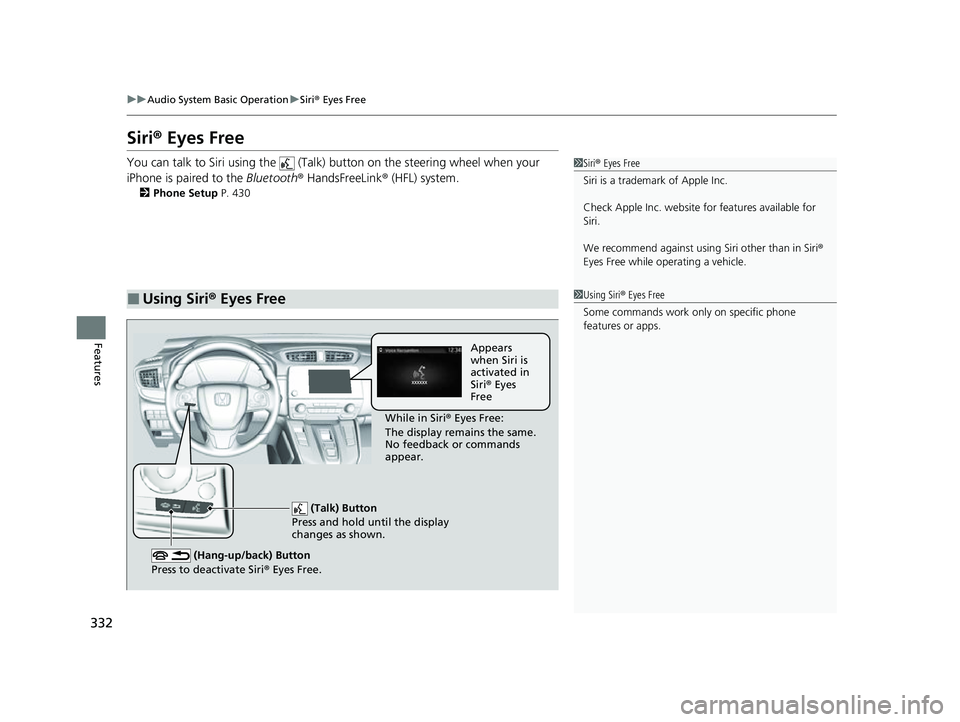
You can talk to Siri using the (Talk) button on the steering wheel when your
iPhone is paired to the Bluetooth® HandsFreeLink ® (HFL) system.
2Phone Setup P. 430
■Using Siri® Eyes Free
1 Siri ® Eyes Free
Siri is a trademark of Apple Inc.
Check Apple Inc. website for features available for
Siri.
We recommend against using Siri other than in Siri ®
Eyes Free while operating a vehicle.
1 Using Siri ® Eyes Free
Some commands work only on specific phone
features or apps.
(Talk) Button
Press and hold until the display
changes as shown.
(Hang-up/back) Button
Press to deactivate Siri ® Eyes Free.
While in Siri ® Eyes Free:
The display remains the same.
No feedback or commands
appear. Appears
when Siri is
activated in
Siri
® Eyes
Free
22 CR-V HEV ELP-31TPG6200.book 332 ページ 2021年6月30日 水曜日 午前11時6分
Page 424 of 692

422
Features
Bluetooth® HandsFreeLink ®
Bluetooth® HandsFreeLink ® (HFL) allows you to place and receive phone calls using
your vehicle’s audio system, without handling your cell phone.
Using HFL
■HFL Buttons
1 Bluetooth ® HandsFreeLink ®
Place your phone where y ou can get good reception.
To use HFL, you need a Bluetooth-compatible cell
phone. For a list of compatible phones, pairing
procedures, and special feature capabilities:
Visit automobiles.honda.com/handsfreelink/ , or call
1-888-528 -7876.
To use the system, the Bluetooth On/Off Status
setting must be On. If there is an active connection to
Apple CarPlay
TM or Android AutoTM, HFL is
unavailable. 2 How to customize P. 369
Voice control tips
•Aim the vents away from the ceiling and close the
windows, as noise coming from them may interfere
with the microphone.
•Press the button when you want to call a
number using a stored voice tag, a phonebook
name, or a number. Spe ak clearly and naturally
after a beep.
•If the microphone picks up vo ices other than yours,
the command may be misinterpreted.
•To change the volume level, select the audio
system’s VOL (Volume) or use the remote audio
controls on the steering wheel.
Up to three speed dial entries can be displayed
among a total of 20 that can be entered. 2 Speed Dial P. 436
Up to three previous calls can be displayed at a time
among a total of 20 that can be entered. If there is no
call history, Call History is disabled.
Models with Display Audio
(Talk) Button
( + (- Bar
(Hang-up/Back) Button
(Pick-up) Button
ENTEq Button
(Display/Information) Button
Buttons34
22 CR-V HEV ELP-31TPG6200.book 422 ページ 2021年6月30日 水曜日 午前11時6分