Page 449 of 692
Continued447
uuBluetooth ® HandsFreeLink ®u HFL Menus
Features
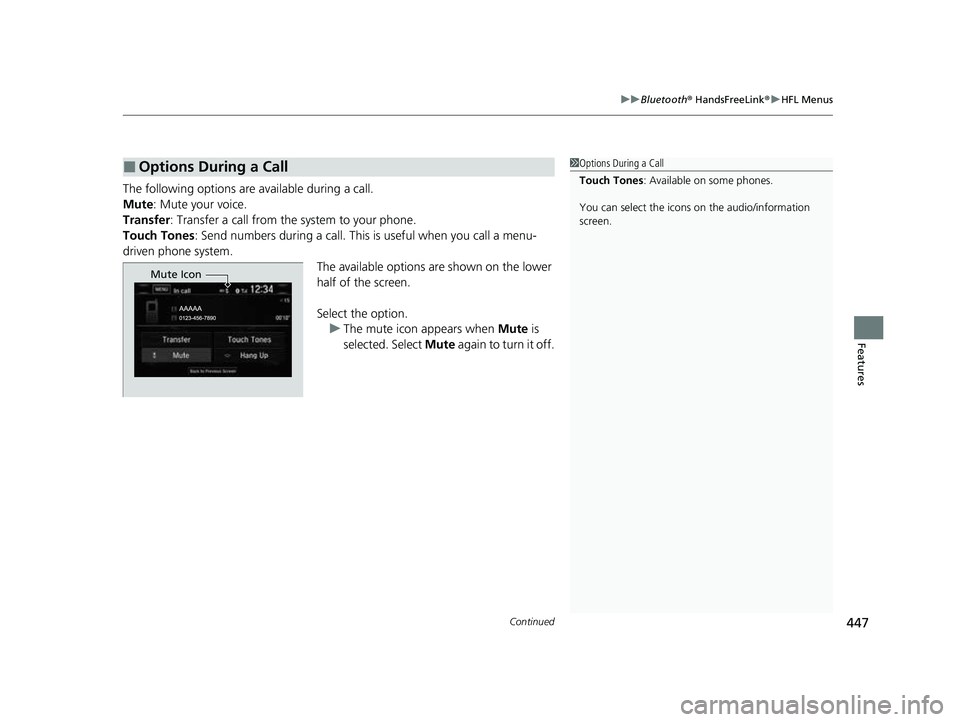
The following options ar e available during a call.
Mute: Mute your voice.
Transfer: Transfer a call from the system to your phone.
Touch Tones : Send numbers during a call. This is useful when you call a menu-
driven phone system. The available options are shown on the lower
half of the screen.
Select the option.u The mute icon appears when Mute is
selected. Select Mute again to turn it off.
■Options During a Call1Options During a Call
Touch Tones : Available on some phones.
You can select the icons on the audio/information
screen.
Mute Icon
22 CR-V HEV ELP-31TPG6200.book 447 ページ 2021年6月30日 水曜日 午前11時6分
Page 459 of 692
457
uuCompass*uCompass Zone Selection
Features
Compass Zone Selection
1. Set the power mode to ON.
2. Press and hold the (day/night) button
until the display shows the compass setting
menu.
3. Rotate to select Zone, then press .
The display shows the current zone
number.
4. Rotate to select the zone number of
your area (See Zone Map), then press .1Compass Zone Selection
The zone selection is done to compensate the
variation between magneti c north and true north.
If the calibration starts while the audio system is in
use, the display returns to normal after the calibration
is completed.
Zone Number
Zone Map
Guam Island: Zone 8
Puerto Rico: Zone 11
22 CR-V HEV ELP-31TPG6200.book 457 ページ 2021年6月30日 水曜日 午前11時6分
Page 474 of 692
uuWhen Driving uTurning on the Power
472
Driving
■To turn the power system off1Remote Engine Start
The power system may not be turned on by the
remote engine start if:
•You have disabled a remo te engine start setting
using the driver information interface* or audio/
information screen*.
2 Customized Features P. 140, 369
•The power mode is not in VEHICLE OFF (LOCK).•The transmission is in a position other than (P.•The hood is open, or any door or the tailgate is
unlocked.
•You have already used the remote twice to turn the
power system on.
•Another registered keyless remote is in the vehicle.•There is an antenna failure.•The door is unlocked with the built-in key.•The engine oil pressure is low.•The engine coolant temper ature is extremely high.•The security system alarm is not set.Press and hold the
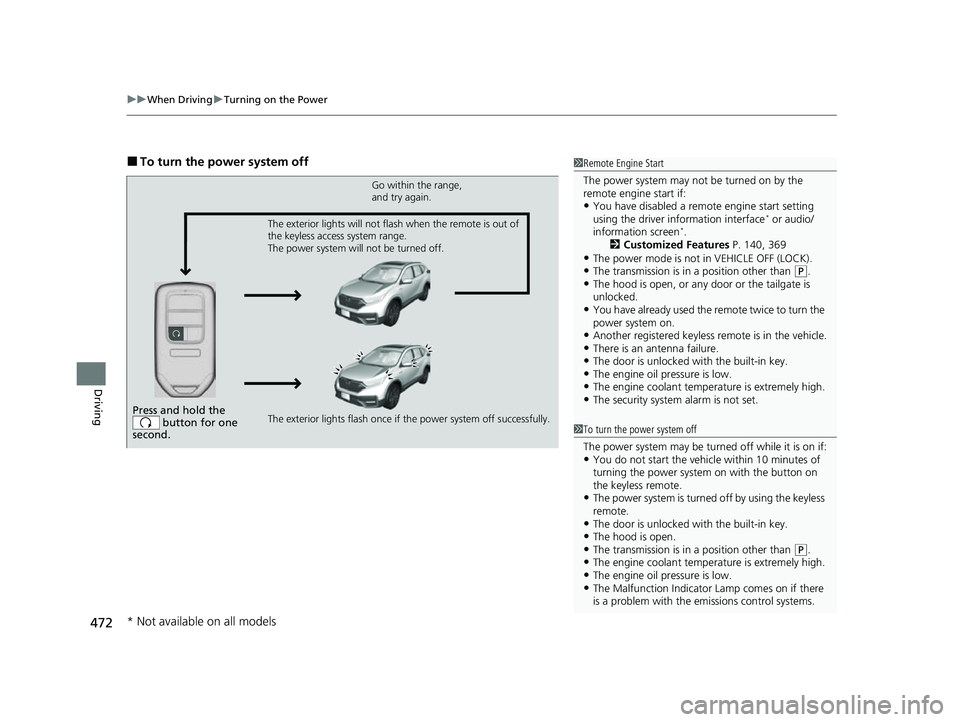
button for one
second.
Go within the range,
and try again.
The exterior lights flash once if the power system off successfully. The exterior lights will not flash when the remote is out of
the keyless access system range.
The power system will not be turned off.
1 To turn the power system off
The power system may be turned off while it is on if:
•You do not start the vehicl e within 10 minutes of
turning the power system on with the button on
the keyless remote.
•The power system is turned off by using the keyless
remote.
•The door is unlocked with the built-in key.•The hood is open.•The transmission is in a position other than ( P.•The engine coolant temper ature is extremely high.•The engine oil pressure is low.•The Malfunction Indicator Lamp comes on if there
is a problem with the emissions control systems.
* Not available on all models
22 CR-V HEV ELP-31TPG6200.book 472 ページ 2021年6月30日 水曜日 午前11時6分
Page 497 of 692
495
uuWhen Driving uTire Pressure Monitoring System (TPMS)
Continued
Driving
You can calibrate the system from the
customized features on the driver information
interface.
1. Press the then / button to select
Vehicle Settings , then press the ENTER
button.
u TPMS Calibration appears on the
display.
2. Press the ENTER button.
u The display swit ches to the
customization setup screen, where you
can select Cancel or Calibrate .
3. Press the / button and select
Calibrate , then press the ENTER button.
u Calibration Started screen appears,
then the display returns to the
customization menu screen.
• If the Calibration Failed to Start message
appears, repeat steps 2-3.
• The calibration process finishes
automatically.
Models with color audio system
34
22 CR-V HEV ELP-31TPG6200.book 495 ページ 2021年6月30日 水曜日 午前11時6分
Page 498 of 692
496
uuWhen Driving uTire Pressure Monitoring System (TPMS)
Driving
You can calibrate the system from the
customized feature on the audio/information
screen.
1. Set the power mode to ON.
2. Select .
3. Select Settings .
4. Select Vehicle .
5. Select TPMS Calibration .
6. Select Cancel or Calibrate .
u When the calibration is complete, the
display returns to the customization
menu screen.
• If the Unable to initialize TPMS. message
appears, repeat step 6.
• The calibration pr ocess finishes
automatically.
Models with Display Audio
22 CR-V HEV ELP-31TPG6200.book 496 ページ 2021年6月30日 水曜日 午前11時6分
Page 510 of 692
uuHonda Sensing ®u Collision Mitigation Braking SystemTM (CMBSTM)
508
Driving
■When the system activates
You can change the distance ( Long/Normal /Short ) between vehicles at which the
system’s earliest collision alert will co me on through driver information interface
* or
audio/information screen* setting options.
2 Customized Features P. 140, 369
1How the system works
The camera in the CMBS
TM is also designed to detect
pedestrians.
However, this pedestrian detection feature may not
activate or may not detect a pedestrian in front of
your vehicle under certain conditions.
Refer to the ones indicating the pedestrian detection
limitations from the list. 2 CMBS
TM Conditions and Limitations P. 511
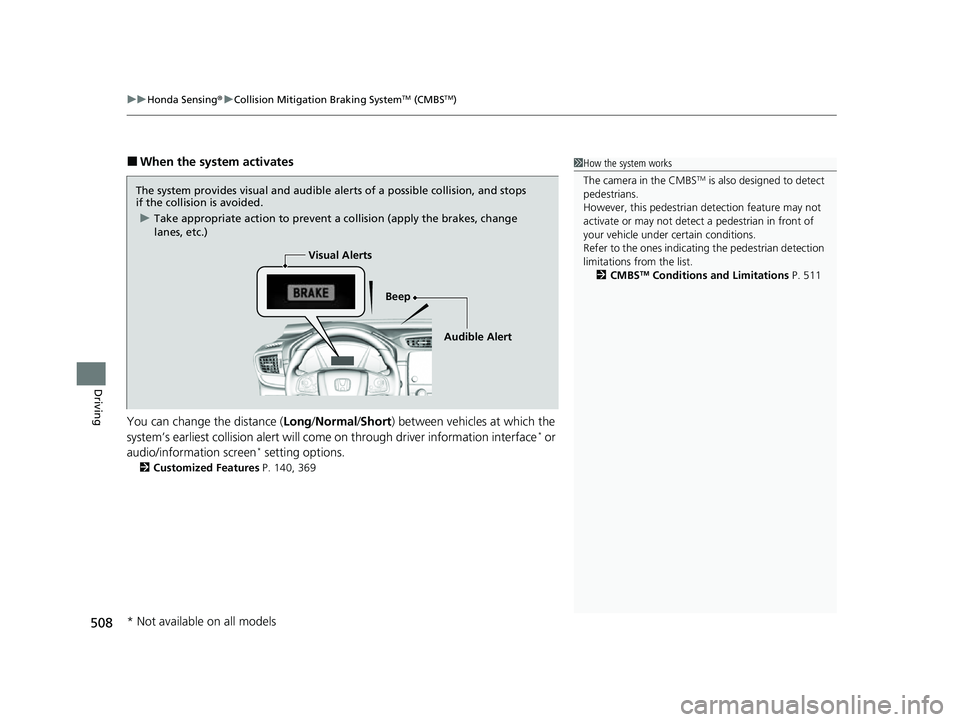
The system provides visual and audible alerts of a possible collision, and stops
if the collision is avoided.
u Take appropriate action to prevent a collision (apply the brakes, change
lanes, etc.)
Beep
Visual Alerts
Audible Alert
* Not available on all models
22 CR-V HEV ELP-31TPG6200.book 508 ページ 2021年6月30日 水曜日 午前11時6分
Page 521 of 692

Continued519
uuHonda Sensing ®u Adaptive Cruise Control (ACC) with Low Speed Follow
Driving
When driving at about 25 mph (40 km/h) or above: Take your foot off the
pedal and press the –/SET button when you reach the desired speed. The moment
you release the button, th e set speed is fixed, and ACC with Low Speed Follow
begins.
When driving slower than about 25 mph (40 km/h): If the vehicle is moving
and the brake pedal is not depressed, pressing the button fixes the set speed to
about 25 mph (40 km/h) regardless of current vehicle speed. If the vehicle is
stationary, you can set the vehicle speed even with the brake pedal depressed.
■To Set the Vehicle Speed1 Adaptive Cruise Control (ACC) with Low Speed Follow
The indicators for the Adaptive Cruise Control (ACC)
with Low Speed Follow, Road Departure Mitigation
(RDM), Vehicle Stability Assist
TM (VSA ®) system,
Vehicle Stability AssistTM (VSA ®) OFF, low tire
pressure/TPMS, Collision Mitigation Braking SystemTM
(CMBSTM), and Parking Brake and Brake System
(Amber) may come on along with a message in the
Driver Information Interf ace after reconnecting the
12V-battery. Drive a short distance at more than 12
mph (20 km/h). The indicator should go off. If it does
not, have your vehicle checked by a dealer.
On when ACC with Low
Speed Follow begins
Press and release
−/SET button
1
To Set the Vehicle Speed
You can switch the displayed set speed
measurements on the driv er information interface
* or
audio/information screen* between mph and km/h.
2 Customized Features P. 140, 369
* Not available on all models
22 CR-V HEV ELP-31TPG6200.book 519 ページ 2021年6月30日 水曜日 午前11時6分
Page 529 of 692

Continued527
uuHonda Sensing ®u Adaptive Cruise Control (ACC) with Low Speed Follow
Driving
Increase or decrease the vehicle speed using the RES/+ or –/SET button on the
steering wheel.
• Each time you press the RES/+ or –/SET button, the vehicle speed is increased or
decreased by about 1 mph or 1 km/h accordingly.
• If you keep pressing the RES/+ or –/SET button, the vehicle speed increases or
decreases by about 5 mph or 5 km/h accordingly.
■To Adjust the Vehicle Speed1 To Adjust the Vehicle Speed
If a vehicle detected ahead is going at a speed slower
than your increased set speed, ACC with Low Speed
Follow may not accelerate y our vehicle. This is to
maintain the set interval between your vehicle and
the vehicle ahead.
You can switch the displayed set speed
measurements on the driv er information interface
* or
audio/information screen* between mph and km/h.
2 Customized Features P. 140, 369
When you depress the accelerator pedal and then
push and release the –/SET button, the current speed
of the vehicle is set.
To increase speed
To decrease speed
* Not available on all models
22 CR-V HEV ELP-31TPG6200.book 527 ページ 2021年6月30日 水曜日 午前11時6分