Page 143 of 692
141
uuGauges and Driver Information Interface uDriver Information Interface
Continued
Instrument Panel
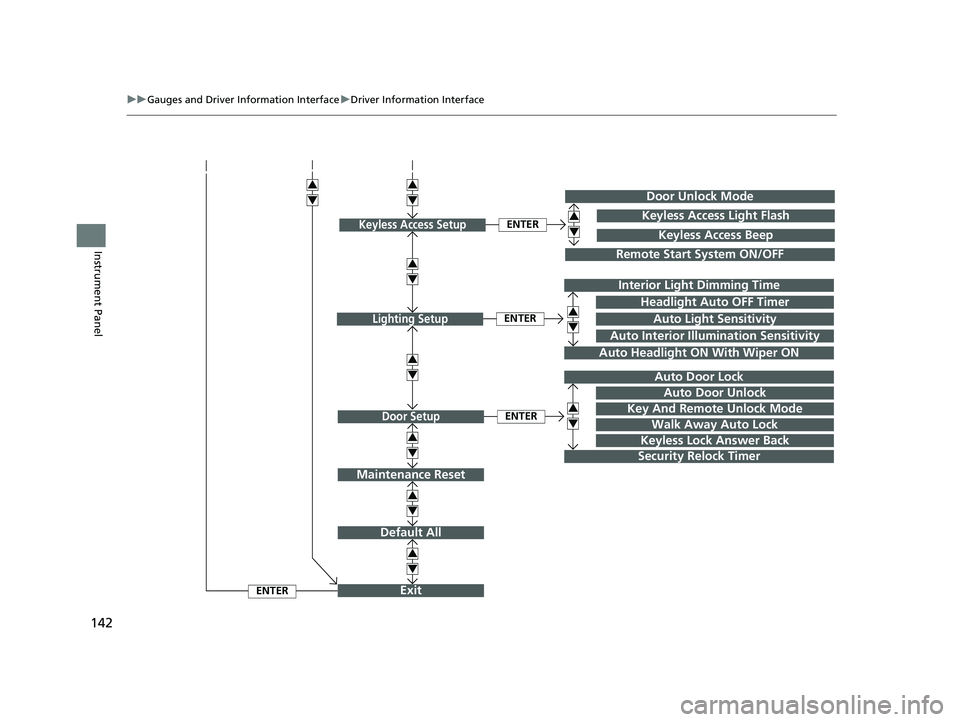
■Customization flow
Press the button.
ENTER
TPMS Calibration
Vehicle Settings
Lane Keeping Assist Suspend Beep
Forward Collision Warning Distance
Road Departure Mitigation Setting
Driver Attention Monitor
Driver Assist System SetupENTER
ACC Forward Vehicle Detect Beep
“Trip B” Reset Timing
Language Selection
“Trip A” Reset Timing
Adjust Alarm Volume
Speed/Distance Units
Reverse Alert Tone
Meter SetupENTER
Adjust Outside Temp. Display
3
4
3
4
3
4
3
4
3
4
3
4
ENTER
Fuel Efficiency Backlight
22 CR-V HEV ELP-31TPG6200.book 141 ページ 2021年6月30日 水曜日 午前11時6分
Page 144 of 692
142
uuGauges and Driver Information Interface uDriver Information Interface
Instrument Panel
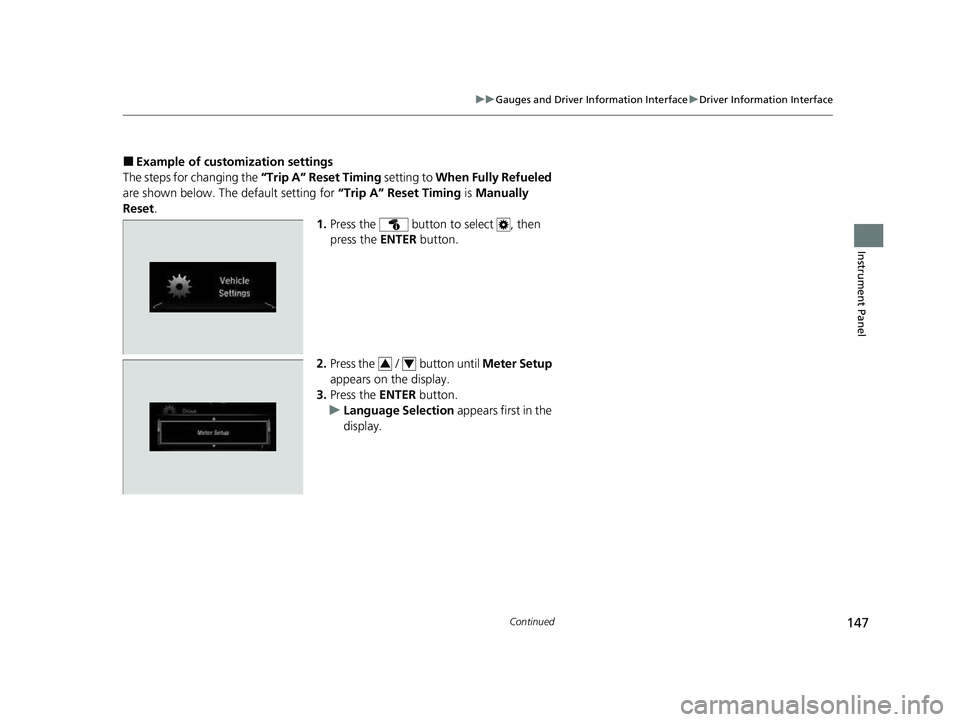
Exit
Default All
Auto Door Lock
Walk Away Auto Lock
Security Relock Timer
Headlight Auto OFF Timer
Auto Headlight ON With Wiper ON
ENTER
ENTER
Lighting Setup
Door Setup
ENTER
Auto Interior Illumination Sensitivity
Door Unlock Mode
Remote Start System ON/OFF
ENTERKeyless Access SetupKeyless Access Light Flash
Keyless Access Beep
3
4
3
4
3
4
3
4
3
4
3
4
3
4Interior Light Dimming Time
Auto Light Sensitivity
Key And Remote Unlock Mode
Keyless Lock Answer Back
Auto Door Unlock
Maintenance Reset
3
4
3
4
3
4
22 CR-V HEV ELP-31TPG6200.book 142 ページ 2021年6月30日 水曜日 午前11時6分
Page 146 of 692

144
uuGauges and Driver Information Interface uDriver Information Interface
Instrument Panel
*1:Default SettingSetup Group Customizable Features
Description Selectable Settings
Meter Setup
Language SelectionChanges the displayed language.English*1/Français /Español
Adjust Outside Temp.
DisplayAdjusts the temperature reading by a few
degrees.-5°F ~ ±0°F*1 ~ +5°F
“Trip A” Reset TimingChanges the setting of how to reset trip meter
A, average fuel economy A, average speed A,
and elapsed time A.When Fully Refueled /IGN OFF /
Manually Reset*1
“Trip B” Reset Timing
Changes the setting of how to reset trip meter
B, average fuel economy B, average speed B,
and elapsed time B.When Fully Refueled /IGN OFF /
Manually Reset*1
Adjust Alarm VolumeChanges the alarm volume, such as buzzers,
warnings, turn signal sound, and so on.High /Mid*1/Low
Reverse Alert ToneCauses the beeper to sound once when the
shift position is changed to
(R.ON*1/OFF
Fuel Efficien cy BacklightTurns the ambient meter feature on and off.ON*1/OFF
Speed/Distance UnitsSelects the trip computer units.km/h∙km /mph∙miles*1
22 CR-V HEV ELP-31TPG6200.book 144 ページ 2021年6月30日 水曜日 午前11時6分
Page 148 of 692

146
uuGauges and Driver Information Interface uDriver Information Interface
Instrument Panel
*1: Default SettingSetup Group Customizable Features
DescriptionSelectable Settings
Door Setup
Auto Door LockChanges the setting for when the doors and the
tailgate automatically lock.With Vehicle Speed*1/Shift
From P /OFF
Auto Door UnlockChanges the setting for when the doors and the
tailgate automatically unlock.
When Driver’s Door Opens*1/
When Shifting Into Park/
When Ignition Switched
OFF /OFF
Key And Remote Unlock
ModeSets up either the driver’s door or all doors to unlock
on the first operation of the keyless remote.Driver Door*1/ All Doors
Walk Away Auto Lock
Changes the settings for the automatic locking the
doors when you walk away from the vehicle while
carrying the keyless remote.
ON /OFF*1
Keyless Lock Answer
BackLOCK/UNLOCK- The exterior lights flash.
LOCK (2nd push)- The beeper sounds.ON*1/OFF
Security Relock Timer
Changes the time it takes for the doors to relock and
the security system to set after you unlock the
vehicle without opening any door.
90sec /60sec /30sec*1
Maintenance
Reset—Resets the Maintenance MinderTM display when you
have performed the maintenance service.Cancel /All Due Items
Default All—Cancels customized changes you have made or
restores them to their default setting.Cancel /Set
22 CR-V HEV ELP-31TPG6200.book 146 ページ 2021年6月30日 水曜日 午前11時6分
Page 149 of 692
147
uuGauges and Driver Information Interface uDriver Information Interface
Continued
Instrument Panel
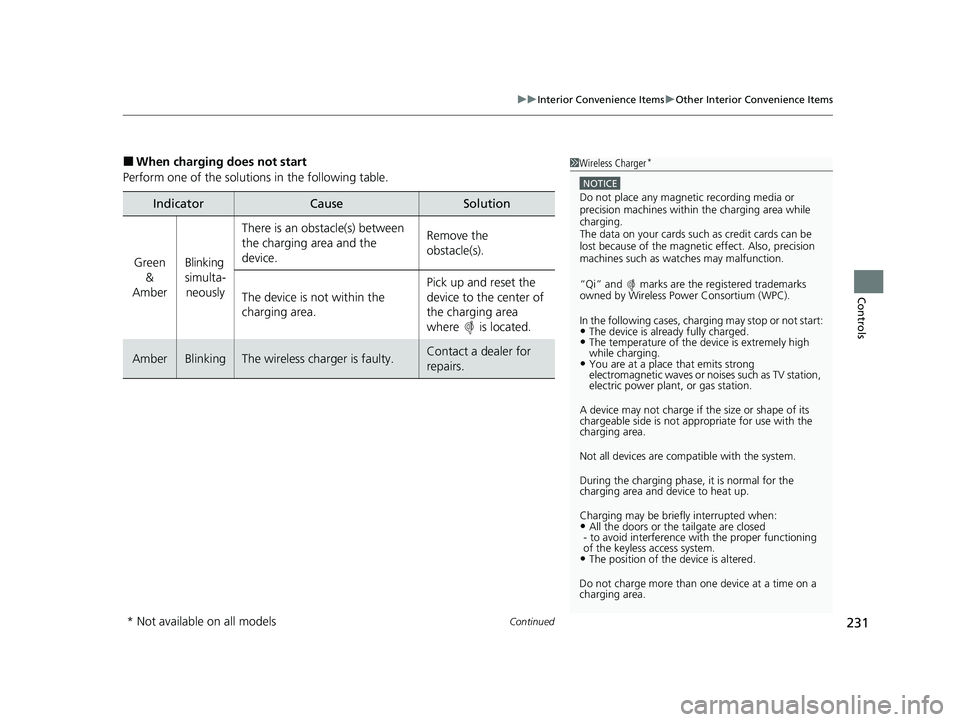
■Example of customization settings
The steps for changing the “Trip A” Reset Timing setting to When Fully Refueled
are shown below. The default setting for “Trip A” Reset Timing is Manually
Reset .
1.Press the button to select , then
press the ENTER button.
2. Press the / button until Meter Setup
appears on the display.
3. Press the ENTER button.
u Language Selection appears first in the
display.
34
22 CR-V HEV ELP-31TPG6200.book 147 ページ 2021年6月30日 水曜日 午前11時6分
Page 150 of 692
148
uuGauges and Driver Information Interface uDriver Information Interface
Instrument Panel
4. Press the / button until “Trip A”
Reset Timing appears on the display, then
press the ENTER button.
u The display switches to the
customization setup screen, where you
can select When Fully Refueled , IGN
OFF , Manually Reset , or Exit .
5. Press the / button and select When
Fully Refueled , then press the ENTER
button.
u The When Fully Refueled Setup screen
appears, then the di splay returns to the
customization menu screen.
6. Press the / button until Exit appears
on the display, then press the ENTER
button.
7. Repeat Step 6 until you return to the
normal screen.34
34
34
22 CR-V HEV ELP-31TPG6200.book 148 ページ 2021年6月30日 水曜日 午前11時6分
Page 205 of 692
203
uuOperating the Switches Around the Steering Wheel uDriving Position Memory System*
Continued
Controls
Driving Position Memory System*
You can store two driver’s seat positions (except for power lumbar) with the driving
position memory system.
When you unlock and open the driver’s door with a remote transmitter or the
keyless access system, the seat adjusts automatically to one of the two preset
positions.
When you enter the vehicle, the driver in formation interface briefly shows you which
remote transmitter you used to unlock the vehicle.
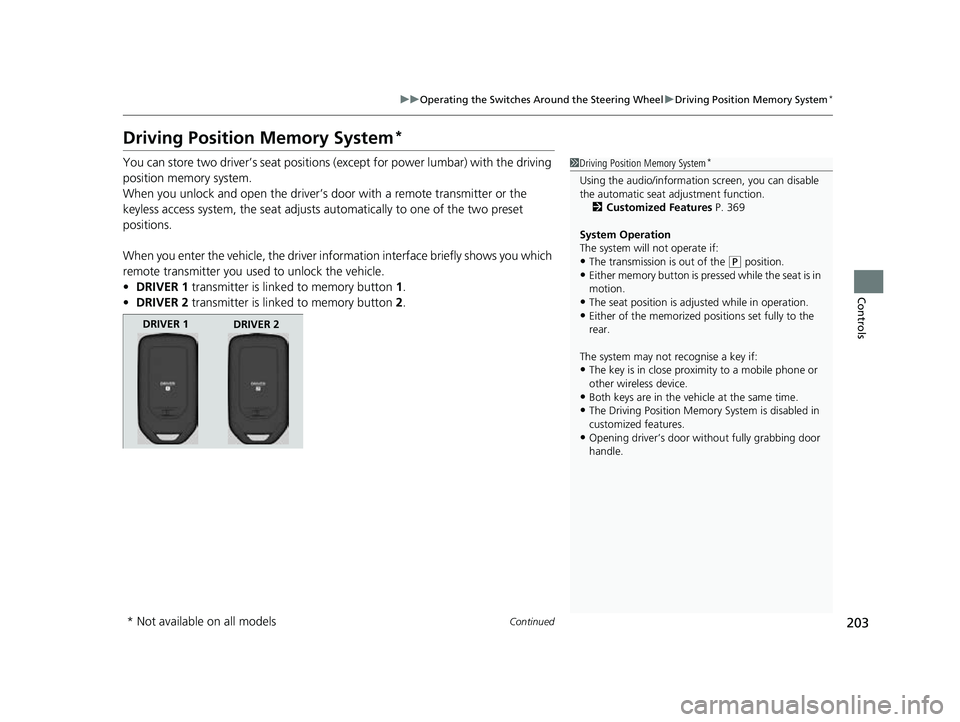
• DRIVER 1 transmitter is linked to memory button 1.
• DRIVER 2 transmitter is linked to memory button 2.1 Driving Position Memory System*
Using the audio/informati on screen, you can disable
the automatic seat adjustment function.
2 Customized Features P. 369
System Operation
The system will not operate if:
•The transmission is out of the ( P position.•Either memory button is pressed while the seat is in
motion.
•The seat position is adju sted while in operation.•Either of the memorized pos itions set fully to the
rear.
The system may not recognise a key if:
•The key is in close proximity to a mobile phone or
other wireless device.
•Both keys are in the vehicle at the same time.
•The Driving Position Memory System is disabled in
customized features.
•Opening driver’s door wi thout fully grabbing door
handle.
DRIVER 1 DRIVER 2
* Not available on all models
22 CR-V HEV ELP-31TPG6200.book 203 ページ 2021年6月30日 水曜日 午前11時6分
Page 233 of 692
Continued231
uuInterior Convenience Items uOther Interior Convenience Items
Controls
■When charging does not start
Perform one of the solutions in the following table.
IndicatorCauseSolution
Green &
AmberBlinking
simulta- neously
There is an obstacle(s) between
the charging area and the
device.Remove the
obstacle(s).
The device is not within the
charging area. Pick up and reset the
device to the center of
the charging area
where is located.
AmberBlinkingThe wireless charger is faulty.Contact a dealer for
repairs.
1
Wireless Charger*
NOTICE
Do not place any magneti c recording media or
precision machines within the charging area while
chargingM
The data on your cards such as credit cards can be
lost because of the magneti c effect. Also, precision
machines such as watches may malfunctionM