Page 372 of 692
370
uuCustomized Features u
Features
■Customization flow
Select Settings.Clock
Wallpaper
Others
Clock/Wallpaper Type*1/Clock Type*2
Clock Adjustment
Clock Format
ClockClock
Auto Time Zone
Manual Time Zone
Auto Daylight Saving Time
Clock Display
Overlay Clock Location
Clock Reset
Info Screen Preference
Clock
Wallpaper
Others
Clock/Wallpaper Type*1/Clock Type*2
Clock Adjustment
Clock Format
Clock
Auto Time Zone
Manual Time Zone
Auto Daylight Saving Time
Clock Display
Overlay Clock Location
Clock Reset
Info Screen Preference
Info
HondaLinkDiagnostic & Location Data
HondaLinkDiagnostic & Location Data
*1 : Does not appear when you chang e the screen interface design.
*2 : Appears only when you change the screen interface design.
Default
Default
22 CR-V HEV ELP-31TPG6200.book 370 ページ 2021年6月30日 水曜日 午前11時6分
Page 374 of 692
372
uuCustomized Features u
Features
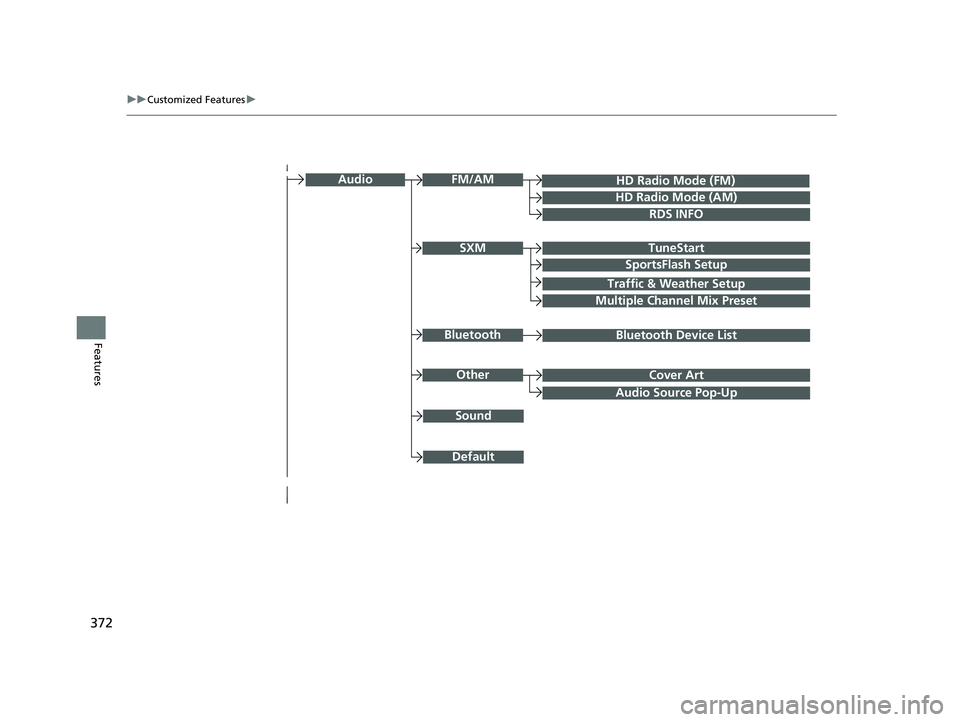
Audio Source Pop-Up
Cover Art
HD Radio Mode (FM)
RDS INFO
TuneStart
SportsFlash Setup
Traffic & Weather Setup
Audio
Other
FM/AM
SXM
Sound
Bluetooth Device ListBluetooth
Multiple Channel Mix Preset
HD Radio Mode (AM)
Default
22 CR-V HEV ELP-31TPG6200.book 372 ページ 2021年6月30日 水曜日 午前11時6分
Page 376 of 692
374
uuCustomized Features u
Features
Voice Recog.
Voice Prompt
Voice Recog. Volume
Song by Voice
Song by Voice Phonetic Modification
Phonebook Phonetic Modification
Automatic Phone Sync
Clock Adjustment
Clock Format
Auto Time Zone
Manual Time Zone
Auto Daylight Saving Time
Clock Display
Overlay Clock Location
Clock Reset
Clock
Wallpaper
One Press Voice Operation
*1 : Does not appear when you chang e the screen interface design.
*2 : Appears only when you change the screen interface design.
Clock/Wallpaper Type*1/
Clock Type*2Clock
22 CR-V HEV ELP-31TPG6200.book 374 ページ 2021年6月30日 水曜日 午前11時6分
Page 377 of 692
375
uuCustomized Features u
Continued
Features
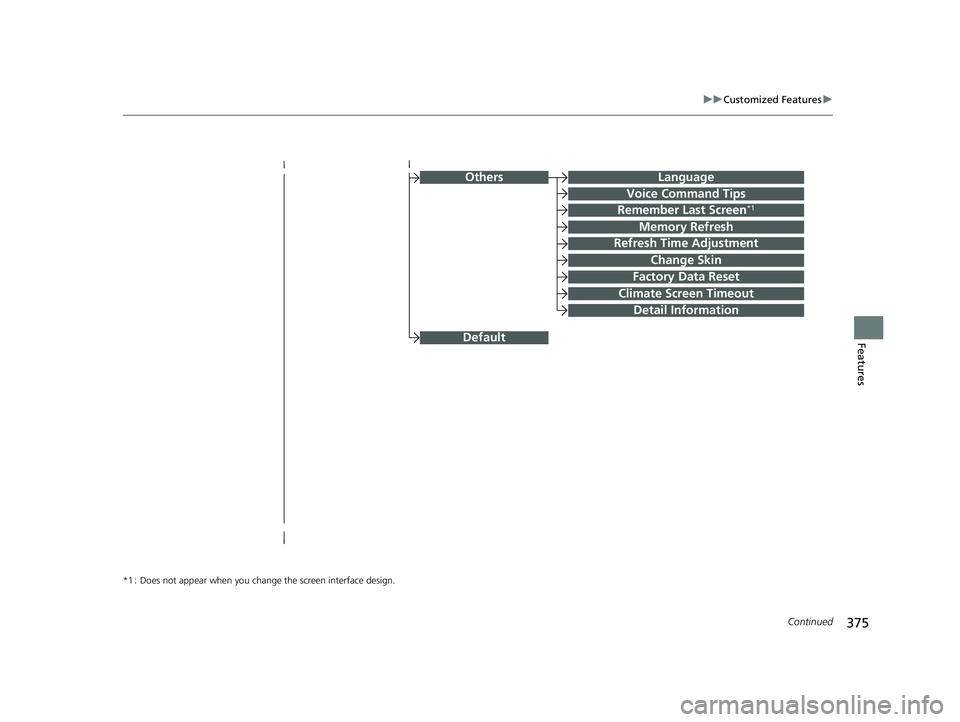
OthersLanguage
Voice Command Tips
Remember Last Screen*1
Memory Refresh
Refresh Time Adjustment
Change Skin
Factory Data Reset
Climate Screen Timeout
Detail Information
*1 : Does not appear when you chang e the screen interface design.
Default
22 CR-V HEV ELP-31TPG6200.book 375 ページ 2021年6月30日 水曜日 午前11時6分
Page 378 of 692
376
uuCustomized Features u
Features
Driver Assist System SetupForward Collision Warning Distance
ACC Forward Vehicle Detect Beep
Lane Keeping Assist Suspend Beep
Road Departure Mitigation Setting
Adjust Outside Temp. Display
“Trip A” Reset Timing
“Trip B” Reset Timing
Vehicle
Meter Setup
Adjust Alarm Volume
New Message Notifications
Reverse Alert Tone
Turn By Turn Auto Display
Speed/Distance Units
CancelTPMS Calibration
Calibrate
Blind Spot Info
Fuel Efficiency Backlight
Memory Position Link
Driver Attention Monitor
Driving Position Setup
22 CR-V HEV ELP-31TPG6200.book 376 ページ 2021年6月30日 水曜日 午前11時6分
Page 380 of 692
378
uuCustomized Features u
Features
■List of customizable options
*1:Does not appear when you change the screen interface design.
*2:Appears only when you change the screen interface design. Setup
Group Customizable Features Descri
ption Selectable Settings
Clock
Clock
Clock/
Wallpaper
Type
*1/Clock
Type*2
Clock
See Info on P. 379
Wallpaper
Clock Adjustment
Auto Time Zone
Manual Time Zone
Auto Daylight Saving Time
Clock Format
Clock Display
Overlay Clock Location
Clock Reset
HondaLinkDiagnostic & Location Data
OthersInfo Screen Preference
DefaultCancels/Resets all customized items in the
Clock settings group as default.Yes/No
22 CR-V HEV ELP-31TPG6200.book 378 ページ 2021年6月30日 水曜日 午前11時6分
Page 381 of 692

379
uuCustomized Features u
Continued
Features
*1:Default Setting
*2:Does not appear when you chan ge the screen interface design.
*3:Appears only when you change the screen interface design. Setup
Group Customizable Features Description Selectable Settings
Info Clock Clock/
Wallpaper
Type
*2/
Clock
Type
*3
Clock Changes the clock display type. Analog
/Digital*1/
Small Digital /Off
Wallpaper
●Changes the wallpaper type.●Imports an image file for a new wallpaper.●Deletes an image file for a wallpaper. Blank
/Galaxy
*1/
Metallic /Time Zone*
Clock Adjustment Adjusts Clock. —
Auto Time Zone Automatically adjusts the clock when driving
through different time zones. On
*1/
Off
Manual Time Zone Changes the time zone manually. —
Auto Daylight Saving Time Select
On to have the GPS automatically adjust
the clock to daylight savings time. Select Off to
cancel this function. On
*1/
Off
Clock Format Selects the digital clock display from 12H to 24H. 12H
*1/24H
Clock Display Selects whether the clock display comes on. On
*1/Off
Overlay Clock Location Changes the clock display layout. Upper Right
*1/
Upper
Left/ Lower Right/
Lower Left /Off
Clock Reset Resets the clock settings to the factory default. Yes/No
* Not available on all models
22 CR-V HEV ELP-31TPG6200.book 379 ページ 2021年6月30日 水曜日 午前11時6分
Page 382 of 692

380
uuCustomized Features u
Features
*1:Default SettingSetup
Group Customizable Features
DescriptionSelectable Settings
Info HondaLink
Diagnostic &
Location Data
Turns HondaLink
® on and off. On
*1/Off
Others Info Screen
Preference Selects the top menu when the (display/
information) button is pressed.
●Info Top
- A brief menu pops up.●Info Menu - A full menu pops up.●Off- A menu does not pop up. Info Top
/Info
Menu
*1/ Off
Default Cancels/Resets all customized items in the
Info settings
group as default. Yes
/No
Camera
Rear
Camera
Fixed Guideline
Selects whether the fixed guidelines come on the rear
camera monitor.
2 Multi-View Rear Camera P. 570
On*1/Off
Dynamic Guideline
Selects whether the guidelines adjust to the movement
of the steering wheel.
2 Multi-View Rear Camera P. 570
On*1/Off
Parking Sensor
Display*Selects whether to turn on the parking sensor display.Normal View /Split
View*1
DefaultCancels/Resets all customized items in the Rear Camera
setting group as default.Yes /No
Cross Traffic MonitorTurns on and off the cross traffic monitor.On*1/Off
* Not available on all models
22 CR-V HEV ELP-31TPG6200.book 380 ページ 2021年6月30日 水曜日 午前11時6分