Page 102 of 692

100
uuIndicators u
Instrument Panel
IndicatorNameOn/BlinkingExplanationMessage
System Message
Indicator
●Comes on along with a beep
when a problem is detected. A
system message on the driver
information interface appears at
the same time.●While the indicator is on, press the
(display/information) button to see the
message again.
●Refer to the Indicators information in this
chapter when a system message appears
on the driver information interface.
Respond to the message accordingly.
●The driver information interface does not
return to the normal screen unless the
warning is canceled, or the button is
pressed.
—
Turn Signal and
Hazard Warning
Indicators
●Blinks when you operate the turn
signal lever.
●Blink along with all turn signals
when you press the hazard
warning button.
●Does not blink or blinks rapidly
- Have your vehicle checked by a dealer.
—
High Beam
Indicator●Comes on when the high beam
headlights are on.——
22 CR-V HEV ELP-31TPG6200.book 100 ページ 2021年6月30日 水曜日 午前11時6分
Page 146 of 692

144
uuGauges and Driver Information Interface uDriver Information Interface
Instrument Panel
*1:Default SettingSetup Group Customizable Features
Description Selectable Settings
Meter Setup
Language SelectionChanges the displayed language.English*1/Français /Español
Adjust Outside Temp.
DisplayAdjusts the temperature reading by a few
degrees.-5°F ~ ±0°F*1 ~ +5°F
“Trip A” Reset TimingChanges the setting of how to reset trip meter
A, average fuel economy A, average speed A,
and elapsed time A.When Fully Refueled /IGN OFF /
Manually Reset*1
“Trip B” Reset Timing
Changes the setting of how to reset trip meter
B, average fuel economy B, average speed B,
and elapsed time B.When Fully Refueled /IGN OFF /
Manually Reset*1
Adjust Alarm VolumeChanges the alarm volume, such as buzzers,
warnings, turn signal sound, and so on.High /Mid*1/Low
Reverse Alert ToneCauses the beeper to sound once when the
shift position is changed to
(R.ON*1/OFF
Fuel Efficien cy BacklightTurns the ambient meter feature on and off.ON*1/OFF
Speed/Distance UnitsSelects the trip computer units.km/h∙km /mph∙miles*1
22 CR-V HEV ELP-31TPG6200.book 144 ページ 2021年6月30日 水曜日 午前11時6分
Page 158 of 692
uuLocking and Unlocking the Doors uLocking/Unlocking the Doors from the Outside
156
Controls
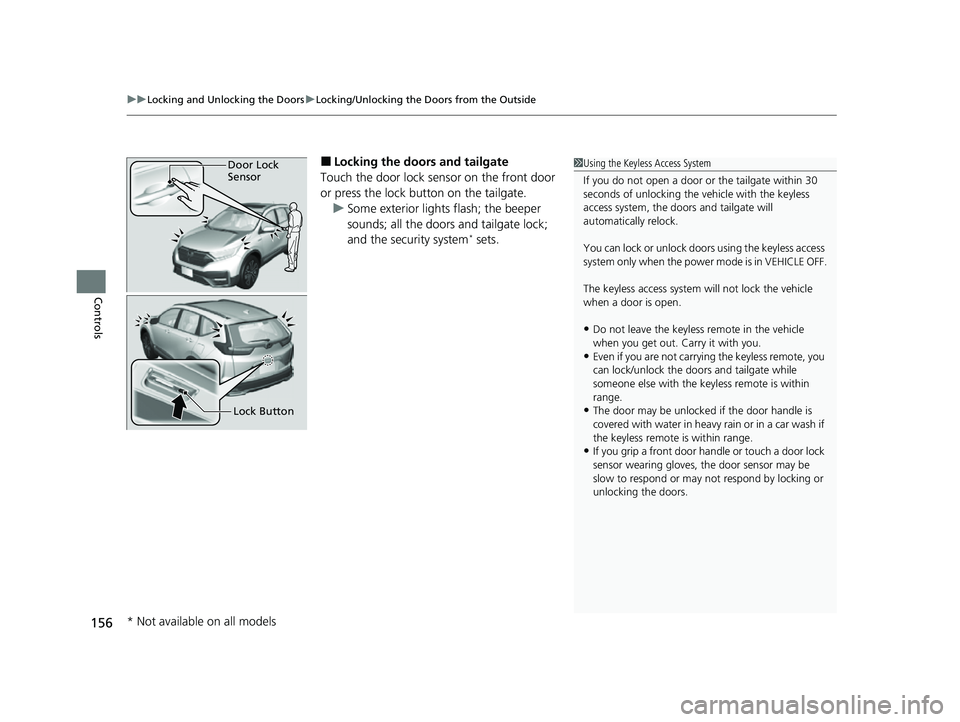
■Locking the doors and tailgate
Touch the door lock sensor on the front door
or press the lock button on the tailgate. u Some exterior lights flash; the beeper
sounds; all the doors and tailgate lock;
and the security system
* sets.
1Using the Keyless Access System
If you do not open a door or the tailgate within 30
seconds of unlocking the vehicle with the keyless
access system, the doors and tailgate will
automatically relock.
You can lock or unlock doors using the keyless access
system only when the power mode is in VEHICLE OFF.
The keyless access system will not lock the vehicle
when a door is open.
•Do not leave the keyless remote in the vehicle
when you get out. Carry it with you.
•Even if you are not carrying the keyless remote, you
can lock/unlock the doors and tailgate while
someone else with the keyless remote is within
range.
•The door may be unlocked if the door handle is
covered with water in heavy rain or in a car wash if
the keyless remote is within range.
•If you grip a front door ha ndle or touch a door lock
sensor wearing gloves, the door sensor may be
slow to respond or may no t respond by locking or
unlocking the doors.
Door Lock
Sensor
Lock Button
* Not available on all models
22 CR-V HEV ELP-31TPG6200.book 156 ページ 2021年6月30日 水曜日 午前11時6分
Page 172 of 692
170
uuTailgate uOpening/Closing the Power Tailgate*
Controls
Opening/Closing the Power Tailgate*
The power tailgate can be operated by pressing the power tailgate button on the
remote transmitter, pressing the power tail gate button in the driver’s side control
panel, pressing the button on the tailgate, or by raising and lowering your foot
under the center of the rear bumper for hands free access
*.
The power tailgate can be opened/c losed when the transmission is in
(P.
1Opening/Closing the Power Tailgate*
NOTICE
Do not push or pull on the power tailgate when it is
being automatically opened or closedM
Forcibly opening or closing the power tailgate while
in operation can deform the tailgate frameM
When operating the power tailgate, make sure there is
enough space around your vehicle. People near the tailgate
may be seriously hurt if the tailgate hits or closes on their
heads. Be especially cautious if children are aroundM
The power tailgate may not open or close under the
following conditionsY
•You activate the power system while the tailgate is
automatically openi ng or closing.
•The vehicle is parked on a steep hill.•The vehicle is swayed in a strong wind.•The tailgate or the roof is covered with snow or ice.
If you close the power tail gate when all the doors are
locked, the power tailgate locks automatically.
3WARNING
Opening or closing a power tailgate while
any part of a passenger is in the tailgate’s
operating path can cause serious injury.
Make sure all passengers or objects are
clear of the tailgate operating range
before opening or closing the tailgate.
* Not available on all models
22 CR-V HEV ELP-31TPG6200.book 170 ページ 2021年6月30日 水曜日 午前11時6分
Page 229 of 692
Continued227
uuInterior Convenience Items uStorage Items
Controls
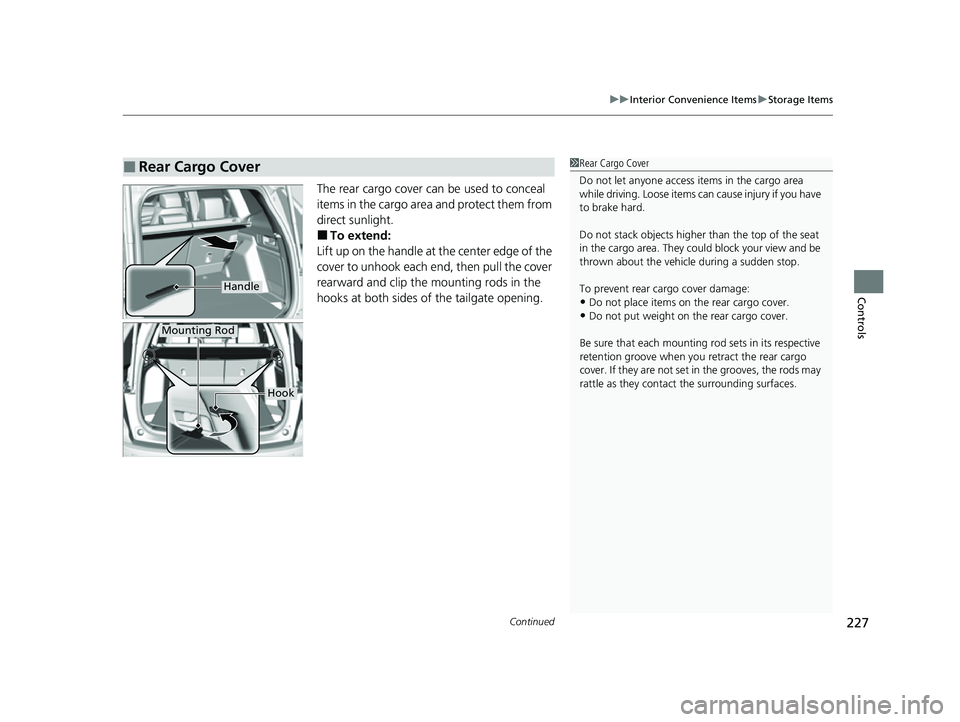
The rear cargo cover can be used to conceal
items in the cargo area and protect them from
direct sunlight.
■To extend:
Lift up on the handle at the center edge of the
cover to unhook each en d, then pull the cover
rearward and clip the mounting rods in the
hooks at both sides of the tailgate opening.
■Rear Cargo Cover1 Rear Cargo Cover
Do not let anyone access items in the cargo area
while driving. Loose items can cause injury if you have
to brake hard.
Do not stack objects higher than the top of the seat
in the cargo area. They could block your view and be
thrown about the vehicle during a sudden stop.
To prevent rear cargo cover damage:
•Do not place items on the rear cargo cover.•Do not put weight on the rear cargo cover.
Be sure that each mounting rod sets in its respective
retention groove when you retract the rear cargo
cover. If they are not set in the grooves, the rods may
rattle as they contac t the surrounding surfaces.
Handle
Mounting Rod
Hook
22 CR-V HEV ELP-31TPG6200.book 227 ページ 2021年6月30日 水曜日 午前11時6分
Page 264 of 692
uuAudio System Basic Operation uPlaying an iPod
262
Features
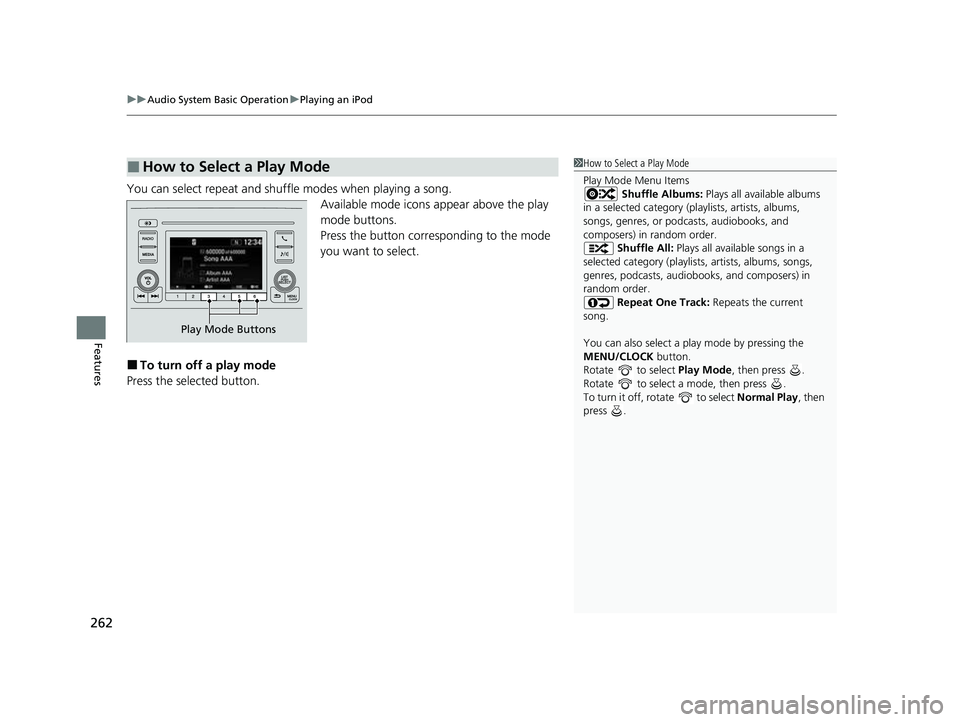
You can select repeat and shuffle modes when playing a song.
Available mode icons appear above the play
mode buttons.
Press the button corresponding to the mode
you want to select.
■To turn off a play mode
Press the selected button.
■How to Select a Play Mode1 How to Select a Play Mode
Play Mode Menu Items
Shuffle Albums: Plays all available albums
in a selected category (playlists, artists, albums,
songs, genres, or podca sts, audiobooks, and
composers) in random order.
Shuffle All: Plays all available songs in a
selected category (playlists , artists, albums, songs,
genres, podcasts, audiobooks, and composers) in
random order.
Repeat One Track: Repeats the current
song.
You can also select a pl ay mode by pressing the
MENU/CLOCK button.
Rotate to select Play Mode, then press .
Rotate to select a mode, then press .
To turn it off, rotate to select Normal Play, then
press .
Play Mode Buttons
22 CR-V HEV ELP-31TPG6200.book 262 ページ 2021年6月30日 水曜日 午前11時6分
Page 269 of 692
267
uuAudio System Basic Operation uPlaying a USB Flash Drive
Features
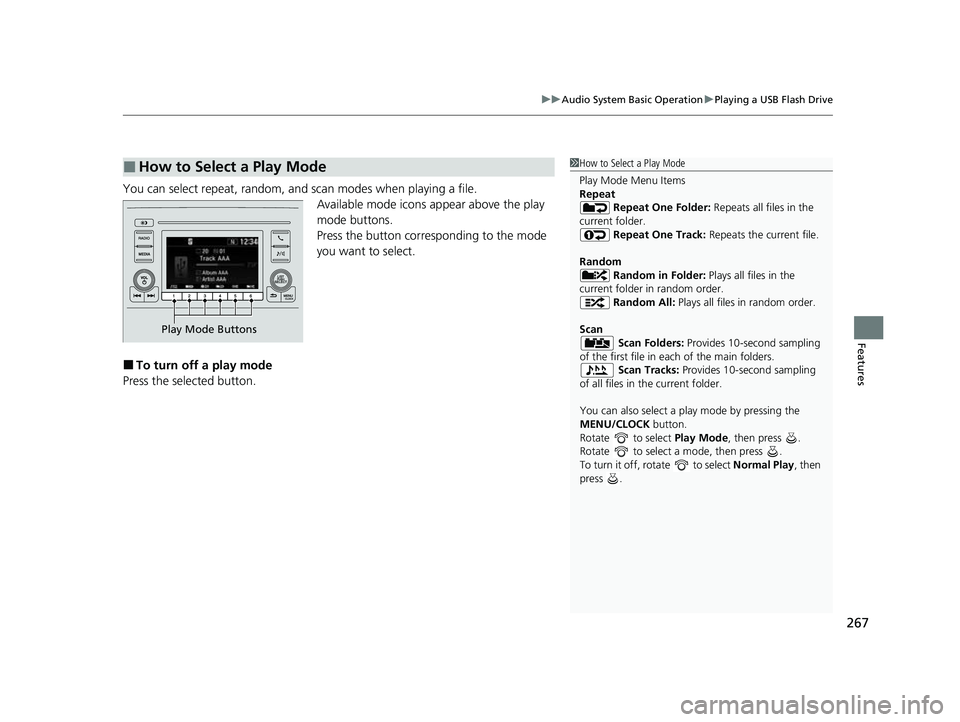
You can select repeat, random, and scan modes when playing a file.
Available mode icons appear above the play
mode buttons.
Press the button corresponding to the mode
you want to select.
■To turn off a play mode
Press the selected button.
■How to Select a Play Mode1 How to Select a Play Mode
Play Mode Menu Items
Repeat
Repeat One Folder: Repeats all files in the
current folder. Repeat One Track: Repeats the current file.
Random Random in Folder: Plays all files in the
current folder in random order. Random All: Plays all files in random order.
Scan Scan Folders: Provides 10-second sampling
of the first file in each of the main folders.
Scan Tracks: Provides 10-second sampling
of all files in the current folder.
You can also select a pl ay mode by pressing the
MENU/CLOCK button.
Rotate to select Play Mode, then press .
Rotate to select a mode, then press .
To turn it off, rotate to select Normal Play, then
press .
Play Mode Buttons
22 CR-V HEV ELP-31TPG6200.book 267 ページ 2021年6月30日 水曜日 午前11時6分
Page 276 of 692
uuAudio System Basic Operation uAudio/Information Screen
274
Features
■Using the audio/information screen
Select to go to the home screen.
Select the following ic ons on the home screen.
■Phone
Displays the HFL information.
2 Bluetooth ® HandsFreeLink ® P. 422
1 Using the audio/in formation screen
Touchscreen operation
•Use simple gestures - in cluding touching, swiping
and scrolling - to operate certain audio functions.
•Some items may be grayed out during driving to
reduce the potential for distraction.
•You can select them when the vehicle is stopped or
use voice commands.
•Wearing gloves may limit or prevent touchscreen
response.
You can change the touchs creen sensitivity setting.
2 Customized Features P. 369
Home Screen
22 CR-V HEV ELP-31TPG6200.book 274 ページ 2021年6月30日 水曜日 午前11時6分
