2022 HONDA CRV USB port
[x] Cancel search: USB portPage 10 of 692

Visual Index
8
Quick Reference Guide
❚Rearview Mirror (P206)
❚Driver’s Front Airbag
(P59)
❚Memory Buttons* (P 204)
❚Interior Fuse Box (P661)
❚Passenger’s Front Airbag
(P59)
❚SET Button* (P 204)
❚Power Window Switches (P182)
❚Door Mirror Controls (P207)
❚Master Door Lock Switch (P 165)
❚Electric Parking Brake
Switch
(P551)
❚Automatic Brake Hold
Button
(P555)
❚Glove Box (P220)
❚SPORT Button (P483)
❚Accessory Power Socket
(P229)
❚Shift Buttons (P477)
❚EV Button (P14)
❚ECON Button (P487)
❚Wireless Charger* (P230)
❚USB Port(s) (P245)
❚Hood Release Handle (P587)
❚Fuel Fill Door Release Handle (P573)
❚Driver’s Pocket
22 CR-V HEV ELP-31TPG6200.book 8 ページ 2021年6月30日 水曜日 午前11時6分
Page 11 of 692
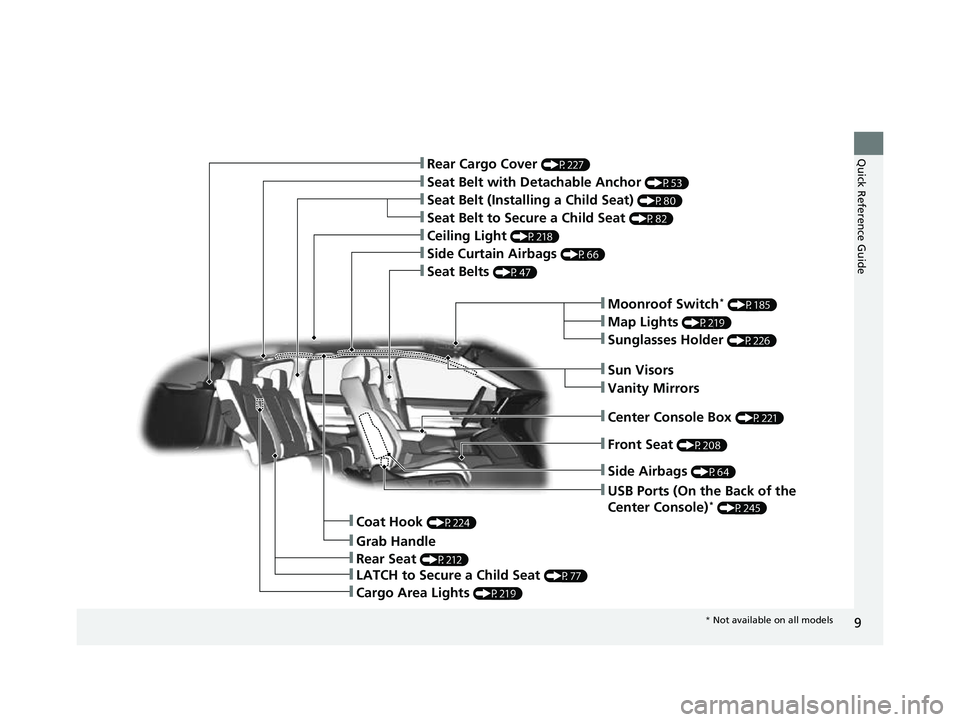
9
Quick Reference Guide
❚Moonroof Switch* (P185)
❚LATCH to Secure a Child Seat (P77)
❚Grab Handle
❚Map Lights (P219)
❚Seat Belts (P47)
❚Ceiling Light (P218)
❚Side Curtain Airbags (P66)
❚Seat Belt with Detachable Anchor (P53)
❚Seat Belt to Secure a Child Seat (P82)
❚Seat Belt (Installing a Child Seat) (P80)
❚Rear Cargo Cover (P227)
❚USB Ports (On the Back of the
Center Console)* (P245)
❚Front Seat (P208)
❚Sun Visors
❚Vanity Mirrors
❚Center Console Box (P221)
❚Sunglasses Holder (P226)
❚Side Airbags (P64)
❚Coat Hook (P224)
❚Rear Seat (P212)
❚Cargo Area Lights (P219)
* Not available on all models
22 CR-V HEV ELP-31TPG6200.book 9 ページ 2021年6月30日 水曜日 午前11時6分
Page 245 of 692

243
Features
This chapter describes how to operate technology features.
Audio SystemAbout Your Audio System ................ 244
USB Port(s) ....................................... 245
Audio System Theft Protection ......... 247
Audio Remote Controls .................... 248
Audio System Basic Operation Audio/Information Screen ................ 252
Adjusting the Sound ........................ 256
Display Setup ................................... 257
Playing AM/FM Radio ....................... 258
Playing an iPod ................................ 260
Playing Pandora ®.............................. 263
Playing a USB Flash Drive ................. 265
Models with color audio system
Playing Bluetooth ® Audio................. 268
Siri ® Eyes Free .................................. 271
Audio System Basic Operation Audio/Information Screen ................ 273
Adjusting the Sound ........................ 294
Display Setup ................................... 295
Voice Control Operation .................. 297
Playing AM/FM Radio ....................... 301
Playing SiriusXM ® Radio ................... 305
Playing an iPod ................................ 312
Song By Voice
TM (SBV) ...................... 315
Playing Pandora ®............................. 319
Playing a USB Flash Drive ................. 321
Models with Display Audio
Playing Bluetooth ® Audio ................ 324
HondaLink ®..................................... 326
Wi-Fi Connection ............................. 331
Siri ® Eyes Free .................................. 332
Apple CarPlay
TM............................... 333
Android AutoTM............................... 336
Audio Error Messages ...................... 340
General Information on the Audio System ............................................. 345
Customized Features ................ 362, 369
HomeLink ® Universal Transceiver
*.. 395
Bluetooth® HandsFreeLink® ..... 398, 422
Compass
*.......................................... 456
* Not available on all models
22 CR-V HEV ELP-31TPG6200.book 243 ページ 2021年6月30日 水曜日 午前11時6分
Page 247 of 692

245
uuAudio System uUSB Port(s)
Continued
Features
USB Port(s)
Install the USB connector or the USB flash drive to the USB port.
■On the front of the center console
The USB port (1.0A) is for playing audio files
on a USB flash drive, connecting a cellular
phone, and charging devices.
The USB port (1.5A) is for charging devices,
playing audio files and connecting compatible
phones with Apple CarPlay
TM or Android
AutoTM.
u To prevent any potenti al issues, be sure
to use an Apple MFi Certified Lightning
Connector for Apple CarPlay
TM, and for
Android AutoTM, the USB cables should
be certified by USB-IF to be compliant
with USB 2.0 Standard.
*1: Models with color audio system
*2: Models with Display Audio
1 USB Port(s)
•Do not leave the iPod or USB flash drive in the
vehicle. Direct sunlight and high temperatures may
damage it.
•We recommend that you us e a USB cable if you are
attaching a USB flash drive to the USB port.
•Do not connect the iPod or USB flash drive using a
hub.
•Do not use a device such as a card reader or hard
disk drive, as the device or your files may be
damaged.
•We recommend backing up yo ur data before using
the device in your vehicle.
•Displayed messages may vary depending on the
device model and software version.
If the audio system does not recognize the iPod, try
reconnecting it a few times or reboot the device. To
reboot, follow the manufac turer’s instructions
provided with the iPod or visit www.apple.com/ipod.
The USB port can supply up to 1.5A/2.5A of power. It
does not output 1.5A/2.5A unless the device
requests.
For amperage details, read the operating manual of
the device that ne eds to be charged.
Under certain condi tions, a device connected to the
port may generate noise to the radio station you are
listening to.
On the front of the center console
*1
*2
USB Port (1.0A)
USB Port (1.5A)*
* Not available on all models
22 CR-V HEV ELP-31TPG6200.book 245 ページ 2021年6月30日 水曜日 午前11時6分
Page 248 of 692
246
uuAudio System uUSB Port(s)
Features
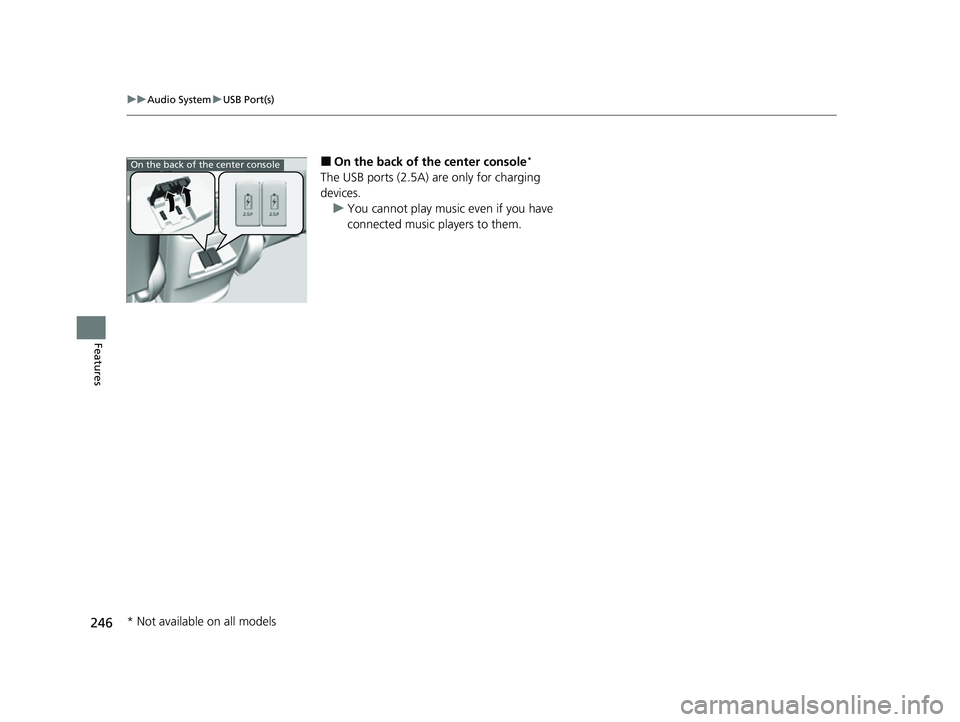
■On the back of the center console*
The USB ports (2.5A) are only for charging
devices.
u You cannot play music even if you have
connected music players to them.
On the back of the center console
* Not available on all models
22 CR-V HEV ELP-31TPG6200.book 246 ページ 2021年6月30日 水曜日 午前11時6分
Page 256 of 692

uuAudio System Basic Operation uAudio/Information Screen
254
Features
You can change, store, and delete the wallpaper on the audio/information screen.
■Import wallpaper
You can import up to three images, one at a time, for wallpaper from a USB flash
drive. 1.Connect the USB flash drive to the USB
port.
2 USB Port(s) P. 245
2.Press the MENU/CLOCK button.
3. Rotate to select Settings, then press
.
4. Rotate to select Wallpaper , then press
.
5. Rotate to select Import, then press .
u The picture name is displayed on the list.
6. Rotate to select a desired picture, then
press .
u The selected picture is displayed.
7. Press to save the picture.
8. Press to select OK.
9. Rotate to select a location to save the
picture, then press .
u The display will return to the wallpaper
setting screen.
■Wallpaper Setup1Wallpaper Setup
•When importing wallpaper f iles, the image must be
in the USB flash drive’s root directory. Images in a
folder cannot be imported.
•The file name must be fewer than 64 characters.•The file format of the im age that can be imported
is BMP (bmp) or JPEG (jpg).
•The individual file size limit is 2 MB.•The maximum image size is 1,920 x 936 pixels. If
the image size is less than 480 × 234 pixels, the
image is displayed in the middle of the screen with
the extra area appearing in black.
•Up to 255 files can be selected.
•If the USB flash drive doe s not have any pictures,
the error message appears.
•The wallpaper setup is limited while driving.
22 CR-V HEV ELP-31TPG6200.book 254 ページ 2021年6月30日 水曜日 午前11時6分
Page 262 of 692

260
uuAudio System Basic Operation uPlaying an iPod
Features
Playing an iPod
Using your USB connector, connect the iPod to the USB port, then select the USB
mode.
2 USB Port(s) P. 245
USB Indicator
Appears when an iPod is connected.
MEDIA Button
Press to select iPod
(if connected).
(Back) Button
Press to go back to the
previous display or cancel a
setting.
/ (Seek/Skip) Buttons
Press or to change songs.
Press and hold to move rapidly within a song.
VOL/ (Volume/Power) Knob
Press to turn the audio system
on and off.
Turn to adjust the volume.Selector Knob
Turn to change songs.
Press, and then turn to select
an item. After that, press
again to make your selection.
MENU/CLOCK Button
Press to display the menu
items.
Audio/Information Screen
Albu m Ar
t
Pla
y Mode Buttons
Press to select a play mode.
Play Button
Press to resume a
song. Pause Button
Press to pause a
song.
22 CR-V HEV ELP-31TPG6200.book 260 ページ 2021年6月30日 水曜日 午前11時6分
Page 265 of 692

263
uuAudio System Basic Operation uPlaying Pandora ®
Continued
Features
Playing Pandora ®
Your audio system allows you to listen to music from the Pandora ® app on a
compatible smartphone.
This function is available when the phone is paired and connected to the vehicle’s
Bluetooth ® HandsFreeLink ® (HFL) system, or with an iPhone, you can connect using
your USB cable to the USB port.
2 Phone Setup P. 404
2 USB Port(s) P. 245
1Playing Pandora ®
Pandora ®, the Pandora logo, and the Pandora trade
dress are trademarks or registered trademarks of
Pandora Media, Inc., used with permission. Pandora
is only available in certai n countries. Visit the Pandora
website for more information.
To find out if your phone is compatible with this
feature, visit automobiles.honda.com/handsfreelink/ ,
or call 1-888-528-7876.
To use this service in your vehicle, the Pandora ® app
must first be installed on your phone. Visit
www.pandora.com . for more information.
Pandora ® is free, personalized radio that plays music
and comedy you’ll love. Just start with the name of
one of your favorite arti sts, tracks, comedians or
composers and Pandora ® will create a custom station
that plays similar tracks. Pandora ® also features
hundreds of genre stations ranging from Dubstep to
Smooth Jazz to Power Workout.
If you cannot operate Pandora ® through the audio
system, it may be streaming through Bluetooth®
Audio. Make sure Pandora ® mode on your audio
system is selected.
Audio/Information Screen Selector Knob
Turn to change a
station.
Press, and then turn to
select an item. After
that, press again to
make your selection.
VOL/ (Volume/Power)
Kn
ob
Pres
s to turn the audio
system on and off.
Turn to adjust the
volume.
(Back) Button
Press to go back to the previous
display or cancel a setting.
MEDIA Button
Press to select Pandora ®.
Play/Pause Button
Select to resume or play a track.
(Skip) Button
Press to skip a track.
Like/Dislike Buttons
Select to evaluate a track.
MENU/CLOCK Button
Press to display the menu
items.
Bookmark Button
Select to set a track as a bookmark.
22 CR-V HEV ELP-31TPG6200.book 263 ページ 2021年6月30日 水曜日 午前11時6分