Page 296 of 692
294
uuAudio System Basic Operation uAdjusting the Sound
Features
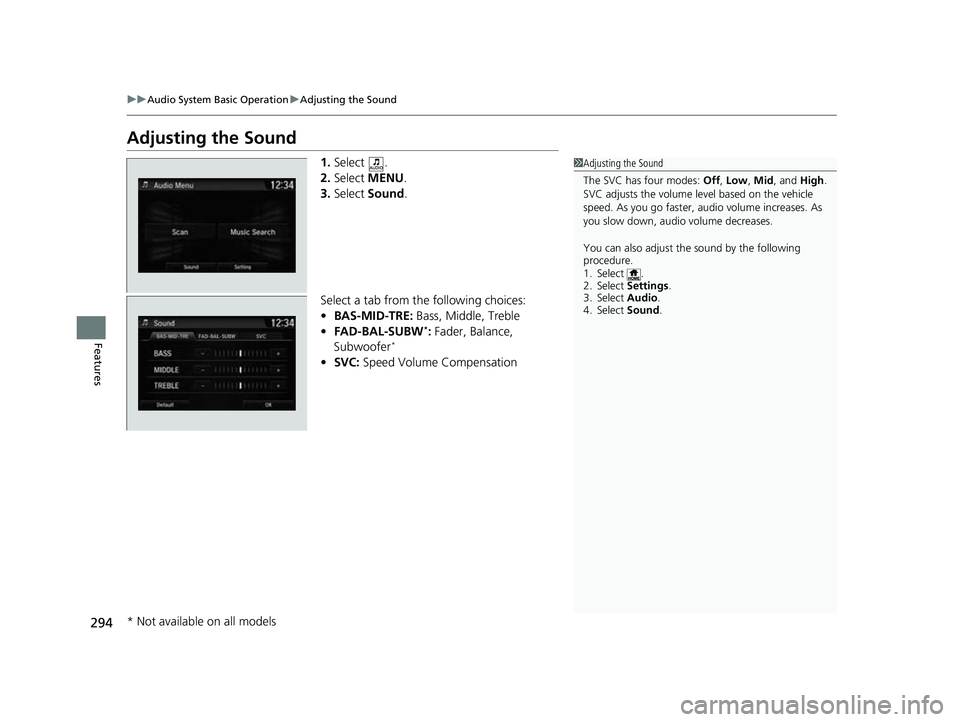
Adjusting the Sound
1. Select .
2. Select MENU .
3. Select Sound.
Select a tab from the following choices:
• BAS-MID-TRE: Bass, Middle, Treble
• FAD-BAL-SUBW
*: Fader, Balance,
Subwoofer*
• SVC: Speed Volume Compensation
1Adjusting the Sound
The SVC has four modes: Off, Low , Mid, and High.
SVC adjusts the volume level based on the vehicle
speed. As you go faster, audio volume increases. As
you slow down, audi o volume decreases.
You can also adjust the sound by the following
procedure.
1. Select .
2. Select Settings .
3. Select Audio.
4. Select Sound .
* Not available on all models
22 CR-V HEV ELP-31TPG6200.book 294 ページ 2021年6月30日 水曜日 午前11時6分
Page 297 of 692
295
uuAudio System Basic Operation uDisplay Setup
Continued
Features
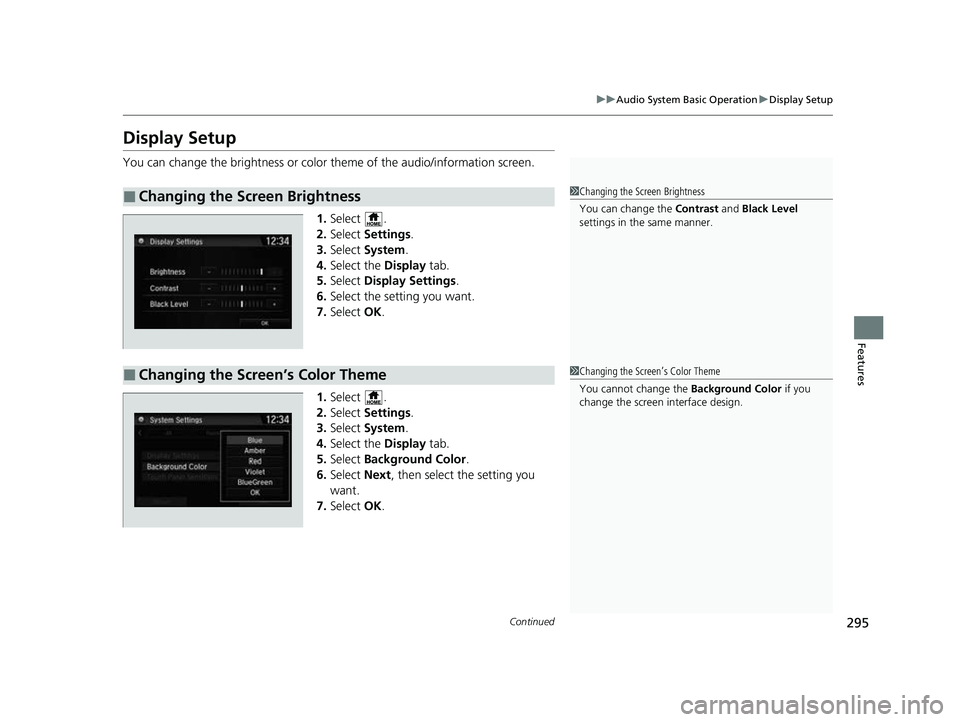
Display Setup
You can change the brightness or color theme of the audio/information screen.
1. Select .
2. Select Settings .
3. Select System.
4. Select the Display tab.
5. Select Display Settings .
6. Select the setting you want.
7. Select OK.
1. Select .
2. Select Settings .
3. Select System.
4. Select the Display tab.
5. Select Background Color .
6. Select Next, then select the setting you
want.
7. Select OK.
■Changing the Screen Brightness1Changing the Screen Brightness
You can change the Contrast and Black Level
settings in the same manner.
■Changing the Screen’s Color Theme1 Changing the Screen’s Color Theme
You cannot change the Background Color if you
change the screen interface design.
22 CR-V HEV ELP-31TPG6200.book 295 ページ 2021年6月30日 水曜日 午前11時6分
Page 298 of 692
uuAudio System Basic Operation uDisplay Setup
296
FeaturesSelect the current source icon, then select an icon on the source list to switch the
audio source.
Certain manual functions are disabled or inoperable while the vehicle is in motion.
You cannot select a grayed-out option until the vehicle is stopped.
■Selecting an Audio Source1 Selecting an Audio Source
If you startup preinstalled audio apps, is
displayed on the screen.
These preinstalled apps ca nnot be displayed on the
source select screen.
You can startup thos e audio apps from .
■Limitations for Manual Operation
Select the source icon.
Source Select Screen
Source List Icons
22 CR-V HEV ELP-31TPG6200.book 296 ページ 2021年6月30日 水曜日 午前11時6分
Page 299 of 692

297
uuAudio System Basic Operation uVoice Control Operation
Continued
Features
Voice Control Operation
Your vehicle has a voice control syst em that allows hands-free operation.
The voice control system uses the (Talk) and (hang-up/back) buttons on
the steering wheel and a microphone near the map lights on the ceiling.
To achieve optimum voice recognition when using the voice control system:
• Make sure the correct screen is displa yed for the voice command that you are
using.
The system recognizes only certain commands.
Available voice commands.
2 Voice Portal Screen P. 298
•Close the windows and moonroof.
• Adjust the dashboard and side vents so air does not blow onto the microphone
on the ceiling.
• Speak clearly in a natural speaking vo ice without pausing between words.
• Reduce any background noise if possible. The system may misinterpret your
command if more than one person is speaking at the same time.
■Voice Recognition
1Voice Control Operation
When you press the button, a helpful prompt asks
what you would like to do. Press and release the
button again to bypass this prompt and give a
command.
1 Voice Recognition
The voice control system can only be used from the
driver’s seat because the microphone unit removes
noises from the front passenger’s side.
22 CR-V HEV ELP-31TPG6200.book 297 ページ 2021年6月30日 水曜日 午前11時6分
Page 300 of 692

298
uuAudio System Basic Operation uVoice Control Operation
FeaturesWhen the (Talk) button is pressed,
available voice commands appear on the
screen.
For a complete list of commands, say “ Voice
Help ” after the beep or select Voice Help.
You can see the list of commands in Voice
Info on the Info Menu screen. Select Info,
then select MENU.
The system only reco gnizes the commands
on the following pages, at certain screens.
Free form voice commands are not
recognized.
*1: Models with navigation system
■Voice Portal Screen■Phone Call
This can be only used when the phone is
connected. When the sy stem recognizes the
Phone call command, the screen will
change to the voice recognition screen for
phone commands.
• Dial by number
• Call history
• Redial
• Call
• Call
• Call Police
• Call 911
Phone Call commands are not available if
using Apple CarPlay
TM.
■Music Search
This can be only used when the iPod or USB
device is connected.
■Climate Control*1
When the system recognizes the Climate
Control command, the screen will change
the dedicated screen to the climate control
voice recognition screen.
2 Climate Control Commands*1 P. 300
■Audio*1
When the system recognizes the Audio
command, the screen will change to the
audio voice recognition screen.
• Audio On/Off
• Radio FM/AM/SXM
• PANDORA
• iPod
• USB
• Other Sources
Pandora ® cannot be used while Android
Auto
TM is active.
■Navigation*1
The screen changes to the navigation
screen.
2 Refer to the Navigation System Manual
■HondaLink
This can be only used when the phone is
connected.
■Voice Setting
The screen changes to the Voice Recog.
tab on the System Settings screen.
* Not available on all models
22 CR-V HEV ELP-31TPG6200.book 298 ページ 2021年6月30日 水曜日 午前11時6分
Page 301 of 692

299
uuAudio System Basic Operation uVoice Control Operation
Continued
Features
■Voice Help
You can see a list of the available
commands on the screen.
• Useful Commands
• Phone Commands
• Audio Commands
*
•Climate Control Commands*
•General Commands
• Music Search Commands
• On Screen Commands
The system accepts th ese commands on the
voice portal top screen.
• Call
• Call
• What time is it?
• What is today’s date?
*1: Models with navigation system
■Useful Commands
The system accepts these commands on the
dedicated screen for the voice recognition
of the phone.
• Call by number
• Call by name
• Call
• Call
The system accepts these commands on the
dedicated screen for the voice recognition
of the audio.
■Radio FM Commands
• Radio tune to <87.7-107.9> FM
• Radio tune to <87.7 -107.9> HD <1-8>
FM
• Radio FM preset # (#:1-12)
■Radio AM Commands
• Radio tune to <530-1710> AM
• Radio AM preset # (#:1-6)
■Radio SXM Commands
• SXM channel <1-999>
■Phone Commands
■Audio Commands*1
•SXM channel
name, traffic and weather city name,
sports team name>
• Radio SXM preset <1-12>
■Pandora ® Commands
• PANDORA play
■iPod Commands
• iPod play
• iPod play track # (#:1-30)
• Music Search
• What album is this?
• What am I listening to?
■USB Commands
• USB play
• USB play track # (#:1-30)
• Music Search
• What album is this?
• What am I listening to?
■Bluetooth ® audio Commands
• Bluetooth audio play
NOTE:
Bluetooth ® Audio commands may not work
on some phones or Bluetooth® Audio
devices.
* Not available on all models
22 CR-V HEV ELP-31TPG6200.book 299 ページ 2021年6月30日 水曜日 午前11時6分
Page 302 of 692

300
uuAudio System Basic Operation uVoice Control Operation
Features
When On Screen Commands is selected,
the explanation screen is displayed.
The system accepts th ese commands on the
Music Search screen.
■Using Song By Voice
Song By VoiceTM is a feature that allows you
to select music from yo ur iPod or USB device
using Voice Commands. To activate this
mode, you must press the (Talk) button
and say: “ Music search ”.
■Song By Voice Commands
• What am I listening to?
• Who am I listening to?
• Who is this?
• What’s playing?
• Who’s playing?
• What album is this?
*1: Models with navigation system
■On Screen Commands
■Music Search Commands
■Play Commands
• Play artist
• Play track/song
• Play album
• Play genre/category
• Play playlist
• Play composer
■List Commands
• List artist
• List album
• List genre/category
• List playlist
• List composer
• What time is it?
• What is today’s date?
■General Commands
•Climate Control On
• Climate Control Off
• Fan Speed <1-7>
• Temperature max heat
• Temperature max cool
• Temperature <57-87> degrees
• Defrost On
• Defrost Off
• Air conditioner On
• Air conditioner Off
• More
• Vent
• Dash and floor
• Floor vents
• Floor and Defrost
• Climate Control Automatic
• Fan Speed up/down
• Temperature up
• Temperature down
NOTE:
These commands toggl e the function on
and off, so the command may not match
your intended action.
■Climate Control Commands*1
22 CR-V HEV ELP-31TPG6200.book 300 ページ 2021年6月30日 水曜日 午前11時6分
Page 303 of 692
301
uuAudio System Basic Operation uPlaying AM/FM Radio
Continued
Features
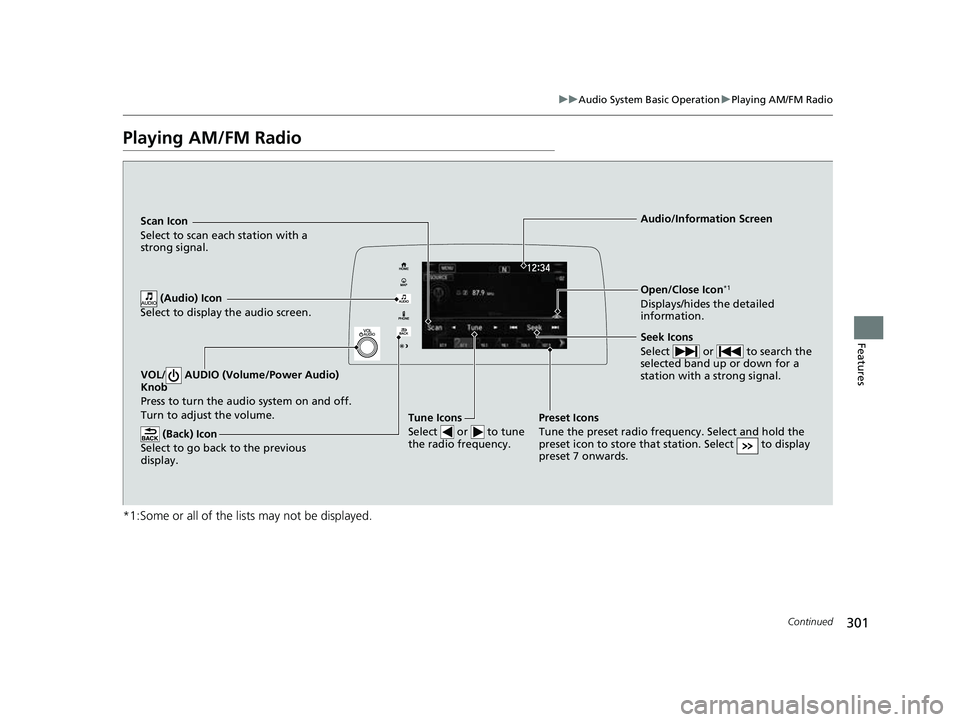
Playing AM/FM Radio
*1:Some or all of the lists may not be displayed.
VOL/ AUDIO (Volume/Power Audio)
Knob
Press to turn the a udio system on and off.
Turn to adjust the volume.
(Back) Icon
Select to go back to the previous
display.
Seek Icons
Select or to search the
selected band up or down for a
station with a strong signal.
Open/Close Icon*1
Displays/hides the detailed
information.
(Audio) Icon
Select to display the audio screen.
Tune Icons
Select or to tune
the radio frequency.
Audio/Information Screen
Scan Icon
Select
to scan each station with a
strong signal.
Preset Icons
Tune the preset radio frequency. Select and hold the
preset icon to store that station. Select to display
preset 7 onwards.
22 CR-V HEV ELP-31TPG6200.book 301 ページ 2021年6月30日 水曜日 午前11時6分