Page 67 of 533
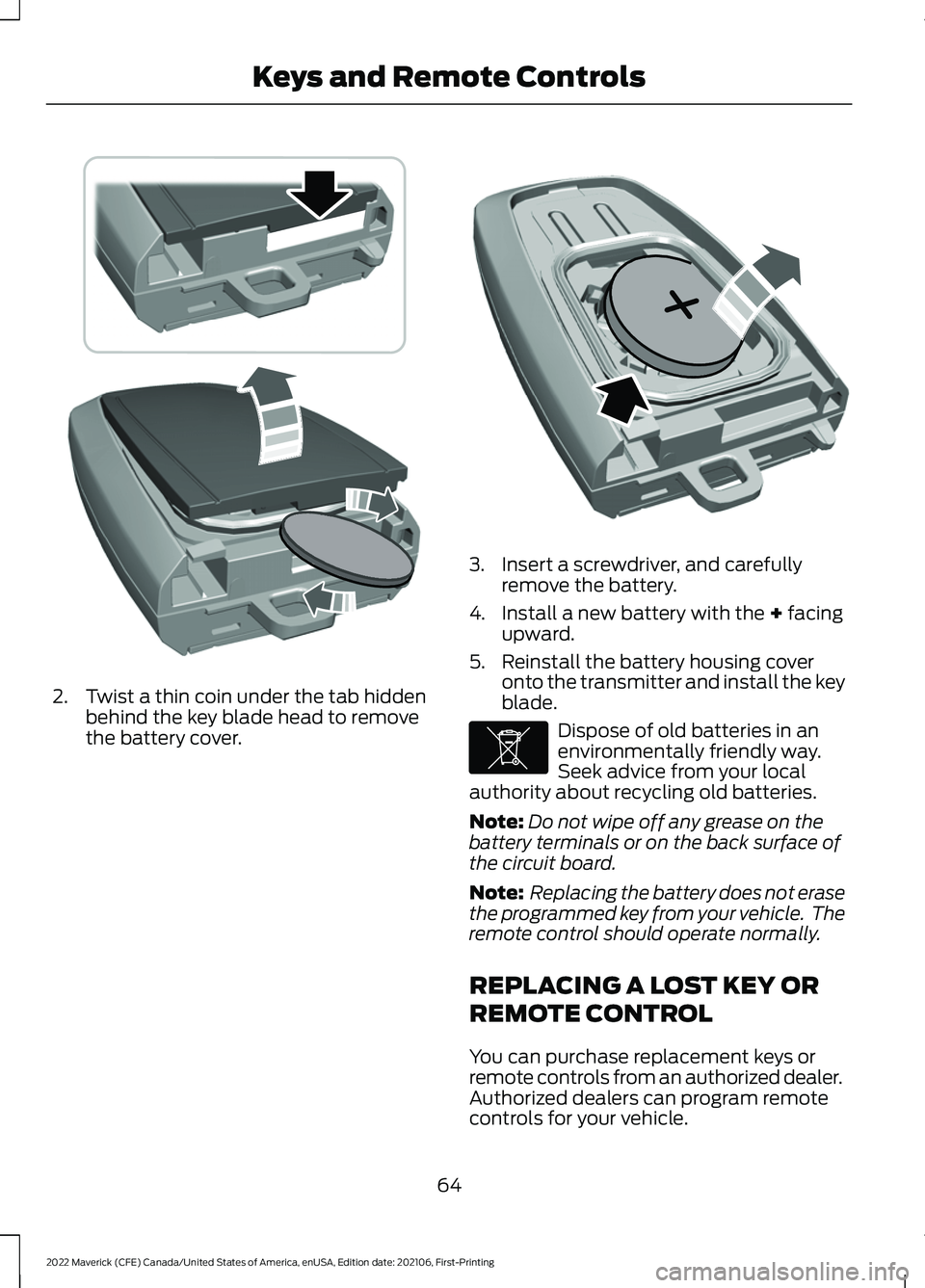
2. Twist a thin coin under the tab hidden
behind the key blade head to remove
the battery cover. 3. Insert a screwdriver, and carefully
remove the battery.
4. Install a new battery with the + facing
upward.
5. Reinstall the battery housing cover onto the transmitter and install the key
blade. Dispose of old batteries in an
environmentally friendly way.
Seek advice from your local
authority about recycling old batteries.
Note: Do not wipe off any grease on the
battery terminals or on the back surface of
the circuit board.
Note: Replacing the battery does not erase
the programmed key from your vehicle. The
remote control should operate normally.
REPLACING A LOST KEY OR
REMOTE CONTROL
You can purchase replacement keys or
remote controls from an authorized dealer.
Authorized dealers can program remote
controls for your vehicle.
64
2022 Maverick (CFE) Canada/United States of America, enUSA, Edition date: 202106, First-Printing Keys and Remote ControlsE303824 E218402 E107998
Page 68 of 533
Note:
Your vehicle keys came with a
security label that provides important key
cut information. Keep the label in a safe
place for future reference.
PROGRAMMING THE REMOTE
CONTROL
Contact an authorized dealer to program
remote controls for your vehicle.
KEYS AND REMOTE CONTROLS – TROUBLESHOOTING
KEYS AND REMOTE CONTROLS – INFORMATION MESSAGES Action
Message
Replace remote control battery.
Key Battery Low Replace
Soon
65
2022 Maverick (CFE) Canada/United States of America, enUSA, Edition date: 202106, First-Printing Keys and Remote ControlsE151795
Page 70 of 533
Emergency Assistance
If you set emergency assistance to always
on, you cannot switch it off with a MyKey.
Do Not Disturb
If you set do not disturb to always on, you
cannot switch it off with a MyKey.
Note:
If a phone is connected using Apple
CarPlay or Android Auto while driving with
a MyKey, the driver can receive phone calls
and text messages even if the do not disturb
restriction is on, and if the vehicle comes
with satellite radio, there is no restriction on
the adult content.
Traction and Stability Control
If you set traction control or stability
control to always on, you cannot switch it
off with a MyKey.
CREATING A MYKEY -
VEHICLES WITHOUT: PUSH
BUTTON START
1. Switch the ignition on using an admin key.
Note: You can program the restrictions to
all keys but one. Any keys that you did not
program are administrator keys or admin
keys.
2. Access the main menu in the information display and then scroll
through the menus to change the
settings of your MyKey. From the
MyKey menu select the option Create
MyKey. See Instrument Cluster
Display (page 116). 3. When prompted, hold the OK button
until you see a message informing you
to label this key as a MyKey. The
programmed restrictions apply when
you switch the vehicle off, open and
close the driver door and restart your
vehicle with the programmed key or
remote control.
4. Switch the ignition off.
You successfully created a MyKey.
You can also program configurable
settings for the keys.
Note: We recommend that you label this
key.
67
2022 Maverick (CFE) Canada/United States of America, enUSA, Edition date: 202106, First-Printing MyKey
™
Page 71 of 533
CREATING A MYKEY -
VEHICLES WITH: PUSH
BUTTON START
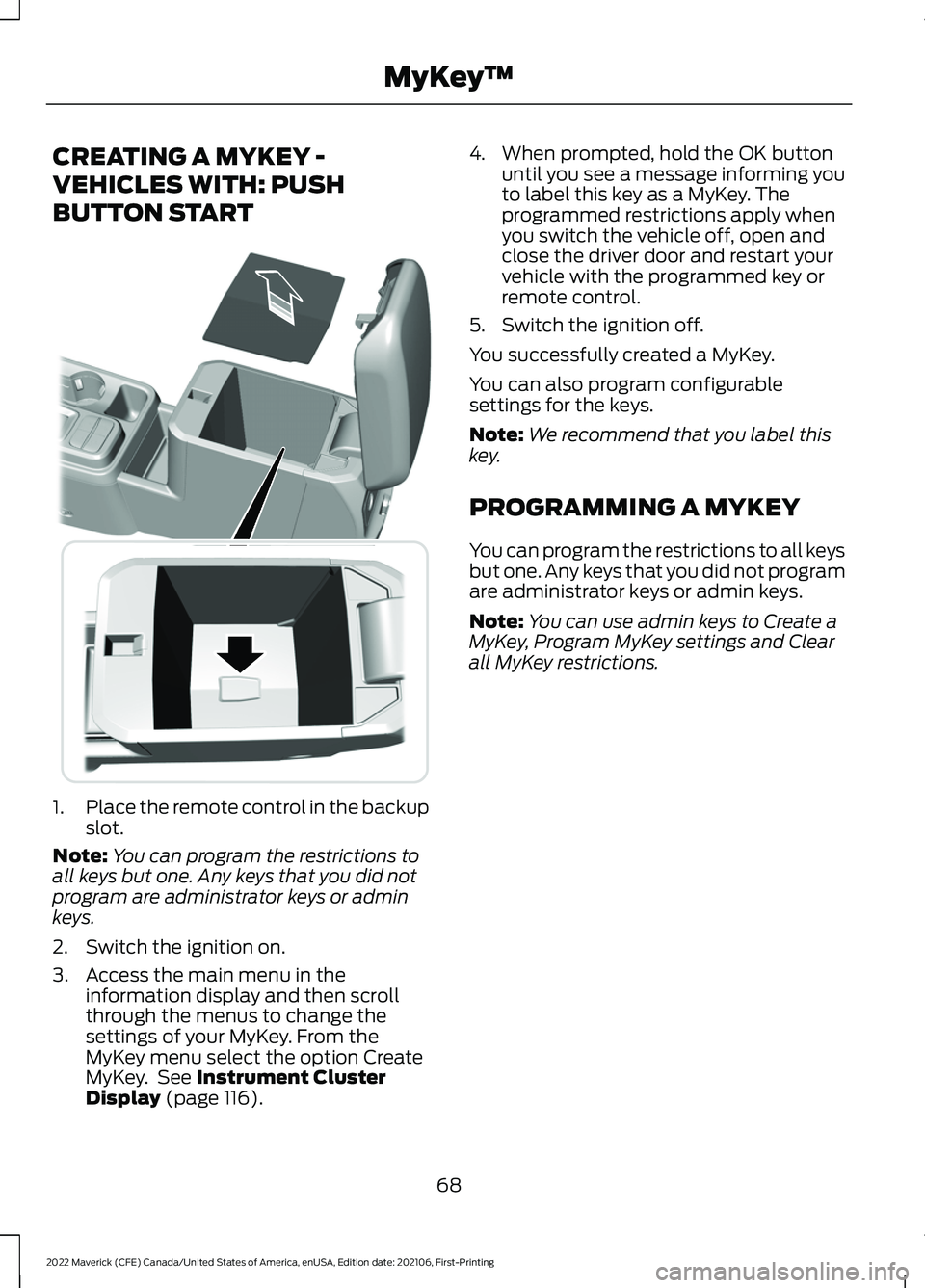
1.
Place the remote control in the backup
slot.
Note: You can program the restrictions to
all keys but one. Any keys that you did not
program are administrator keys or admin
keys.
2. Switch the ignition on.
3. Access the main menu in the information display and then scroll
through the menus to change the
settings of your MyKey. From the
MyKey menu select the option Create
MyKey. See Instrument Cluster
Display (page 116). 4. When prompted, hold the OK button
until you see a message informing you
to label this key as a MyKey. The
programmed restrictions apply when
you switch the vehicle off, open and
close the driver door and restart your
vehicle with the programmed key or
remote control.
5. Switch the ignition off.
You successfully created a MyKey.
You can also program configurable
settings for the keys.
Note: We recommend that you label this
key.
PROGRAMMING A MYKEY
You can program the restrictions to all keys
but one. Any keys that you did not program
are administrator keys or admin keys.
Note: You can use admin keys to Create a
MyKey, Program MyKey settings and Clear
all MyKey restrictions.
68
2022 Maverick (CFE) Canada/United States of America, enUSA, Edition date: 202106, First-Printing MyKey
™E349250
Page 72 of 533
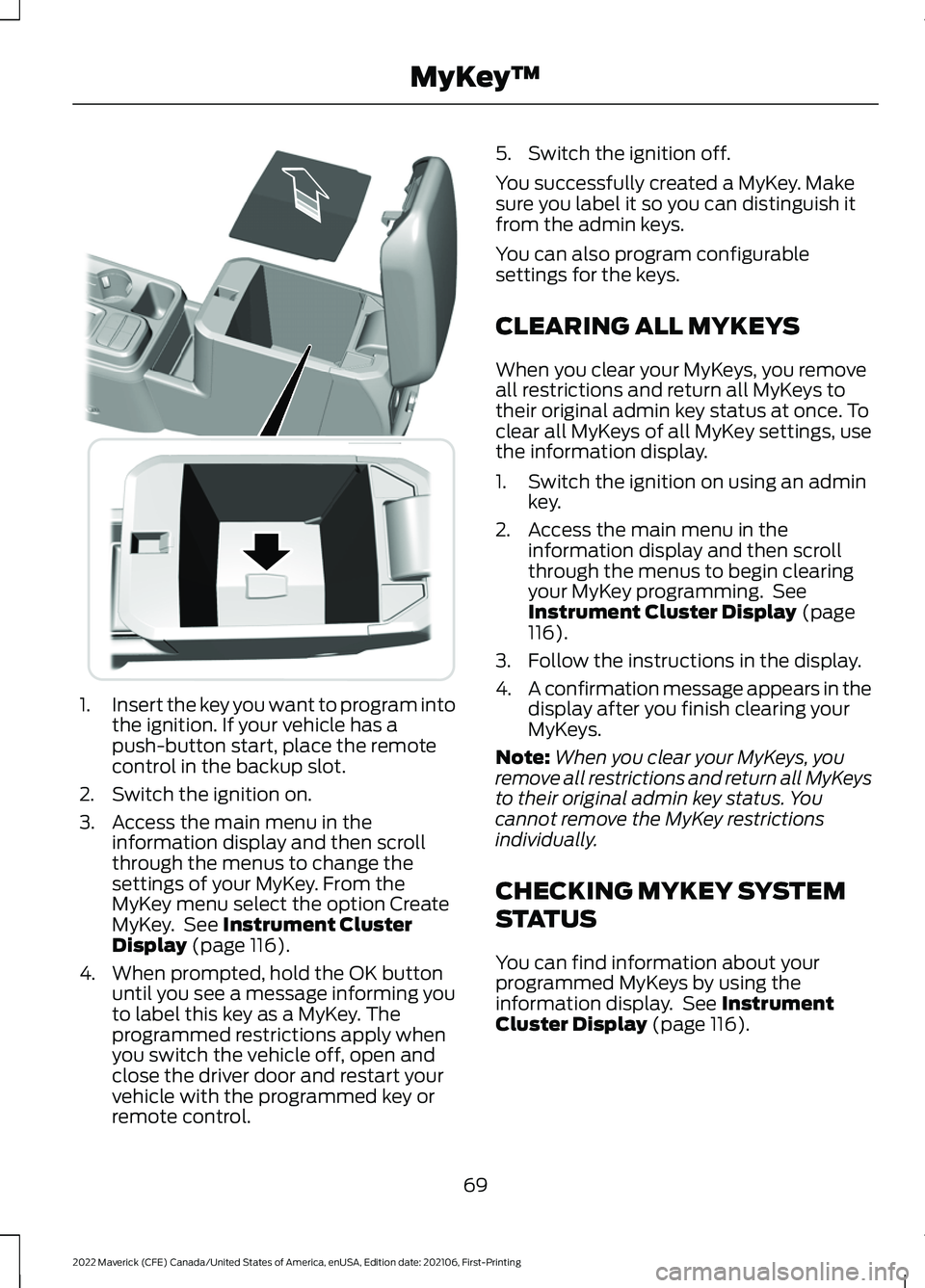
1.
Insert the key you want to program into
the ignition. If your vehicle has a
push-button start, place the remote
control in the backup slot.
2. Switch the ignition on.
3. Access the main menu in the information display and then scroll
through the menus to change the
settings of your MyKey. From the
MyKey menu select the option Create
MyKey. See Instrument Cluster
Display (page 116).
4. When prompted, hold the OK button until you see a message informing you
to label this key as a MyKey. The
programmed restrictions apply when
you switch the vehicle off, open and
close the driver door and restart your
vehicle with the programmed key or
remote control. 5. Switch the ignition off.
You successfully created a MyKey. Make
sure you label it so you can distinguish it
from the admin keys.
You can also program configurable
settings for the keys.
CLEARING ALL MYKEYS
When you clear your MyKeys, you remove
all restrictions and return all MyKeys to
their original admin key status at once. To
clear all MyKeys of all MyKey settings, use
the information display.
1. Switch the ignition on using an admin
key.
2. Access the main menu in the information display and then scroll
through the menus to begin clearing
your MyKey programming. See
Instrument Cluster Display
(page
116).
3. Follow the instructions in the display.
4. A confirmation message appears in the
display after you finish clearing your
MyKeys.
Note: When you clear your MyKeys, you
remove all restrictions and return all MyKeys
to their original admin key status. You
cannot remove the MyKey restrictions
individually.
CHECKING MYKEY SYSTEM
STATUS
You can find information about your
programmed MyKeys by using the
information display. See
Instrument
Cluster Display (page 116).
69
2022 Maverick (CFE) Canada/United States of America, enUSA, Edition date: 202106, First-Printing MyKey
™E349250
Page 76 of 533
OPERATING THE DOORS
FROM OUTSIDE YOUR
VEHICLE
UNLOCKING AND LOCKING THE
DOORS USING THE REMOTE
CONTROL
You can only use the remote control when
your vehicle is stationary.
Unlocking the Doors
Press the button to unlock all
doors.
Locking the Doors Press the button to lock all
doors. One short flash of the
turn signal lamps confirms that
your vehicle has locked.
Note: For more information on operating
the doors from outside your vehicle See
Keyless Entry (page 77).
UNLOCKING AND LOCKING THE
DOORS USING THE KEY BLADE
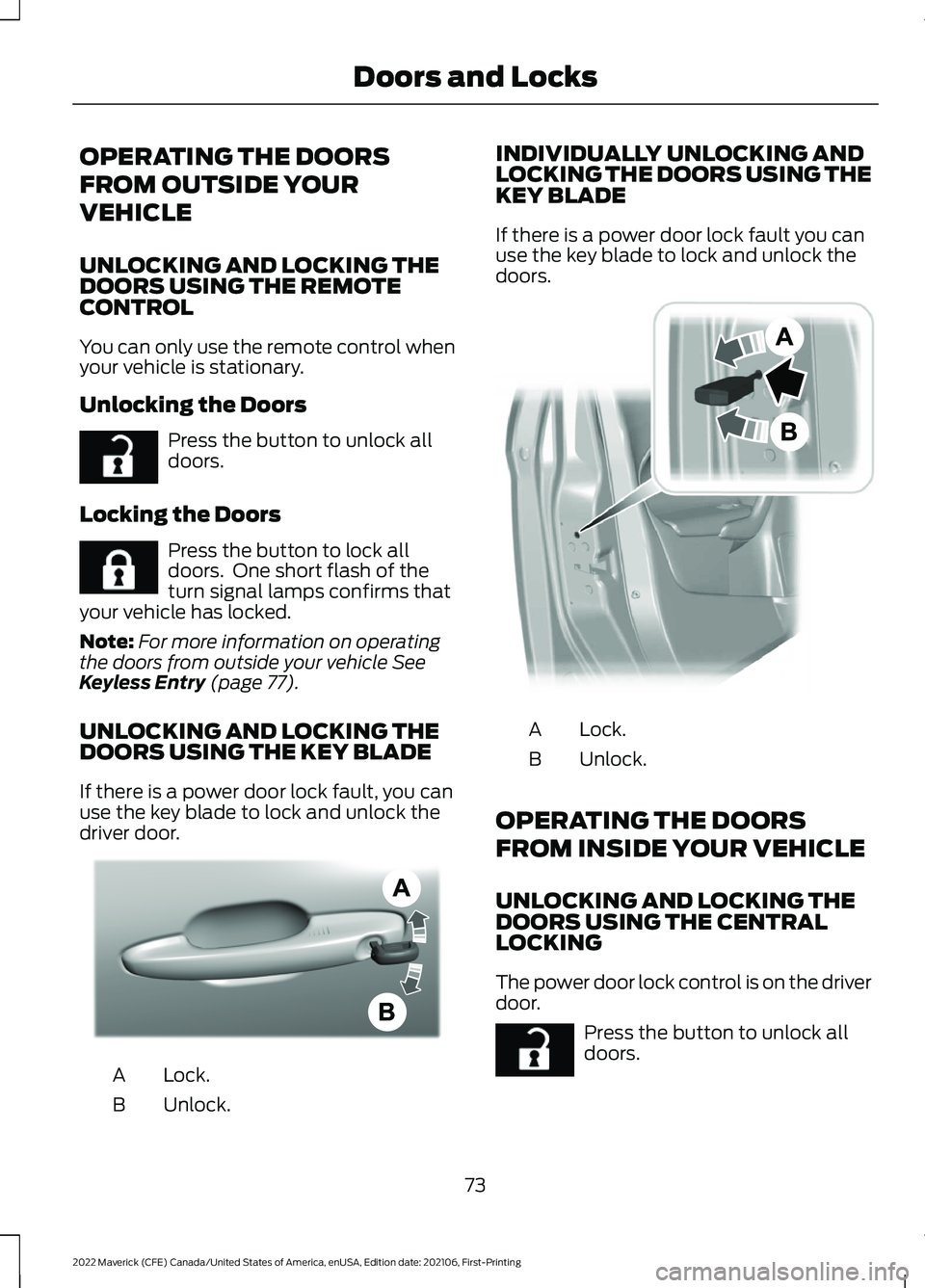
If there is a power door lock fault, you can
use the key blade to lock and unlock the
driver door. Lock.
A
Unlock.
B INDIVIDUALLY UNLOCKING AND
LOCKING THE DOORS USING THE
KEY BLADE
If there is a power door lock fault you can
use the key blade to lock and unlock the
doors.
Lock.
A
Unlock.
B
OPERATING THE DOORS
FROM INSIDE YOUR VEHICLE
UNLOCKING AND LOCKING THE
DOORS USING THE CENTRAL
LOCKING
The power door lock control is on the driver
door. Press the button to unlock all
doors.
73
2022 Maverick (CFE) Canada/United States of America, enUSA, Edition date: 202106, First-Printing Doors and LocksE267112 E267111 AE328009 E112203 E267112
Page 78 of 533
MISLOCK LIMITATIONS
When you press the lock button once, the
direction indicators do not flash if:
•
Any door or the liftgate is open.
• The hood is open.
When you press the lock button twice
within three seconds, the horn sounds if:
• Any door or the liftgate is open.
• The hood is open.
If you switch mislock off, the horn does not
sound if you press the lock button on the
remote control when a door is open.
SWITCHING MISLOCK ON AND
OFF
1. Using the information display controls on the steering wheel, select Settings.
2. Select Vehicle Settings. 3. Switch
Mislock Chirp on or off.
DOORS AND LOCKS AUDIBLE
WARNINGS
Door Ajar Audible Warning
Sounds when a door is not fully closed and
your vehicle is moving.
DOORS AND LOCKS –
TROUBLESHOOTING
DOORS AND LOCKS – WARNING
LAMPS
Door Ajar Warning Lamp It illuminates when you switch
the ignition on and remains on if
any door or the hood is open.
DOORS AND LOCKS – INFORMATION MESSAGES Action
Message
Displays if a door is open. Fully close the door.
Driver Door Ajar
Passenger Door Ajar
Rear Left Door Ajar
Rear Right Door Ajar
75
2022 Maverick (CFE) Canada/United States of America, enUSA, Edition date: 202106, First-Printing Doors and LocksE249859
Page 80 of 533
KEYLESS ENTRY LIMITATIONS
Make sure your remote control is within 3 ft
(1 m) from the front door handles and the
tailgate.
The system could not function if:
• The remote control remains stationary
for about a minute.
• The vehicle battery has no charge.
• The remote control battery has no
charge.
• There is interference causing issues
with the remote control frequencies.
• The remote control is too close to
metal objects or electronic devices, for
example keys or a cell phone.
KEYLESS ENTRY SETTINGS
Switching Keyless Entry On and
Off
1. Switch the ignition on using an original
key that has not been created as a
MyKey.
2. Using the information display controls on the steering wheel, select Settings.
3. Select
Vehicle Settings.
4. Select
Locks.
Reprogramming the Unlocking
Function
You can enable two-stage unlocking
function allowing you to unlock only the
driver door when you touch the unlock
sensor.
Press and hold both the lock and unlock
buttons on the remote control for four
seconds to disable or enable two-stage
unlocking. If you program the unlocking function so
that only the driver door unlocks, you can
unlock all of the other doors from inside
your vehicle using the power door lock
control. You can unlock individual doors
by pulling the interior door handles on
those doors.
USING KEYLESS ENTRY
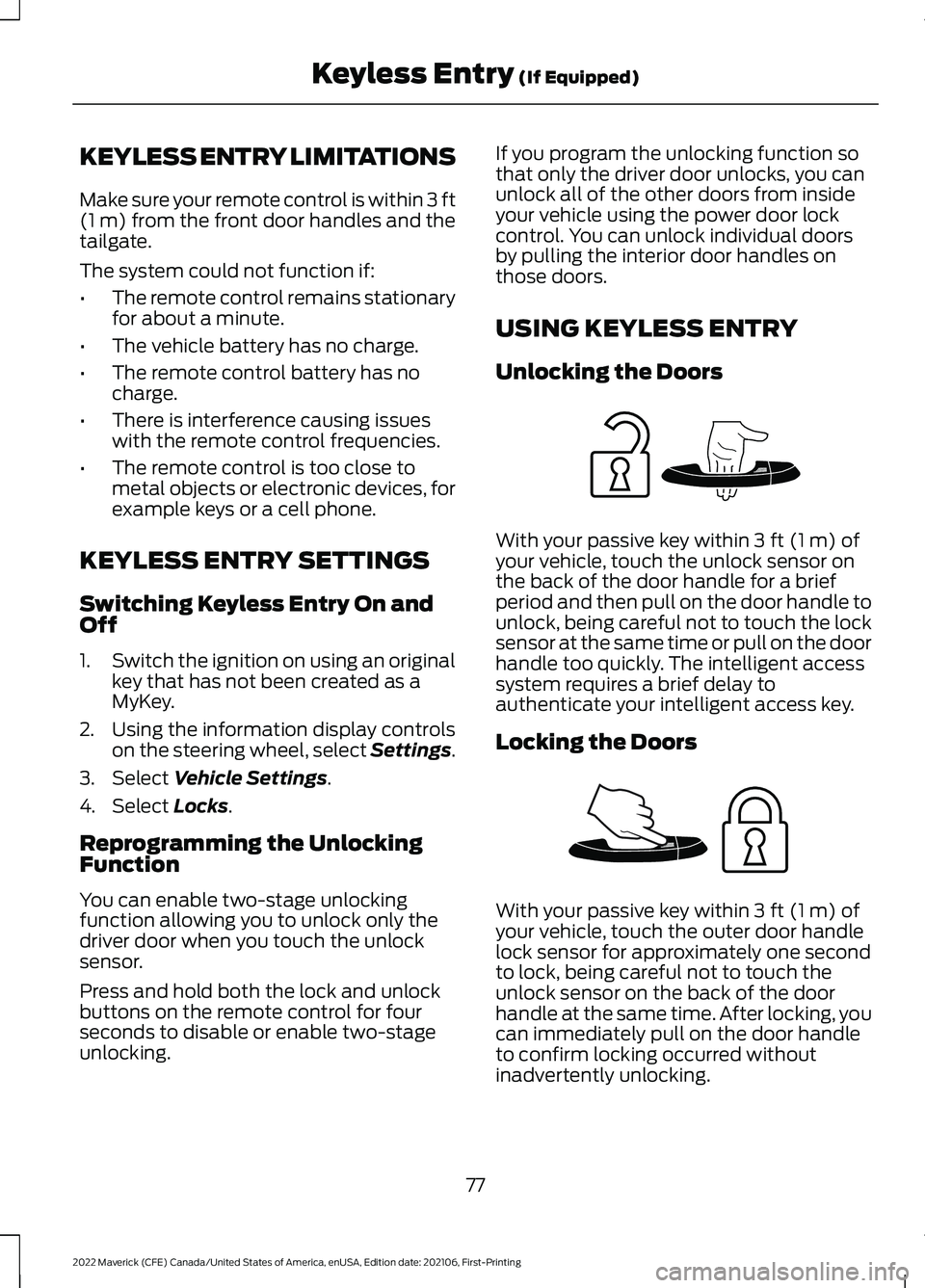
Unlocking the Doors
With your passive key within
3 ft (1 m) of
your vehicle, touch the unlock sensor on
the back of the door handle for a brief
period and then pull on the door handle to
unlock, being careful not to touch the lock
sensor at the same time or pull on the door
handle too quickly. The intelligent access
system requires a brief delay to
authenticate your intelligent access key.
Locking the Doors With your passive key within
3 ft (1 m) of
your vehicle, touch the outer door handle
lock sensor for approximately one second
to lock, being careful not to touch the
unlock sensor on the back of the door
handle at the same time. After locking, you
can immediately pull on the door handle
to confirm locking occurred without
inadvertently unlocking.
77
2022 Maverick (CFE) Canada/United States of America, enUSA, Edition date: 202106, First-Printing Keyless Entry
(If Equipped)E248553 E248554