2022 FORD F-150 ESP
[x] Cancel search: ESPPage 360 of 750
Normal is the default steering, suspension,
and exhaust modes. Off-road steering
mode is not available. All suspension and
exhaust modes are available.
The system tunes the engine and
transmission controls to slippery mode.
The system tunes stability and traction
controls to slippery mode.
The electronic locking differential is
available below 25 mph (40 km/h). See
Switching the Electronic Locking
Differential On and Off
(page 280).
Note: Do not use this mode when driving
on dry pavement. This could cause driveline
bind up and damage the system depending
on the four-wheel drive mode selection.
See
Four-Wheel Drive (page 269).
SLIPPERY - 4X4, VEHICLES WITH:
ELECTRONIC SHIFT-ON-THE-FLY For less than ideal road
conditions such as snow or ice
covered roads. Use this mode for
crossing terrain where loose or slippery
materials cover a firm surface. Slippery
mode lowers throttle response and
optimizes shifting for slippery surfaces.
Four-wheel drive high is the default
four-wheel drive mode. All four-wheel drive
modes are selectable in slippery mode.
The electronic locking differential is
available below
25 mph (40 km/h). See
Switching the Electronic Locking
Differential On and Off
(page 280).
Note: Do not use this mode when driving
on dry pavement. This could cause driveline
bind up and damage the system depending
on the four-wheel drive mode selection.
See
Four-Wheel Drive (page 269). SLIPPERY - 4X2 For less than ideal road
conditions such as snow or ice
covered roads. Use this mode for
crossing terrain where loose or slippery
materials cover a firm surface. Slippery
mode lowers throttle response and
optimizes shifting for slippery surfaces.
The electronic locking differential is
available below
25 mph (40 km/h). See
Switching the Electronic Locking
Differential On and Off
(page 283).
Note: Do not use this mode when driving
on dry pavement. This could cause driveline
bind up and damage the system depending
on the four-wheel drive mode selection.
See
Four-Wheel Drive (page 269).
SPORT - 4X4, VEHICLES WITH: 2-
SPEED TORQUE ON DEMAND For sporty driving with improved
performance handling and
response. This mode increases
accelerator pedal response and provides
a sportier steering feel. The powertrain
system holds onto lower gears longer,
helping your vehicle accelerate faster.
Four-wheel drive auto is the default
four-wheel drive mode. Four-wheel drive
low is not available in sport mode.
The system tunes the steering and
suspension to provide a more connected
and spirited driving experience.
The electronic locking differential is
available below
25 mph (40 km/h). See
Switching the Electronic Locking
Differential On and Off
(page 280).
356
2022 F-150 (TFD) Canada/United States of America, enUSA, Edition date: 202109, First-Printing Drive Mode ControlE295414 E295414 E246593
Page 361 of 750
SPORT - RAPTOR
For sporty driving with improved
performance handling and
response. This mode increases
accelerator pedal response and provides
a sportier steering feel. The powertrain
system holds onto lower gears longer,
helping your vehicle accelerate faster.
Two-wheel drive high is the default
four-wheel drive mode. Four-wheel drive
low is not available in sport mode.
Sport is the default steering, suspension,
and exhaust modes. Off-road steering
mode is not available. All suspension and
exhaust modes are available.
The system tunes the engine and
transmission controls to sport mode.
The system tunes the stability and traction
controls to normal mode.
The electronic locking differential is
available below 25 mph (40 km/h). See
Switching the Electronic Locking
Differential On and Off
(page 280).
SPORT - 4X4, VEHICLES WITH:
ELECTRONIC SHIFT-ON-THE-FLY For sporty driving with improved
performance handling and
response. This mode increases
accelerator pedal response and provides
a sportier steering feel. The powertrain
system holds onto lower gears longer,
helping your vehicle accelerate faster.
Two-wheel drive high is the default
four-wheel drive mode. Four-wheel drive
low is not available in sport mode.
The system tunes the steering and
suspension to provide a more connected
and spirited driving experience. The electronic locking differential is
available below
25 mph (40 km/h). See
Switching the Electronic Locking
Differential On and Off
(page 280).
SPORT - 4X2 For sporty driving with improved
performance handling and
response. This mode increases
accelerator pedal response and provides
a sportier steering feel. The powertrain
system holds onto lower gears longer,
helping your vehicle accelerate faster.
The system tunes the steering and
suspension to provide a more connected
and spirited driving experience.
The electronic locking differential is
available below
25 mph (40 km/h). See
Switching the Electronic Locking
Differential On and Off
(page 283).
TOW/HAUL - RAPTOR For improved transmission
operation when towing a trailer
or a heavy load. This mode
moves upshifts to higher engine speeds to
reduce the frequency of transmission
shifting. This mode also provides engine
braking in all forward gears, which slows
your vehicle and assists you in controlling
your vehicle when descending a slope. The
amount of downshift braking provided
varies based on the amount you press the
brake pedal.
All four-wheel drive modes are selectable
when in tow/haul mode. This mode does
not default to a certain four-wheel drive
mode and maintains the previous
selection.
Normal is the default steering and exhaust
modes. Off-road steering mode is not
available. All exhaust modes are available.
357
2022 F-150 (TFD) Canada/United States of America, enUSA, Edition date: 202109, First-Printing Drive Mode ControlE347140 E246593 E246593 E347108
Page 362 of 750
Sport is the default suspension mode.
Normal suspension mode is available.
Off-road suspension mode is not available.
The system tunes the engine and
transmission controls to tow mode.
The system tunes the stability and traction
controls to normal mode.
The electronic locking differential is
available below 25 mph (40 km/h). See
Switching the Electronic Locking
Differential On and Off
(page 280).
TOW/HAUL - 4X4 For improved transmission
operation when towing a trailer
or a heavy load. This mode
moves upshifts to higher engine speeds to
reduce the frequency of transmission
shifting. This mode also provides engine
braking in all forward gears, which slows
your vehicle and assists you in controlling
your vehicle when descending a slope. The
amount of downshift braking provided
varies based on the amount you press the
brake pedal.
All four-wheel drive modes are selectable
in tow/haul mode. This mode does not
default to a certain four-wheel drive mode
and maintains the previous selection.
The system tunes the steering and
suspension to enhance driving comfort
when towing or carrying heavy loads.
The electronic locking differential is
available below
25 mph (40 km/h). See
Switching the Electronic Locking
Differential On and Off
(page 280). TOW/HAUL - 4X2 For improved transmission
operation when towing a trailer
or a heavy load. This mode
moves upshifts to higher engine speeds to
reduce the frequency of transmission
shifting. This mode also provides engine
braking in all forward gears, which slows
your vehicle and assists you in controlling
your vehicle when descending a slope. The
amount of downshift braking provided
varies based on the amount you press the
brake pedal.
The system tunes the steering and
suspension to enhance driving comfort
when towing or carrying heavy loads.
The electronic locking differential is
available below
25 mph (40 km/h). See
Switching the Electronic Locking
Differential On and Off
(page 283).
TRAIL - 4X2 Trail mode is for off-road driving
on muddy, rutted, soft or uneven
terrain. This mode lowers
throttle response to increase wheel spin
to keep the tires clear and to prevent
getting stuck.
The electronic locking differential is
available below
25 mph (40 km/h). See
Switching the Electronic Locking
Differential On and Off
(page 283).
358
2022 F-150 (TFD) Canada/United States of America, enUSA, Edition date: 202109, First-Printing Drive Mode ControlE246592 E246592 E295419
Page 365 of 750

WHAT IS THE LANE KEEPING
SYSTEM
The lane keeping system alerts you by
providing temporary steering assistance
or steering wheel vibration when it detects
an unintended lane departure.
HOW DOES THE LANE
KEEPING SYSTEM WORK
The lane keeping system uses a forward
looking camera mounted on the windshield
to monitor vehicle movement within the
travel lane.
When the camera detects a drift out of the
travel lane, the lane keeping system alerts
the driver by vibrating the steering wheel,
or aids the driver by providing a small
steering input to move the vehicle back
into the travel lane.
The driver can select one of three modes:
•
Alert (If Equipped)
• Aid
• Alert + Aid
LANE KEEPING SYSTEM
PRECAUTIONS WARNING: You are responsible for
controlling your vehicle at all times. The
system is designed to be an aid and does
not relieve you of your responsibility to
drive with due care and attention. Failure
to follow this instruction could result in
the loss of control of your vehicle,
personal injury or death. WARNING: The system will not
operate if the sensor cannot track the
road lane markings. WARNING:
The sensor may
incorrectly track lane markings as other
structures or objects. This can result in
a false or missed warning. WARNING:
In cold and severe
weather conditions the system may not
function. Rain, snow and spray can all
limit sensor performance. WARNING:
The system may not
operate properly if the sensor is blocked.
Keep the windshield free from
obstruction. WARNING:
If damage occurs in the
immediate area surrounding the sensor,
have your vehicle checked as soon as
possible. WARNING:
The system may not
correctly operate if your vehicle is fitted
with a suspension kit not approved by
us. WARNING:
Large contrasts in
outside lighting can limit sensor
performance.
LANE KEEPING SYSTEM
LIMITATIONS
The lane keeping system only operates
when the vehicle speed is greater than
40 mph (64 km/h)
.
The system works when the camera can
detect at least one lane marking.
Note: When you select Aid or Alert and Aid
mode and the system detects no steering
activity for a short period of time, the system
alerts you to put your hands on the steering
wheel. The system may detect a light grip
or touch on the steering wheel as hands-off
driving.
361
2022 F-150 (TFD) Canada/United States of America, enUSA, Edition date: 202109, First-Printing Lane Keeping System
(If Equipped)
Page 379 of 750
WHAT IS PRE-COLLISION
ASSIST
Pre-collision assist detects and warns of
approaching hazards in the roadway. The
system provides multiple levels of
assistance to help avoid a collision if your
vehicle is rapidly approaching another
stationary vehicle, a vehicle traveling in the
same direction as yours, or a pedestrian or
cyclist within your driving path.
HOW DOES PRE-COLLISION
ASSIST WORK
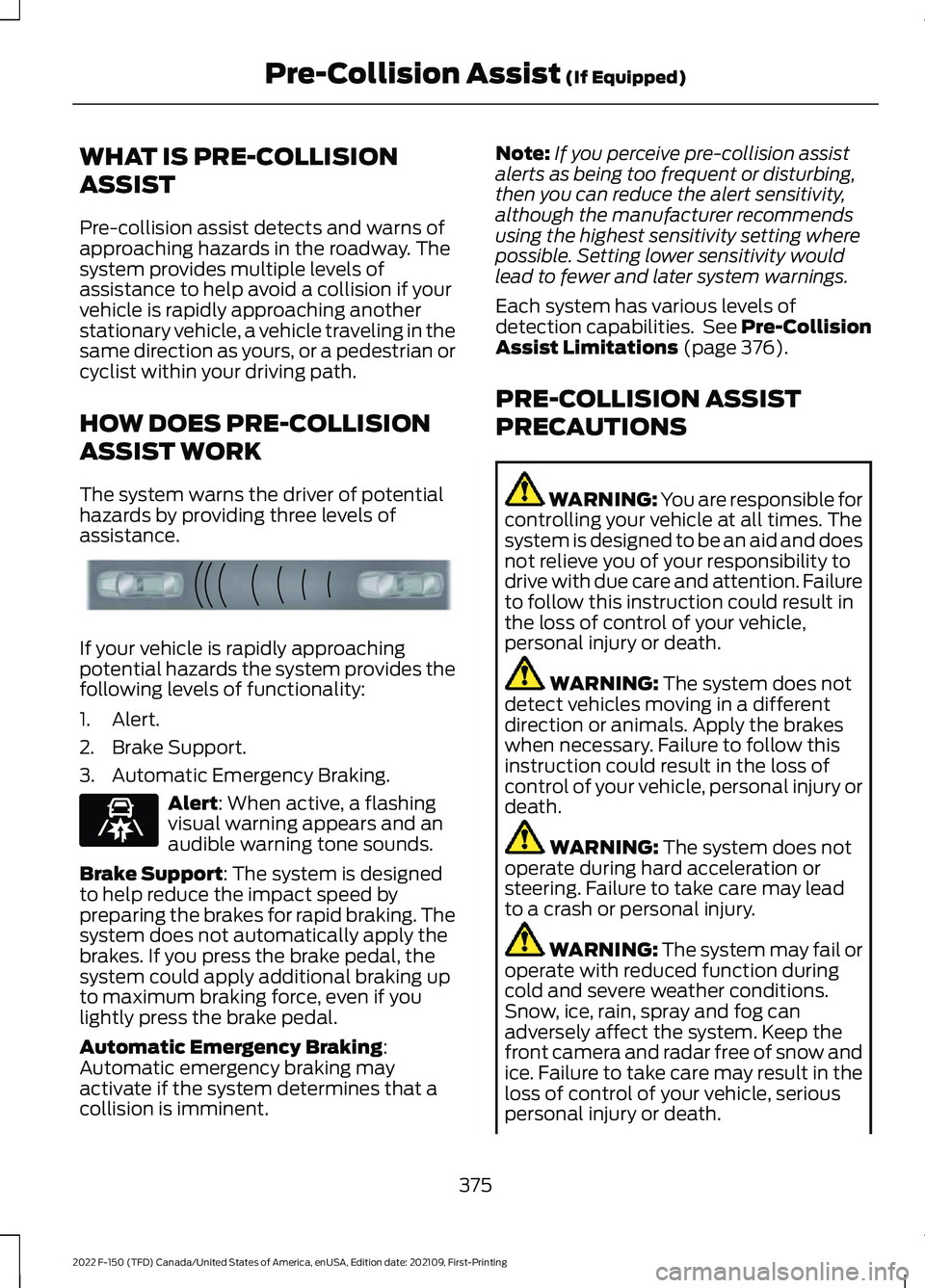
The system warns the driver of potential
hazards by providing three levels of
assistance.
If your vehicle is rapidly approaching
potential hazards the system provides the
following levels of functionality:
1. Alert.
2. Brake Support.
3. Automatic Emergency Braking.
Alert: When active, a flashing
visual warning appears and an
audible warning tone sounds.
Brake Support
: The system is designed
to help reduce the impact speed by
preparing the brakes for rapid braking. The
system does not automatically apply the
brakes. If you press the brake pedal, the
system could apply additional braking up
to maximum braking force, even if you
lightly press the brake pedal.
Automatic Emergency Braking
:
Automatic emergency braking may
activate if the system determines that a
collision is imminent. Note:
If you perceive pre-collision assist
alerts as being too frequent or disturbing,
then you can reduce the alert sensitivity,
although the manufacturer recommends
using the highest sensitivity setting where
possible. Setting lower sensitivity would
lead to fewer and later system warnings.
Each system has various levels of
detection capabilities. See Pre-Collision
Assist Limitations
(page 376).
PRE-COLLISION ASSIST
PRECAUTIONS WARNING: You are responsible for
controlling your vehicle at all times. The
system is designed to be an aid and does
not relieve you of your responsibility to
drive with due care and attention. Failure
to follow this instruction could result in
the loss of control of your vehicle,
personal injury or death. WARNING:
The system does not
detect vehicles moving in a different
direction or animals. Apply the brakes
when necessary. Failure to follow this
instruction could result in the loss of
control of your vehicle, personal injury or
death. WARNING:
The system does not
operate during hard acceleration or
steering. Failure to take care may lead
to a crash or personal injury. WARNING: The system may fail or
operate with reduced function during
cold and severe weather conditions.
Snow, ice, rain, spray and fog can
adversely affect the system. Keep the
front camera and radar free of snow and
ice. Failure to take care may result in the
loss of control of your vehicle, serious
personal injury or death.
375
2022 F-150 (TFD) Canada/United States of America, enUSA, Edition date: 202109, First-Printing Pre-Collision Assist
(If Equipped)E156130 E329466
Page 381 of 750

SWITCHING PRE-COLLISION
ASSIST ON AND OFF - POLICE
RESPONDER
To switch the system on or off, use the
touchscreen:
1. Press Features on the touchscreen.
2. Press
Driver Assistance.
3. Press
Pre-Collision Assist.
4. Switch the feature on or off. You can switch the entire system
off at any time by pressing the
button above the touchscreen.
Adjusting the Pre-Collision Assist
Settings
You can adjust the following settings by
using the touchscreen controls in the
pre-collision assist menu:
• Change alert sensitivity to one of three
possible settings.
• If required, switch automatic
emergency braking on or off.
• If required, switch the entire
pre-collision assist feature on or off.
Note: Automatic emergency braking turns
on every time you switch the ignition on. SWITCHING PRE-COLLISION
ASSIST ON AND OFF
To switch the system on or off, use the
touchscreen:
1. Press
Features on the touchscreen.
2. Press
Driver Assistance.
3. Press
Pre-Collision Assist.
4. Switch the feature on or off.
Adjusting the Pre-Collision Assist
Settings
You can adjust the following settings by
using the touchscreen controls in the
pre-collision assist menu:
• Change alert and distance alert
sensitivity to one of three possible
settings.
• Switch distance indication and alert on
or off.
• If required, switch automatic
emergency braking on or off.
• If required, switch the entire
pre-collision assist feature on or off.
• If required, switch evasive steering
assist on or off.
Note: Automatic emergency braking and
evasive steering turn on every time you
switch the ignition on.
Note: If your vehicle has a radar sensor, we
recommend that you switch the system off
if you install a snow plow or similar object
in such a way that it may block the radar
sensor. Your vehicle remembers the selected
setting across key cycles.
Note: If you switch automatic emergency
braking off, evasive steering assist switches
off.
377
2022 F-150 (TFD) Canada/United States of America, enUSA, Edition date: 202109, First-Printing Pre-Collision Assist
(If Equipped)E309750 E296163
Page 382 of 750

LOCATING THE PRE-
COLLISION ASSIST SENSORS
- POLICE RESPONDER
Camera.
1
If a message regarding a blocked camera
appears in the instrument cluster display,
something is obstructing the camera
images. With a blocked camera, the
system may not function, or performance
may reduce. See Pre-Collision Assist –
Information Messages (page 383).
Note: Proper system operation requires a
clear view of the road by the camera. Have
any windshield damage in the area of the
camera's field of view repaired.
Note: If your vehicle detects excessive heat
at the camera or a potential misalignment
condition, a message could display in the
information display indicating temporary
sensor unavailability. When operational
conditions are correct, the message
deactivates. For example, when the ambient
temperature around the sensor decreases
or the sensor recalibrates successfully. LOCATING THE PRE-
COLLISION ASSIST SENSORS
Camera.
1.
Radar sensor (if equipped).
2.
If a message regarding a blocked sensor
or camera appears in the information
display, something is obstructing the radar
signals or camera images. The radar sensor
is behind the fascia cover in the center of
the lower grille. With a blocked sensor or
camera, the system may not function, or
performance may reduce. See
Pre-Collision Assist – Information
Messages
(page 383).
Note: Proper system operation requires a
clear view of the road by the camera. Have
any windshield damage in the area of the
camera's field of view repaired.
Note: If something hits the front end of your
vehicle or damage occurs and your vehicle
has a radar sensor, the radar sensing zone
could change. This could cause missed or
false vehicle detections. Have your vehicle
serviced to have the radar checked for
proper coverage and operation.
378
2022 F-150 (TFD) Canada/United States of America, enUSA, Edition date: 202109, First-Printing Pre-Collision Assist
(If Equipped)1E346800 E328125
Page 386 of 750
SWITCHING EVASIVE STEERING
ASSIST ON AND OFF
To switch the system on or off, use the
touchscreen:
1. Press Features on the touchscreen.
2. Press
Driver Assistance.
3. Press
Pre-Collision Assist.
4. Switch
Evasive Steering on or off.
Note: If you switch automatic emergency
braking off, evasive steering assist turns off. Note:
Automatic emergency braking and
evasive steering assist turn on every time
you switch the ignition on.
PRE-COLLISION ASSIST –
TROUBLESHOOTING
PRE-COLLISION ASSIST –
WARNING LAMPS A telltale illuminates in the
cluster to indicate if the system
is disabled or unavailable.
PRE-COLLISION ASSIST – INFORMATION MESSAGES - POLICE
RESPONDER Details
Message
A fault with the system has occurred. Haveyour vehicle checked as soon as possible.
Pre-Collision Assist Not Available
382
2022 F-150 (TFD) Canada/United States of America, enUSA, Edition date: 202109, First-Printing Pre-Collision Assist
(If Equipped)E335612