Page 37 of 750
STEERING WHEEL - RAPTOR
See Selecting a Drive Mode (page 351).
A
See
Setting the Adaptive Cruise Control Speed (page 334).
B
See
Shifting Using the Paddle Shifters (page 262).
C
See
Using the Instrument Cluster Display Controls (page 173).
D
See
Selecting a Drive Mode (page 351).
E
See
Selecting a Drive Mode (page 351).
F
See
Selecting a Drive Mode (page 351).
G
See
Selecting a Radio Station (page 605).
H
See
Switching Lane Centering On and Off (page 339).
I
See
Beginning a Voice Interaction (page 617).
J
33
2022 F-150 (TFD) Canada/United States of America, enUSA, Edition date: 202109, First-Printing Visual SearchABFED
LJKJGHI
C E348681
Page 40 of 750
See Selecting a Four-Wheel Drive Mode (page 271).
L
See
Using the Integrated Trailer Brake Controller (page 410).
M
INSTRUMENT PANEL - RAPTOR See
Instrument Cluster Overview (page 168). See Instrument Cluster
Overview (page 167). See Instrument Cluster Overview (page 166).
A
See
Switching Active Park Assist On and Off (page 325).
B
See
Switching the Hazard Flashers On and Off (page 464).
C
See
Switching Trail Control On and Off (page 303).
D
See
Opening the Glove Compartment (page 227).
E
See
Feature Bar (page 615).
F
See
What Is the Power Outlet (page 222).
G
See
Identifying the Audio Unit (page 603).
H
36
2022 F-150 (TFD) Canada/United States of America, enUSA, Edition date: 202109, First-Printing Visual SearchA
D
F
IKHGL
BEC
JE343518
Page 41 of 750
See Identifying the Climate Control Unit (page 181). See Identifying the
Climate Control Unit (page 186).
I
See
Selecting a Drive Mode (page 351).
J
See
Selecting a Four-Wheel Drive Mode (page 271).
K
See
Using the Integrated Trailer Brake Controller (page 410).
L
INSTRUMENT PANEL - POLICE RESPONDER See
Instrument Cluster Overview (page 168). See Instrument Cluster
Overview (page 167). See Instrument Cluster Overview (page 166).
A
See
Switching Traction Control On and Off (page 298).
B
See
Switching the 360 Degree Camera On and Off (page 323).
C
See
Switching the Hazard Flashers On and Off (page 464).
D
See
Switching Active Park Assist On and Off (page 325).
E
37
2022 F-150 (TFD) Canada/United States of America, enUSA, Edition date: 202109, First-Printing Visual SearchA
BCDE
F
HIJKGE343531
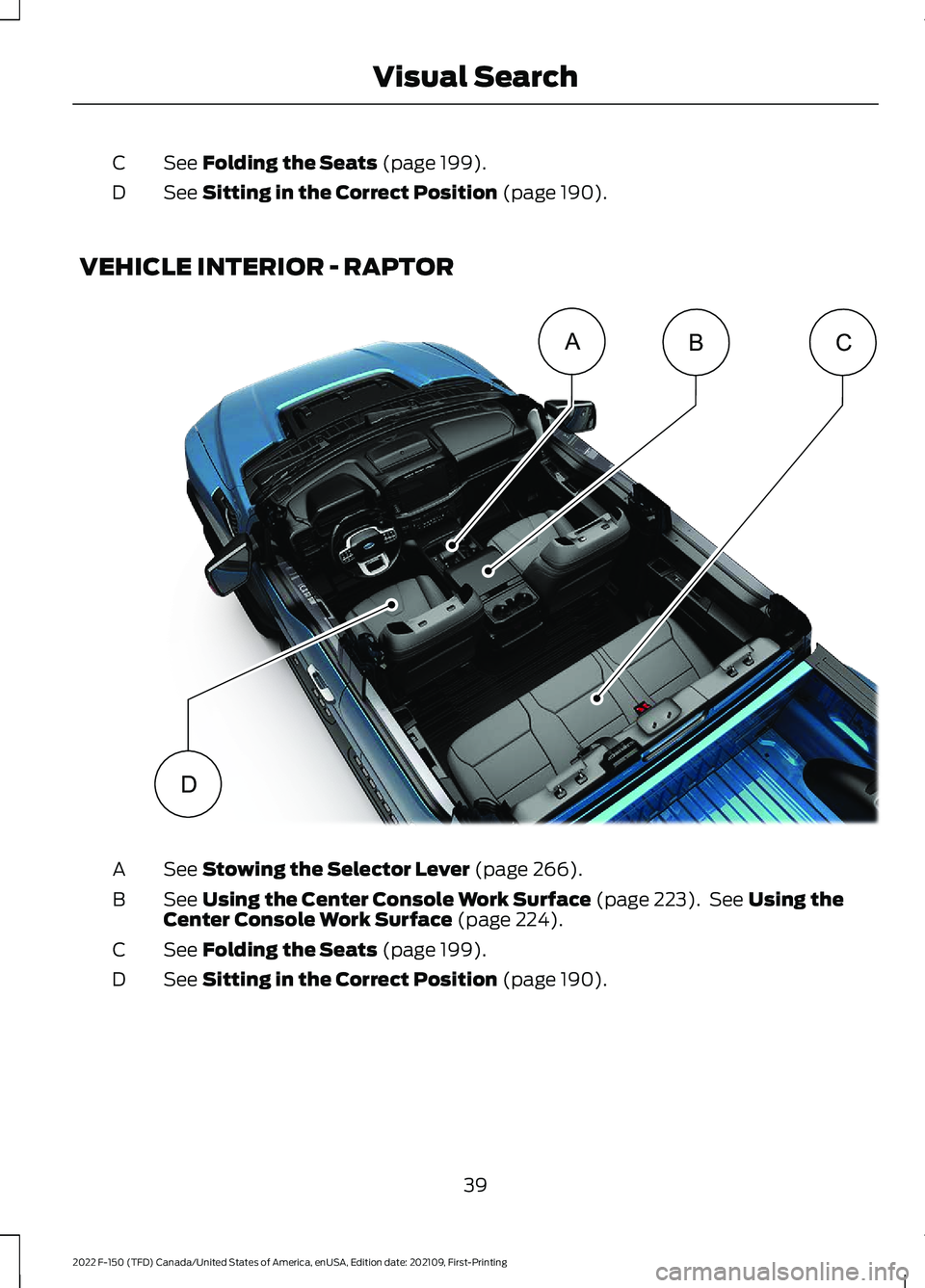
Page 43 of 750
See Folding the Seats (page 199).
C
See
Sitting in the Correct Position (page 190).
D
VEHICLE INTERIOR - RAPTOR See
Stowing the Selector Lever (page 266).
A
See
Using the Center Console Work Surface (page 223). See Using the
Center Console Work Surface (page 224).
B
See
Folding the Seats (page 199).
C
See
Sitting in the Correct Position (page 190).
D
39
2022 F-150 (TFD) Canada/United States of America, enUSA, Edition date: 202109, First-Printing Visual SearchABC
DE343519
Page 209 of 750

WHAT IS THE GARAGE DOOR
OPENER
HomeLink Wireless Control
System
The universal garage door opener replaces
the common hand-held garage door
opener with a three-button transmitter
integrated into the driver
’s sun visor.
HOW DOES THE GARAGE
DOOR OPENER WORK
The system includes two primary features,
a garage door opener and a platform for
remote activation of devices within the
home. You can program garage doors as
well as entry gate operators, security
systems, entry door locks and home or
office lighting.
Additional system information can be
found online at www.homelink.com or by
calling the toll-free help line at
1-800-355-3515.
Note: You can program a maximum of
three devices. To change or replace any of
the three devices after it has been initially
programmed, you must first erase the
current settings. See Clearing the Garage
Door Opener (page 207). GARAGE DOOR OPENER
PRECAUTIONS WARNING:
Do not use the system
with any garage door opener that does
not have the safety stop and reverse
feature as required by U.S. Federal
Safety Standards (this includes any
garage door opener manufactured
before April 1, 1982). A garage door
opener which cannot detect an object,
signaling the door to stop and reverse,
does not meet current federal safety
standards. Using a garage door opener
without these features increases the risk
of serious injury or death.
Note: Make sure that the garage door and
security device are free from obstruction
when you are programming. Do not program
the system with your vehicle in the garage.
Note: Make sure you keep the original
remote control transmitter for use in other
vehicles as well as for future system
programming.
Note: We recommend that upon the sale
or lease termination of your vehicle, you
erase the programmed function buttons for
security reasons. See Clearing the Garage
Door Opener
(page 207).
GARAGE DOOR OPENER
LIMITATIONS
Canadian radio-frequency laws require
transmitter signals to time-out (or quit)
after several seconds – which may not be
long enough for HomeLink to pick up the
signal.
U.S. gate operators time-out in the same
manner.
205
2022 F-150 (TFD) Canada/United States of America, enUSA, Edition date: 202109, First-Printing Garage Door Opener
(If Equipped)E188211