2022 FORD F-150 Auto stop
[x] Cancel search: Auto stopPage 269 of 750
3. Press and hold the brake pedal.
4. Shift into neutral (N).
Note:
An instructional message appears.
5. Press the manual (M) button.
Note: A confirmation message appears
when your vehicle enters the mode.
6. Release the brake pedal.
Note: Your vehicle is free to roll.
7. Switch your vehicle off.
Note: Do not tow your vehicle in this mode.
Note: The neutral (N) indicator on the
transmission selector may flash in this
mode.
EXITING TEMPORARY NEUTRAL
MODE
1. Press the brake pedal.
2. Shift into park (P), or power your vehicle on and shift into drive (D) or
reverse (R).
USING PROGRESSIVE RANGE
SELECTION
Progressive range selection gives you the
ability to lock out gears from the automatic
shifting range. This could provide you with
an improved driving experience by reducing
transmission shifts, for example, in slippery
conditions or steep slopes.
With the transmission in drive (D), press
the - button to begin to switch the feature
on.
Press the - button again to continue locking
out higher gears. Beginning with the highest
gear, the instrument cluster will indicate
the current gear and highest gear available.
For example, press the - button twice to
lock out 10th and 9th gears. Note:
The instrument cluster will indicate
the current gear and highest gear available.
Press the + button to unlock gears to allow
the transmission to shift to higher gears.
Note: The transmission automatically
shifts within the gear range you select.
AUTOMATIC RETURN TO
PARK (P)
WHAT IS AUTOMATIC RETURN TO
PARK (P)
Your vehicle shifts into park (P) if you
attempt to exit your vehicle without the
transmission in park (P).
HOW DOES AUTOMATIC RETURN
TO PARK (P) WORK
Your vehicle shifts into park (P) when your
vehicle is stationary and any of the
following occur:
• You switch the vehicle off.
• You open the driver door with your
seatbelt unlatched.
• You unlatch the driver seatbelt when
the driver door is open.
Note: Do not use automatic return to park
(P) when your vehicle is moving, except in
an emergency. See Starting and Stopping
the Engine (page 231).
AUTOMATIC RETURN TO PARK
(P) LIMITATIONS
Automatic return to park may not work if
the door ajar switch is malfunctioning.
See an authorized dealer if any of the
following occur:
265
2022 F-150 (TFD) Canada/United States of America, enUSA, Edition date: 202109, First-Printing Automatic Transmission
Page 271 of 750

Note:
Do not store objects in the selector
lever stow bin, and be sure that the bottom
selector lever tray mat is flat inside the
selector lever stow bin.
Note: If there are objects in the stow bin
while stowing the selector lever, the selector
lever could come back to the upright park
(P) position.
MANUAL PARK RELEASE
WHAT IS MANUAL PARK RELEASE
Manual park release allows you to move
your transmission out of the park (P)
position in the event of an electrical
malfunction or emergency.
MANUAL PARK RELEASE
PRECAUTIONS WARNING: When doing this
procedure, you need to take the
transmission out of park (P) which
means your vehicle can roll freely. To
avoid unwanted vehicle movement,
always fully apply the parking brake prior
to doing this procedure. Use wheels
chocks if appropriate. WARNING:
If the parking brake is
fully released, but the brake warning
lamp remains illuminated, the brakes
may not be working properly. Have your
vehicle checked as soon as possible. WARNING:
Do not drive your
vehicle until you verify that the
stoplamps are working.
Use the manual park release to move your
transmission from the park (P) position in
the event of an electrical malfunction or
emergency. See
Emergency Towing
(page 471). Note:
Do not engage the manual park
release with the engine on.
USING MANUAL PARK RELEASE
Activating the Manual Park
Release Cable
1. Apply the parking brake. See Electric
Parking Brake
(page 289).
Note: If vehicle battery is dead, for example,
no electrical power available, an external
power source may be required to apply the
parking brake.
2. Locate the manual park release cable access cover at the bottom of the
driver dash lower panel, under the
steering wheel. 3.
Carefully open the hinged access cover
using a plastic type wedge or pry tool
at the upper edge of the panel. If done
correctly, the panel will swing
downward.
Note: Do not activate the override lever
until you are in the driver's seat. If damage
occurs when access cover is opened,
contact your authorized Ford Dealer for a
replacement.
4. Switch ignition on, but do not start your
vehicle.
267
2022 F-150 (TFD) Canada/United States of America, enUSA, Edition date: 202109, First-Printing Automatic TransmissionE336473
Page 272 of 750

5. Once in the driver seat, fully apply the
brake pedal and hold. Do not release.
Pull the tether straight out toward the
driver seat until engaged. If done
correctly, a message will appear in the
instrument cluster.
Note: Do not use excessive force when
using the manual park release handle, as it
could result in damage to the handle.
Note: Your vehicle is now out of the park
(P) position and is free to roll. 6.
With your foot still fully applied on the
brake pedal, disengage the parking
brake. See Electric Parking Brake
(page 289).
7. Your vehicle remains in neutral (N) for emergency towing purposes.
8. Turn off the ignition.
9. Once safe to do so, and there is no risk
that your vehicle will roll, disconnect
the negative (black) battery cable from
the battery.
Returning Your Vehicle to Normal
Mode 1. Once it is safe to do so, reconnect the
negative (black) battery cable to the
battery. 2.
Apply the parking brake. See Electric
Parking Brake
(page 289).
Note: If vehicle battery is dead, for example,
no electrical power available, an external
power may be required to apply the parking
brake.
Note: Do not pull the tether until you are in
the driver seat.
3. Once in the driver seat, fully apply the brake pedal and hold, do not release.
Using the tether, pull the handle
towards the driver seat until you hit a
hard stop.
4. Pull the lever toward the floor until it hits a hard stop, before returning to the
stowed position.
Note: Maintain tension on the strap until
the lever reaches the stowed position.
5. Return the manual park release cable lever to the stowed position and install
the access cover.
6. With your foot fully applied on the brake pedal, start your vehicle. Confirm
that your vehicle is in the park (P)
position and that the instrument
cluster indicates park (P).
Note: If the instrument cluster is not
displaying the park (P) position or the
instrument cluster displays an error
message, apply the parking brake before
exiting your vehicle.
7. Close the access cover.
AUTOMATIC TRANSMISSION
AUDIBLE WARNINGS
Transmission Not In Park (P)
Audible Warning
Sounds if you open the driver door before
shifting into park (P).
268
2022 F-150 (TFD) Canada/United States of America, enUSA, Edition date: 202109, First-Printing Automatic TransmissionE315156 E315157
Page 276 of 750
To select a four-wheel drive mode, press
the four-wheel drive mode control button
of the desired mode. You can select
two-wheel drive high (2H), four-wheel
drive high (4H), or if your vehicle has
four-wheel drive auto (4A) at a stop or
while driving. Once the shift is complete,
the information display will then display
the selected four-wheel drive mode. While
shifts are in progress, the lights on the
four-wheel drive control switch can flash
and you could see messages in the
information display indicating that a shift
is in progress or to release the accelerator
pedal to improve shift performance.
Note:
Do not perform this operation if the
rear wheels are slipping or while applying
the accelerator pedal.
Note: You could hear some noise as the
system shifts or engages which is normal.
If the system detects a fault, a warning
message appears in the information
display. See Four-Wheel Drive –
Information Messages (page 275).
Shifting to or from Four-Wheel
Drive Low (4L)
To select or exit four-wheel drive low (4L):
1. Bring your vehicle to a speed of
3 mph
(5 km/h) or less.
2. Place the transmission in neutral (N)
3. Press the desired four-wheel drive button on the four-wheel drive mode
control switch.
The information display will display a
message indicating a four-wheel drive shift
is in progress. If any of the above shift
conditions are not present, the shift will
not occur and the information display will
display information guiding the driver
through the proper shifting procedures. If
there is a transfer case tooth blockage a
message will display in the information display. To alleviate this condition, place
the transmission in a forward gear, move
your vehicle forward approximately
5 ft
(1.5 m), and shift the transmission back to
neutral (N) to allow the transfer case to
complete the range shift.
Note: You could hear some noise as the
system shifts or engages which is normal.
If the system detects a fault, a warning
message appears in the information
display.
See Four-Wheel Drive –
Information Messages (page 275).
SELECTING A FOUR-WHEEL
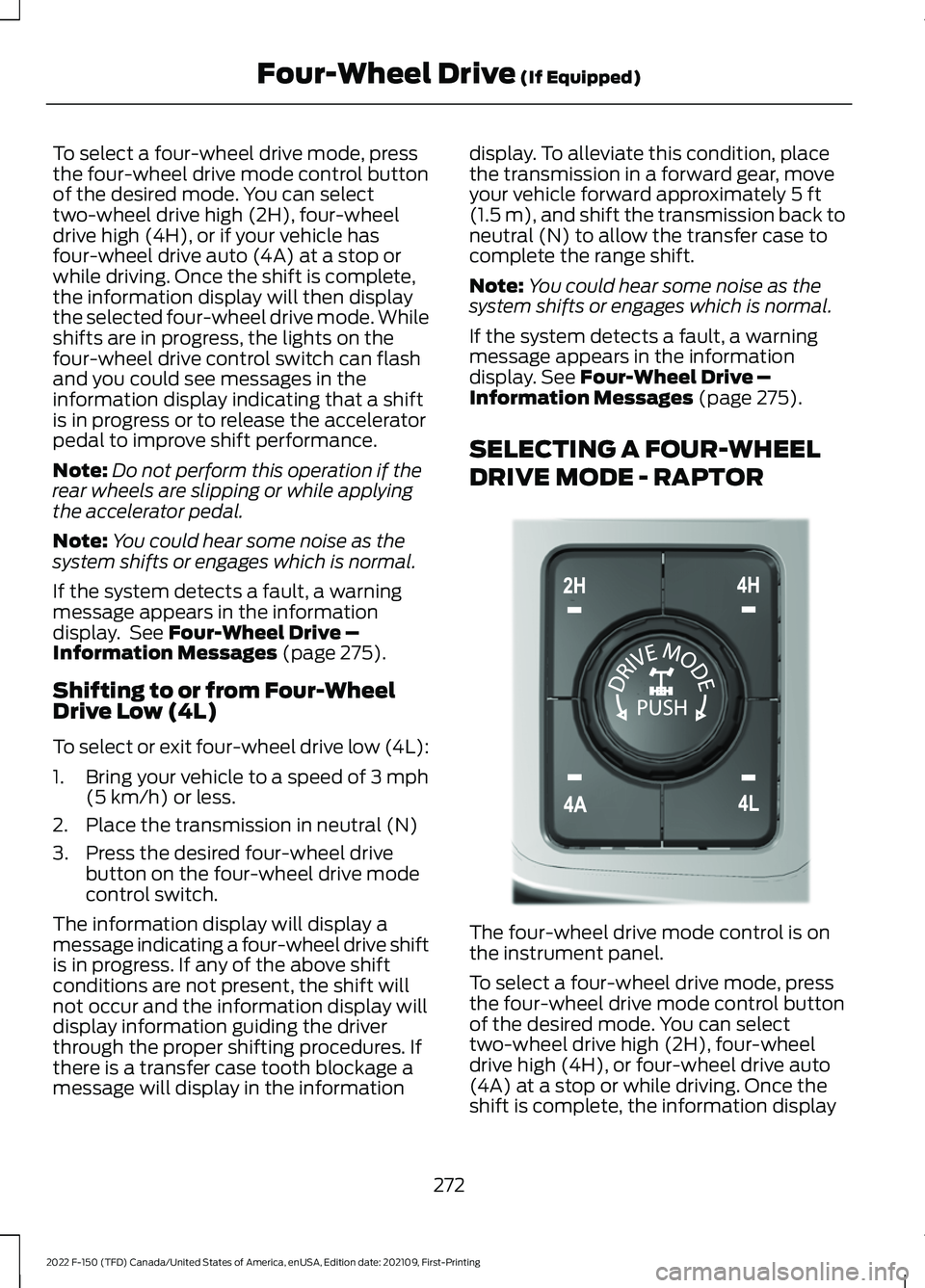
DRIVE MODE - RAPTOR The four-wheel drive mode control is on
the instrument panel.
To select a four-wheel drive mode, press
the four-wheel drive mode control button
of the desired mode. You can select
two-wheel drive high (2H), four-wheel
drive high (4H), or four-wheel drive auto
(4A) at a stop or while driving. Once the
shift is complete, the information display
272
2022 F-150 (TFD) Canada/United States of America, enUSA, Edition date: 202109, First-Printing Four-Wheel Drive
(If Equipped)E308146
Page 279 of 750
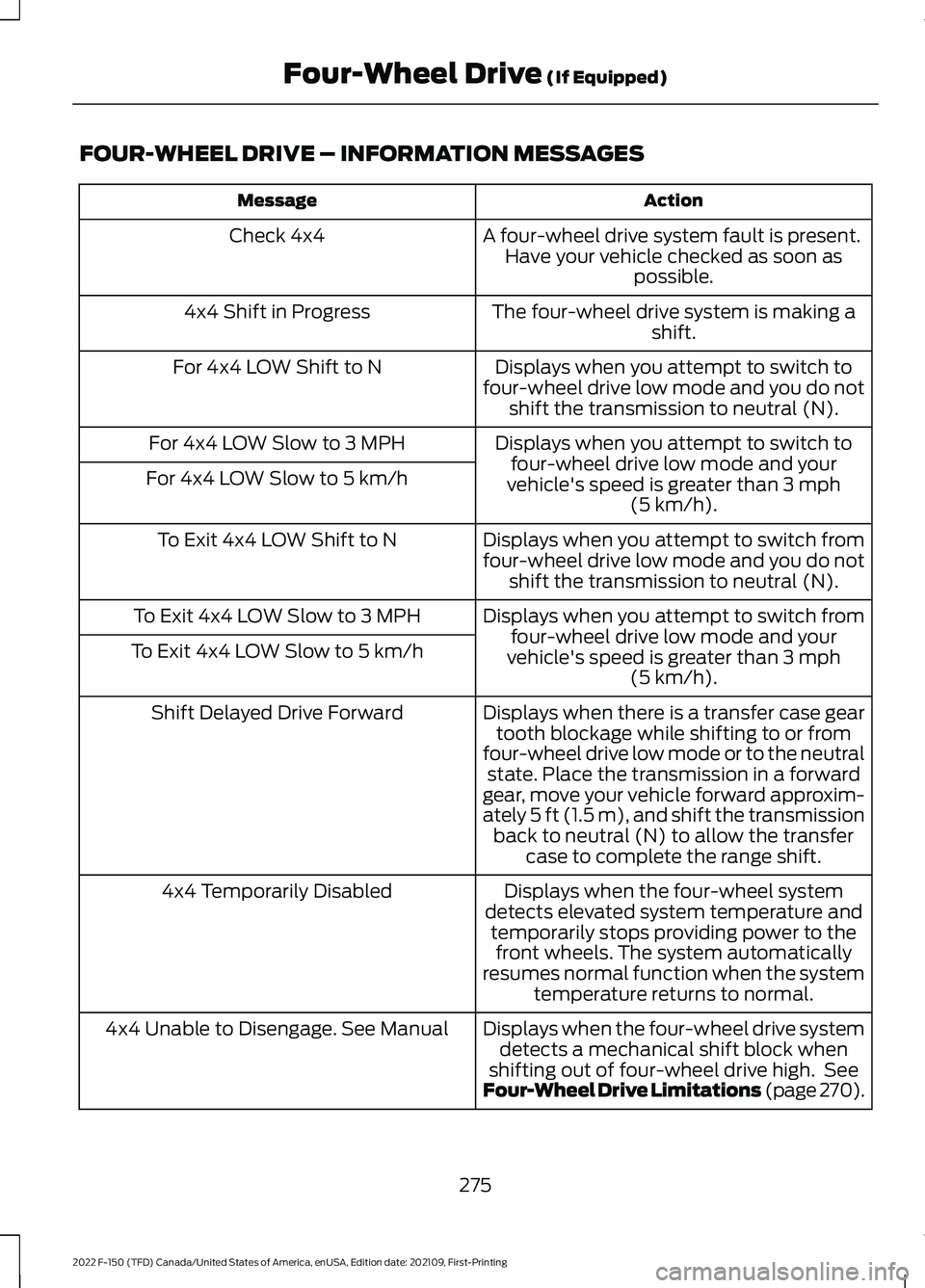
FOUR-WHEEL DRIVE – INFORMATION MESSAGES
Action
Message
A four-wheel drive system fault is present.Have your vehicle checked as soon as possible.
Check 4x4
The four-wheel drive system is making ashift.
4x4 Shift in Progress
Displays when you attempt to switch to
four-wheel drive low mode and you do not shift the transmission to neutral (N).
For 4x4 LOW Shift to N
Displays when you attempt to switch tofour-wheel drive low mode and your
vehicle's speed is greater than 3 mph
(5 km/h).
For 4x4 LOW Slow to 3 MPH
For 4x4 LOW Slow to 5 km/h
Displays when you attempt to switch from
four-wheel drive low mode and you do notshift the transmission to neutral (N).
To Exit 4x4 LOW Shift to N
Displays when you attempt to switch fromfour-wheel drive low mode and your
vehicle's speed is greater than
3 mph
(5 km/h).
To Exit 4x4 LOW Slow to 3 MPH
To Exit 4x4 LOW Slow to 5 km/h
Displays when there is a transfer case geartooth blockage while shifting to or from
four-wheel drive low mode or to the neutral state. Place the transmission in a forward
gear, move your vehicle forward approxim-
ately
5 ft (1.5 m), and shift the transmission
back to neutral (N) to allow the transfer case to complete the range shift.
Shift Delayed Drive Forward
Displays when the four-wheel system
detects elevated system temperature and temporarily stops providing power to thefront wheels. The system automatically
resumes normal function when the system temperature returns to normal.
4x4 Temporarily Disabled
Displays when the four-wheel drive systemdetects a mechanical shift block when
shifting out of four-wheel drive high. See
Four-Wheel Drive Limitations (page 270).
4x4 Unable to Disengage. See Manual
275
2022 F-150 (TFD) Canada/United States of America, enUSA, Edition date: 202109, First-Printing Four-Wheel Drive
(If Equipped)
Page 284 of 750

the accelerator pedal and turn the steering
wheel in the opposite direction when
rolling. We recommend engaging and
disengaging the electronic locking
differential at a stop when you mount a
spare on the rear axle.
SWITCHING THE ELECTRONIC
LOCKING DIFFERENTIAL ON
AND OFF - 4X4
The button to activate and deactivate the
electronic locking differential is in the
center of the drive mode rotary switch.
To manually activate or deactivate the
electronic locking differential, press the
electronic locking differential button.
Note:
The electronic locking differential can
activate or deactivate automatically based
on speed, four-wheel drive mode, and drive
mode selection. See Selecting a Drive
Mode (page 350).
4X4 Rear Electronic Locking Differential Engagement Speed and Availability Automatic Re-
Engagement Speed
Automatic Disen-
gagement Speed
Maximum Engage-
ment Speed
Drive Modes
20 mph (30 km/h)
25 mph (41 km/h)
20 mph (30 km/h)
Normal (2H, 4A 2
, 4H)
20 mph (30 km/h)
25 mph (41 km/h)
20 mph (30 km/h)
Eco (2H, 4A 2
, 4H)
20 mph (30 km/h)
25 mph (41 km/h)
20 mph (30 km/h)
Sport (2H, 4A 2
, 4H)
280
2022 F-150 (TFD) Canada/United States of America, enUSA, Edition date: 202109, First-Printing Electronic Locking Differential
(If Equipped)E323655 E308146
Page 293 of 750

WHAT IS THE ELECTRIC
PARKING BRAKE
The electric parking brake is used to hold
your vehicle on slopes and flat roads.
APPLYING THE ELECTRIC
PARKING BRAKE
WARNING: Always fully apply the
parking brake and make sure you shift
into park (P). Failure to follow this
instruction could result in personal injury
or death. WARNING:
If you drive extended
distances with the parking brake applied,
you could cause damage to the brake
system. The switch is on the lower part
of the instrument panel.
1. Pull the switch up.
The red warning lamp flashes during
operation and illuminates when the parking
brake is applied.
Note: You can apply the electric parking
brake when the ignition is off.
Note: The electric parking brake could
apply when the transmission selector is in
park (P).
See Park (P) (page 260).
APPLYING THE ELECTRIC
PARKING BRAKE IN AN
EMERGENCY
You can use the electric parking brake to
slow or stop your vehicle in an emergency.
1. Pull the switch up and hold it. The electric parking brake continues to
slow your vehicle down unless you release
the switch.
The red warning lamp illuminates, a tone
sounds and the stoplamps turn on when
you use the electric parking brake in an
emergency.
Note:
Do not apply the electric parking
brake when your vehicle is moving, except
in an emergency. If you repeatedly use the
electric parking brake to slow or stop your
vehicle, you could cause damage to the
brake system.
MANUALLY RELEASING THE
ELECTRIC PARKING BRAKE
1. Switch the ignition on.
2. Press and hold the brake pedal.
3. Push the switch down.
The red warning lamp turns off.
Pulling Away on a Hill When Towing a
Trailer
1. Press and hold the brake pedal.
2. Pull the switch upward and hold it.
3. Shift into gear.
4. Press the accelerator pedal until engine
has developed sufficient torque to
prevent your vehicle from rolling down
the hill.
5. Release the switch and pull away in a normal manner.
AUTOMATICALLY RELEASING
THE ELECTRIC PARKING
BRAKE
1. Close the driver door.
2. Shift into gear.
289
2022 F-150 (TFD) Canada/United States of America, enUSA, Edition date: 202109, First-Printing Electric Parking BrakeE267156
Page 301 of 750

HOW DOES AUTO HOLD WORK
Auto Hold applies the brakes to hold your
vehicle after you stop it and release the
brake pedal. This can help when waiting
on a hill or in traffic.
SWITCHING AUTO HOLD ON
AND OFF
WARNING: The system does not
replace the parking brake. When you
leave your vehicle, always apply the
parking brake. WARNING:
You must remain in
your vehicle when the system turns on.
At all times, you are responsible for
controlling your vehicle, supervising the
system and intervening, if required.
Failure to take care may result in the loss
of control of your vehicle, serious
personal injury or death.
You can switch the system on or off by
accessing the menu on the touchscreen.
1. Press
Settings on the touchscreen.
2. Press
Driver Assistance.
Note: You can only switch the system on
after you close the driver door and fasten
your seatbelt.
Note: The system remembers the last
setting when you start your vehicle.
Note: When using an automatic car wash,
make sure to switch auto hold off, or shift
to neutral (N) with the brake pedal applied
to ensure auto hold is not active. USING AUTO HOLD
1. Bring your vehicle to a complete stop.
The auto hold active indicator
illuminates in the information display.
2. Release the brake pedal. The system holds your vehicle at a standstill. The
auto hold active indicator remains
illuminated in the information display.
3. Pull away in the normal manner. The system releases the brakes and the
auto hold active indicator switches off.
Note: The system only activates if you
apply enough brake pressure on the brake
pedal to bring the vehicle to a standstill.
Note: Under certain conditions, the system
could apply the electric parking brake. The
brake system warning lamp illuminates. The
electric parking brake releases when you
press the accelerator pedal. See
Automatically Releasing the Electric
Parking Brake
(page 289).
Note: Auto hold cancels if you shift into
reverse (R), or neutral (N), and press the
brake pedal.
There could be actions that can cause the
auto hold system not to work when the
following occur:
• When you use active park assist.
• The driver door is open.
• You have not fastened your seatbelt.
• You shift into reverse (R), or neutral
(N) before the system is active.
AUTO HOLD INDICATORS Illuminates when the system is
active.
Illuminates when the system is
on but cannot hold your vehicle
at a standstill at this particular
time.
297
2022 F-150 (TFD) Canada/United States of America, enUSA, Edition date: 202109, First-Printing Auto HoldE323448 E323449