2022 FORD F-150 Monitor
[x] Cancel search: MonitorPage 365 of 750

WHAT IS THE LANE KEEPING
SYSTEM
The lane keeping system alerts you by
providing temporary steering assistance
or steering wheel vibration when it detects
an unintended lane departure.
HOW DOES THE LANE
KEEPING SYSTEM WORK
The lane keeping system uses a forward
looking camera mounted on the windshield
to monitor vehicle movement within the
travel lane.
When the camera detects a drift out of the
travel lane, the lane keeping system alerts
the driver by vibrating the steering wheel,
or aids the driver by providing a small
steering input to move the vehicle back
into the travel lane.
The driver can select one of three modes:
•
Alert (If Equipped)
• Aid
• Alert + Aid
LANE KEEPING SYSTEM
PRECAUTIONS WARNING: You are responsible for
controlling your vehicle at all times. The
system is designed to be an aid and does
not relieve you of your responsibility to
drive with due care and attention. Failure
to follow this instruction could result in
the loss of control of your vehicle,
personal injury or death. WARNING: The system will not
operate if the sensor cannot track the
road lane markings. WARNING:
The sensor may
incorrectly track lane markings as other
structures or objects. This can result in
a false or missed warning. WARNING:
In cold and severe
weather conditions the system may not
function. Rain, snow and spray can all
limit sensor performance. WARNING:
The system may not
operate properly if the sensor is blocked.
Keep the windshield free from
obstruction. WARNING:
If damage occurs in the
immediate area surrounding the sensor,
have your vehicle checked as soon as
possible. WARNING:
The system may not
correctly operate if your vehicle is fitted
with a suspension kit not approved by
us. WARNING:
Large contrasts in
outside lighting can limit sensor
performance.
LANE KEEPING SYSTEM
LIMITATIONS
The lane keeping system only operates
when the vehicle speed is greater than
40 mph (64 km/h)
.
The system works when the camera can
detect at least one lane marking.
Note: When you select Aid or Alert and Aid
mode and the system detects no steering
activity for a short period of time, the system
alerts you to put your hands on the steering
wheel. The system may detect a light grip
or touch on the steering wheel as hands-off
driving.
361
2022 F-150 (TFD) Canada/United States of America, enUSA, Edition date: 202109, First-Printing Lane Keeping System
(If Equipped)
Page 406 of 750

CONNECTING A TRAILER – TROUBLESHOOTING
CONNECTING A TRAILER – INFORMATION MESSAGES
Description
Message
The system senses a trailer connection
becomes disconnected, either intentionally or unintentionally, during a given ignition cycle.
Trailer Disconnected
There are certain faults in your vehicle
wiring and trailer wiring or brake system.
Trailer Wiring Fault
There is a fault with your trailer battery, oryour trailer battery voltage is very low.
Trailer Battery Not Charging See Manual
One or more tires on your trailer is belowthe specified tire pressure.
Trailer Tire Low Specified:
Displays when one or more tires on the
trailer is above the recommended temper- ature.
Trailer Tire Over Temperature
A trailer tire pressure sensor is malfunc-
tioning. If the warning stays on or continues to come on, have the system checked as soon as possible.
Trailer Tire Pressure Sensor Fault
The trailer tire pressure monitoring systemis malfunctioning. If the warning stays on
or continues to come on, have the system checked.
Trailer Tire Pressure Monitor Fault
The system cannot detect the trailer tirepressure monitoring system.
Trailer Tire Pressure Monitor Capability Not
Detected
The trailer tire pressure monitoring systemis not setup.
Trailer Tire Pressure Indication Not Setup
See Manual
402
2022 F-150 (TFD) Canada/United States of America, enUSA, Edition date: 202109, First-Printing Connecting a Trailer
Page 413 of 750
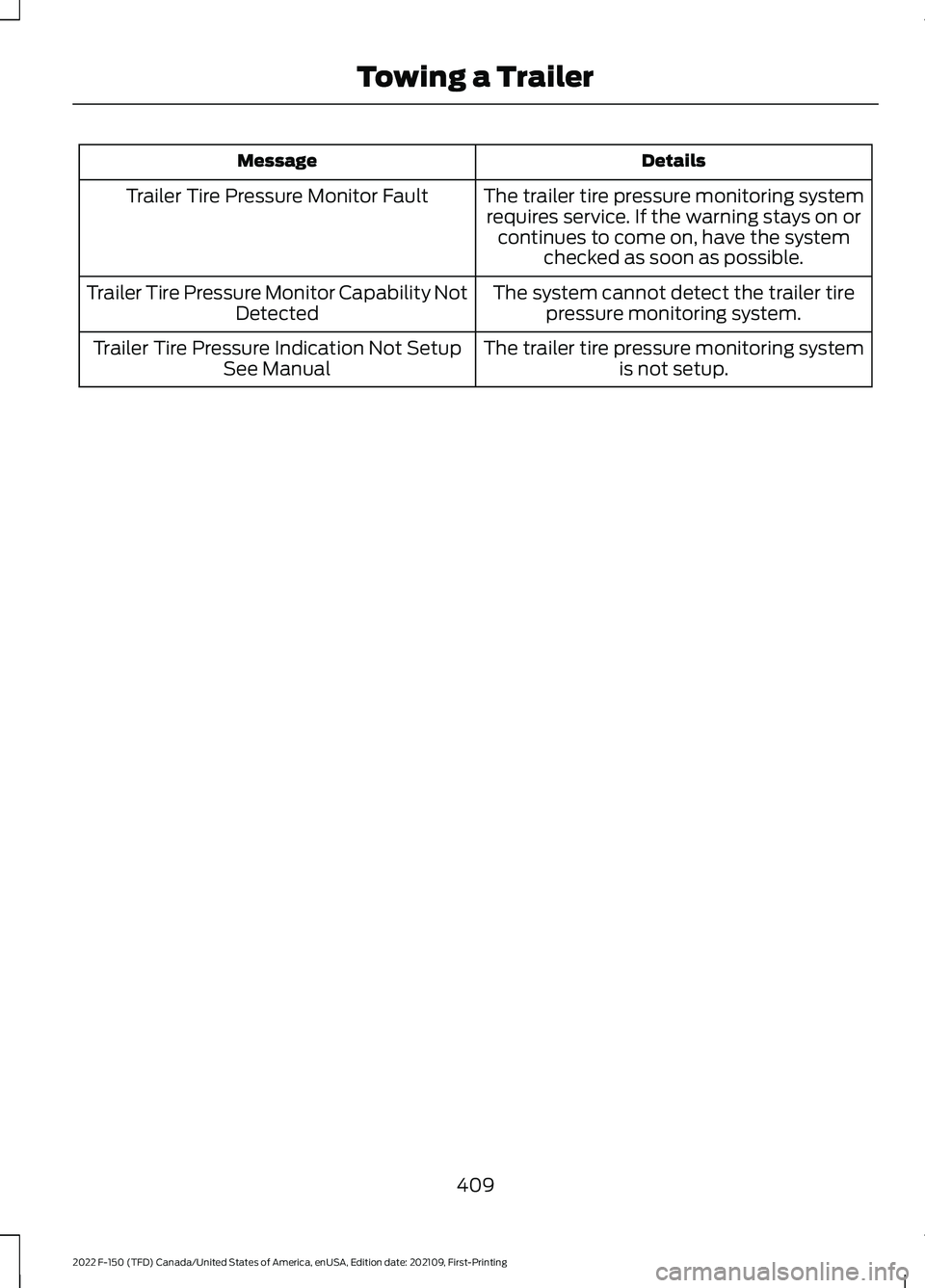
Details
Message
The trailer tire pressure monitoring systemrequires service. If the warning stays on or continues to come on, have the system checked as soon as possible.
Trailer Tire Pressure Monitor Fault
The system cannot detect the trailer tirepressure monitoring system.
Trailer Tire Pressure Monitor Capability Not
Detected
The trailer tire pressure monitoring systemis not setup.
Trailer Tire Pressure Indication Not Setup
See Manual
409
2022 F-150 (TFD) Canada/United States of America, enUSA, Edition date: 202109, First-Printing Towing a Trailer
Page 426 of 750

WHAT IS TRAILER BACKUP
ASSISTANCE
Trailer backup assistance utilizes the
control knob on the instrument panel to
help you steer a trailer. Turn the control
knob in the direction you want the trailer
to go and the system steers the vehicle.
HOW DOES TRAILER BACKUP
ASSISTANCE WORK
Trailer backup assistance uses a sticker or
sensor attached to the trailer to detect the
trailer angle relative to the towing vehicle
and provides instructions, graphics and
camera views on the touchscreen.
TRAILER BACKUP
ASSISTANCE PRECAUTIONS
WARNING: Driving while distracted
can result in loss of vehicle control, crash
and injury. We strongly recommend that
you use extreme caution when using any
device that may take your focus off the
road. Your primary responsibility is the
safe operation of your vehicle. We
recommend against the use of any
hand-held device while driving and
encourage the use of voice-operated
systems when possible. Make sure you
are aware of all applicable local laws
that may affect the use of electronic
devices while driving. WARNING: This system is an extra
driving aid. It does not replace your
attention and judgment, or the need to
apply the brakes. This system does NOT
automatically brake your vehicle. If you
fail to press the brake pedal when
necessary, you may collide with another
vehicle.
Note: The system is not a substitute for
safe driving practices. Always be aware of
your vehicle and trailer combination, and
the surrounding environment.
Note: The system does not detect or
prevent your vehicle or trailer from making
contact with obstacles in the surrounding
environment.
Note: The front end of your vehicle swings
out when changing the direction of the
trailer.
Note: In certain conditions, the trailer could
turn faster or the trailer angle could increase
more than anticipated. Always monitor the
clearance between the trailer and vehicle
and the surroundings.
SETTING UP THE TRAILER
BACKUP ASSISTANCE FOR A
CONVENTIONAL TRAILER
CONFIGURING THE TRAILER
You must configure a trailer in the system
to use trailer backup assistance. This is a
one-time setup process and the system
saves the trailer information for the next
time you use that trailer.
The system only works with conventional
trailers. It does not work with other types
including fifth-wheel and gooseneck. The
following illustration shows examples of
conventional trailers on the left-hand side.
422
2022 F-150 (TFD) Canada/United States of America, enUSA, Edition date: 202109, First-Printing Trailer Backup Assistance
(If Equipped)
Page 432 of 750

Rear view camera view. Shows
your trailer hitch or what is
directly behind your vehicle.
Rear split view camera view.
Shows a 180° degree view of
what is behind your vehicle. Bed camera view. Shows the
truck bed.
Note: This view also provides a
picture-in-picture view. Trailer AUX camera view. Shows
a rear view camera image of
what is behind your trailer. You
need to separately purchase this camera
and have it installed.
Note: This view also provides a
picture-in-picture view. Trailer reverse guidance view.
Shows you a view of the sides of
your truck and the trailer. In auto
mode, this view moves as the trailer moves
so that you do not have to adjust the
camera as you turn. Left and right arrows
let you see other camera views. Picture-in-picture view. Shows
a main view and a secondary
view when in bed camera view
or trailer AUX camera view.
Note: If you have a
8 in (20 cm)
touchscreen, picture-in-picture is off by
default. Press the picture-in-picture icon on
the touchscreen to switch picture-in-picture
view on and off.
Note: If you have a
12 in (30 cm)
touchscreen, picture-in-picture is on by
default and you cannot switch it off. Swap. Press to swap between
picture-in-picture views.
Auto. Press to return to auto
view. Note:
Auto is the default setting.
Hitch Angle Graphic
The hitch angle graphic shows a small
representation of your truck and trailer with
visual feedback to help you monitor the
trailer. The graphic shows two different
colored lines for the trailer hitch angle. A
black line shows you where your trailer is
in relation to your vehicle. The white line
represents the amount the trailer can turn
based on knob input.
The graphic shows a yellow and red zone
for the hitch angle to warn you of a high
angle condition that could require you to
pull forward to reduce the hitch angle. The
angle limits for each zone vary based on
the trailer length.
The yellow zone indicates you are
approaching the maximum controllable
trailer angle for the system. When the
trailer enters this zone, it is more difficult
to reduce the trailer turn when backing up.
It may be necessary to put your vehicle
back into drive (D) and pull forward to get
the truck and trailer back to an in-line
position.
The red zone indicates you have exceeded
the maximum controllable trailer angle for
the system. Immediately stop reversing.
Put your vehicle into drive (D) and pull
forward until the trailer is no longer in the
red zone.
Setting the
Trailer Angle Limit
1. Press
Features on the touchscreen.
2. Press
Towing.
3. Press
Manage trailers.
4. Press
Pro Trailer Backup Assist.
5. Press
Trailer Angle Limit.
6. Press a setting.
428
2022 F-150 (TFD) Canada/United States of America, enUSA, Edition date: 202109, First-Printing Trailer Backup Assistance
(If Equipped)E310967 E310974 E310995 E311776 E310965 E351663 E351662 E315644
Page 441 of 750

WHAT IS TRAILER REVERSE
GUIDANCE
Trailer reverse guidance provides views
and graphics on the touchscreen to help
you steer your vehicle when you backup a
trailer.
HOW DOES TRAILER REVERSE
GUIDANCE WORK
Trailer reverse guidance uses a sticker or
sensor attached to the trailer to detect the
trailer angle relative to the towing vehicle
and provides instructions, graphics and
camera views on the touchscreen.
TRAILER REVERSE GUIDANCE
PRECAUTIONS
WARNING: Driving while distracted
can result in loss of vehicle control, crash
and injury. We strongly recommend that
you use extreme caution when using any
device that may take your focus off the
road. Your primary responsibility is the
safe operation of your vehicle. We
recommend against the use of any
hand-held device while driving and
encourage the use of voice-operated
systems when possible. Make sure you
are aware of all applicable local laws
that may affect the use of electronic
devices while driving. WARNING: This system is an extra
driving aid. It does not replace your
attention and judgment, or the need to
apply the brakes. This system does NOT
automatically brake your vehicle. If you
fail to press the brake pedal when
necessary, you may collide with another
vehicle. Note:
The system is not a substitute for
safe driving practices. Always be aware of
your vehicle and trailer combination, and
the surrounding environment.
Note: The system does not detect or
prevent your vehicle or trailer from making
contact with obstacles in the surrounding
environment.
Note: The front end of your vehicle swings
out when changing the direction of the
trailer.
Note: In certain conditions, the trailer could
turn faster or the trailer angle could increase
more than anticipated. Always monitor the
clearance between the trailer and vehicle
and the surroundings.
SETTING UP TRAILER
REVERSE GUIDANCE FOR A
CONVENTIONAL TRAILER
CONFIGURING THE TRAILER
You must configure a trailer in the system
to use trailer reverse guidance. This is a
one-time setup process and the system
saves the trailer information for the next
time you use that trailer.
The system only works with conventional
trailers. It does not work with other types
including fifth-wheel and gooseneck. The
following illustration shows examples of
conventional trailers on the left-hand side.
Note: Trailer reverse guidance camera
views are available without setting up a
trailer. However, complete functionality,
including images and automatic view
switching, is enabled by setup. Setup is
required to enable trailer backup assistance.
437
2022 F-150 (TFD) Canada/United States of America, enUSA, Edition date: 202109, First-Printing Trailer Reverse Guidance
(If Equipped)
Page 446 of 750
Note:
Auto mode is the default setting.
Hitch Angle Graphic
The hitch angle graphic shows a small
representation of your truck and trailer with
visual feedback to help you monitor the
trailer. The graphic shows two different
colored lines for the trailer hitch angle. A
black line shows you where your trailer is
in relation to your vehicle. The white line
represents the amount the trailer can turn
based on steering wheel position.
The graphic shows a yellow and red zone
for the hitch angle to warn you of a high
angle condition that could require you to
pull forward to reduce the hitch angle. The
angle limits for each zone vary based on
the trailer length. The yellow zone indicates you are
approaching the maximum controllable
trailer angle for the system. When the
trailer enters this zone, it is more difficult
to reduce the trailer turn when backing up.
It may be necessary to put your vehicle
back into drive (D) and pull forward to get
the truck and trailer back to an in-line
position.
The red zone indicates you have exceeded
the maximum controllable trailer angle for
the system. Immediately stop reversing.
Put your vehicle into drive (D) and pull
forward until the trailer is no longer in the
red zone.
442
2022 F-150 (TFD) Canada/United States of America, enUSA, Edition date: 202109, First-Printing Trailer Reverse Guidance (If Equipped)
Page 484 of 750

Protected Component
Fuse Rating
Fuse
Loca- tion
Driver door control module.
30 A
23
Moonroof.
30 A
24
Not used.
20 A
25
Passenger door control module.
30 A
26
Not used.
30 A
27
Amplifier.
30 A
28
12 inch display.
15 A
29
Adjustable pedals.
Not used.
5 A
30
RF receiver.
10 A
31
Driver monitor.
Terrain management switch.
Audio control module.
20 A
32
Not used.
—
33
Run/start relay.
30 A
34
400 watt inverter run/start.
5 A
35
Auto-dimming interior mirror.
15 A
36
Rear heat seat run/start.
Adaptive front steering run/start.
Heated wheel (vehicles without adaptive front steering).
Advanced driver-assistance systems.
20 A
37
Rear power windows.
30 A circuit
breaker.
38
480
2022 F-150 (TFD) Canada/United States of America, enUSA, Edition date: 202109, First-Printing Fuses