2022 FORD ESCAPE belt
[x] Cancel search: beltPage 128 of 585

Select ScreensCalm Screen
Fuel Economy Trip 1
Trip 2
This Trip
Traffic Signs EV Coach
Electric Efficiency Eco BehaviorTire Pressure
Intelligent 4WD Off-Road
Trailer Light Check Seatbelts
Average Speed Auto Startstop
Note: Some options may appear slightly
different or not at all if items are optional.
Configuring Gauges
1. Select Display Setup .
2. Select a setting.
PERSONALIZED SETTINGS
CHANGING THE INSTRUMENT
CLUSTER DISPLAY LANGUAGE -
VEHICLES WITH: 4.2 INCH
INSTRUMENT CLUSTER DISPLAY
SCREEN
You can change the language using the
instrument cluster display.
1. Select Settings and press the menu
button.
2. Select Display.
3. Select Language.
4. Select a language.
CHANGING THE INSTRUMENT
CLUSTER DISPLAY LANGUAGE -
VEHICLES WITH: 6.5 INCH
INSTRUMENT CLUSTER DISPLAY
SCREEN/ 12.3 INCH INSTRUMENT
CLUSTER DISPLAY SCREEN
You can change the language using the
touchscreen.
1. Press General.
2. Press Language .
3. Select a language.
Note: Available languages vary by region.
CHANGING THE MEASURE UNIT -
VEHICLES WITH: 4.2 INCH
INSTRUMENT CLUSTER DISPLAY
SCREEN
You can change the measurement unit
using the instrument cluster display.
1. Select Settings and press the menu
button.
2. Select Display.
3. Select Measurement Unit .
4. Select a measurement unit.
125
Instrument Cluster Display
Page 151 of 585
FRONT SEAT PRECAUTIONS
WARNING: Sitting improperly, out
of position or with the seatback reclined
too far can take weight off the seat
cushion and affect the decision of the
passenger sensing system, resulting in
serious injury or death in the event of a
crash. Always sit upright against your
seat back, with your feet on the floor.
WARNING: Do not recline the seat
backrest too far as this can cause the
occupant to slide under the seatbelt,
resulting in personal injury in the event
of a crash.
WARNING: Do not place objects
higher than the top of the seat backrest.
Failure to follow this instruction could
result in personal injury or death in the
event of a sudden stop or crash.
WARNING: Do not adjust the driver
seat or seat backrest when your vehicle
is moving. This may result in sudden seat
movement, causing the loss of control
of your vehicle.
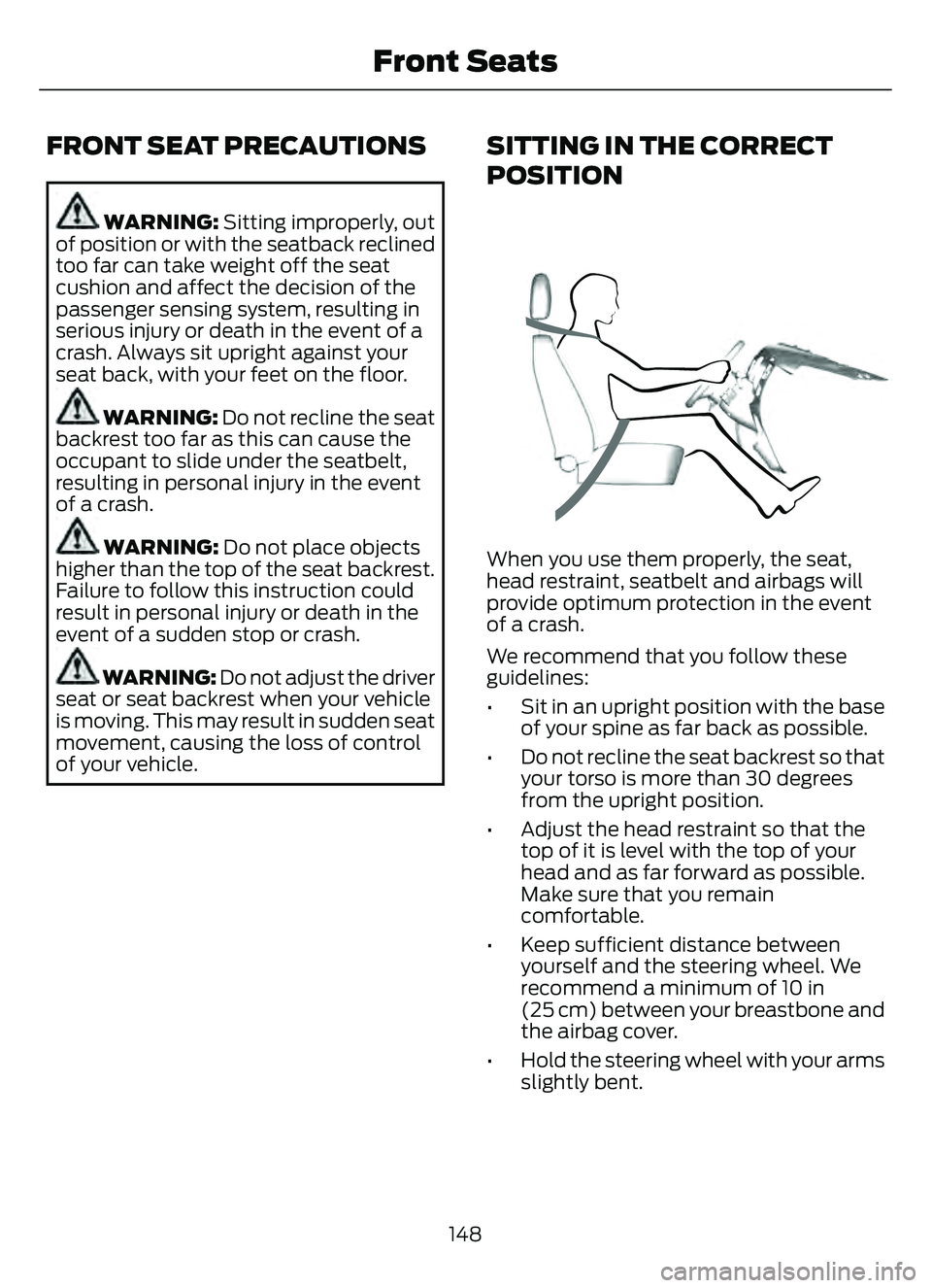
SITTING IN THE CORRECT
POSITION
When you use them properly, the seat,
head restraint, seatbelt and airbags will
provide optimum protection in the event
of a crash.
We recommend that you follow these
guidelines:
• Sit in an upright position with the base of your spine as far back as possible.
• Do not recline the seat backrest so that your torso is more than 30 degrees
from the upright position.
• Adjust the head restraint so that the top of it is level with the top of your
head and as far forward as possible.
Make sure that you remain
comfortable.
• Keep sufficient distance between yourself and the steering wheel. We
recommend a minimum of 10 in
(25 cm) between your breastbone and
the airbag cover.
• Hold the steering wheel with your arms slightly bent.
148
Front Seats
Page 152 of 585

• Bend your legs slightly so that you canpress the pedals fully.
• Position the shoulder strap of the seatbelt over the center of your
shoulder and position the lap strap
tightly across your hips.
Make sure that your driving position is
comfortable and that you can maintain full
control of your vehicle.
MANUAL SEATS
HEAD RESTRAINT COMPONENTS
E291E29139139
The front seat head restraints consists of:
An energy absorbing head
restraint.
A
Two steel stems.
B
Guide sleeve adjust and unlock
button.
C
ADJUSTING THE HEAD
RESTRAINT
WARNING: Fully adjust the head
restraint before you sit in or operate your
vehicle. This will help minimize the risk
of neck injury in the event of a crash. Do
not adjust the head restraint when your
vehicle is moving.
WARNING: The head restraint is a
safety device. Whenever possible it
should be installed and properly
adjusted when the seat is occupied.
Failure to adjust the head restraint
properly could reduce its effectiveness
during certain impacts.
WARNING: Adjust the head
restraints for all passengers before you
drive your vehicle. This will help minimize
the risk of neck injury in the event of a
crash. Do not adjust the head restraints
when your vehicle is moving.
Note: Adjust the seat backrest to an upright
driving position before adjusting the head
restraint. Adjust the head restraint so that
the top of it is level with the top of your head
and as far forward as possible. Make sure
that you remain comfortable. If you are
extremely tall, adjust the head restraint to
its highest position.
Pull the head restraint up to raise it.
To lower the head restraint:
1. Press and hold the adjust and unlock button.
2. Push the head restraint down.
To tilt the head restraint (if equipped):
149
Front Seats
Page 160 of 585
With the seat empty, pull the lever up to
fold the seat backrest forward. You may
need to lower the center head restraint
first.
UNFOLDING THE SEAT BACKREST
WARNING: When unfolding the
seat, make sure that the seatbelts are
not trapped behind the seat.
WARNING: Make sure that the
seats and the seat backrests are secure
and fully locked in their catches.
Pull the seat backrest up to unfold it.
157
Rear Seats
Page 215 of 585

HOW DOES AUTOMATIC RETURN
TO PARK (P) WORK
Your vehicle shifts into park (P) when your
vehicle is stationary and any of the
following occur:
• You switch the vehicle off.
• You open the driver door with yourseatbelt unlatched.
• You unlatch the driver seatbelt when the driver door is open.
Note: Do not use automatic return to park
(P) when your vehicle is moving, except in
an emergency. See Stopping the Engine
When Your Vehicle is Moving (page 175).
AUTOMATIC RETURN TO PARK
(P) LIMITATIONS
Automatic return to park may not work if
the door ajar switch is malfunctioning.
See an authorized dealer if any of the
following occur:
• Door ajar indicator does not illuminate with the driver door open.
• Door ajar indicator illuminates with the driver door closed.
• Transmission not in park message appears with the driver door closed,
after you shift out of park (P).
GRADE ASSIST - HYBRID
ELECTRIC VEHICLE (HEV)
WHAT IS GRADE ASSIST
Provides additional grade braking with a
combination of engine motoring and
high-voltage battery charging to help
maintain vehicle speed when descending
a grade.
SWITCHING GRADE ASSIST ON
AND OFF
1. Press Settings on the touchscreen.
2. Select Driver Assistance Settings .
3. Select Grade Assist.
The grade assist lamp appears in the
instrument cluster.
Your vehicle determines the amount of
engine motoring and high-voltage battery
charging. You could notice the engine
speed increasing and decreasing to help
maintain your vehicle speed when
descending a slope.
GRADE ASSIST INDICATORS
E345122E345122
MANUAL PARK RELEASE -
GASOLINE
WHAT IS MANUAL PARK RELEASE
Manual park release is used to move your
transmission from the park (P) position in
the event of an electrical malfunction or
emergency.
MANUAL PARK RELEASE
PRECAUTIONS
WARNING: When doing this
procedure, you need to take the
transmission out of park (P) which
means your vehicle can roll freely. To
avoid unwanted vehicle movement,
always fully apply the parking brake prior
to doing this procedure. Use wheel
chocks if appropriate.
212
Automatic Transmission
Page 227 of 585

HOW DOES AUTO HOLD WORK
Auto Hold applies the brakes to hold your
vehicle after you stop it and release the
brake pedal. This can help when waiting
on a hill or in traffic.
SWITCHING AUTO HOLD ON
AND OFF
WARNING: The system does not
replace the parking brake. When you
leave your vehicle, always apply the
parking brake.
WARNING: You must remain in
your vehicle when the system turns on.
At all times, you are responsible for
controlling your vehicle, supervising the
system and intervening, if required.
Failure to take care may result in the loss
of control of your vehicle, serious
personal injury or death.
You can switch the system on or off by
accessing the menu in the SYNC display
screen.
1. Press Features on the touchscreen.
2. Press Driver Assistance.
Note: You can only switch the system on
after you close the driver door, and fasten
your seatbelt.
Note: The system remembers the last
setting when you start your vehicle.
Note: Make sure you switch the system off
before using an automatic car wash.
USING AUTO HOLD
1. Bring your vehicle to a complete stop. The auto hold active indicator
illuminates in the information display. 2. Release the brake pedal. The system
holds your vehicle at a standstill. The
auto hold active indicator remains
illuminated in the information display.
3. Pull away in the normal manner. The system releases the brakes and the
auto hold active indicator switches off.
Note: The system only activates if you
apply enough brake pressure on the brake
pedal.
Note: Under certain conditions, the system
could apply the electric parking brake. The
brake system warning lamp illuminates. The
electric parking brake releases when you
press the accelerator pedal. See
Automatically Releasing the Electric
Parking Brake (page 221).
Note: The system switches off if you shift
into reverse (R) and press the brake pedal.
There could be actions that can cause the
auto hold system not to work when the
following occur:
• When you use active park assist.
• Your vehicle is in stay in neutral mode.
• The driver door is open.
• You have not fastened your seatbelt.
• You shift into reverse (R) before the system is active.
AUTO HOLD INDICATORS
E323448Illuminates when the system is
active.
E323449Illuminates when the system is
on but cannot hold your vehicle
at a standstill at this particular
time.
224
Auto Hold
Page 250 of 585

Optimal system performance requires a
clear view of the road by the
windshield-mounted camera.
Optimal performance may not occur if:
• The camera is blocked.
• There is poor visibility or lightingconditions.
• There are bad weather conditions.
SWITCHING ADAPTIVE
CRUISE CONTROL ON AND OFF
The cruise controls are on the steering
wheel. See What Is Cruise Control
(page 242).
Switching Adaptive Cruise Control
On
E144529
Press the button to set the
system in standby mode.
The indicator, current gap setting and set
speed appear in the information display.
Switching Adaptive Cruise Control
Off
E144529
Press the button when the
system is in standby mode, or
switch the ignition off.
Note: You erase the set speed when you
switch the system off.
ADAPTIVE CRUISE CONTROL
AUTOMATIC CANCELLATION
The system may cancel if:
• The tires lose traction.
• You apply the parking brake. The system may cancel and set the parking
brake if:
• You unbuckle the seatbelt and open
the driver door after you stop your
vehicle.
• Your vehicle is at a stop continuously for more than three minutes.
The system may deactivate or prevent
activating when requested if:
• The vehicle has a blocked sensor.
• The brake temperature is too high.
• There is a failure in the system or a related system.
SETTING THE ADAPTIVE
CRUISE CONTROL SPEED
Drive to the speed you prefer.
Press the toggle button upward
or downward to set the current
speed.
Take your foot off the accelerator pedal.
The indicator, current gap setting and set
speed appear in the information display.
E2556686E25566866
A vehicle image illuminates if there is a
vehicle detected in front of you.
Note: When adaptive cruise control is
active, the speedometer may vary slightly
from the set speed displayed in the
information display.
247
Adaptive Cruise Control (If Equipped)
Page 316 of 585

2. Connect the other end of the positive(+) jumper cable to the positive (+)
terminal of the booster vehicle battery.
3. Connect the negative (-) jumper cable to the negative (-) terminal of the
booster vehicle battery.
4. Make the final connection of the negative (-) jumper cable to an
exposed metal part of the disabled
vehicle's engine, as shown in the
following illustration, away from the
battery and fuel injection system, or
connect the negative (-) jumper cable
to a ground connection point if
available.
E338715E338715
Starting the Engine
1. Start the engine of the booster vehicleand moderately rev the engine, or
gently press the accelerator to keep
the engine speed between 2000 and
3000 RPM, as shown in your
tachometer.
2. Start the engine of the disabled vehicle.
3. Once you start the disabled vehicle, run both vehicle engines for an additional
three minutes before disconnecting the
jumper cables.
Removing the Jumper Cables
Remove the jumper cables in the reverse
order that they were connected. Note:
Do not switch the headlamps on
when disconnecting the cables. The peak
voltage could blow the bulbs.
POST-CRASH ALERT SYSTEM
WHAT IS THE POST-CRASH
ALERT SYSTEM
The system helps draw attention to your
vehicle in the event of a serious impact.
HOW DOES THE POST-CRASH
ALERT SYSTEM WORK
The system is designed to turn the hazard
flashers on and to intermittently sound the
horn in the event of a serious impact that
deploys an airbag or the seatbelt
pretensioners.
POST-CRASH ALERT SYSTEM
LIMITATIONS
Depending on applicable laws in the
country your vehicle was built for, the horn
does not sound in the event of a serious
impact.
SWITCHING THE POST-CRASH
ALERT SYSTEM OFF
Press the hazard flasher switch or the
unlock button on the remote control to
switch the system off.
Note: The alert turns off when the vehicle
battery runs out of charge.
313
Crash and Breakdown Information