2022 FORD BRONCO auto mode
[x] Cancel search: auto modePage 49 of 562

1.Position the child restraint in a seatwith a seatbelt.
2.Pull down on the shoulder belt andthen grasp the shoulder belt and lapbelt together.
3.While holding the shoulder and lap beltportions together, route the tonguethrough the child restraint accordingto the child restraint manufacturer'sinstructions. Make sure you did nottwist the belt webbing.
4.Insert the belt tongue into the properbuckle for that seating position untilthe latch engages. Make sure thetongue is latched securely by pullingon it.
5.To put the retractor in the automaticlocking mode, grasp the shoulderportion of the belt and pull downwarduntil you pull all of the seatbelt out.
Note:The automatic locking mode isavailable on the front passenger and rearseats. This vehicle does not require the useof a locking clip.
6.Allow the belt to retract to removeslack. The seatbelt clicks as it retractsto indicate it is in the automatic lockingmode.
45
2022 Bronco (TG1) Canada/United States of America, enUSA, Edition date: 202109, First-PrintingChild SafetyE142529 E142530 E142531 E142875
Page 50 of 562

7.Pull the seatbelt out of the retractor tomake sure the retractor is in theautomatic locking mode. You shouldnot be able to pull more belt out. If theretractor is not locked, unbuckle thebelt and repeat Steps 5 and 6.
8.Remove remaining slack from the belt.Force the seat down with extra weight,for example, by pressing down orkneeling on the child restraint whilepulling up on the shoulder belt in orderto force slack from the belt. This isnecessary to remove the remainingslack that exists once you add the extraweight of the child to the child restraint.It also helps to achieve the propersnugness of the child restraint to yourvehicle. Sometimes, a slight leantoward the buckle helps to removeremaining slack from the belt.
9.If the child restraint has a tether strap,attach it.
10.Before placing the child in the seat,forcibly move the seat forward andback to make sure the seat is securelyheld in place.
To check this, grab the seat at the belt pathand attempt to move it side to side andforward and back. There should be nomore than 1 in (2.5 cm) of movement.
We recommend checking with a NHTSACertified Child Passenger SafetyTechnician to make certain the childrestraint is properly installed. In Canada,check with Transport Canada for referralto a Child Car Seat Clinic.
USING LOWER ANCHORS ANDTETHERS FOR CHILDREN
WARNING: Do not attach two childsafety restraints to the same anchor. Ina crash, one anchor may not be strongenough to hold two child safety restraintattachments and may break, causingserious injury or death.
46
2022 Bronco (TG1) Canada/United States of America, enUSA, Edition date: 202109, First-PrintingChild SafetyE142533 E142534
Page 56 of 562

SEATBELT PRECAUTIONS
WARNING: Always drive and ridewith your seatback upright and the lapbelt snug and low across the hips.
WARNING: Children must alwaysbe properly restrained.
WARNING: Do not allow apassenger to hold a child on their lapwhen your vehicle is moving. Failure tofollow this instruction could result inpersonal injury or death in the event of asudden stop or crash.
WARNING: All occupants of yourvehicle, including the driver, shouldalways properly wear their seatbelts,even when an airbag supplementalrestraint system is provided. Failure toproperly wear your seatbelt couldseriously increase the risk of injury ordeath.
WARNING: It is extremelydangerous to ride in a cargo area, insideor outside of a vehicle. In a crash, peopleriding in these areas are more likely to beseriously injured or killed. Do not allowpeople to ride in any area of your vehiclethat is not equipped with seats andseatbelts. Make sure everyone in yourvehicle is in a seat and properly using aseatbelt. Failure to follow this warningcould result in serious personal injury ordeath.
WARNING: In a rollover crash, anunbelted person is significantly morelikely to die than a person wearing aseatbelt.
WARNING: Each seating positionin your vehicle has a specific seatbeltassembly made up of one buckle andone tongue designed to be used as a pair.Use the shoulder belt on the outsideshoulder only. Never wear the shoulderbelt under the arm. Never use a singleseatbelt for more than one person.
WARNING: Even with advancedrestraints systems, properly restrainchildren 12 and under in a rear seatingposition. Failure to follow this couldseriously increase the risk of injury ordeath.
WARNING: Seatbelts and seatsmay be hot in a vehicle that is in thesunshine. The hot seatbelts or seats mayburn a small child. Check seat covers andbuckles before you place a childanywhere near them.
WARNING: If your vehicle isinvolved in a crash, have the seatbeltsand associated components inspectedas soon as possible. Failure to follow thisinstruction could result in personal injuryor death.
All seating positions in this vehicle havelap and shoulder seatbelts. All occupantsof the vehicle should properly wear theirseatbelts, even when an airbagsupplemental restraint system is provided.
The seatbelt system consists of:
•Lap and shoulder seatbelts.
•A shoulder seatbelt with automaticlocking mode, except driver seatbelt.
•Seatbelt pretensioners at the frontoutermost and rear outermost seatingpositions.
·A seatbelt warning light andchime.
52
2022 Bronco (TG1) Canada/United States of America, enUSA, Edition date: 202109, First-PrintingSeatbeltsE71880
Page 58 of 562

AUTOMATIC LOCKING MODE
WHAT IS AUTOMATIC LOCKINGMODE
This is a safety feature built into theseatbelt retractors that keeps theseatbelts pre-locked.
ENGAGING AUTOMATIC LOCKINGMODE
1.Fasten the combination lap andshoulder belt.
2.Grasp the shoulder portion and pulldownward until you pull the entire beltout.
3.Allow the belt to retract. As the beltretracts, you will hear a clicking sound.This indicates the seatbelt is now in theautomatic locking mode.
DISENGAGING AUTOMATICLOCKING MODE
Unbuckle the combination lap andshoulder belt and allow it to retractcompletely to disengage the automaticlocking mode and activate the vehiclesensitive locking mode.
ADJUSTING THE SEATBELTS
DURING PREGNANCY
WARNING: Always ride and drivewith your seatback upright and properlyfasten your seatbelt. Fit the lap portionof the seatbelt snugly and low acrossthe hips. Position the shoulder portion ofthe seatbelt across your chest. Pregnantwomen must follow this practice. Seethe following figure.
Pregnant women should always wear theirseatbelt. Position the lap belt portion of acombination lap and shoulder belt lowacross the hips below the belly and wornas tight as comfort allows. Position theshoulder belt to cross the middle of theshoulder and the center of the chest.
SEATBELT REMINDER
HOW DOES THE SEATBELTREMINDER WORK
WARNING: The system will onlyprovide protection when you use theseatbelt correctly.
54
2022 Bronco (TG1) Canada/United States of America, enUSA, Edition date: 202109, First-PrintingSeatbeltsE142591 E142590
Page 78 of 562

WHAT IS MYKEY
MyKey allows you to program keys withrestricted driving modes to promote gooddriving habits.
MYKEY SETTINGS
NON-CONFIGURABLE MYKEYSETTINGS
Seatbelt Reminder or Belt-Minder™
MyKey mutes the audio system until thefront seat passengers buckle the front seatbelts.
Note:If your vehicle includes an AM/FMradio or a very basic audio system, then theradio may not mute.
Satellite Radio (If Equipped)
Some Satellite radio channels haverestricted access to adult radio content.
Early Low Fuel
The low fuel level warning lamp turns onearlier.
Driving and Parking Aids
You cannot configure settings for parkingaids, blind spot information system, andcross traffic alert. These systems turn onwhen the vehicle turns on, and you cannotswitch them off with a MyKey.
You cannot configure settings forpre-collision assist and lane keeping. Thesesystems turn on when the vehicle turns on,but you can switch them off with a MyKey.
A new destination in the navigation systemcan only be set using voice commandswhen using a MyKey, and with your vehiclemoving.
Note:MyKey drivers may be able to switchthe lane departure warning feature off, butthis feature turns back on automaticallywith every new key cycle.
CONFIGURABLE MYKEYSETTINGS
You can configure the following settingsafter creating a MyKey. See Creating aMyKey (page 75).
Speed Limit
WARNING: Do not set MyKeymaximum speed limit to a limit that willprevent the driver from maintaining asafe speed considering posted speedlimits and prevailing road conditions. Thedriver is always responsible to drive inaccordance with local laws andprevailing conditions. Failure to do socould result in accident or injury.
You can set a speed limit for your vehicle.Warning messages appear in theinformation display and a tone sounds ifyour vehicle reaches the set speed. Youcannot override the set speed when usinga MyKey.
Speed Minder
You can set a speed reminder for yourvehicle. Warning messages appear in theinformation display and a tone sounds ifyour vehicle exceeds the set speed.
Audio System Volume Limit
The audio system maximum volumereduces. A message appears in theinformation display if you attempt toexceed the volume limit. Automaticvolume control turns off.
74
2022 Bronco (TG1) Canada/United States of America, enUSA, Edition date: 202109, First-PrintingMyKey™
Page 120 of 562

REMOTE START REMOTE
CONTROL INDICATORS (IF
EQUIPPED)
Remote Control Feedback
An LED on the remote control providesstatus feedback of remote start or stopcommands.
StatusLED
Remote startsuccessful.Solid green.
Remote stopsuccessful.Solid red.
Request failed orstatus not received.Blinking red.
Status incomplete.Blinking green.
REMOTE START SETTINGS
SWITCHING CLIMATE CONTROLAUTO MODE ON AND OFF
1.Using the information display controlson the steering wheel, select Settings.
2.Select Vehicle.
3.Select Remote Start.
4.Select Climate Control.
5.Switch Auto on or off.
Note:If you switch the auto mode on, thesystem attempts to heat or cool the interiorto 72°F (22°C).
Note:When you switch the ignition on, theclimate control system returns to the lastused settings.
Note:The heated windshield, heated rearwindow, heated mirrors, heated seats andheated steering wheel could turn on in coldweather.
SWITCHING CLIMATE CONTROLLAST SETTINGS ON AND OFF
1.Using the information display controlson the steering wheel, select Settings.
2.Select Vehicle.
3.Select Remote Start.
4.Select Climate Control.
5.Switch Last Settings on or off.
Note:If you switch the last settings on, thesystem remembers the last used settings.
SWITCHING THE HEATED SEATSETTINGS ON AND OFF (If Equipped)
1.Using the information display controlson the steering wheel, select Settings.
2.Select Vehicle.
3.Select Remote Start.
4.Select Front Seats.
5.Select Auto or Off.
Note:If you switch the heated seat settingson, the heated seats turn on during coldweather.
Note:You cannot adjust the heated seatsettings when you have remotely startedthe engine.
SWITCHING THE HEATEDSTEERING WHEEL SETTINGS ONAND OFF (If Equipped)
1.Using the information display controlson the steering wheel, select Settings.
2.Select Vehicle.
3.Select Remote Start.
4.Select Front Seats & Wheel.
5.Select Auto or Off.
Note:If you switch the heated steeringwheel settings on, the heated steering wheelturns on during cold weather.
116
2022 Bronco (TG1) Canada/United States of America, enUSA, Edition date: 202109, First-PrintingRemote Start (If Equipped)
Page 122 of 562

IDENTIFYING THE CLIMATE
CONTROL UNIT
Depending on your vehicle options, thecontrols could look different than what yousee here.
SWITCHING CLIMATE
CONTROL ON AND OFF
Press the button.
SWITCHING RECIRCULATED
AIR ON AND OFF
Press the button to recirculateair currently in the passengercompartment.
Note:Recirculated air may turn offautomatically, or prevent you from switchingon in all air flow modes except MAX A/C toreduce the risk of fogging. Recirculation mayalso turn on and off automatically in variousair distribution control combinations toimprove heating or cooling efficiency.
SWITCHING AIR
CONDITIONING ON AND OFF
Press the button.
Note:Under certain conditions, the airconditioning compressor could continue tooperate after you switch air conditioning off.
Note:To keep the system and itscomponents fully functional, switch airconditioning on and let your vehicle idle atleast once per month for a minimum of twominutes.
SWITCHING MAXIMUM
DEFROST ON AND OFF
Press the button.
Air flows through the windshield air vents,the temperature is set to the highestsetting, and the blower motor adjusts tothe highest speed.
You can also use this setting to defog andclear the windshield of a thin covering ofice.
Note:To prevent window fogging, youcannot select recirculated air whenmaximum defrost is on.
Note:The heated rear window and heatedmirrors also turn on when you selectmaximum defrost.
Note:When maximum defrost is on, the airconditioning compressor may continue tooperate even though you switch off the A/C.
SWITCHING MAXIMUM
COOLING ON AND OFF
Press the button.
Air flows through the instrument panel airvents, the temperature is set to the lowestsetting, and the blower motor adjusts tothe highest speed.
Note:When you switch maximum coolingoff, air conditioning remains on.
118
2022 Bronco (TG1) Canada/United States of America, enUSA, Edition date: 202109, First-PrintingClimate Control - Vehicles With: Automatic Temperature
Control E358353 E363177
Page 123 of 562
SWITCHING THE HEATED
REAR WINDOW ON AND OFF (IF
EQUIPPED)
Press the button to clear the rearwindow of thin ice and fog. Theheated rear window turns offafter a short period of time.
Note:This button also activates the heatedmirrors.
Note:Do not use harsh chemicals, razorblades or other sharp objects to clean orremove decals from the inside of the heatedrear window as this could cause damage tothe heated rear window grid lines notcovered by the vehicle Warranty.
SETTING THE BLOWER MOTOR
SPEED
Press up or down on the controlto select the blower motorspeed.
Note:For Hybrid Electric Vehicle (HEV) andPlug-In Hybrid Electric Vehicle (PHEV)vehicles, the blower motor may run, and youmay feel airflow when the climate controlis off, to provide cooling to the battery.
SWITCHING THE HEATED
MIRRORS ON AND OFF
Press the button.
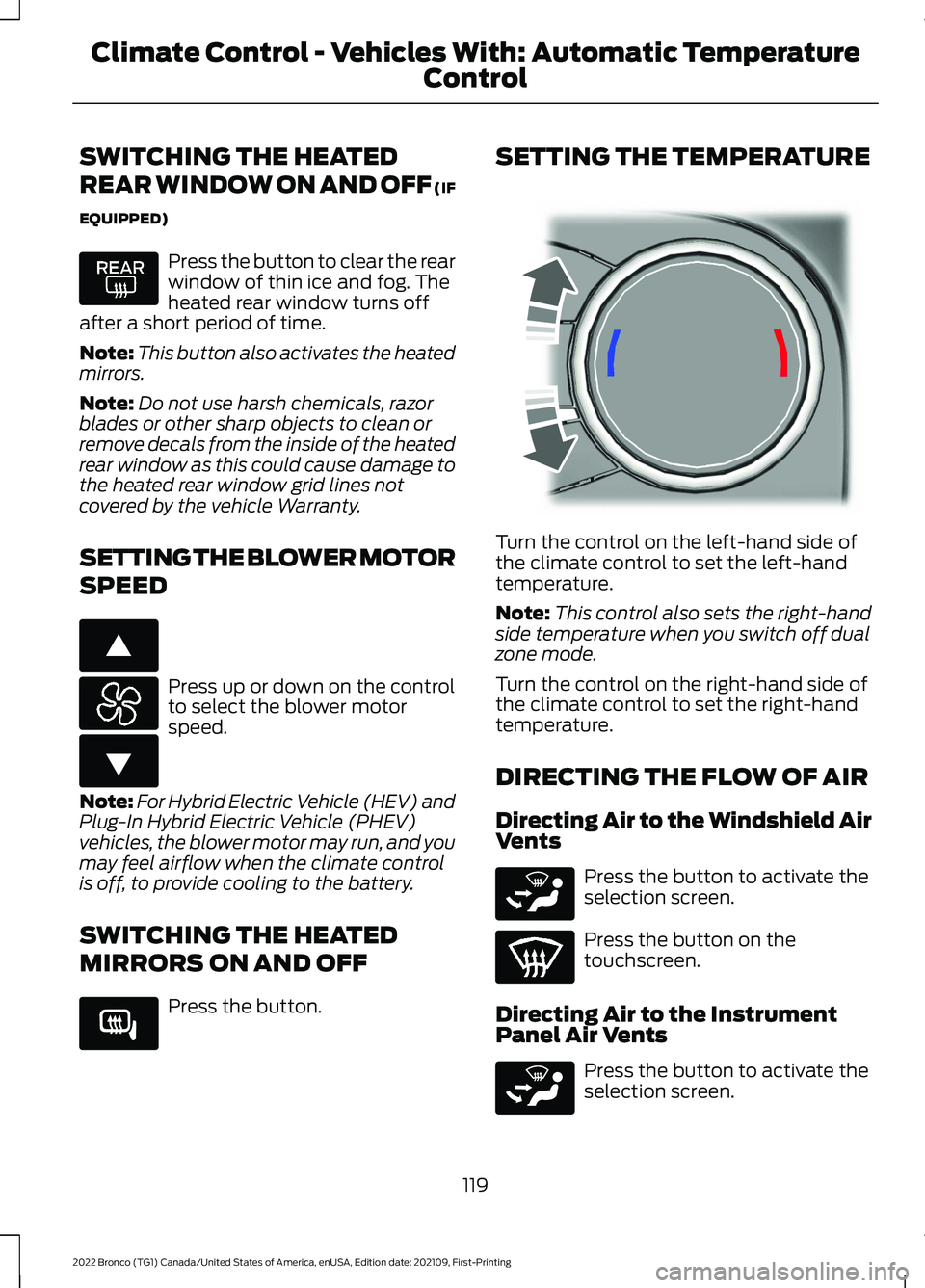
SETTING THE TEMPERATURE
Turn the control on the left-hand side ofthe climate control to set the left-handtemperature.
Note:This control also sets the right-handside temperature when you switch off dualzone mode.
Turn the control on the right-hand side ofthe climate control to set the right-handtemperature.
DIRECTING THE FLOW OF AIR
Directing Air to the Windshield AirVents
Press the button to activate theselection screen.
Press the button on thetouchscreen.
Directing Air to the InstrumentPanel Air Vents
Press the button to activate theselection screen.
119
2022 Bronco (TG1) Canada/United States of America, enUSA, Edition date: 202109, First-PrintingClimate Control - Vehicles With: Automatic Temperature
Control E266187 E266186 E266189 E244115 E265283 E265283