2022 CHEVROLET BOLT EV instrument panel
[x] Cancel search: instrument panelPage 205 of 316
Chevrolet BOLT EV Owner Manual (GMNA-Localizing-U.S./Canada-
15082216) - 2022 - CRC - 6/25/21
204 Driving and Operating
optimal temperature operating range to
maximize vehicle range. SeeProgrammable
Charging 090.
End Charge 1. Wait until the charging process has been fully stopped, the vehicle plug is
unlocked, and the Charging Status
Indicator is solid green or off.
If the vehicle plug does not unlock from
the vehicle charge port after a charge,
contact Roadside Assistance for
assistance. See Roadside Assistance
Program 0289.
2. Unplug the DC vehicle plug from the DC charge port on the vehicle and close the
dust cover.
3. Close the charge port door by pressing firmly in the center until it latches.
4. The Electric Parking Brake should be manually disengaged before driving the
vehicle.
5. To start another DC charge, remove the DC vehicle plug and reconnect.Delayed Charging Override
To temporarily override a delayed charge
event, unplug the charge cord from the
charge port and then plug it back in within
five seconds. A single audible chirp will
sound and charging will begin immediately.
To cancel a temporary override, unplug the
charge cord, wait for 10 seconds, and then
plug the charge cord back in. A double
audible chirp will sound and charging will be
delayed.
See Programmable Charging 090 for
advanced charge scheduling options.
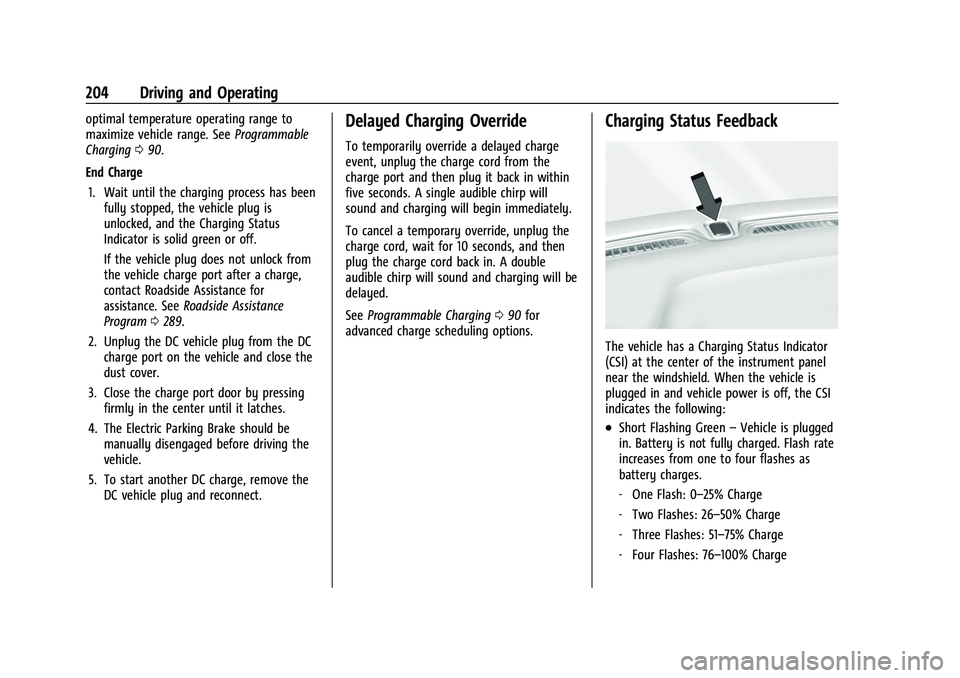
Charging Status Feedback
The vehicle has a Charging Status Indicator
(CSI) at the center of the instrument panel
near the windshield. When the vehicle is
plugged in and vehicle power is off, the CSI
indicates the following:
.Short Flashing Green –Vehicle is plugged
in. Battery is not fully charged. Flash rate
increases from one to four flashes as
battery charges.
‐ One Flash: 0–25% Charge
‐ Two Flashes: 26–50% Charge
‐ Three Flashes: 51–75% Charge
‐ Four Flashes: 76–100% Charge
Page 217 of 316
Chevrolet BOLT EV Owner Manual (GMNA-Localizing-U.S./Canada-
15082216) - 2022 - CRC - 6/25/21
216 Vehicle Care
Vehicle Care
General Information
General Information . . . . . . . . . . . . . . . . . . . 217
California Perchlorate MaterialsRequirements . . . . . . . . . . . . . . . . . . . . . . . . 217
Accessories and Modifications . . . . . . . . . . 217
Vehicle Checks
Doing Your Own Service Work . . . . . . . . . 217
Hood . . . . . . . . . . . . . . . . . . . . . . . . . . . . . . . . . . 218
Underhood Compartment Overview . . . 220
Cooling System . . . . . . . . . . . . . . . . . . . . . . . . 221
Washer Fluid . . . . . . . . . . . . . . . . . . . . . . . . . . 222
Brakes . . . . . . . . . . . . . . . . . . . . . . . . . . . . . . . . . 222
Brake Fluid . . . . . . . . . . . . . . . . . . . . . . . . . . . . 223
Battery - North America . . . . . . . . . . . . . . . 224
Park Brake and P (Park) Mechanism Check . . . . . . . . . . . . . . . . . . . . . . . . . . . . . . . . 225
Wiper Blade Replacement . . . . . . . . . . . . . 226
Windshield Replacement . . . . . . . . . . . . . . . 227
Gas Strut(s) . . . . . . . . . . . . . . . . . . . . . . . . . . . . 227
Headlamp Aiming
Front Headlamp Aiming . . . . . . . . . . . . . . . 228
Bulb Replacement
Bulb Replacement . . . . . . . . . . . . . . . . . . . . . 228
Halogen Bulbs . . . . . . . . . . . . . . . . . . . . . . . . . 229
LED Lighting . . . . . . . . . . . . . . . . . . . . . . . . . . . 229
Back-Up Lamps . . . . . . . . . . . . . . . . . . . . . . . . 229 License Plate Lamp . . . . . . . . . . . . . . . . . . . . 230
Electrical System
High Voltage Devices and Wiring . . . . . 230
Electrical System Overload . . . . . . . . . . . . . 231
Fuses and Circuit Breakers . . . . . . . . . . . . . 232
Underhood Compartment Fuse
Block . . . . . . . . . . . . . . . . . . . . . . . . . . . . . . . . 233
Instrument Panel Fuse Block . . . . . . . . . . 236
Wheels and Tires
Tires . . . . . . . . . . . . . . . . . . . . . . . . . . . . . . . . . . . 238
All-Season Tires . . . . . . . . . . . . . . . . . . . . . . . . 238
Winter Tires . . . . . . . . . . . . . . . . . . . . . . . . . . . 239
Self-Sealing Tires . . . . . . . . . . . . . . . . . . . . . . 239
Summer Tires . . . . . . . . . . . . . . . . . . . . . . . . . 239
Tire Sidewall Labeling . . . . . . . . . . . . . . . . . 240
Tire Designations . . . . . . . . . . . . . . . . . . . . . . 241
Tire Terminology and Definitions . . . . . . 241
Tire Pressure . . . . . . . . . . . . . . . . . . . . . . . . . . 243
Tire Pressure Monitor System . . . . . . . . . 244
Tire Pressure Monitor Operation . . . . . . 245
Tire Inspection . . . . . . . . . . . . . . . . . . . . . . . . 248
Tire Rotation . . . . . . . . . . . . . . . . . . . . . . . . . . 249
When It Is Time for New Tires . . . . . . . . 250
Buying New Tires . . . . . . . . . . . . . . . . . . . . . 250
Different Size Tires and Wheels . . . . . . . . 251
Uniform Tire Quality Grading . . . . . . . . . . 252
Wheel Alignment and Tire Balance . . . . 253
Wheel Replacement . . . . . . . . . . . . . . . . . . . 253
Tire Chains . . . . . . . . . . . . . . . . . . . . . . . . . . . . 254 If a Tire Goes Flat . . . . . . . . . . . . . . . . . . . . . 254
Tire Sealant and Compressor Kit . . . . . . . 255
Storing the Tire Sealant and
Compressor Kit . . . . . . . . . . . . . . . . . . . . . . 260
Jump Starting
Jump Starting - North America . . . . . . . . 260
Towing the Vehicle
Towing the Vehicle . . . . . . . . . . . . . . . . . . . . 263
Recreational Vehicle Towing . . . . . . . . . . . 265
Appearance Care
Exterior Care . . . . . . . . . . . . . . . . . . . . . . . . . . 266
Interior Care . . . . . . . . . . . . . . . . . . . . . . . . . . . 270
Floor Mats . . . . . . . . . . . . . . . . . . . . . . . . . . . . . 273
Page 219 of 316
Chevrolet BOLT EV Owner Manual (GMNA-Localizing-U.S./Canada-
15082216) - 2022 - CRC - 6/25/21
218 Vehicle Care
Warning (Continued)
High voltage components are identified
by labels. Do not remove, open, take
apart, or modify these components. High
voltage cable or wiring has orange
covering. Do not probe, tamper with, cut,
or modify high voltage cable or wiring.
{Warning
It can be dangerous to work on your
vehicle if you do not have the proper
knowledge, service manual, tools,
or parts. Always follow owner’s manual
procedures and consult the service
manual for your vehicle before doing any
service work.
If doing some of your own service work, use
the proper service manual. It tells you much
more about how to service the vehicle than
this manual can. To order the proper service
manual, see Publication Ordering
Information 0293.
This vehicle has an airbag system. Before
attempting to do your own service work,
see Servicing the Airbag-Equipped Vehicle
0 47. Keep a record with all parts receipts and list
the mileage and the date of any service
work performed. See
Maintenance Records
0 283.
Hood
{Warning
Components under the hood can get hot
from running the engine. To help avoid
the risk of burning unprotected skin,
never touch these components until they
have cooled, and always use a glove or
towel to avoid direct skin contact.
Clear any snow from the hood before
opening.
To open the hood: 1. Pull the hood release lever with the
isymbol. It is on the lower left side
of the instrument panel.
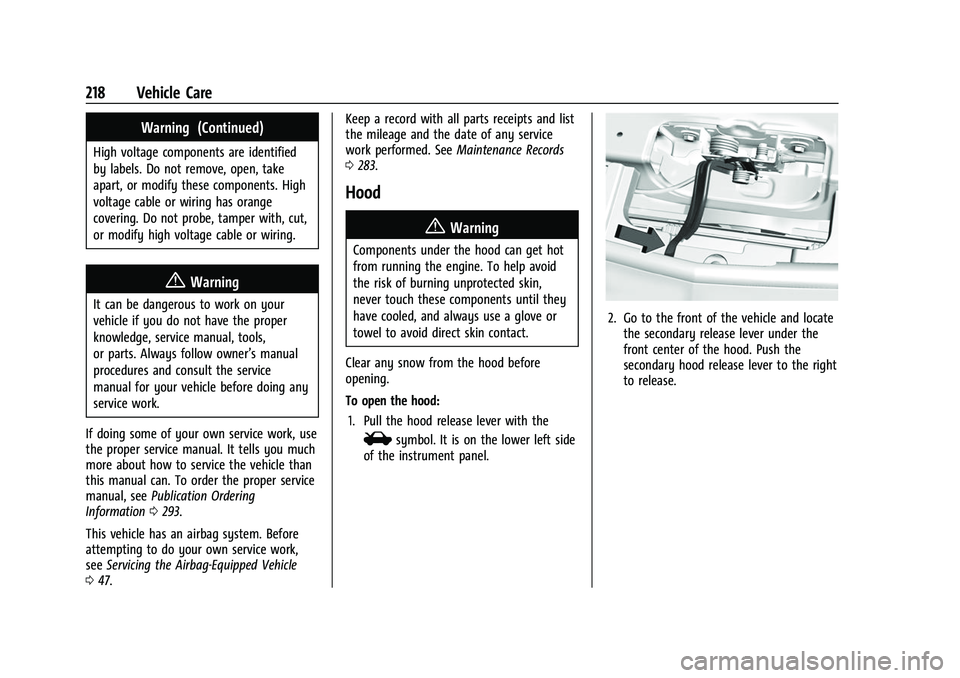
2. Go to the front of the vehicle and locate the secondary release lever under the
front center of the hood. Push the
secondary hood release lever to the right
to release.
Page 237 of 316
Chevrolet BOLT EV Owner Manual (GMNA-Localizing-U.S./Canada-
15082216) - 2022 - CRC - 6/25/21
236 Vehicle Care
FusesUsage
55 Rechargeable Energy
Storage System
Coolant Pump
56 –
57 Power Electronics
Coolant Pump
58 Engine Control Module
59 –
60 HVAC Electric Heater 61 On-board Charging Module
62 Transmission Range Control
Module 1
63 Electric Cooling Fan
64 Engine Control Module 65 Auxiliary Heater Pump
66 Powertrain 67 Drive Unit Controller
70 A/C Control Module 71 –
72 Transmission Range Control
Module Fuses
Usage
73 Single Power Inverter
Module
74 –
Relays Usage
6 Pedestrian Friendly Alert
Function
14 Liftgate 21 –
25 Powertrain
53 Run/Crank
68 Rear Window Defogger
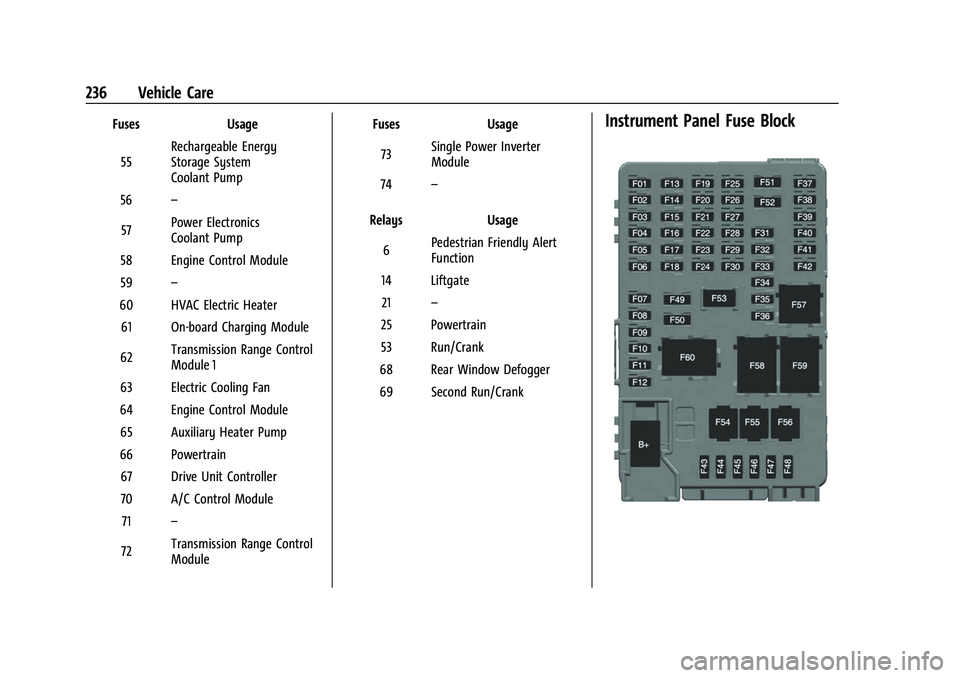
69 Second Run/CrankInstrument Panel Fuse Block
Page 238 of 316

Chevrolet BOLT EV Owner Manual (GMNA-Localizing-U.S./Canada-
15082216) - 2022 - CRC - 6/25/21
Vehicle Care 237
The instrument panel fuse block is on the
left side of the instrument panel. To access
the fuses, open the fuse panel door by
pulling out.
To reinstall the door, insert the top tab first,
then push the door back into its original
location.Fuses Usage
F01 Video Processing Module
F02 Indicator Light Solar Sensor
F03 Side Blind Zone Alert
F04 Passive Entry, Passive Start F05 CGM –Central Gateway
Module
F06 Body Control Module 4 F07 Body Control Module 3
F08 Body Control Module 2
F09 Body control module 1 F10 Police SSV F11 Amplifier
F12 Body Control Module 8
F13 Data Link Connector
F14 Parking Assist Fuses
Usage
F15 Headlamp LH
F16 Single Power Inverter Module 1
F17 Body Control Module 6
F18 Body Control Module 5
F19 –
F20 –
F21 –
F22 –
F23 USB
F24 Wireless Charging Module F25 Reflected LED Alert Display
F26 Heated Steering Wheel F27 CGM –Central Gateway
Module 2
F28 Instrument Cluster 2
F29 –
F30 –
F31 TCP –Telemetics Control
Platform (OnStar)
F32 – Fuses
Usage
F33 Heating, Ventilation, and Air Conditioning Module
F34 Heating, Ventilation and Air Conditioning Display/
Integrated Center Stack
F35 Instrument Cluster 1
F36 Center Stack Module F37 –
F38 –
F39 –
F40 –
F41 –
F42 –
F43 Body Control Module 7
F44 Sensing and Diagnostic Module
F45 Front Camera Module
F46 Vehicle Integration Control Module
F47 Single Power Inverter Module 2
F48 Headlamp RH
Page 273 of 316
Chevrolet BOLT EV Owner Manual (GMNA-Localizing-U.S./Canada-
15082216) - 2022 - CRC - 6/25/21
272 Vehicle Care
.For solid soils, remove as much as
possible prior to vacuuming.
To clean: 1. Saturate a clean, lint-free colorfast cloth with water. Microfiber cloth is
recommended to prevent lint transfer to
the fabric or carpet.
2. Remove excess moisture by gently wringing until water does not drip from
the cleaning cloth.
3. Start on the outside edge of the soil and gently rub toward the center. Fold the
cleaning cloth to a clean area frequently
to prevent forcing the soil into the
fabric.
4. Continue gently rubbing the soiled area until there is no longer any color
transfer from the soil to the cleaning
cloth.
5. If the soil is not completely removed, use a mild soap solution followed only
by plain water.
If the soil is not completely removed, it may
be necessary to use a commercial upholstery
cleaner or spot lifter. Test a small hidden
area for colorfastness before using a commercial upholstery cleaner or spot lifter.
If ring formation occurs, clean the entire
fabric or carpet.
After cleaning, use a paper towel to blot
excess moisture.
Cleaning High Gloss Surfaces and Vehicle
Information and Radio Displays
Use a microfiber cloth on high gloss surfaces
or vehicle displays. First, use a soft bristle
brush to remove dirt that can scratch the
surface. Then gently clean by rubbing with a
microfiber cloth. Never use window cleaners
or solvents. Periodically hand wash the
microfiber cloth separately, using mild soap.
Do not use bleach or fabric softener. Rinse
thoroughly and air dry before next use.
Caution
Do not attach a device with a suction cup
to the display. This may cause damage
and would not be covered by the vehicle
warranty.
Instrument Panel, Leather, Vinyl, Other
Plastic Surfaces, Low Gloss Paint
Surfaces, and Natural Open Pore Wood
Surfaces
Use a soft bristle brush to remove dust from
knobs and crevices on the instrument
cluster. Use a soft microfiber cloth
dampened with water to remove dust and
loose dirt. For a more thorough cleaning,
use a soft microfiber cloth dampened with a
mild soap and water solution.
Caution
Soaking or saturating leather, especially
perforated leather, as well as other
interior surfaces, may cause permanent
damage. Wipe excess moisture from
these surfaces after cleaning and allow
them to dry naturally. Never use heat,
steam, or spot removers. Do not use
liquids that contain alcohol or solvents on
leather seats. Do not use cleaners that
contain silicone or wax-based products.
Cleaners containing these solvents can
permanently change the appearance and
feel of leather or soft trim, and are not
recommended.
Page 274 of 316
Chevrolet BOLT EV Owner Manual (GMNA-Localizing-U.S./Canada-
15082216) - 2022 - CRC - 6/25/21
Vehicle Care 273
Do not use cleaners that increase gloss,
especially on the instrument panel. Reflected
glare can decrease visibility through the
windshield under certain conditions.
Caution
Use of air fresheners may cause
permanent damage to plastics and
painted surfaces. If an air freshener
comes in contact with any plastic or
painted surface in the vehicle, blot
immediately and clean with a soft cloth
dampened with a mild soap solution.
Damage caused by air fresheners would
not be covered by the vehicle warranty.
Cargo Cover and Convenience Net
If equipped, wash with warm water and
mild detergent. Do not use chlorine bleach.
Rinse with cold water, and then dry
completely.
Care of Seat Belts
Keep belts clean and dry.
{Warning
Do not bleach or dye seat belt webbing.
It may severely weaken the webbing. In
a crash, they might not be able to
provide adequate protection. Clean and
rinse seat belt webbing only with mild
soap and lukewarm water. Allow the
webbing to dry.
Floor Mats
{Warning
If a floor mat is the wrong size or is not
properly installed, it can interfere with
the pedals. Interference with the pedals
can cause unintended acceleration and/or
increased stopping distance which can
cause a crash and injury. Make sure the
floor mat does not interfere with the
pedals.
Use the following guidelines for proper floor
mat use.
.The original equipment floor mats are
designed for your vehicle. If the floor
mats need to be replaced, it is
recommended that GM-certified floor mats are purchased. Non-GM floor mats
may not fit properly and may interfere
with the pedals. Always check that the
floor mats do not interfere with the
pedals.
.Do not use a floor mat if the vehicle is
not equipped with a floor mat retainer on
the driver side floor.
.Use the floor mat with the correct side
up. Do not turn it over.
.Do not place anything on top of the
driver side floor mat.
.Use only a single floor mat on the
driver side.
.Do not place one floor mat on top of
another.
Removing and Replacing the Floor Mats
Pull up on the rear of the floor mat to
unlock each retainer and remove.
Page 285 of 316

Chevrolet BOLT EV Owner Manual (GMNA-Localizing-U.S./Canada-
15082216) - 2022 - CRC - 6/25/21
284 Technical Data
Technical Data
Vehicle Identification
Vehicle Identification Number (VIN) . . . 284
Service Parts Identification . . . . . . . . . . . . 284
Vehicle Data
Capacities and Specifications . . . . . . . . . . 285
Vehicle Identification
Vehicle Identification
Number (VIN)
This legal identifier is in the front corner of
the instrument panel, on the driver side of
the vehicle. It can be seen through the
windshield from outside. The Vehicle
Identification Number (VIN) also appears on
the Vehicle Certification label and certificates
of title and registration.
Engine Identification
The eighth character in the VIN is the
engine code. This code identifies the
vehicle's engine, specifications, and
replacement parts. See“Engine
Specifications” underCapacities and
Specifications 0285 for the vehicle's
engine code.
Service Parts Identification
There may be a large barcode on the
certification label on the center pillar that
you can scan for the following information:
.Vehicle Identification Number (VIN)
.Model designation
.Paint information
.Production options
If there is not a large barcode on this label,
then you will find this same information on
a label inside of the trunk.