2022 CADILLAC ESCALADE remote control
[x] Cancel search: remote controlPage 148 of 508

Cadillac Escalade Owner Manual (GMNA-Localizing-U.S./Canada/Mexico-
15567102) - 2022 - CRC - 11/18/21
INSTRUMENTS AND CONTROLS 147
Suspension
Touch and the following may display:
.Service Mode
.Alignment Mode
Service Mode
This feature disables the air
suspension system and is used to
prevent unintended raising or
lowering of the suspension.
Touch Off or On.
Alignment Mode
This feature will optimize the vehicle
height to provide the most accurate
wheel alignment.
Touch Off or On.
Remote Key Relearn
This sets up a new or forgotten key
for use in the vehicle. Place the key in
the transmitter pocket. Make sure
vehicle is parked and touch Start.
Universal Remote
System
See Radio Frequency Statement 0481.
Universal Remote System
Programming
If equipped, these buttons are in the
overhead console.
This system can replace up to three
remote control transmitters used to
activate devices such as garage door
openers, security systems, and home
automation devices. These instructions refer to a garage door
opener, but can be used for other
devices.
Do not use the Universal Remote
system with any garage door opener
that does not have the stop and
reverse feature. This includes any
garage door opener model
manufactured before April 1, 1982.
Keep the original hand-held
transmitter for use in other vehicles
as well as for future programming.
Erase the programming when vehicle
ownership is terminated. See
“Erasing
Universal Remote System Buttons”
later in this section.
To program a garage door opener,
park outside directly in line with and
facing the garage door opener receiver.
Clear all people and objects near the
garage door.
Make sure the hand-held transmitter
has a new battery for quick and
accurate transmission of the
radio-frequency signal.
Page 149 of 508
Cadillac Escalade Owner Manual (GMNA-Localizing-U.S./Canada/Mexico-
15567102) - 2022 - CRC - 11/18/21
148 INSTRUMENTS AND CONTROLS
Programming the Universal
Remote System
The Universal Remote system is
compatible with radio-frequency
devices operating between
433-434 MHz.
Programming involves time-sensitive
actions and may time out, requiring
the procedure to be repeated. Read
these instructions completely before
programming the Universal Remote
system. It may help to have another
person assist with the programming
process.1. Hold the end of the hand-held transmitter about 3 to 8 cm (1 to
3 in) away from the Universal
Remote system buttons with the
indicator light in view. The
hand-held transmitter was supplied
by the manufacturer of the garage
door opener receiver.
2. Press and release one of the three Universal Remote system buttons
to be programmed. Press and hold
the hand-held transmitter button.
Do not release the hand-held
transmitter button until the
indicator light changes from a slow to a rapid flash or continuous light.
Then release the hand-held
transmitter button.
Some garage door openers may
require substitution of Step 2 with
the procedure under
“Radio Signals
for Some Gate Operators ”later in
this section.
3. Press and hold the newly programmed Universal Remote
system button for five seconds
while watching the indicator light
and garage door activation.
.If the indicator light stays on
continuously or the garage door
moves when the button is
pressed, then programming is
complete. There is no need to
complete Steps 4–6.
.If the indicator light does not
come on or the garage door does
not move, a second button press
may be required. For a second
time, press and hold the newly
programmed button for
five seconds. If the indicator
light stays on continuously or
the garage door moves when the
button is pressed, then programming is complete. There
is no need to complete
Steps 4–6.
.If the garage door does not
move, continue with
programming Steps 4–6.
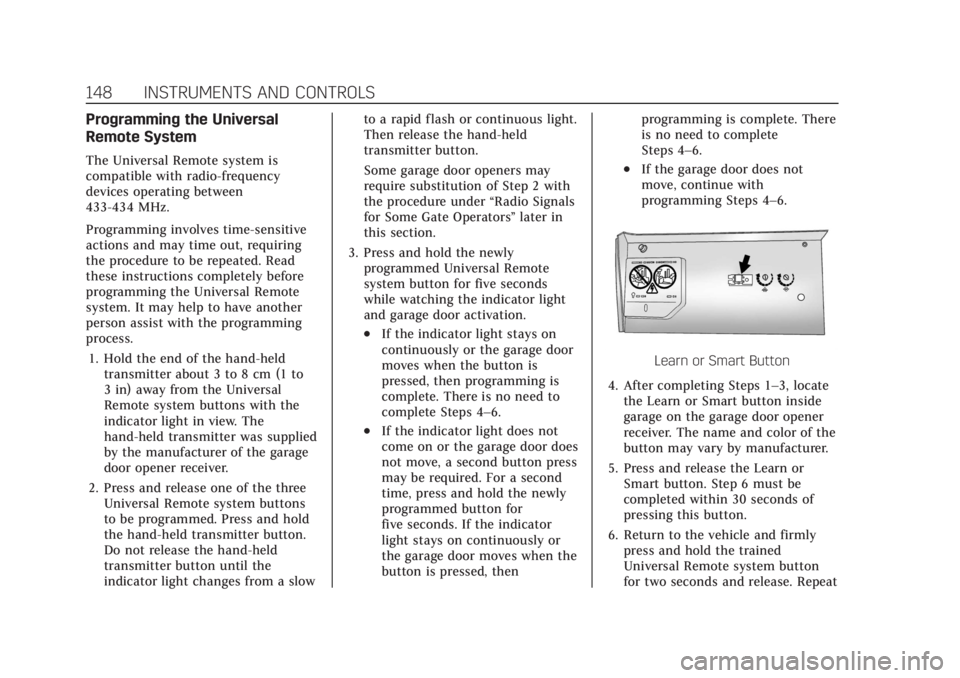
Learn or Smart Button
4. After completing Steps 1–3, locate the Learn or Smart button inside
garage on the garage door opener
receiver. The name and color of the
button may vary by manufacturer.
5. Press and release the Learn or Smart button. Step 6 must be
completed within 30 seconds of
pressing this button.
6. Return to the vehicle and firmly press and hold the trained
Universal Remote system button
for two seconds and release. Repeat
Page 150 of 508

Cadillac Escalade Owner Manual (GMNA-Localizing-U.S./Canada/Mexico-
15567102) - 2022 - CRC - 11/18/21
INSTRUMENTS AND CONTROLS 149
the“press/hold/release ”sequence
up to three times to complete the
training process.
The Universal Remote system should
now activate the garage door. Repeat
the process for programming the
remaining two buttons.
For questions or programming help,
see www.homelink.com/gm or call
1-800-355-3515. For calls placed
outside the U.S., Canada, or Puerto
Rico, international rates will apply and
may differ based on landline or mobile
phone.
Radio Signals for Some Gate
Operators
Some gate operators and
radio-frequency laws require
transmitter signals to time out or quit
after several seconds of transmission.
This may not be long enough for the
Universal Remote system to pick up
the signal during programming.
If the programming did not work,
replace Step 2 under “Programming
the Universal Remote System ”with
the following: Press and hold the Universal Remote
system button while pressing and
releasing the hand-held transmitter
button every two seconds until the
signal has been successfully accepted
by the Universal Remote system. The
Universal Remote system indicator
light will flash slowly at first and then
change to a rapid flash or continuous
solid-light. Proceed with Step 3 under
“Programming the Universal Remote
System
”to complete.
Universal Remote System
Operation
Using the Universal Remote
System
Press and hold the appropriate
Universal Remote system button for at
least one-half second. The indicator
light will come on while the signal is
being transmitted.
Erasing Universal Remote
System Buttons
Erase all programmed buttons when
vehicle ownership is terminated. To erase:
1. Press and hold the two outside buttons until the indicator light
begins to flash. This should take
about 10 seconds.
2. Release both buttons.
Reprogramming a Single
Universal Remote System Button
To reprogram any of the system
buttons: 1. Press and hold any one of the buttons. Do not release the button.
2. The indicator light will begin to flash after 20 seconds. Without
releasing the button, proceed with
Step 1 under “Programming the
Universal Remote System.”
Page 158 of 508

Cadillac Escalade Owner Manual (GMNA-Localizing-U.S./Canada/Mexico-
15567102) - 2022 - CRC - 11/17/21
LIGHTING 157
Dome Lamps
There are dome lamps in the overhead
console and the headliner.
To change the dome lamp settings,
press the following:
jOFF :Press to turn off the dome
lamps when any door is opened,
Kon
the RKE tansmitter is pressed,
or when the ignition is switched off.
An indicator light on the button will
turn on when the dome lamp override
is activated. Press
jOFF again to
deactivate this feature and the
indicator light will turn off. The dome
lamps will come on when any door is opened,
Kon the RKE transmitter is
pressed, or when the ignition is
switched off.
Press and hold any of the overhead
console lens to turn all dome lamps
on or off manually.
Reading Lamps
There are reading lamps in the
overhead console and the headliner,
if equipped.
These lamps come on automatically
when any door is opened,
Kon the
RKE transmitter is pressed, or when
the ignition is switched off. To operate, the ignition must be on or
in ACC/ACCESSORY or using Retained
Accessory Power (RAP).
Press the lens on each reading lamp to
turn it on and off.
Lighting Features
Entry Lighting
The interior lamps turn on when
pressing
Kon the remote key or
opening any doors, and the dome
lamp control is in the DOOR position.
Some exterior lamps also turn on
when pressing
Kon the remote key or
opening any doors. Low-Beam lamps
will only turn on briefly at night, or in
areas with limited lighting.
Page 159 of 508

Cadillac Escalade Owner Manual (GMNA-Localizing-U.S./Canada/Mexico-
15567102) - 2022 - CRC - 11/17/21
158 LIGHTING
All lamps will gradually fade out after
about 30 seconds.
Entry lighting can be disabled
manually by closing all doors, pressing
Qon the remote key, or starting the
vehicle.
This feature can be changed. See
“Vehicle Locator Lights” underVehicle
Personalization 0140.
Exit Lighting
Some exterior lamps and interior
lamps turn on when the driver door is
opened after the ignition is turned off.
The interior lights turn on when the
ignition is turned off.
The exterior and interior lamps
remain on for a set amount of time,
then automatically turn off.
The exterior lamps turn off
immediately by turning the exterior
lamp control off.
This feature can be changed. See
Vehicle Personalization 0140.
Battery Load Management
The vehicle has Electric Power
Management (EPM), which estimates
the battery's temperature and state of
charge. It then adjusts the voltage for
best performance and extended life of
the battery.
When the battery's state of charge is
low, the voltage is raised slightly to
quickly bring the charge back up.
When the state of charge is high, the
voltage is lowered slightly to prevent
overcharging. The voltmeter gauge or
the voltage display on the Driver
Information Center (DIC), if equipped,
may show the voltage moving up or
down. This is normal. If there is a
problem, an alert will be displayed.
The battery can be discharged at idle
if the electrical loads are very high.
This is true for all vehicles. This is
because the generator (alternator)
may not be spinning fast enough at
idle to produce all the power that is
needed for very high electrical loads.
A high electrical load occurs when
several of the following are on, such
as: headlamps, high beams, fog lamps, rear window defogger, climate control
fan at high speed, heated seats, engine
cooling fans, trailer loads, and loads
plugged into accessory power outlets.
EPM works to prevent excessive
discharge of the battery. It does this
by balancing the generator's output
and the vehicle's electrical needs.
It can increase engine idle speed to
generate more power, whenever
needed. It can temporarily reduce the
power demands of some accessories.
Normally, these actions occur in steps
or levels, without being noticeable. In
rare cases at the highest levels of
corrective action, this action may be
noticeable to the driver. If so, a DIC
message might be displayed and it is
recommended that the driver reduce
the electrical loads as much as
possible.
Battery Power Protection
This feature helps prevent the battery
from being drained, if the interior
courtesy lamps or reading lamps are
accidentally left on. If any of these
lamps are left on, they automatically
turn off after 10 minutes, if the
Page 208 of 508

Cadillac Escalade Owner Manual (GMNA-Localizing-U.S./Canada/Mexico-
15567102) - 2022 - CRC - 11/17/21
INFOTAINMENT SYSTEM 207
.Wi-Fi Password: Select to change
the vehicle’s Wi-Fi network
password.
.Connected Phones: Select to show a
list of the vehicle’s currently
connected phones.
.Data Updating: Select to show the
data plan details including the
amount of data remaining.
Networks
This will show connected and
available Wi-Fi networks.
If a 4G LTE data package is not active
on the vehicle, the infotainment
system can be connected to an
external protected Wi-Fi network,
such as a mobile device or home
hotspot, to utilize connected services.
Device Remote Access
Touch and the following may display:
.Remote Access: Select to control
devices with an installed OnStar app
linked to this vehicle by USB or the
Wi-Fi hotspot.
Language
This will set the display language used
on the infotainment display and
instrument cluster. It may also use the
selected language for voice
recognition and audio feedback. Select
from the available languages.
Privacy
Touch and the following may display:
.Location Services: Select to allow
apps and services to identify the
vehicle location.
.Voice Recognition Sharing: Select to
send voice sessions to a cloud-based
voice recognition system.
.Types: This setting lists permissions
considered sensitive by Android,
and the apps that are currently
allowed to use each permission.
.Used By Applications: This setting
lists each application and its
allowed permissions.
Software Updates
If equipped, the vehicle can download
and install select software updates
over a wireless connection. The
system will prompt for certain updates to be downloaded and
installed. There is also an option to
check for updates manually.
To manually check for updates, touch
Settings on the Home Page and select
the System tab. Follow the on-screen
prompts. There are two options
available under Software Updates,
"Check for Updates" and "Previous
Updates". Selecting "Check for
Updates", will check and list if any
updates are available for this vehicle.
"No updates available" will display if
there is no update available. Selecting
"Previous Updates" will list all the
previous SW version(s) installed in the
vehicle. The steps to check for,
download, and install updates may
vary by vehicle.
The vehicle can be used normally
during the software download. Once
the download is complete, there may
be a prompt to accept the installation
of the update upon the next ignition
cycle or the next time the vehicle is
shifted into P (Park). For most
updates, the vehicle will be disabled
and cannot be driven during the
installation. The system will deliver
Page 225 of 508

Cadillac Escalade Owner Manual (GMNA-Localizing-U.S./Canada/Mexico-
15567102) - 2022 - CRC - 11/17/21
224 CLIMATE CONTROLS
Rear Window Defogger
K:Press to turn the rear window
defogger on or off. An indicator light
on the button comes on to show that
the rear window defogger is on.
The rear window defogger only works
when the ignition is on. The defogger
turns off if the ignition is turned off
or to ACC/ACCESSORY.
The rear window defogger can be set
to automatic operation. When Auto
Rear Defog is selected, the rear
window defogger turns on
automatically when the vehicle is first
started in cold weather and turns off
when the vehicle is warmed. To turn
Auto Rear Defog on or off, see
“Climate and Air Quality” under
Vehicle Personalization 0140.
The heated outside rearview mirrors
turn on when the rear window
defogger button is on and help to
clear fog or frost from the surface of
the mirrors.
Caution
Do not try to clear frost or other
material from the inside of the
front windshield and rear window
with a razor blade or anything else
that is sharp. This may damage the
rear window defogger grid and
affect the radio's ability to pick up
stations clearly. The repairs would
not be covered by the vehicle
warranty.
Driver and Passenger Heated and
Cooled Seats : Press
Ior+to heat
the driver or passenger seatback only.
Press
Jorzto heat the driver or
passenger seat cushion and seatback.
Press
Cor{to cool the driver or
passenger seat.
There are also auto heated and cooled
seats, for more information see Heated
and Ventilated Front Seats 048. Remote Start Climate Control
Operation :
The climate control
system may run when the vehicle is
started remotely. The rear defog may
come on during remote start based on
cold ambient conditions. The rear
defog indicator light does not come on
during a remote start. If equipped
with heated or cooled seats, they may
come on during a remote start. See
Remote Vehicle Start 013 and
Heated and Ventilated Front Seats 048.
Sensor
Page 284 of 508

Cadillac Escalade Owner Manual (GMNA-Localizing-U.S./Canada/Mexico-
15567102) - 2022 - CRC - 11/17/21
DRIVING AND OPERATING 283
ACC Automatically Disengages
ACC may automatically disengage and
the driver will need to manually apply
the brakes to slow the vehicle if:
.The sensors are blocked.
.The Traction Control System (TCS)
or Stabilitrack/ESC has activated or
been disabled.
.There is a fault in the system.
.The radar falsely reports blockage
when driving in a desert or remote
area with no other vehicles or
roadside objects.
.A DIC message may display to
indicate that ACC is temporarily
unavailable.
The ACC active symbol will turn white
when ACC is no longer active.
In some cases, when ACC is
temporarily unavailable, regular cruise
control may be used. See “Switching
Between ACC and Regular Cruise
Control ”previously in this section.
Always consider driving conditions
before using either cruise control
system. Notification to Resume ACC
ACC will maintain a following gap
behind a detected vehicle and slow
your vehicle to a stop behind that
vehicle.
If the stopped vehicle ahead has
driven away and ACC has not
resumed, the vehicle ahead indicator
will flash as a reminder to check
traffic ahead before proceeding. In
addition, the left and right sides of the
Safety Alert Seat will pulse three
times, or three beeps will sound. See
“Alert Type
”and “Adaptive Cruise Go
Notifier” in“Collision/Detection
Systems” underVehicle Personalization
0 140.
When the vehicle ahead drives away,
ACC resumes automatically if the stop
was brief. If necessary, press RES+ or
the accelerator pedal to resume ACC.
If stopped for more than two minutes
or if the driver door is opened and the
driver seat belt is unbuckled, the ACC
automatically applies the Electric
Parking Brake (EPB) to hold the
vehicle. The EPB status light will turn on. See
Electric Parking Brake 0262.
To release the EPB, press the
accelerator pedal.
A DIC warning message may display
indicating to shift to P (Park) before
exiting the vehicle. See Vehicle
Messages 0139.
{Warning
If ACC has stopped the vehicle, and
if ACC is disengaged, turned off,
or canceled, the vehicle will no
longer be held at a stop. The vehicle
can move. When ACC is holding the
vehicle at a stop, always be
prepared to manually apply the
brakes.
{Warning
Leaving the vehicle without placing
it in P (Park) can be dangerous. Do
not leave the vehicle while it is
being held at a stop by ACC. Always
place the vehicle in P (Park) and
turn off the ignition before leaving
the vehicle.