Page 167 of 712

166
Controls
Operating the Switches Around the Steering Wheel
ENGINE START/STOP Button
■Changing the Power Mode1ENGINE START/STOP Button
ENGINE START/STOP Button Operating Range
You can start the engine when the keyless access
remote is inside the vehicle.
The engine may also run if the keyless access remote
is close to the door or window, even if it is outside the
vehicle.
ON mode:
The ENGINE START/STOP button is on (in red), if the
engine is running.
If the battery of the keyless access remote is getting
low, the engine may not start when you press the
ENGINE START/STOP button. If the engine does not
start, refer to the following link. 2 If the Keyless Access Remote Battery is
Weak P. 663
Do not leave the power mode in ACCESSORY or ON
when you get out.
Operating Range
VEHICLE OFF (LOCK)
The button is off.
The power to all electrical components is turned off.
ACCESSORY
The button blinks (in red).
Operate the audio system and other accessories in this
position.
ON
The button blinks (in red).
All electrical components can be used.
Press the button. Without pressing
the brake pedal
22 ACURA MDX-31TYA6000_02.book 166 ページ 2020年11月5日 木曜日 午前11時39分
Page 168 of 712
167
uuOperating the Switches Around the Steering Wheel uENGINE START/STOP Button
Continued
Controls
If you leave the vehicle for 30 to 60 minutes with the transmission in (P and the
power mode in ACCESSORY, the vehicle automa tically goes into the mode similar to
VEHICLE OFF (LOCK) to avoid draining the battery.
If you open the driver’s door when the pow er mode is set to ACCESSORY, a warning
beep sounds.
■Automatic Power Off
■Power Mode Reminder
22 ACURA MDX-31TYA6000_02.book 167 ページ 2020年11月5日 木曜日 午前11時39分
Page 172 of 712

Continued171
uuOperating the Switches Around the Steering Wheel uLight Switches
Controls
Automatic lighting control can be used when
the power mode is in ON.
When the light switch is in AUTO, the
headlights and other exterior lights will switch
on and off automatically depending on the
ambient brightness.
The headlights come on when you unlock a
door in dark areas with the headlight switch in
AUTO .
u Once you lock the door, the headlights
will go off.
■Automatic Operation (automatic lighting control)1 Automatic Operation (aut omatic lighting control)
We recommend that you tu rn on the lights manually
when driving at night, in a de nse fog, or in dark areas
such as long tunnels or parking facilities.
The light sensor is in the location shown below.
Do not cover this light sensor with anything;
otherwise, the automatic lighting system may not
work properly.
Light Sensor
Models with automatic
intermittent wipers
Models without automatic
intermittent wipers
Light Sensor
22 ACURA MDX-31TYA6000_02.book 171 ページ 2020年11月5日 木曜日 午前11時39分
Page 173 of 712

uuOperating the Switches Around the Steering Wheel uLight Switches
172
Controls
The headlights automatically come on when the wipers are used several times within
a certain number of intervals wi th the headlight switch in AUTO.
The headlights automatically go off a few minutes later if the wipers are stopped.
The headlights, all other exterior lights, an d the instrument panel lights turn off 15
seconds after you set the power mode to VE HICLE OFF, take the remote with you,
and close the driver’s door.
If you set the power mode to VEHICLE OFF with the headlight switch on, but do not
open the door, the lights turn off after 10 minutes (3 minutes, if the switch is in the
AUTO position).
The lights turn on again when you unlock or open the driver’s door. If you unlock
the door, but do not open it within 15 seconds, the lights go off. If you open the
driver’s door, you will hear a reminder chime alerting you that the lights are on.
■Headlight Integration with Wiper
■Automatic Lighting Off Feature
1Automatic Operation (aut omatic lighting control)
You can adjust the auto li ght sensitivity as follows:
2 Customized Features P. 345
SettingThe exterior lights come on
when the ambient light is at
Max
High
Mid
Low
Min
U.S. models
Bright
Dark
1 Headlight Integration with Wiper
This feature activates while the headlights are off in
AUTO .
The instrument panel br ightness does not change
when the headlights come on.
At dark ambient light levels, the automatic lighting
control feature turns on the headlights, regardless of
the number of wiper sweeps.
You can turn the headlight integration with wipers
function on and off. 2 Customized Features P. 345
1Automatic Lighting Off Feature
You can change the headlight auto off timer setting.
2 Customized Features P. 345
22 ACURA MDX-31TYA6000_02.book 172 ページ 2020年11月5日 木曜日 午前11時39分
Page 184 of 712
183
uuOperating the Switches Around the Steering Wheel uDriving Position Memory System
Continued
Controls
Driving Position Memory System
You can store three driver’s seat, front passenger’s seat*, steering wheel*1 and door
mirror*1 positions with the drivin g position memory system.
When you unlock and open the driver’s door with a remote transmitter, or keyless
access system, door mirrors adjust to one of the three preset positions
*1 and the seat
adjusts to retracted position s of one of the three preset positions automatically.
The steering wheel and the seat will move to the stored position when you set the
power mode to ACCESSORY
*1.
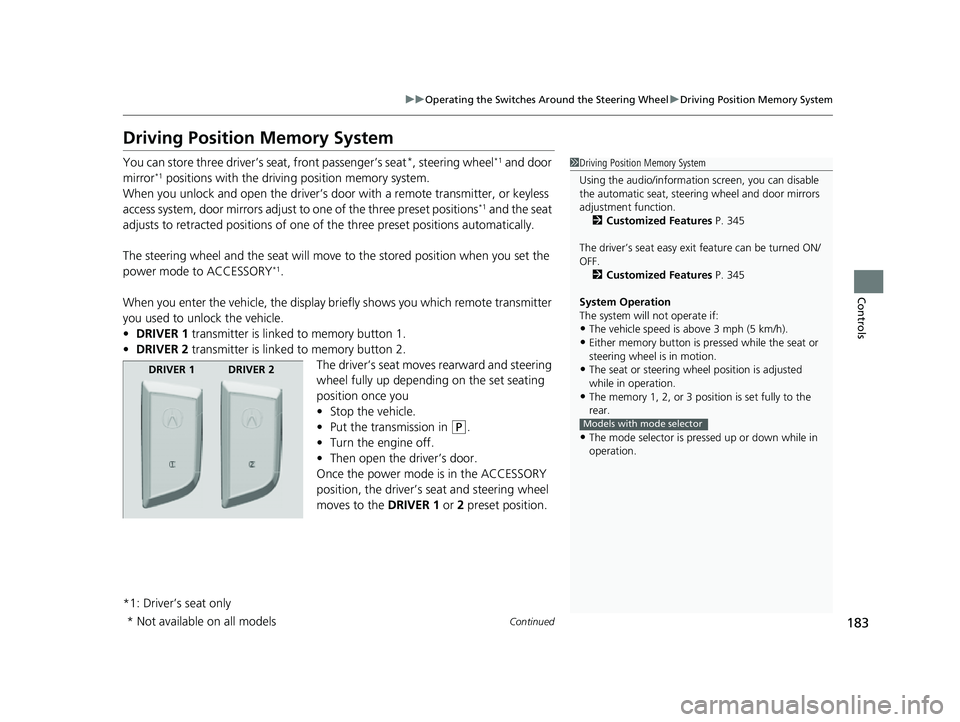
When you enter the vehicle, the display briefly shows you which remote transmitter
you used to unlock the vehicle.
• DRIVER 1 transmitter is linked to memory button 1.
• DRIVER 2 transmitter is linked to memory button 2.
The driver’s seat moves rearward and steering
wheel fully up depending on the set seating
position once you
•Stop the vehicle.
• Put the transmission in
(P.
• Turn the engine off.
• Then open the driver’s door.
Once the power mode is in the ACCESSORY
position, the driver’s s eat and steering wheel
moves to the DRIVER 1 or 2 preset position.
*1: Driver’s seat only
1 Driving Position Memory System
Using the audio/informati on screen, you can disable
the automatic seat, steeri ng wheel and door mirrors
adjustment function. 2 Customized Features P. 345
The driver’s seat easy exit feature can be turned ON/
OFF. 2 Customized Features P. 345
System Operation
The system will not operate if:
•The vehicle speed is above 3 mph (5 km/h).•Either memory button is pr essed while the seat or
steering wheel is in motion.
•The seat or steering wheel position is adjusted
while in operation.
•The memory 1, 2, or 3 position is set fully to the
rear.
•The mode selector is pressed up or down while in
operation.
Models with mode selector
DRIVER 1 DRIVER 2
* Not available on all models
22 ACURA MDX-31TYA6000_02.book 183 ページ 2020年11月5日 木曜日 午前11時39分
Page 190 of 712
189
uuMirrors uPower Door Mirrors
Controls
■Folding in th e door mirrors
Lock the driver’s door using the key, press the lock button on the remote
transmitter, or touch the door lock sensor on any door. u The mirrors start folding in automatically.
■Folding out the door mirrors
Unlock the driver’s door using the key, press the unlock button on the remote
transmitter, or grab the door handle on any door.
u The mirrors start folding out automatically.
■Automatic Folding Door Mirror Function*1Automatic Folding Door Mirror Function*
If you use the fold button to fold the door mirrors,
the auto folding door mirror function will not work.
You can turn the automa tic folding door mirror
function on and off.
2 Customized Features P. 345
Door mirrors will not fold automatically when locking
from inside the vehicle usi ng lock tab or master door
lock switch.
* Not available on all models
22 ACURA MDX-31TYA6000_02.book 189 ページ 2020年11月5日 木曜日 午前11時39分
Page 196 of 712
195
uuSeats uSecond Row Seats
Continued
Controls
Second Row Seats
■Adjusting the Seat Positions1Second Row Seats
Once a seat is adjusted co rrectly, rock it back and
forth to make sure it is locked in position.
3WARNING
An unsecured seat or seat-back can move
out of position or collapse without warning
if there is sudden acce leration or stop or in
a crash.
A seat or seat-back that suddenly moves or
collapses can result in severe injury or
death.
Always make sure all seats and seat-backs
are securely locked in to position before
driving.
Seat-back Angle
Adjustment
Pull up the strap to
change the angle.
Horizontal Position Adjustment
Pull up the bar to move the seat, then
release the bar.
Seat-back Angle
Adjustment
Pull up the lever to
change the angle.
22 ACURA MDX-31TYA6000_02.book 195 ページ 2020年11月5日 木曜日 午前11時39分
Page 197 of 712
uuSeats uSecond Row Seats
196
Controls
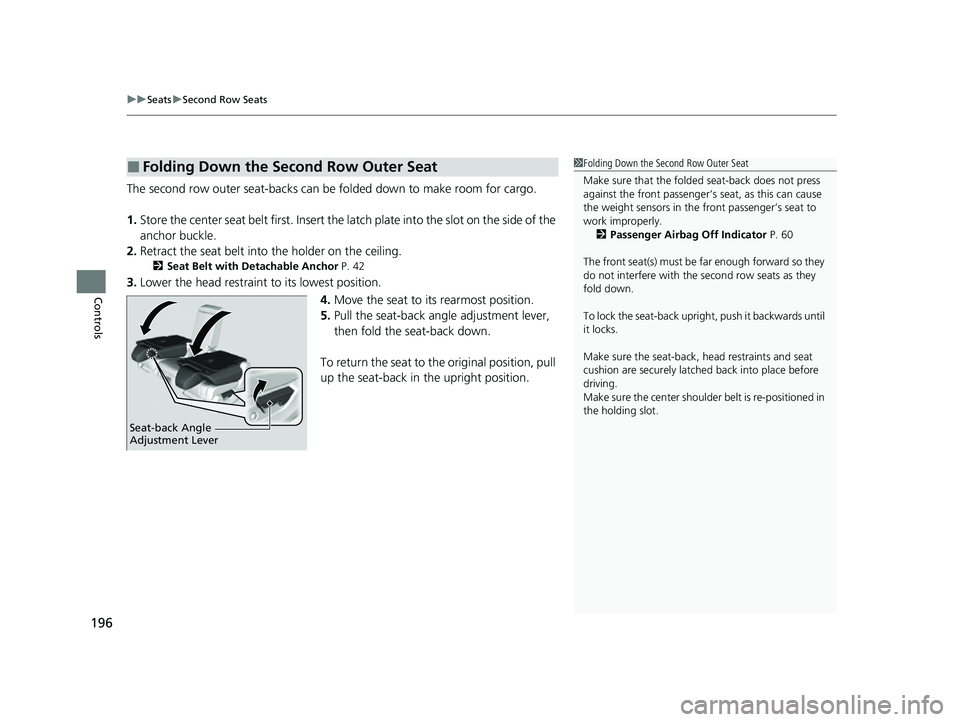
The second row outer seat-backs can be folded down to make room for cargo.
1. Store the center seat belt first. Insert the la tch plate into the slot on the side of the
anchor buckle.
2. Retract the seat belt into the holder on the ceiling.
2 Seat Belt with Detachable Anchor P. 42
3.Lower the head restraint to its lowest position.
4.Move the seat to it s rearmost position.
5. Pull the seat-back angle adjustment lever,
then fold the seat-back down.
To return the seat to th e original position, pull
up the seat-back in the upright position.
■Folding Down the Second Row Outer Seat1Folding Down the Second Row Outer Seat
Make sure that the folded seat-back does not press
against the front passenger’s seat, as this can cause
the weight sensors in the front passenger’s seat to
work improperly. 2 Passenger Airbag Off Indicator P. 60
The front seat(s) must be far enough forward so they
do not interfere with the second row seats as they
fold down.
To lock the seat-back upri ght, push it backwards until
it locks.
Make sure the seat-back, head restraints and seat
cushion are securely latche d back into place before
driving.
Make sure the center shoulde r belt is re-positioned in
the holding slot.
Seat-back Angle
Adjustment Lever
22 ACURA MDX-31TYA6000_02.book 196 ページ 2020年11月5日 木曜日 午前11時39分


