2021 VOLVO V90 CROSS COUNTRY climate settings
[x] Cancel search: climate settingsPage 240 of 683
CLIMATE CONTROL
* Option/accessory.
238
Pre-cleaning *
Pre-cleaning of the vehicle before driving is used to improve the air quality in the passen-ger compartment.
It is only possible to activate pre-cleaning manually from the center display, but the func-tion is also started automatically when pre-conditioning has finished. The function uses the ventilation system to blow fresh air into the passenger compart-ment and then circulates the air through theclimate system's passenger compartment airfilter.
Related information
Parking climate
* (p. 234)
Starting and stopping pre-cleaning
*
(p. 238)
Preconditioning
* (p. 234)
Starting and stopping pre- cleaning *
Pre-cleaning improves the air quality in the
passenger compartment before driving. The function can be started in the center displayor from a cellular phone.
Starting and stopping from the vehicle
1. Tap the symbol in the center of the climate bar to open Climate view in the center dis- play.
2. Select the
Parking climate tab.
3. Tap
Start Pre-cleaning.
> Pre-cleaning starts/stops and the but- ton lights up/goes out.
Starting from app *A device with the Volvo On Call * app can be
used to start pre-cleaning or check settings.
NOTE
Precleaning always starts automatically when preconditioning is complete.
Related information
Parking climate
* (p. 234)
Pre-cleaning
* (p. 238)
Preconditioning
* (p. 234)
Page 241 of 683
CLIMATE CONTROL
}}
* Option/accessory.239
Climate comfort retaining function*
The climate in the passenger compartment can be maintained when the vehicle isparked, e.g. if the engine is turned off but thedriver or passengers remain in the vehicle.
This function can only be direct-started from the center display. The function utilizes several of the vehicle's systems:
Residual heat from the engine is used tohelp heat the passenger compartment to acomfortable temperature.
In warm weather, the ventilation systemcools the passenger compartment byblowing air in from outside.
NOTE
Climate comfort maintenance will be deac- tivated if the vehicle is locked from the out-side in order to avoid using residual engineheat unnecessarily. This function isintended to be used to maintain climatecomfort when the driver or a passengerremains in the vehicle after the engine isturned off. The climate comfort retaining function is limited in duration in cold weather depend-ing on the amount of residual warmthavailable.
Related information
Parking climate
* (p. 234)
Starting and switching off the climate retaining function when parking
* (p. 239)
Starting and switching off the climate retaining function when parking *
The climate retaining function maintains the climate settings in the vehicle after theengine has been switched off. The functioncan be activated in the center display.
1. Tap the symbol in the center of the climate bar to open Climate view in the center dis- play.
2. Select the
Parking climate tab.
3. Tap
Keep climate comfort.
> The climate comfort retaining function will be activated/deactivated and the button light will go on/off.
NOTE
Maintained climate comfort is not possible when there is not sufficient residual engineheat to maintain the climate settings in thepassenger compartment, or if the outsidetemperature is above approximately 20 °C(68 °F).
Page 421 of 683
STARTING AND DRIVING
}}
* Option/accessory.419
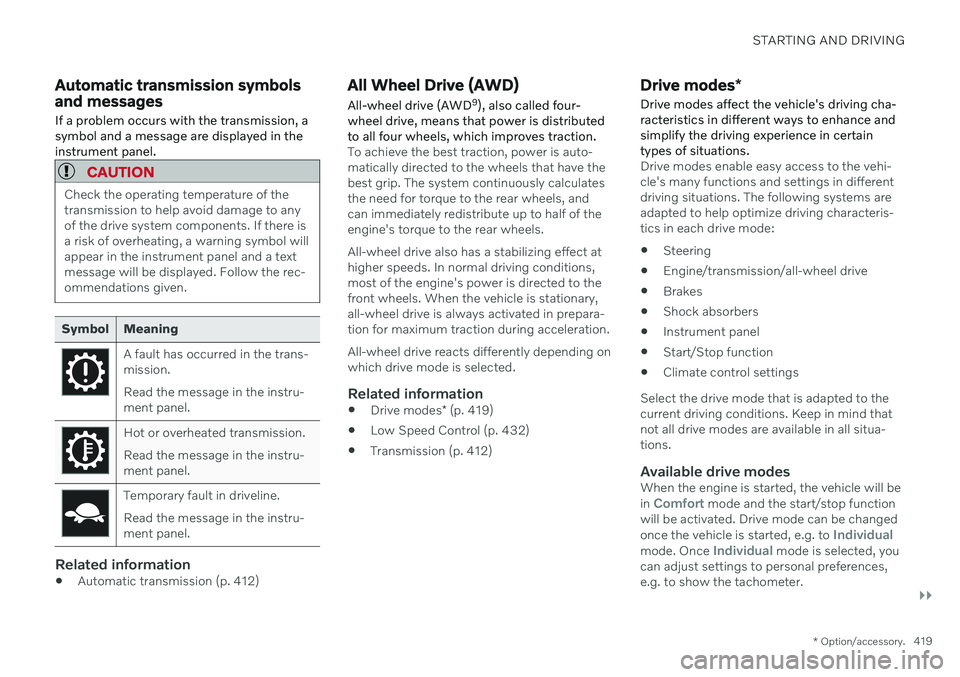
Automatic transmission symbols and messages If a problem occurs with the transmission, a symbol and a message are displayed in theinstrument panel.
CAUTION
Check the operating temperature of the transmission to help avoid damage to anyof the drive system components. If there isa risk of overheating, a warning symbol willappear in the instrument panel and a textmessage will be displayed. Follow the rec-ommendations given.
Symbol Meaning
A fault has occurred in the trans- mission. Read the message in the instru- ment panel.
Hot or overheated transmission. Read the message in the instru- ment panel.
Temporary fault in driveline. Read the message in the instru- ment panel.
Related information
Automatic transmission (p. 412)
All Wheel Drive (AWD)
All-wheel drive (AWD 9
), also called four-
wheel drive, means that power is distributed to all four wheels, which improves traction.
To achieve the best traction, power is auto- matically directed to the wheels that have thebest grip. The system continuously calculatesthe need for torque to the rear wheels, andcan immediately redistribute up to half of theengine's torque to the rear wheels. All-wheel drive also has a stabilizing effect at higher speeds. In normal driving conditions,most of the engine's power is directed to thefront wheels. When the vehicle is stationary,all-wheel drive is always activated in prepara-tion for maximum traction during acceleration. All-wheel drive reacts differently depending on which drive mode is selected.
Related information
Drive modes
* (p. 419)
Low Speed Control (p. 432)
Transmission (p. 412)
Drive modes
*
Drive modes affect the vehicle's driving cha- racteristics in different ways to enhance andsimplify the driving experience in certaintypes of situations.
Drive modes enable easy access to the vehi- cle's many functions and settings in differentdriving situations. The following systems areadapted to help optimize driving characteris-tics in each drive mode: Steering
Engine/transmission/all-wheel drive
Brakes
Shock absorbers
Instrument panel
Start/Stop function
Climate control settings
Select the drive mode that is adapted to the current driving conditions. Keep in mind thatnot all drive modes are available in all situa-tions.
Available drive modesWhen the engine is started, the vehicle will be in Comfort mode and the start/stop function
will be activated. Drive mode can be changed once the vehicle is started, e.g. to
Individualmode. Once Individual mode is selected, you
can adjust settings to personal preferences, e.g. to show the tachometer.
Page 422 of 683
||
STARTING AND DRIVING
* Option/accessory.
420
Comfort
Comfort is the vehicle's default mode. This
setting offers driving comfort, light steering and soft suspension. In
Comfort mode, no tachometer will be dis-
played in the instrument panel 10
.
Eco
Adapt the vehicle for more fuel-efficient and eco-friendly driving with Eco mode.
In this mode, the Start/Stop function is acti- vated and certain climate settings arereduced. When driving in
Eco mode, an ECO gauge
indicating how economical the driving is will be displayed in the instrument panel.
Off Road
Helps maximize the vehicle's ability to tra- verse difficult terrain or poor roads.
Steering is light and all-wheel drive and thelow-speed function with assistance for driving downhill (HDC 11
) are activated. The Start/Stop
function is deactivated. This mode can only be activated at low speeds. The permitted speed range will beshown in the speedometer. If this speed is exceeded,
Off Road mode will be deactivated
and another drive mode activated. In
Off Road mode, a compass will be dis-
played between the speedometer and the tachometer in the instrument panel.
NOTE
This drive mode is not designed to be used for normal street driving.
Dynamic
Dynamic mode is designed to help pro-
vide sportier driving characteristics and a faster acceleration response.
Gear shifting will be faster and more distinctand the transmission will prioritize gears witha higher traction force. Steering response is faster and suspension is stiffer 12
to help reduce body roll when corner-
ing. The Start/Stop function is deactivated.
Dynamic mode is also available in a Polestar
Engineered* version.
Individual
Customizes drive mode to personal prefer- ences. Select one of the drive modes as a basis andadjust the settings to achieve your preferreddriving characteristics. These settings will bestored in the active driver profile and will beavailable every time the vehicle is unlockedwith that remote key. Individual drive mode is only available if it has been activated in the center display.
9
All Wheel Drive
10 Only applies to vehicles with 8-inch instrument panels.
11 Hill Descent Control
12 Vehicles with Four-C.
Page 423 of 683
STARTING AND DRIVING
}}
* Option/accessory.421
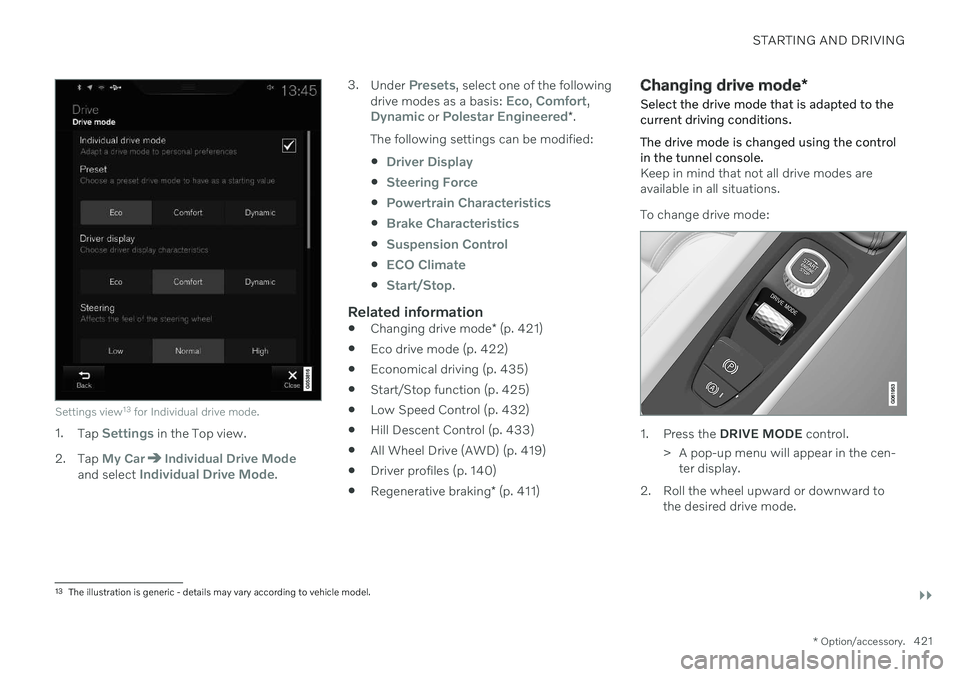
Settings view13
for Individual drive mode.
1. Tap Settings in the Top view.
2. Tap
My CarIndividual Drive Modeand select Individual Drive Mode. 3.
Under
Presets, select one of the following
drive modes as a basis: Eco, Comfort,Dynamic or Polestar Engineered* .
The following settings can be modified:
Driver Display
Steering Force
Powertrain Characteristics
Brake Characteristics
Suspension Control
ECO Climate
Start/Stop.
Related information
Changing drive mode
* (p. 421)
Eco drive mode (p. 422)
Economical driving (p. 435)
Start/Stop function (p. 425)
Low Speed Control (p. 432)
Hill Descent Control (p. 433)
All Wheel Drive (AWD) (p. 419)
Driver profiles (p. 140)
Regenerative braking
* (p. 411)
Changing drive mode *
Select the drive mode that is adapted to the current driving conditions. The drive mode is changed using the control in the tunnel console.
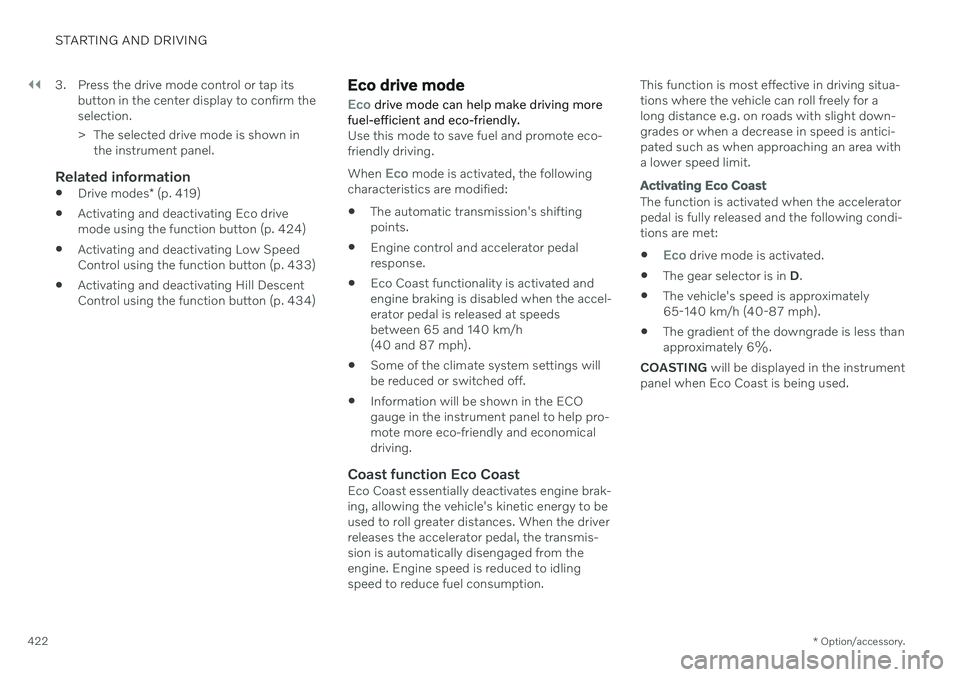
Keep in mind that not all drive modes are available in all situations. To change drive mode:
1. Press the DRIVE MODE control.
> A pop-up menu will appear in the cen- ter display.
2. Roll the wheel upward or downward to the desired drive mode.
13The illustration is generic - details may vary according to vehicle model.
Page 424 of 683
||
STARTING AND DRIVING
* Option/accessory.
422 3. Press the drive mode control or tap its
button in the center display to confirm the selection.
> The selected drive mode is shown inthe instrument panel.
Related information
Drive modes
* (p. 419)
Activating and deactivating Eco drive mode using the function button (p. 424)
Activating and deactivating Low SpeedControl using the function button (p. 433)
Activating and deactivating Hill DescentControl using the function button (p. 434)
Eco drive mode
Eco drive mode can help make driving more
fuel-efficient and eco-friendly.
Use this mode to save fuel and promote eco- friendly driving. When
Eco mode is activated, the following
characteristics are modified:
The automatic transmission's shifting points.
Engine control and accelerator pedalresponse.
Eco Coast functionality is activated andengine braking is disabled when the accel-erator pedal is released at speedsbetween 65 and 140 km/h(40 and 87 mph).
Some of the climate system settings willbe reduced or switched off.
Information will be shown in the ECOgauge in the instrument panel to help pro-mote more eco-friendly and economicaldriving.
Coast function Eco CoastEco Coast essentially deactivates engine brak-ing, allowing the vehicle's kinetic energy to beused to roll greater distances. When the driverreleases the accelerator pedal, the transmis-sion is automatically disengaged from theengine. Engine speed is reduced to idlingspeed to reduce fuel consumption. This function is most effective in driving situa-tions where the vehicle can roll freely for along distance e.g. on roads with slight down-grades or when a decrease in speed is antici-pated such as when approaching an area witha lower speed limit.
Activating Eco Coast
The function is activated when the accelerator pedal is fully released and the following condi-tions are met:
Eco drive mode is activated.
The gear selector is in
D.
The vehicle's speed is approximately 65-140 km/h (40-87 mph).
The gradient of the downgrade is less thanapproximately 6%.
COASTING will be displayed in the instrument
panel when Eco Coast is being used.
Page 426 of 683
||
STARTING AND DRIVING
* Option/accessory.
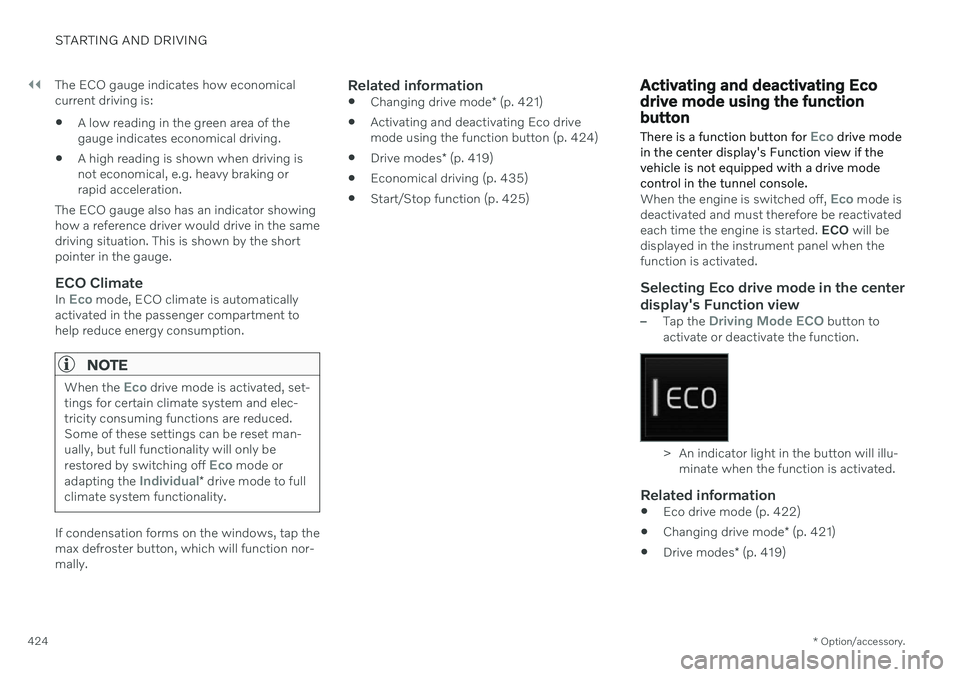
424 The ECO gauge indicates how economical current driving is:
A low reading in the green area of thegauge indicates economical driving.
A high reading is shown when driving isnot economical, e.g. heavy braking orrapid acceleration.
The ECO gauge also has an indicator showinghow a reference driver would drive in the samedriving situation. This is shown by the shortpointer in the gauge.
ECO ClimateIn Eco mode, ECO climate is automatically
activated in the passenger compartment to help reduce energy consumption.
NOTE
When the Eco drive mode is activated, set-
tings for certain climate system and elec- tricity consuming functions are reduced.Some of these settings can be reset man-ually, but full functionality will only be restored by switching off
Eco mode or
adapting the Individual* drive mode to full
climate system functionality.
If condensation forms on the windows, tap the max defroster button, which will function nor-mally.
Related information
Changing drive mode
* (p. 421)
Activating and deactivating Eco drivemode using the function button (p. 424)
Drive modes
* (p. 419)
Economical driving (p. 435)
Start/Stop function (p. 425)
Activating and deactivating Eco drive mode using the functionbutton There is a function button for
Eco drive mode
in the center display's Function view if the vehicle is not equipped with a drive modecontrol in the tunnel console.
When the engine is switched off, Eco mode is
deactivated and must therefore be reactivated each time the engine is started. ECO will be
displayed in the instrument panel when thefunction is activated.
Selecting Eco drive mode in the center display's Function view
–Tap the Driving Mode ECO button to
activate or deactivate the function.
> An indicator light in the button will illu- minate when the function is activated.
Related information
Eco drive mode (p. 422)
Changing drive mode
* (p. 421)
Drive modes
* (p. 419)
Page 429 of 683
STARTING AND DRIVING
}}
427
Conditions for the Start/Stop functionCertain conditions must be met for Start/ Stop to function.
If any condition is not met, this will be indi- cated in the instrument panel.
The engine does not auto-stopThe engine will not auto-stop if: The vehicle has not reached a speed of ca 10 km/h (6 mph) after starting.
After several auto-stops, the speed mustagain exceed approximately ca 10 km/h(6 mph) before the next auto-stop.
The driver has not fastened the seatbelt.
The engine is not running at its normaloperating temperature.
The ambient temperature is underapproximately -5 °C (23 °F) or overapproximately 30 °C (86 °F).
Windshield heating is activated.
The climate system settings and theactual climate in the passenger compart-ment differ.
The vehicle is in reverse.
The driver is making large steering wheelmovements.
The road gradient is very steep.
The hood is open.
Driving at high altitude and the engine hasnot reached its normal operating tempera-ture.
ABS has been activated.
Hard braking (even if the ABS system hasnot been activated).
Many starts during a short period of timehave triggered the starter motor's over-heating protection.
The exhaust system's particulate filter isfull.
A trailer is connected to the vehicle's elec-trical system.
The transmission is not running at its nor-mal operating temperature.
The gear selector is in mode
M (±
).
If traffic conditions allow it (for example ina traffic jam).
The engine does not auto-startThe engine will not auto-start after an auto-stop if:
The driver is not wearing a seat belt, thegear selector is in the
P position and the
driver's door is open. The engine must bestarted normally.
The engine auto-starts while the brake pedal is depressed
In the following situations, the engine will auto-start even if the brake pedal isdepressed:
High levels of condensation on the insideof the windows.
The climate system settings and theactual climate in the passenger compart-ment differ.
The brake pedal is pumped repeatedly.
The hood is open.
The vehicle begins to roll or increasesspeed slightly if the engine auto-stoppedbefore the vehicle was at a standstill.
The driver's seat belt is unbuckled with thegear selector in the
D or N positions.
The gear selector is moved from
D to R or
M (± ).
The driver's door is opened with the gearselector in
D. An audible signal and a text
message informs the driver that the igni-tion is on.
WARNING
Do not open the hood if the engine has auto-stopped. Turn off the engine byswitching off the ignition before lifting thehood.