2021 VOLKSWAGEN T-ROC INTERVAL
[x] Cancel search: INTERVALPage 101 of 502

With some equipment levels, the vehicle may have a SAFELOCK mechanism.
SAFELOCK deactivates the door release levers if the vehicle has been locked. This makes it more
difficult to break into the vehicle. The doors can no longer be opened from the inside ⇒ .
Press the button on the vehicle key once.
Press the button on the vehicle key twice in quick succession.
Vehicles with the Keyless Access locking and starting system: touch the sensor on the outside of the
door handle twice⇒ Unlocking or locking the vehicle with Keyless Access .
OR: press the central locking button in the driver door once ⇒ Central locking button .
There may be an indication of the activated SAFELOCK in the display of the instrument cluster
(SAFELOCK).
Deactivating SAFELOCK
Switch on the ignition.
OR: deactivate interior monitoring and the anti-tow alarm ⇒ Temporarily switching off the interior
monitoring system and anti-tow alarm .
Before locking the vehicle, temporarily deactivate the interior monitoring and the anti-tow alarm in
the Vehicle Settings menu in the Infotainment system ⇒ Infotainment system controls and displays .
The following applies when SAFELOCK is deactivated:
The interior monitoring and the anti-tow alarm are activated and deactivated in the Vehicle settings
menu in the Infotainment system ⇒ Infotainment system controls and displays .
WARNING
Careless or unsupervised use of SAFELOCK can cause serious injuries.
Never leave other persons in the vehicle if the vehicle has been locked using the vehicle key. The
doors can no longer be opened from the inside once SAFELOCK is activated.
If you unlock the driver door mechanically using the vehicle key, only the driver door is unlocked,
and not the whole vehicle. The doors are released (but not unlocked) and the central locking button
is activated only when the ignition is switched on.
Troubleshooting
First read and observe the introductoryinformation and safety warnings⇒Introduction
Indicator lamp lights up continuously
The red LED in the vehicle door flashes at short intervals and then lights up continuously.
Page 115 of 502

Remove leaves and other loose items from the glass roof guide rails at regular intervals using a
vacuum cleaner, or by hand.
The roll-back function will not work properly if there is a malfunction in the glass roof. Go to a
qualified workshop.
Convenience opening or closing of the glass roof
Convenience opening and closing
The glass roof can be opened and closed from outside the vehicle using the vehicle key:
Press and hold the locking or unlocking button on the vehicle key. The glass roof is tilted or closed.
In vehicles with the Keyless Access locking and starting system: place your finger on the locking
sensor in the door handle for a few seconds until the glass roof is closed ⇒ Unlocking or locking the
vehicle with Keyless Access .
Release the locking or unlocking button to interrupt this function.
The convenience closing function closes all the windows in the doors and the glass roof. All turn
signals will flash once as confirmation that all the windows and the glass roof have been closed.
Make settings for operation of the glass roof in the Vehicle settings menu in the Infotainment
system ⇒ Infotainment system controls and displays .
Some settings can be saved in the user accounts for personalisation and therefore change
automatically when the user account is changed ⇒ Personalisation .
Glass roof roll-back function
The roll-back function reduces the risk of crush injuries ⇒ . If the glass roof is obstructed during
the closing process, it will open again immediately.
Check to see why the glass roof has not closed.
Try to close the glass roof again.
If the glass roof still cannot be closed, close it without the roll-back function.
Closing the glass roof without the roll-back function
Press the button to the second position Ⓓ until the glass roof has fully closed.
The glass roof will now close without the roll-back function.
Please go to a qualified workshop if the glass roof still cannot be closed.
If you release the switch during the closing procedure, the glass roof will open automatically.
Page 142 of 502

Wipers switched off.
Interval wipe for the windscreen or rain/light sensor mode. The interval wipe for the
windscreen depends on the speed of the vehicle. The wipers will wipe more frequently as the vehicle
moves faster.
Slow wipe.
Fast wipe.
x Flick wipe – brief wiping. Push down and hold the lever for longer to wipe more quickly.
Pulling the lever activates the wash and wipe system for cleaning the windscreen. Climatronic
will switch to air recirculation mode for approximately 30 seconds to prevent the smell of the
washer fluid from entering the vehicle interior.
Switch for interval settings (vehicles without a rain/light sensor) or adjusting the
sensitivity of the rain/light sensor.
Interval wipe for the rear window. The wiper will wipe the window approximately every
six seconds.
Pushing the lever activates the wash and wipe system for cleaning the rear window.
WARNING
Without an adequate amount of anti-freeze, the washer fluid can freeze on the windscreen and
obscure your view.
In winter temperatures, use the windscreen washer system only when adequate anti-freeze has
been added to the washer fluid.
Never use the windscreen washer system at winter temperatures before the windscreen has been
heated by the ventilation system. The anti-freeze mixture may otherwise freeze on the windscreen
and restrict vision.
WARNING
Worn or dirty wiper blades reduce visibility and increase the risk of accidents and serious injuries.
Always change wiper blades if they are damaged or worn and no longer clean the windows properly
⇒ Wiper blades .
NOTICE
Page 144 of 502
When the rain/light sensor is activated, it automatically controls the frequency of the wiper intervals
depending on the intensity of the rain.
Activating and deactivating the rain/light sensor
Position Ⓐ - the rain/light sensor is deactivated.
Position Ⓑ - the rain/light sensor is activated, automatic wipe when necessary.
The automatic wipe function can be activated and deactivated in the Infotainment system in
the Vehicle settings menu ⇒ Infotainment system controls and displays .
If the automatic wipe function is deactivated in the Infotainment system, the intervals are set at
fixed levels.
Adjusting the sensitivity of the rain/light sensor
The sensitivity of the rain/light sensor can be adjusted manually using the switch in the wiper lever
⇒ Fig. 85 ① ⇒ .
Switch to the right – high sensitivity.
Switch to the left – low sensitivity.
WARNING
The rain/light sensor cannot always adequately detect all precipitation and activate the wipers
correspondingly.
If necessary, switch on the wipers manually in good time if the water on the windscreen restricts the
field of vision.
Some settings can be stored in the user accounts of the personalisation function and therefore
change automatically when the user account changes ⇒ Personalisation .
Troubleshooting
Washer fluid level too low
The indicator lamp lights up yellow.
Fill up the washer fluid reservoir at the next opportunity ⇒ Washer fluid
Fault in rain/light sensor
The wipers are not switched on automatically if it rains during rain/light sensor operation.
The indicator lamp lights up yellow.
Switch the ignition off and on.
If the problem persists, go to a qualified workshop.
Page 145 of 502

Fault in wipers
The wipers do not wipe.
The indicator lamp lights up yellow.
Switch the ignition off and on.
If the problem persists, go to a qualified workshop.
Changes in the activation behaviour of the rain/light sensor
Possible causes for faults and misinterpretations relating to the sensitive surface of the rain/light
sensor ⇒ Vehicle overviews include:
Damaged wiper blades: a film of water or smears caused by damaged wiper blades can increase the
time the wipers are switched on, can shorten the length of the intervals between wipes or cause the
wipers to run quickly and continuously.
Insects: insects hitting the windscreen can cause the wipers to be activated.
Salt deposits: in winter, salt deposits can cause the wipers to continue to wipe the windscreen when
it is almost dry.
Dirt: dry dust, wax, windscreen coatings (lotus effect), or detergent deposits (from an automatic car
wash) can cause the rain/light sensor to become less sensitive and react too slowly, or prevent it
from reacting at all. Clean the sensitive surface of the rain/light sensor ⇒ Caring for and cleaning the
vehicle exterior at regular intervals and inspect the wiper blades for damage.
Crack in the windscreen: a wipe cycle will be triggered if the rain/light sensor is on when the
windscreen is impacted by a stone. The rain/light sensor will then register the impairment of the
sensitive surfaces and adjust accordingly. Depending on the size of the stone impact, the activation
behaviour of the rain/light sensor may be changed.
We recommend that you use an alcohol-based glass cleaner to remove wax and polish.
The wipers will try to wipe away any obstacles that are on the window. The wiper will stop moving if
the obstacle continues to block its path. Remove the obstacle and switch the wiper back on again.
Mirrors
Introduction
This chapter contains information on the followingsubjects:
⇒ Interior mirror
⇒ Exterior mirrors
You can use the exterior mirrors and the interior mirror to observe traffic behind you and adjust
your driving style accordingly.
Page 251 of 502

Traffic Jam Assist is an extension of the lane keeping system (Lane Assist) for vehicles with DSG ® and
combines its functions with the Adaptive Cruise Control (ACC). Please therefore read both these
chapters and observe the information about the system limits and warnings.
Traffic Jam Assist function
Traffic Jam Assist can maintain a time interval set by the driver to a vehicle in front and help the
vehicle to stay in lane ⇒ .
The system automatically controls acceleration, braking, steering and, if required, will decelerate to
a stop behind a vehicle that is stopping, and then pull away again automatically.
Use Traffic Jam Assist only on motorways and good main roads. Do not use Traffic Jam Assist in
urban traffic.
Switching Traffic Jam Assist on and off
Traffic Jam Assist is switched on and off together with the adaptive lane guidance of the lane
keeping system in the Infotainment system ⇒ Vehicle settings menu .
Traffic Jam Assist can also be switched off together with the lane keeping system via the button for
driver assist systems ⇒ Button for driver assist systems .
Technical requirements for using Traffic Jam Assist
The lane keeping system is switched on and active together with adaptive lane guidance ⇒ Driving
with the lane keeping system .
Adaptive Cruise Control (ACC) is switched on and active ⇒ Switching ACC on and off .
The selector lever is in position D/S or in the Tiptronic gate.
The system has detected a lane marking on both the right and left sides of the vehicle ⇒ Fig. 123① .
The speed is under 60 km/h (35 mph).
Traffic Jam Assist is not active (indicator lamp for the lane keeping system lights up yellow)
As soon as one of the conditions indicated in ⇒ Technical requirements for using Traffic Jam Assist is
no longer fulfilled.
If one of the conditions for the proper functioning of the lane keeping system is no longer fulfilled
⇒ .
If one of the conditions for the proper functioning of the Adaptive Cruise Control (ACC) is no longer
fulfilled ⇒ Limits of ACC .
Switch off Traffic Jam Assist in the following situations
Traffic Jam Assist should always be switched off in the following situations due to system limitations:
When a high level of concentration is required by the driver.
Very sporty driving.
In poor weather conditions, e.g. snow or heavy rain.
Page 266 of 502
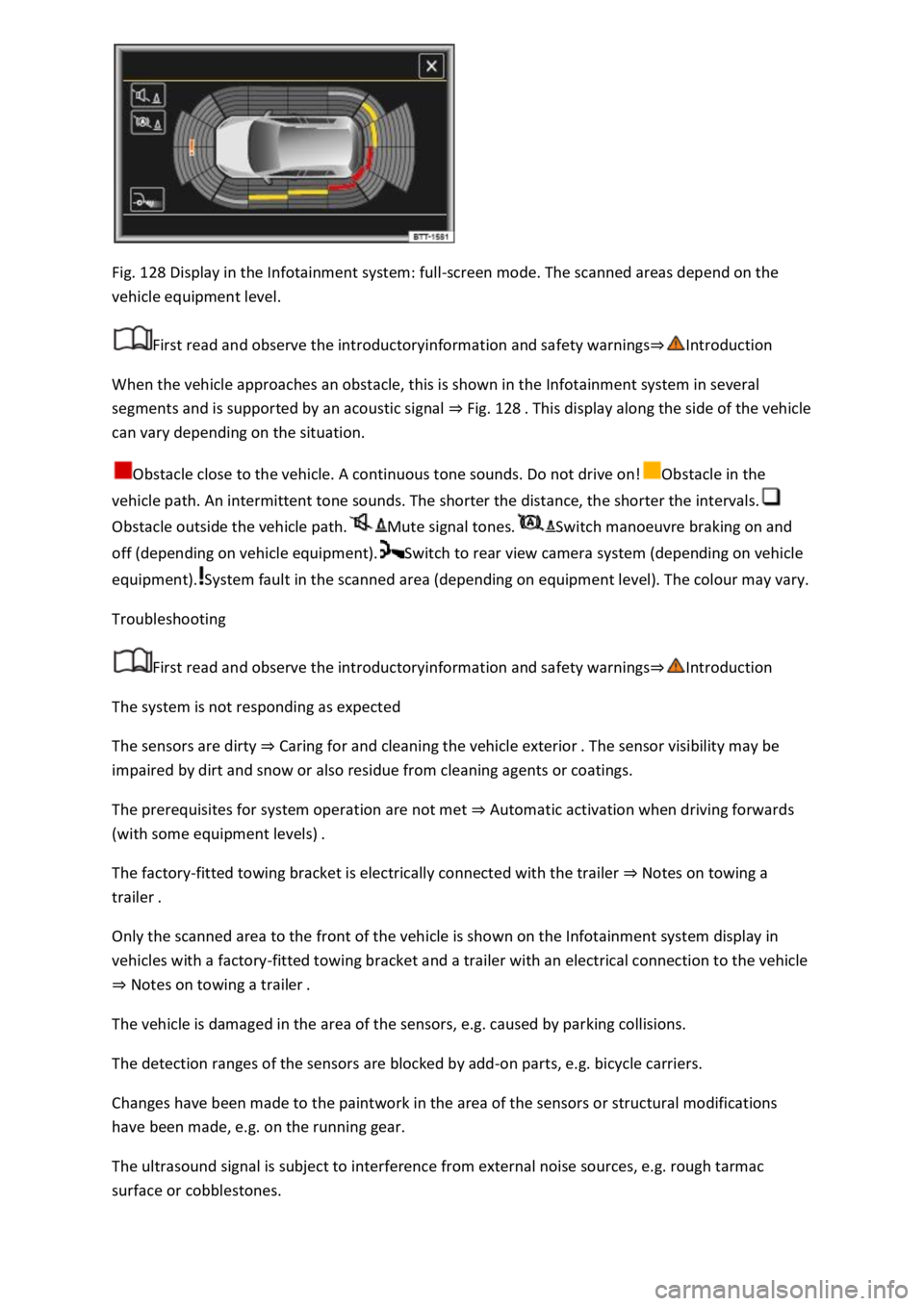
Fig. 128 Display in the Infotainment system: full-screen mode. The scanned areas depend on the
vehicle equipment level.
First read and observe the introductoryinformation and safety warnings⇒Introduction
When the vehicle approaches an obstacle, this is shown in the Infotainment system in several
segments and is supported by an acoustic signal ⇒ Fig. 128 . This display along the side of the vehicle
can vary depending on the situation.
Obstacle close to the vehicle. A continuous tone sounds. Do not drive on!Obstacle in the
vehicle path. An intermittent tone sounds. The shorter the distance, the shorter the intervals.
Obstacle outside the vehicle path.Mute signal tones.Switch manoeuvre braking on and
off (depending on vehicle equipment).Switch to rear view camera system (depending on vehicle
equipment).System fault in the scanned area (depending on equipment level). The colour may vary.
Troubleshooting
First read and observe the introductoryinformation and safety warnings⇒Introduction
The system is not responding as expected
The sensors are dirty ⇒ Caring for and cleaning the vehicle exterior . The sensor visibility may be
impaired by dirt and snow or also residue from cleaning agents or coatings.
The prerequisites for system operation are not met ⇒ Automatic activation when driving forwards
(with some equipment levels) .
The factory-fitted towing bracket is electrically connected with the trailer ⇒ Notes on towing a
trailer .
Only the scanned area to the front of the vehicle is shown on the Infotainment system display in
vehicles with a factory-fitted towing bracket and a trailer with an electrical connection to the vehicle
⇒ Notes on towing a trailer .
The vehicle is damaged in the area of the sensors, e.g. caused by parking collisions.
The detection ranges of the sensors are blocked by add-on parts, e.g. bicycle carriers.
Changes have been made to the paintwork in the area of the sensors or structural modifications
have been made, e.g. on the running gear.
The ultrasound signal is subject to interference from external noise sources, e.g. rough tarmac
surface or cobblestones.
Page 307 of 502

Before driving through an automatic car wash.
The vehicle height exceeds the required clearance height, e.g. in a garage.
NOTICE
Always remove the roof carrier before driving through an automatic car wash.
The height of the vehicle is changed by the installation of a roof carrier and the load secured to it.
Check and compare the height of the vehicle with clearance heights, e.g. for underpasses and garage
doors.
The roof carrier and its load must not obstruct you from opening and closing the glass roof and the
boot lid. The roof aerial must also remain unaffected.
Driving with a fitted roof carrier will increase air resistance and thus increase fuel consumption.
Trailer towing
Introduction
This chapter contains information on the followingsubjects:
⇒ Technical requirements
⇒ Fitting the removable ball head
⇒ Removing the ball head
⇒ Notes on towing a trailer
⇒ Loading the trailer
⇒ Driving with a trailer
⇒ Trailer stabilisation
⇒ Retrofitting a towing bracket
The vehicle can be used to tow a trailer if it has the required technical equipment for this. The
additional trailer load will affect the amount of wear, fuel consumption and performance of the
vehicle and, in certain circumstances, could shorten the service intervals.
Driving with a trailer not only places an extra load on the vehicle, but also requires increased
concentration on the part of the driver.
Vehicles with start/stop system
When using towing brackets that were not retrofitted by Volkswagen, the start/stop system must be
deactivated manually using the button in the centre console before towing a trailer, and it must
remain deactivated for as long as a trailer is being towed ⇒ .